


Mro Inventory Meaning
MRO inventory meaning in plain terms: MRO stands for Maintenance, Repair, and Operations. MRO inventory is every supply your business needs to keep running that does not end up in the product you sell. Think cleaning supplies, safety gloves, light bulbs, and machine lubricants. These items support the operation. Without them, work stops.
Reviewed September 2026. Figures are worked from the assumptions stated beside them, so you can substitute your own and the arithmetic still holds.
Reviewed and updated: June 2025
Book a callWhat MRO Inventory Means for Your Business
MRO stands for Maintenance, Repair, and Operations. MRO inventory covers the supplies that keep your facility running, not the goods you sell or ship to customers. A box of nitrile gloves, a replacement fuse, a roll of packing tape: none of those go into your product, but all of them are MRO supplies.
Small distributors and warehouse operators often treat MRO as an afterthought. That is understandable. These items do not show up on a sales order. They do not generate revenue on their own. Still, when a critical MRO item runs out, the whole floor can stop just as fast as if you ran out of product.
Keeping a clear picture of your MRO inventory is the first step toward avoiding that kind of surprise.
We build it for your operation, and the first look is free
If you would rather not compare products, describe how your operation already works and we build the system around it.
No build cost. You see it running on your own process first, and the monthly subscription starts only once it is live.
Book a callMRO vs. Direct Inventory: What Is the Difference?
Direct inventory is what you buy to make or resell. It goes into your finished product or your outbound shipment. MRO inventory keeps the lights on and the machines running while direct inventory does the revenue work.
Here is a simple side-by-side view:
| Direct Inventory | MRO Inventory | |
|---|---|---|
| Goes into the product? | Yes | No |
| Affects cost of goods sold? | Yes | Indirectly |
| Tracked closely? | Usually | Rarely |
| Causes downtime if missing? | Yes | Yes |
Why Loose MRO Tracking Creates Two Costly Problems
Most businesses track direct inventory carefully because it ties directly to cost of goods sold. MRO often gets tracked loosely, in a shared spreadsheet or not at all. That loose tracking leads to two problems: stockouts that halt work and overbuying that ties up cash. GS1, the global standards body behind product barcodes, notes that consistent item spotting is the foundation of any reliable count. As GS1 states, "barcodes are the most widely used automatic spotting technology in the world," and you can read their barcode standards at gs1.org. That same logic applies to MRO: if an item has no label or code, it is nearly impossible to count reliably.
Why the Tracking Gap Exists
Direct inventory has a paper trail: buy orders, receiving documents, sales orders. MRO buys often skip that trail. Someone grabs a box of gloves from a supply closet, or a supervisor buys a replacement belt on a company card. No record, no reorder point, no history. The gap grows over time until a stockout forces the issue.
What Are the Common MRO Inventory Categories?
What kinds of items count as MRO supplies? The list is wider than most people expect. MRO inventory covers 4 broad categories, and most warehouses touch all of them every week.
- Maintenance supplies: lubricants, hydraulic fluid, filters, and scheduled replacement parts for forklifts and conveyor systems
- Repair parts: motors, drive belts, fuses, fasteners, and any component swapped out when equipment breaks down
- Operations supplies: packaging tape, shipping labels, stretch wrap, cleaning products, and hand tools used on the floor
- Safety items: hard hats, safety goggles, ear protection, first-aid kits, and spill containment gear required by OSHA standards
- Office and admin supplies: printer paper, labels, pens, and the small items that support the people running the warehouse
Every one of these categories can cause a work stoppage if it runs dry at the wrong moment. Knowing which categories you carry is the starting point for any MRO tracking system.
The comparison is easier when one option is built for you
Off-the-shelf means fitting your process to the software. We do it the other way round, and the first look costs nothing.
Book a call
Why MRO Inventory Is Easy to Overlook
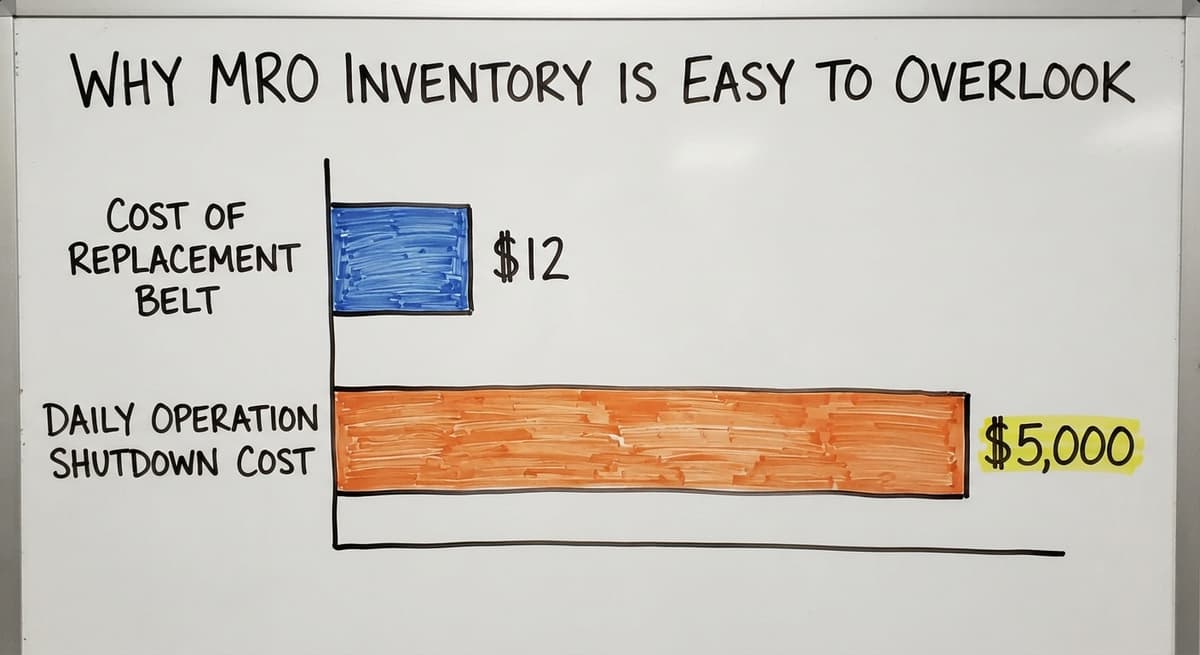
MRO items do not generate revenue, so they rarely get the same attention as product inventory. If you are running a 20-person warehouse on QuickBooks and a few spreadsheets, MRO tracking is probably the last thing on your list. That is the reality for most small distributors, and there is no shame in it. The problem shows up in two ways. First, a stockout of a $12 replacement belt can shut down a $5,000-a-day operation. Second, overbuying happens when no one knows what is already on the shelf. Both outcomes cost real money.
Does the IRS Require You to Count MRO Inventory?
The IRS adds another layer. Publication 538 states directly: "To figure taxable income, you must value your inventory at the beginning and end of each tax year," as noted in IRS Publication 538. MRO items held as inventory may fall under that obligation depending on how your books are set up. That is a conversation to have with your accountant, but it is one more reason to keep a real count. Spreadsheets work up to a point. Past that point, they create more problems than they solve.

The Real Cost of Poor MRO Inventory Management
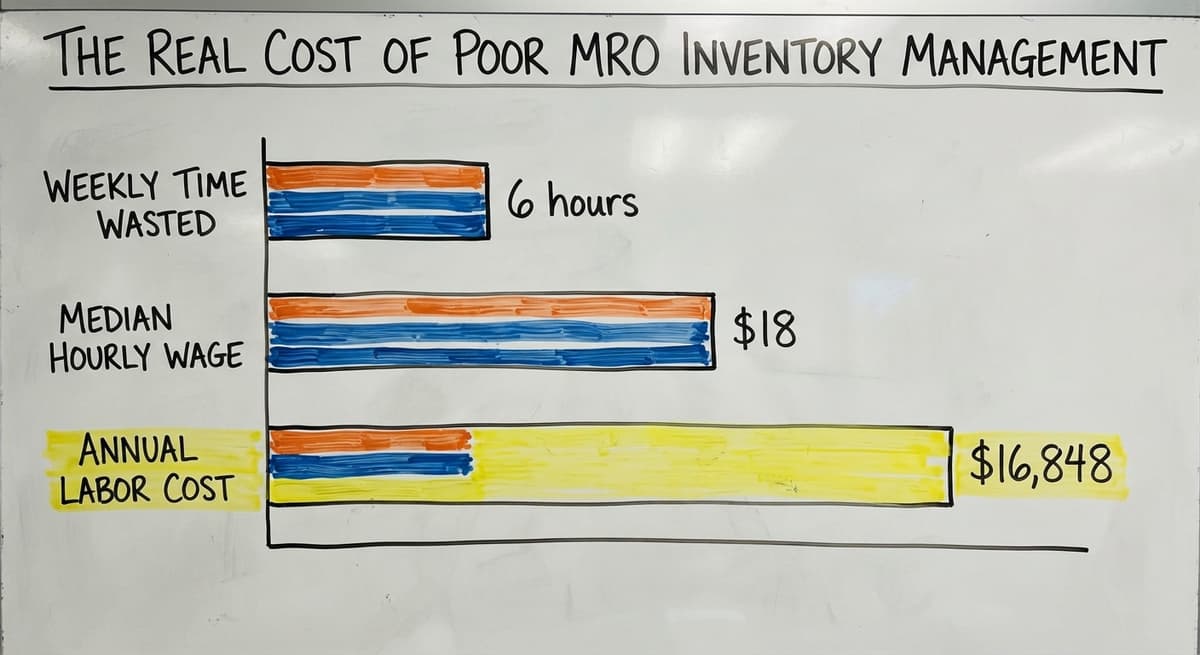
The cost of missing an MRO item is almost never just the price of the item. Unplanned downtime from a missing part costs far more than the part itself, and that gap widens fast. Consider a realistic example. Three warehouse staff spend 6 hours a week between them hunting for supplies, waiting on emergency orders, or reconciling duplicate buys. According to the US Bureau of Labor Statistics, the median hourly wage for stock clerks and order fillers runs around $18 per hour. At that rate, 3 people losing 6 combined hours a week costs roughly $16,848 a year in labor alone, before you add the premium shipping on emergency buys.
How Duplicate Purchasing Hides Inside Your Expenses
Duplicate purchasing is another quiet drain. When no one knows what is on hand, supervisors buy what they think they need. You end up with 4 boxes of the same fuse and zero of the belt that actually failed. None of this shows up as a line item called "poor MRO tracking." It hides inside overtime, freight charges, and lost production hours. That invisibility is exactly why it persists.
See it running on your own process first
No build cost. The subscription starts once it is live and doing the job, not before.
Book a call
How to Track MRO Inventory Without a Big ERP
You do not need a six-figure ERP to get MRO under control. Start with a simple item list and a reorder point for each item, and you will already be ahead of most small distributors. Here is a practical starting sequence:
- List every MRO item you currently stock, even if the list is rough.
- Set a minimum reorder point for each item based on how fast you use it.
- Assign one person ownership of each category so there is always a clear name attached to the restock.
- Log every MRO buy, even small ones, so you build a usage history over time.
- Review the list monthly rather than waiting for an annual audit.
When Simple Logs Are Not Enough: Moving to Purpose-Built Software
A simple inventory log beats nothing. Purpose-built software beats a log. The good news is that inventory management software for small distributors does not have to replace QuickBooks. The right tool sits alongside it, pulls buy data in, and sends a reorder alert before the shelf goes empty. If the thought of a full system migration makes you uneasy, a custom tool scoped to just the MRO problem is a realistic starting point. How to replace Excel-based inventory tracking is a question worth asking before the next stockout forces the answer.

MRO Inventory Best Practices for Distributors and Warehouses
Good MRO tracking comes down to a few habits applied consistently. The biggest gains come from standardizing how items are named and counted, not from buying expensive software. Practical steps that work at any size:
- Standardize item names so every person on the floor uses the same description. "Blue nitrile gloves, size L" beats "gloves" every time.
- Set par levels from real usage data, not from gut feel. Pull 3 months of buy history and let that set the floor.
- Run a quick monthly count on your top 20 MRO items rather than one big annual audit that nobody has time for.
- Use a buy order for every MRO buy, even a $15 order. A PO creates a record that feeds your usage history.
Why MRO Needs Its Own Budget Line in QuickBooks
Add an MRO budget line in QuickBooks so spending is visible and not buried inside a catch-all expense account. The NIST Manufacturing Extension Partnership offers vendor-neutral supply chain guidance that reinforces this point: visibility into what you spend and use is the foundation of any process improvement. Without a budget line, MRO spending is invisible, and invisible spending never gets managed. Small changes to how you record and review MRO buys compound into real savings within a quarter.
Not sure this is the right shape for your operation
Describe how the work runs today. We map it on a call and show you what it would look like built around that, before you spend anything.
Book a call
When Manual MRO Tracking Stops Working
There are clear signs that a spreadsheet has hit its limit. Recurring stockouts, mystery charges on the company card, and staff debating what was ordered last month are all signals that the current system is costing more than a better one would. For most distributors, the tipping point lands somewhere between 20 and 50 staff. Below that, a disciplined spreadsheet can hold. Above it, the volume of MRO transactions outpaces what one person can track manually, and errors multiply.
What a Custom MRO Tool Does That a Spreadsheet Cannot
A custom-built tool can automate reorder alerts and generate a weekly usage report without requiring a full ERP migration. Custom warehouse software that works with QuickBooks is built around the way your operation already runs, not around the way a software vendor thinks it should run. That distinction matters when your team has been doing things a certain way for years and does not have 6 months to retrain. The goal is not a perfect system on day one. The goal is a system that removes the recurring pain points and grows as the operation grows.
Does Inventory Management Software Handle MRO Items Too?
Good inventory management software handles both product inventory and MRO in one place, and it should work with QuickBooks rather than fight it. The features that matter most for MRO are reorder alerts, usage history, and vendor tracking, because those three close the gaps that spreadsheets leave open. Look for these capabilities when evaluating any tool:
- Reorder alerts that trigger automatically when stock drops below the par level you set
- Usage history by item so you can see trends and adjust par levels based on facts
- Vendor records tied to each MRO item so reorders go to the right supplier without a search
- QuickBooks integration that syncs buy data without manual entry
Starting With a Custom MRO Tool Instead of a Full Platform
If a full platform feels like more than you need right now, a custom tool scoped to just the MRO problem is a valid starting point. Reorder point calculation for wholesale operations is one of the most practical features to build first, because it turns a reactive process into a proactive one. The Software Society builds tools around the workflow you already have, not the one a vendor imagined. If MRO tracking is the biggest pain point in your operation right now, that is a good place to start a conversation with a team that builds to fit rather than to sell seats.
Frequently asked questions
What does MRO stand for in inventory?
MRO stands for Maintenance, Repair, and Operations. MRO inventory covers every supply a business needs to keep its facility running that does not become part of the finished product. Examples include lubricants, replacement parts, safety gear, cleaning supplies, and packaging materials.
What is the difference between MRO inventory and direct inventory?
Direct inventory goes into the product you make or sell. MRO inventory keeps the operation running. Direct inventory is tracked closely because it affects cost of goods sold. MRO is often tracked loosely, which leads to stockouts and duplicate buys. Both can halt operations if they run out.
What are examples of MRO inventory items?
Common MRO inventory items include machine lubricants, drive belts, fuses, replacement filters, nitrile gloves, safety goggles, hard hats, packing tape, cleaning products, and first-aid kits. Any supply that supports the facility but does not ship to a customer qualifies as MRO.
Why is MRO inventory hard to manage?
MRO items do not generate revenue directly, so they get less attention than product inventory. Buys are often made informally, with no buy order or usage record. Over time, no one knows what is on hand, which leads to both stockouts and overbuying.
Do I need an ERP system to manage MRO inventory?
No. A simple item list with reorder points and one assigned owner per category will outperform most spreadsheet setups. Purpose-built software that integrates with QuickBooks can handle MRO tracking without a full ERP migration. A custom tool scoped to just the MRO problem is a realistic option for small and mid-size distributors.
What does poor MRO inventory management actually cost a business?
The cost includes unplanned downtime, premium freight on emergency orders, staff time spent hunting for supplies, and duplicate buys. Three employees losing a combined 6 hours per week to MRO-related tasks can cost over $16,000 a year in labor alone, before adding emergency shipping charges.
How do small warehouses and distributors track MRO supplies?
Most small distributors track MRO on a spreadsheet or not at all. A more reliable approach is to list every MRO item, set a minimum reorder point for each, assign category ownership to a specific person, and log every buy. Software that integrates with QuickBooks can automate the reorder alert step.
Start with a free first look
A 30 minute call, your operation mapped, and a clear picture of what we would build. No obligation and nothing to install.
Book a callRelated guides
The rest of this guide, for the parts of the job this page does not cover.
Guides
- Fnsku Meaning
- Excess Inventory
- Closed for Inventory
- Multi Location Inventory Management Software
- Inventory Management for Multiple Locations
- Costing Inventory
- Is Inventory a Long-term Asset
- Inventory Management System for Manufacturing
- Excel Inventory Template
- Jewelry Inventory Management
- Dental Inventory Management
- Qr Code for Inventory Management
- Inventory Metrics
- Inventory Formulas
- Hvac Inventory Management Software
- Calculate Beginning Inventory
- Inventory Management Software for Schools
- Find Beginning Inventory
- Nonprofit Inventory Management
- Manual Inventory Management