


Ms Excel Inventory Template
An MS Excel inventory template is a practical tool for thousands of small warehouses and distributors across the country. This guide shows you how to build one that actually works, where to download a free version, and how to recognize when the spreadsheet has reached its limit.
Book a callWhat an MS Excel Inventory Template Does and Who Uses One
An MS Excel inventory template is a pre-built spreadsheet that tracks stock quantities, item locations, unit costs, and total inventory value. It runs inside Microsoft Excel with no extra software required. That simplicity is exactly why it remains the first choice for so many small operations.
We build it for your operation, and the first look is free
If you would rather not compare products, describe how your operation already works and we build the system around it.
Reviewed October 2026. Figures are worked from the assumptions stated beside them, so you can substitute your own and the arithmetic still holds.
The arithmetic is worth doing before the software conversation. 3 people spending 6 hours a week between them chasing the same questions, at 22 dollars an hour, is 936 hours a year of paid time spent confirming what a system would already know. Over 3 years that is 2,808 hours.
The obligation behind all of this is not optional. IRS Publication 538 states: “To figure taxable income, you must value your inventory at the beginning and end of each tax year.” A figure nobody trusts makes that number a guess.
No build cost. You see it running on your own process first, and the monthly subscription starts only once it is live.
Book a callWho Uses an MS Excel Inventory Template
Small wholesale distributors, fulfillment centers, and warehouses with fewer than 100 staff use Excel inventory templates most often. So do businesses already running QuickBooks who track overflow stock in a side spreadsheet. These teams want something they can open and edit today, not a system that takes months to configure. As GS1 notes in its barcode standards records, consistent item spotting is the foundation of any inventory process, and a well-structured Excel template can support that foundation at low cost.
This article is practical and honest. Excel is a legitimate tool. It also has real limits, and you deserve to know both.
What Columns Should an Excel Inventory Template Include?
Every solid inventory management spreadsheet starts with the same core fields. Without them, counts drift and reorder decisions become guesswork.
Required columns for any warehouse inventory template:
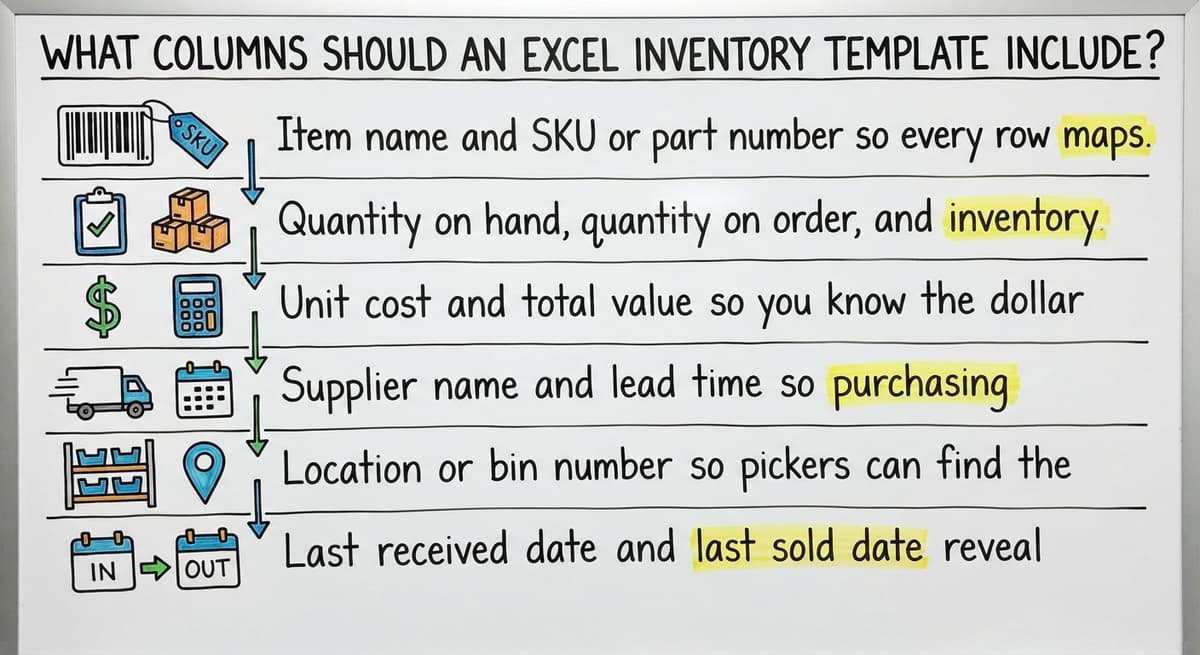
- Item name and SKU or part number so every row maps to one specific product
- Quantity on hand, quantity on order, and inventory reorder point so you can see what you have and what you need before you run out
- Unit cost and total value so you know the dollar exposure sitting on each shelf
- Supplier name and lead time so purchasing decisions have context
- Location or bin number so pickers can find the item without asking
Optional Columns That Add Real Value
Optional columns are worth adding before the sheet grows too large to restructure cleanly.
- Last received date and last sold date reveal slow-moving stock without any extra analysis
- Minimum and maximum stock levels give you a range rather than a single trigger number
- A notes field captures seasonal flags or special handling requirements that do not fit anywhere else
- A barcode or UPC field supports USB scanner workflows where the scanner types directly into the active cell
Add these early. Retrofitting them onto a live sheet used by multiple people is the kind of task that always gets delayed until something goes wrong.
How to Set Up Your MS Excel Inventory Template Step by Step
A clean setup prevents most of the formula errors and version conflicts that plague shared inventory spreadsheets.
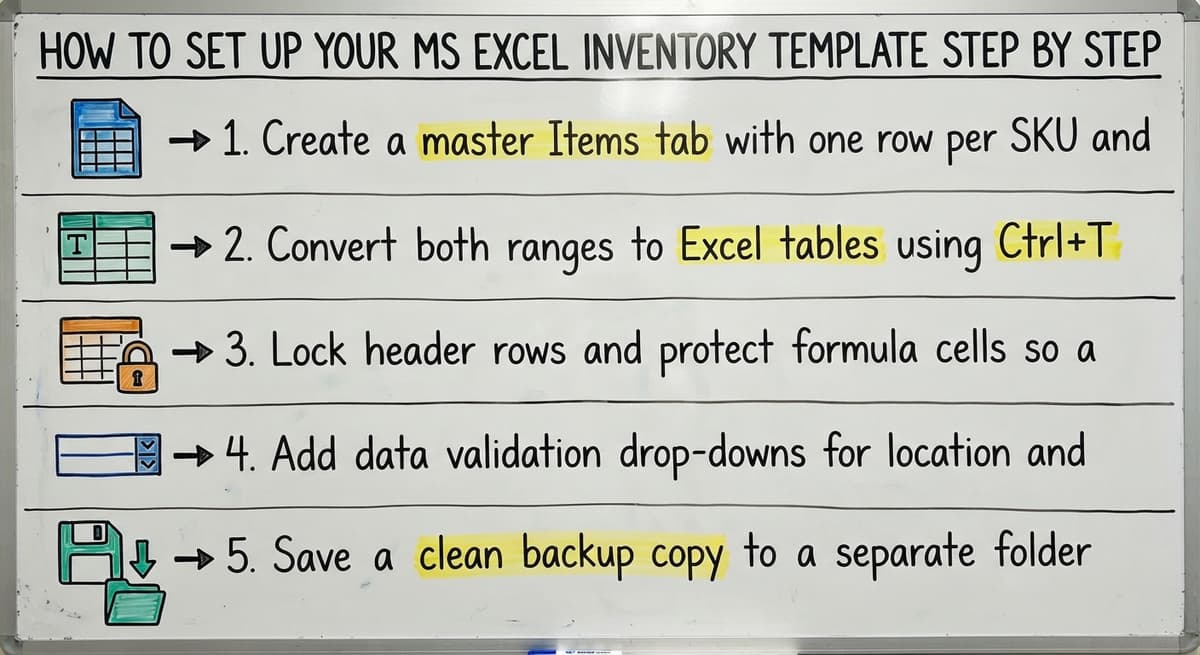
- Create a master Items tab with one row per SKU and a separate Transactions tab that logs every receipt and shipment.
- Convert both ranges to Excel tables using Ctrl+T so formulas extend automatically when new rows are added.
- Lock header rows and protect formula cells so a teammate cannot accidentally overwrite a calculation while entering a quantity.
- Add data validation drop-downs for location and supplier fields. Consistent entries make SUMIF formulas reliable.
- Save a clean backup copy to a separate folder before anyone enters live data. Name it clearly so nobody mistakes it for the working file.
Five steps sounds simple because it is. The teams that skip step five are the ones rebuilding the sheet from scratch after a bad paste.
The comparison is easier when one option is built for you
Off-the-shelf means fitting your process to the software. We do it the other way round, and the first look costs nothing.
Book a callUsing Excel Inventory Formulas to Automate Your Counts
The right formulas turn a static list into a working excel inventory tracking system. Keep them simple enough that any team member can diagnose a broken cell.
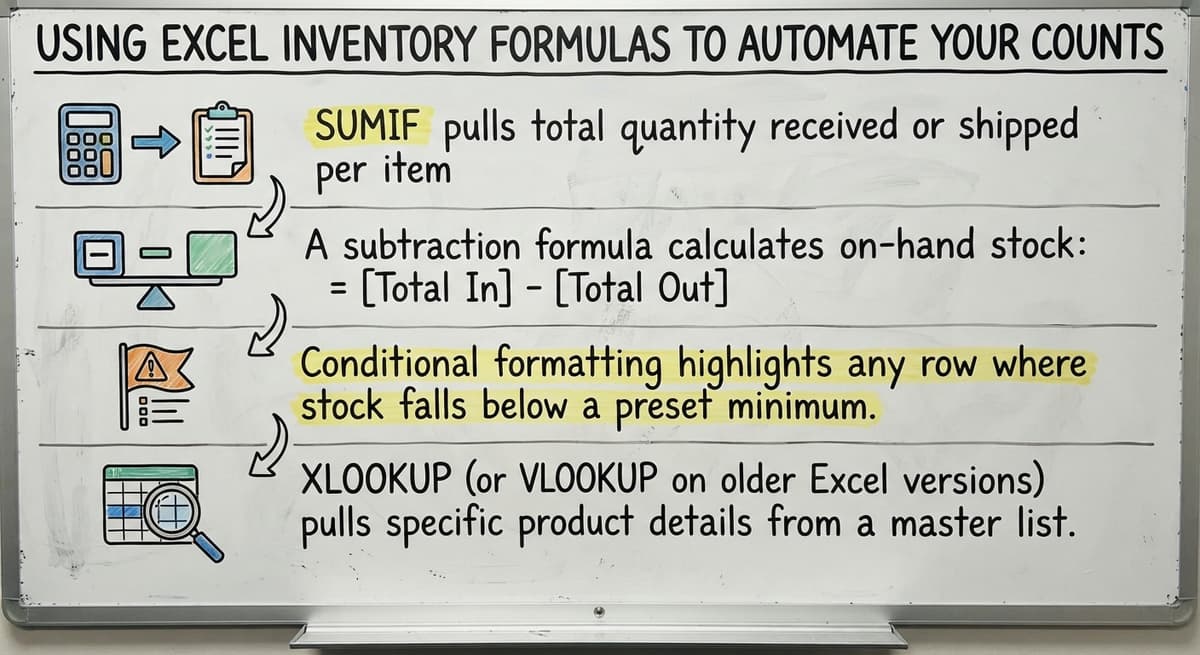
- SUMIF pulls total quantity received or shipped per SKU from the Transactions tab without manual addition
- A subtraction formula calculates on-hand stock:
=Received - Shipped, placed in the Items tab next to each SKU - Conditional formatting highlights any row where on-hand quantity falls below the reorder point in red, making priority restocks visible at a glance
- XLOOKUP (or VLOOKUP on older Excel versions) pulls supplier name and lead time from a reference tab so that data lives in one place and updates everywhere
Complex nested formulas break under pressure. One person who understands a simple formula is worth more than a sophisticated model nobody can keep.
How to Connect Your Excel Template to QuickBooks
QuickBooks inventory and Excel can work together, with some manual effort. QuickBooks exports item lists and buy orders as CSV files. You paste those exports into your Excel template to refresh stock counts after a receiving run or a sales period.
This works well for low-transaction-volume operations. It is a manual process, and that is the honest limitation. Every time someone forgets to export, or pastes into the wrong column, the two systems drift apart. Growing distributors consistently name this sync problem as the point where the spreadsheet stops saving time and starts creating it.
If you are running QuickBooks integration for warehouse operations and using Excel as the bridge, build a clear weekly routine around the export and paste steps. Discipline around the process delays the problem. It does not remove it.

Where to Download a Free MS Excel Inventory Template
Several reliable sources offer free downloads worth considering.
| Source | Best For | Cost |
|---|---|---|
| Microsoft Office template gallery | Basic small business inventory list | Free |
| Vertex42 | Warehouse and retail-focused layouts | Free |
| Smartsheet | More structured Excel-compatible templates | Free tier available |
Pick the simplest inventory template download that covers your core columns. A template with twenty tabs and color-coded dashboards sounds impressive and usually goes unused after the first week. A downloaded template is a starting point, not a finished system. You will need to adapt it before it fits your operation.
How Do I Customize a Downloaded Template for My Warehouse?
Customizing a downloaded template takes less than an hour if you work through it methodically. Start by deleting every column you will never fill in. Clutter causes errors because people skip fields they do not understand.
Rename column headers to match your own terminology. If your team calls it a "bin" not a "location," the header should say bin. Add your warehouse zones or aisle codes as a named reference list and point your data validation drop-downs at it. Insert your company logo and a consistent color scheme so the file looks official rather than temporary. Staff treat a professional-looking document differently.
Test the customized sheet with ten real SKUs before rolling it out to the full catalog. Real data surfaces formula gaps that sample data never does.
See it running on your own process first
No build cost. The subscription starts once it is live and doing the job, not before.
Book a call
Common Mistakes People Make With Excel Inventory Templates
Most spreadsheet problems are predictable. Knowing them ahead of time lets you build around them.
- Multiple people editing the same file simultaneously creates version conflicts that are hard to untangle after the fact
- Entering the same receipt data in both QuickBooks and Excel doubles the work and doubles the chance of a mismatch
- No audit trail means you cannot see who changed a quantity or when, which makes investigating a discrepancy nearly impossible
- Inserting or deleting a row without checking downstream formulas breaks SUMIF ranges silently, so the count looks right but is not
- Files grow large as transaction history accumulates, and a slow-opening spreadsheet during a busy receiving period is a real working problem
None of these mistakes reflect badly on the people making them. They reflect the natural limits of a tool being used beyond what it was designed to handle.
When Should a Small Warehouse Stop Using Excel for Inventory?
Excel holds up well until the operation crosses a few specific thresholds. The signal is not the size of the catalog. It is the cost of the errors.
Consider moving on when:
- More than one person needs to update inventory at the same time and version conflicts are a weekly occurrence
- Shipments leave from multiple locations and a single spreadsheet cannot reflect real-time stock across all of them
- Management needs current numbers but the file is always a few hours behind the last manual update
- Staff keep personal copies of the spreadsheet because the shared version is unreliable
- A customer received the wrong shipment and the root cause traced back to an Excel count error
- Onboarding a new warehouse employee takes days just to explain how the spreadsheet logic works
When you are spending more time maintaining the tool than running the operation, the tool has become the problem.

What to Look for When You Step Up From Excel
The right next step for most small distributors is not a full ERP. When to replace manual processes with custom software is a question about fit, not features.
Look for a system that delivers:
- Real-time inventory updates visible to every team member without a manual sync step
- Clean QuickBooks integration for warehouse operations so accounting stays exactly where it is
- A workflow that matches how your team already operates rather than forcing a process change
- Fast onboarding without a dedicated IT department or a consulting engagement
How Custom Software Differs From Another Off-the-Shelf Tool
Off-the-shelf inventory platforms are built for a hypothetical average operation. Custom warehouse management software is built around the process you already run well.
The practical difference shows up at adoption. When the screens match the terminology your team uses and the steps follow your actual workflow, training takes days instead of weeks. QuickBooks stays in place for accounting. The custom layer handles the warehouse floor. Historical data does not need to migrate because the new system works alongside what you already have, not instead of it. Wholesale distribution software built around your workflow removes the friction that kills adoption on generic platforms.
Not sure this is the right shape for your operation
Describe how the work runs today. We map it on a call and show you what it would look like built around that, before you spend anything.
Book a callDoes Excel Still Have a Role After You Upgrade?
Yes, and a good one. Excel remains the right tool for one-off analysis, seasonal forecasting, and board-level reporting. A well-built custom system exports clean data to Excel on demand, so staff who are comfortable in spreadsheets can keep working in them for those purposes.
The goal is to stop using Excel as a live database, not to stop using it entirely. Inventory management software for small distributors handles the real-time working work. Excel handles the analysis that happens after the fact. That division keeps both tools in their strongest role.

Checklist Before You Share Your Excel Inventory Template With the Team
Run through this list before the file goes live. Fixing a structural problem after fifty people have entered data is far harder than fixing it now.
- All required columns are labeled clearly and match the terminology your team uses
- Formula cells are locked and the sheet is protected with a password known to the template owner
- A clean backup copy is saved to a separate folder with a clear name and date
- Data validation drop-downs are in place for location, supplier, and any other field with a fixed set of valid entries
- At least one person has tested the template end-to-end using real SKUs and real transaction data
- Everyone on the team knows which file is the master and where it lives
A shared template that skips this checklist will develop problems within the first week. A template that passes it can run a small operation reliably for years.
Frequently Asked Questions About MS Excel Inventory Templates
Does Excel have an inventory template? Yes. Microsoft includes a basic inventory list template in the Office template gallery, accessible directly from the Excel start screen under New. It covers item name, quantity, unit price, and reorder level.
Can I download a free inventory list template in Excel? Yes. Microsoft, Vertex42, and Smartsheet all offer free Excel inventory templates. Vertex42 has warehouse-specific layouts. Smartsheet's free tier includes templates with more built-in structure. Pick the one that matches your column needs without excess complexity.
What is the best free inventory management software for Excel? There is no single best answer. For a basic small business inventory tracking list, the Microsoft template is enough. For a warehouse with bin locations and supplier lead times, Vertex42's warehouse template is more complete. The right choice depends on how many SKUs you manage and how many people touch the file.

More Frequently Asked Questions About MS Excel Inventory Templates
Does Microsoft Office have an inventory management system? Not as a dedicated application. Excel templates fill that gap for small operations, and Microsoft 365 Business Central includes inventory modules, but that is a separate paid product. For most small distributors, an Excel inventory template combined with QuickBooks covers the basics until transaction volume demands something purpose-built.
Does an Excel inventory template work with barcode scanners? Yes. A USB barcode scanner acts as a keyboard and types the scanned value into whichever cell is active. Set your template up so the cursor moves to the quantity field after each scan and the workflow is straightforward.
When should I stop using Excel for inventory? When errors or delays start costing you money or customers. Missed reorder points, wrong shipments, and hours spent reconciling two systems are the concrete signals that the spreadsheet has reached its limit.

Ready to Move Beyond Your Excel Inventory Template
An MS Excel inventory template is a solid starting point. For many small distributors and warehouse operations, it is the right tool for years. When the errors multiply and the manual work outweighs the savings, the next step does not have to be a painful ERP migration.
The Software Society builds custom inventory and warehouse systems around the operation you already run, with QuickBooks staying in place and no forced process overhaul. The same team that builds the software supports it going forward. If you have hit the ceiling on your spreadsheet and want a no-pressure conversation about what comes next, reach out and let us know what you are working with.
Frequently asked questions
Does Excel have an inventory template?
Yes. Microsoft includes a basic inventory list template in the Office template gallery, accessible directly from the Excel start screen under New. It covers item name, quantity, unit price, and reorder level.
Can I download a free inventory list template in Excel?
Yes. Microsoft, Vertex42, and Smartsheet all offer free Excel inventory templates at no cost. Vertex42 has warehouse-specific layouts. Smartsheet's free tier includes templates with more built-in structure. Pick the one that matches your column needs without excess complexity.
What is the best free inventory management software for Excel?
There is no single best answer. For a basic small business inventory tracking list, the Microsoft template is enough. For a warehouse with bin locations and supplier lead times, Vertex42's warehouse template is more complete. The right choice depends on how many SKUs you manage and how many people update the file.
Does Microsoft Office have an inventory management system?
Not as a dedicated application. Excel templates fill that gap for small operations, and Microsoft 365 Business Central includes inventory modules, but that is a separate paid product. For most small distributors, an Excel inventory template combined with QuickBooks covers the basics until transaction volume demands something purpose-built.
Does an Excel inventory template work with barcode scanners?
Yes. A USB barcode scanner acts as a keyboard and types the scanned value into whichever cell is active. Set your template up so the cursor moves to the quantity field after each scan and the process is straightforward for any warehouse employee.
When should I stop using Excel for inventory?
When errors or delays start costing you money or customers. Missed reorder points, wrong shipments, and hours spent reconciling two out-of-sync systems are the concrete signals that the spreadsheet has reached its limit.
Can Excel handle inventory for a warehouse with thousands of SKUs?
It can, but performance and accuracy suffer at scale. Large transaction histories slow the file, and multiple users editing simultaneously creates version conflicts. A warehouse with thousands of active SKUs and daily receiving activity will usually see errors climb before the SKU count alone becomes the issue.
Start with a free first look
A 30 minute call, your operation mapped, and a clear picture of what we would build. No obligation and nothing to install.
Book a callRelated guides
The rest of this guide, for the parts of the job this page does not cover.
Guides
- Excel Inventory Template
- Inventory Control with Excel
- Excel Barcode
- Classification of Inventory
- Excess Inventory
- Closed for Inventory
- Multi Location Inventory Management Software
- Inventory Management for Multiple Locations
- Costing Inventory
- Is Inventory a Long-term Asset
- Inventory Management System for Manufacturing
- Inventory Fixed Assets
- Inventory Management Pics
- Push and Pull Inventory
- Consumable Inventory
- B2b Inventory Management
- Jewelry Inventory Management
- Dental Inventory Management
- The Objective of Inventory Management is To
- Qr Code for Inventory Management
- Inventory Metrics