


Inventory Management For Multiple Locations
Managing inventory for multiple locations means tracking stock levels, transfers, and reorder points at each site from one central system. If your team is running on QuickBooks plus spreadsheets, you already feel where that breaks down. This guide covers what a real fix looks like, what it costs, and how fast you can have it running. Reviewed July 2025.
Book a callWhy Inventory Management for Multiple Locations Breaks Down
When each site tracks stock on its own, the numbers never match. One warehouse shows 40 units available. The other shows 12. Neither count is current because the last update came through email two days ago.
Spreadsheets and email chains create delays. A pick sheet printed Monday is wrong by Wednesday. Staff at each location work from different versions of the truth, and no one knows it until a customer calls about a missing order.
Every new warehouse makes the problem worse. With 1 site, a sharp manager can hold it together. With 3 or more, the manual approach collapses under its own weight. The core problem is not effort. It is structure. Your team is working hard inside a system that was never built for this.
We build it for your operation, and the first look is free
If you would rather not compare products, describe how your operation already works and we build the system around it.
No build cost. You see it running on your own process first, and the monthly subscription starts only once it is live.
Book a callThe Real Cost of Getting Multi-Location Inventory Wrong
Missed shipments damage customer trust fast. The US Federal Trade Commission needs sellers to ship by the date they promise, and a bad stock count is no defense when an order arrives late.
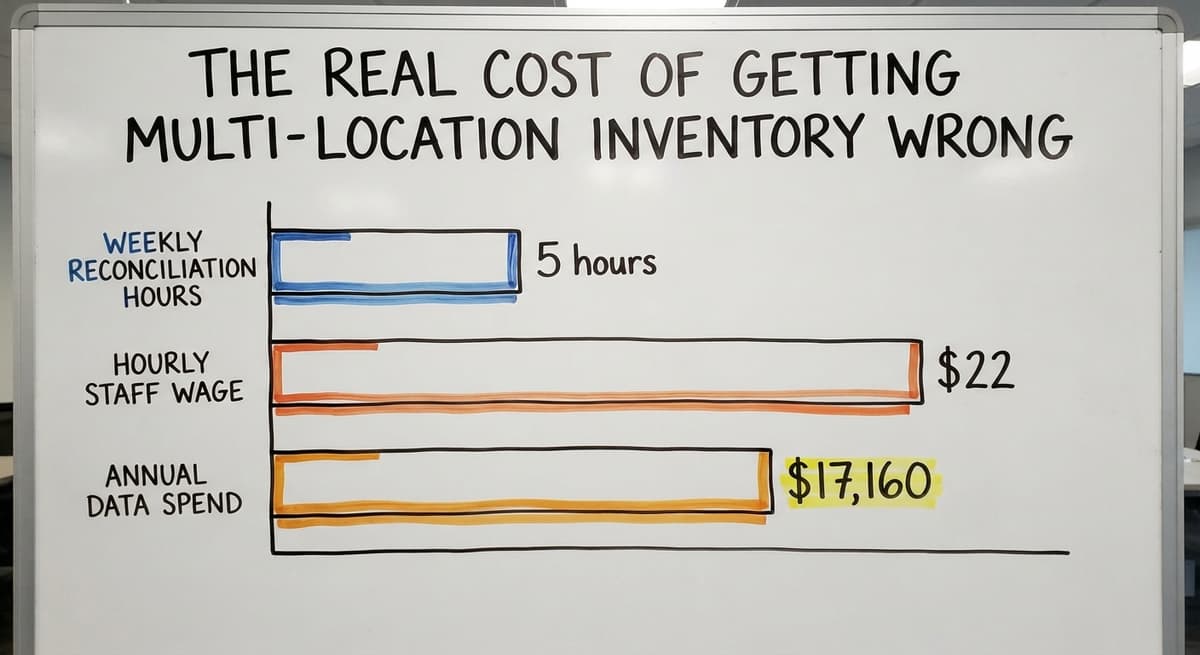
The staff cost adds up quickly. If 3 people spend 5 hours a week reconciling location data at $22 an hour, that is $17,160 a year spent on a problem a better system would prevent. The Bureau of Labor Statistics puts median pay for stock clerks and order fillers in that range, so the math is grounded.
Carrying too much stock at one site while another runs dry ties up cash and creates phantom shortages. GS1, the global standards body behind product barcodes, notes that accurate scan-based tracking is the foundation of reliable counts: their barcode standards exist precisely because "manual data entry is a primary source of errors in supply chain operations."
Errors that start small compound over months and become nearly impossible to trace.
What Good Multi-Location Inventory Tracking Actually Looks Like
What does good inventory management for multiple locations look like in practice? It looks like one screen that shows live stock at every site, with transfers recorded the moment they happen and reorder alerts tied to each specific location.
Here is what a working setup includes:
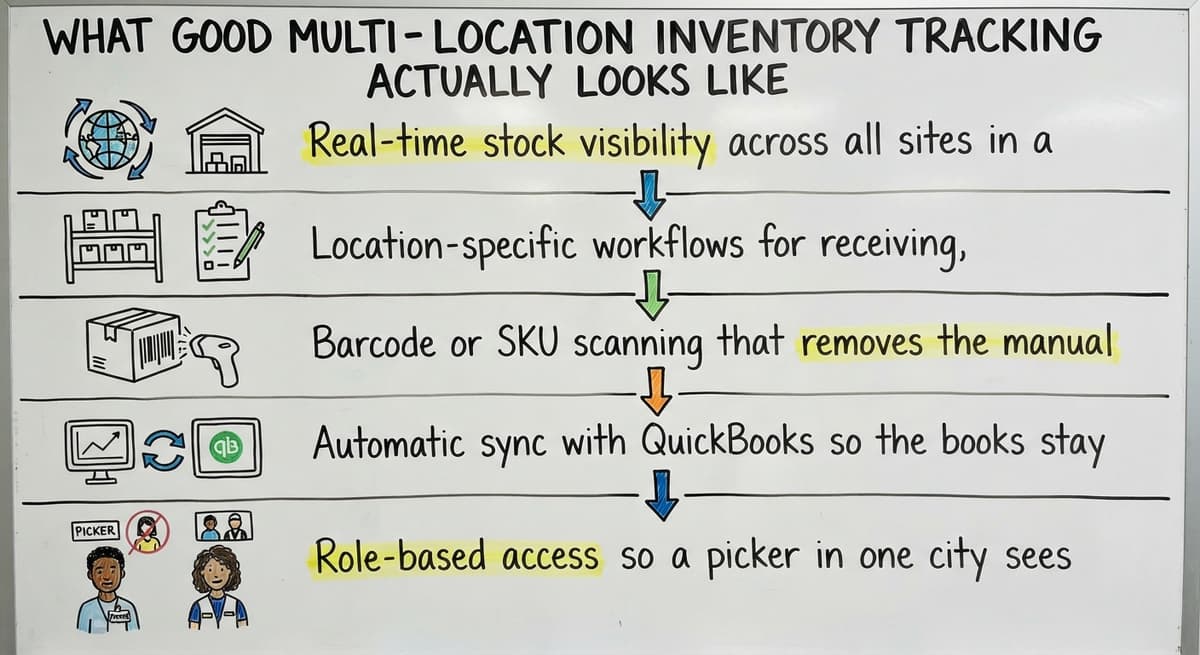
- Real-time stock visibility across all sites in a single dashboard, so no one is guessing
- Location-specific workflows for receiving, picking, and transferring stock
- Barcode or SKU scanning that removes the manual entry step causing most receiving errors
- Automatic sync with QuickBooks so the books stay clean without double entry
- Role-based access so a picker in one city sees only what that site holds
The IRS is clear on why accurate counts matter beyond operations. IRS Publication 538 states: "To figure taxable income, you must value your inventory at the beginning and end of each tax year." A system that cannot give you a reliable count by location cannot give you a reliable company-wide count either.
A good multi-location setup does not add complexity. It removes the manual steps that create it.
The comparison is easier when one option is built for you
Off-the-shelf means fitting your process to the software. We do it the other way round, and the first look costs nothing.
Book a call
How Most Small Distributors Handle It Today
QuickBooks handles the accounting. Excel handles the stock counts. Printed pick sheets handle the warehouse floor. Email handles everything in between.
Each of those tools works fine on its own. Together, they form a chain where every link is a failure point. A pick sheet does not update when stock moves. An Excel file does not flag when 2 locations are counting the same in-transit pallet. An email thread does not stop a duplicate buy order.
The patchwork holds when the business is small and the team knows every SKU by memory. Add a third warehouse or a second product line, and the whole structure starts to crack. Most distributors reach this point before they realize the system is the problem, not the people running it.

Can QuickBooks Handle Inventory Management for Multiple Locations on Its Own?
QuickBooks tracks inventory at the company level in most setups. It was built for accounting, not warehouse operations. Location-level stock detail needs workarounds that often create more confusion in the books than they solve.
That does not mean QuickBooks should go. It means QuickBooks should do what it does well: invoicing, payments, and the general ledger. A separate inventory layer handles the warehouse side and syncs transactions back automatically. The accountant sees clean data. The warehouse team works in a system built for their actual job.
The NIST Manufacturing Extension Partnership recommends that small and mid-size operations match their tools to their actual process complexity rather than adopting platforms built for larger enterprises. QuickBooks plus a targeted inventory layer is often the right fit for a 10-to-80-person distributor.
Do I Need a Full ERP to Track Stock at More Than One Warehouse?
No. Large ERP systems are built for enterprises. Rollouts run 6 to 18 months and cost more than most small distributors can absorb. Staff resistance is high when a familiar system gets replaced entirely.
A targeted solution that fills the gap between QuickBooks and your warehouse floor is faster, cheaper, and far less disruptive. Your team keeps working in tools they know. The new layer handles the parts those tools cannot do.

Tracking Stock Transfers Between Locations
A transfer is not complete until both the sending site and the receiving site record it. Skip that step and the same pallet gets counted twice, or not at all.
In-transit inventory needs its own status. Stock that has left Cleveland but has not arrived in Columbus is not available at either location. A system that shows it as available at the destination before it arrives will create oversells.
Approval steps prevent unauthorized moves. A transfer log gives managers a clear audit trail when a count does not match.
Accurate transfer records are what keep your company-wide stock number from drifting away from reality.

How Do You Set Different Reorder Points for Each Location?
Location-level reorder points prevent one site from running dry while another overstocks. A warehouse in a fast-moving metro area may turn a SKU in 4 days. A regional site might take 12. A single company-wide reorder point serves neither well.
Setting thresholds by site means:
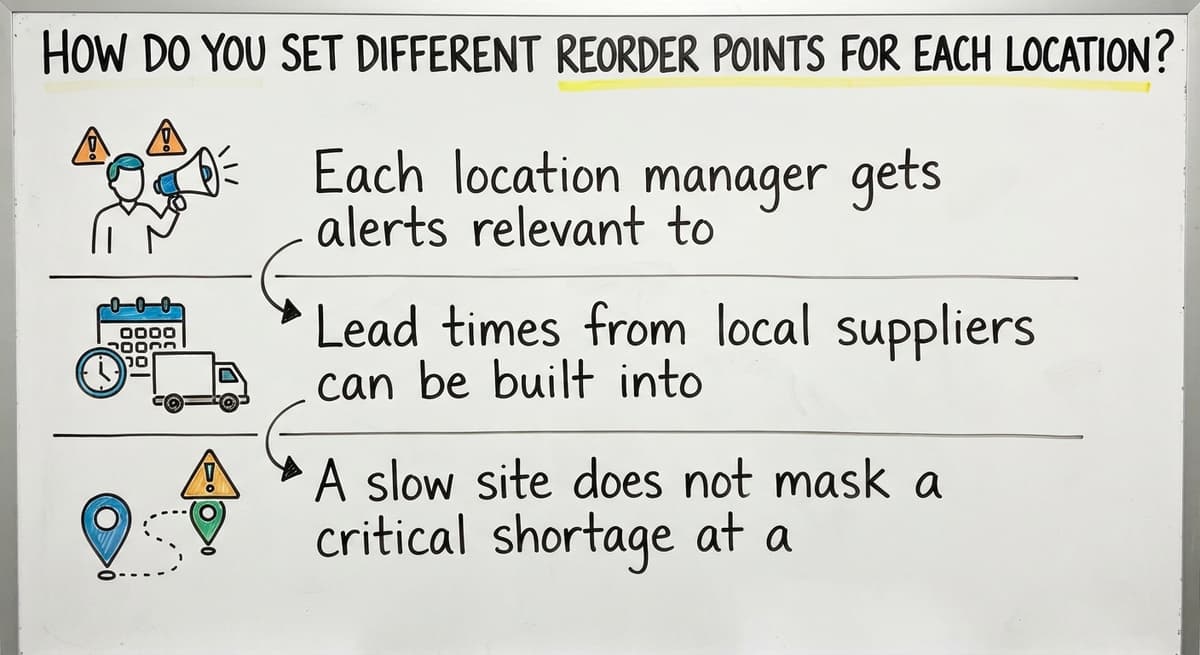
- Each location manager gets alerts relevant to their own stock, not the company average
- Lead times from local suppliers can be built into the threshold for that site
- A slow site does not mask a critical shortage at a busy one
The US Census Bureau's Monthly Wholesale Trade data tracks the national inventories-to-sales ratio for wholesale firms, which shows how tightly most distributors are running stock relative to demand. At those margins, a misaligned reorder point at even one location is expensive.
See it running on your own process first
No build cost. The subscription starts once it is live and doing the job, not before.
Book a callRole-Based Access and Cycle Counting Across Sites
A picker in Cleveland does not need to see inventory in Columbus. Managers can view all locations while site staff see only their own. Role-based access reduces errors and keeps sensitive stock data where it belongs.
Cycle counting, which means counting a small section of inventory each day rather than shutting down for a full count, works well across multiple sites because each location runs its own schedule. A zone in one warehouse gets counted on Tuesday. A different SKU group in another gets counted Thursday. Variances are flagged and investigated without halting shipments.
Cycle counting and role-based access together let a multi-location operation keep accuracy without the disruption of a full physical count.

Receiving Inventory and Reporting Across All Sites
Each site needs its own receiving workflow tied to buy orders. When a delivery arrives, the count updates the central system at once. If what arrives does not match the buy order, the system flags the gap rather than letting it slip through.
Receiving records feed back into QuickBooks without manual re-entry. No double entry means no transcription errors between the warehouse and the books.
On the reporting side, managers need a consolidated view, not a separate spreadsheet for each location. Useful reports show:
- Stock value, turnover rate, and aging by site
- Transfer activity between locations over a set period
- Reorder alerts by location rather than company-wide totals
Drill-down ability lets a manager move from a company-wide summary to a single location in a few clicks. A report that shows the full picture across all sites is what turns raw counts into decisions.

What the Build Process Looks Like for a Small Distributor
What does building a custom multi-location inventory system actually involve for a small operation? It starts with mapping how inventory moves today, identifying which manual steps create the most errors, and building around the workflows your team already uses.
A typical timeline for a targeted custom build runs 4 to 10 weeks. That range depends on the number of locations and how complex the transfer and receiving workflows are. Staff training is short because the system is built around habits the team already has, not a foreign platform they have to learn.
The system grows as the operation does. Add a new warehouse and the site gets added to the same dashboard. Change a workflow and the software changes with it. A build that fits the operation from day one does not need a big-bang cutover or months of parallel running.
Keeping QuickBooks as the Accounting Source of Truth
QuickBooks handles invoicing, payments, and the general ledger. The inventory layer syncs transactions back automatically. No duplicate entry, no risk of the books falling out of sync, and no need for the accountant to learn a new system.
The goal is a clean boundary: warehouse operations on one side, accounting on the other, with an automatic bridge between them. That boundary is what lets each tool do its job without getting in the way of the other.
Not sure this is the right shape for your operation
Describe how the work runs today. We map it on a call and show you what it would look like built around that, before you spend anything.
Book a callCommon Mistakes When Scaling to More Locations
Adding a new site to an already-broken system does not fix the system. It adds more volume to a process that was already failing.
Using different tracking methods at each location is equally damaging. One site uses a spreadsheet. Another uses a whiteboard. A third uses the QuickBooks item list. Reconciling those 3 sources at month-end is a full-time job.
Waiting until the pain is severe means fixing a bigger mess. The right time to build a proper system is before the third location opens, not after the fourth one exposes how bad the data has become.
The distributors who scale cleanly are the ones who standardized their tracking before the volume made it impossible.
Signs Your Current System Is No Longer Working
Your current setup is telling you it is done when:
- Stock counts on screen differ from what is actually on the shelf
- Staff spend several hours each week reconciling location data by hand
- Customers receive wrong items or wait too long because stock was misallocated
- Adding a new location feels impossible with the tools you have now
Any one of those is a signal. All 4 together means the cost of staying is already higher than the cost of fixing it.
The question is not whether to build a better system. It is how long to wait.
What to Look for in a Software Partner for Multi-Location Inventory
What should I ask before choosing a multi-location inventory solution? Start with these 4 questions:
- Will this work with QuickBooks without replacing it?
- Can it handle location-level reorder points and stock transfers between locations?
- How long is the build and what does it cost?
- Who supports it after go-live and how fast do they respond?
Beyond the questions, look for a partner who understands wholesale distribution, not just software. Experience with QuickBooks integration and small-to-mid-size operations matters more than a long client list of enterprise names.
Avoid vendors who push you toward a platform that does not fit your size. A 20-person distributor does not need the same system as a 2,000-person logistics company. The right partner sizes the solution to the operation, not the other way around.
Next Steps for Getting Multi-Location Inventory Under Control
Start by writing down where the biggest errors happen today. Which location has the worst matching problems? Which SKUs cause the most backorders or duplicate orders? That map is the starting point for any honest conversation about a fix.
Talk to a builder who works at your scale. A short discovery call can show what a targeted system would look like for your specific locations, your SKUs, and your team structure. The Software Society builds custom inventory systems for distributors running on QuickBooks, without replacing what already works.
A targeted fix built around your operation is faster to deploy, easier for your team to adopt, and cheaper than any ERP replacement.
Frequently asked questions
What is multi-location inventory management?
Multi-location inventory management means tracking stock levels, transfers, and reorder points across 2 or more warehouses or fulfillment sites from a single system. Instead of each site keeping its own count, one central platform shows what is available at every location in real time. This prevents overselling, duplicate orders, and the matching work that comes from running separate spreadsheets per site.
Can QuickBooks handle inventory management for multiple locations on its own?
Not well. QuickBooks tracks inventory at the company level in most setups. It was built for accounting, not warehouse operations. Location-level stock detail, transfer recording, and site-specific reorder points need workarounds that often create more confusion in the books than they solve. Most small distributors get better results by keeping QuickBooks for accounting and adding a dedicated inventory layer that syncs back to it automatically.
What is the 80/20 rule in inventory?
The 80/20 rule in inventory, sometimes called Pareto analysis, holds that roughly 80% of your sales volume comes from about 20% of your SKUs. In a multi-location operation, this means a small number of items drive most of the picking activity at each site. Identifying those items lets you set tighter reorder points and cycle count them more often, which reduces the risk of a stockout on the products that matter most.
How do stock transfers between locations get recorded correctly?
A transfer needs to be recorded at the sending site when it leaves and at the receiving site when it arrives. In-transit stock should appear as its own status so it is not counted as available at either end. A system that handles this automatically, rather than relying on staff to update 2 separate spreadsheets, is the only reliable way to keep the numbers clean across multiple warehouses.
How do you ensure inventory accuracy across multiple locations?
Accuracy across multiple locations comes from 4 practices working together: barcode or SKU scanning at every receiving and picking step, cycle counting on a rolling schedule at each site, automatic transfer recording so in-transit stock is never double-counted, and a central system that flags variances rather than letting them accumulate. No single tool solves it alone. The combination of the right system and consistent process at each site is what keeps the numbers reliable.
What is the best POS system for multiple stores?
There is no single best answer. The right system depends on what you sell, how you fulfill orders, and what accounting platform you already use. For retail stores, Square for Retail, Lightspeed, and Shopify POS all handle multi-location stock reasonably well at different price points. For wholesale distributors who need warehouse-level tracking and QuickBooks integration, a POS alone is usually not enough. A dedicated inventory layer built around your workflows will do more than any retail POS.
Do I need a full ERP to manage stock at more than one warehouse?
No. Full ERP systems are built for large enterprises and usually take 6 to 18 months to implement. A small or mid-size distributor usually needs a targeted inventory system that handles location-level tracking and syncs with QuickBooks, not a platform that replaces every tool the business already uses. A custom build tailored to your locations and workflows can go live in 4 to 10 weeks at a fraction of the cost.
How much does a custom multi-location inventory system cost for a small distributor?
Cost depends on the number of locations, the complexity of your transfer and receiving workflows, and how deeply the system needs to integrate with QuickBooks. A targeted custom build for a small distributor is usually far less than an ERP rollout and can often be delivered in weeks rather than months. The best way to get an honest number is a short discovery call where a builder maps your actual workflows before quoting anything.
Start with a free first look
A 30 minute call, your operation mapped, and a clear picture of what we would build. No obligation and nothing to install.
Book a callRelated guides
More on the same work.
Guides
- Multi Location Inventory Management
- Multi Location Inventory Management Software
- Automated Inventory Management System
Common questions
- What is E Inventory Management
- What is Roq in Inventory Management
- What is Barcoding in Inventory Management
- What is Online Inventory Management System
- What is Effective Inventory Management
- What is the Definition of Inventory Management
- What is Inventory Management Mary Kay
- What is Inventory Management Practices
- What is Fluctuation Stock in Inventory Management
- What is Abc Classification in Inventory Management
- What is the Purpose of Inventory in Operations Management
- How to Manage Food Inventory
- What is Sales and Inventory Management System
- What is the Importance of Quality Inventory Management
- What is Inventory Management System Project
- How to Manage Consignment Inventory
- What is Inventory Management Meaning in Hindi
- What is Fifo in Inventory Management
- What is Telecom Inventory Management
- How to Manage Fba Inventory
- What is Kanban System of Inventory Management
Added since this page was reviewed
The newer guides in this cluster are here.
- How to Manage Inventory in Rocket League Answered on its own page.
Added since this page was reviewed
The newer guides in this cluster are here.
- How to Manage Inventory in Stardew Valley Answered on its own page.
Added since this page was reviewed
The newer guides in this cluster are here.
- How to Manage Inventory Fallout 76 Answered on its own page.
Added since this page was reviewed
The newer guides in this cluster are here.
- What is the Difference Between Aggregate and Item Inventory Management Answered on its own page.
- What is Jit Inventory Management Answered on its own page.
- Inventory Management System for Manufacturing Answered on its own page.
- Inventory Management Pics Answered on its own page.
- What is an Important Factor in Inventory Management Answered on its own page.
- B2b Inventory Management Answered on its own page.
- Jewelry Inventory Management Answered on its own page.
- Dental Inventory Management Answered on its own page.
- What is Inventory Management in Working Capital Answered on its own page.
- The Objective of Inventory Management is To Answered on its own page.
- What is Poor Inventory Management Answered on its own page.
- What is Inventory Management and Its Types Answered on its own page.
- Qr Code for Inventory Management Answered on its own page.
- Hvac Inventory Management Software Answered on its own page.
- Inventory Management Software for Schools Answered on its own page.
- What is the Main Purpose of Inventory Management Answered on its own page.
- Nonprofit Inventory Management Answered on its own page.
- Manual Inventory Management Answered on its own page.
- What is Inventory Management in Pharmacy Answered on its own page.