

Operations Management Suite
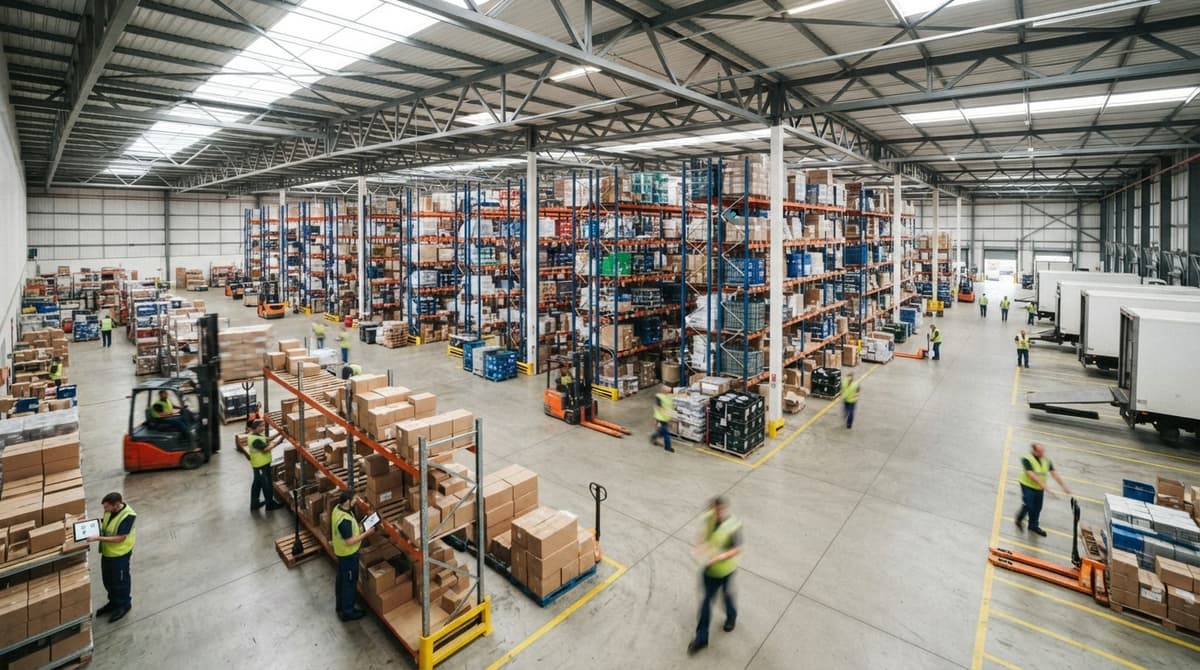
An operations management suite is a connected set of software tools that runs your daily business tasks in one place. It covers inventory, orders, purchasing, warehouse tasks, and reporting. Instead of jumping between spreadsheets, email chains, and separate apps, your team works from a single screen where every module shares the same data.
Reviewed August 2026. Each figure comes from the assumptions stated beside it, so you can substitute your own and the arithmetic still holds.
Published 12 August 2026. Reviewed and updated 15 September 2026.
Book a callWhat Does an Operations Management Suite Do, and Who Is It For?
Most wholesale distributors and fulfilment centres run on a mix of the accounting package, spreadsheets, and email. That works until it stops working. Orders go missing. Stock counts drift. Staff spend hours chasing status updates instead of moving goods.
An operations management suite is built for businesses with 5 to 100 staff. These teams are too busy for manual tools but not large enough to justify a full ERP project.
The suite sits in the middle: focused, fast to adopt, and built around the work your team already does.
The IRS makes the stakes clear. IRS Publication 538 states: "To figure taxable income, you must value your inventory at the beginning and end of each tax year." That is a legal obligation, not a preference.
A suite gives you an accurate count without manual reconciliation every time a tax deadline arrives.
Would you rather have it built around your operation?
The first look is free. If you would rather not compare products, describe how your operation already works and we build the system around it.
No build cost. You see it running on your own process first, and the monthly subscription starts only once it is live.
Book a callWhat Modules Are Inside a Typical Operations Management Suite?
A suite is made of connected modules, and every module reads from the same database. Nothing gets re-entered. A purchase order received in one screen updates stock counts, triggers a pick list, and feeds the reporting dashboard automatically.
The core modules most small distributors need are:
- Inventory management tracks stock in real time and replaces the manual spreadsheet update that always runs a day behind. Low-stock alerts fire before you run out, not after. Errors in inventory cost money directly: a wrong count leads to a missed sale or an over-order.
- Order management moves each order from receipt to fulfilment without an email chain. Status updates are automatic. Picking, packing, and shipping steps connect in sequence so no one has to ask where an order stands.
- Purchase order management lets your team raise and approve POs inside the suite. Supplier lead times tie to stock levels, so the system flags a reorder before the shelf empties. Approval workflows replace printed or emailed forms.
- Warehouse and fulfilment tools give floor staff pick lists, put-away tasks, and bin locations on a screen or a mobile device. Barcode scanning removes the manual entry step that causes most receiving errors. Fewer errors mean faster fulfilment.
- Reporting and the operations dashboard pull numbers from every module. An owner can see fill rate, stock turns, and order cycle time at a glance, without opening 4 spreadsheets and hoping they match.

Does an Operations Management Suite Work with the accounting software?
Yes, and a well-built suite sits alongside the accounting software rather than replace it. Invoicing, payroll, and tax stay in the accounting software because that is what it does well.
The suite takes over inventory, orders, purchasing, and warehouse tasks, which are the parts the accounting software was never built to handle at volume.
Data moves between the two systems on a schedule or in real time, depending on how the integration is set up. accounting integration for warehouse operations means your accountant keeps working in the tool they know while your warehouse team works in a tool built for their job.
You do not have to abandon familiar accounting software to fix your operations.
Is the comparison easier when one option is built for you?
Yes. Off-the-shelf means fitting your process to the software, and custom is the other way round. The first look costs nothing.
Book a call
Operations Management Suite vs Full ERP: What Is the Real Difference?
An ERP (enterprise resource planning system) is a large platform that tries to run every part of a business, from HR to manufacturing to finance.
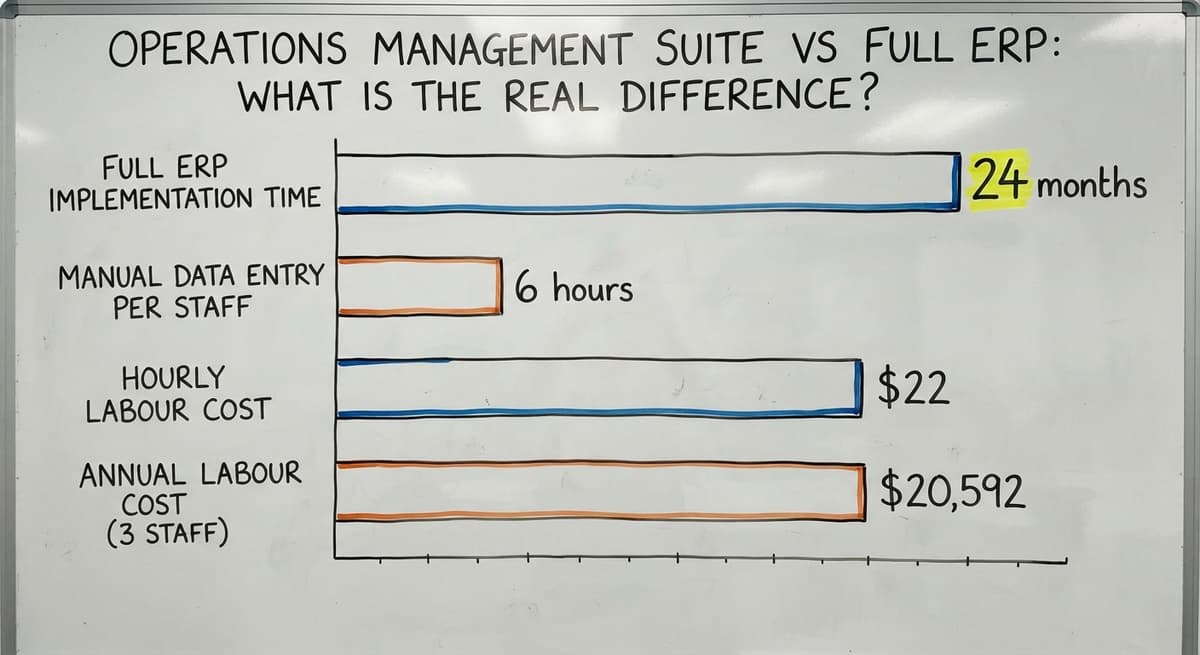
For a 15-person distributor, an ERP is too wide, too expensive, and too slow to stand up. Implementations run 12 to 24 months and cost more than the problem they solve.
A focused operations management suite covers the daily operational work without the overhead. Consider a simple cost check: 3 staff spending 6 hours a week on manual data entry at $22 an hour adds up to $20,592 a year in labour alone, before you count the errors those hours produce.
A suite built to the right scope can recover that cost in the first year without a multi-year rollout.
The NIST Manufacturing Extension Partnership offers vendor-neutral guidance on supply chain process improvement and consistently points smaller operations toward targeted tools rather than broad platforms. The right-sized answer for 5 to 100 staff is a suite, not an ERP.

Off-the-Shelf or Custom: Which Suite Fits Your Operation?
Off-the-shelf suites start fast. They target a generic business, which means your team adapts to the software rather than the other way around. That creates training friction and workarounds that pile up over time.
A custom suite follows your existing workflows. Your product fields, your receiving steps, your approval chains. Staff do not have to change how they work to match software defaults, which cuts training time and reduces resistance on the floor.
What Makes a Suite Custom to Your Operation?
Custom does not mean slow or expensive when the scope is right. It means the software follows the process your team already uses, with the fields and steps that match your products and suppliers.
Examples of what custom looks like in practice:
- Product fields that match how your team actually describes goods, not a generic catalogue format
- Receiving steps that match your dock layout and supplier labelling
- Approval chains that reflect who actually signs off on orders in your business
Custom workflow implementation for wholesale distributors shortens the gap between go-live and full adoption because the system already speaks your language.

How Long Does Implementation Take and What Should You Expect?
A focused suite rolls out in weeks, not years. A phased approach lets the business keep running while the build happens. Start with the most painful manual process, get that working, then add the next module.
What Will the First 90 Days Look Like?
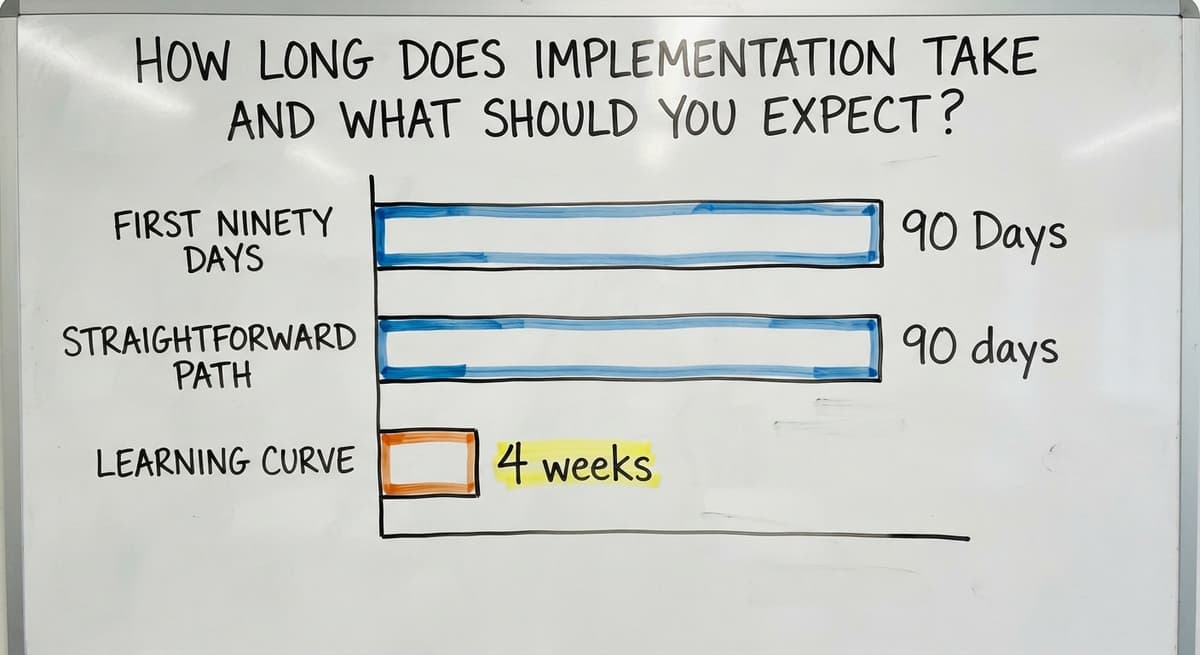
The first 90 days follow a straightforward path: discovery, build, test, and go live. Discovery means mapping your current workflows and gathering the data you already hold.
The build follows those workflows. Testing runs against real orders and real stock. Go-live is not the end; it is the start of a short adjustment period while staff get comfortable.
What you need to bring to the process:
- A clear picture of your top 3 manual pain points
- Access to the staff who do the daily work, not just management
- Your current data, even if it is messy, so it can be cleaned before migration
Expect a learning curve of 2 to 4 weeks after go-live. That is normal and shortens fast when the suite matches how your team already works.
How Do You Choose a Suite, and What Mistakes Should You Avoid?
The right suite fits your current workflows, connects to the accounting software, and comes with implementation support that does not disappear after go-live. Features matter less than fit. A long feature list built for a different industry is a liability, not an asset.
Questions to Ask a Potential Suite Provider
Before you sign anything, ask these directly:
- Who builds the suite and who supports it after go-live?
- How are changes handled when your process shifts six months in?
- Who owns the data if you leave?
- Can you speak to a business of similar size and type that uses this system?
- What does the go-live week actually look like on our end?
Common mistakes that are easy to avoid with the right planning partner:
- Buying more features than the team can absorb in the first 6 months
- Skipping data cleaning before migration, which imports old errors into the new system
- Going live during your busiest week of the year
- Choosing a suite built for manufacturing or retail when your operation is distribution
What does it look like running on your own process?
The first thing you see is it running on your own process, at no build cost. The subscription starts once it is live and doing the job, not before.
Book a callWhat Results Do Small Distribution Businesses See After Going Live?
The measurable outcomes most operations see are fewer order errors, faster pick times, and less time spent on manual data entry.
The US Census Bureau's Monthly Wholesale Trade data tracks the inventories-to-sales ratio across wholesale firms, and tighter inventory control is one of the clearest levers a distributor can pull to improve that ratio.
The softer outcomes matter too. An operations manager stops starting the day by reconciling 3 spreadsheets. An owner can see the state of the business from one screen instead of chasing staff for updates. The business stops running the owner and starts running itself.
Inventory management software for small distributors, order management software for fulfilment centres, and warehouse management tools for growing businesses all deliver more when they share a single data layer. That is what a suite provides that a collection of separate apps cannot.
Frequently Asked Questions About Operations Management Suites
What are the 5 P's of operations management? The 5 P's are People, Products, Processes, Plant, and Planning. They describe the five areas an operations manager must keep in balance to run a business efficiently.
A suite supports all five by giving each area a connected tool rather than a separate system.
What are the 7 main functions of operations management? The 7 functions are planning, organising, staffing, directing, controlling, reporting, and budgeting. In a small distributor, most of these happen informally. A suite adds structure to controlling, reporting, and planning without requiring a formal management layer.
What are the four types of operations management? The four types are batch, continuous, project, and job-shop operations. Most wholesale distributors run batch or job-shop operations, where orders are picked and fulfilled in discrete runs. A suite is well suited to both.
What are the 12 key components of operations management? The 12 components commonly listed are: design, planning, execution, control, quality, inventory, supply chain, purchasing, logistics, forecasting, capacity, and performance measurement.
A suite covers the operational core of these, inventory, purchasing, order flow, warehouse tasks, and reporting, while leaving finance and HR in their existing tools.
How much does an operations management suite cost? Cost depends on scope, the number of users, and whether the suite is off-the-shelf or custom built. Off-the-shelf tools charge a monthly fee per user.
A custom suite has a build cost and then an ongoing support cost. Either way, compare the total cost against what your team currently spends on manual work each year.
What happens to my existing data when I move to a suite? Your data is cleaned and migrated during the discovery phase.
A good implementation partner will map your current data structure, identify gaps or errors, and import clean records before go-live. You do not lose history; you carry it forward in better shape.
Your Next Step
Before you evaluate any software, write down your top 3 manual pain points. Be specific. "Stock counts are always wrong" is more useful than "our operations need improvement." That list becomes the filter you apply to every vendor conversation.
If you want to talk through your operation with a local team that builds custom suites around how your business already works, that conversation starts with your list, not a product demo.
Operational management software works best when it is shaped to your process, not the other way around.
Frequently asked questions
Frequently asked questions
What are the 5 P's of operations management?
The 5 P's are People, Products, Processes, Plant, and Planning. They describe the five areas an operations manager must keep in balance to run a business efficiently. A suite supports all five by giving each area a connected tool rather than a separate system.
What are the 7 main functions of operations management?
The 7 functions are planning, organising, staffing, directing, controlling, reporting, and budgeting. In a small distributor, most of these happen informally. A suite adds structure to controlling, reporting, and planning without requiring a formal management layer.
What are the four types of operations management?
The four types are batch, continuous, project, and job-shop operations. Most wholesale distributors run batch or job-shop operations, where orders are picked and fulfilled in discrete runs. A suite is well suited to both.
What are the 12 key components of operations management?
The 12 components commonly listed include design, planning, execution, control, quality, inventory, supply chain, purchasing, logistics, forecasting, capacity, and performance measurement. A suite covers the operational core of these while leaving finance and HR in their existing tools.
How much does an operations management suite cost?
Cost depends on scope, number of users, and whether the suite is off-the-shelf or custom built. Off-the-shelf tools charge a monthly fee per user.
A custom suite has a build cost and then an ongoing support fee. Compare the total against what your team currently spends on manual work each year.
What happens to my existing data when I move to a suite?
Your data is cleaned and migrated during the discovery phase. A good implementation partner maps your current data structure, finds gaps or errors, and imports clean records before go-live. You carry your history forward in better shape rather than losing it.
How is an operations management suite different from a full ERP?
An ERP tries to run every part of a business, from HR to manufacturing to finance. A suite focuses on daily operational work: inventory, orders, purchasing, and warehouse tasks.
For a team of 5 to 100, a suite is faster to implement, less expensive, and easier to maintain.
What is in a free first look?
A 30 minute call, your operation mapped, and a clear picture of what we would build. No obligation and nothing to install.
Book a callRelated guides
The rest of this guide, for the parts of the job this page does not cover.
Guides
- Warehousing Operations
- Warehouse Operations
- Order Management Software
- Ordering Management System
- Order Management System
- Order Management Program
- Warehouse Inventory Management Software
- Warehouse Inventory Management Systems
- Quickbooks Inventory Management Software
- Warehouse Stock Management Software
- Warehouse Management System Top 10
- Software for Warehouse Management System
- Inventory and Warehouse Management Software
- Small Business Warehouse Management System
- Custom Inventory Management Software
- Cloud Based Warehouse Management
- Warehouse Management System Types
- Warehouse Inventory Management System
- List of Warehouse Management Software