


What Are The Benefits Of Warehouse Management System
The benefits of a warehouse management system are accurate stock, faster picking, and fewer errors. A WMS delivers all 3 without replacing the tools you already use. This guide, reviewed in September 2026, lists the 7 benefits a warehouse of 5 to 100 people actually sees, with the number each one moves, and ends with how to tell when you are ready.
Reviewed August 2026. Each figure comes from the assumptions stated beside it, so you can substitute your own and the arithmetic still holds.
Published 14 August 2026. Reviewed and updated 15 September 2026.
Book a callWhat Does a Warehouse Management System Actually Do?
A WMS is software that tracks every item in your warehouse, from the moment it arrives to the moment it leaves.
Think of it as a live map of your stock. It replaces the spreadsheet you update every few days, the printed pick sheets your team carries around, and the email chains you use to chase down a missing pallet.
Would you rather have it built around your operation?
The first look is free. If you would rather not compare products, describe how your operation already works and we build the system around it.
No build cost. You see it running on your own process first, and the monthly subscription starts only once it is live.
Book a callA WMS Does Not Have to Be a Big, Expensive Project
A WMS does not have to be a big, expensive project. Small operations with 10 to 50 staff use them every day.
The right system fits around how you already work. It can sit alongside your accounting software rather than replacing it. It handles the warehouse side.
The accounting software handles the money side. Both stay in place. Warehouse inventory management software works at whatever scale you need.
A 15-person distributor and a 500-person fulfilment centre both benefit from the same core idea: one accurate record of what stock you have and where it is.
Benefit 1: You Always Know What Stock You Have
Real-time inventory visibility is the most immediate benefit most operations notice. Staff scan items as they move. The system updates instantly. You see what you have right now, not what you had when someone last updated the spreadsheet.
OSHA notes that "the warehousing and storage industry includes establishments operating facilities for general merchandise, refrigerated goods, and other products." Every one of those product types needs accurate counts to run safely and profitably.
Without accurate counts, 2 things go wrong regularly:
- Overstock ties up cash in items you do not need yet
- Stockouts mean you sell something you cannot ship
Picture a wholesale distributor taking orders by phone and email. A customer orders 40 units of a product. The spreadsheet says 50 are in stock.
But 15 were picked yesterday and the sheet was not updated. The order goes out short. The customer calls angry. That problem disappears when stock moves are recorded at the point they happen.
Accurate Inventory Counts Also Satisfy a Legal Obligation
The IRS has a stake in your counts. IRS Publication 538 states plainly: "To figure taxable income, you must value your inventory at the beginning and end of each tax year." Accurate real-time inventory makes that legal obligation far easier to meet.
When every movement is logged as it happens, your end-of-year valuation reflects what is actually on the shelves, not a figure reconstructed from memory or partial records.
Does a WMS Help You Pick Orders Faster and With Fewer Mistakes?
Yes. A WMS guides each picker to the exact shelf location for every item on an order. The picker does not have to remember where things are or ask a colleague. The system tells them.
Fewer wrong items get shipped. Fewer returns come back. Fewer customers call to complain. Faster pick rates mean more orders leave the building each shift. For a fulfilment centre or wholesale distributor running 150 to 300 orders a day, that speed adds up fast.
Is the comparison easier when one option is built for you?
Yes. Off-the-shelf means fitting your process to the software, and custom is the other way round. The first look costs nothing.
Book a callThe Cost of Manual Picking Errors Adds Up Quickly
Consider the cost of manual picking errors. If your team ships 200 orders a day and gets 3% wrong, that is 6 bad orders every day.
At 250 working days a year, that is 1,500 errors. Each one costs time to fix, a return to process, and a customer relationship to repair.
A WMS cuts that error rate sharply by removing the guesswork from every pick. The Warehousing Education and Research Council publishes standard benchmarks for distribution centre performance, including pick accuracy.
Operations using directed picking through a WMS consistently outperform those using paper-based methods on those benchmarks.
How Does Directed Picking Work?
Directed picking means the system tells each picker exactly where to go and what to grab. The picker scans a barcode to confirm the right item.
If the scan does not match, the system flags it before the wrong item goes into the box. GS1 barcode standards make this work across different suppliers and product types, so a barcode printed by one company scans correctly in your system.

Benefit 3: Receiving and Putaway Stop Being a Guessing Game
Inbound goods are the start of every inventory problem. When a delivery arrives and staff log it by hand later, or not at all, your stock count is wrong before the goods even reach a shelf.
A WMS logs every inbound item at the dock. Staff scan items as they come off the truck. Quantities go straight into the system.
If a supplier sends 48 units instead of 50, the system catches it immediately, not 3 weeks later when a customer order comes up short.
Putaway Stops Depending on One Person's Memory
Putaway, which means deciding where to store incoming stock, stops relying on tribal knowledge. Tribal knowledge is when only one experienced person knows where things go. When that person is off sick, stock ends up in the wrong place and no one can find it.
A WMS tells every staff member exactly where each item belongs. New and experienced staff follow the same process. Because receiving is logged automatically, your stock total updates the moment goods arrive. No manual step. No lag.
Benefit 4: Your Team Spends Less Time on Paperwork
Manual data entry is one of the biggest time drains in a warehouse. Staff record movements on paper. Someone types those records into a spreadsheet. A manager checks the spreadsheet and finds errors. More time goes into fixing them.
A WMS automates all of that recording. Stock moves are logged at the point they happen, by the person doing the work, using a scanner or mobile device. No paper trail to chase. No double entry.
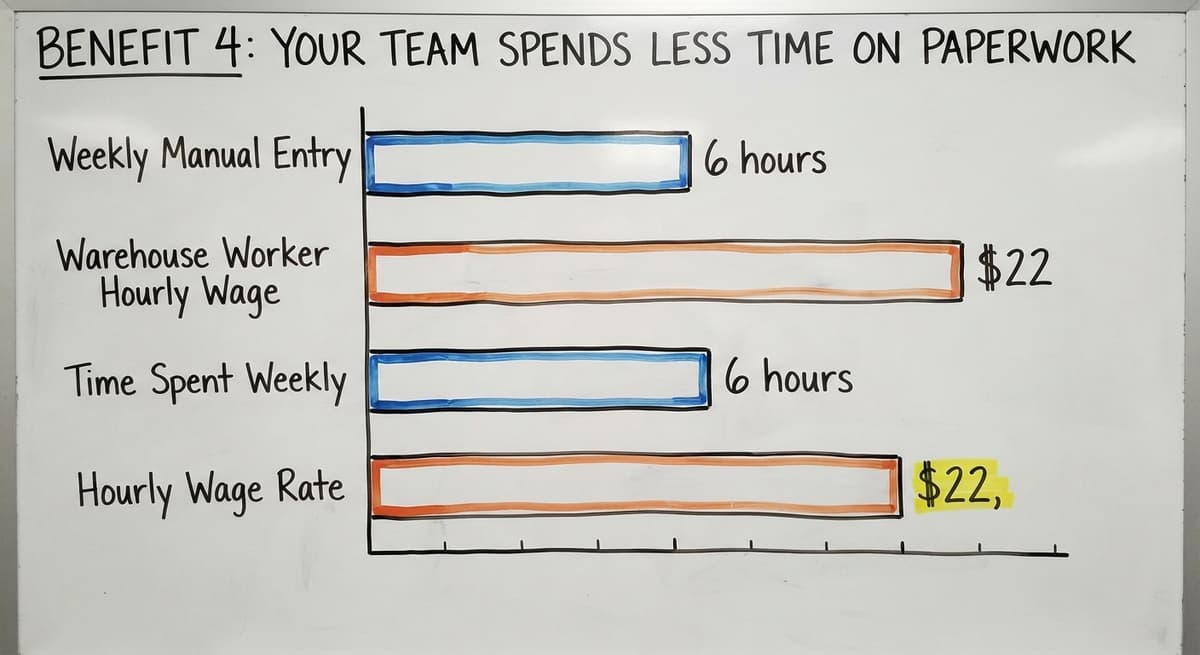
Look at the cost in plain numbers. If 3 people each spend 6 hours a week on manual data entry and recording, and the US Bureau of Labor Statistics puts warehouse worker wages around $22 an hour, that is 3 people times 6 hours times $22, which equals $396 a week.
Over a year, that is $20,592 spent on work a WMS handles automatically. That figure does not count the manager time spent chasing errors those records contain.
Managers also stop compiling reports by hand. The system surfaces data on stock levels, order volumes, and team output without anyone having to pull it together.
Staff who are not buried in paperwork or constantly correcting errors tend to stay longer. A WMS removes a lot of the frustration from warehouse work. That matters when warehouse labour is tight and turnover is costly.

Benefit 5: Your Accounting Software Stays Where It Is
Many small operators fear that buying a WMS means ripping out their accounting system. That fear is understandable. Off-the-shelf accounting software runs the finances for thousands of small distributors and warehouse operations. Nobody wants to rebuild that.
A well-built WMS integrates with your accounting software rather than replacing it. Inventory data flows from the WMS into that accounting software automatically. Stock values update. Purchase records sync. You stop keying the same number into 2 different systems.
How Does Your Accounting Software Integration Work in Practice?
Accounting software integration for distributors means the warehouse and the accounts stay in sync without anyone manually bridging the gap. This matters most for the 5-to-100 staff operation that runs its books on standard accounting software today and wants to keep it that way.
The WMS handles what that software was never designed to do: track physical stock movements in real time across a warehouse floor.
Replacing a spreadsheet with warehouse software is the first step. The accounting software stays. The spreadsheet goes. The WMS fills the gap between them.
What does it look like running on your own process?
The first thing you see is it running on your own process, at no build cost. The subscription starts once it is live and doing the job, not before.
Book a callBenefit 6: You Can See Problems Before They Get Expensive
A WMS surfaces patterns that a spreadsheet hides. Slow-moving stock, items that sit for months without selling, shows up clearly in a WMS report. Shrinkage, which means stock that disappears without a recorded reason, becomes visible when every movement is logged.
Managers spot these patterns early. A product that has not moved in 90 days can be flagged before it becomes a write-off. A supplier whose deliveries are consistently short can be identified before the shortfall causes a customer problem.

Visibility Turns Gut Feel Into Actual Numbers
Decision-making shifts from gut feel to actual numbers. The US Census Bureau's Monthly Wholesale Trade data tracks the inventories-to-sales ratio for wholesale firms nationally. Operations that manage their ratio well, keeping stock lean without running out, tend to outperform those that do not.
A WMS gives you the data to manage that ratio at your own level, not just as a national average.
The NIST Manufacturing Extension Partnership provides vendor-neutral guidance on supply chain and inventory process. Their guidance consistently points to visibility as the foundation of a well-run operation. You cannot manage what you cannot see.
Benefit 7: New Staff Get Up to Speed Faster
Training a new warehouse employee takes time. In most operations, that training depends heavily on one or two experienced people passing on what they know. When those people leave, the knowledge leaves with them.
A WMS gives step-by-step guidance for every task. A new picker follows the system rather than following a colleague.
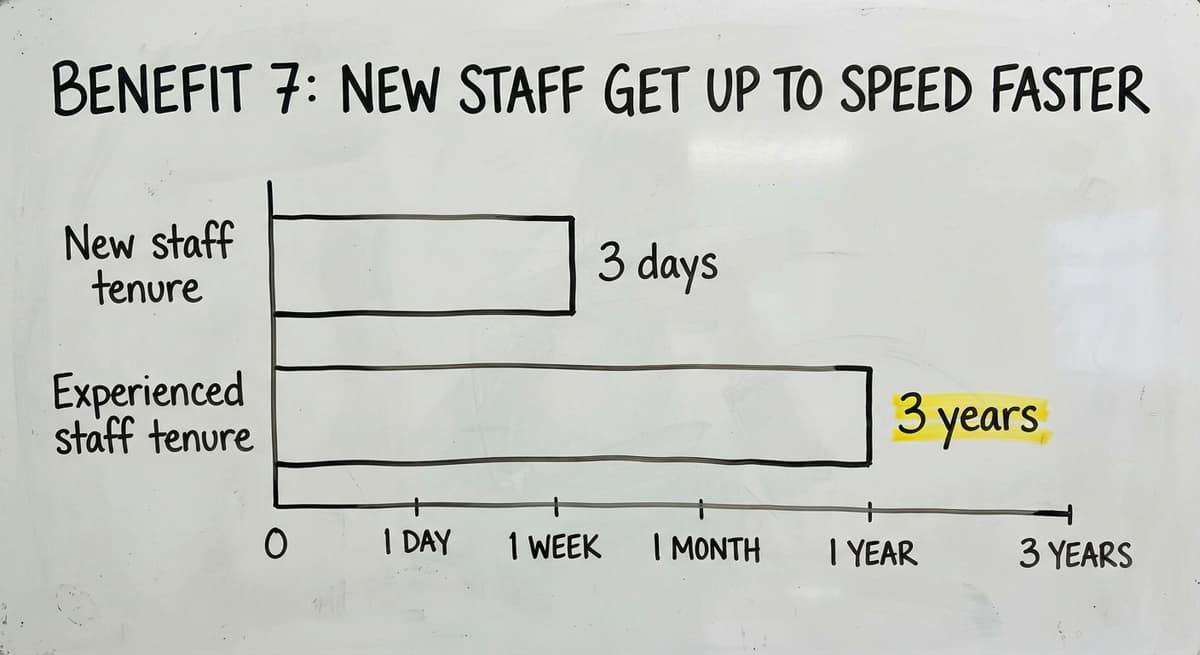
A new receiving clerk scans items and the system tells them where each one goes. The process is consistent whether the person has been there 3 days or 3 years.
Consistent Processes Reduce Errors Among Newer Staff
Consistent processes mean less variation in how work gets done. That matters for quality and for compliance. The Auburn University RFID Lab has documented how technology-guided processes in warehousing reduce error rates compared to memory-based ones, particularly among newer staff.
For operations with seasonal workers or part-time staff, this benefit is especially clear. You can bring in 5 extra people for a busy period and have them working accurately within a day, rather than spending a week shadowing a full-time employee.
What Does This Mean for Staff Retention?
Staff who are not buried in paperwork or constantly correcting errors tend to stay longer. A WMS removes a lot of the frustration from warehouse work. That matters when warehouse labour is tight and turnover is costly.

Does a WMS Actually Improve Customer Service?
Yes, and it does it in 3 direct ways. First, accurate inventory means you give customers honest delivery estimates. You stop promising stock you do not have.
Second, faster picking means orders ship sooner. Third, fewer errors mean fewer calls from unhappy customers chasing a wrong or missing item.
For wholesale distributors, repeat business is the foundation of revenue. A customer who gets the right order on time, every time, does not shop around.
A customer who gets the wrong item twice in a month does. Better service builds the repeat business that keeps a wholesale operation growing.
Custom operational software for small warehouses takes shape around the specific service promises your business makes, so the system supports the way you already sell, not a generic version of how a warehouse is supposed to work.
What is in a free first look?
A 30 minute call, your operation mapped, and a clear picture of what we would build. No obligation and nothing to install.
Book a callDo Small Warehouses Actually Need a WMS?
Small warehouse operators assume WMS tools are enterprise software, built for large logistics operations with hundreds of staff and complex networks. That assumption is wrong.
The problems a WMS solves grow in proportion to order volume, not headcount. A 20-person distributor shipping 200 orders every day has real WMS problems.
Stock counts are wrong. Orders get mixed up. New staff take weeks to get productive. Those are not big-company problems. They are volume problems.
Wholesale distributor software solutions built for smaller operations exist precisely because the problems are real at 20 staff, not just at 200.
The right system is built to fit the operation. It does not force you to change how you work just to use the software.
If you are managing inventory in a spreadsheet or a desktop database, you have already outgrown it. That is not a criticism. It is a signal.
Spreadsheets target analysis, not for live operational tracking. When your order volume grows past what one person can keep up with, the spreadsheet starts failing you.
What Should You Watch Out for When Choosing a Warehouse Management System?
Not every WMS is right for a small or mid-sized operation. Some target large enterprises and carry the costs and complexity to match.
Watch for these red flags:
- A requirement to migrate your whole accounting system before you can start
- Implementation timelines measured in months rather than weeks
- Consultants who bill by the hour without a fixed outcome in mind
- Feature lists that cover things your operation will never use
- No local support or a team that does not understand your specific workflow

Choose a System That Fits How You Already Work
The NIST Manufacturing Extension Partnership recommends that small manufacturers and distributors look for systems that align with their current processes rather than forcing a process change just to adopt new software. That principle applies directly to choosing a WMS.
A system built around how your operation already works will be used. A system that requires your team to change everything they do to fit the software will be ignored.
How Do You Know If You Are Ready for a Warehouse Management System?
Some signs are clear. Stock counts are wrong more often than they are right. Orders are getting mixed up and customers are noticing. Staff spend more time on paperwork than on physical work. A key employee leaving would take critical knowledge with them.
Other signs are quieter. You cannot answer a customer's stock question without walking the floor first. Your month-end inventory count takes 2 full days. You find out about supplier discrepancies weeks after the delivery.
Start With the Problem, Then Find the System
If any of these sound familiar, a WMS is worth a serious look. The goal is not to buy software. The goal is to fix a specific operational problem.
A short conversation about your current workflow can clarify whether a WMS addresses the problem or whether something else is needed first. Wholesale distributor software solutions and warehouse inventory management software work best when the problem is clear before the software is chosen.
Know what is breaking. Then find the system that fixes it. A discovery conversation with a team that understands operations, not just software, can make that clear quickly.
The Software Society works with growing businesses to replace fragmented manual work with systems aligned to real operations. If your warehouse is outgrowing what you have, that conversation is a good place to start.
Frequently asked questions
Frequently asked questions
What are the four types of WMS?
The four types are standalone WMS, which runs independently; ERP-integrated WMS, which sits inside a larger enterprise resource planning suite; cloud-based WMS, which is hosted online and accessed via browser or app; and supply chain module WMS, which is part of a broader supply chain platform.
For small and mid-sized operations, cloud-based standalone systems are the most practical starting point because they are faster to set up and do not require a full ERP.
What are the five S's of warehouse management?
The five S's come from a Japanese workplace method: Sort (remove what is not needed), Set in order (give everything a fixed place), Shine (keep the space clean), Standardise (document the right way to do each task), and Sustain (keep the habits going over time).
A WMS supports all five by making locations fixed, processes consistent, and records automatic. The five S's are a practice. A WMS is the tool that makes them stick.
Is WMS difficult to learn?
A well-designed WMS is not difficult to learn for day-to-day tasks. Pickers, receivers, and putaway staff need a few hours of hands-on practice. The system guides them step by step, so they do not need to memorise locations or processes.
Manager-level reporting and setup take longer, a few days of training. Systems built for small operations tend to be simpler than enterprise platforms.
If a vendor cannot show you the basics in a short demo, that is a sign the system may not be the right fit.
Is your business software a WMS or ERP?
An ERP stands for enterprise resource planning. It is a large system that covers finance, HR, procurement, and operations across a whole business. Some ERPs include a warehouse module as part of the larger suite.
But the ERP as a whole is built for enterprise-wide operations, not for warehouse tasks specifically. For most small and mid-sized distributors, a dedicated WMS that connects to standard accounting software is a far more practical choice than a full enterprise resource planning platform.
Will a WMS replace your accounting software?
No. A WMS handles warehouse operations: stock tracking, picking, receiving, and putaway. Your accounting software handles your accounts.
A good WMS integrates with that software so inventory data flows across automatically, cutting out double entry. It stays in place. The WMS fills the gap it was never designed to cover.
How does a WMS reduce picking errors?
A WMS uses directed picking, which means it tells each picker exactly where to go and which item to take. The picker scans a barcode to confirm the right product.
If the scan does not match the order, the system flags it before the wrong item is packed. This removes the guesswork that causes most picking errors in manual operations.
Can a WMS work for a team of fewer than 50 people?
Yes. Many WMS platforms are built specifically for operations with 5 to 50 staff. The problems a WMS solves, wrong stock counts, picking errors, slow receiving, are not limited to large teams.
A 20-person distributor shipping 200 orders per day benefits just as much as a larger operation. The key is choosing a system built for your scale, not an enterprise platform scaled down.
What problems does a warehouse management system solve?
A WMS solves inaccurate stock counts, slow and error-prone order picking, disorganised receiving, heavy manual paperwork, poor visibility into slow-moving or missing stock, and long training times for new staff. It also removes the gap between your warehouse records and your accounting system when it integrates with the right accounting software.
What are the main features of a warehouse management system?
A warehouse management system offers real-time inventory tracking that updates as items are scanned, directed picking that guides staff to exact shelf locations and flags mismatched barcodes, and automated receiving and putaway that logs inbound goods at the dock. It also removes manual paperwork by capturing stock moves electronically, and it can integrate with existing accounting software so financial records stay accurate without duplicate data entry.
How much does a warehouse management system cost?
Cost depends on the size of your operation, the features you need, and whether the system follows your existing process or sold off the shelf.
Some providers avoid a large upfront build cost, charging a monthly subscription only once the system is running. Because pricing structures vary so widely between providers, it is best to get a quote based on your own warehouse's requirements.
What is the difference between WMS and ERP?
A warehouse management system focuses specifically on warehouse operations, tracking stock as it arrives, moves, and ships, guiding picking, and managing how goods are received and put away.
An ERP or accounting system, by contrast, handles the financial side of the business, such as inventory valuation, purchase records, and overall accounting. The two are meant to work together, with warehouse data flowing into the accounting system rather than one replacing the other.
How long does it take to implement a warehouse management system?
Implementation is quicker than people expect, especially for smaller operations. Many businesses see the main benefits, such as improved stock accuracy and faster picking, within the first few weeks of going live.
Because a warehouse management system takes shape around processes you already use rather than forcing a complete overhaul, setup tends to be far less disruptive than a typical large software project.
Not sure this is the right shape for your operation?
The call is free. Describe how the work runs today. We map it on a call and show you what it would look like built around that, before you spend anything.
Book a callRelated guides
The rest of this guide, for the parts of the job this page does not cover.
Guides
- Warehouse Inventory Management Systems
- Warehouse Management System Top 10
- Software for Warehouse Management System
- Small Business Warehouse Management System
- Warehouse Management System Types
- Warehouse Inventory Management System
- Warehouse Management System Examples
- Warehouse Management System Implementation
Common questions
- What is the Point of Warehouse Management System
- What is Asn in Warehouse Management System
- What is a Warehouse Management System
- What is a Warehouse Management System Used For
- What is the Purpose of a Warehouse Management System
- What is a Warehouse Management System Pdf
- What is a Warehouse Management System Example
- What Warehouse Management System Does Amazon Use
- What Are the Top 5 Warehouse Management Systems?
- What is the Best Warehouse Inventory Management System?
- What is the Difference Between Warehousing and Inventory Management
- What is the Most Popular Warehouse Management System?
- What is B Type of Inventory in Warehouse Management
- What is a Simple Warehouse Management System?
- What is Warehousing and Inventory Management
- How to Choose a Warehouse Management System