


Order Management System
An order management system is the software that records every order from arrival to invoice. It checks stock at entry, sends the pick to the warehouse, and pushes the tracking number back to the customer. For a wholesale distributor handling 50 to 2,000 orders a week an order management system costs $100 to $500 a month packaged, or $10,000 to $30,000 once for a build around your own pricing and packing rules. This guide, reviewed in September 2026, follows an order through a business with and without one.
Reviewed August 2026. Each figure comes from the assumptions stated beside it, so you can substitute your own and the arithmetic still holds.
Published 25 August 2026. Reviewed and updated 15 September 2026.
Book a callWhat Does an Order Management System Actually Do?
An order management system is a central record for every order your business receives. It captures the order, checks stock, guides the pick and pack steps, and updates the customer when the order ships.
Think of it as the traffic controller for your warehouse floor. Orders come in from different places. The system puts them in one queue. The team works the queue. Nothing falls through the cracks.
This is different from an accounting system, which records money. It is different from a warehouse management system, which manages bin locations and stock counts in detail.
An order management system sits between the two. It moves orders through your operation from start to finish.
Would you rather have it built around your operation?
The first look is free. If you would rather not compare products, describe how your operation already works and we build the system around it.
No build cost. You see it running on your own process first, and the monthly subscription starts only once it is live.
Book a callHow Do Orders Move Through a Business Without a System?
Here is what manual order tracking looks like in most small distributors.
A customer sends an email. Someone reads it and types the order into the accounting software. Someone else prints a pick sheet.
A third person picks the goods, writes the quantity on the sheet, and leaves it on a desk. Order status lives in someone's head.
The IRS Publication 538 states directly: "To figure taxable income, you must value your inventory at the beginning and end of each tax year" (IRS Publication 538). That legal obligation means your inventory records have to be accurate. Manual order tracking makes that accuracy hard to maintain.
Errors enter the process at every handoff. The email gets missed. The the accounting software entry has a wrong quantity.
The pick sheet is for an old order. The customer calls asking where their goods are, and no one knows without checking 3 different places.
If this sounds like your operation, you are not alone. Most small distributors run this way until the volume gets high enough that the errors become expensive.
What Does Manual Order Tracking Actually Cost?
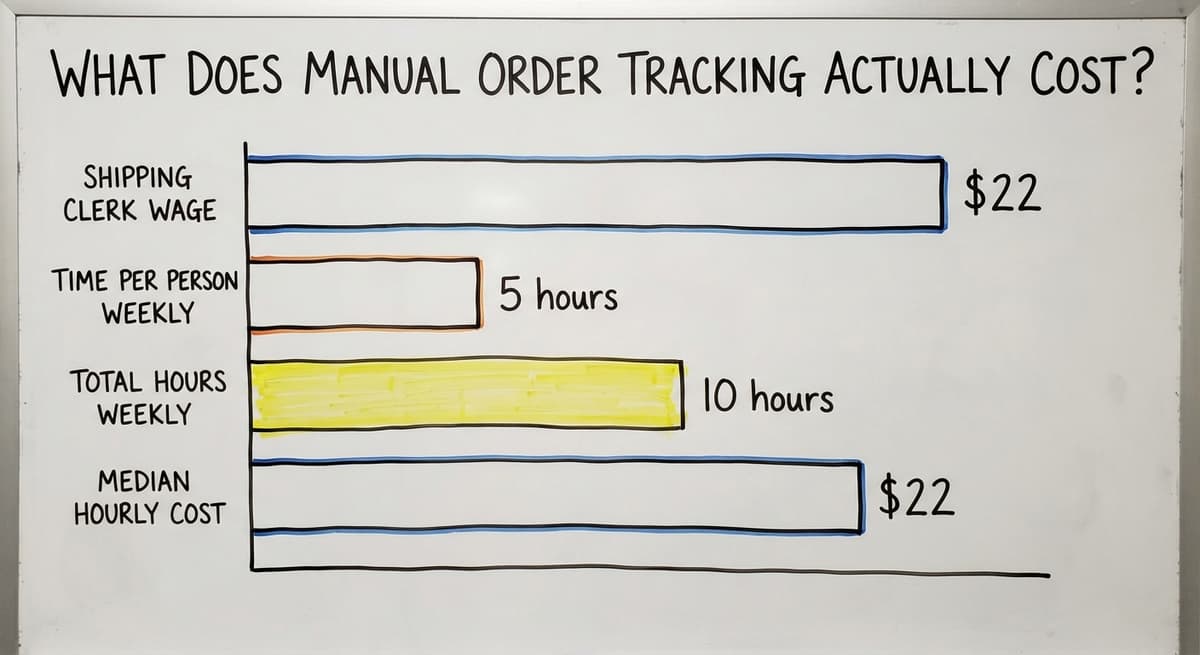
Manual order tracking costs more than most owners realise, and the cost is easy to calculate with numbers you already know.
According to the US Bureau of Labor Statistics, the median hourly wage for shipping and order clerks runs around $22 per hour.
If 2 people each spend 5 hours a week re-entering orders, chasing status, and answering customer calls, that is 10 hours a week. At $22 an hour, that is $220 a week, or $11,440 a year, spent on work a system would do automatically.
That number does not include the cost of a wrong order reaching a customer.
A mispicked shipment means a return, a reship, and a conversation no one wants to have. It also does not include the time managers spend answering status questions instead of doing actual management work.
Three common costs that rarely appear on a P&L:
- Staff time re-entering the same data across 2 or 3 systems
- Errors that reach the customer before anyone in the building catches them
- Management hours spent tracking down order status instead of running the business
Core Features Every Order Management System Should Have
Not every system has the same features. But any system worth using for wholesale distribution or warehouse operations should cover these 5 areas.
- Centralised order intake from multiple channels
- Real-time order status visible to everyone who needs it
- Inventory checks tied to each order before it ships
- Fulfilment and shipping updates that happen automatically
- Customer communication that goes out without manual effort
Order Intake and Capture
A good system is one that pulls orders from every channel into one place.
Email, web forms, EDI (electronic data interchange, a standard format for sending orders between businesses), phone, and fax all land in the same queue.
Consider a wholesale distributor with 6 customers. Five send orders by email. One sends a fax. Right now, someone checks both every morning and types everything into a spreadsheet.
A single intake point means no missed orders and no duplicates. The order exists in the system the moment it arrives, not the moment someone gets around to it.
Order Status and Visibility
Real-time status means anyone in the business can see where an order is without asking someone else.
The warehouse team sees what needs to be picked. Sales sees what is confirmed. Management sees what is late.
Visibility reduces 2 types of friction. Internal: staff stop interrupting each other to ask where things stand. External: customers stop calling because they can get an update without picking up the phone.
Inventory Tie-In
Order management and Inventory Management System functions need to talk to each other. When an order comes in, the system should check stock before confirming the order, not after it is picked.
Catching a stock problem before the order ships is a minor fix. Catching it after the order has left the building is a customer service problem.
The NIST Manufacturing Extension Partnership recommends integrating order and inventory data as a basic supply chain practice, precisely because the gap between the two is where errors live.
Is the comparison easier when one option is built for you?
Yes. Off-the-shelf means fitting your process to the software, and custom is the other way round. The first look costs nothing.
Book a callFulfilment Workflow
The system guides the 3 fulfilment steps, pick, pack, and ship, in sequence. Some operations use printed pick lists.
Others use a digital pick queue on a screen in the warehouse. Either way, the system should update the order status automatically when each step is confirmed, not when someone remembers to type it in.
This is the step that removes the most manual work from a warehouse floor.
Can I Keep Using the accounting software If I Add an Order Management System?
Yes. A good order management system does not replace the accounting software. It feeds it.
Many small distributors and warehouses already run their accounting in the accounting software. That is not a problem. Accounting Integration for Distributors is a standard feature in any system worth considering.
Here is how it works. An order is confirmed in the order management system. The system pushes a sales order or invoice to the accounting software automatically.
The accounting record is created without anyone typing it twice. The the accounting software workflow stays exactly as it is.
This removes double entry. It also removes the errors that come with double entry. A number typed once is right or wrong. A number typed twice has a second chance to be wrong.
Off-the-Shelf Systems Versus Custom-Built Systems
Two broad options exist when choosing an order management system. Each fits a different type of operation.
| Factor | Off-the-shelf | Custom-built |
|---|---|---|
| Cost to start | Lower upfront | Higher upfront |
| Fit to your workflow | Generic | Built to match |
| Time to go live | Faster | Longer |
| Flexibility later | Limited by vendor | You own the logic |
| Best for | Standard operations | Unusual workflows |
When Is an Off-the-Shelf System Enough?
Off-the-shelf systems work well when your operation runs in a fairly standard way.
If your order types, product categories, and fulfilment steps match what most distributors do, a packaged system will cover most of your needs.
These systems also suit teams that can absorb a learning curve. The software will not match your current process exactly.
Your team will need to adapt. If that is manageable, the lower starting cost makes sense.
When Does a Custom Order Management System Make More Sense?
Custom Operational Software for Wholesale Distributors makes sense when the off-the-shelf options require you to change how your team works in ways that create risk.
Signs a custom system fits better:
- Your product types or order formats are unusual
- Your customer pricing or terms vary widely
- Your team cannot absorb a long disruption during a rollout
- You have outgrown spreadsheets but are not ready for a full ERP
- You want the system to match the team, not the other way around
Custom Software is not always the right answer. But for operations with specific workflows, it is the faster path to something that actually works.

What Does Implementation Actually Look Like?
Most owners picture a long, expensive rollout that shuts down the operation for weeks. That is not how a phased approach works.
Start by identifying the one step in your current process that causes the most errors or delays.
Build or configure the system around that step first. The team keeps working while the system is being set up around them.
A realistic timeline for a small to mid-size operation:
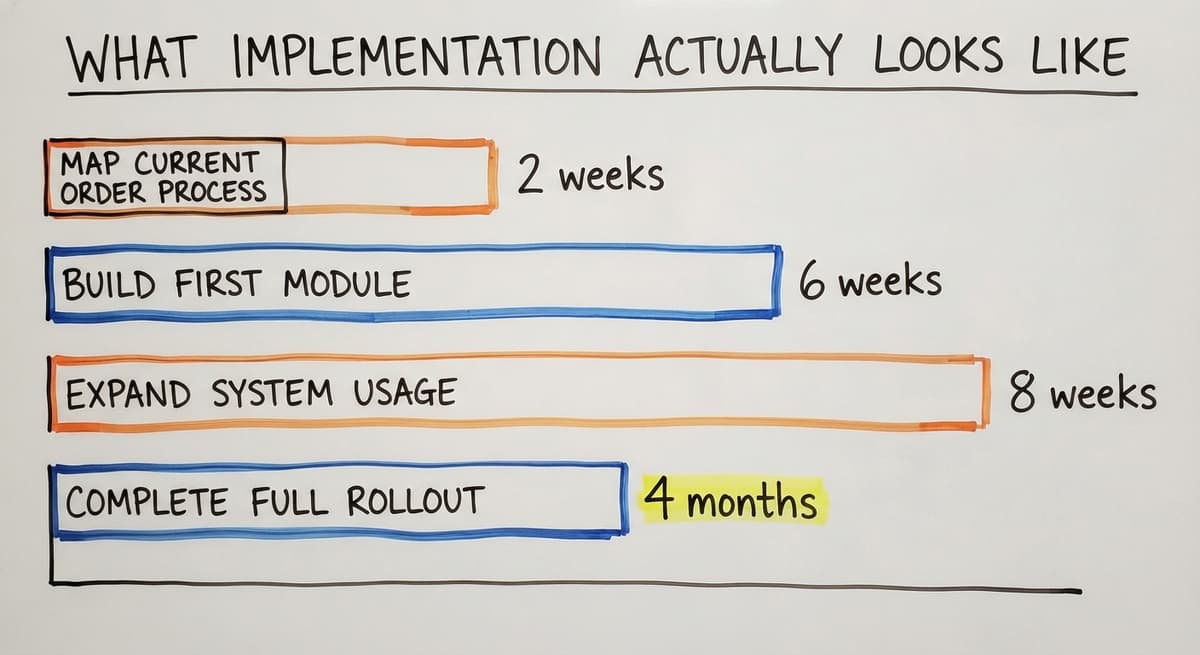
- Map the current order process on paper (1 to 2 weeks)
- Build or configure the first module around the most painful step (2 to 6 weeks)
- Train the team on that one piece (1 week)
- Run the old process and the new system side by side briefly
- Add more of the system as the team gets comfortable
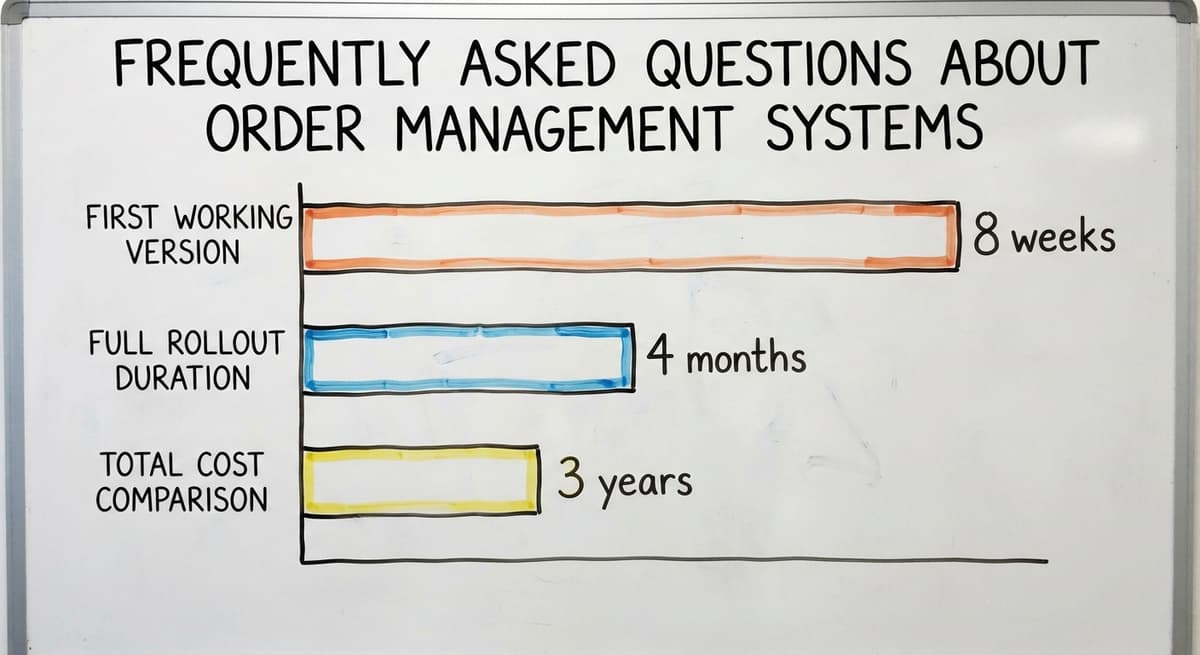
For a small distributor with 5 to 20 staff, a first working version of the core order flow can be live in 4 to 8 weeks.
A full rollout covering all channels and integrations takes 2 to 4 months.
What does it look like running on your own process?
The first thing you see is it running on your own process, at no build cost. The subscription starts once it is live and doing the job, not before.
Book a callSigns Your Operation Is Ready for an Order Management System
Not every business needs one right now. These are the signs that the timing is right.
- Orders are tracked in a spreadsheet or on paper
- Staff spend time answering status questions instead of doing actual work
- Errors reach customers more than once a month
- The business is growing and the current process is not keeping up
- Management cannot see order status without asking someone
If 3 or more of these describe your operation, the cost of staying manual is likely higher than the cost of a system.
The US Census Bureau Monthly Wholesale Trade data shows that inventory-to-sales ratios at wholesale firms are tight. Errors in order fulfilment have a direct effect on that ratio.

What Does a Wholesale Distributor Need in an Order Management System?
Wholesale operations need features that most e-commerce-focused systems do not include by default.
Wholesale orders come from repeat customers who have specific pricing, credit terms, and delivery requirements. A system built for retail will not handle that well.
Key requirements for wholesale distribution:
- Purchase order matching: the system should accept a customer's PO number and tie it to the order record
- Partial shipment tracking, so a customer knows what shipped and what is on backorder
- Per-customer pricing or discount rules built into the order intake step
- Backorder management that keeps the order open until it is fully fulfilled
- Visibility into what is promised versus what is physically on hand
A wholesale distributor promising 500 units when 380 are in stock needs to know that before the order is confirmed, not when the picker reaches an empty shelf.
Order Management for Fulfilment Centres and Warehouses
Fulfilment centre software is a different job from a standard order management system. A fulfilment centre manages orders on behalf of other businesses, not its own products.
That creates 3 specific requirements:
- Client separation: inventory and orders for each client must be tracked independently, with no cross-contamination
- Pick and pack speed and accuracy, because that is the core service being sold
- Reporting back to each client on order status, shipment confirmation, and stock levels
Warehouse Management Software for fulfilment centres also needs to handle returns by client, bill for services by client, and give each client visibility into their own orders without seeing anyone else's.
A generic order management system cannot do this without significant customisation. If you run a fulfilment centre, that is the first question to ask any vendor.

How Does Order Data Improve Decisions Over Time?
When every order runs through one system, 4 patterns become visible that manual tracking hides.
You can see which customers order most often, which products move fastest, and which days of the week create the most fulfilment pressure. That information helps with staffing decisions, purchasing timing, and conversations with customers about volume and terms.
A manual process makes this analysis slow. Someone has to pull data from multiple places, clean it, and build a report.
A system does it automatically. The data is a by-product of running the operation well, not a separate project.
Common Mistakes When Choosing an Order Management System
Five mistakes appear often enough when selecting an order management system to be worth naming directly.
- Choosing based on a feature list that sounds good but does not match how the team actually works
- Underestimating how much it costs when staff have to change their habits
- Picking a system that cannot connect to the accounting software without a manual export step
- Buying more system than the team can use at the current stage of the business
- Skipping the question of who to call when something breaks after go-live
The last one matters more than most buyers expect. A software vendor sells a product. A local partner understands the operation, can visit the site, and is accountable after the system is live.
For Columbus, Ohio businesses and operations like them, that difference is worth asking about before signing anything.
What is in a free first look?
A 30 minute call, your operation mapped, and a clear picture of what we would build. No obligation and nothing to install.
Book a call
Questions to Ask Before You Choose a System
There are 7 questions to use with any vendor, off-the-shelf or custom.
- Does it connect to the accounting software without a manual export step?
- Can it handle our specific product types and order formats?
- What does the rollout process look like and how long does it take?
- Who do we call when something breaks, and how fast do they respond?
- Can the system grow with us without a full replacement later?
A vendor who cannot answer the last question clearly is telling you something important.
How Do You Get Started Without Disrupting the Business?
Start by writing down your current order process, step by step, on paper.
This sounds simple. Most owners have never done it. Writing it down shows you exactly where the handoffs happen and where things go wrong.
Once you can see the process, identify the one step that causes the most errors or takes the most time. That is where the system should start.
Build or configure around that step first. Add more as the team gets comfortable.
This approach means the business keeps running while the system is built around it. No big cutover. No week where everything stops.
The team learns one piece at a time, and the system earns trust before it takes on more.
If you are not sure where to start, a process review with someone who has done this before is faster than trying to map it alone.

Frequently Asked Questions About Order Management Systems

Next Steps for Wholesale and Distribution Operations
Moving from manual order tracking to a managed system is a 4 to 8 week project, not a big ERP or a long disruption. It requires a clear picture of where the current process breaks down and a system built to fix that specific problem first.
The value is straightforward. Fewer errors reach customers. Staff spend time on real work instead of answering status questions.
Management can see what is happening without asking. And the data the system collects over time makes every purchasing and staffing decision easier.
If your operation is tracking orders in a spreadsheet, fielding daily status calls, or watching errors reach customers more than once a month, the process is ready for a system. The question is which system fits the way you already work.
The Software Society works with wholesale distributors and warehouse operations to map the current process, identify where a system will have the most impact, and build or configure something that fits the team rather than forcing the team to change everything at once.
If you want to talk through your current order process and where it is costing you the most, schedule a conversation.
No sales pitch. Just a clear look at what is happening and what a system could do about it.
Frequently asked questions
Frequently asked questions
What does an order management system do?
An order management system tracks every order from the moment it comes in to the moment it ships. It captures the order, checks stock, guides the pick and pack steps, and updates the customer automatically. It replaces the email chains, spreadsheets, and manual status checks that slow down a warehouse operation.
What is CRM and OMS?
A CRM (customer relationship management system) manages your relationships with customers, tracking contacts, conversations, and sales activity. An OMS (order management system) manages the orders those customers place.
A CRM helps you sell. An OMS helps you fulfil. Some businesses use both, connected so that order history is visible inside the CRM.
What are the most popular order management systems?
There is no single best answer. The right system depends on your order volume, product types, and existing tools.
The commonly used options split into distributor tools, e-commerce platforms, and the 3PL systems built for fulfilment centres. For businesses with unusual workflows, a custom-built system fits better than any packaged product.
Is an OMS different than an ERP?
Yes. An ERP (enterprise resource planning system) covers the whole business: accounting, HR, purchasing, manufacturing, and more. An order management system handles one specific part: the order flow from intake to fulfilment.
Most small distributors do not need a full ERP. An order management system connected to the accounting software covers the same ground at a fraction of the cost and complexity.
Do I have to replace the accounting software to add an order management system?
No. A well-built order management system connects to the accounting software and pushes confirmed orders through as invoices or sales orders automatically.
Your accounting workflow stays the same. The order management system handles the operational side. The accounting software handles the financial side. The two work together without double entry.
How long does it take to implement an order management system?
For a small to mid-size operation, a first working version of the core order flow can be live in 4 to 8 weeks.
A full rollout covering all channels, integrations, and reporting takes 2 to 4 months. A phased approach, starting with the most painful part of the current process, keeps the business running throughout.
Can a small team use an order management system without IT staff?
Yes. Most modern order management systems are built to be used by warehouse and operations staff, not IT teams.
Setup and configuration requires a partner or vendor to handle. Day-to-day use, entering orders, checking status, and confirming shipments, does not require any technical knowledge.
What is the difference between an OMS and an ERP?
An ERP runs the whole company: accounting, purchasing, HR, and orders in one suite, over 6 to 18 months of implementation.
An OMS runs the orders alone, in 4 to 8 weeks, and hands the invoices to the accounting package you already have. A distributor under 50 staff almost always needs the OMS.
How much does an order management system cost?
Packaged tools run $100 to $500 a month for a small distributor, climbing with users and channels.
A build scoped to one operation runs $10,000 to $30,000 once with $150 to $500 a month for hosting and support.
How does an OMS integrate with an online store?
Through the store platform's API: the OMS pulls new orders every few minutes, checks and reserves stock, pushes the tracking number when the label prints, and writes the stock count back so the store never oversells. One connection per store, set up once.
What features should I look for in an order management system?
One queue for every order source, a stock check at order entry, customer-specific pricing, a pick list per order, carrier labels with tracking pushed back to the customer, and an invoice posted to the accounting package. Those 6 cover a distributor.
Not sure this is the right shape for your operation?
The call is free. Describe how the work runs today. We map it on a call and show you what it would look like built around that, before you spend anything.
Book a callRelated guides
The rest of this guide, for the parts of the job this page does not cover.
Guides
- Ordering Management System
- Order Management Software
- Order Management Program
- Cloud-based Purchase Order System
- Warehouse Inventory Management Systems
- Warehouse Management System Top 10
- Software for Warehouse Management System
- Small Business Warehouse Management System
- Warehouse Management System Types
- Warehouse Inventory Management System
- Warehouse Management System Examples
- Warehouse Management System Implementation
- Cloud Warehouse Management System
Common questions
- What Are the Benefits of Warehouse Management System
- What is the Point of Warehouse Management System
- How to Choose a Warehouse Management System
- What is Asn in Warehouse Management System
- How to Create a Warehouse Management System
- What is a Warehouse Management System
- Which Warehouse Management System Would a Jeweler Most Likely Use
- How to Build a Warehouse Management System
- What is a Warehouse Management System Used For
- Warehouse Management System vs Warehouse Control System
- Meaning of Warehouse Management System