


What Is The Point Of Warehouse Management System
The point of a warehouse management system is one trustworthy record of the floor. This guide covers what a warehouse management system actually does, why spreadsheets fail, and how a WMS cuts errors without replacing your accounting software, in plain language, reviewed in September 2026.
Published 19 August 2026. Reviewed and updated 15 September 2026.
Book a callThe Short Answer
A warehouse management system gives you real-time visibility into your inventory, your orders, and your team's activity, all in one place.
The point is fewer mistakes, faster shipments, and no more chasing information across disconnected tools. It replaces the spreadsheets, printed pick lists, and email threads that slow everything down and quietly cost you money.
Reviewed August 2026. Each figure comes from the assumptions stated beside it, so you can substitute your own and the arithmetic still holds.
Put numbers on the errors and it gets clearer. 200 orders a day at a 2 percent mispick rate is 4 wrong shipments a day and roughly 1,000 orders a year going out wrong.
Cutting that to 0.5 percent leaves 250 orders a year: 750 fewer apologies.
If you run a warehouse with five to a hundred staff and you spend part of every day reconciling counts or fixing wrong shipments, this article is for you.
Would you rather have it built around your operation?
The first look is free. If you would rather not compare products, describe how your operation already works and we build the system around it.
No build cost. You see it running on your own process first, and the monthly subscription starts only once it is live.
Book a callWhat a Warehouse Management System Actually Does
A warehouse management system (WMS) connects every physical step of your operation into one digital record. Nothing falls through the cracks: every action updates the same source of truth.
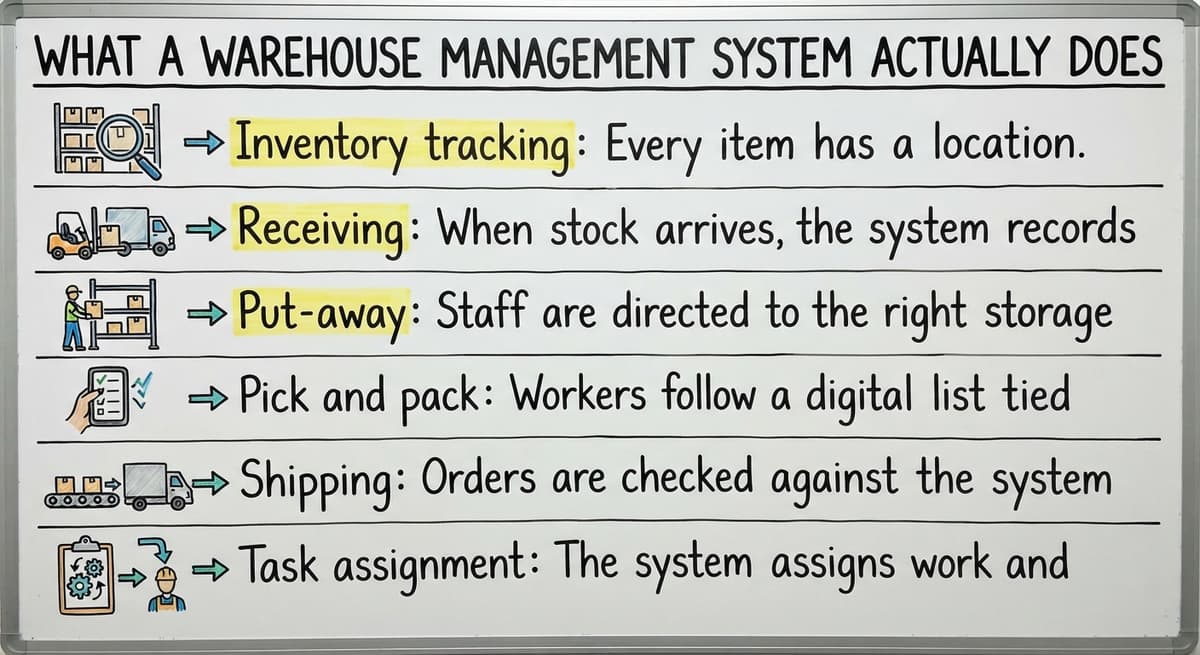
Here is what it handles day to day:
- Inventory tracking: Every item has a location. The system knows exactly where it sits and how many units remain, updated in real time.
- Receiving: When stock arrives, the system records it immediately so counts are accurate from the moment goods hit the dock.
- Put-away: Staff are directed to the right storage location rather than choosing one by habit.
- Pick and pack: Workers follow a digital list tied to live inventory, not a printed sheet that aged the moment it left the printer.
- Shipping: Orders are checked against the system before they leave, so mismatches are caught before the parcel is sealed.
- Task assignment: The system assigns work and records who did what, and when.
Proper warehouse operations also carry real safety obligations. As OSHA states directly on their warehousing page, "Workers in warehousing and storage face a variety of hazards," which makes it clear that record-keeping and organised workflows are a compliance matter, not just an efficiency one.

Why Do Spreadsheets Stop Working in a Warehouse?
Spreadsheets stop working once two people need to edit the same file at the same time, and warehouse operations never pause long enough for one person to finish first.
One staff member updates a count. Another ships against the old number. The inventory record is wrong before lunch.
Printed pick lists have the same problem in a different form. The moment a sheet leaves the printer, it is already out of date. A new order arrives, a return comes back, a location changes. The person holding the list has no way to know.
Email threads make accountability even harder. A question about an order gets buried under replies. Nobody is sure who confirmed what, or when. When something ships wrong, tracing the cause takes longer than fixing it.
Owners who replace spreadsheet and desktop database tools in a warehouse describe the same pattern: the system worked fine at low volume, then quietly broke as orders grew. The tool did not fail overnight. It just could not scale.
The Core Benefits of a Warehouse Management System
Inventory accuracy is the foundation. A WMS tells you what you have without requiring a full manual count every time you need to make a decision.
- Order accuracy: Staff follow a clear digital workflow. There is no hunting for information, no guessing at locations.
- Error reduction: The system flags mismatches before a wrong item ships, not after the customer calls.
- Accountability: Every pick, pack, and shipment is logged with a timestamp and a user name.
- Capacity: The same team handles more orders with the wasted steps removed, not by working harder.
Small operations discover that inventory management was already costing them more than a WMS would. The errors were just spread across enough small incidents that no single one looked expensive.

Does a warehouse management system replace your accounting software?
No, and it should not. A WMS handles warehouse operations; your accounting software handles your bookkeeping. These are different jobs, and a good WMS is built to work alongside that accounting software, not to remove it.
Integrating warehouse operations with your bookkeeping platform means your sales, invoices, and financial records stay exactly where they are. The WMS handles the physical side: what moved, where it went, and who touched it. That platform handles what the movement means financially.
If someone tells you that adopting warehouse software means migrating away from your accounting system, that is a red flag. The right system fits into your existing financial workflow and only replaces the manual parts that cause errors.
Is the comparison easier when one option is built for you?
Yes. Off-the-shelf means fitting your process to the software, and custom is the other way round. The first look costs nothing.
Book a callWhen Does a Small Warehouse Actually Need One?
A WMS is not reserved for large distribution centres. Operations with as few as five warehouse staff can benefit when the right signals are present.
Apply this checklist to your own situation:
- Shipping errors are rising and you are spending time on customer complaints or re-ships
- Inventory counts are unreliable and you cannot trust the number without physically checking
- Onboarding a new staff member takes weeks because the process lives in someone's head
- You spend hours each week reconciling counts or chasing order status across different tools
- Growth is stalling because the team is at capacity but the volume is not yet high enough to justify a large headcount
None of these signals require a large operation to matter. A small fulfilment centre software for small teams built around your actual workflows can address each one without adding complexity.

What Makes Implementation Go Wrong
Most WMS projects run into trouble for one reason: the software forces the operation to change how it already works, rather than fitting into it.
Teams spend months configuring a system built for a different kind of warehouse, and by the time it goes live, staff are exhausted and adoption is low.
Long, expensive implementations drain energy fast. Enterprise systems designed for distribution warehouses with hundreds of staff overwhelm a team of ten. The feature list looks impressive. The daily reality is a system nobody uses correctly.
This is a known fear among small warehouse owners, and it is a fair one. The answer is not to avoid warehouse software.
Custom warehouse software for small distributors, built around your specific workflows rather than a generic template, shortens implementation time and removes the friction that kills adoption.
What to Look for in a Warehouse Management System
Buyer guidance rather than a feature checklist is more useful here. When evaluating warehouse software, ask these questions:
| Criterion | What to look for |
|---|---|
| Workflow fit | Does it match how you already work, or does it require you to change? |
| your accounting software integration | Can it sync without a full data migration? |
| Team size | Is it designed for small teams or does pricing assume enterprise volume? |
| Implementation timeline | Weeks, not months. Ask for a realistic estimate upfront. |
| Support | Is there a real person accountable for your setup, or a ticket queue? |
| Vertical fit | Is it built for wholesale, distribution, or fulfilment, or is it a generic tool? |
Warehouse inventory management software overview pages focus on feature counts. The better question is if the system removes work your team currently does manually, without adding new complexity in return.
Is This Worth It for My Operation?
Yes, if the manual work is already costing you time, errors, or growth.
A WMS is not about adding complexity. It is about removing the manual steps that cause mistakes and slow shipments. When inventory tracking is accurate and order accuracy is reliable, the team does more with the same hours.
If you are ready to move past the spreadsheets and printed sheets, describe your current workflow to us.
We build connected systems for operations exactly like yours, and we can show you what a practical, custom-built solution would look like without a long enterprise-style project to get there.
Frequently asked questions
Frequently asked questions
Is WMS difficult to learn?
A well-designed WMS should not be difficult to learn for warehouse floor staff. Most modern systems use simple scan-and-confirm workflows that take hours to learn, not weeks.
Difficulty comes from systems built for enterprise warehouses being used by small teams. If a WMS requires weeks of training before staff can use it confidently, it is probably the wrong system for the operation.
What problems does a WMS solve that spreadsheets cannot?
Spreadsheets cannot update in real time across multiple users, cannot flag a mismatch before an order ships, and cannot assign tasks with timestamps and user records.
A WMS solves the synchronisation problem that breaks spreadsheets at volume: every action updates one shared record instantly, so two people never work from different versions of the truth.
Is the software a WMS or ERP?
Large ERP (enterprise resource planning) platforms are built primarily for company-wide operations, though many include warehouse functionality as an add-on module.
The distinction matters for small operations: this kind of platform targets large enterprises and carries the cost and implementation complexity to match. Standalone WMS tools built for smaller warehouses are a more practical starting point for operations with fewer than 50 staff.
What are the four types of WMS?
The four common types are: standalone WMS (a dedicated warehouse tool that integrates with other systems), ERP-integrated WMS (warehouse modules built into a broader enterprise platform), cloud-based WMS (hosted software accessed via browser or app, no local servers required), and supply chain management platforms (broader tools that include warehouse functions alongside procurement and logistics).
For small distributors, standalone or cloud-based options are the most practical fit.
What's the difference between WMS and ERP?
A WMS focuses specifically on warehouse operations: receiving, storage, picking, packing, and shipping. An ERP covers a much wider scope including finance, HR, procurement, and manufacturing.
Many businesses run both: a WMS for the warehouse floor and an ERP or a general accounting package for financial management. They are not competitors; they serve different functions and work best when connected.
How long does it take to implement a warehouse management system?
Implementation time depends on the complexity of the operation and the system chosen. Enterprise ERP-style projects can take six to twelve months. A purpose-built WMS designed for a small warehouse, configured around existing workflows, can go live in weeks.
The key variable is how much the software requires the business to change versus how much the software is built to fit the business.
How does a WMS reduce shipping errors?
A WMS reduces shipping errors by checking each pick against the live order before the item is packed.
If the wrong product or quantity is scanned, the system flags it immediately. This replaces the manual check that relies on a staff member catching a mistake by eye, a check that is inconsistent and fails under time pressure.
Every step is logged, so if an error does occur, the cause is traceable.
What are the main features of a warehouse management system?
A warehouse management system covers inventory tracking, receiving, put-away, pick and pack, shipping checks, and task assignment. It gives every item a location, records stock the moment it arrives, directs staff to correct storage spots, replaces printed pick lists with live digital ones, checks orders before they ship, and logs who did what and when.
Together these features remove guesswork and keep one accurate source of truth.
How much does a warehouse management system cost?
Cost varies depending on how the system is built and priced, so there is no single figure that applies to every operation. Some approaches avoid upfront build costs and only charge a subscription once the system is live and running on your actual process.
The better question is if pricing assumes enterprise volume or scales fairly for a small team; that affects true cost far more than a headline number.
What are the best warehouse management systems?
The best warehouse management system is the one that fits how your operation already works rather than forcing you to change your process to match generic software.
Look for workflow fit, smooth integration with your existing accounting tools, pricing designed for your team size, a short implementation timeline measured in weeks, real support from an accountable person, and a design suited to your specific type of operation, whether wholesale, distribution, or fulfilment.
What is the difference between a WMS and an inventory management system?
A warehouse management system connects every physical step of an operation, including receiving, put-away, picking, packing, shipping, and task assignment, into one live record. Inventory management focuses more narrowly on tracking what stock exists and where.
A WMS builds on inventory accuracy but also manages workflow and accountability across the whole warehouse, while working alongside financial tools rather than replacing them.
When does a business need a WMS?
A business needs a warehouse management system when shipping errors are rising, inventory counts cannot be trusted without a physical check, onboarding new staff takes weeks because processes only live in someone's head, hours each week go into sorting out inventory discrepancies or chasing order status, or growth is stalling because the team is at capacity. These signals can appear in operations with as few as five staff, not only large distribution centres.
What is in a free first look?
A 30 minute call, your operation mapped, and a clear picture of what we would build. No obligation and nothing to install.
Book a callRelated guides
The rest of this guide, for the parts of the job this page does not cover.
Guides
- Warehouse Inventory Management Systems
- Warehouse Management System Top 10
- Software for Warehouse Management System
- Small Business Warehouse Management System
- Warehouse Management System Types
- Warehouse Inventory Management System
- Warehouse Management System Examples
- Warehouse Management System Implementation
Common questions
- What Are the Benefits of Warehouse Management System
- What is Asn in Warehouse Management System
- What is a Warehouse Management System
- What is a Warehouse Management System Used For
- What is the Purpose of a Warehouse Management System
- What is a Warehouse Management System Pdf
- What is a Warehouse Management System Example
- What Warehouse Management System Does Amazon Use
- What Are the Top 5 Warehouse Management Systems?
- What is the Best Warehouse Inventory Management System?
- What is the Difference Between Warehousing and Inventory Management
- What is the Most Popular Warehouse Management System?
- What is B Type of Inventory in Warehouse Management
- What is a Simple Warehouse Management System?
- What is Warehousing and Inventory Management
- How to Choose a Warehouse Management System