

What Is Warehousing Operations
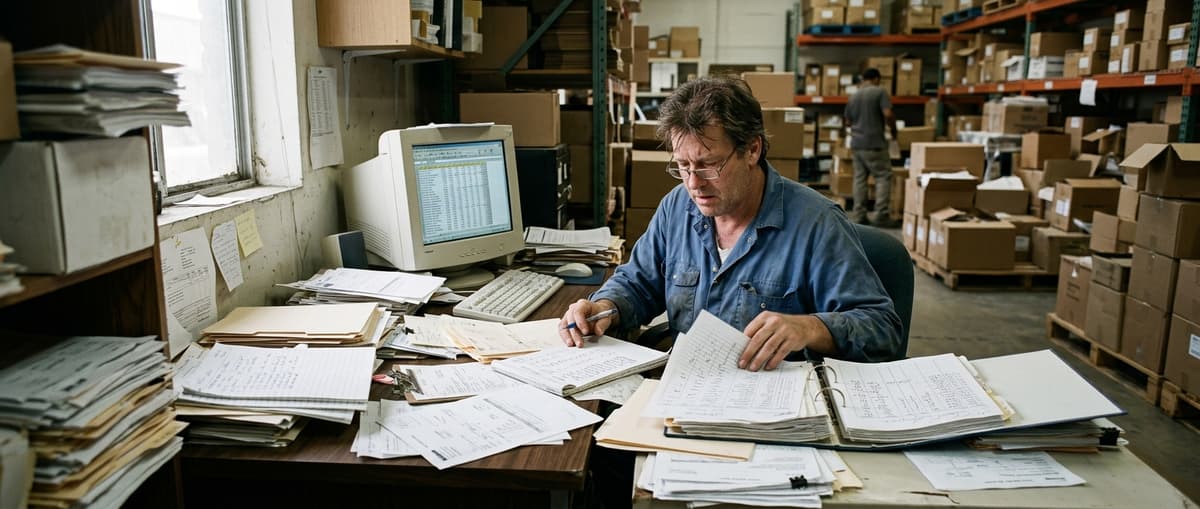
Warehousing operations is the day-to-day work of moving, storing, tracking, and shipping goods inside a warehouse. It covers everything from the moment a product arrives at your dock door to the moment it leaves on a truck. It is hands-on work, not strategy. It is what your team does every shift, every day.
Published 31 July 2026. Reviewed and updated 15 September 2026.
Book a callWhat Does Warehousing Operations Actually Mean?
Warehousing operations is not the same as logistics or supply chain. Those are bigger ideas. Logistics covers the whole journey a product takes, from a supplier to a customer.
Supply chain covers every business and process in between. Warehousing operations is just the work that happens inside your four walls.
Think of it this way. Logistics is the map. Supply chain is the road network. Warehousing operations is what happens inside the building at one stop on that route.
If your team is counting boxes, scanning barcodes, pulling items for an order, or loading a pallet, that is warehousing operations. It is practical. It is physical. And when it goes wrong, customers feel it fast.
Would you rather have it built around your operation?
The first look is free. If you would rather not compare products, describe how your operation already works and we build the system around it.
No build cost. You see it running on your own process first, and the monthly subscription starts only once it is live.
Book a callThe Core Functions of Warehousing Operations: Inbound
Receiving and Put-Away
Receiving is the first step. A truck pulls up. Your team checks the shipment against a purchase order, counts the items, and logs what came in.
If counts are off or items are damaged, that gets noted right away. Catching problems at the door is far cheaper than finding them later.
Put-away comes next. Someone moves the goods to the right storage location. This sounds simple. In a small warehouse it is. But as your SKU count grows, put-away without a clear system creates a real problem: nobody knows where anything is.
Inventory management ties these two steps together. It means knowing what you have, where it sits, and how much is left. The IRS makes this a legal requirement, not just a best practice.
As IRS Publication 538 states directly: "To figure taxable income, you must value your inventory at the beginning and end of each tax year." That means your counts have to be right, not just close.
Picking, Packing, and Shipping
Picking is pulling the right items for an order. A picker walks the warehouse, finds each item, and brings it to a pack station.
The route a picker takes matters. A poor route wastes time. A good route cuts the time spent per order by a measurable amount.
Reviewed August 2026. Each figure comes from the assumptions stated beside it, so you can substitute your own and the arithmetic still holds.
Packing means putting those items into a box or bag safely and accurately. Labels go on. Padding goes in. The right item goes to the right customer.
Shipping closes the loop. Labels get generated. Carriers get scheduled. The order leaves the building and gets confirmed as dispatched.
Returns processing handles goods that come back. Items get inspected, restocked, or disposed of. This step is easy to ignore until it piles up and becomes its own problem.
For a deeper look at how the inbound side works, see our guide on the warehouse receiving process best practices.

Why Does Warehousing Operations Get Harder as You Grow?
How Do Small Operations Start?
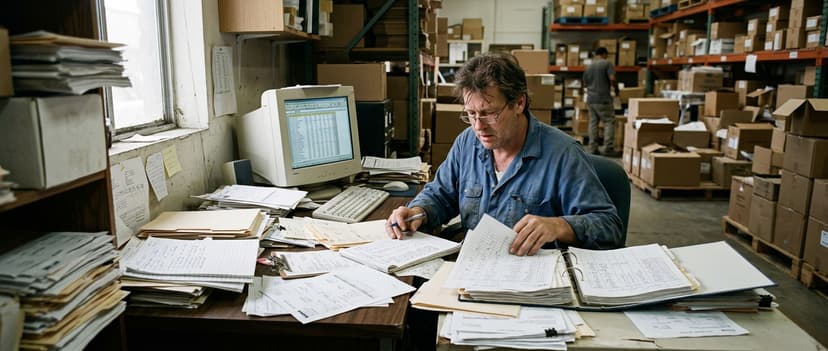
Most small warehouses start with simple tools. A paper log for receiving. A spreadsheet for inventory. A printed pick list. One person who knows where everything is.
This works fine when the operation is small. Orders are few. SKUs are manageable. Mistakes are easy to catch and fix.
The problem is that growth does not just add more orders. It adds more complexity. More SKUs. More staff. More carriers. More chances for something to go wrong. The systems that worked at 50 orders a day break down at 200.
The comparison is easier when one option is built for you
The choice between off-the-shelf and custom warehouse software is easier when one option is built for you. Off-the-shelf means fitting your process to the software. We do it the other way round, and the first look costs nothing.
Book a callWhere Do the Errors Start to Compound?
As volume grows, manual processes are the source of compounding errors. A picker pulls the wrong item. A receiving log misses a short shipment. A spreadsheet does not get updated.
Now the inventory count is wrong. An order ships with the wrong item. A customer calls. Someone spends 2 hours fixing what took 10 minutes to break.
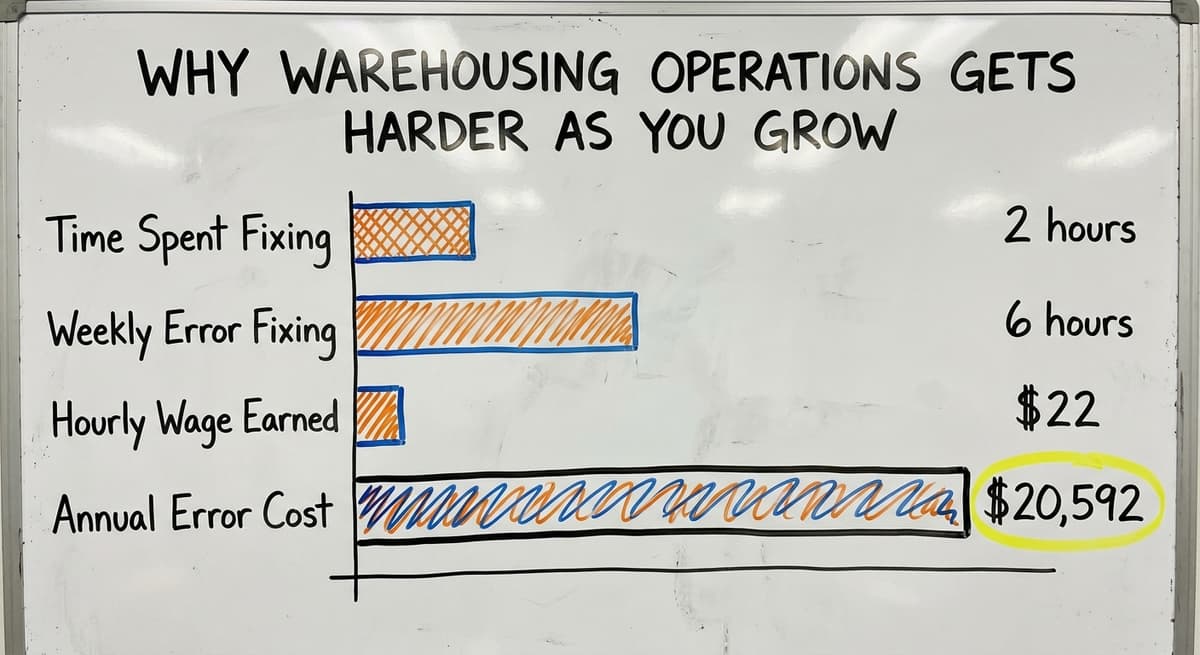
Consider the math. If 3 staff members each spend 6 hours a week fixing errors caused by manual processes, and each earns $22 an hour (a figure consistent with current Bureau of Labor Statistics wage data for warehouse workers), that is $20,592 a year spent not fulfilling orders.
the leading accounting software handles the financials well. It was built for that. But it was not built to manage bin locations, pick lists, or receiving workflows.
The gap between the accounting software and the warehouse floor is exactly where most small operations struggle. For more on this, see our overview of accounting software integration for warehouse operations.
What Does Good Warehousing Operations Look Like in Practice?
On the Inbound Side
Good warehouse operations means every inbound shipment is checked against the matching purchase order automatically. No one has to type it in twice. Discrepancies show up right away, not at the end of the month.
Inventory counts stay accurate without a full physical count every week. When a picker pulls an item, the count updates. When a shipment arrives, the count updates.
Management can see what is in stock and what is on order without asking someone to walk the floor and check.
It is achievable for small and mid-size operations. It does not require a huge corporate budget or a year-long software rollout.
On the Outbound Side
Good outbound warehouse operations means pickers follow a clear, efficient route through the warehouse. Orders ship on time with the right items every time. Mistakes get caught before they leave the building, not after a customer calls.
Here is what that looks like on a normal day:
- An order comes in and a pick list is generated automatically
- The picker follows a route that cuts backtracking
- A packer checks each item before sealing the box
- A label prints with the right carrier and address
- The order is confirmed as shipped and inventory updates
None of these steps require a large enterprise system. They require a process. And a process takes shape around tools you already use. For practical steps, see our guide on how to improve warehouse inventory accuracy.

How Does Software Support Warehousing Operations Without Replacing What Works?
The Problem With Most Warehouse Software
Most warehouse management software assumes you are starting fresh. It wants to replace your whole system. That means a long setup, a high price, and a team that has to learn everything at once.
Smaller operations do not need that. A small warehouse running 5 to 100 staff does not need a full WMS or ERP to run better. It needs the manual, error-prone steps replaced with something faster and more reliable.
The NIST Manufacturing Extension Partnership offers vendor-neutral guidance on this point: improving supply chain and inventory processes does not require replacing your entire operation. It requires identifying the weak points and fixing them.
The right approach is targeted. Find the step that causes the most errors. Fix that step. Then move to the next one.
What Do Targeted Improvements Look Like?
Here are examples of fixes that work without a full system replacement:
- A digital receiving log that checks inbound shipments against open purchase orders
- Automatic pick list generation based on order data already in your system
- Real-time inventory visibility so managers do not have to ask someone to check
- A returns log that tracks what came back and why
Your accounting software can stay in place. Custom tools handle the warehouse floor. The 2 systems talk to each other where they need to. Nothing gets rebuilt for the sake of it.
For businesses in Columbus, Ohio and the surrounding area, working with a local partner who understands small-operation constraints makes a real difference.
You get someone who can look at your floor, understand your workflow, and build something that fits, not a generic product that forces you to change how you work.
To see what this looks like in practice, review our overview of custom warehouse software for small distributors and our warehouse inventory management software overview.
What does it look like running on your own process?
The first thing you see is it running on your own process, at no build cost. The subscription starts once the system is live and doing the job, not before.
Book a call
Common Questions About Warehousing Operations: Part One
Is Warehousing Operations the Same as Logistics?
No. Logistics is the broader system that moves goods from suppliers to customers. Warehousing operations is one part of that system. It covers only what happens inside the warehouse.
Think of logistics as the whole game and warehousing operations as one position on the field.
Do I Need a WMS to Improve Warehousing Operations?
Not always. A full warehouse management system (WMS) is a large piece of software that manages every part of the warehouse. Many small operations do not need that level of complexity.
Targeted tools that fix specific problems, like a digital receiving log or an automatic pick list, deliver more value with far less disruption.
Common Questions About Warehousing Operations: Part Two
What Is the Biggest Problem in Small Warehouse Operations?
Inventory accuracy is the most common pain point. When counts are wrong, everything downstream breaks. Wrong picks. Short shipments. Frustrated customers. Manual processes are the root cause.
Staff enter data by hand, skip steps when busy, or rely on one person's memory. When that person is out, the system falls apart.
How Do I Know If My Warehousing Operations Need Improvement?
There are 6 signs to look for:
- Picking errors happen more than once a week
- Inventory counts do not match what the system shows
- Staff spend time on workarounds instead of fulfilling orders
- Managers cannot answer basic stock questions without checking manually
- Customers call about wrong or missing items more than occasionally
If 2 or more of those sound familiar, the operation has a process problem. It is not a people problem. The people are working hard. The system is making their work harder than it needs to be.
The Real Cost of Manual Processes in Warehouse Operations
Manual processes feel free. They are not. Every hour a staff member spends fixing a picking error is an hour not spent fulfilling orders. Every time a manager walks the floor to check stock is time not spent on decisions that grow the business.
The US Census Bureau's Monthly Wholesale Trade data tracks inventory-to-sales ratios across wholesale firms. When that ratio climbs, it signals that inventory is not moving as efficiently as it should. For small operations, the cause is process, not demand.
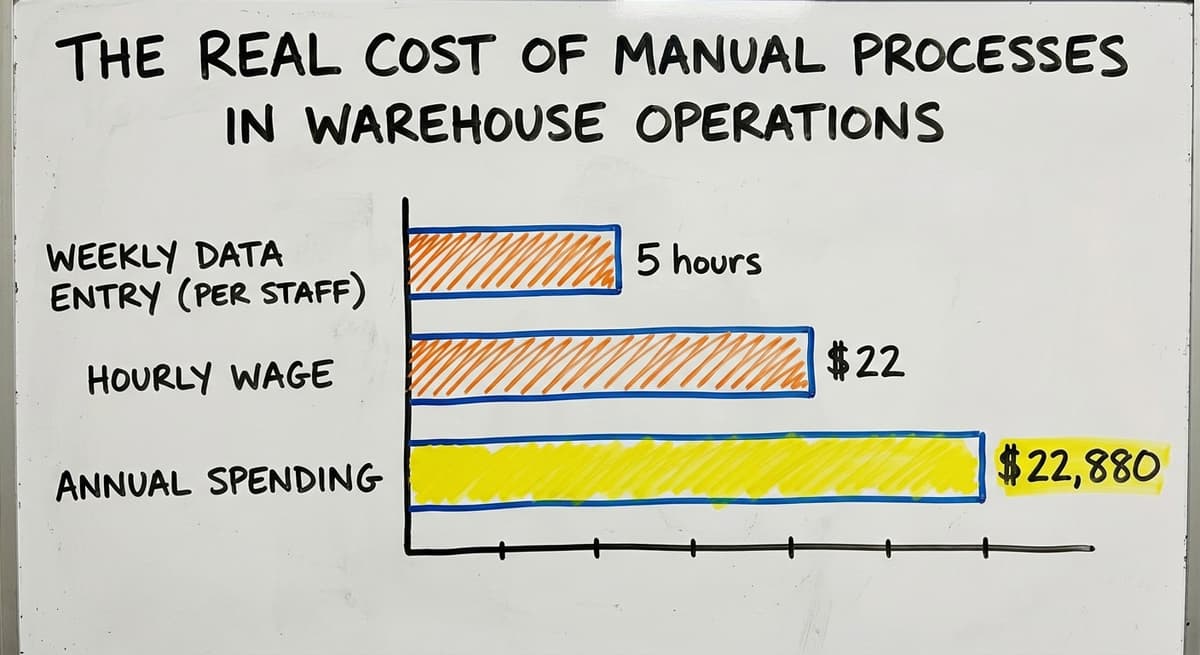
The math is straightforward. A warehouse with 4 staff members each spending 5 hours a week on manual data entry and error correction, at $22 an hour, is spending $22,880 a year on work that better processes would eliminate or reduce sharply. That money could pay for the tools to fix the problem, with plenty left over.
What Should You Do Next If Your Warehousing Operations Are Struggling?
Start by naming the biggest problem. Not the general feeling that things are messy. The specific step where errors happen most often. Is it receiving? Picking? Inventory counts?
Once you name it, you can fix it. You don't have to replace everything. You need to replace the thing that is breaking.
Here is a simple starting checklist:
- List the 3 most common errors your team makes each week
- Trace each error back to the step where it starts
- Ask whether that step is manual, and whether it has to be
- Identify what data already exists in your system that could automate that step
- Start with the fix that takes the least time to build and removes the most errors
This is not a transformation project. It is a series of small, practical improvements. Each one makes the next one easier.
If you want a partner who will look at your actual operation and build tools around how you already work, not around a software vendor's idea of how you should work, that is exactly what The Software Society does.
We build custom workflow tools for growing operations. We work alongside what you already have. And we start with the problem that is costing you the most right now.
Reach out for a no-pressure conversation about what is slowing your warehouse down. We will tell you honestly whether we can help, and what that would look like.
Frequently asked questions
Frequently asked questions
What is warehousing operations in simple terms?
Warehousing operations is the day-to-day work of moving, storing, tracking, and shipping goods inside a warehouse. It covers everything from a product arriving at your dock door to leaving on a truck. It is hands-on work, not a strategy concept.
What are the main functions of warehousing operations?
The core functions are receiving, put-away, inventory management, picking, packing, shipping, and returns processing. Each step connects to the next. When one step breaks down, the errors compound through the rest of the process.
How is warehousing operations different from logistics or supply chain?
Logistics covers the entire journey a product takes from supplier to customer. Supply chain includes every business and process in that journey. Warehousing operations is just what happens inside your warehouse. It is one part of the larger system, not the whole thing.
Why do small warehouses struggle with operations as they grow?
Small warehouses start with simple tools like spreadsheets and paper logs. Those tools work at low volume. As order volume and SKU counts grow, manual systems produce more errors. Staff spend time fixing mistakes instead of fulfilling orders, and the cost adds up fast.
Do I need a full WMS or ERP to improve my warehousing operations?
No. Most small and mid-size operations don't require a full WMS. Targeted tools that fix the specific steps causing the most errors deliver more value with far less disruption and cost.
How can I improve warehousing operations without replacing your accounting software?
Your accounting software can stay in place. Custom tools built for the warehouse floor handle receiving, picking, and inventory tracking. The two systems share data where needed. Nothing gets replaced that does not need to be.
What are the most common problems in small warehouse operations?
Inventory accuracy is the top problem. Wrong counts lead to wrong picks, short shipments, and unhappy customers. Manual data entry and reliance on one person's memory are the root causes. The fix is replacing the manual steps, not the people doing them.
What does efficient warehousing operations look like day to day?
Every inbound shipment is checked against its purchase order automatically. Pickers follow a clear route. Orders ship on time with the right items every time. Managers can see stock levels without asking someone to check. Mistakes get caught before they leave the building.
What are the main types of warehouse operations?
Warehouse operations break down into inbound and outbound work. Inbound covers receiving shipments against a purchase order and put-away, moving goods to the correct storage location.
Inventory management ties these together by tracking what is on hand and where it sits. Outbound covers picking items for an order, packing them safely, shipping through label and carrier steps, and returns processing for goods sent back.
What are the key warehouse performance metrics?
Key measures center on accuracy and speed at each step. That includes how well inbound counts match purchase orders, how accurate inventory stays without constant manual recounts, how efficient picking routes are in cutting time per order, and how often orders ship complete and on time.
Catching mistakes before goods leave the building, rather than after a customer complaint, is another important signal of good performance.
How can warehouse operations be improved?
Improvement comes from targeting the weakest step rather than replacing an entire system. Find where errors happen most, such as receiving, inventory counts, or picking, and fix that one step first before moving to the next.
Practical fixes include a digital receiving log checked against open purchase orders, automatic pick list generation, and real time inventory updates as items are pulled or received.
What is a warehouse management system?
A warehouse management system is software that supports the daily tasks of receiving, storing, tracking, picking, and shipping goods.
Rather than replacing an entire operation, it can be used to target specific weak points, such as automating pick lists, logging inbound shipments against purchase orders, or updating inventory counts automatically, so a smaller operation runs more accurately without a costly full system overhaul.
What is in a free first look?
A 30 minute call, your operation mapped, and a clear picture of what we would build. No obligation and nothing to install.
Book a callRelated guides
The rest of this guide, for the parts of the job this page does not cover.
Guides
Common questions
- What is Warehouse Operation
- What is the Most Important Part of Warehouse Organization
- What Are the Benefits of Warehouse Management System
- What is the Point of Warehouse Management System
- What Are the Top 5 Warehouse Management Systems?
- What is Asn in Warehouse Management System
- What is a Warehouse Management System
- What is the Best Warehouse Inventory Management System?
- What is a Warehouse Management System Used For
- What is the Difference Between Warehousing and Inventory Management
- What is the Most Popular Warehouse Management System?
- What is the Purpose of a Warehouse Management System
- What is a Warehouse Management System Pdf
- What is B Type of Inventory in Warehouse Management
- What Does Lpn Stand for in Warehousing
- What is a Simple Warehouse Management System?
- What is Warehousing and Inventory Management
- What is a Warehouse Management System Example
- What Warehouse Management System Does Amazon Use
- What Are the 7s Rules in a Warehouse?
- What is Picking and Packing in a Warehouse?
- What Does Receiving Mean in a Warehouse?