


Warehouse Management System Types
The main warehouse management system types are standalone WMS, ERP-integrated modules, cloud-based WMS, on-premise WMS, custom-built WMS, and open-source WMS. Each type is a different trade of cost, control, and fit, and the right one for a warehouse of 5 to 100 people is rarely the one with the longest feature list. This guide, reviewed in September 2026, takes the 6 types one at a time and ends with how to choose.
Published 3 August 2026. Reviewed and updated 15 September 2026.
Book a callWhat Does a Warehouse Management System Actually Do?
The Short Version
A warehouse management system, or WMS, is software that tracks inventory, orders, locations, and movement inside a warehouse. It knows what you have, where it sits, and what needs to happen next. That is the core job. Everything else is built on top of that.
The term covers a wide range of tools. A simple barcode scanning add-on is technically a WMS. So is a full enterprise platform that costs six figures to set up. Knowing the difference matters before you spend a dollar.
Who This Guide Is For
The guide addresses owners and operations managers at small to mid-size warehouses and distribution companies. If you are running on basic accounting software, spreadsheets, and paper pick lists right now, you are in the right place.
The goal is not to sell you a system. The goal is to explain each type clearly so you can match the right one to your actual operation.
The wrong type wastes money and breaks workflows that are already working. The right type solves the specific problem you have without creating new ones.
Would you rather have it built around your operation?
The first look is free. If you would rather not compare products, describe how your operation already works and we build the system around it.
No build cost. You see it running on your own process first, and the monthly subscription starts only once it is live.
Book a callStandalone Warehouse Management System Types
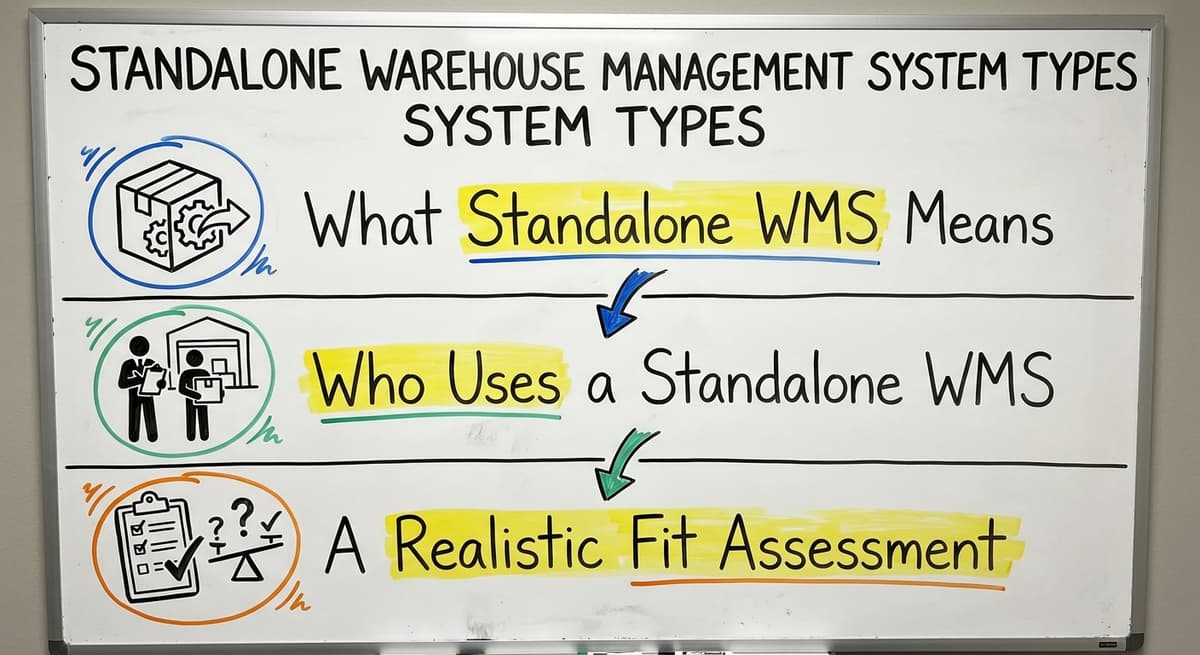
A standalone system is the warehouse management system type that does one job: the warehouse.
What Does Standalone WMS Mean?
A standalone WMS is software built only to manage warehouse work. It is not connected to accounting or an ERP system by default. You buy it to handle warehouse tasks, and it does that job well.
The arithmetic is worth doing before the software conversation. 3 people spending 6 hours a week between them chasing stock questions, at 22 dollars an hour, is 936 hours a year of paid time spent confirming numbers the system already knows. Over 3 years that is 2,808 hours.
Typical features include bin locations, pick and pack workflows, receiving, cycle counts, and barcode scanning. The software knows your warehouse. It does not know your books.
Who Uses a Standalone WMS
Operations that want dedicated warehouse control without replacing their accounting system use standalone tools. They have outgrown spreadsheets but are not ready to change everything at once.
The pros are 3: purpose-built for warehouse tasks, easier to learn than a full ERP module, and faster to get running.
Cons: it requires integration work to connect with your bookkeeping platform or other accounting tools. If that connection is not built properly, data lives in two places and neither is fully trusted.
A Realistic Fit Assessment
This kind of system is a solid middle step. It solves the warehouse problem without forcing a full platform change.
Reviewed August 2026. Each figure comes from the assumptions stated beside it, so you can substitute your own and the arithmetic still holds.
As OSHA notes, "The warehousing and storage industry includes establishments operating facilities for general merchandise, refrigerated goods, and other products." Safe, organized operations depend on knowing where things are. This kind of system gives you that visibility without overhauling your whole business.
The integration question is real. Budget time and money to connect it to your accounting system properly, or the data gap becomes the new problem.
ERP-Integrated Warehouse Modules
An ERP module is the warehouse management system type that lives inside the accounting suite.
What Is an ERP Warehouse Module?
An ERP-integrated WMS is warehouse functionality built inside a larger enterprise resource planning system. Large enterprise platforms used by bigger businesses are common examples. The warehouse module shares a single database with finance, purchasing, and sales.
When a shipment is received, the inventory count updates. The purchase order closes. The accounts payable entry is ready. All of that happens in one system.
The Real Cost of ERP for Small Operations
ERP warehouse modules have 3 real advantages. No integration gaps. No data living in two places. One source of truth across the whole business.
The cons are also real. ERP systems are expensive. Implementation timelines run long. They target larger operations. They ask the business to change how it works to match the software, not the other way around.
For a team of 10 to 50 people, the cost and disruption of an ERP migration can outweigh the benefit.
The IRS is clear that inventory must be counted and valued: "To figure taxable income, you must value your inventory at the beginning and end of each tax year," per IRS Publication 538.
But you do not need a six-figure ERP to meet that requirement.
An Honest Note About Your Accounting Software
If your accounting software handles your books and you are happy with it, a full ERP migration is a major decision. It means moving your financial records, retraining your team, and changing processes that work. That is not always wrong.
But it is rarely necessary for a warehouse running under 75 people.
ERP warehouse modules are worth exploring when the business is already outgrowing its accounting software on the finance side too. If accounting is the bottleneck, not just the warehouse, then ERP starts to make sense.
Is the comparison easier when one option is built for you?
Yes. Off-the-shelf means fitting your process to the software, and custom is the other way round. The first look costs nothing.
Book a call
Cloud-Based Warehouse Management Systems
Cloud-based systems are the warehouse management system type most small warehouses start with, and there are 3 things to check first.
How Does Cloud WMS Work?
A cloud-based warehouse management system is hosted online. You access it through a browser or an app. There is no server sitting in your building. The vendor manages the software, runs updates automatically, and handles security on their end.
The pricing model is a monthly or annual subscription, called SaaS (software as a service). You pay to use it rather than buying it outright.
Common Cloud WMS Options
Several cloud WMS products are aimed at small and mid-size operations. A handful of established platforms show up again and again in the market. This guide mentions the category for awareness only, not as a recommendation. Each fits different workflows and budgets.
Pros of cloud WMS:
- Lower upfront cost than on-premise or ERP
- Accessible from multiple locations or devices
- Faster to deploy than systems that require server setup
- Automatic updates with no IT work on your end
Cons of cloud WMS:
- Monthly fees add up over time
- Customization is limited to what the vendor allows
- Your data lives on someone else's server
- Standard workflows are well-supported; unique workflows are not
The Key Question for Cloud WMS
Before choosing a cloud WMS, there is 1 question to ask: does the software adapt to how you work, or do you have to change how you work to use the software?
Cloud tools are built around common warehouse workflows. If your operation matches those patterns, a cloud WMS is fast and affordable.
If your workflows are different, you will spend time working around the software's limits. That friction is a real cost, even if it does not show up on an invoice.

On-Premise Warehouse Management Systems
On-premise is the warehouse management system type that runs on a server in the building.
What Does On-Premise WMS Mean?
An on-premise warehouse management system is software installed on servers at your location. Before cloud software became common, this was the standard model. You bought a license, set up the hardware, and ran the system yourself.
The software does not depend on an internet connection for core operations. If your connection goes down, the system keeps running.
Pros and Cons of On-Premise
Pros:
- Full control over your data
- No dependency on a vendor's uptime or pricing changes
- Can be heavily customized by a developer
- Works in facilities with poor or no internet connectivity
Cons:
- Higher upfront cost for hardware and licensing
- Requires IT support for maintenance and updates
- Slower to scale as the business grows
- New deployments of on-premise systems are declining
Who Still Uses On-Premise WMS
On-premise systems are still in use at operations with strict data security needs, cold storage facilities with limited connectivity, and businesses with legacy infrastructure already in place. If you already have the servers and the IT staff, on-premise can still make sense.
For a business starting fresh, cloud or custom options are more practical. On-premise is not dead. It is just no longer the default.

Custom-Built Warehouse Management Systems
A custom build is the warehouse management system type shaped to one operation.
What Does Custom WMS Actually Mean?
A custom warehouse management system is software designed and built for one operation. It is not a packaged product you buy off a shelf. A development partner builds it to match how your warehouse already works.
The core difference is direction. Off-the-shelf tools ask you to adapt to the software. A custom WMS adapts to you. You get exactly the screens, rules, automations, and integrations your operation needs. Nothing more, nothing less.
What Gets Built and How Does It Fit Your Accounting Software?
A custom WMS takes shape to sit alongside your accounting software without replacing it. It pulls and pushes only the data that needs to move. Inventory adjustments, order totals, and receiving records flow between the two systems. Financial records stay where they are.
This matters for the audience this guide addresses. If your bookkeeping software already works well, that build does not touch it. It replaces only the manual parts: paper pick lists, spreadsheet inventory counts, email order updates.
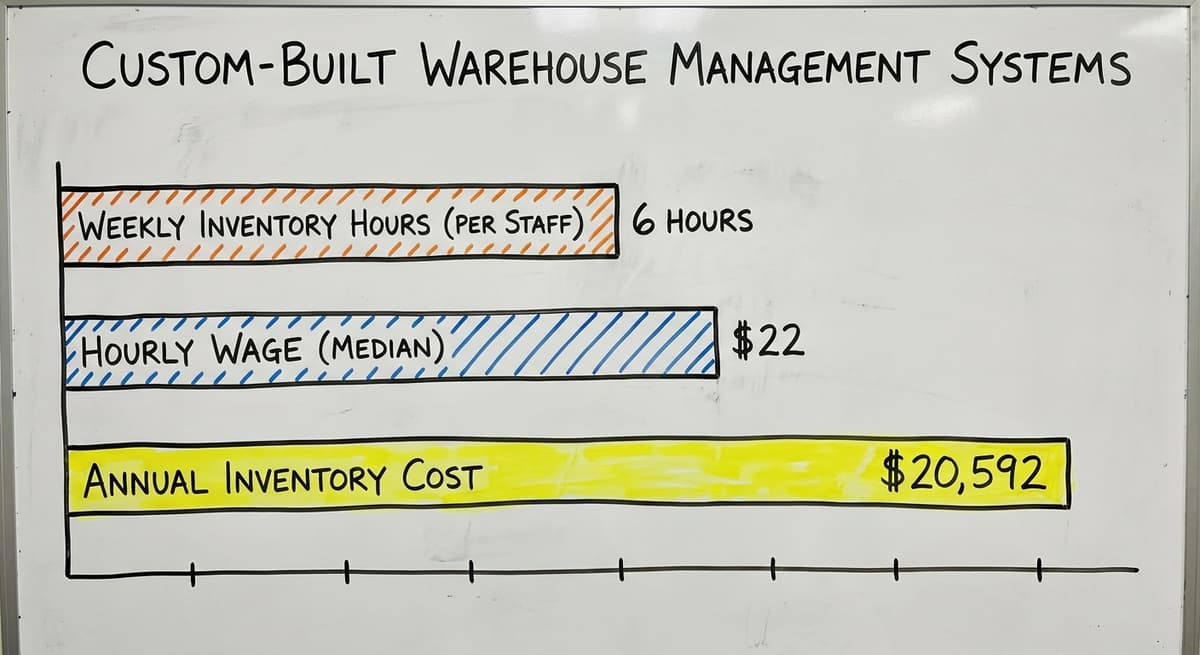
Consider the real cost of manual work. If 3 staff members each spend 6 hours a week on manual inventory tasks at $22 an hour (close to the median for stock clerks per the US Bureau of Labor Statistics), that is $20,592 a year in labor alone. A right-sized custom system can recover most of that.
What does it look like running on your own process?
The first thing you see is it running on your own process, at no build cost. The subscription starts once it is live and doing the job, not before.
Book a callWho Benefits Most from Custom WMS
Small to mid-size warehouses and distributors with specific workflows that off-the-shelf tools cannot handle cleanly benefit most from a custom build.
Pros:
- Fits your operation precisely
- Avoids paying for features you will never use
- Replaces only the parts that are broken, not the whole system
- Can integrate with your finance software from day one
Cons:
- Requires a capable development partner
- Takes time to build before you can use it
- Needs an ongoing relationship for updates and changes
Custom does not mean complicated or expensive by default. It means right-sized for the actual operation. A custom system built for a 20-person warehouse is not the same project as one built for a 500-person distribution center.
If you want to explore this path, custom warehouse software for small distributors is a practical starting point for understanding what a scoped build looks like.

Open-Source Warehouse Management Systems
Open source is the warehouse management system type with no licence fee and a real technical bill.
What Does Open-Source WMS Mean?
An open-source WMS is software with publicly available source code. Anyone can download it, modify it, and deploy it. A few established open-source projects are commonly mentioned in this space.
The main appeal is cost. There is no licensing fee. The code is yours to work with.
The Real Cost of Free Software
Open-source WMS software is not the same as low-cost software once you factor in what it takes to run it.
Pros of open-source WMS:
- No licensing fees
- Full access to the code
- Large developer communities around popular platforms
Cons of open-source WMS:
- Requires technical expertise to deploy and maintain
- Support is community-driven, not guaranteed
- Customization still takes developer time and money
- Bugs and updates depend on the community, not a paid vendor
Open-source fits operations that have in-house technical staff or a development partner willing to manage the platform long-term.
For a non-technical team, the hidden costs of setup, maintenance, and troubleshooting exceed what a paid cloud tool would have cost. Free at the start does not mean affordable over time.

How Do You Choose the Right Warehouse Management System Type?
Five Questions That Drive the Decision
Choosing a WMS type is not about picking the most popular option. It is about matching the tool to the problem. Work through these questions before talking to any vendor.
- How standard are your workflows? Standard workflows fit off-the-shelf tools. Unique workflows need customization or a custom build.
- What systems are you already using? If your bookkeeping tool already works, the WMS should connect to it rather than replace it.
- How much disruption can the operation handle? A long ERP rollout is a real business risk for a lean team.
- What is the actual problem to solve? Identify whether the pain is inventory accuracy, order speed, receiving errors, or something else. Then match the system type to that specific problem.
- What is the realistic total cost? Include implementation, training, and ongoing fees. Not just the sticker price.
Comparing WMS Types Side by Side
| WMS Type | Upfront Cost | Customization | your accounting software Fit | Best For |
|---|---|---|---|---|
| Standalone | Low to mid | Moderate | Requires integration work | Ops that want warehouse focus without full platform change |
| ERP Module | High | Low (fits ERP model) | Means leaving QB | Larger ops replacing everything |
| Cloud SaaS | Low | Limited to vendor options | Pre-built connectors, limited depth | Standard workflows, fast deployment |
| On-Premise | High | High with IT support | Possible with dev work | Ops with connectivity or security constraints |
| Custom Build | Mid to high upfront | Built to spec | Designed in from day one | Unique workflows, specific QB needs |
| Open-Source | Low license, high setup | Full access | Requires dev work | Ops with in-house technical staff |
A Note on Budget Reality
The NIST Manufacturing Extension Partnership offers vendor-neutral guidance on supply chain processes. One consistent theme in that guidance is that the right system is the one that fits the operation, not the one with the most features.
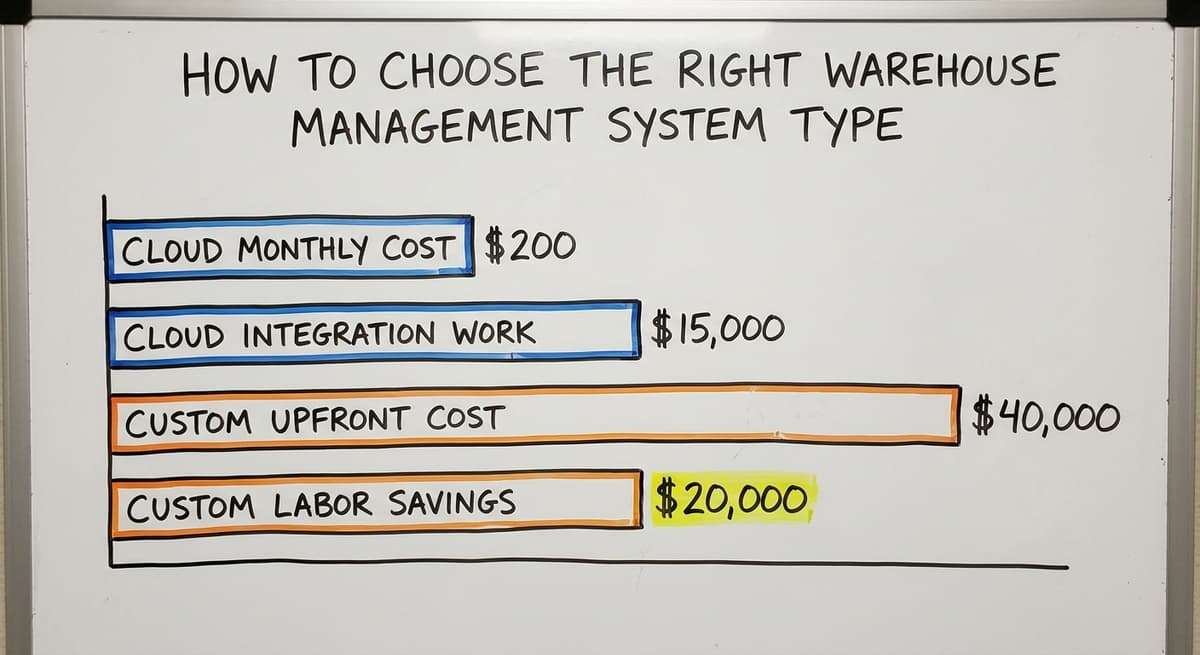
Budget for the full picture. A $200 per month cloud tool that requires $15,000 in integration work is not a low-cost option.
A custom build that costs $40,000 upfront but saves $20,000 a year in labor pays back in 2 years. Run the real numbers before deciding.
What is in a free first look?
A 30 minute call, your operation mapped, and a clear picture of what we would build. No obligation and nothing to install.
Book a call
Where Does Your Accounting Software Fit in Each Warehouse Management System Type?
The Core Concern for This Audience
Most warehouse owners reading this guide are on some form of accounting software and do not want to abandon it. That is a reasonable position.
Popular accounting platforms handle the books well for small and mid-size businesses. The question is how each WMS type interacts with it.
For a deeper look at this topic, the accounting software integration page for warehouses covers the specific connection points in more detail.
How Does Each Type Connect to Your Accounting Software?
- Standalone WMS: Integration is possible but requires a third-party connector or custom API work. It can be done well. Budget for it.
- ERP-integrated WMS: This means leaving your bookkeeping system entirely. The ERP becomes the accounting system. That is a major decision, not a minor upgrade.
- Cloud WMS: Many have pre-built connectors for popular accounting software. They sync basic data. Complex workflows or custom fields fall outside what the connector handles.
- Custom WMS: Can be designed from the start to work alongside your accounting platform. It passes only the data that needs to move: inventory adjustments, order totals, receiving records. Financial records stay where they already are. Nothing duplicates or conflicts.
- On-Premise WMS: Integration is possible with developer work. Less common in new setups.
- Open-Source WMS: Requires developer work to connect. Possible, but not simple.
The Key Message on Your Accounting Software
Your bookkeeping software does not have to go away. The right WMS type works with it, not against it. The worst outcome is choosing a system that forces you to migrate your financial records before you are ready.
Ask every vendor directly: how does your system connect to the accounting software you already use, and what data does that connection actually move?
Warehouse inventory management software overview page has more on what to look for when evaluating these connections.
Signs Your Operation Has Outgrown Spreadsheets and Needs a WMS
The Operational Warning Signs
Before choosing a WMS type, confirm that a WMS is actually what you need. The warning signs below point to a real problem that software can solve.
- Inventory counts are frequently wrong, and you do not know why until an order fails
- Orders are picked incorrectly because pick lists are printed from a spreadsheet and go out of date before the pick is done
- Staff spend hours each week reconciling what is in the accounting system against what is physically in the warehouse
- No one knows which bin a product is in without asking the person who put it there
- Receiving is tracked on paper and data entry into the accounting system happens hours or days later
- Growth is being limited by the manual workload, not by customer demand
The Warehousing Education and Research Council publishes standard benchmarks for distribution center performance. Operations running on manual processes consistently underperform those benchmarks on order accuracy and inventory precision. If you recognize more than 2 of the signs above, the gap is costing you real money.
What Should You Do Next?
The warning signs above are the confirmation that a WMS is due. They do not tell you which type. The type decision comes after you have confirmed the problem.
Start by writing down the 3 biggest operational pain points. Then match those to the WMS type that solves them most directly without adding new complexity.
If your workflows are standard, a cloud tool may be enough. If they are specific to your operation, a custom system or a well-integrated standalone tool is worth the investment.
Inventory tracking software for wholesale distributors and fulfillment center software solutions are useful reference points if your operation spans both distribution and fulfillment work.
Choosing the Right Path Forward
Warehouse management system types exist on a spectrum from simple add-ons to full enterprise platforms. The right one for your operation is not the most powerful one. It is the one that solves your actual problem without disrupting what already works.
If you are on accounting software and spreadsheets right now, you do not need to replace everything. You need to replace the parts that are breaking.
A standalone system, a cloud tool with a solid accounting connector, or a custom system designed around your workflows can each do that job. The key is being honest about your workflows, your budget, and how much change your team can absorb at once.
The Software Society builds custom warehouse and inventory systems for small and mid-size operations.
If you want to talk through what your operation actually needs before committing to any type, that conversation is a practical next step. No pitch. Just a clear look at your workflows and what would fix them.
Frequently asked questions
Frequently asked questions
What are the main warehouse management system types?
The main types are standalone WMS, ERP-integrated warehouse modules, cloud-based WMS, on-premise WMS, custom-built WMS, and open-source WMS. Each works differently, costs differently, and fits different operations.
Choosing the right type depends on your workflows, your current software, and how much disruption your team can handle.
What is the difference between a standalone WMS and an ERP warehouse module?
A standalone WMS is built only for warehouse work and connects to accounting tools like the platform you already use through an integration.
An ERP warehouse module is built inside a larger system that also handles finance, purchasing, and sales. ERP modules eliminate integration gaps but cost more and often require replacing that software entirely.
Can a warehouse management system work with your accounting software without replacing it?
Yes. Standalone WMS tools, cloud WMS products with pre-built connectors, and custom-built systems can all work alongside the accounting software you already use. Such a system can be designed from the start to pass only the data that needs to move, like inventory adjustments and receiving records, while leaving those financial records untouched.
When does a custom warehouse management system make sense?
Building a custom system makes sense when your process is specific enough that off-the-shelf tools require you to change how you work to use them. It also makes sense when you need tight accounting integration that pre-built connectors cannot handle.
Custom does not mean expensive by default. It means right-sized for your actual operation.
What is a cloud-based WMS and how is it different from on-premise software?
A cloud-based WMS is the warehouse management system type hosted online and accessed through a browser or app. You pay a monthly subscription and the vendor handles updates. On-premise WMS is installed on servers at your location.
You own the software and hardware, control your data, and do not depend on an internet connection. Cloud is faster to deploy. On-premise gives more control.
Is an open-source WMS a good fit for small warehouse operations?
Open-source WMS tools have no licensing fees, but they require technical expertise to deploy and maintain.
For a non-technical team, the cost of setup, customization, and ongoing maintenance exceeds what a paid cloud tool would cost. Open-source works best for operations with in-house technical staff or a dedicated development partner.
What are the signs that a warehouse has outgrown spreadsheets and needs a WMS?
Key signs include frequent inventory count errors, orders picked incorrectly from outdated spreadsheet pick lists, staff spending hours reconciling accounting records against physical stock, no clear bin location system, receiving tracked on paper with delayed data entry, and growth being limited by manual workload rather than customer demand.
Which warehouse management system type is best for a small warehouse or distribution operation?
The answer depends on your workflows. Standard workflows are well-served by cloud WMS tools, which are affordable and fast to deploy. Unique workflows that do not match standard software assumptions are better served by a custom-built WMS.
Operations that want dedicated warehouse control without changing their accounting setup start with a standalone system connected to their existing accounting software.
How do I choose the right WMS for my business?
Choosing the right system starts with matching the tool to your actual operation rather than buying more than you need. Consider your team size, whether your processes are standard or unique, and whether accounting, not just the warehouse, is the real bottleneck.
A standalone system suits businesses that have outgrown spreadsheets but want to keep their existing accounting software, while larger, more complex operations may benefit from a fully integrated platform.
How much does a warehouse management system cost?
Cost varies widely depending on type. Standalone systems are affordable but require budget for integrating with accounting software. Cloud based options use a monthly or annual subscription with lower upfront cost but ongoing fees that add up over time.
On premise systems involve buying a license and hardware for your own servers. Enterprise integrated modules tend to be the most expensive, with long implementation timelines suited to larger operations.
What are the benefits of a cloud-based WMS?
Cloud based systems offer lower upfront cost compared to on premise or enterprise platforms, since there is no server to install and maintain locally. They can be accessed from multiple locations or devices through a browser or app, deploy faster than systems requiring server setup, and receive automatic updates without requiring internal IT work. They work best when your operation follows common, standard warehouse workflows rather than highly customized processes.
What are the key features of a warehouse management system?
Core features include tracking inventory, orders, locations, and movement inside a warehouse, so the system always knows what you have, where it sits, and what needs to happen next.
Typical functions include bin locations, pick and pack workflows, receiving, cycle counts, and barcode scanning. More advanced versions add integration with accounting or enterprise systems so inventory, purchasing, and financial records update together in one place.
Not sure this is the right shape for your operation?
The call is free. Describe how the work runs today. We map it on a call and show you what it would look like built around that, before you spend anything.
Book a callRelated guides
The rest of this guide, for the parts of the job this page does not cover.
Guides
- Warehouse Inventory Management Systems
- Warehouse Management System Top 10
- Software for Warehouse Management System
- Small Business Warehouse Management System
- Warehouse Inventory Management System
- Warehouse Management System Examples
- Warehouse Management System Implementation
- Cloud Warehouse Management System
- Warehouse Stock Management System
Common questions
- What is B Type of Inventory in Warehouse Management
- What Are the Benefits of Warehouse Management System
- What is the Point of Warehouse Management System
- How to Choose a Warehouse Management System
- What is Asn in Warehouse Management System
- How to Create a Warehouse Management System
- What is a Warehouse Management System
- Which Warehouse Management System Would a Jeweler Most Likely Use
- How to Build a Warehouse Management System
- What is a Warehouse Management System Used For
- Warehouse Management System vs Warehouse Control System
- Meaning of Warehouse Management System
- Definition of Warehouse Management System
- Warehouse Management System Comparison
- What is the Purpose of a Warehouse Management System