

Cloud Based Warehouse Management
If you run a warehouse or distribution operation and you are still managing inventory in spreadsheets, you are not alone. Most operations in the 10-to-80-person range run on a mix of your accounting software, Excel, printed pick sheets, and a lot of institutional knowledge held by one or two people. It works until it does not.
Published 26 July 2026. Reviewed and updated 15 September 2026.
The guide explains what cloud based warehouse management actually is, how it fits into an operation like yours, and how to decide whether it is worth making a change. No jargon, no pressure, no suggestion that you need to throw out what is already working.
Book a callWhat Cloud Based Warehouse Management Actually Means
Cloud based warehouse management is software that runs on the internet rather than on a server inside your building. You log in through a browser, the same way you would check email or bank online. That is the core of it.
Software That Lives Online, Not in Your Building
With a cloud warehouse management system, there is no installation disc, no server room, and no IT person needed to keep things running. The software provider hosts everything on their own infrastructure. They handle security, backups, and uptime. You just use it.
This matters because it means you can pull up inventory from your phone, a tablet on the warehouse floor, or a laptop at home. Your team sees the same data at the same time, wherever they are.
Not Just for Big Operations
The word cloud sometimes sounds like it belongs to enterprise companies with dedicated IT departments. It does not. Small warehouses and distributors use cloud based warehouse management every day. If you can open a browser, you can use it.
The difference from on-premise software is straightforward. On-premise means the software is installed on computers or servers you own. You manage updates, backups, and access yourself. Cloud means the vendor manages all of that. You pay for the service and focus on running your operation.
Would you rather have it built around your operation?
The first look is free. If you would rather not compare products, describe how your operation already works and we build the system around it.
No build cost. You see it running on your own process first, and the monthly subscription starts only once it is live.
Book a callHow Most Small Warehouses Manage Inventory Right Now
Understanding what a cloud WMS can do is easier when you are honest about where most small operations actually are.
The obligation behind all of this is not optional. IRS Publication 538 states: “To figure taxable income, you must value your inventory at the beginning and end of each tax year.” A stock figure nobody trusts makes that number a guess.
Reviewed August 2026. Each figure comes from the assumptions stated beside it, so you can substitute your own and the arithmetic still holds.
The Patchwork That Got You Here
The typical inventory setup in a small warehouse looks something like this:
- Accounting software for invoicing, payroll, and accounting
- One or more spreadsheets for inventory counts
- Printed pick sheets that someone fills in by hand
- Email threads to communicate order updates
- A receiving log that lives in a binder or a shared drive
This is not a bad setup. The accounting software is genuinely good at what it does. Spreadsheets are flexible. And the people running this system know it inside and out. The problem is that it does not scale cleanly.
Where the Pain Shows Up
You probably have a spreadsheet that only one person fully understands. When that person is out, things slow down.
When a number gets entered wrong, it takes hours to find the error. When a customer asks where their order is, someone has to physically check.
The specific pain points that come up most often are:
- Stock discrepancies between the spreadsheet and what is actually on the shelf
- Manual re-entry errors when moving data from one system to another
- Time lost reconciling numbers at the end of the week or month
- No real-time view of what is in stock, what is committed, and what needs to be ordered
Safety and Compliance Add Another Layer
Warehouse operations also carry real safety responsibilities. As OSHA notes directly on their warehousing guidance page, "warehousing operations present a variety of hazards" that require active management. You can read their full guidance at https://www.osha.gov/warehousing.
Keeping accurate records, knowing where products are, and managing workflows correctly is not just an efficiency issue. It is part of running a safe operation. A system that gives you real-time visibility supports that.

Core Features of a Cloud Based Warehouse Management System
Not every cloud WMS offers the same features. But if you are evaluating warehouse inventory management software for a small or mid-size operation, these are the capabilities that actually move the needle.
Inventory and Receiving
Real-time inventory tracking is the foundation of cloud based warehouse management. It shows you exactly what is on hand, where it is located, and what is committed to open orders. This replaces the manual count sheet and removes the lag between what happened and what the spreadsheet reflects.
Receiving workflows replace paper receiving logs. When a purchase order comes in, staff can receive against it directly in the system, scan barcodes, and flag discrepancies before product hits the shelf. The inventory updates immediately.
Pick, Pack and Ship
Pick pack ship processes are where cloud based warehouse management earns its keep on the floor. Instead of printing a pick sheet and hoping someone reads it correctly, staff work from a live pick list on a tablet or scanner.
The system guides them to the right bin, confirms the right quantity, and updates inventory as they go.
This is where barcode and scan support makes a real difference. Scanning removes the manual entry step that causes most errors. You do not need expensive hardware. A basic barcode scanner or even a phone camera is enough for many operations.
Orders, Reporting, and Access Control
Order management connects inbound purchase orders and outbound sales orders in one place. You can see what is on order, what has been received, what is picked, and what has shipped without switching between systems.
Reporting and dashboards give you a live view of the operation from any device. You can check fill rates, stock levels, and order status from your phone without calling the warehouse.
User permissions mean staff only see what they need. A picker does not need access to cost data. A manager can see everything. This keeps the system clean and reduces the risk of accidental changes.
Is the comparison easier when one option is built for you?
Yes. Off-the-shelf means fitting your process to the software, and custom is the other way round. The first look costs nothing.
Book a callCloud Based vs On-Premise Warehouse Management
If you have looked at warehouse software before, you may have come across on-premise systems. Here is how they compare.
The Practical Differences
| Factor | Cloud Based | On-Premise |
|---|---|---|
| Setup cost | Lower, no server hardware | Higher, requires server purchase |
| IT maintenance | Handled by vendor | Requires internal or contracted IT |
| Updates | Automatic | Manual, paid |
| Remote access | Any device with internet | Limited without VPN setup |
| Uptime risk | Vendor managed | Depends on your hardware |
| Customisation | Varies by vendor | Can be modified but costly |
Total Cost of Ownership
On-premise systems look cheaper on a monthly basis because there is no subscription fee. But the full cost includes server hardware, IT support, update licences, and the time your team spends managing the system.
When you add those up, cloud based warehouse management is less expensive over a three-to-five year period.
One Size Does Not Fit All
Cloud does not mean generic. Custom cloud solutions exist for operations that have unusual workflows, specific product types, or customer requirements that off-the-shelf products do not handle well. The cloud delivery model and the ability to build for your specific process are not mutually exclusive.

Does Cloud Based Warehouse Management Work with your accounting software?
Whether cloud based warehouse management works with standard accounting software is one of the most common questions from small operations, and the answer is yes, with the right system.
What your accounting software Does Well
Accounting software is built for financial management. It handles invoicing, payroll, accounts payable, accounts receivable, and general ledger well.
Most small operations have years of financial history in their accounting software and a bookkeeper or accountant who knows it. Replacing it is not necessary and often not worth the disruption.
What accounting software does not do well is warehouse operations. It was not designed for bin-level inventory tracking, pick pack ship workflows, or real-time stock visibility across locations. That is not a criticism. It is just outside its scope.
How a Cloud WMS Sits Alongside your accounting software
Cloud based warehouse management handles the warehouse side: receiving, inventory, picking, packing, and shipping. When an order ships, it pushes clean, accurate data back to the accounting system for invoicing.
When a purchase order is received, the cost data flows through. The two systems work together rather than competing.
This is an accounting software integration for distributors that removes the manual re-entry step. Instead of someone copying numbers from one system into another, the integration handles it automatically. Errors drop. Time spent on reconciliation drops with it.
What to Avoid
Be cautious of vendors who insist you must migrate off your accounting software entirely. For most small operations, that is not necessary. The goal is to remove the manual parts that are slowing you down, not to rebuild the whole business.
If a vendor's pitch requires you to abandon your accounting system, ask why and look carefully at whether their system actually handles financials better or just handles them differently.
What to Watch Out For When Choosing a Cloud Warehouse System
Not every cloud WMS is a good fit for a small or mid-size operation. The warning signs below are worth knowing before you commit to a vendor.
Implementation and Pricing Problems
- Long implementation timelines that stall operations for months before you see any benefit
- Enterprise pricing built for 500-person operations that does not scale down to a 15-person team
- Hidden costs for integrations, extra users, data exports, or basic support
Ask vendors directly: what is the total cost in year one, including setup, training, and any integrations you need? Get it in writing.
Workflow and Fit Problems
Rigid workflows are a real issue with off-the-shelf warehouse management for distributors.
Some systems are built around a generic warehouse process and expect you to change how you work to match the software. That is backwards. The software should adapt to your operation, not the other way around.
Off-the-shelf systems handle 80 percent of your process well and leave the other 20 percent back in spreadsheets. That 20 percent is the part that makes your operation different from every other warehouse.
If it stays in spreadsheets, you have not actually solved the problem.
What does it look like running on your own process?
The first thing you see is it running on your own process, at no build cost. The subscription starts once it is live and doing the job, not before.
Book a callSupport Problems
Some cloud based warehouse management vendors hand off a product at go-live and disappear.
Look for a team that offers ongoing support, understands your operation, and can help when something does not work the way you expected. A system is only as useful as the support behind it.

Custom Cloud Based Warehouse Management for Operations That Do Not Fit the Box
For some operations, the right answer is not an off-the-shelf product at all.
When Off-the-Shelf Falls Short
Most warehouse inventory management software is built for a generic workflow: receive, put away, pick, pack, ship. That covers a lot of ground.
But distributors with unusual product types, complex lot tracking requirements, customer-specific labelling rules, or non-standard receiving processes find that standard products handle most of their needs and miss the rest.
This is where custom warehouse software becomes worth considering. Custom operational software for wholesale and distribution means the system follows how your operation already runs, not how a software company thinks warehouses should run.
What Custom Actually Means
Custom cloud based warehouse management does not have to mean expensive or slow: a focused build runs $8,000 to $40,000 and goes live in 6 to 12 weeks.
A focused build scoped to your actual requirements can go live faster than a full ERP implementation and cost less than a year of an enterprise WMS licence.
The key is scoping it correctly: build what you need, not everything that could theoretically be useful.
Fulfilment centre software options for small operations that are custom-built also tend to fit better with existing tools. Instead of forcing an accounting software migration or replacing your carrier integrations, a custom build can connect to what you already use.
The Local Advantage
There is a real benefit to working with a local team that can visit your floor, watch how your operation works, and build accordingly.
Remote implementations based on a requirements document miss things that become obvious in five minutes on the warehouse floor. A partner who understands your operation before they write a line of code builds something that actually works for your team.
This is the middle path between spreadsheets and a big ERP: software built for your operation, delivered without the enterprise price tag or the 18-month implementation timeline.
How to Know If Your Operation Is Ready for a Cloud WMS
You do not need to be large to benefit from cloud based warehouse management. You need to have outgrown your current setup.
Signs You Have Outgrown Spreadsheets
The signs that you have outgrown spreadsheets are the signals that come up most often:
- Frequent stock errors that require manual investigation to resolve
- Staff spending hours each week on manual reconciliation between systems
- No reliable way to see real-time inventory without physically checking the shelf
- Orders falling through the cracks because the information lives in too many places
- A key person who holds the system together in their head, and whose absence causes problems
If two or more of these describe your operation, the question is not whether to make a change. It is when.
What is in a free first look?
A 30 minute call, your operation mapped, and a clear picture of what we would build. No obligation and nothing to install.
Book a callThe Right Time to Act
Adding cloud based warehouse management does not require you to replace your accounting software or hire an IT team. You do not need to be a 200-person operation.
Five to fifty warehouse staff is enough to benefit from a cloud WMS, provided the pain points above are present.
The right time to act is before a major fulfilment failure, not after. A missed shipment that costs you a customer is a much harder conversation than a planned system upgrade.
A practical first step: write down where your current process breaks down. Be specific. Use that list when you talk to any vendor. If their system does not address the specific points on your list, it is not the right system.
If you are ready to replace Excel with a real inventory system and want to know what that looks like in practice, that conversation is worth having before the next reconciliation headache.
Frequently Asked Questions About Cloud Based Warehouse Management
What does cloud based warehouse management cost for a small operation?
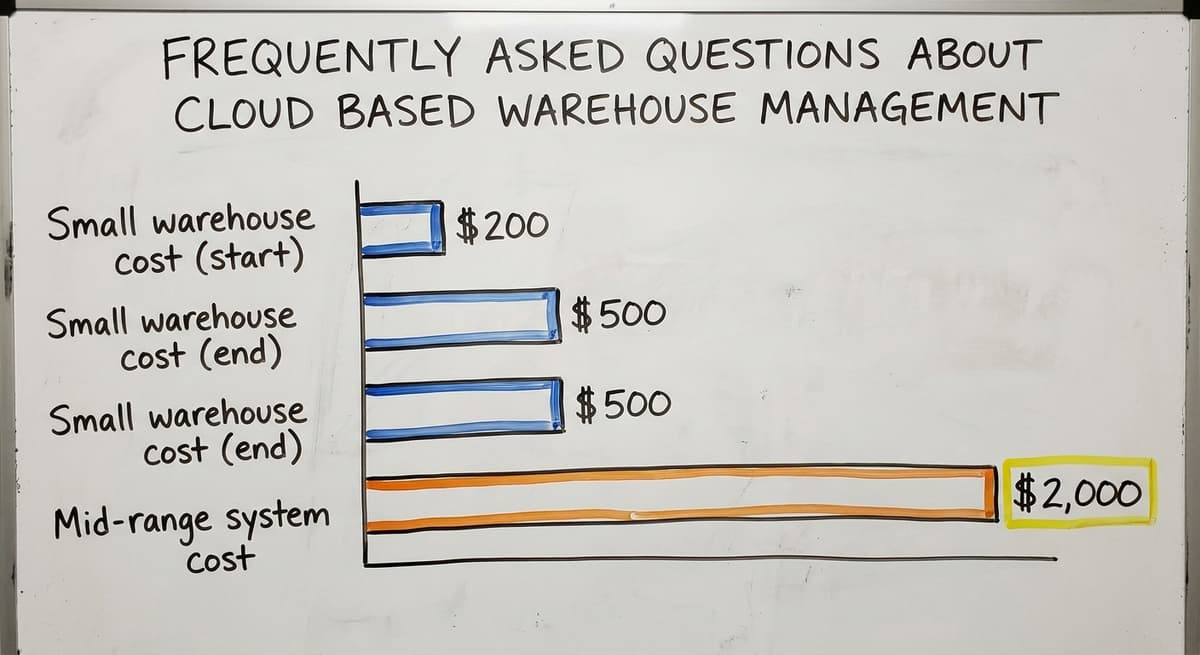
Costs vary widely. Simple cloud WMS products for small warehouses start around $200 to $500 per month. Mid-range systems with more features and integrations run $500 to $2,000 per month.
Custom-built systems involve a one-time build cost that varies by scope. Always ask for the total year-one cost including setup, training, and integrations, not just the monthly licence fee.
Can I keep using your accounting software if I add a cloud WMS?
Yes. A cloud WMS is designed to handle warehouse operations while your accounting software continues to handle your financials. The two systems connect through an integration that moves data automatically.
You do not need to migrate off your accounting software, and for most small operations, doing so would create more problems than it solves.
Is my data safe in a cloud warehouse system?
Reputable cloud WMS providers store data on secure servers, run regular backups, and use encryption for data in transit and at rest.
In most cases, this is more secure than a local server in your building that depends on your own backup routine. Ask any vendor about their uptime guarantees, backup frequency, and data recovery process before signing.
What are the four types of WMS?
Warehouse management systems fall into four types most commonly referenced: standalone WMS (purpose-built warehouse software that integrates with other systems), ERP-integrated WMS (a warehouse module built into a broader ERP system like the large enterprise suites), supply chain module WMS (part of a larger supply chain management platform), and cloud-based WMS (delivered via the internet, hosted by the vendor).
The right type depends on the size of the operation, the complexity of workflows, and what other systems are already in place.
What is ERP vs WMS?
An ERP (Enterprise Resource Planning) system covers the full business: accounting, HR, procurement, manufacturing, and often warehouse functions. A WMS (Warehouse Management System) focuses specifically on warehouse operations: inventory, receiving, picking, packing, and shipping.
A WMS goes deeper on warehouse workflows than most ERP warehouse modules do. Many small operations use a WMS alongside accounting software rather than replacing both with a full ERP.
Is the platform an ERP or WMS?
The large enterprise suites are primarily ERPs. They include a warehouse management module, called extended warehouse management, but the core product is a full enterprise resource planning system covering finance, HR, procurement, and operations. These suites target large enterprises and carry implementation costs and complexity to match. They are not typically relevant for small or mid-size warehouse operations.
Is WMS difficult to learn?
A well-designed cloud WMS should not be difficult to learn for warehouse staff. Most modern systems are built around simple workflows: scan a barcode, confirm a quantity, move to the next step.
The learning curve depends more on how well the system fits your existing process than on technical complexity.
Systems that force staff to learn an entirely new way of working take longer to adopt. Systems built around how the operation already runs tend to get picked up quickly.
What is the difference between a WMS and a full ERP?
A WMS handles warehouse operations specifically, while a full ERP handles the entire business. For most small warehouses and distributors, a WMS that integrates with accounting software covers the gap without the cost or complexity of replacing everything with an ERP.
The ERP route makes sense when a business has outgrown separate systems entirely and needs one unified platform across every department.
If your operation is running on spreadsheets and accounting software and you are starting to feel the friction, the next step is straightforward. Document where your process breaks down, then talk to a team that will listen before they pitch.
The Software Society builds connected operational systems for growing businesses, including custom warehouse software designed around how your operation actually works. If that sounds like what you need, start with a conversation.
Frequently asked questions
Frequently asked questions
What does cloud based warehouse management cost for a small operation?
Costs vary widely. Simple cloud WMS products for small warehouses start around $200 to $500 per month. Mid-range systems with more features and integrations run $500 to $2,000 per month.
Custom-built systems involve a one-time build cost that varies by scope. Always ask for the total year-one cost including setup, training, and integrations, not just the monthly licence fee.
Can I keep using your accounting software if I add a cloud WMS?
Yes. A cloud WMS is designed to handle warehouse operations while your accounting software continues to handle your financials. The two systems connect through an integration that moves data automatically.
You do not need to migrate off your accounting software, and for most small operations, doing so would create more problems than it solves.
Is my data safe in a cloud warehouse system?
Reputable cloud WMS providers store data on secure servers, run regular backups, and use encryption for data in transit and at rest.
In most cases, this is more secure than a local server in your building that depends on your own backup routine. Ask any vendor about their uptime guarantees, backup frequency, and data recovery process before signing.
Is WMS difficult to learn?
A well-designed cloud WMS should not be difficult to learn for warehouse staff. Most modern systems are built around simple workflows: scan a barcode, confirm a quantity, move to the next step.
The learning curve depends more on how well the system fits your existing process than on technical complexity. Systems built around how the operation already runs tend to get picked up quickly.
What are the four types of WMS?
The four types most commonly referenced are: standalone WMS (purpose-built warehouse software that integrates with other systems), ERP-integrated WMS (a warehouse module built into a broader ERP system like the large enterprise suites), supply chain module WMS (part of a larger supply chain management platform), and cloud-based WMS (delivered via the internet, hosted by the vendor).
The right type depends on the size of the operation, the complexity of workflows, and what other systems are already in place.
What is ERP vs WMS?
An ERP (Enterprise Resource Planning) system covers the full business: accounting, HR, procurement, manufacturing, and often warehouse functions. A WMS (Warehouse Management System) focuses specifically on warehouse operations: inventory, receiving, picking, packing, and shipping.
A WMS goes deeper on warehouse workflows than most ERP warehouse modules do. Many small operations use a WMS alongside accounting software rather than replacing both with a full ERP.
Is the platform an ERP or WMS?
The large enterprise suites are primarily ERPs. They include a warehouse management module, called extended warehouse management, but the core product is a full enterprise resource planning system covering finance, HR, procurement, and operations. These suites target large enterprises and carry implementation costs and complexity to match. They are not typically relevant for small or mid-size warehouse operations.
What is the difference between a WMS and a full ERP?
A WMS handles warehouse operations specifically. A full ERP handles the entire business. For most small warehouses and distributors, a WMS that integrates with accounting software covers the gap without the cost or complexity of replacing everything with an ERP.
The ERP route makes sense when a business has outgrown separate systems entirely and needs one unified platform across every department.
How much does cloud warehouse management software cost?
Cost varies by vendor and how the system is built, but cloud based warehouse management has a lower upfront setup cost than on-premise software since there is no server hardware to buy.
Instead, you pay an ongoing subscription that covers hosting, updates, security, and backups. When compared over a three-to-five year period against the hardware, IT support, and licensing costs of an on-premise system, cloud options are the less expensive choice overall.
What are the best cloud-based warehouse management systems?
The best system is the one that matches how your operation actually works rather than the one with the longest feature list. Look for real-time inventory tracking, receiving workflows, guided pick pack ship processes, barcode scanning, order management, reporting dashboards, and user permission controls.
Some operations do better with an off-the-shelf option, while others with unusual workflows or specific product types benefit more from a solution built around their existing process.
How do I choose a WMS for a small business?
Choosing a WMS starts with being honest about where your operation currently stands, whether that is spreadsheets, printed pick sheets, or a mix of tools one person understands.
Prioritize real-time inventory visibility, simple receiving and picking workflows, barcode scanning support, and permission controls so staff only see what they need.
Weigh setup cost, ongoing maintenance, and remote access against your team size, and consider whether a custom-built option suits your workflow better than an off-the-shelf product.
What hardware is needed for a cloud-based WMS?
Very little hardware is needed, which is one of the main advantages of this approach. Since the software runs in a browser, staff can access it from a phone, tablet, or laptop without a server room or dedicated IT setup.
For picking and receiving, a basic barcode scanner or even a phone camera is usually enough, since the scanning simply removes manual data entry rather than requiring specialized equipment.
Not sure this is the right shape for your operation?
The call is free. Describe how the work runs today. We map it on a call and show you what it would look like built around that, before you spend anything.
Book a callRelated guides
The rest of this guide, for the parts of the job this page does not cover.
Guides
- Warehouse Management Cloud
- Cloud Warehouse Management System
- Cloud Stock Management Software
- Warehouse Inventory Management Software
- Warehouse Inventory Management Systems
- Warehouse Stock Management Software
- Warehouse Management System Top 10
- Software for Warehouse Management System
- Inventory and Warehouse Management Software
- Small Business Warehouse Management System
- Warehouse Management System Types
- Warehouse Inventory Management System
- List of Warehouse Management Software
- Warehouse Management Costs
- Warehouse Management System Examples
- Warehouse Management System Implementation
- Online Warehouse Management Software
Common questions
- What Are the Benefits of Warehouse Management System
- What is the Point of Warehouse Management System
- How to Choose a Warehouse Management System
- What Are the Top 5 Warehouse Management Systems?
- What is Asn in Warehouse Management System
- How to Create a Warehouse Management System
- What is a Warehouse Management System