


Order Management Program
An order management program is a system that records every order from arrival to invoice. It checks stock at entry and pushes tracking back to the customer, at $100 to $500 a month packaged or $10,000 to $30,000 once for a build.
Reviewed August 2026. Each figure comes from the assumptions stated beside it, so you can substitute your own and the arithmetic still holds.
Published 8 August 2026. Reviewed and updated 15 September 2026.
Book a callWhat Is an Order Management Program?
An order management program is software that acts as the single place where order status lives. An order comes in. The program captures it.
Staff pick, pack, and ship against it. The customer gets a confirmation. At no point does anyone need to copy data from one tool to another.
Contrast that with a shared inbox and an spreadsheet tab. Someone reads an email, types the order into a spreadsheet, prints a pick sheet, and hands it to the warehouse.
Each step is a chance to copy something wrong. The program removes those steps.
The core job of the program is to make the order visible to everyone who needs it, in real time, without anyone having to ask.
Would you rather have it built around your operation?
The first look is free. If you would rather not compare products, describe how your operation already works and we build the system around it.
No build cost. You see it running on your own process first, and the monthly subscription starts only once it is live.
Book a callWhy Does Order Tracking Break Down Without a Program?
Most small operations start by tracking orders in email threads, printed sheets, and spreadsheet tabs. That works at low volume. It breaks fast as volume grows.
The problem is copying. Every time order data moves from one tool to another, a human types it again. Humans make errors.
The same order number in 3 places means 3 chances for the data to differ. A wrong quantity on a pick sheet ships as a wrong quantity to the customer.
Manual tracking also hides the full picture. No one can see all open orders at once. A manager has to open 4 tabs and ask 2 people to get a status.
Why Do Manual Inventory Records Create Tax Risk?
There is also a legal reason to keep accurate records. The IRS is direct about this: IRS Publication 538 states that "to figure taxable income, you must value your inventory at the beginning and end of each tax year." A manual process that loses orders or miscounts stock makes that valuation harder and less reliable.
Growth makes all of this worse faster than most owners expect. A process that holds at 20 orders a day will crack at 60.
Is an Order Management Program Different From a Spreadsheet?
Yes, and the difference matters in practice. A spreadsheet is a document. A program is a live system.
Open a shared spreadsheet with 2 people at the same time and both can overwrite the same row.
One saves. The other saves. One version is gone. A program handles multiple users at once without that conflict.
A spreadsheet only stores what someone types. A program enforces rules. It can block a sale if stock is zero. It can send an alert if an order has not moved in 4 hours. It can trigger a pick list the moment an order is confirmed. A spreadsheet does none of that on its own.
The practical result: a spreadsheet requires a disciplined person to work correctly. A program works correctly by design, and flags it when something is off.
Who Uses an Order Management Program
The operations that benefit most are not large enterprises. They are:
- Wholesale distributors managing B2B purchase orders from multiple buyers
- Fulfilment centres processing high volumes of outbound shipments daily
- Warehouses that receive, store, and release inventory on customer demand
- Small teams of 5 to 100 staff who cannot afford to miss or delay an order
These operations share a common trait. Their pain is in the order flow, not in the accounting.
The accounting software handles the books fine. What breaks is the gap between an order arriving and a shipment leaving.
Core Features Every Order Management Program Should Have
Use this as a checklist when you evaluate options. Not every operation needs every feature. Missing a core one causes problems that show up fast.
Is the comparison easier when one option is built for you?
Yes. Off-the-shelf means fitting your process to the software, and custom is the other way round. The first look costs nothing.
Book a call
How Does an Order Management Program Connect to the Accounting Software?
Many small distributors and warehouses already use a standard accounting package for accounting.
The goal of an order management program is not to replace the accounting software. The goal is to stop re-entering data between it and other tools.
A well-built program passes order and invoice data to the accounting software automatically. The accounting team keeps working in the accounting software.
The warehouse team works in the program. Data moves between them without anyone copying it.
What Should Stay in the Accounting Software?
Keep your chart of accounts, tax settings, payroll, and financial reporting in the accounting software.
Accounts payable and bank reconciliation belong there too. These are accounting tasks, and the accounting software handles them well. The order management program handles the operational side. The two systems do different jobs.

What Should Move Out of the Accounting Software?
Order entry, pick lists, inventory tracking, and shipping should not live inside the accounting software. The accounting software was built for accounting, not warehouse operations.
Moving those tasks out reduces clutter in the accounting software and cuts the accounting errors that come from mixing operational and financial data in one tool.
What Does an ERP Do That a Smaller Program Does Not?
ERP systems cover manufacturing, HR, full financials, multi-entity accounting, and more. For a 10-person distributor, most of that goes unused and adds complexity.
ERPs also require long setup timelines and internal resources to run. That is a significant ask for a lean team.
How Does the Data Handoff Between the Two Systems Work?
When an order is marked shipped in the program, a sales record or invoice is created in the accounting software automatically. Customer records and pricing sync so both systems stay consistent.
The handoff should be automatic and logged so nothing falls through the gap and no one has to check whether it happened.
This is the accounting integration for warehouse operations that small distributors need most. Not a full replacement. A clean, automatic connection.

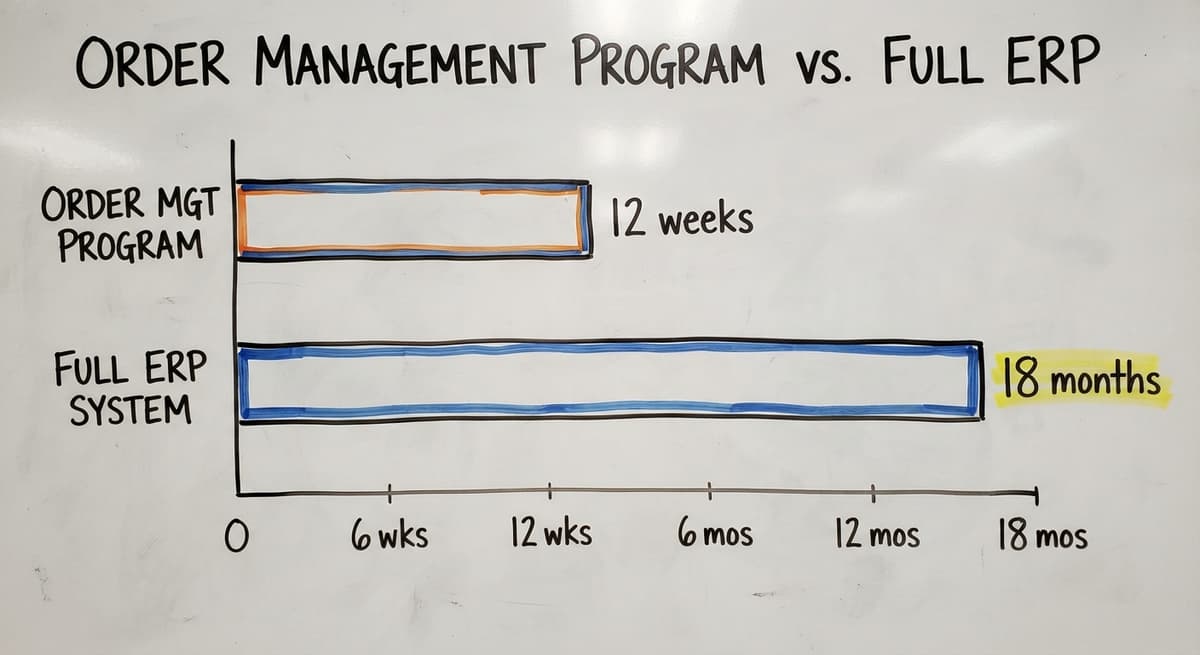
Order Management Program vs. Full ERP
Many small operators hear ERP (enterprise resource planning, a large platform that covers accounting, HR, manufacturing, and more) and assume that is the only way to get organised. It is not.
| Factor | Order Management Program | Full ERP |
|---|---|---|
| Scope | Order flow and inventory | Finance, HR, manufacturing, and more |
| Cost | Lower, focused on operations | High, covers many functions |
| Implementation time | 4 to 12 weeks | 6 to 18 months or more |
| Best fit | 5 to 100 staff, existing the accounting software | Larger operations needing one system for everything |
When Is an Order Management Program the Right Fit?
The program is the right fit when:
- The business already uses the accounting software and does not need a new accounting system
- The pain is in operations, not in financial reporting
- The team is small enough that a focused tool will be adopted faster than a large platform
A focused order management program solves the operational problem without pulling the team into a year-long software project.
The Real Cost of Delaying a Program
Manual order tracking has a cost that does not show up on any invoice. It shows up in staff hours, shipping errors, and customers who stop calling back.
Every week a manual process runs past its limit, errors accumulate and staff spend time correcting mistakes instead of processing orders. That cost compounds quietly until a lost account or a compliance problem makes it visible.
Staff Time Spent on Manual Steps
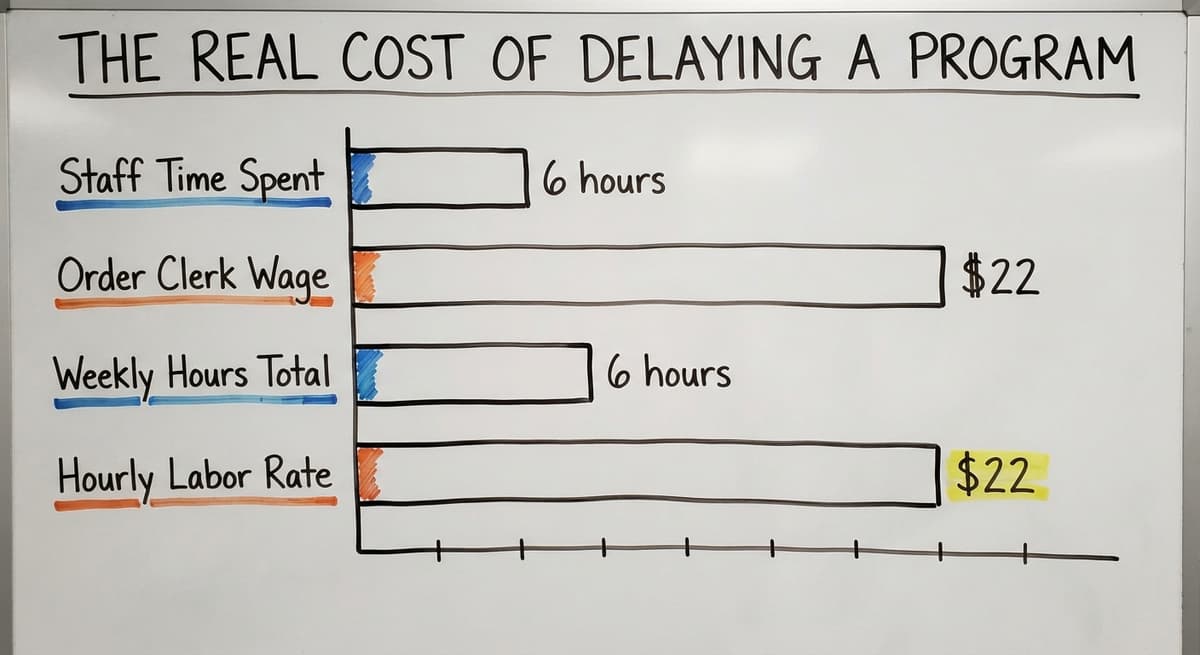
Consider 3 people each spending 6 hours a week on order re-entry, status checks, and phone calls.
According to the US Bureau of Labor Statistics, order clerks earn around $22 an hour. That is 3 people, 6 hours, $22 an hour, 52 weeks: $20,592 a year in labor spent on steps a program would handle automatically. That number grows with every new order.
What Do Errors That Reach the Customer Actually Cost?
Wrong items shipped, quantities off, or orders lost in email all damage customer trust. One bad shipment can cost more in returns, reshipping, and lost repeat business than a full month of program fees.
A program with a clear, system-generated pick list and a confirmation step catches most errors before they leave the building.
Repeated shipping errors are not a people problem. They are a process problem.
A program with a scan or confirmation step reduces the error rate to near zero within the first 60 days for most operations.
What does it look like running on your own process?
The first thing you see is it running on your own process, at no build cost. The subscription starts once it is live and doing the job, not before.
Book a call
How Do You Choose an Order Management Program?
Choosing based on a demo is one of the most common mistakes.
A demo shows the software at its best, with clean data and a practiced presenter. What matters is whether the program fits your actual workflow.
Questions to Ask Any Vendor
- How does the program connect to the accounting software?
- Can it be set up to match our current workflow, or does our workflow have to change?
- What does setup look like and how long does it take?
- Who supports us after go-live and where are they located?
Map Your Current Order Flow Before You Shop
Write down every step an order takes from the moment it arrives to the moment cash is collected. Note where handoffs happen. Note where errors or delays most often occur.
A program that fits your flow gets adopted faster than one that forces you to change how you work. This map also tells you which features matter most and which ones you can ignore.
Off-the-Shelf vs. Custom-Built Programs
Off-the-shelf programs start faster but may not match unusual workflows. Custom-built programs take longer to build but fit the operation exactly and do not force process changes.
The right answer depends on how standard or unique the operation's processes are.
Custom warehouse management software is worth considering when the operation has pricing rules, product configurations, or shipping steps that standard software does not handle well.
Implementation: What to Expect and How to Prepare
The biggest risk in any software project is not the software. It is the data and the people.
Incomplete or inconsistent data from the old system causes more go-live failures than any technical problem. Audit your order history and customer records before setup begins, not after.
Training the Team Without Disrupting Operations
Train on real orders, not made-up test cases, so staff learn in the context they will actually use. Start with the highest-volume, simplest order type first to build confidence.
Keep the old process running alongside the new one for a short period so nothing is lost during the switch.
How Do You Clean Your Data Before You Start?
Customer records, product lists, and pricing need to be accurate before they go into the program. Bad data in produces bad results out, no matter how good the software is.
A data cleanup sprint before setup saves weeks of correction after go-live. Pull your customer list, check for duplicates, confirm your product codes, and verify your pricing tiers before the vendor touches anything.
How Long Should Implementation Take for a Small Operation?
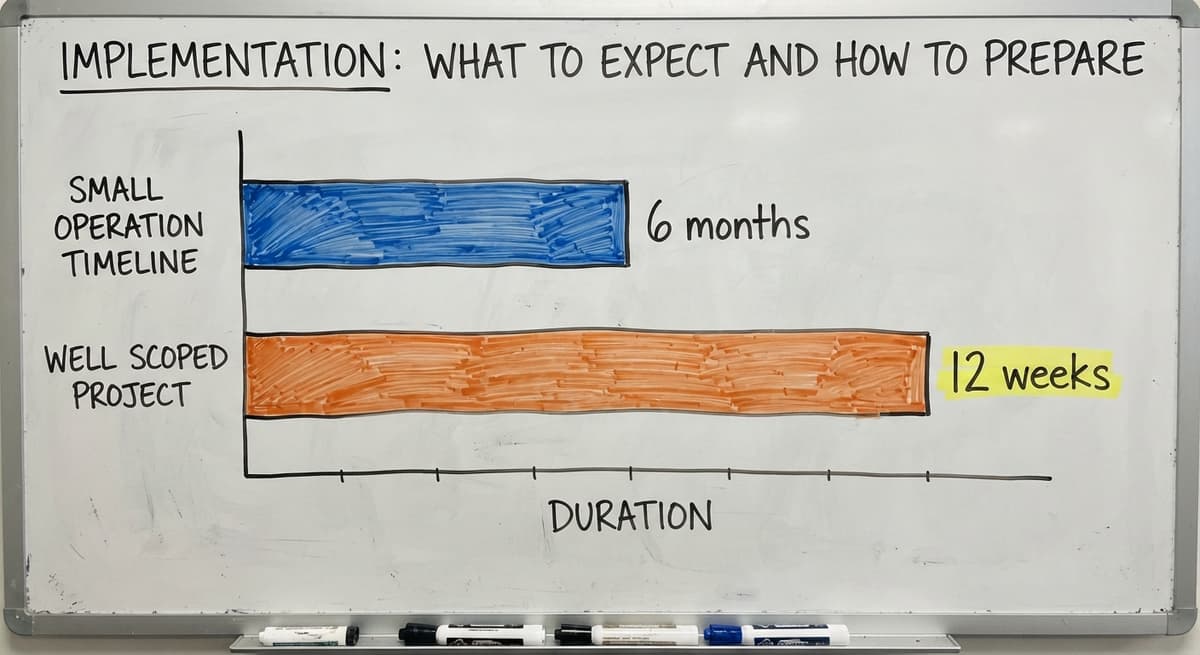
A focused order management program for a team of 5 to 30 people should not take 6 months to set up.
A realistic timeline for a well-scoped project is 4 to 12 weeks, depending on complexity. Longer timelines mean the scope is too broad or the vendor is not used to working at this scale.
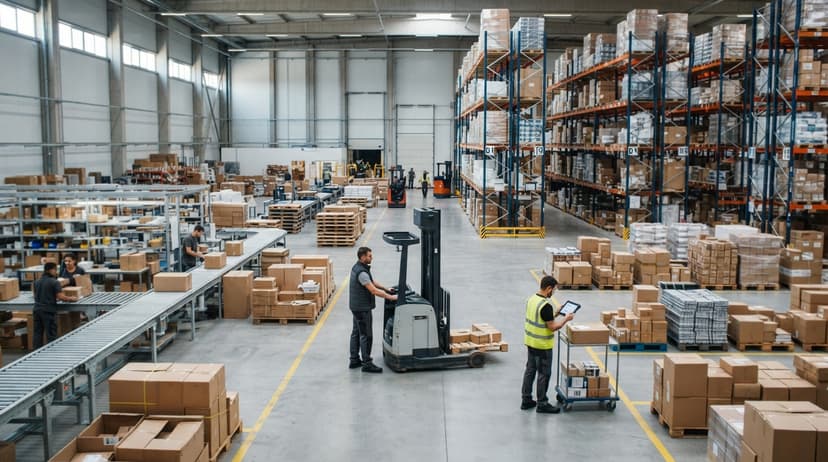
Signs That Your Current Setup Is Ready to Break
Manual order tracking shows specific symptoms before it fails completely, not abstract warnings. If more than 2 of these match your operation, the manual process is already at its limit.
How Does a Custom Order Management Program Work Differently?
Some operations have workflows that do not fit standard software. Unusual pricing rules, custom product configurations, or non-standard shipping steps will fight a template program at every turn.
A custom-built program is designed around the actual workflow from the start, so staff use it as written rather than building workarounds that reintroduce the manual steps the program was meant to eliminate.
Built Around Your Workflow, Not a Template
Standard programs assume a standard workflow. A custom program starts by learning yours.
If the program feels familiar from day one, the team adopts it faster. That is the practical advantage of building to the workflow rather than fitting the workflow to the software.
Wholesale distribution software built to order handles the edge cases that off-the-shelf tools push back to manual workarounds.
Keeps the accounting software Where It Already Works
A custom program does not ask you to move your accounting out of the accounting software. It connects to the accounting software at the points where data needs to transfer and leaves everything else alone. This avoids a full migration and lets the team keep using the tool they already know.
The order management program handles operations. The accounting software handles finance. Both do their job.
What is in a free first look?
A 30 minute call, your operation mapped, and a clear picture of what we would build. No obligation and nothing to install.
Book a callScales With the Operation, Not Against It
A custom program can grow as the business grows without switching to a new platform.
New order types, new locations, or new customer categories can be added to the existing program. This is the opposite of outgrowing a spreadsheet and having to start over. The investment compounds rather than expiring.

What Mistakes Do Businesses Make When Choosing an Order Management Program?
Several common errors derail software decisions, and each one is avoidable:
- Buying based on the demo rather than testing against a real order flow
- Choosing a program built for a much larger operation and hoping to grow into it
- Underestimating the time needed to clean data and train staff before go-live
- Picking a vendor with no local presence or real support after the sale
- Skipping the workflow map and letting the vendor define the scope
The vendor who asks the most questions about your operation before showing you software is the right one to trust.
What Does Good Support Look Like After Go-Live?
The program is not done when it goes live. Operations change. Order types change. Staff turn over. The program needs to keep up.
Good support means a real person who knows your setup, not a ticket queue and a chatbot. A vendor who worked with you through setup already understands your workflow and can make changes fast.
Local support means someone can visit if needed. That matters more than it sounds when something breaks on a busy shipping day.
Metrics to Watch After You Launch
A new order management program should produce measurable improvement. Track these 3 numbers before launch and again at 60 days to confirm the program is working and to catch any steps that still need adjustment.
Order Error Rate
Track the percentage of orders that ship with an error. A well-set-up program should reduce this number significantly within the first 60 days. If the error rate does not drop, the pick list or confirmation step needs adjustment. This is the clearest signal of whether the program is working.
Time From Order to Shipment
Measure how long it takes from when an order is received to when it leaves the building.
A program that removes manual steps should compress this time. Faster order to shipment time improves customer satisfaction and allows more daily volume without adding staff.
Staff Time on Administrative Order Tasks
Track how many hours per week staff spend on order-related admin before and after launch.
The goal is to redirect that time to tasks that need human judgment: customer calls, exceptions, and decisions that software cannot make. If admin time does not drop, there are manual steps still happening outside the program.
Frequently Asked Questions About Order Management Programs
Next Steps for Operations Ready to Move Forward
Start by mapping your current order flow on paper. Write down every step from when an order arrives to when cash is collected.
Mark where errors happen most often. That map tells you exactly what the program needs to do.
Then evaluate programs against that flow, not against a feature list. The program that fits your workflow gets used. The one that does not gets worked around.
If your operation has non-standard workflows, a the accounting software dependency, or a history of being burned by software that did not fit, a custom-built program is worth a serious look.
The Software Society builds order management programs around how operations actually work, connects them to the accounting software without a migration, and supports them after go-live with real people who know the setup.
Start with a conversation about your order flow, not a software demo. The right program becomes clear once the workflow is on the table.
Frequently asked questions
Frequently asked questions
What is the best order management software?
There is no single best answer. The right program depends on your order volume, workflow, and whether you use the accounting software. For small distributors and warehouses, 3 packaged tools come up most often.
For operations with non-standard workflows, a custom-built program fits better. Evaluate based on the accounting software connection, workflow fit, and the vendor's support model after go-live.
What are the four stages of order management?
The four stages are: order capture (the order arrives and is recorded), order processing (the order is checked against inventory and confirmed), fulfilment (the order is picked, packed, and shipped), and post-shipment (the invoice is sent and the customer is notified).
A good order management program handles all four stages in one system.
What is the best free order management software?
Free tools exist but carry real limits. A couple of the accounting and inventory apps offer free tiers with basic order tracking. These work for very low volumes but lack pick list generation, inventory checks at order entry, and accounting integration at any depth.
For most small distributors and warehouses, the cost of a paid program is recovered quickly in reduced errors and staff time.
Is order management a good career?
Order management roles are stable and in demand across wholesale, logistics, and distribution.
Experience with order management programs and accounting integration makes candidates more valuable. It is a practical career path for people who like operational work and clear outcomes.
Do I need to replace the accounting software to use an order management program?
No. A well-designed order management program connects to the accounting software rather than replacing it. The accounting software handles accounting.
The program handles operations. The two systems share data automatically so nothing needs to be entered twice.
How much does an order management program cost?
Off-the-shelf programs charge a monthly fee per user, ranging from $50 to $300 per user per month depending on features.
Custom-built programs carry a build cost and a lower ongoing maintenance fee. The right choice depends on how standard the workflow is.
Can a small team implement this without an IT department?
Yes, if the vendor does the setup work rather than handing over documentation and walking away.
The team needs to join training sessions and clean their data before go-live. They should not need to configure the software themselves. A vendor who works with small operations understands this and builds the process accordingly.
How long does it take to implement an order management program for a small team?
A focused order management program for a team of 5 to 30 people should take 4 to 12 weeks to set up, depending on complexity.
Longer timelines mean the scope is too broad or the vendor is not used to working at this scale.
What is the difference between an OMS and an ERP?
An ERP runs the whole company: accounting, purchasing, HR, and orders in one suite, over 6 to 18 months of implementation.
An order management program runs the orders alone, in 4 to 8 weeks, and hands the invoices to the accounting package you already have.
What is the best order management program for a small business?
The one that covers the manual steps in your own order cycle without a workaround, connects to the accounting package you run, and can be live in under 2 months.
Under 500 orders a week a packaged tool at $100 to $500 a month is enough; a build fits when pricing or packing rules are your own.
Which order management systems integrate with online stores and marketplaces?
Any current system pulls orders from the major store platforms and marketplaces through their APIs, pushes tracking back, and writes stock counts to each channel.
Ask the vendor to show your specific channels connected in the demo, not on the integrations page.
How can an order management program improve inventory accuracy?
By checking stock at order entry, reserving it, and reducing it at the pick scan rather than at the end of the day.
The count then moves when the goods do, and overselling stops the same week.
Not sure this is the right shape for your operation?
The call is free. Describe how the work runs today. We map it on a call and show you what it would look like built around that, before you spend anything.
Book a callRelated guides
The rest of this guide, for the parts of the job this page does not cover.
Guides
- Order Management Software
- Ordering Management System
- Order Management System
- Warehouse Inventory Software Programs
- Cloud-based Purchase Order System
- Operations Management Suite
- Warehouse Inventory Management Software
- Warehouse Inventory Management Systems
- Quickbooks Inventory Management Software
- Warehouse Stock Management Software
- Warehouse Management System Top 10
- Software for Warehouse Management System
- Inventory and Warehouse Management Software
- Small Business Warehouse Management System
- Custom Inventory Management Software
- Cloud Based Warehouse Management
- Warehouse Management System Types
- Warehouse Inventory Management System
- List of Warehouse Management Software
- Warehouse Management Costs
- Warehouse Management Cloud
- Warehouse Management System Examples