

Ordering Management System
An ordering management system is a system that tracks every order from the moment a customer places it to the moment it ships. It replaces email chains, spreadsheets, and re-entry with one place where orders live, move, and get completed.
Published 26 August 2026. Reviewed and updated 15 September 2026.
Book a callWhat Is an Ordering Management System?
An ordering management system tracks orders from placement to fulfillment. Think of it as the single place where every order lands, gets assigned, and moves forward without anyone chasing it.
Reviewed August 2026. Each figure comes from the assumptions stated beside it, so you can substitute your own and the arithmetic still holds.
A spreadsheet holds data. An email chain records a conversation. Neither one tells your warehouse team what to pick, alerts your customer when the box ships, or flags a duplicate order before it goes out twice.
An ordering management system connects people, inventory, and suppliers in one place. When an order arrives, the system captures it.
When a picker marks it complete, the system moves it forward. When the box leaves the dock, the customer gets a note. No one has to ask what happened.
Would you rather have it built around your operation?
The first look is free. If you would rather not compare products, describe how your operation already works and we build the system around it.
No build cost. You see it running on your own process first, and the monthly subscription starts only once it is live.
Book a callHow Do Orders Move Without a System?
Picture the before state, which is how 4 in 5 small distributors still run: orders arrive by email, phone, fax, or text.
Someone reads each one and types it into the accounting software or a spreadsheet by hand. That same data gets re-keyed again when the pick ticket prints. A third time when the invoice goes out.
Every re-key is a chance for a mistake. A wrong address. A wrong quantity. A wrong SKU.
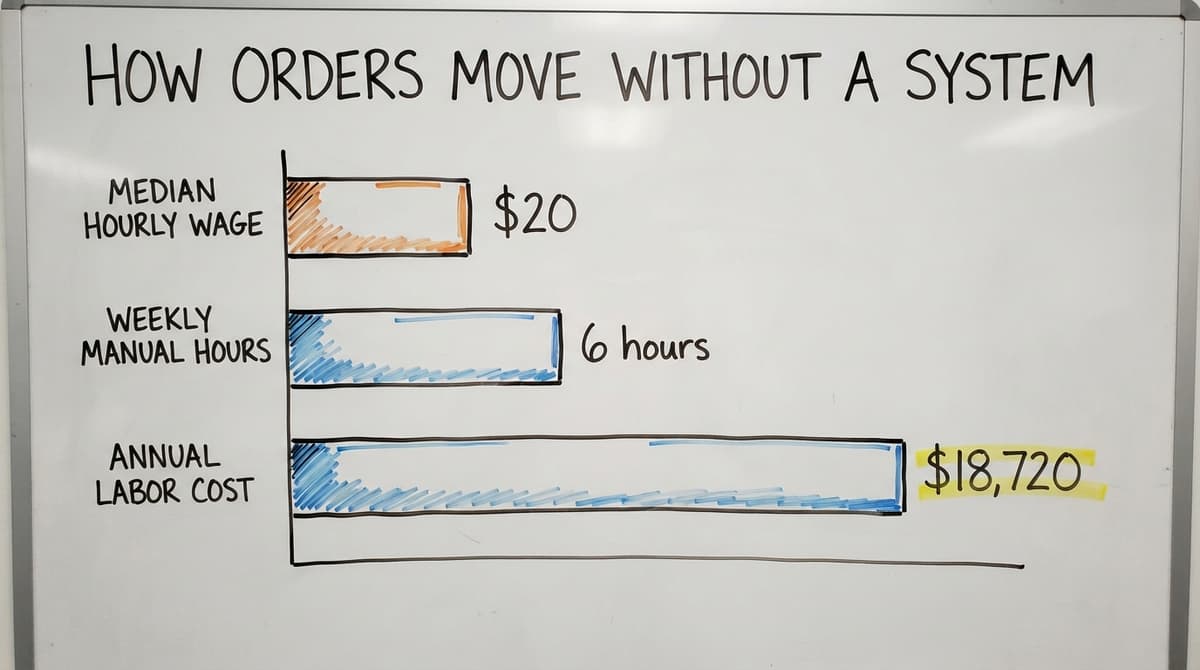
Staff spend hours each week calling the warehouse to get a status update, then calling the customer back. The US Bureau of Labor Statistics reports that order clerks earn a median wage of around $20 per hour.
Three people spending 6 hours a week on manual order tasks costs your business roughly $18,720 a year in labor alone. That number does not count the cost of errors.
What Does the IRS Require From Your Order Records?
The IRS adds another reason to care about accurate records. IRS Publication 538 states directly: "To figure taxable income, you must value your inventory at the beginning and end of each tax year." Sloppy order records make that valuation harder and riskier.
For wholesale and distribution operations, this manual process works until it does not. One bad month, one key person out sick, and the whole thing stalls.
What Does an Ordering Management System Actually Do?
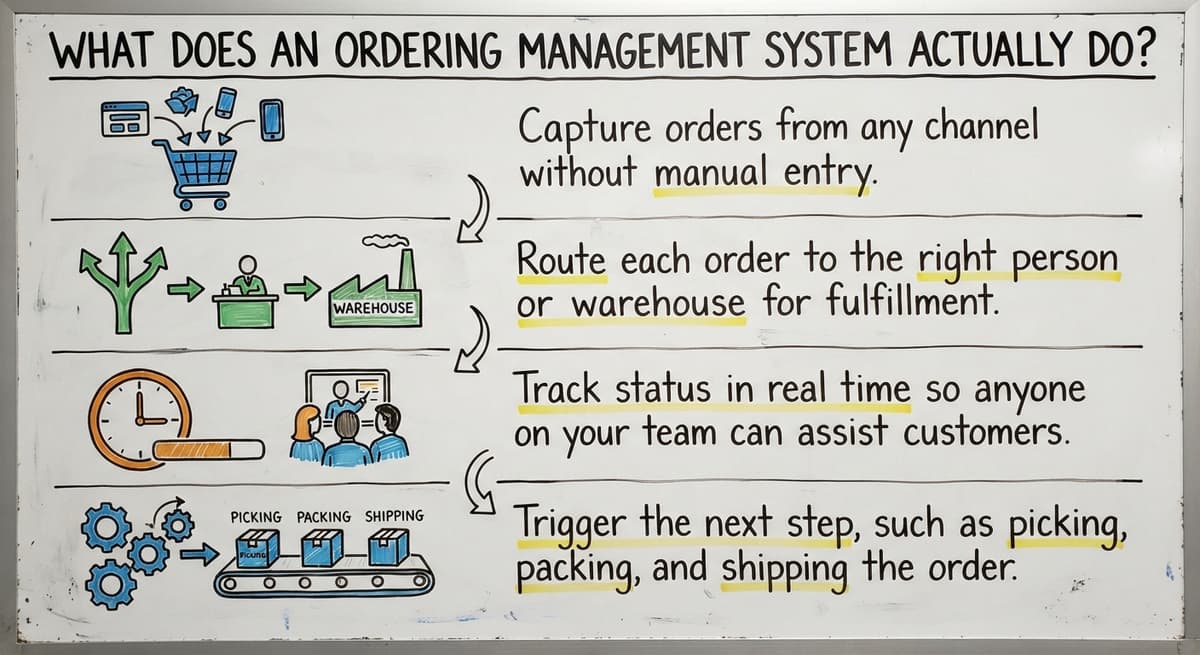
An ordering management system captures, routes, and tracks every order automatically, so your team ships product instead of managing paperwork.
Here is what that looks like in practice:
- Capture orders from any channel without manual re-entry
- Route each order to the right person or warehouse location based on rules you set
- Track status in real time so anyone on your team can answer a customer question in seconds
- Trigger the next step, such as picking, packing, or invoicing, without someone nudging it forward
None of this requires a big ERP project. A focused system handles these 4 jobs well and leaves everything else alone.
Key Features to Look For in an Ordering Management System
Not every system fits every operation. These are the features that matter most for small and mid-size distributors.
- Centralized order dashboard visible to all relevant staff
- Inventory availability check at the moment an order is placed
- Automated status alerts to customers or internal teams
- Reporting that shows order volume, fulfillment time, and error rates
- Integration hooks so the system talks to the accounting software or a warehouse management tool
Order Capture
Order capture means pulling an order in from any source without anyone re-typing it. Sources include web forms, EDI feeds (electronic data interchange, a standard format large retailers use), email parsing, phone entry by staff, or a customer portal.
One entry point eliminates duplicate data and lost orders. When an order exists in only one place, it cannot get missed in someone's inbox.
Order Routing and Assignment
Once captured, the order is routed: the system decides who handles it and where it ships from. Rules can be based on product type, customer tier, warehouse zone, or carrier preference.
Routing removes the need for a manager to manually assign every order. A rule might say: all orders over 200 pounds ship from the east warehouse.
Another rule might say: wholesale accounts get a different pick priority than retail. The system applies those rules every time, without fail.
Status Tracking and Visibility
Every stakeholder, warehouse staff, sales reps, and the customer, can see where an order stands at any moment. Status updates fire automatically when a step is completed.
Fewer inbound calls asking "where is my order" is one of the fastest wins distributors report after going live. When customers can see their own order status, they stop calling.
When your sales team can see it too, they stop interrupting the warehouse to find out.
Is the comparison easier when one option is built for you?
Yes. Off-the-shelf means fitting your process to the software, and custom is the other way round. The first look costs nothing.
Book a callWho Needs an Ordering Management System
You need an ordering management system when the manual process is costing you time, money, or customers. That means one of these situations:
- Wholesale distributors processing more orders than one person can track by memory
- Fulfillment centers juggling multiple clients or high SKU counts
- Warehouses where the pick list still prints on paper and sometimes gets lost
- Operations where the owner personally answers order-status questions
- Businesses where the accounting software holds the financials but nothing manages the order flow before invoicing

Why Does Growing Order Volume Make the Problem Worse?
The US Census Bureau's Monthly Wholesale Trade data shows that wholesale inventories and sales volumes have grown steadily, meaning more orders moving through the same lean teams.
If your team size has stayed flat while your order count has grown, the gap between them is where errors live.
Warehouse management software for small distributors includes some order tracking, but it is built around the physical warehouse, not the full order lifecycle from customer to cash.
Is Your Current Order Process Costing You Money?
Yes, if more than 2 of these are true for your operation right now.
These are the signs that your manual order process has become a financial drain:
- Orders shipped to the wrong address more than once a month
- Staff re-keying the same order into 2 or more systems
- Customers calling to check status because they have no other way to find out
- End-of-month reconciliation takes days because records live in multiple places
- New hires take weeks to learn the order process because it is undocumented

The Costs You Can See and the Ones You Cannot
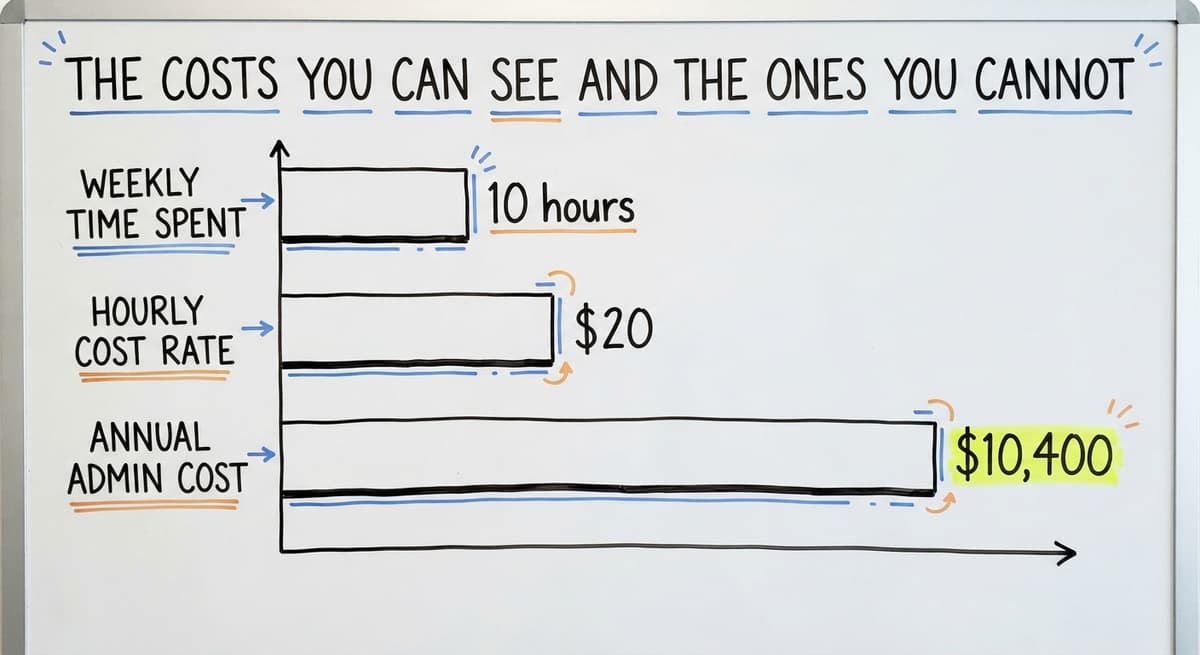
The cost is not always visible until it becomes a crisis. A lost order is a visible cost. A customer who quietly stops ordering because fulfillment was unreliable is invisible. Both are real.
If your team spends 10 hours a week on manual order admin at $20 per hour, that is $10,400 a year.
Add 1 mis-ship per week at an average cost to reship and credit, and the number climbs fast.
How Does an Ordering Management System Work With the Accounting Software?
The accounting software is built for accounting. It records what happened financially. It is not built to manage the order flow that happens before an invoice exists.
An ordering management system sits upstream of the accounting software and hands it clean, complete data. Your team does not re-key anything.
The order system captures the order, moves it through fulfillment, and then sends the invoice data to the accounting software automatically.
You do not replace the accounting software. The 2 tools handle different jobs:
| Tool | Job |
|---|---|
| Ordering management system | Captures, routes, and tracks orders from placement to ship |
| The accounting software | Records invoices, payments, and financials |
Invoices, payments, and reports stay in the accounting software exactly as they are today. accounting integration for wholesale operations is one of the most common reasons distributors choose a focused ordering system over a full ERP replacement.

Off-the-Shelf Systems Versus Custom Ordering Management Systems
Choosing between off-the-shelf and custom ordering management systems comes down to how standard your operation is. Both options work.
The right choice depends on your order flow, pricing rules, and how much the software needs to bend to fit your process rather than the other way around.
What Does Off-the-Shelf Get Right?
Off-the-shelf tools are faster to deploy when your order flow is simple and standard. They cost less upfront. The vendor handles updates and security patches.
For a business with a straightforward process and common pricing rules, an off-the-shelf system may be all you need.
What does it look like running on your own process?
The first thing you see is it running on your own process, at no build cost. The subscription starts once it is live and doing the job, not before.
Book a callWhere Does Off-the-Shelf Fall Short for Distributors?
Most off-the-shelf systems target retail, not wholesale. Pricing tiers, custom customer rules, and volume-based discounts are missing or require expensive add-ons.
Integration with niche carriers or legacy warehouse software is frequently limited. Workarounds pile up.
After 12 months, the system is as messy as the spreadsheets it replaced, and your team has learned to work around it rather than with it.
Custom operational software for fulfillment centers is built around the workflow already running in your business. The software changes to fit you. Off-the-shelf requires you to change to fit the software.
Cost comparison across 3 dimensions:
| Factor | Off-the-Shelf | Custom Build |
|---|---|---|
| Upfront cost | Lower | Higher |
| Change-management cost | Hidden and significant | Lower, mirrors existing workflow |
| Fit to your specific rules | Generic | Exact |
What Does a Custom Ordering Management System Look Like in Practice?
Here is a realistic day for a wholesale distributor running a custom system.
- A customer emails an order at 7 a.m. The system parses the email and creates the order record automatically. No one types anything.
- The warehouse team sees the order on a screen at 7:05 a.m. The routing rule has already assigned it to the correct warehouse zone.
- A picker pulls the items, marks the order complete on a tablet. The system moves the order to "shipped" status.
- The accounting software receives the invoice data without anyone re-typing it.
- The customer gets an automated shipment alert with a tracking number.

Why Is Process Clarity the Real Outcome?
The owner never touched that order. No one called the warehouse. No one re-keyed data. The customer did not have to call to ask where their box was.
The NIST Manufacturing Extension Partnership notes that supply chain process clarity, knowing who does what and when, is a core driver of fulfillment reliability for small and mid-size manufacturers and distributors. A custom system makes that clarity automatic.
What Integrations Does an Ordering Management System Need?
The integrations your system needs depend on the tools already running your operation. These are the most common for distributors.
- The accounting software or Desktop for accounting and invoicing
- Shipping carriers for label generation and order status tracking
- Warehouse management tools for pick-and-pack workflows
- Customer portals so buyers can place and track their own orders without calling
- EDI connections for large retail or wholesale trading partners who require electronic data interchange
An inventory management system is a common companion. It tracks what is on the shelf. The ordering system tracks what a customer asked you to send.
The 2 work together but solve different problems. Some platforms combine both; a custom build can do either or both depending on your needs.
How Long Does Implementation Take?
A focused custom system for a 10 to 50 person operation can go live in weeks, not months. This is not an ERP project. It does not require migrating years of historical data out of the accounting software or retraining your entire team on a new platform.
Implementation moves in phases:
- Capture first. Get orders flowing in automatically before adding anything else.
- Routing next. Add the rules that assign orders to the right person or location.
- Reporting last. Build the dashboards once the data is clean and flowing.
Staff training is shorter when the system mirrors the existing workflow. If your team already knows the steps, learning the system that automates those steps takes days, not weeks.
Custom workflow automation for distributors is built to match how your team already works, not to teach them a new process.
What Does the Build Process Look Like?
A good build partner follows 5 steps before writing a line of code.
- Discovery. Map the current order process step by step, from the moment an order arrives to the moment it ships.
- Design. Build the system around those steps, not a generic template.
- Build. Develop and test with real orders from your operation, not sample data.
- Launch. Go live with support from the same team that built it.
- Iteration. Add features as the business grows, not all at once.
This approach keeps scope tight and cost predictable. You are not paying for features you will never use.
What is in a free first look?
A 30 minute call, your operation mapped, and a clear picture of what we would build. No obligation and nothing to install.
Book a call
Questions to Ask Before Choosing an Ordering Management System
There are 6 buyer-protection questions that matter more than feature lists. Ask every vendor these before signing anything.
- Does it connect to the accounting software the way we use it today?
- Can it handle our specific pricing rules and customer tiers?
- Who do we call when something breaks at 6 a.m. on a Monday?
- How long before staff are comfortable using it without help?
- What happens when our order volume doubles?
The answers tell you more than any feature list. A vendor who cannot answer the third question clearly has not thought through support.
A vendor who cannot answer the fifth has not thought through your growth.
Ordering Management System Versus Inventory Management System
Ordering management systems and inventory management systems are used as if they mean the same thing. They do not.
- An inventory management system tracks what you have on the shelf. Quantities, locations, reorder points.
- An ordering management system tracks what a customer asked you to send. The order record, its status, and its path to fulfillment.
The 2 systems work together but solve different problems. An inventory management system tells you that you have 40 units of SKU 1042 in bin 7.
The ordering system tells you that Customer A ordered 10 of them, the pick is in progress, and the box ships tomorrow.
Some platforms combine both. A custom build can handle either or both, depending on where your biggest pain is right now.
Measuring Success After You Go Live
Four numbers tell you whether your ordering management system is doing its job.
- Order error rate. The percentage of orders shipped incorrectly. Track this weekly.
- Fulfillment cycle time. Hours or days from order placed to order shipped. A shorter cycle means the system is moving work forward.
- Staff time on order admin. Hours per week spent on manual order tasks. This number should drop within the first month.
- Customer inquiry volume. Calls or emails asking for order status. When customers can see their own status, this drops sharply.
Measure these 4 numbers before go-live so you have a baseline. A system that cuts error rate by half and reduces inquiry calls by 30% has paid for itself. You will not know that without the before number.
Why Do Small Distributors Wait Too Long to Fix Their Order Process?
Because the manual process is fine at 20 orders a day, and it stops being fine at 50.
A lost order is painful but survivable. A key employee leaving and taking the undocumented process with them is a crisis.
A spike in volume that doubles order count overnight exposes every fragile step at once.
The cost of waiting is invisible until it becomes a crisis. You do not see the customers who quietly stop ordering.
You do not count the hours your best people spend on work a system could do. You do not measure what growth you did not pursue because the team was too busy managing orders manually.
A focused ordering management system does not require you to stop and rebuild everything. It sits on top of what is working, handles the parts that are breaking down, and leaves the rest alone.
Your caution about big projects is well-placed. The answer is not a big project.
How Do You Get Started With an Ordering Management System?
The first step is on paper, before you talk to any vendor.
- Write down every step your current order process takes, from the moment an order arrives to the moment it ships.
- Mark the one step that causes the most errors or delays. That is your starting point.
- Look for a system that solves that one step well. Expand from there.
- Talk to a builder who spends time understanding your operation before proposing anything.
The right partner asks more questions than they answer in the first meeting. If a vendor shows you a demo before they understand your workflow, they are selling a product, not solving your problem.
Custom workflow automation for distributors starts with that discovery step. The system that gets built reflects your operation, not a generic template.
Frequently Asked Questions About Ordering Management Systems
What is an order management system? An order management system is software that tracks orders from the moment a customer places one to the moment it ships. It captures order data, routes it to the right team or location, and updates everyone automatically as each step completes.
What are the top 10 order management systems? There is no single ranked list that fits every operation. The 10 names that come up most split into small-distributor tools, e-commerce fulfilment platforms, and enterprise suites.
The right choice depends on your order volume, pricing rules, existing tools, and whether you need a custom build or an off-the-shelf fit.
Picking one
What is the best order management software? There is no single best option. The best system is the one that fits your specific workflow, connects to the tools you already use, and can be supported when something goes wrong.
For distributors with non-standard pricing or complex routing rules, a custom build outperforms any off-the-shelf product.
OMS or ERP
Is an OMS different than an ERP? Yes. An OMS (ordering management system) handles the order lifecycle from capture to fulfillment. An ERP (enterprise resource planning system) covers the entire business, including finance, HR, manufacturing, and more.
An OMS is narrower, faster to implement, and far less disruptive to deploy. Most distributors do not need an ERP. They need a focused OMS that talks to the accounting software.
Do I have to replace the accounting software to use an ordering management system? No. An ordering management system sits upstream of the accounting software and passes clean data to it automatically.
The accounting software keeps doing what it does. The ordering system handles what happens before the invoice.
What size business needs an ordering management system? Any operation where manual order tracking is causing errors, delays, or staff overload. That starts at around 5 staff and becomes urgent somewhere between 15 and 50 people.
Custom systems work well at this scale and cost far less than a full ERP.
What is the difference between an ordering management system and an inventory management system? An inventory management system tracks what you have on the shelf.
An ordering management system tracks what a customer asked you to send. The two work together but answer different questions. You may need both, or a custom build that combines them.
How do I know if my current process is costing me money? Count the hours your team spends on manual order tasks each week. Multiply by their hourly rate.
Add the cost of any mis-ships in the last 90 days. If the total surprises you, the process is costing more than you thought. Most operations find the number is higher than the cost of fixing it.
Frequently asked questions
Frequently asked questions
What is an order management system?
An order management system is software that tracks orders from the moment a customer places one to the moment it ships. It captures order data, routes it to the right team or location, and updates everyone automatically as each step completes.
What are the top 10 order management systems?
There is no single ranked list that fits every operation. The 10 names that come up most split into small-distributor tools, e-commerce fulfilment platforms, and enterprise suites.
The right choice depends on your order volume, pricing rules, existing tools, and whether you need a custom build or an off-the-shelf fit.
What is the best order management software?
There is no single best option. The best system is the one that fits your specific workflow, connects to the tools you already use, and can be supported when something goes wrong.
For distributors with non-standard pricing or complex routing rules, a custom build outperforms any off-the-shelf product.
Is an OMS different than an ERP?
Yes. An OMS (ordering management system) handles the order lifecycle from capture to fulfillment. An ERP (enterprise resource planning system) covers the entire business, including finance, HR, manufacturing, and more.
An OMS is narrower, faster to implement, and far less disruptive to deploy. Most distributors do not need an ERP. They need a focused OMS that talks to the accounting software.
Do I have to replace the accounting software to use an ordering management system?
No. An ordering management system sits upstream of the accounting software and passes clean data to it automatically.
The accounting software keeps doing what it does. The ordering system handles what happens before the invoice.
What size business needs an ordering management system?
Any operation where manual order tracking is causing errors, delays, or staff overload. That starts at around 5 staff and becomes urgent somewhere between 15 and 50 people.
Custom systems work well at this scale and cost far less than a full ERP.
What is the difference between an ordering management system and an inventory management system?
An inventory management system tracks what you have on the shelf. An ordering management system tracks what a customer asked you to send.
The two work together but answer different questions. You may need both, or a custom build that combines them.
How do I know if my current order process is costing me money?
Count the hours your team spends on manual order tasks each week. Multiply by their hourly rate. Add the cost of any mis-ships in the last 90 days.
If the total surprises you, the process is costing more than you thought. Most operations find the number is higher than the cost of fixing it.
How much does an order management system cost?
Packaged tools run $100 to $500 a month for a small distributor, climbing with users and channels.
A build scoped to one operation runs $10,000 to $30,000 once with $150 to $500 a month for hosting and support. The accounting package stays and receives the invoices either way.
What features should an ordering management system include?
One queue for every order source, a stock check at order entry, customer-specific pricing, a pick list per order, carrier labels with tracking pushed back to the customer, and an invoice posted to the accounting package. Those 6 cover a distributor; e-commerce adds returns and channel sync.
How do I choose the best OMS for my business?
List the manual steps in one order cycle, from the email arriving to the invoice going out, and ask each vendor to show those exact steps in the demo.
The tool that covers the most steps without a workaround wins; the feature list is a distraction.
How can an OMS integrate with inventory and shipping software?
Through their APIs: the OMS checks stock at order entry, reserves it, sends the pick to the warehouse system, and hands the packed order to the shipping tool for a label.
The tracking number comes back the same way. Ask to see each link running, not listed.
Not sure this is the right shape for your operation?
The call is free. Describe how the work runs today. We map it on a call and show you what it would look like built around that, before you spend anything.
Book a callRelated guides
The rest of this guide, for the parts of the job this page does not cover.
Guides
- Order Management System
- Order Management Software
- Order Management Program
- Cloud-based Purchase Order System
- Warehouse Inventory Management Systems
- Warehouse Management System Top 10
- Software for Warehouse Management System
- Small Business Warehouse Management System
- Warehouse Management System Types
- Warehouse Inventory Management System
- Warehouse Management System Examples
- Warehouse Management System Implementation
- Cloud Warehouse Management System
Common questions
- What Are the Benefits of Warehouse Management System
- What is the Point of Warehouse Management System
- How to Choose a Warehouse Management System
- What is Asn in Warehouse Management System
- How to Create a Warehouse Management System
- What is a Warehouse Management System
- Which Warehouse Management System Would a Jeweler Most Likely Use
- How to Build a Warehouse Management System
- What is a Warehouse Management System Used For
- Warehouse Management System vs Warehouse Control System
- Meaning of Warehouse Management System