


Which Software Is Best For Warehouse Management?
The best software for warehouse management is the one that matches how your operation actually runs, not the most popular tool on the market. The answer changes with your team size, your current systems, and where the daily friction actually lives. A 15-person distributor shipping 120 orders a day from 2,000 SKUs needs a different tool than a 3-person stockroom, and a $30 a month add-on can outperform a $50,000 platform when it fixes the right step.
Published 17 August 2026. Reviewed and updated 15 September 2026.
Book a callWhy Is There No Single Best Answer For Warehouse Management?
A 10-person warehouse with a clipboard and an entry-level ledger has completely different needs than a 500-person distribution center with multiple sites. The right software fits the operation it is going into, not the other way around.
Walking is the hidden cost. A picker covering 40 feet to a fast mover 60 times a shift walks 2,400 feet a day, and across 250 days that is 600,000 feet a year per picker.
Moving 20 fast movers nearer the pack bench removes most of it.
Reviewed August 2026. Each figure comes from the assumptions stated beside it, so you can substitute your own and the arithmetic still holds.
Most comparisons online speak to enterprise buyers. They rank tools by feature count. That framing is not useful if you are an operations manager at a 30-person distributor trying to get off spreadsheets without blowing up your accounting setup.
The better question is not "which software is best" but "which type of software fits how we work today and where we are going."
Would you rather have it built around your operation?
The first look is free. If you would rather not compare products, describe how your operation already works and we build the system around it.
No build cost. You see it running on your own process first, and the monthly subscription starts only once it is live.
Book a callWhat Does Warehouse Management Software Actually Do?
A warehouse management system, or WMS, tracks inventory as it moves through your facility. It handles receiving, put-away, picking, packing, and shipping. It reduces manual errors by replacing paper-based steps with scans, prompts, or digital records.
The key distinction is between a full WMS and a lighter inventory management tool. It manages the physical movement of goods inside the warehouse. An inventory management tool mostly tracks quantities and locations. Many small operations only need the latter.
According to OSHA, warehousing operations involve specific hazards tied to how goods are stored, moved, and tracked, which means disorganized inventory processes carry real operational and safety risk, not just efficiency costs.
Before evaluating any software, decide which category you actually need. Buying a full WMS when you need inventory tracking is like buying a semi-truck when you need a cargo van.
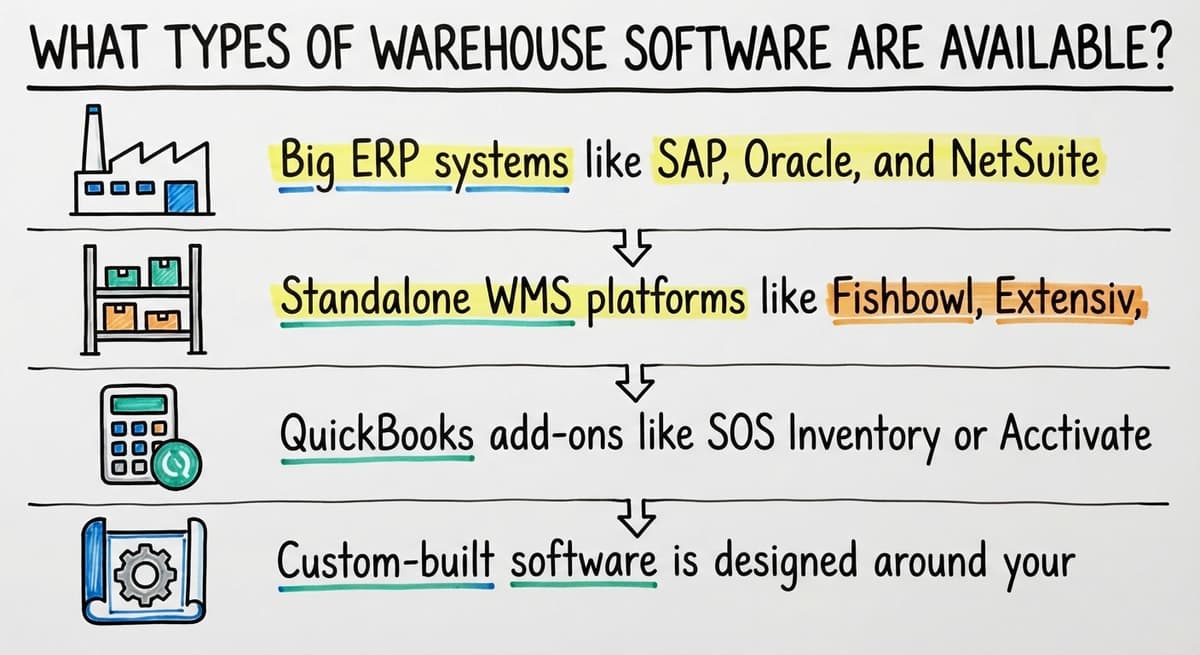
What Types of Warehouse Software Are Available?
Four main categories cover most of the market, and each one suits a different kind of operation.
| Category | Best For | Typical Cost Signal | your accounting software Impact |
|---|---|---|---|
| ERP with warehouse module | Large, complex, multi-site | High | Replaces QB |
| Standalone WMS | Growing mid-size operations | Mid to high | May replace QB |
| your accounting software add-ons | Small teams needing basic tracking | Low | Keeps QB in place |
| Custom-built software | Unique workflows, lean teams | Varies | Keeps QB in place |
- Big ERP systems, the kind used by large multinational corporations, include warehouse modules as part of a much larger platform
- Standalone WMS platforms built specifically for warehouse operations sit between spreadsheets and full ERP
- Accounting software add-ons, such as inventory extensions, connect directly to your existing accounting setup
- Custom-built software follows your specific workflows rather than asking you to adapt to a vendor's logic

Big ERP Systems: Powerful but Often Too Much
Large ERP systems target large, complex operations with dedicated IT staff and long implementation budgets. Implementation timelines run six to eighteen months, and costs can reach six figures before you go live.
These platforms also require replacing your existing systems, including your accounting software. For a team under 100 people, that trade-off rarely makes sense.
You end up paying for capabilities you will not use for years while disrupting the accounting workflow your finance team already knows.
If your operation runs multiple sites, manages hundreds of SKUs across complex fulfillment channels, and has the budget and staff to support a major migration, an ERP may eventually be the right call. For most small warehouse operations, it is not.
The comparison is easier when one option is built for you
Off-the-shelf means fitting your process to the software. We start from your workflow instead, and the first look costs nothing.
Book a callStandalone WMS Platforms: Mid-Range Options
Standalone WMS tools occupy the middle ground. They offer more warehouse-specific functionality than an accounting add-on without the full weight of an ERP.
Growing operations with 20 to 80 staff find this category worth evaluating. Setup still takes time, weeks to a few months, and licensing costs vary widely depending on user count and features enabled.
One honest trade-off: standalone WMS platforms are built around their own process logic.
If your picking workflow or receiving process does not match how the software expects things to work, you will either customize at extra cost or change how your team operates. Neither option is free.
Your Accounting Software Add-Ons: When You Just Need a Little More
For small operations that primarily need inventory tracking layered onto existing accounting, accounting add-ons are worth a look. They connect directly to your bookkeeping software, keep your accounting workflow intact, and cost significantly less than a standalone WMS.
The ceiling is real, though. Once your warehouse adds multiple storage locations, lot or serial number tracking, or more complex pick-pack-ship workflows, most add-ons start to strain. You end up building workarounds on top of workarounds.
Think of accounting add-ons as a bridge, not a destination. They work well at a certain scale and break down past it.

Custom Warehouse Software: Built Around How You Work
Custom warehouse software matches your operation instead of asking your team to adapt to a vendor's assumptions. Buyers overlook this category because they assume it means expensive and slow.
The real advantage is fit. A focused custom tool can eliminate the spreadsheets, printed pick sheets, and email chains that slow your team down every day, without requiring a full system migration. It leaves the ledger where it is and replaces only the manual steps that cause friction.
For operations with workflows that do not map cleanly onto off-the-shelf tools, custom software built for small distribution operations is worth a serious look. It is not the right fit for everyone, but for teams with specific processes that generic platforms cannot handle cleanly, it costs less in the long run than forcing a poor fit.
How Do You Know Which Type Fits Your Operation?
Start with staff size and current pain points rather than feature lists.
- Under 20 staff, mostly on basic accounting software: An accounting add-on or a focused custom tool will likely cover your needs without a major disruption
- 20 to 100 staff with growing complexity: A standalone WMS or custom build is worth evaluating, depending on how unique your workflows are
- Over 100 staff with multi-site operations: A dedicated WMS or ERP is probably necessary, and the migration cost becomes more justifiable
If you are still running on a mix of basic accounting software, spreadsheets, and paper, you are not alone. Many small distributors and fulfillment centers operate this way.
The move away from that mix does not require a full ERP. A targeted solution can solve the majority of daily friction without touching what already works.
Signs your warehouse has outgrown spreadsheets are visible before the software conversation even starts: missed picks, inventory count errors, receiving backlogs, and staff spending hours reconciling data manually.
What does it look like running on your own process?
The first thing you see is it running on your own process, at no build cost. The subscription starts once it is live and doing the job, not before.
Book a callWhat Should I Look for When Choosing Warehouse Management Software?
Before committing to any platform, work through these questions with your team.
- Will it work with your accounting software or replace it? Accounting integration for warehouses and distributors is a real differentiator for small operations that want to keep their accounting intact
- How long does implementation take, and who manages it? A vendor who cannot give you a clear timeline is a risk, not a partner
- Can it handle your specific workflow, or will you change how you work? The software should serve the operation, not the other way around
- What does support look like after go-live? A dedicated contact matters more than a ticket system when something breaks on a busy shipping day
- What is the total cost including setup, training, and ongoing licensing? Sticker price and real cost are rarely the same number
Answering these questions before a demo will save you significant time and prevent you from being sold features you do not need.

Red Flags to Watch for When Evaluating Software
Vague implementation timelines are the most common warning sign that a vendor has not done this kind of rollout for an operation like yours.
Other signals worth taking seriously:
- Pricing that only becomes clear after multiple sales calls
- Demos built around the vendor's sample data rather than your actual workflows
- No named support contact after purchase, only a ticketing system
- Pressure to replace systems that are working fine, especially accounting software
- Feature lists that do not map to the specific problems you described
A good software partner will ask about your operation before showing you anything. If the demo starts before the questions do, slow down.
The Short Answer: Match the Software to the Operation
The cost signal in numbers
No single tool is best for every warehouse, and the price tags make that plain. In our experience an accounting add-on runs $30 to $200 a month, a standalone WMS $300 to $2,000 a month for a small team, an ERP warehouse module $50,000 to $150,000 with implementation, and a focused custom build $8,000 to $40,000 once, with a monthly subscription after go-live.
Add the labour: 3 staff at $22 an hour spending 5 hours a week on manual stock work is about $17,000 a year, and that is the number any option has to beat. The warehouse inventory management software that works for a 200-person 3PL will not work for a 15-person specialty distributor, and vice versa.
The decision framework
The decision framework is simple: start with your current stack, your staff size, and the specific friction points costing you time every week. Then find the category of software that addresses those friction points without creating new ones.
For small and mid-size operations, that means keeping your existing accounting software in place and building or buying something targeted on top of it. A warehouse inventory management software overview can help you understand the full landscape before you start talking to vendors.
If your workflows are specific enough that off-the-shelf tools keep asking you to change how you work, custom operational software for wholesale and distribution is a legitimate option, not a last resort.
When you are ready to think through which direction fits your operation, The Software Society works with growing businesses to replace fragmented manual processes with systems built around how the team actually works.
Start with a clear picture of your daily friction points, and the right category of software becomes much easier to identify.
Frequently asked questions
Frequently asked questions
What software is commonly used for warehouse management?
Commonly used warehouse management software includes large enterprise resource planning suites for big operations, dedicated warehouse platforms for mid-size warehouses, and accounting add-ons for small teams already using basic bookkeeping software.
The most common choice depends heavily on operation size and complexity. There is no single dominant tool across all warehouse types.
What is the best warehouse management software?
There is no single best warehouse management software. The right choice depends on your team size, existing systems, workflow complexity, and budget.
A small distributor whose books live in an entry-level package needs a very different solution than a multi-site fulfillment center. Evaluate options based on fit with your operation, not feature count.
How much does WMS software cost?
WMS costs vary widely. Accounting add-ons run a few hundred dollars per month. Dedicated WMS tools can range from a few thousand dollars to tens of thousands depending on user count and features.
Full ERP implementations with warehouse modules cost six figures or more when you include setup, training, and licensing. Always ask for total cost, not just the monthly subscription price.
What are the four types of WMS?
The four main types of warehouse management systems are: dedicated warehouse platforms built specifically for warehouse operations; ERP-integrated WMS modules that are part of a larger business system used by large enterprises; cloud-based WMS tools designed for flexibility and lower upfront cost; and custom-built warehouse software designed around a specific operation's workflows.
Some vendors blur these categories, so it is worth asking directly how their system is architected.
Can I Keep Using Your Accounting Software and Add Warehouse Management on Top?
Yes, in many cases you can. Accounting add-ons plug straight into the ledger you already run.
Custom warehouse software can also be built to work alongside your accounting system rather than replace it. This approach works well for small to mid-size operations that want to solve warehouse friction without disrupting their accounting workflow.
Is custom warehouse software worth it for a small operation?
It can be, especially when off-the-shelf tools keep asking you to change how your team works. Custom software built around your actual workflows can eliminate daily friction points like manual pick sheets, spreadsheet reconciliation, and email-based receiving without requiring a full system migration.
The key question is whether your workflows are specific enough that a generic tool will not handle them cleanly.
How long does it take to implement warehouse management software?
Implementation timelines vary by software type. Accounting add-ons can be set up in days to a few weeks. Dedicated WMS tools take one to three months. Full ERP implementations run six to eighteen months.
Custom-built tools depend on scope but are faster than a complete ERP rollout because they are scoped to specific problems rather than replacing every system at once.
What is the difference between a WMS and an ERP?
A WMS focuses specifically on managing the physical movement and storage of goods inside a warehouse: receiving, put-away, picking, packing, and shipping. An ERP is a broader business platform that covers accounting, HR, procurement, and often includes a warehouse module as one component.
Most small warehouses do not need a full enterprise system. A dedicated WMS or a targeted inventory tool covers the actual problem without the overhead of a large ERP migration.
How much does warehouse management software cost?
Cost depends heavily on the type of system chosen. Large ERP platforms carry high costs, reaching six figures, plus lengthy implementation timelines. Standalone warehouse management systems fall in the mid to high range, varying by user count and features.
Accounting add-ons are the least expensive option. Custom built software varies with scope, and it follows existing workflows instead of forcing a costly migration.
What features should a warehouse management system include?
A warehouse management system should track inventory as it moves through receiving, put-away, picking and packing before shipping. It should reduce manual errors by replacing paper based steps with scans, prompts, or digital records rather than spreadsheets and printed sheets.
Depending on complexity, it may also need multiple storage location support, lot or serial number tracking, and workflows that match how the team already operates.
What is the best warehouse management software for a small business?
For a small business, especially one under twenty staff whose books sit in an entry-level package, the best fit is an accounting add-on or a focused custom tool, not a full warehouse management system. These options keep existing accounting workflows intact, avoid a disruptive migration, and address manual tracking pain points directly.
As complexity grows, with multiple locations or serial tracking, the operation eventually needs a more capable system.
What is the best warehouse management software for small businesses?
Small businesses do best with lighter tools rather than a full warehouse management system. If the operation is small and mostly needs inventory tracking layered onto existing accounting, an add-on works well.
If workflows are unique or generic tools do not fit cleanly, a custom built solution focused on eliminating manual steps delivers better long term value than forcing a mismatched off the shelf platform.
What is in a free first look?
A 30 minute call, your operation mapped, and a clear picture of what we would build. No obligation and nothing to install.
Book a callRelated guides
The rest of this guide, for the parts of the job this page does not cover.
Guides
- Warehouse Inventory Management Software
- Warehouse Inventory Tracking Software
- Warehouse Receiving Software
- Warehouse Stock Management Software
- Software for Warehouse Management System
- Inventory and Warehouse Management Software
- List of Warehouse Management Software
- Online Warehouse Management Software
- Warehouse Stock Software
- Warehouse Inventory Software Programs
- Inventory Software Warehouse
- Software Warehouse Management
- Warehouse Software System
- Quickbooks Inventory Management Software
- Custom Inventory Management Software
- Warehouse Inventory Management Systems
- Pick and Pack in Warehouse
- Warehouse Inventory Systems
- Warehouse Management System Top 10
- Warehouse Shipment
- Warehouse Tracking System