

What Does Receiving Mean In A Warehouse?
Receiving in a warehouse means accepting the goods that arrive, checking them against the order, and recording them in the inventory system. It covers every step from the moment a truck backs up to the dock to the moment stock sits in its bin with a count against it. This guide, reviewed in September 2026, walks the 6 receiving steps and the checks inside each.
Reviewed August 2026. Each figure comes from the assumptions stated beside it, so you can substitute your own and the arithmetic still holds.
Published 20 August 2026. Reviewed and updated 15 September 2026.
Book a callWhat Happens Before the Truck Arrives?
Good receiving starts before a single box is unloaded. Your team needs 3 things in place before the truck shows up: a purchase order (PO) to match against, an advance shipping notice (ASN) from the supplier, and a scheduled dock appointment.
A purchase order is the document your business sends to a supplier to confirm what you ordered, at what price, and in what quantity.
Without one, your team has nothing to check incoming goods against. That single gap causes more receiving discrepancies than any other problem.
An advance shipping notice is a message the supplier sends before the shipment leaves. It tells you what is on the truck, how it is packed, and when it will arrive. Not every supplier sends one. When they do not, your team is receiving blind.
As OSHA notes, "The warehousing and storage industry includes establishments operating facilities for general merchandise, refrigerated goods, and other products." Safe receiving prep is part of that scope.
OSHA's warehousing guidance covers dock safety, pedestrian traffic, and how to set up a receiving area so your staff can work without injury.
Many small warehouses skip the prep stage entirely. A truck shows up, someone waves it in, and the count happens on the fly. That approach feels fast. It costs more later when counts are wrong and you cannot trace why.
Would you rather have it built around your operation?
The first look is free. If you would rather not compare products, describe how your operation already works and we build the system around it.
No build cost. You see it running on your own process first, and the monthly subscription starts only once it is live.
Book a callHow Does the Physical Unloading Step Work?
Physical unloading is where receiving becomes hands-on work. Your dock staff count cartons as they come off the truck, check for visible damage, and sign the bill of lading (BOL) before the driver leaves.
The bill of lading is the legal document that travels with the shipment. It lists what was shipped, who shipped it, and where it is going. When you sign it, you are confirming what you received.
If a carton is crushed or a pallet is wet, note it on the BOL before you sign. Once the driver leaves with a clean signature, your claim for that damage becomes much harder to prove.
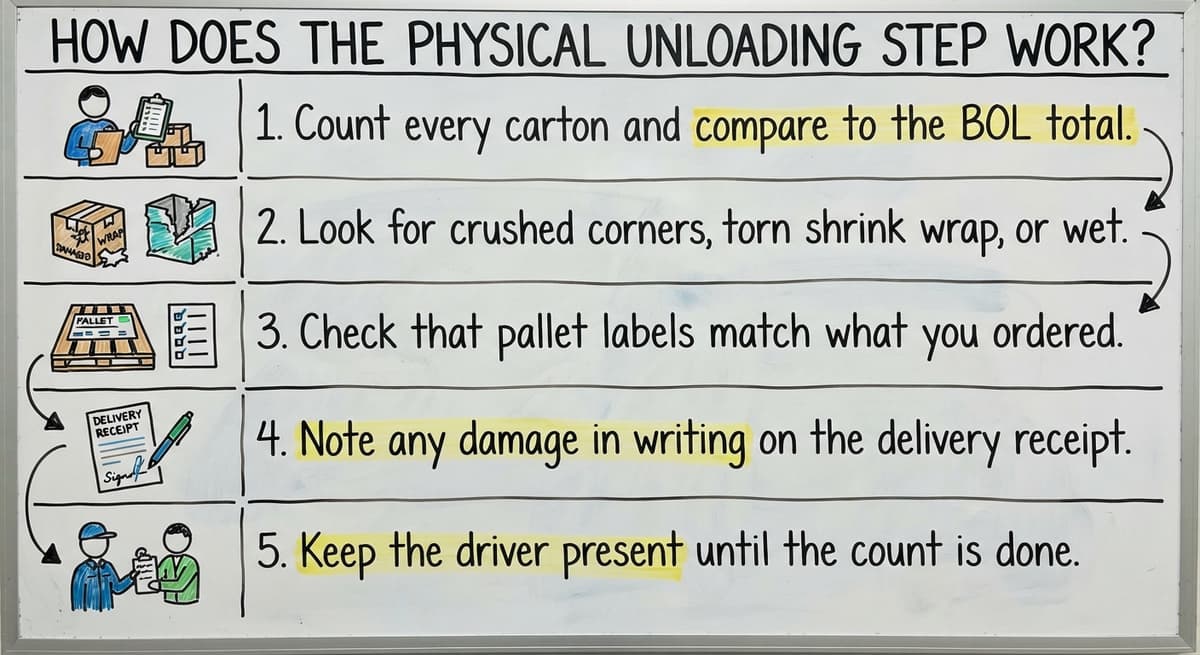
What to Check During Unloading
- Count every carton and compare to the BOL total
- Look for crushed corners, torn shrink wrap, or wet boxes
- Check that pallet labels match what you ordered
- Note any damage in writing on the delivery receipt
- Keep the driver present until the count is done
This is not slow work if your team has a routine. A 2-person crew can unload and count a standard 20-pallet delivery in under 90 minutes when the process is clear.
Checking Quantities Against the Purchase Order
Matching what arrived to what you ordered is the core of the receiving process. Your team pulls the original PO and compares it line by line to what is on the truck.
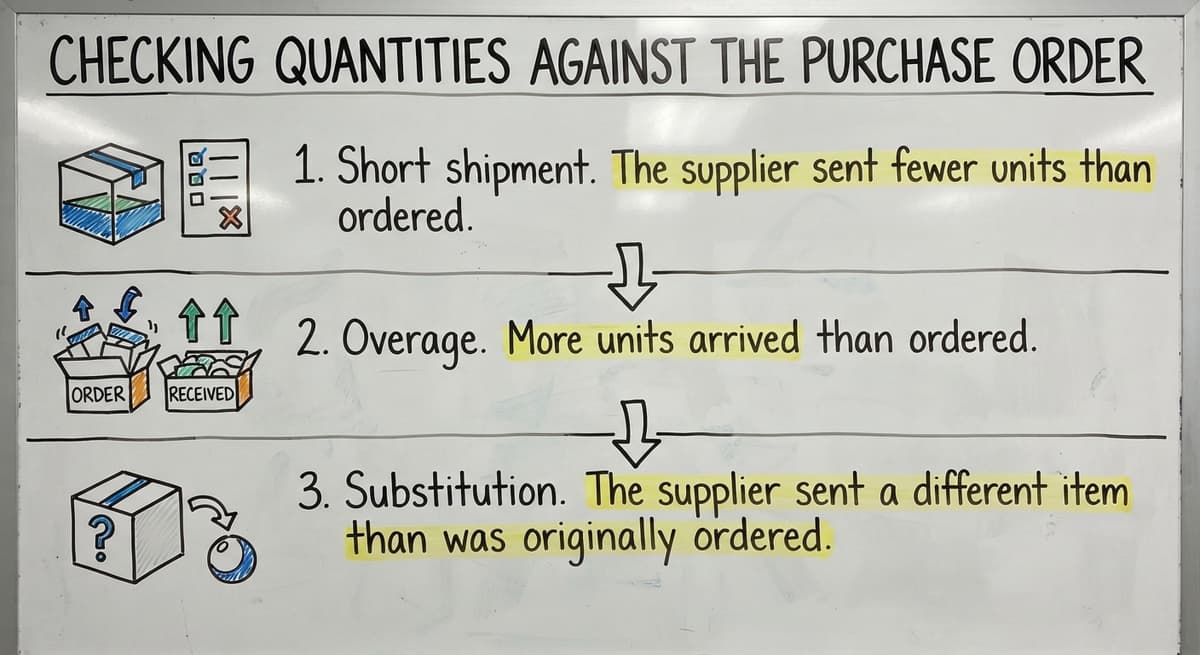
Three things can go wrong here:
- Short shipment. The supplier sent fewer units than ordered. You need to decide whether to accept the partial order, place a back-order, or contact the supplier for a credit.
- Overage. More units arrived than ordered. Accepting them without a new PO creates inventory you did not budget for and may not be able to return.
- Substitution. The supplier sent a different item or a different size. This needs a decision before the goods go into stock.
Paper receiving sheets make this step slow and error-prone. A staff member writes a count by hand, someone else keys it into a system later, and the two numbers rarely match perfectly.
The gap between the physical count and the system update is where receiving discrepancies are born.
The NIST Manufacturing Extension Partnership recommends that small and mid-size operations build a clear exception process for each of these three cases. Without one, your team makes judgment calls that are inconsistent from shift to shift.
Is the comparison easier when one option is built for you?
Yes. Off-the-shelf means fitting your process to the software, and custom is the other way round. The first look costs nothing.
Book a call
Inspecting for Quality and Condition
Counting boxes tells you how many arrived. It does not tell you what is inside them. Quality inspection is a separate step, and skipping it is a common mistake in lean operations.
A quality check might include:
- Opening sample cartons to confirm the right item is inside
- Checking expiration dates on perishable or regulated goods
- Looking for labeling errors, wrong barcodes, or missing lot numbers
- Confirming that items match the product spec on the PO
Quality holds are a real outcome of this step. If a batch fails inspection, it needs to go somewhere that is not your active pick locations.
A defined hold area, even just a taped-off zone on the floor, keeps bad stock from mixing with good stock.
Many small warehouses combine the quantity check and quality check into one pass. That works if your team knows what to look for. It breaks down when a new staff member does not know the difference between two similar SKUs.

Recording the Receipt in Your System
Receiving is not complete until your inventory records are updated. This is the step that turns a physical count into a number your whole operation can trust.
What Gets Recorded
- Item number and description
- Quantity received
- Lot number or serial number, if your product requires it
- Storage location assigned
- Date received
- Supplier name and PO number
If your team runs its books in a standard accounting package, this is also the step where a purchase receipt or item receipt gets entered.
Accounting software handles the financial side of receiving well. It was built to track what you owe a supplier and to match payments to bills. It was not built to manage dock-level receiving workflows, and that gap shows up when you need real-time inventory counts by location.
The IRS is clear about why inventory records matter. IRS Publication 538 states: "To figure taxable income, you must value your inventory at the beginning and end of each tax year." Accurate receiving records are the foundation of that valuation.
A sloppy receiving process is not just an operations problem. It is a tax compliance risk.
Manual entry at this step is the single biggest source of inventory error in small warehouses. A staff member who enters 120 units when 102 arrived creates a phantom count that will cause a pick failure weeks later.

Putaway: Getting Stock to Its Location
Putaway is the step that moves verified goods from the receiving dock to their storage location. It is distinct from receiving, even though the two happen close together in time.
For a full breakdown of how putaway works as its own process, see our guide on what is putaway in a warehouse.
What does it look like running on your own process?
The first thing you see is it running on your own process, at no build cost. The subscription starts once it is live and doing the job, not before.
Book a callThree Common Putaway Approaches
| Approach | How It Works | Best For |
|---|---|---|
| Fixed location | Each SKU always goes to the same slot | Small, stable product ranges |
| Directed location | A system assigns the best open slot | Growing operations with variable stock |
| Zone-based | Stock goes to a zone by type or velocity | Operations with clear product categories |
Putaway without a system means stock sits in a staging area for too long. A pallet that waits 2 days before being put away is a pallet your pickers cannot find. That creates a false out-of-stock, which creates a failed order, which creates a customer problem.
The Warehousing Education and Research Council includes putaway cycle time in its standard set of distribution center performance benchmarks. Fast, accurate putaway is measurable. If you are not measuring it, you do not know how much it is costing you.

How Does Receiving Tie Into the Rest of Inventory Management?
Every number in your warehouse inventory starts at the receiving dock. If the count is wrong when goods come in, every downstream process works from a wrong number.
Consider a simple example. Your team receives 500 units of a SKU but records 520. Your system now shows 20 phantom units. Over the next few weeks, pickers pull orders against those 20 units.
Each one fails at the pick location. Your team does manual searches, delays shipments, and eventually writes off the discrepancy. The cost is not just the 20 units. It is the labor spent chasing them.
According to the US Bureau of Labor Statistics, warehouse and storage workers earn a median wage in the range that makes manual error-chasing expensive fast.
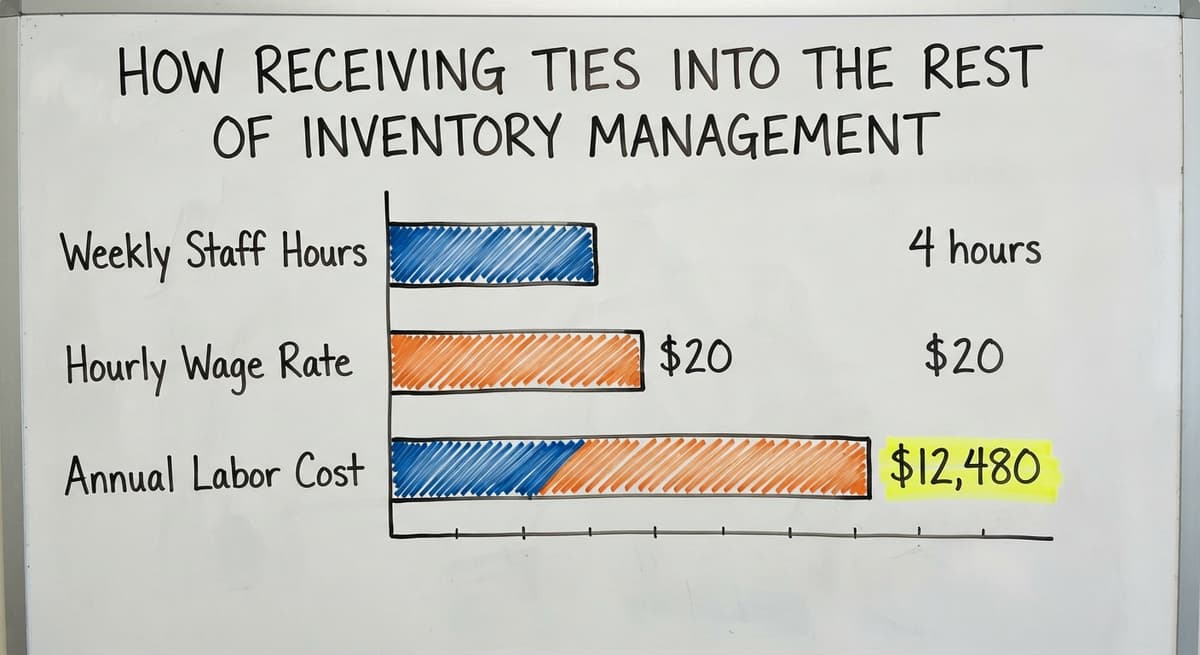
If 3 staff members spend 4 hours a week resolving receiving discrepancies at $20 an hour, that is $12,480 a year in labor spent on a fixable problem.
Receiving accuracy is the starting point for all warehouse inventory management. Picking accuracy, fulfillment speed, and customer order accuracy all depend on what was recorded correctly at the dock.
For a broader view of how these pieces connect, our warehouse inventory management software overview covers the full picture.

What Are the Most Common Receiving Problems in Small Warehouses?
The most common receiving problems in small warehouses are not failures of effort. They are gaps in process that show up when volume grows faster than the system around it.
Here is what warehouse managers at the 5-to-100-employee scale run into most often:
- No PO to match against. A supplier ships early, or a rush order skips the paperwork. The team receives goods with nothing to check against.
- Counting from memory. A busy dock worker counts 12 pallets and writes it down 20 minutes later. The number is close, not exact.
- Paper receiving sheets that get lost. A clipboard disappears between the dock and the office. The receipt never gets entered.
- Updating the system hours or days later. The count happens Monday morning. The system gets updated Wednesday afternoon. For 2 days, your inventory records are wrong.
- No defined exception process. A short shipment arrives and no one knows whether to accept it, hold it, or send it back. The decision gets made differently every time.
These are normal problems. They are not signs that your team is doing a bad job. They are signs that the process has not caught up with the volume. Our guide on how to reduce inventory discrepancies covers practical fixes for each of these.

What Does Good Receiving Look Like Without a Big ERP?
Fixing your receiving process does not require a full enterprise resource planning (ERP) system. An ERP is a large, expensive software platform that manages every part of a business. Most small warehouses do not need one and cannot justify the cost or the setup time.
A practical receiving workflow for a small or mid-size operation looks like this:
- PO is created and shared with the supplier before the order ships
- Supplier sends an ASN when the order leaves their facility
- Dock staff use a printed or digital PO to count against on arrival
- Quantities are recorded immediately, not at the end of the shift
- Exceptions (short shipments, damage, substitutions) are flagged in the same step
- Inventory records are updated before the goods move to putaway
- Putaway location is assigned and confirmed
The key change is recording at the dock, not at a desk later. That single shift closes the gap between what your team counted and what your system shows. It does not require new software. It requires a clear routine and a place to record the count that connects directly to your inventory records.
For teams already running a standard accounting package, our guide on how to manage purchase orders in a small warehouse covers how to build this routine around the tools you already have.
What is in a free first look?
A 30 minute call, your operation mapped, and a clear picture of what we would build. No obligation and nothing to install.
Book a callHow Can Software Handle the Manual Parts of Receiving?
Some parts of receiving are well suited to software. Others still need a person making a judgment call.
What Software Does Well
- Matching incoming quantities to an open PO automatically
- Flagging exceptions when counts do not match
- Updating inventory records in real time, without a second entry step
- Generating a receiving report for the supplier or for your own records
- Assigning putaway locations based on rules your team sets
Where Accounting Software Falls Short
Accounting software is an accounting tool. It tracks money well. It was not built to manage what happens on a dock. It does not support barcode scanning at the point of receipt, it does not flag receiving discrepancies in real time, and it does not assign putaway locations.
For a detailed look at where this gap shows up, see our piece on accounting software limitations for warehouse operations.
GS1 standards make it possible for a barcode printed by one company to scan correctly at another company's dock.
When your receiving software supports GS1 barcodes, your team can scan a carton label and have the item, quantity, and lot number captured in one step. That removes the manual entry risk entirely.
A purpose-built receiving layer that sits alongside the accounting software is the right answer for a small warehouse. It handles the dock-level work: scanning, counting, flagging, and updating.
The accounting software handles the financial side: the bill, the payment, and the accounting entry. The two systems share data without either one trying to do the other's job.
The Auburn University RFID Lab has documented how RFID and barcode-based receiving tools reduce count errors in supply chain settings. The principle applies at any scale: capture the data at the point of receipt, and you do not spend labor fixing it later.
Key Terms You Will Hear in the Receiving Process
The following glossary covers the terms that come up most often in warehouse receiving. Each one is defined in plain language.
ASN (advance shipping notice). A message a supplier sends before a shipment leaves their facility. It lists what is on the truck and when it will arrive. An ASN lets your team prepare before the truck shows up.
BOL (bill of lading). The legal document that travels with a shipment. It lists what was shipped, who shipped it, and where it is going. You sign it when you accept delivery.
PO (purchase order). The document your business sends to a supplier to confirm an order. It lists items, quantities, and prices. Every receiving transaction should match back to a PO.
Blind receiving. A receiving process where the dock staff do not see the expected quantities before they count. They count what arrived and record it, then the system compares it to the PO.
Blind receiving catches count errors that would otherwise go unnoticed when staff count to match a number they already know.
Three-way match. A check that compares 3 documents: the purchase order, the receiving record, and the supplier invoice. All 3 should agree before payment is approved. A three-way match catches both receiving errors and billing errors.
Receiving discrepancy. Any difference between what was ordered, what was shipped, and what was recorded. Discrepancies need a defined process: accept, return, or hold.
Putaway. The step that moves verified goods from the receiving dock to their storage location. Putaway is separate from receiving, even though the two happen in sequence.
Conclusion
Warehouse receiving covers every step from dock appointment to storage location. It is the point where your physical inventory and your records either line up or start to drift apart.
Small warehouses do not need a large ERP to get this right. They need a clear process, a PO to match against, and a way to record the count at the dock rather than hours later. Those 3 changes close most of the gap.
If your team is still receiving on paper or updating the accounting system at the end of the day, the Custom Workflow Implementation from The Software Society can replace that manual loop with a connected process that fits how your operation actually works.
No months-long migration. No tools your team will not use. Just a receiving workflow that records the right number the first time.
Frequently asked questions
Frequently asked questions
What is receiving in warehousing?
Receiving in warehousing is the process of accepting goods that arrive at a facility, checking them against what was ordered, and recording them in the inventory system. It covers unloading, counting, inspecting, documenting, and moving stock to its storage location.
Receiving is complete only when the inventory records are updated to reflect what actually arrived.
What is receiving in a warehouse job?
In a warehouse job, receiving means working on the dock when shipments arrive. A receiving worker unloads trucks, counts cartons, checks for damage, compares the delivery to the purchase order, and records what came in.
Some receiving roles also include moving stock to storage locations after the count is confirmed.
What is the lowest position in a warehouse?
There is no single answer, because warehouse structures vary by company size and industry.
In most operations, entry-level roles include receiving clerk, dock associate, or general warehouse associate. These roles handle physical tasks like unloading, counting, and moving stock. They do not require prior experience and are the starting point for a warehouse career.
What is the process of receiving?
The receiving process runs in this order: prepare by confirming the purchase order and dock appointment, unload the truck and count cartons, check quantities against the purchase order, inspect for quality and condition, record the receipt in your inventory system, and move verified goods to their storage location.
Each step depends on the one before it. Skipping any step creates a gap that shows up later as a discrepancy.
What is blind receiving in a warehouse?
Blind receiving is a method where dock staff count what arrived without seeing the expected quantity first. They record their count, and the system then compares it to the purchase order. This approach catches honest count errors that would otherwise go unnoticed when a worker counts to match a number they already know.
What is a three-way match in receiving?
A three-way match compares 3 documents: the purchase order your team created, the receiving record from the dock, and the invoice the supplier sent.
All 3 should show the same items and quantities before payment is approved. A three-way match catches both receiving errors and billing errors before money leaves your account.
What happens if receiving is done incorrectly?
Incorrect receiving creates wrong inventory counts. Those wrong counts affect every order that pulls from the affected SKU. Pickers cannot find stock that the system says exists. Orders are delayed or cancelled.
The labor cost of chasing discrepancies adds up fast. One wrong count at the dock can cause problems across dozens of customer orders before anyone traces it back to the original receiving error.
How can a warehouse improve receiving accuracy?
Count against the purchase order at the dock, not from memory later; scan rather than write, so each carton becomes a recorded event; flag shortages, overages and damage at the moment they are found, with a note; record the receipt in the system before the goods leave the dock; and put stock away to an assigned location the same day.
Most receiving errors come from the gap between the physical count and the record, so closing that gap fixes most of them.
What are the steps in the warehouse receiving process?
Five steps, in order: preparing for the delivery by having the purchase order and dock time ready; unloading and staging the freight; counting and checking each line against the purchase order; inspecting condition and flagging damage or shortages; and recording the receipt so inventory and the accounting system update.
Put-away follows, moving the goods from the dock to their storage location.
What is the difference between receiving and put-away?
Receiving is everything that happens at the dock: accepting the delivery, counting and inspecting it against the purchase order, and recording what arrived.
Put-away is the next step: moving the received goods from the dock to their assigned bin or shelf and recording that location. A receipt without a put-away leaves stock the system knows you own but nobody can find.
What documents are used during warehouse receiving?
The purchase order, which says what was ordered; the packing slip or delivery note from the supplier, which says what was sent; the bill of lading from the carrier, which says what was transported and in what condition; and the receiving report or goods received note your own team creates, which says what actually arrived.
Matching those documents is the three-way check that stops paying for goods you never got.
What does a warehouse receiver do?
A receiver takes deliveries in at the dock, checks the shipment against the purchase order line by line, counts and inspects the goods, records shortages, overages and damage, labels items for storage, enters the receipt so inventory updates, and hands the goods over for put-away. It is the point where an inventory error is cheapest to catch and most expensive to miss.
Not sure this is the right shape for your operation?
The call is free. Describe how the work runs today. We map it on a call and show you what it would look like built around that, before you spend anything.
Book a callRelated guides
The rest of this guide, for the parts of the job this page does not cover.
Guides
Common questions
- What Are the 7s Rules in a Warehouse?
- What is Picking and Packing in a Warehouse?
- What Are the 5 Main Activities in a Warehouse?
- What Does Lpn Stand for in Warehousing
- What Warehouse Management System Does Amazon Use
- What Does a Barcode Look Like
- Warehouse Meaning
- Meaning of Warehouse Management System
- What is the Most Important Part of Warehouse Organization
- What Are the Benefits of Warehouse Management System
- What is the Point of Warehouse Management System
- What Are the Top 5 Warehouse Management Systems?
- What is Asn in Warehouse Management System
- What is a Warehouse Management System
- What is the Best Warehouse Inventory Management System?
- What is a Warehouse Management System Used For
- What is the Difference Between Warehousing and Inventory Management
- What is the Most Popular Warehouse Management System?
- What Are the 7 Types of Warehouses?
- What is Warehousing Operations
- What is the Purpose of a Warehouse Management System
- What is a Warehouse Management System Pdf
- What is Warehouse Operation