

Pick And Pack In Warehouse
Pick and pack in warehouse operations means selecting the right items from storage and packing them into outbound shipments. The picker finds the item. The packer puts it in a box and sends it out. That is the whole process. Every warehouse that fulfils orders does some version of it, whether they use software or a handwritten list.
Published 22 July 2026. Reviewed and updated 15 September 2026.
Book a callWhat Does Pick and Pack in Warehouse Operations Actually Mean?
Pick and pack is the core of order fulfilment. It is not a system or a software product. It is a set of actions your team does every time a customer order needs to go out the door.
The Two Core Steps
Pick and pack begins with two core steps, and the first is picking.
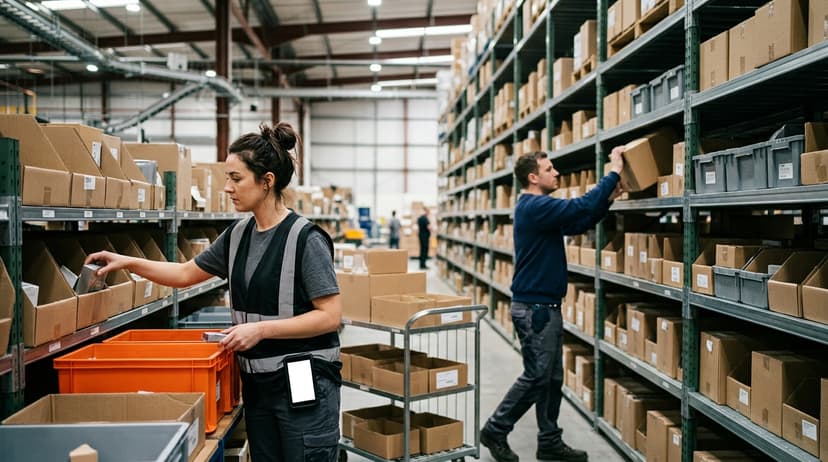
A picker reads a list, walks to a shelf, and pulls the right item in the right quantity. That sounds simple. It is simple when the list is accurate and the shelf is labelled. It gets hard when the list is wrong or the item is not where it should be.
The second step is packing. The packer takes the picked items, puts them in the right box, adds any packing material, seals it, and labels it for shipping. Each of those actions is a chance for an error.
Who This Article Is For
Pick and pack is a process that operations managers at small to mid-size wholesale distributors and fulfilment centres will recognise immediately. You already run pick and pack.
You may run it on paper, on whiteboards, or from memory. You want to understand it more clearly so you can decide whether to change anything. That is exactly the right question to be asking.
Would you rather have it built around your operation?
The first look is free. If you would rather not compare products, describe how your operation already works and we build the system around it.
No build cost. You see it running on your own process first, and the monthly subscription starts only once it is live.
Book a callThe Basic Steps of a Pick and Pack Workflow
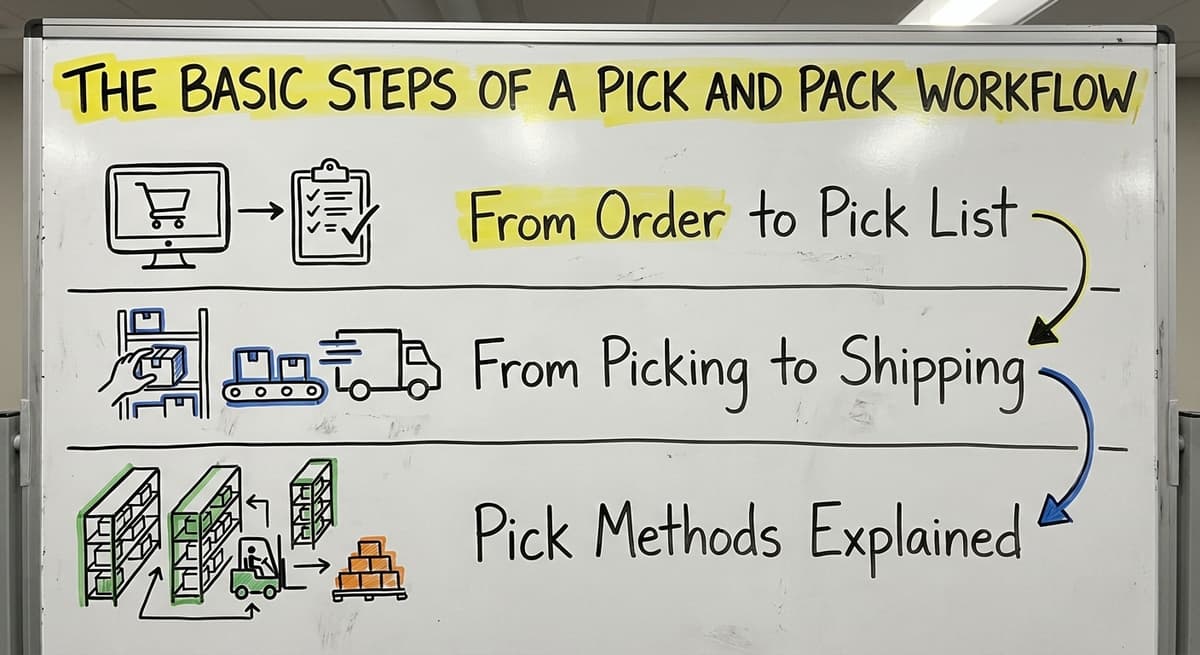
Every pick and pack process follows the same basic path. An order comes in. A pick list is created. A picker moves through the warehouse. Items are staged, packed, labelled, and shipped. The details vary. The sequence does not.
From Order to Pick List
A pick list is a document, printed or digital, that tells a picker what to get and where to find it. It lists the item, the quantity, and the bin or shelf location.
Pick list accuracy is everything. If the list is wrong, the pick is wrong. If the list shows a location that no longer matches the shelf, the picker wastes time or guesses.
Many small warehouses generate pick lists from their accounting software. That works until the inventory data in that software drifts from the physical stock on the shelf. Once that gap opens, every pick list that prints is already wrong.
From Picking to Shipping
OSHA notes that "the warehousing and storage industry includes establishments operating facilities for general merchandise, refrigerated goods, and other products," and its guidance at https://www.osha.gov/warehousing covers the physical risks workers face moving through those facilities every day.
Safe travel paths, clear aisle markings, and consistent shelf labelling are not just good practice. They reduce the chance of injury and the chance of a mispick at the same time.
Reviewed August 2026. Each figure comes from the assumptions stated beside it, so you can substitute your own and the arithmetic still holds.
Once items are picked and staged, the packer verifies the order, selects the right box, packs the items, and applies a shipping label. Each step that happens without a check is a step where an error can hide until a customer calls.
Pick Methods Explained
Warehouses do not all pick orders the same way. The method you use affects how fast orders move and how many errors enter the process.
Single-Order and Batch Picking
Single-order picking means one picker handles one order at a time from start to finish. It is easy to manage and easy to trace when something goes wrong. It is also slow. A picker walks the full warehouse for every order.
Batch picking means one picker pulls items for several orders in a single trip. The picker collects all the items at once and sorts them at the packing station. This cuts travel time. It adds complexity.
If the picker loses track of which item belongs to which order, errors multiply fast.
Zone and Wave Picking
Zone picking divides the warehouse into sections. Each picker owns one zone and only picks from it. Orders pass between zones until all items are collected. This reduces travel time in larger operations. It requires good coordination between zones or items get lost between handoffs.
Wave picking releases orders in scheduled batches, called waves, at set times during the day. It combines elements of batch and zone picking. It works well when demand is high and predictable.
For a 10-to-50-person warehouse, single-order or batch picking is the right starting point. Zone and wave picking make sense when a single picker can no longer cover the whole floor without the travel time becoming a problem.
Where Does Pick and Pack Go Wrong in Small Warehouses?
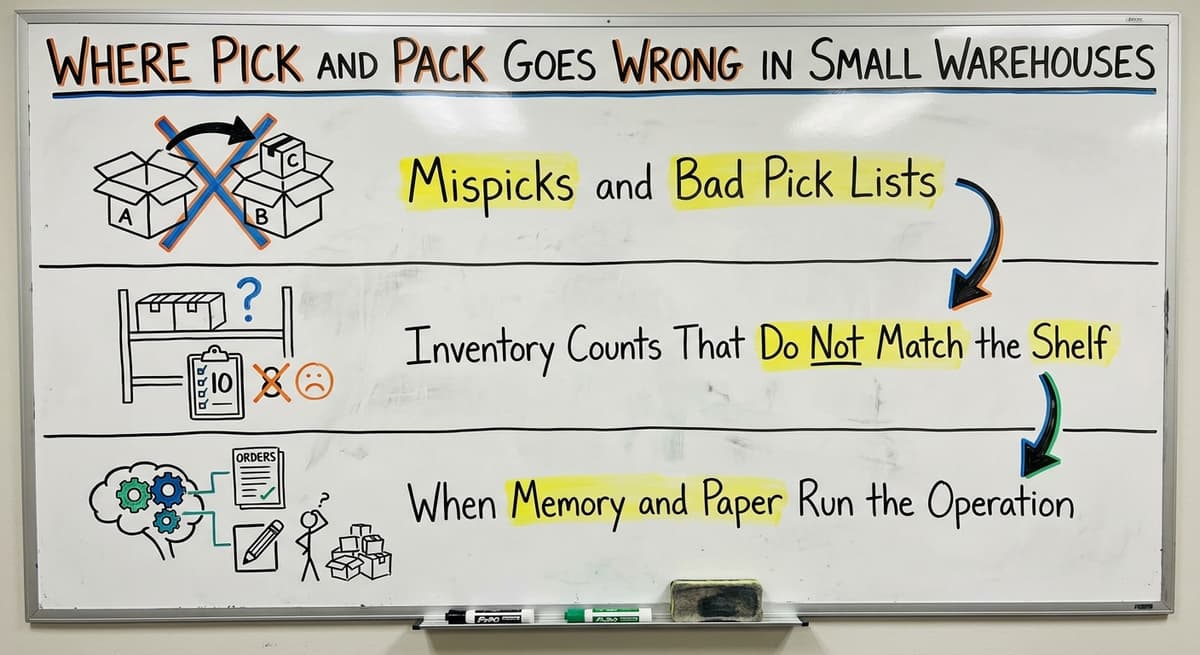
Pick and pack in a small warehouse comes with predictable failure points, and most operations managers already know where the pain lives. This section names it plainly.
Mispicks and Bad Pick Lists
A mispick means the wrong item, the wrong quantity, or the wrong location was pulled. Mispicks happen most often when the pick list is out of date.
A pick list printed from your accounting software at 8 a.m. may already be wrong by 9 a.m. if stock was moved, used, or received without being logged.
They also happen when shelves are not labelled clearly. If a picker has to guess between 2 similar items, they will sometimes guess wrong. That is not a people problem. It is a labelling problem.
Is the comparison easier when one option is built for you?
Yes. Off-the-shelf means fitting your process to the software, and custom is the other way round. The first look costs nothing.
Book a callInventory Counts That Do Not Match the Shelf
Inventory count mismatches are the root of most pick and pack problems in small warehouses. The accounting system shows 40 units. The shelf has 31.
No one knows when the gap opened. It may have been a receiving error 3 weeks ago. It may be a return that was put back but never logged.
The IRS is clear on the obligation to count: "To figure taxable income, you must value your inventory at the beginning and end of each tax year," as stated in IRS Publication 538.
But a year-end count only tells you how bad the gap got. It does not stop the mispicks that happened all year.
This overview of warehouse inventory management software explains how live tracking prevents this kind of drift before it becomes a fulfilment problem.
When Do Memory and Paper Run the Operation?
In many small warehouses, experienced staff carry the operation in their heads. They know where the overflow stock lives. They know which bin label is wrong. They know which customer always orders a substitution. That knowledge is valuable. It is also fragile.
When that person is out sick, everything slows down. Paper pick lists get wet, lost, or ignored.
No one knows where an order is until a shipment is late. These are not signs of a failing team. They are signs that the process has outgrown the tools supporting it.
How Does Pick and Pack Connect to Inventory Accuracy?
Pick and pack performance depends entirely on the quality of the inventory data behind it. A fast, well-organised pick team cannot fix a bad pick list. The list comes first.
The Cycle of Bad Data
Here is how the bad-data cycle runs in most small warehouses. The bookkeeping software shows a count that is wrong. The pick list reflects that wrong count. The picker either cannot find the item or ships the wrong quantity.
A customer complains. Someone fixes the order manually. The correction is rarely logged back into the system. The next pick list for that SKU is still wrong.
Breaking that cycle means fixing the data before the pick list is generated, not after the customer calls.
Cycle Counting as a Practical Fix
Cycle counting means counting a small portion of your inventory on a regular schedule, rather than shutting down for a full physical count once a year.
You count fast-moving SKUs weekly. You count slower items monthly. Over time, your counts stay accurate without a major disruption.
The Warehousing Education and Research Council tracks distribution centre performance benchmarks. Inventory accuracy is one of the core measures they monitor, and it consistently separates high-performing operations from struggling ones.
Cycle counting in a warehouse ranks among the most practical tools available to small operations. The problem is that most small warehouses skip it because there is no easy system to support it. A spreadsheet works for a while. It does not scale.
Why Is Inventory Accuracy a Pick and Pack Problem?
Some warehouse managers treat inventory accuracy as a receiving problem. If receiving logs everything correctly, the counts will be right. That is partly true.
But picks also consume inventory. Returns add to it. Damage removes it. Each of those events is a chance for the count to drift.
Inventory accuracy is a pick and pack problem. It belongs to everyone who touches stock, not just the team at the dock.
What does it look like running on your own process?
The first thing you see is it running on your own process, at no build cost. The subscription starts once the system is live and doing the job, not before.
Book a call
The Role of Software in Pick and Pack Operations
Warehouse management software does specific things on the warehouse floor. It is worth understanding what those things are before deciding whether you need it.
What Does Warehouse Management Software Actually Do?
A warehouse management system, or WMS, is software that manages the movement of goods inside a warehouse. It generates pick lists, tracks where items are, confirms picks before they are finalised, and updates counts as picks happen. It is not accounting software and does not replace the program that manages your books.
Many small warehouses avoid looking at a WMS because they assume it means a large, expensive system that requires months to set up and a consultant to run. That is true of enterprise WMS platforms built for operations with hundreds of staff. It is not true of lighter systems built around how a specific warehouse already works.
Improving inventory accuracy in a small warehouse starts with understanding what a lighter system can do without the enterprise price tag.
Your Accounting Software and Warehouse Software Can Work Together
The most common concern from small warehouse operators about adopting warehouse software is this: we do not want to rip out our accounting platform and start over. That is a reasonable concern. It handles the books well. It was not built to manage bin locations, direct pickers, or confirm scans instantly.
The right warehouse software sits alongside your bookkeeping system. It handles the warehouse floor, while the bookkeeping system handles the books. Data passes between them so nothing is re-keyed. You keep what works. You replace only the parts that were never working.
The limits of financial software for warehouse operations are well documented among small distributors. The answer is not to abandon it. It is to stop asking it to do things it was not designed for.
Barcode Scanning Without a Big Investment
Barcode scanning ranks among the highest-impact tools available to a small warehouse. A picker scans the item before it is placed in the box. If the scan does not match the pick list, the system flags it. The wrong item does not ship.
GS1, the global standards body for barcodes, maintains the standards that make a barcode printed by one company scannable at another. Their guidance is at https://www.gs1.org/standards/barcodes.
Most items in a small warehouse already carry a GS1 barcode. The scanner and the software to read it do not require an enterprise budget.
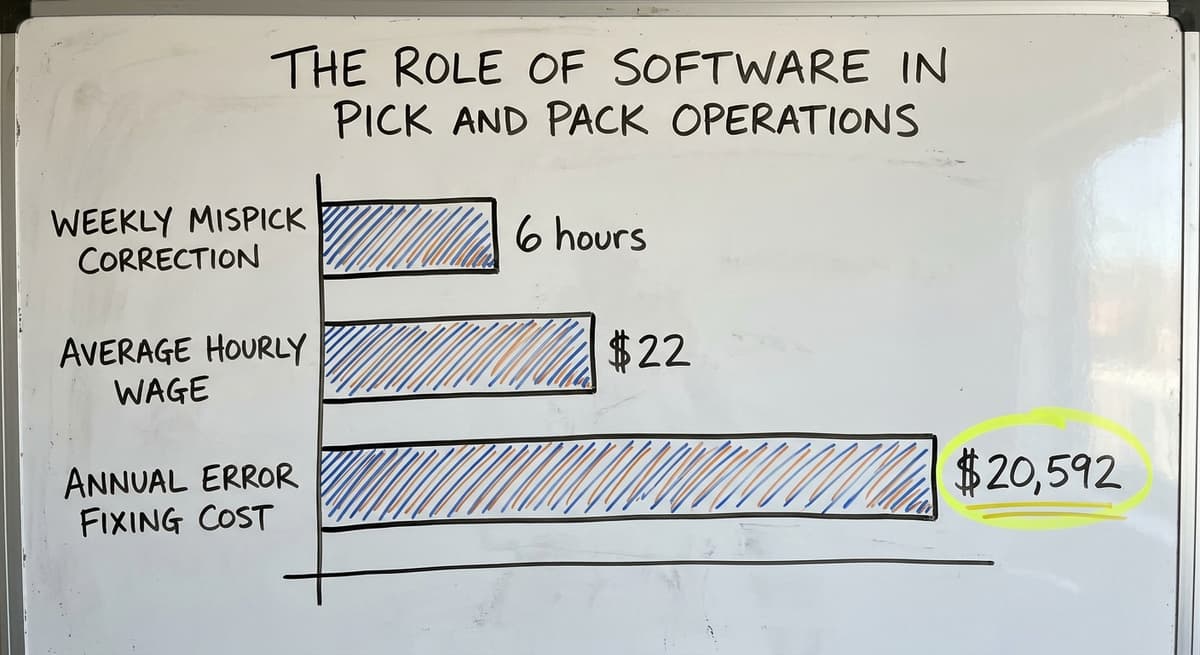
Consider a 3-person pick team spending 6 hours a week correcting mispicks at an average wage of $22 an hour, based on BLS data for hand labourers and material movers. That is $20,592 a year spent fixing errors that a scan-to-verify step could prevent. The scanner pays for itself.

What Does Good Pick and Pack Software Do on the Warehouse Floor?
Good pick and pack software does a small number of things well. Here is what to look for.
The Core Functions That Reduce Errors
Software that actually helps pick and pack operations will do all of the following:
- Generate pick lists automatically when orders are placed or released
- Direct pickers to the correct bin or shelf location
- Confirm the right item was scanned before allowing the pick to proceed
- Update inventory counts in real time as items are picked
- Flag discrepancies so supervisors can act before orders ship
These functions address the 5 most common failure points in a manual pick and pack process. None of them require an enterprise system to deliver.
The Functions That Build Accountability
Beyond error prevention, good pick and pack software builds accountability into the workflow:
- Tracks packer activity so each order is tied to the person who packed it
- Produces packing slips and shipping labels without re-keying data
- Gives supervisors a live view of order status at any point in the day
That last point matters more than it sounds. When a customer calls asking where their order is, a supervisor should be able to answer in 30 seconds. On a paper system, that question takes 10 minutes and a phone call to the floor.
Custom warehouse software for small distributors is built around these specific needs rather than the needs of a 500-person operation.
Start with a free first look
A 30 minute call maps your operation and gives you a clear picture of what we would build. No obligation and nothing to install.
Book a call
Pick and Pack Best Practices for Small and Mid-Size Warehouses
Pick and pack best practices for small and mid-size warehouses work. None of them require a six-figure software budget. Most of them cost nothing but discipline.
Organise the Warehouse Around the Work
Fast-moving items should be closest to the packing station. This sounds obvious. In most small warehouses, items are stored where they fit, not where they should be.
Moving your top 20 SKUs to the front of the warehouse can cut pick travel time by a third without changing anything else.
Label every bin and shelf consistently. Use the same format everywhere. If a picker has to guess which bin is which, errors follow. A label that peeled off 6 months ago and was never replaced is a mispick waiting to happen.
Build Verification Into the Process
Add a confirmation step before packing. It does not have to be a scanner. A second set of eyes on each order before the box is sealed catches a large share of errors.
Standardise box sizes so packers are not guessing which box fits which order. Wrong box size leads to damaged goods and extra freight cost.
Keep pick lists tied to live inventory, not a snapshot from this morning. If your system cannot update in real time, check counts on high-velocity SKUs before the day's orders are released.
Document the Process
Write down how pick and pack works in your warehouse. Not a policy manual. A one-page process map that a new hire can follow on day one. If the process lives only in one person's head, the operation is one resignation away from chaos.
Run cycle counts on high-velocity SKUs every week. Do not wait for year-end. The NIST Manufacturing Extension Partnership recommends regular process review as a core supply chain discipline.
A weekly count on your top 30 SKUs takes less than an hour and keeps your pick lists honest.
The US Census Bureau's Monthly Wholesale Trade data shows that inventory-to-sales ratios for wholesale firms shift regularly. Operations that count are better placed to respond when demand changes fast.
When Is It Time to Move Beyond Paper Pick Lists?
Paper pick lists have worked for a long time in small warehouses. The question is whether they still work at the volume you are running today.
The Signs That Paper Has Hit Its Limit
Three signs tell you the paper system is no longer enough:
- Order volume is growing but accuracy is falling. More orders, more errors. The two should not move together.
- Staff spend more time correcting errors than fulfilling orders. If your team is re-picking, re-packing, and re-labelling, the correction work is eating the fulfilment work.
- A supervisor cannot answer "where is that order right now?" without walking the floor or calling someone.
If any one of those is true, the paper system is costing you more than a software system would.
The Transition Does Not Have to Be Painful
Many small warehouse operators delay moving from paper pick lists because they expect the transition to be disruptive. That is not always true. Software built around your existing workflow, rather than one that forces a new one, can be running in days rather than months.
The goal is not to replace everything. It is to replace the parts that are breaking. Keep your bookkeeping software. Keep your team's knowledge. Add the tools that give that knowledge a reliable structure.
This Is a Natural Evolution, Not a Crisis
Every warehouse that runs well today on paper ran well on paper at a lower volume. Growth is what changes the equation.
A process that handled 50 orders a day cleanly may not handle 200 orders a day cleanly. That is not a failure. It is a signal that the operation has grown past its current tools.
The right response is a measured one. Understand what is breaking. Find the tool that fixes that specific thing. Build from there.
Pick and Pack in Warehouse Operations: A Quick Summary
Pick and pack in warehouse operations is the heart of order fulfilment. Its accuracy depends on 3 things: clean inventory data, a clear process, and the right tools for the size of the operation.
Small and mid-size warehouses do not need enterprise software to achieve high accuracy. They need inventory data that matches the shelf, pick lists that reflect that data, and a verification step before items are packed. Those 3 things, done consistently, will outperform a complex system run poorly.
The goal is not the most sophisticated system. It is the right system for where you are right now, with a clear path to the next level when you need it.
If your pick and pack process is running on paper and standard accounting software and you are starting to feel the strain, the next step does not mean swapping out the whole system. It is an honest look at where the errors enter and what the simplest fix would be. Start there.
If you want help mapping that out for your specific operation, The Software Society builds custom workflow systems around how your warehouse already works, so you keep what is good and fix what is not.
Frequently asked questions
Frequently asked questions
What is pick and pack in a warehouse?
Pick and pack in a warehouse means selecting the right items from storage locations and packing them into outbound shipments for customers. The picker pulls items from shelves based on a pick list.
The packer places those items in the correct box, seals it, and prepares it for shipping. Every warehouse that fulfils orders runs some version of this process, whether it uses software or paper lists.
Is picker packer a hard job?
Picker packer work is physically demanding. It involves walking long distances, lifting items repeatedly, and maintaining accuracy under time pressure.
OSHA recognises warehousing as a sector with significant physical hazards, including those from repetitive motion and moving through busy floor environments. The job is not technically complex, but it requires focus and physical stamina across a full shift.
Is picker packer a warehouse job?
Yes. Picker packer is a warehouse job. It is one of the most common roles in any warehouse that fulfils orders.
The work happens on the warehouse floor, moving between storage locations and packing stations. It is distinct from receiving, shipping coordination, and inventory management, though in smaller warehouses one person may cover more than one of those roles.
Is pick packing a stressful job?
Pick packing can be stressful, particularly when order volume climbs, pick lists are inaccurate, or the warehouse is disorganised.
Stress rises when pickers spend time searching for items that are not where the list says they should be, or when errors discovered after packing create pressure to re-do completed work. A well-organised warehouse with accurate inventory data reduces that stress significantly.
What is the difference between batch picking and zone picking?
Batch picking means one picker collects items for several orders in a single trip through the warehouse, then sorts them at the packing station. Zone picking divides the warehouse into sections, with each picker responsible for one section.
Orders pass between zones until all items are collected. Batch picking works well in smaller warehouses. Zone picking suits larger operations where travel time across the full floor becomes a problem.
Do I need to replace my accounting software to improve my pick and pack process?
No. Your accounting program handles the books well and does not need to be replaced. The issue is that it was not built to manage bin locations, direct pickers, or confirm scans instantly.
The right approach is to add warehouse software that sits alongside it and handles the warehouse floor, while the accounting program continues to handle the books. Data passes between the two systems so nothing needs to be re-keyed.
How do I know when my paper pick list system is no longer working?
Three signs point to a paper system that has hit its limit. First, order volume is growing but accuracy is falling. Second, your team spends more time correcting errors than fulfilling orders.
Third, a supervisor cannot say where a specific order is without walking the floor or calling someone. If any one of those is true, the cost of the paper system is likely higher than the cost of replacing it.
Can a small warehouse use barcode scanning without a big investment?
Yes. Most items in a small warehouse already carry a GS1-standard barcode. A basic scanner and the software to read it do not require an enterprise budget.
A scan-to-verify step, where a picker scans each item before it goes in the box, catches mispicks before they ship. For a small team spending several hours a week correcting errors, a basic scanning setup can pay for itself within a few months.
What equipment is used for picking and packing?
The page focuses on the process rather than specific machinery, describing pick and pack as relying on pick lists, either printed or digital, along with shelving with clear labels, bins for storing items, boxes, packing materials, and shipping labels.
A picker uses the list to locate and pull items, and a packer uses boxes, packing material, and labels to prepare the order for shipment.
What are the main types of warehouse picking?
The main types are single-order picking, batch picking, zone picking, and wave picking. Single-order picking has one picker complete one order at a time, which is simple but slow.
Batch picking lets a picker collect items for several orders in one trip. Zone picking divides the warehouse into sections with dedicated pickers, and wave picking releases orders in scheduled batches, combining elements of batch and zone methods for high, predictable volume.
How can a warehouse improve pick-and-pack efficiency?
Efficiency improves by fixing the accuracy of the data behind the process first, since a fast pick team cannot overcome a bad pick list. This means keeping inventory counts matched to actual shelf stock, labelling shelves clearly, logging corrections back into the system immediately, and choosing a picking method suited to warehouse size, such as single order or batch picking for smaller teams and zone or wave picking as volume grows.
What does a pick-and-pack worker do?
A pick and pack worker carries out two core actions. As a picker, they read a list, walk to the correct shelf or bin, and pull the right item in the right quantity.
As a packer, they verify the order, select the appropriate box, place the items inside with any needed packing material, seal the box, and attach the correct shipping label before it goes out.
Not sure this is the right shape for your operation?
The call is free. Describe how the work runs today. We map it on a call and show you what it would look like built around that, before you spend anything.
Book a callRelated guides
The rest of this guide, for the parts of the job this page does not cover.
Guides
- Warehousing Pick and Pack
- Pick List
- Pick Lists
- Warehouse Inventory Management Software
- Warehouse Inventory Tracking Software
- Warehouse Inventory Management Systems
- Warehouse Receiving Software
- Warehouse Inventory Systems
- Warehouse Stock Management Software
- Warehouse Management System Top 10
- Software for Warehouse Management System
- Warehouse Shipment
- Warehouse Tracking System
- Warehousing Operations
- Inventory and Warehouse Management Software
- Small Business Warehouse Management System
- Cloud Based Warehouse Management
- Warehouse Management System Types
- Warehouse Inventory Management System
- List of Warehouse Management Software