


Warehouse Shipment
A warehouse shipment is the full process of moving goods from storage to the customer or next stop. It includes picking the right items, packing them, printing a label, staging the order, and handing it to a the software. It is not just the moment a box leaves the dock. Every step before that moment matters.
Published 29 July 2026. Reviewed and updated 15 September 2026.
Book a callWhat Does Warehouse Shipment Actually Mean?
From Storage to Customer: The Full Picture
A warehouse shipment covers more ground than most people think. It starts when an order arrives and ends when a shipping partner scans the package. Everything in between is part of the shipment process.
For wholesale distributors and fulfilment centres, this matters a lot. A single order might include dozens of line items. One missed step creates a problem the customer feels, not just the warehouse.
Warehouse shipment also covers inbound movement: receiving goods from a supplier and putting them in the right place. If inbound is handled badly, outbound shipment suffers later.
Speed and Accuracy Are the Two Goals
Every warehouse shipment operation is trying to do 2 things well: ship the right items and ship them fast.
Those 2 goals pull against each other when the process is manual. Speed creates errors. Checking for errors slows things down. A good shipment process does both without asking staff to choose.
The rest of this article explains where things go wrong, why inventory is always part of the problem, and what a better system looks like for a 5-to-100-person operation.
Would you rather have it built around your operation?
The first look is free. If you would rather not compare products, describe how your operation already works and we build the system around it.
No build cost. You see it running on your own process first, and the monthly subscription starts only once it is live.
Book a callThe Steps Inside a Warehouse Shipment
A warehouse shipment is 5 steps in a fixed order, and each one is a place the next can go wrong.
Order Receipt and Pick List Generation
Every warehouse shipment starts with an order. The order comes in by email, phone, or an online system. Someone then creates a pick list, the document that tells a warehouse worker what to grab and where to find it.
The obligation behind all of this is not optional. IRS Publication 538 states: “To figure taxable income, you must value your inventory at the beginning and end of each tax year.” A stock figure nobody trusts makes that number a guess.
In many small operations, a person types this list by hand or copies it from an email. That is where the first errors creep in. A wrong item number or a misread quantity starts a chain of problems.
A better approach generates the pick list automatically from the confirmed order. No typing. No copy-paste.
Picking, Packing, and Labelling
Picking means a worker walks the warehouse floor and collects the items on the list. Packing means those items go into the right box with the right materials. Labelling means the correct shipping label goes on the outside.
Reviewed August 2026. Each figure comes from the assumptions stated beside it, so you can substitute your own and the arithmetic still holds.
OSHA notes that "The warehousing and storage industry includes establishments operating facilities for general merchandise, refrigerated goods, and other products", and it sets clear rules about how people move safely on a warehouse floor. Safe movement and accurate picking go together.
Errors at picking are the most common and the most costly. A wrong item packed and labelled correctly still goes to the wrong customer.
Staging, the software Handoff, and What Gets Missed
Staging is the warehouse shipment step of placing packed orders in a zone ready for the shipping partner. The shipping partner arrives, scans the packages, and takes them. That scan is the handoff.
This final step is where silent failures happen. A box staged in the wrong area misses the shipping partner. A label that did not scan properly causes a delay the team does not know about until the customer calls.
Logging the shipping partner handoff with a timestamp and a tracking number tied to the original order closes this gap. Without that log, the shipment process has no clear end point.
Why Does Warehouse Shipment Go Wrong?
A warehouse shipment goes wrong at the handoffs, and the 4 most common are below.
The Most Common Failure Points
Most warehouse shipment errors come from the same short list:
- Wrong item picked because the pick list had the wrong SKU
- Wrong quantity because stock was not where the system said it was
- Missing or wrong label because it was printed from a separate spreadsheet
- Shipping partner missed because staging was not tracked
None of these are unusual. They happen every day in operations that are running on printed sheets and email updates.
How Do Manual Processes Create Gaps?
Manual processes create gaps between steps. An order arrives by email. Someone reads it and types up a picking list.
The picker grabs items and marks the sheet by hand. Someone else packs and prints a label from a different file. No single system connects these steps.
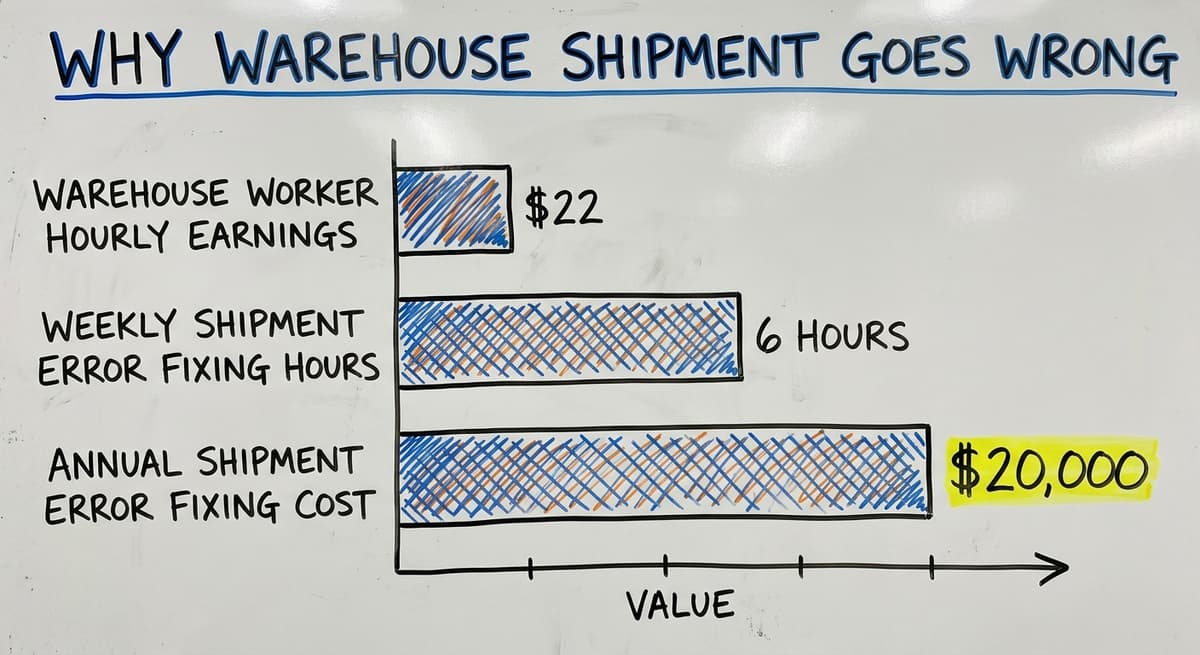
Each handoff is a chance for information to change or get lost. The US Bureau of Labor Statistics shows that warehouse workers earn around $22 per hour.
Three people spending 6 hours a week fixing shipment errors costs over $20,000 a year. That is before counting re-ship costs or lost customer trust.
The Compounding Effect of One Error
One error at picking does not stay one error in a warehouse shipment. A wrong item gets packed. The label is printed for the wrong item.
The box ships. Now the team must find the error, contact the customer, arrange a return, re-pick the right item, re-pack, re-label, and re-ship.
That is at least 6 extra steps from 1 mistake. For an operation running on accounting software and spreadsheets, each of those steps is manual.
The cost in staff time alone is significant. The cost in customer trust is harder to measure but just as real.
Is the comparison easier when one option is built for you?
Yes. Off-the-shelf means fitting your process to the software, and custom is the other way round. The first look costs nothing.
Book a callHow Does Shipment Accuracy Connect to Inventory?
Warehouse shipment accuracy is inventory accuracy seen from the dock: the same numbers, one step later.
The Direct Link Between Inventory Records and Shipments
Inventory records drive the pick lists behind every warehouse shipment. If the system says 50 units are in bin A3, that pick list sends a worker to bin A3.
If only 30 units are actually there, the pick fails. The worker either grabs the wrong thing or comes back empty-handed.
The IRS requires that businesses "value your inventory at the beginning and end of each tax year." That is a legal floor, not a target. Real shipment accuracy needs inventory counts that are right all the time, not just at year end.
The Feedback Loop That Makes Things Worse
Bad warehouse shipments make inventory data worse. A short pick leaves items unaccounted for. A return that is not logged puts stock back in the system twice. Over time, the gap between what the system says and what is on the shelf grows.
That gap creates more bad pick lists. More bad pick lists create more bad shipments. The loop runs until someone stops it with a full stock count, and that takes time and stops normal work.
Why Do Small Operations Feel This Most?
An operation with 5 to 100 staff cannot absorb this rework the way a large distribution centre can. There is no spare team to investigate errors. The same people picking orders are also fixing the ones that went wrong.
Fixing shipment problems almost always means fixing inventory visibility first. Better inventory data leads directly to better pick lists, and better pick lists lead directly to better warehouse shipments. Inventory tracking for small distributors is not a separate project. It is the same project.

What Does Good Warehouse Shipment Tracking Look Like?
Good warehouse shipment tracking is a status on every order and an exception flag before the customer calls.
Visibility at Every Step
In a well-tracked warehouse shipment process, every order has a status. Anyone in the operation can see where each order is at any moment: received, picked, packed, labelled, staged, or with the shipping partner.
That visibility removes the need to chase status by phone or email. It also means problems surface inside the building, not after the shipping partner leaves.
The Warehousing Education and Research Council sets benchmarks for distribution centre performance. Shipment accuracy and on-time dispatch are among the core measures. Visibility is what makes those measures trackable.
What does it look like running on your own process?
The first thing you see is it running on your own process, at no build cost. The subscription starts once it is live and doing the job, not before.
Book a callAutomatic Pick Lists and System-Printed Labels
Good warehouse shipment tracking means pick lists come from the system, not from a person typing. Once an order is confirmed, that pick list generates automatically. It reflects what is actually in stock, not what was in stock last week.
Labels are printed from the same system. No copy-paste from an email. No handwriting.
GS1 barcode standards mean a label printed in one warehouse scans correctly at any shipping partner's facility. That only works if the label is built from clean data in the first place.
Flagging Exceptions Before They Become Problems
Exceptions happen in every warehouse shipment process. A short pick, a damaged item, a shipping delay. In a good system, these are flagged the moment they occur. The team knows before the customer does.
Without that flag, the exception becomes a complaint. The team then spends time investigating something that already left the building. Catching it early costs far less than fixing it after dispatch.
The Role of Software in Managing Warehouse Shipments
Software is the layer that turns a warehouse shipment from a chain of notes into a chain of scans.
What Does Warehouse Inventory Management Software Actually Do?
Warehouse inventory management software connects the order to every step that follows. When an order comes in, the system creates the pick list.
When the pick is done, the system updates stock. When the label prints, the system logs it. When the shipping partner scans, the system records it.
No one has to move data from one place to another by hand. The record exists as a side effect of the work, not of someone remembering to write it down.
This is what separates a managed shipment process from a manual one. Pick and pack improvements come from removing the gaps between steps, not from asking people to work faster.
Software Built for Your Size, Not Scaled Down From Enterprise
Many operations managers hear "software" and think of a large ERP system with a long setup, a big price tag, and a team of consultants. That is one option. It is not the only one.
Software built around how a 20-person wholesale distributor actually works is very different from enterprise software adjusted to fit. The right tool fits the process. It does not ask the process to change to fit the tool.
Small warehouse software can handle order fulfilment, pick list generation, label printing, and shipping partner logging without requiring a full IT project to set up.
Flagging Problems Before the the software Arrives
The most valuable thing software does for warehouse shipment is flag problems early. A short pick is visible the moment the picker logs it.
A missing label shows as an open step. A staged order with no shipping partner scan after the expected pickup window raises an alert.
These flags turn reactive work into proactive work. The team fixes problems while they still can, not after the customer has already called.

Keeping Your Accounting Software and Adding Shipment Control
What Does Your Accounting Software Do Well and Where Does It Stop?
The accounting software handles accounting well. It tracks invoices, payments, and financial records. It is not built for real-time warehouse shipment tracking. It does not know what bin an item is in. It does not generate pick lists. It does not log a shipping partner handoff.
That is not a criticism of the bookkeeping software. It was not designed for those tasks. The gap is between the order in that platform and the shipment leaving the dock. That gap is where errors live.
Filling the Gap Without a Full Migration
The right move for most operations is not replacing the accounting software. It is filling the gap between the accounting software and the warehouse floor.
Custom software can sit in that space, handling pick lists, packing, labelling, staging, and shipping partner handoff, while the accounting software keeps doing what it does.
This is how custom warehouse software works with your accounting platform: the order lives there, the shipment process runs in a connected system, and the two stay in sync. No double entry. No full ERP migration. No throwing away what already works.
Before and After: A Simple Picture
Before, the warehouse shipment starts like this: an order arrives by email. Someone reads it and types a pick list. The picker marks the sheet by hand.
A label is printed from a spreadsheet. The shipping partner takes the box. No one knows if it was the right box until the customer confirms.
After: The order syncs from the accounting software. The system generates a pick list. The picker logs each item. The label prints from the system.
The shipping partner scan closes the order. Anyone can see the status at any point. Exceptions are visible before the shipping partner arrives.
That shift does not require a new accounting system. It requires a layer between the order and the dock.
Start with a free first look
A 30-minute call covers your operation and gives you a clear picture of what we would build. No obligation and nothing to install.
Book a callSigns Your Warehouse Shipment Process Needs a Better System
The warehouse shipment process is past its limit when 3 or more of the symptoms below are daily.
Day-to-Day Symptoms Worth Naming
The signs that a shipment process has outgrown its current setup:
- Staff spend part of each day chasing shipment status by phone or email
- Customers call asking where their order is before the team knows
- Errors are found after the shipping partner has already left
- Pick lists are printed and then marked up by hand when stock is not where it should be
- There is no single place to see all open shipments and their current status
- Month-end reconciliation takes days because shipment records live in multiple places
These are normal growing pains for a 5-to-100-person operation. They are not failures. They are signs that the process has grown past what a manual system can handle.
What Do These Symptoms Actually Cost?
Each of these warehouse shipment symptoms has a cost. Staff time spent chasing status is time not spent on orders.
Customer calls about missing shipments damage trust that took time to build. Errors found after dispatch cost at least the re-ship fee plus the staff time to investigate.
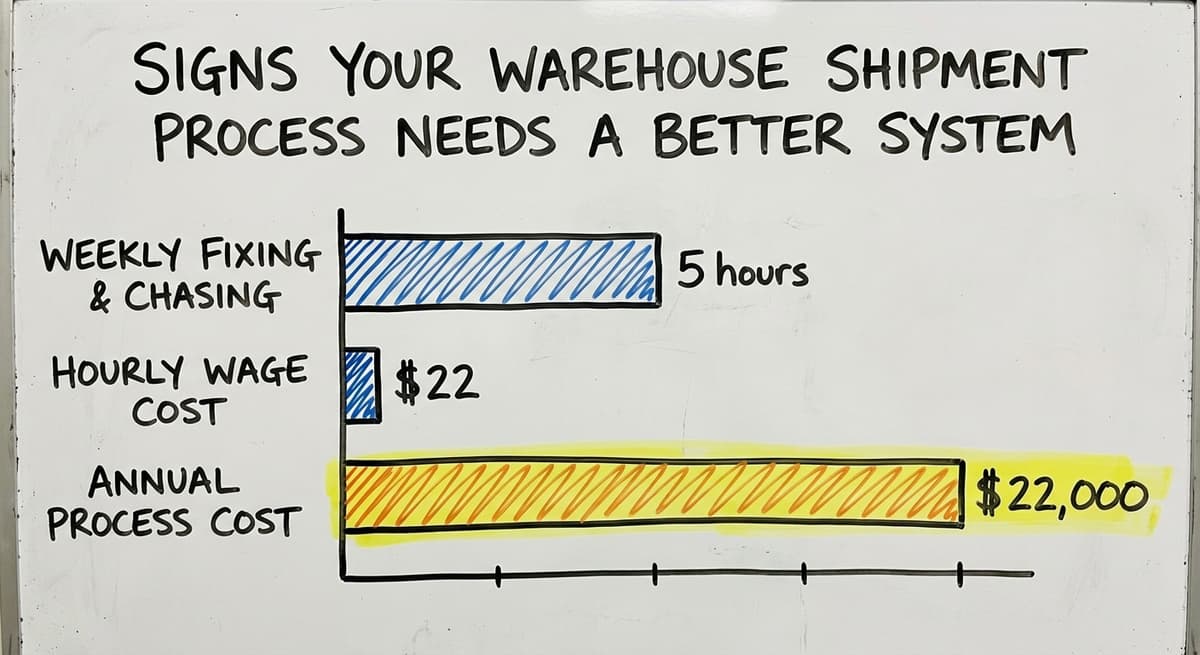
An operation with 4 people each spending 5 hours a week on status chasing and error fixing, at $22 an hour, spends over $22,000 a year on that work alone. A better system does not eliminate all of that. It cuts most of it.
Framing This as Adding Control, Not Admitting Failure
Adopting a warehouse shipment management solution is not an admission that the current setup failed. That matters. The goal is not to replace what works. It is to add control over the parts that have started to slip.
Order fulfilment software for wholesale distributors is most useful when it fits the operation rather than asking the operation to fit it. The right question is not "are we broken" but "what would it look like if this ran more smoothly."

Questions to Ask Before Choosing a Shipment Management Solution
There are 8 questions to ask before choosing a warehouse shipment solution, split between fit and support.
Questions About Fit and Integration
Before talking to any vendor, have clear answers to these questions about fit and integration:
- Will this work with our accounting software or ask us to replace it?
- Is this built for an operation our size, or is it enterprise software adjusted down?
- Can it be changed as our process changes, or are we locked into a fixed workflow?
- How long does setup take and who does the actual work?
These questions cut through most sales conversations quickly. A vendor who cannot answer them clearly is telling you something.
Questions About Support and Ownership
- Who do we call when something goes wrong: a support ticket or a real person?
- Do we own the system or does the vendor?
- What happens to our data if we stop using the service?
Use these questions with every vendor you speak to. The answers reveal whether the vendor is selling software or solving a problem.
A partner who works alongside your team, adjusts the system as you grow, and picks up the phone when something breaks is a very different thing from a platform you buy and figure out alone.
The NIST Manufacturing Extension Partnership offers vendor-neutral guidance on supply chain process that can help frame these conversations before they start.
Frequently asked questions
Frequently asked questions
What is shipping in a warehouse?
Shipping in a warehouse is the outbound side of warehouse operations. It covers everything from picking items off the shelf to handing them to a shipping partner.
The steps are: receive the order, generate a pick list, pick the items, pack them, print a label, stage the box, and hand it off. Each step has to be right for the shipment to arrive correctly.
How long does warehouse delivery take?
The answer depends on the operation and the shipping partner. Most wholesale distributors process an order and hand it to a shipping partner within 1 to 2 business days.
Transit time then adds 1 to 5 days depending on distance and service level. Operations with manual processes take longer because errors slow down each step. A well-tracked shipment process cuts internal processing time significantly.
What are the 7 types of warehouses?
The common types are: private warehouses (owned by the business using them), public warehouses (rented space open to multiple users), bonded warehouses (for goods held under customs control), distribution centres (built for fast throughput rather than long-term storage), cold storage warehouses (temperature controlled), fulfilment centres (focused on picking and shipping direct to consumers), and smart warehouses (using automation and software to manage movement).
Most small distributors operate from a private warehouse or a rented distribution space.
What are the three types of shipping?
The 3 main types of warehouse shipment are: parcel shipping (small packages sent through national parcel carriers), freight shipping (larger loads moved by truck, rail, or sea), and less-than-truckload (LTL) shipping (a partial truck load shared with other shippers).
Most wholesale distributors use a mix of parcel and LTL depending on order size.
Why do warehouse shipments go wrong and what does it cost?
Most warehouse shipment errors come from manual steps between order and dispatch: a picking list typed by hand, a label copied from a spreadsheet, a staging area with no log. One wrong item picked can create 6 or more extra steps to fix.
The cost includes re-ship fees, staff time to investigate, and lost customer trust. An operation with 4 people spending 5 hours a week fixing errors at $22 an hour spends over $22,000 a year on that work alone.
Can a small warehouse manage shipments without replacing your accounting software?
Yes. The accounting software handles accounting well but it is not built for real-time shipment tracking.
The right approach is to add a layer between the order in the accounting software and the shipment leaving the dock. That layer handles pick lists, packing, labelling, and shipping partner handoff while the accounting software keeps doing what it does. No full ERP migration is needed.
What software features actually help with warehouse shipment management?
The features that make the biggest difference are: automatic pick list generation from confirmed orders, real-time inventory counts so pick lists reflect what is actually on the shelf, system-printed labels tied to the original order, shipping partner handoff logging with a timestamp and tracking number, and exception alerts that flag problems before the shipping partner arrives. These features remove the manual gaps where most errors occur.
How do I know if my current shipment process needs a better system?
Clear signs include: staff chasing shipment status by phone or email each day, customers calling before the team knows where an order is, errors found after the shipping partner has already left, pick lists marked up by hand because stock is not where the system says it is, and month-end reconciliation taking days because records live in multiple places. These are normal growing pains, not failures. They signal that the process has grown past what a manual setup can handle.
What documents are required for a warehouse shipment?
A warehouse shipment requires a picking list, which tells a worker what to grab and where to find it, generated from the confirmed order. It also needs a shipping label printed for each package before staging.
Beyond these, accurate inventory records matter, since businesses must value stock on hand at the start and close of each tax year, which keeps the paperwork trail reliable.
Not sure this is the right shape for your operation?
The call is free. Describe how the work runs today. We map it on a call and show you what it would look like built around that, before you spend anything.
Book a callRelated guides
The rest of this guide, for the parts of the job this page does not cover.
Guides
- Drop Ship Inventory Management
- Warehouse Inventory Management Software
- Warehouse Inventory Tracking Software
- Warehouse Inventory Management Systems
- Pick and Pack in Warehouse
- Warehouse Receiving Software
- Warehouse Inventory Systems
- Warehouse Stock Management Software
- Warehouse Management System Top 10
- Software for Warehouse Management System
- Warehouse Tracking System
- Warehousing Operations
- Inventory and Warehouse Management Software
- Small Business Warehouse Management System
- Cloud Based Warehouse Management
- Warehouse Management System Types
- Warehouse Inventory Management System
- List of Warehouse Management Software
- Warehouse Management Costs
- Warehouse Management Cloud
- Warehouse Management System Examples