

Warehouse Tracking System
A warehouse tracking system is the record of where every item, pallet, and order sits right now. Running a warehouse without one is like running a restaurant without a ticket system: everyone is busy, but nobody agrees on what comes next. This guide, reviewed in September 2026, is for owners and operations managers of warehouses with 5 to 100 staff.
Published 31 July 2026. Reviewed and updated 15 September 2026.
Book a callWhat Does a Warehouse Tracking System Actually Do?
A warehouse tracking system is software that records where items are, how many exist, and what is moving in or out. That is the whole job. Everything else, the scanning, the pick lists, the reports, is just how it does that job.
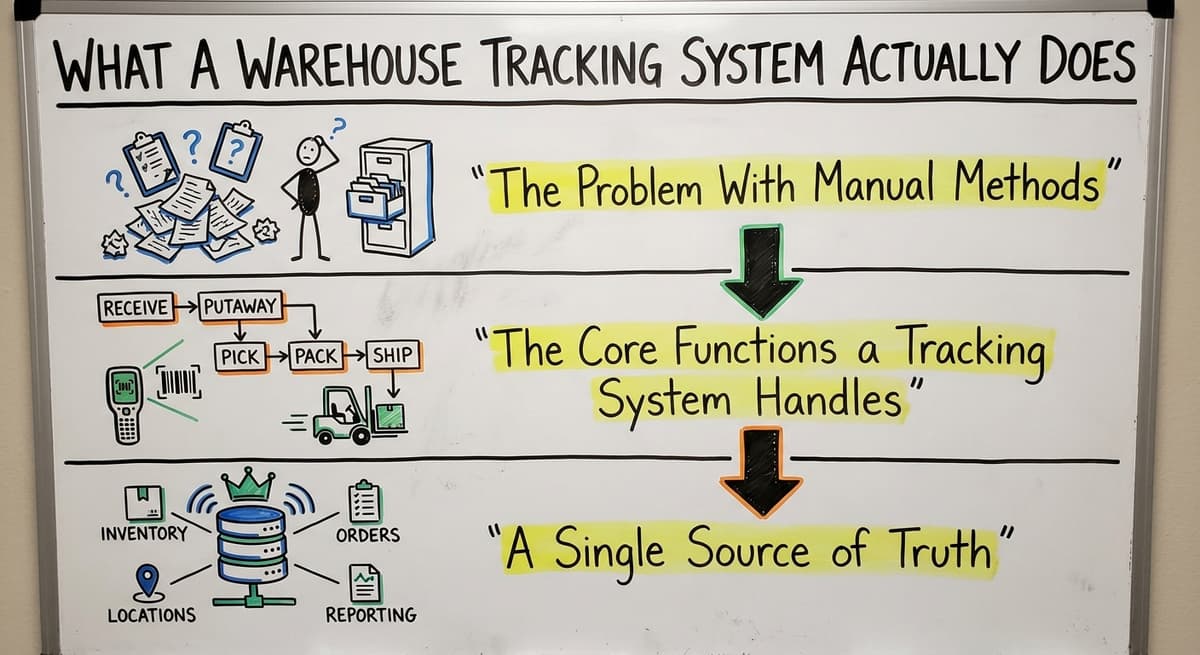
The Problem With Manual Methods
Most small warehouses still run on clipboards, spreadsheets, printed pick lists, and email chains. These tools work fine at low volume. The problem is they do not scale.
A spreadsheet updated at the end of the day is already out of date. A printed pick list does not know that someone just picked the last three units of a product. Manual methods create gaps, and gaps create errors.
The Core Functions a Tracking System Handles
A warehouse tracking system covers the full movement of inventory through the building:
- Receiving: Log what arrived and match it to the purchase order
- Putaway: Direct staff to the right bin or shelf
- Picking: Guide staff to the correct location for each order
- Packing and shipping: Confirm each order before it leaves
- Cycle counting: Verify inventory on a rolling basis without a full shutdown
A Single Source of Truth
The real value is that everyone sees the same numbers at the same time. A wholesale distributor shipping 200 orders a day cannot afford to have the office team working from one count and the floor team working from another.
A warehouse tracking system creates one record that reflects what is actually in the building, updated in real time as items move.
Would you rather have it built around your operation?
The first look is free. If you would rather not compare products, describe how your operation already works and we build the system around it.
No build cost. You see it running on your own process first, and the monthly subscription starts only once it is live.
Book a callSigns Your Current Setup Is Holding You Back
Some problems are easy to spot. Others build slowly until they become expensive. Here are the signs that your current process is creating operational drag.
The obligation behind all of this is not optional. IRS Publication 538 states: “To figure taxable income, you must value your inventory at the beginning and end of each tax year.” A stock figure nobody trusts makes that number a guess.
Reviewed August 2026. Each figure comes from the assumptions stated beside it, so you can substitute your own and the arithmetic still holds.
Staff Are Losing Time to Simple Problems
- Staff spend time searching for items that should be easy to find
- New hires take weeks to learn the layout because nothing is documented
- Managers cannot answer basic questions like "how much of this do we have right now" without walking the floor or calling someone
None of these are minor inconveniences. At 50 orders a day, they are manageable. At 200 orders a day, they are expensive.
Order Accuracy Is Slipping
Orders ship with wrong quantities or wrong products when printed pick lists go stale before anyone uses them.
Inventory counts in the accounting system do not match what is physically in the building. These are not data entry problems. They are process problems, the kind a warehouse tracking system exists to solve.
Receiving Is a Bottleneck
Receiving slows down when someone has to manually enter every item into a spreadsheet or the accounting software after it arrives. That delay means items sit in a staging area instead of going into stock, so pickers cannot find them and orders slip.
Workplace organization also matters here. As OSHA states directly on their warehousing safety page, "good housekeeping and storage practices are essential to a safe and efficient warehouse." A system that guides putaway from the moment items arrive supports both accuracy and safety.

Core Features to Look For in a Warehouse Tracking System
Not every feature matters equally. A 10-person operation picking 50 orders a day has different needs than a 75-person operation running three shifts. Match the features to the size and type of operation. The sections below cover the building blocks of a useful system.
Real-Time Inventory Visibility
Real-time visibility is the first thing a warehouse tracking system delivers: the count on screen is the count on the shelf.
Why Real-Time Matters
Every scan or transaction updates stock levels immediately rather than at the end of the day.
Staff on the floor and managers in the office see the same numbers at the same time. This removes the need for emergency stock checks before committing to a customer order.
A static spreadsheet is always slightly out of date. Even if someone updates it every hour, it does not reflect the pick that just happened two minutes ago. Real-time inventory visibility closes that gap.
How It Changes Daily Operations
When inventory visibility is live, the conversation changes. Instead of "let me check and call you back," the answer to a customer question is immediate.
Instead of discovering a shortage when the picker reaches the shelf, the system flags it before the order goes out. This is one of the clearest day-one improvements most operations notice.
Location and Bin Tracking
Location tracking is the warehouse tracking system's answer to the question every picker asks: where is it?
Assigning a Home to Every SKU
Bin location tracking means every SKU has an assigned address: aisle, shelf, bin.
The system directs pickers to the right spot instead of relying on memory or tribal knowledge. This matters most when staff turn over or volume spikes and temporary workers need to be productive quickly.
For smaller operations, fixed slotting (each SKU always lives in the same spot) is the right starting point.
Dynamic slotting, moving high-velocity items closer to the shipping area as demand changes, is useful but adds complexity that most small warehouses do not need right away.
Faster Onboarding for New Staff
When the system holds every location, a new hire does not need two weeks of shadowing to become productive. The system tells them where to go. This reduces the cost of turnover and makes it easier to scale up quickly during busy seasons.
The comparison is easier when one option is built for you
Choosing between off-the-shelf software and a system built for your operation is easier when one option costs nothing to look at. We do it the other way round, and the first look costs nothing.
Book a callBarcode and Mobile Scanning
Scanning is how a warehouse tracking system gets its data without anyone typing.
Replacing Paper With a Scan
Handheld scanners or mobile devices replace paper-based pick lists. Scanning confirms the right item before it goes into the box. This single step eliminates a large portion of picking errors that come from misreads, similar product labels, or distraction.
Modern systems run on standard mobile devices, so hardware costs stay low. You do not need proprietary hardware to get the benefits of barcode scanning.
Where Scanning Applies
Barcode scanning is not just for picking. It applies across the full warehouse workflow:
- Receiving: scan items as they arrive to confirm against the PO
- Putaway: scan to confirm the item went to the right bin
- Picking: scan to confirm the right item was pulled
- Cycle counting: scan to verify quantities without a full shutdown
Receiving and Putaway Workflows
Receiving is where a warehouse tracking system earns its keep first, because every downstream count depends on it.
A Step-by-Step Receiving Process
A good receiving workflow guides the team through each step: verify the purchase order, count items, scan barcodes, and assign a location.
The system flags gaps between the order and the delivery before anything enters stock. This prevents receiving errors from becoming inventory errors.
For operations using Warehouse Inventory Management Software, the receiving module is where the biggest immediate time savings appear.
Putaway That Sticks
Putaway instructions direct staff to the correct bin so items are findable immediately after receiving.
Without this step, items can sit in a staging area for hours or end up in the wrong location, which creates the same problem as not having a system at all. A guided putaway workflow closes the loop between receiving and inventory visibility.
Order Picking and Fulfillment
Picking is the warehouse tracking system step that customers feel most directly.
Optimized Pick Lists
The system generates pick lists organized by location, so pickers move through the warehouse in a logical path rather than backtracking. This reduces travel time per order, and that adds up quickly at hundreds of orders a day.
For operations running fulfillment center software, pick path optimization is one of the measurable efficiency gains that shows up in labor costs within the first few weeks.
Tracking Orders Through to Shipping
Scanning confirms each pick before the order moves to packing. The system tracks packing and shipping steps, so you know the status of every order without asking anyone. This connects directly to customer service: fewer calls asking where an order is, because the answer is in the system.
Reporting and Inventory Counts
Reporting is the warehouse tracking system's view for the manager: 5 numbers, refreshed on every scan.
Cycle Counting Without Shutting Down
Cycle counting lets staff verify a section of inventory on a rolling basis instead of shutting down for a full physical count.
Staff count a small section each day or week, so the full inventory gets verified over time without disrupting operations. A warehouse tracking system makes this practical by directing staff to the right locations and recording results automatically.
Reports That Drive Decisions
Reports show slow-moving stock, high-velocity items, and shrinkage over time. Managers get the data they need to make purchasing decisions without digging through spreadsheets.
Operations managers who have lived with a system for six months say reporting is the feature they value most, not because they expected it, but because they did not realize how much time they were spending on questions the system now answers automatically.
How Does a Warehouse Tracking System Work With Your Accounting Software?
Many small and mid-size distributors run their financials in accounting software and are not ready to replace it. That is a reasonable position.
The accounting software handles invoicing, accounts payable, and financial reporting well. The problem is it was not built to track physical inventory movement, bin locations, or fulfillment workflows.
What Does Your Accounting Software Handle and Not Handle?
The accounting software is an accounting tool. It records transactions. It does not know the bin a product is in, if a scan confirmed the pick, or if the quantity on a PO matched what arrived.
Asking it to do those things is asking the wrong tool to do the job.
A warehouse tracking system handles the operational layer: where things are, what is moving, and if orders are going out right. The accounting software handles the financial layer: what it cost, what was invoiced, and what the books say.
How Do the Two Systems Work Together?
Data flows between a warehouse management system and the accounting software so inventory values in the accounting system stay accurate without manual re-entry. When the warehouse system receives and scans a shipment, that quantity update flows to the accounting software.
When an order ships, the cost of goods posts. Accounting integration for warehouse operations is a standard part of how these systems target small and mid-size operations.
Why Do You Not Have to Start Over?
Adding a warehouse management system does not mean ripping out what is already working.
The right approach is to add the operational layer that the accounting software was never built to handle, while keeping the accounting software doing what it does well. This is the right move for operations that want better warehouse control without a full ERP migration. It is faster to implement, less disruptive to the team, and easier to justify to ownership.
What does it look like running on your own process?
The first thing you see is it running on your own process, at no build cost. The subscription starts once the system is live and doing the job, not before.
Book a call
Off-the-Shelf Software vs a System Built for Your Operation
Off-the-shelf warehouse management software is built for a generic warehouse. It is not built for your specific layout, your product types, or the way your team actually works.
The Workaround Problem
The common result of buying off-the-shelf software is that staff work around it rather than with it. They use the system for the parts that fit and go back to spreadsheets for the parts that do not. This defeats the purpose and creates two sources of truth, which is worse than one bad one.
For operations with 5 to 100 staff, a large enterprise WMS is oversized, overpriced, and over-complicated. The right system should be learnable in days, not months. If training takes longer than a week, the system is probably not right for the operation.
The Case for Custom Configuration
Custom warehouse software for small distributors maps to how the operation already works instead of forcing a change in process. This does not always mean building from scratch. It means configuring a flexible platform around the specific workflows, product types, and team structure that already exist.
Local implementation support matters here. Someone who can walk the floor with you and understand the operation before configuring a workflow will deliver a better result than a remote team working from a requirements document.
Implementation Does Not Have to Take Months
A focused system that solves the real problems is faster to deploy than a full ERP. A warehouse tracking system scoped to the actual pain points, receiving, picking, bin location, and accounting sync, can be live in weeks.
The fear of a long, expensive implementation comes from experience with enterprise software that never fit to begin with.
What Should You Expect During Implementation?
Good implementation starts with understanding the current process, not selling software. Any vendor who starts by demoing features before asking how your operation works is not the right partner.
Mapping the Current Process
The first step is documenting what actually happens today: how receiving works, where items go after they arrive, how pick lists are generated, and how counts are done. This is not about judging the current process. It is about understanding it well enough to improve it.
The biggest pain points become the first priorities. Not everything needs to change at once. Replacing the manual parts that cause the most problems is the right place to start.
Building and Training
Once the workflows are on paper and the system matches them, training is the real challenge. Not because the software is hard, but because people have habits.
A simple interface and hands-on training on the actual floor, with real products and real workflows, is what makes adoption stick.
A realistic timeline for a focused warehouse tracking system at a small distributor or fulfillment center is weeks, not months. The goal is not to change everything at once but to go live with the core workflows and build from there.
Go-Live and What Comes After
A local partner who can visit the facility makes go-live faster and less disruptive. When something does not work the way it was expected to, having someone who can walk the floor and see the problem directly is far more effective than a support ticket.
After go-live, the system should keep changing as the operation learns what it needs. Good implementation does not end at launch.

Questions to Ask Before Choosing a Warehouse Tracking System
The right questions to ask before choosing a warehouse tracking system will separate vendors who will be a long-term partner from ones who will disappear after the sale.
Questions About Fit and Integration
- Does it connect to the accounting software already in use?
- Can it handle the specific product types in the warehouse: bulk, serialized, lot-tracked, or perishable?
- Is the system built for operations our size, or is it a scaled-down enterprise product?
- Can it work with existing barcode labels and hardware, or does everything have to go?
Questions About Implementation
- How long does implementation take, and what does the vendor do during that time?
- What does training look like, and how long before staff are comfortable?
- Is there someone who can visit the facility, or is everything done remotely?
Questions About Support
- What happens when something breaks or a workflow needs to change?
- Who is the actual point of contact after go-live?
- What does ongoing support cost, and what does it cover?
If a vendor cannot answer these questions clearly, that is useful information before you sign anything.
What is in a free first look?
A 30 minute call, your operation mapped, and a clear picture of what we would build. No obligation and nothing to install.
Book a callFrequently Asked Questions
What Is a Warehouse Tracking System vs an ERP System?
A WMS (warehouse management system) is software focused specifically on warehouse operations: receiving, putaway, picking, packing, and inventory tracking. A large enterprise ERP platform is a full system that includes warehouse management as one module among many, alongside finance, HR, procurement, and manufacturing.
For small and mid-size operations, a standalone WMS or warehouse tracking system is the right tool. Large enterprise ERP platforms target large enterprises with complex, multi-system environments and come with implementation costs and timelines to match.
What Are the Top 10 WMS Systems?
The top warehouse management systems vary depending on who you ask, and there is no single right answer.
The best system depends on the size of the operation, the product types, the existing tech stack, and the budget. Commonly mentioned options include the large enterprise suites as well as a number of smaller, more specialized platforms.
For small and mid-size operations, simpler and more configurable systems outperform large enterprise platforms because they are faster to implement and easier for staff to learn. Inventory management for wholesale distributors calls for a different feature set than a 3PL or a retail fulfillment center.
How to Keep Track of Inventory in a Warehouse?
The most reliable method is a warehouse tracking system that records every movement: receiving, putaway, picking, packing, and shipping. Barcode scanning at each step keeps the record accurate without relying on manual entry.
Cycle counting on a rolling schedule verifies quantities over time without a full shutdown.
For operations not yet ready for a full system, a well-maintained spreadsheet with strict update discipline is a reasonable interim step, but it will not scale past a certain volume without creating errors.
What Is ERP vs WMS?
An ERP (enterprise resource planning) system manages the full business: finance, HR, procurement, manufacturing, and sometimes warehousing. A WMS focuses specifically on warehouse operations.
Many small operations use accounting software as a lightweight ERP for the financial side and add a warehouse tracking system to handle the operational side. This combination covers both layers without the cost or complexity of a full ERP implementation.
Do I Need to Replace Your Accounting Software to Use a Warehouse Tracking System?
No. A warehouse tracking system can sit alongside the accounting software and handle the operational layer that it was not built for.
Data flows between the two so inventory values stay accurate without manual re-entry. This is the right approach for operations that want better warehouse control without starting over on their accounting setup.
How Much Does a Warehouse Tracking System Cost for a Small Operation?
Cost varies widely depending on the features, the number of users, and whether the system is off-the-shelf or custom-configured. Simple cloud-based systems can start in the low hundreds per month.
Custom-configured or custom-built systems have higher upfront costs but are a better fit for operations with specific workflows.
The more useful question is what the current process is costing in errors, labor, and lost time, and whether the system pays for itself within a reasonable period.
How Long Does Implementation Take?
A focused warehouse tracking system scoped to the real pain points, receiving, bin location, picking, and accounting sync, can be live in weeks at a small or mid-size operation. Full enterprise WMS implementations can take months or longer.
The timeline depends on the complexity of the workflows, the number of integrations, and how much customization is needed. A vendor who gives you a realistic timeline upfront, rather than a best-case scenario, is worth more than one who promises speed and then misses it.
The Next Step
If the problems described on this page sound familiar, the right move is not to evaluate every warehouse tracking system on the market. It is to get clear on the two or three things that are costing the most time and money right now, and find a system and a partner who can solve those specifically.
The Software Society builds and implements connected operational systems for growing businesses. If you are running on accounting software and spreadsheets and the volume is outpacing the process, we can help you add the operational layer without replacing what is already working.
Start with a conversation about what the operation looks like today and where it needs to go.
Frequently asked questions
Frequently asked questions
What is WMS vs the software?
A WMS (warehouse management system) is software focused specifically on warehouse operations: receiving, putaway, picking, packing, and inventory tracking. A large enterprise ERP platform is a full system that includes warehouse management as one module among many, alongside finance, HR, procurement, and manufacturing.
For small and mid-size operations, a standalone WMS or warehouse tracking system is the right tool. Large enterprise ERP platforms target large enterprises with complex, multi-system environments and come with implementation costs and timelines to match.
What are the top 10 WMS systems?
There is no single right answer. The best system depends on the size of the operation, the product types, the existing tech stack, and the budget. Commonly mentioned options include the large enterprise suites as well as a number of smaller, more specialized platforms.
For small and mid-size operations, simpler and more configurable systems outperform large enterprise platforms because they are faster to implement and easier for staff to learn.
How to keep track of inventory in a warehouse?
The most reliable method is a warehouse tracking system that records every movement: receiving, putaway, picking, packing, and shipping. Barcode scanning at each step keeps the record accurate without relying on manual entry.
Cycle counting on a rolling schedule verifies quantities over time without a full shutdown.
For operations not yet ready for a full system, a well-maintained spreadsheet with strict update discipline is a reasonable interim step, but it will not scale past a certain volume without creating errors.
What is ERP vs WMS?
An ERP (enterprise resource planning) system manages the full business: finance, HR, procurement, manufacturing, and sometimes warehousing. A WMS focuses specifically on warehouse operations.
Many small operations use accounting software as a lightweight ERP for the financial side and add a warehouse tracking system to handle the operational side. This combination covers both layers without the cost or complexity of a full ERP implementation.
Do I need to replace your accounting software to use a warehouse tracking system?
No. A warehouse tracking system can sit alongside the accounting software and handle the operational layer that it was not built for.
Data flows between the two so inventory values stay accurate without manual re-entry. This is the right approach for operations that want better warehouse control without starting over on their accounting setup.
How much does a warehouse tracking system cost for a small operation?
Cost varies widely depending on the features, the number of users, and whether the system is off-the-shelf or custom-configured. Simple cloud-based systems can start in the low hundreds per month.
Custom-configured or custom-built systems have higher upfront costs but are a better fit for operations with specific workflows. The more useful question is what the current process is costing in errors, labor, and lost time.
How long does implementation take for a warehouse tracking system?
A focused warehouse tracking system scoped to the real pain points, receiving, bin location, picking, and accounting sync, can be live in weeks at a small or mid-size operation.
Full enterprise WMS implementations can take months or longer. The timeline depends on the complexity of the workflows, the number of integrations, and how much customization is needed.
Can a warehouse tracking system work with existing barcode labels and hardware?
In most cases, yes. Modern warehouse tracking systems are designed to work with standard barcodes and can run on standard mobile devices, which keeps hardware costs low.
If your existing labels use a standard barcode format such as Code 128 or QR, they will work without reprinting. Confirm this with any vendor before purchasing, especially if you have serialized or lot-tracked products with existing label formats.
What is the best warehouse tracking system for a small business?
The best system for a small business is one matched to actual order volume and staff size rather than the most feature-heavy option available.
A useful starting point includes real-time inventory visibility, bin location tracking with fixed slotting, and barcode scanning for receiving, putaway, and picking.
Operations moving from spreadsheets or manual logs at around fifty or more orders a day benefit most, since manual methods stop scaling at that point.
How do barcode scanners integrate with warehouse tracking systems?
Barcode scanners integrate by replacing paper pick lists and manual entry with a scan that confirms the right item at each step. They are used during receiving to check items against the purchase order, during putaway to confirm correct bin placement, during picking to verify the right product before packing, and during cycle counts to verify quantities without shutting down.
Scans update inventory records immediately, so floor staff and office staff see identical numbers.
What is the difference between a WMS and an inventory management system?
The difference lies in scope. An inventory management system mainly tracks quantities and locations of stock, similar to what a spreadsheet or basic accounting tool attempts.
A warehouse tracking or management system covers the full physical movement of goods through a building, including receiving, putaway, picking, packing, shipping, and cycle counting, guiding staff through each step and updating one shared record in real time as items move.
How do barcode and RFID warehouse tracking compare?
Barcode tracking requires a direct line of sight and an individual scan for each item, which makes it simple, affordable, and easy to run on standard mobile devices.
RFID tracking uses radio signals to read tags without needing direct alignment, allowing multiple items to be captured at once, which can speed up receiving and counting. Barcode systems tend to suit smaller operations well, while RFID fits higher volume environments needing faster bulk reads.
Not sure this is the right shape for your operation?
The call is free. Describe how the work runs today. We map it on a call and show you what it would look like built around that, before you spend anything.
Book a callRelated guides
The rest of this guide, for the parts of the job this page does not cover.
Guides
- Warehouse Inventory Tracking System
- Warehouse Inventory Tracking Software
- Warehouse Inventory Management Systems
- Warehouse Inventory Systems
- Warehouse Management System Top 10
- Software for Warehouse Management System
- Small Business Warehouse Management System
- Warehouse Management System Types
- Warehouse Inventory Management System
- Warehouse Management System Examples
- Warehouse Management System Implementation
- Cloud Warehouse Management System
Common questions
- How to Keep Track of Inventory in Warehouse
- What Are the Benefits of Warehouse Management System
- What is the Point of Warehouse Management System
- How to Choose a Warehouse Management System
- What is Asn in Warehouse Management System
- How to Create a Warehouse Management System
- What is a Warehouse Management System
- Which Warehouse Management System Would a Jeweler Most Likely Use
- How to Build a Warehouse Management System
- What is a Warehouse Management System Used For
- Warehouse Management System vs Warehouse Control System
- Meaning of Warehouse Management System