

What Is Inventory Listing
An inventory listing is a complete, documented record of every item your business currently holds in stock. It includes item names, quantities, locations, and other details your team needs to find, ship, and reorder stock. Updated May 2025.
Book a callThe Simple Definition of an Inventory Listing
An inventory listing is a structured record of everything your business has in stock right now. Each item on the list carries details: a name, a count, a location, and usually a number that identifies it. A stockroom headcount tells you roughly how much you have. An inventory listing tells you exactly what you have, where it sits, and how much of it is there. It works the same way whether you run a single warehouse or a regional distribution center. Any business that holds physical goods needs one.
We build it for your operation, and the first look is free
If you would rather not compare products, describe how your operation already works and we build the system around it.
Reviewed September 2026. Figures are worked from the assumptions stated beside them, so you can substitute your own and the arithmetic still holds.
No build cost. You see it running on your own process first, and the monthly subscription starts only once it is live.
Book a callWhat an Inventory Listing Includes
The fields in an inventory listing depend on how complex your operation is. A small distributor might track 5 fields. A larger warehouse might track 12 or more.
These are the core fields every inventory listing should carry:
- Item name or description so anyone on the team knows what the record refers to
- SKU or part number, a short code that identifies the item without ambiguity
- Quantity on hand, the count of units you currently hold
- Unit of measure (each, case, pallet, pound) so counts are comparable
- Location (bin number, shelf, or warehouse zone) so staff can find the item fast
Common optional fields include cost per unit, supplier name, reorder point, and the date last counted. GS1, the global standards body behind product barcodes, notes that consistent item spotting is the foundation of any scan-based count. Their barcode standards, published at gs1.org, define how a SKU or GTIN links a physical product to its digital record. The fields you choose should match the decisions your team makes every day.

Inventory Listing vs. Inventory Count: What Is the Difference?
An inventory count is the physical act of checking quantities. An inventory listing is the documented record that results from, or feeds into, that count. The two work together but are not the same thing. A count without a listing has nowhere to land. A listing without regular counts goes stale. Staff walk the warehouse, verify what is actually on the shelves, and then update the listing to match. An accurate inventory listing depends on both solid record-keeping and regular physical check. If counts happen only once a year, the listing will drift out of sync long before the next check.

Why an Accurate Inventory Listing Matters
For a warehouse or distribution manager, the stakes are practical and immediate.
- Stockouts delay shipments and frustrate customers. The FTC's Mail and Telephone Order Rule needs sellers to ship within the time they promised or notify the buyer. A bad inventory listing is often the reason a business cannot meet that standard.
- Overstock locks up cash and fills shelf space that other items need.
- Financial reporting depends on accurate stock counts. The IRS states plainly in Publication 538: "To figure taxable income, you must value your inventory at the beginning and end of each tax year." That is a legal requirement, not a suggestion.
- Time loss is real. Staff who cannot trust the listing spend hours searching for items or fixing mismatches between paper records and what is actually on the shelf.
A reliable inventory listing removes all 4 of those problems at once.
The comparison is easier when one option is built for you
Off-the-shelf means fitting your process to the software. We do it the other way round, and the first look costs nothing.
Book a call
How Most Small Distributors Manage Their Inventory Listing Today
Most small distributors use a mix of tools that were never designed to work together. QuickBooks holds the item list and the financials. A spreadsheet tracks daily stock movements. Printed pick sheets go out to the floor. Handwritten notes fill the gaps. This setup works when order volume is low and the same 2 or 3 people touch every transaction. The cracks appear when volume grows, staff turn over, or a second location opens. Items get missed. Two versions of the same spreadsheet circulate at once. Someone updates one file and forgets the other. The system does not fail all at once. It just gets slower and less reliable, month by month.
The Spreadsheet as a Starting Point
An inventory spreadsheet is a reasonable place to start. It costs nothing, everyone knows how to open it, and it can be shaped to fit almost any operation. The problem is not the spreadsheet itself. The problem is that a spreadsheet is a static file. It does not update when a shipment arrives or when a picker pulls an item. Someone has to do that manually, every time, without missing a step.

Common Problems With a Manual Inventory Listing
Manual inventory tracking creates specific, recurring problems. Each one costs time or money.
- Dual entry puts records out of sync fast. When the same transaction has to be entered in QuickBooks and in a spreadsheet, one of them will be wrong by end of day.
- No single source of truth. Staff pull from different versions of the same file. The purchasing manager works from Monday's sheet. The warehouse lead works from Tuesday's. Neither knows the other's copy exists.
- Human error during manual entry creates quantity gaps. A mistyped count of 100 instead of 10 does not trigger any alert. It just sits there until a physical check catches it.
- Real-time inventory visibility is absent. The listing reflects what someone entered last, not what is on the shelf right now.
- Update cycles consume staff hours. Someone has to pull the latest numbers, update the file, print it, and distribute it. Then the cycle starts again.
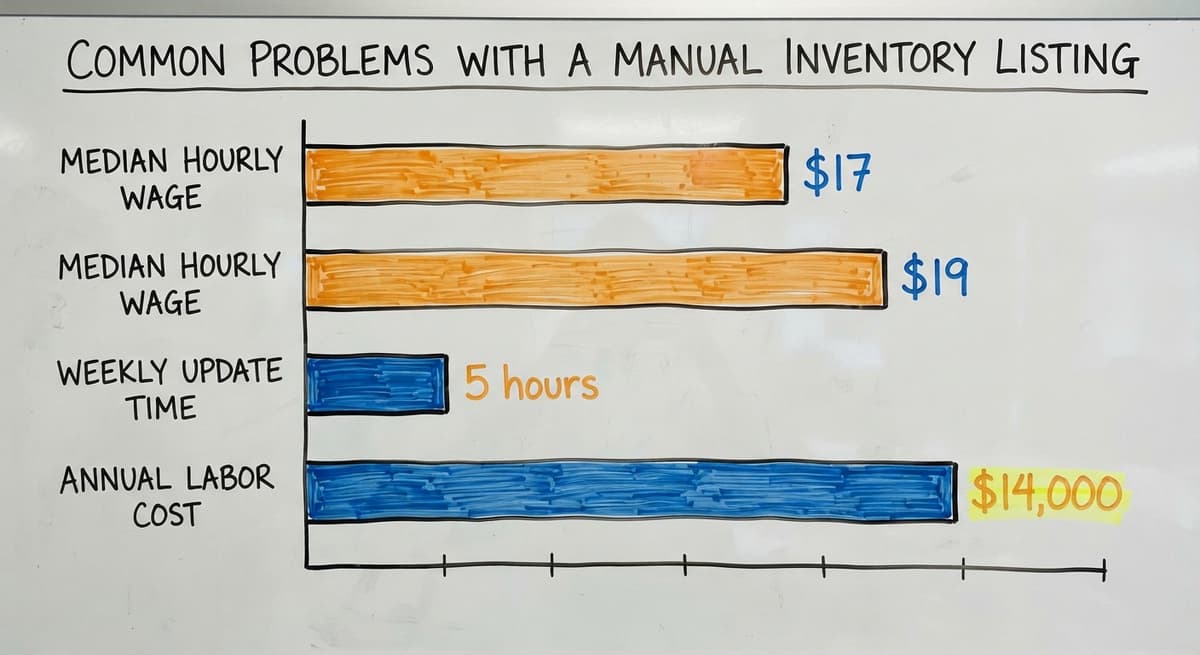
The Bureau of Labor Statistics reports that stock clerks and order fillers earn a median wage of around $17 to $19 per hour. Three people spending 5 hours a week each on manual listing updates costs roughly $14,000 to $15,000 a year in labor alone, before counting the errors those updates still miss.

What a Good Inventory Listing System Looks Like
A well-built inventory tracking system does not need a warehouse to change how it operates. It fits around the work that already happens.
These are the qualities that separate a functional system from a frustrating one:
- One central record that updates automatically when stock moves. Receiving a shipment adds to the count. Picking an order subtracts from it. No one enters the same number twice.
- Role-based access so warehouse staff, purchasing, and management each see what they need without version conflicts or accidental overwrites.
- Connections to receiving, picking, and shipping so quantities stay current as a byproduct of normal work rather than as an extra step.
- QuickBooks integration that keeps accounting in QuickBooks where it belongs, while the inventory layer handles real-time stock movement. The two systems stay aligned without manual matching.
- A workflow that mirrors the existing operation, so training time is short and staff adoption is high.
Inventory management software for small distributors does not have to be expensive or complex to deliver all 5 of these.
See it running on your own process first
No build cost. The subscription starts once it is live and doing the job, not before.
Book a callThe Role of Barcodes and SKUs
Scan-based receiving and picking remove the manual entry step that causes most quantity errors. When a warehouse worker scans a barcode on arrival, the system records the item, the quantity, and the location without anyone typing a number. GS1's barcode standards, available at gs1.org/standards/barcodes, define the global format that makes this possible across suppliers and systems. A SKU that follows a consistent structure connects the physical label to the digital record every time.
When Should You Upgrade From a Spreadsheet Inventory Listing?
Custom warehouse management software makes sense sooner than most small distributors expect. The right time to upgrade is not when the pain becomes unbearable. It is when the cost of staying with the current setup exceeds the cost of changing it.
These are the practical triggers to watch for:
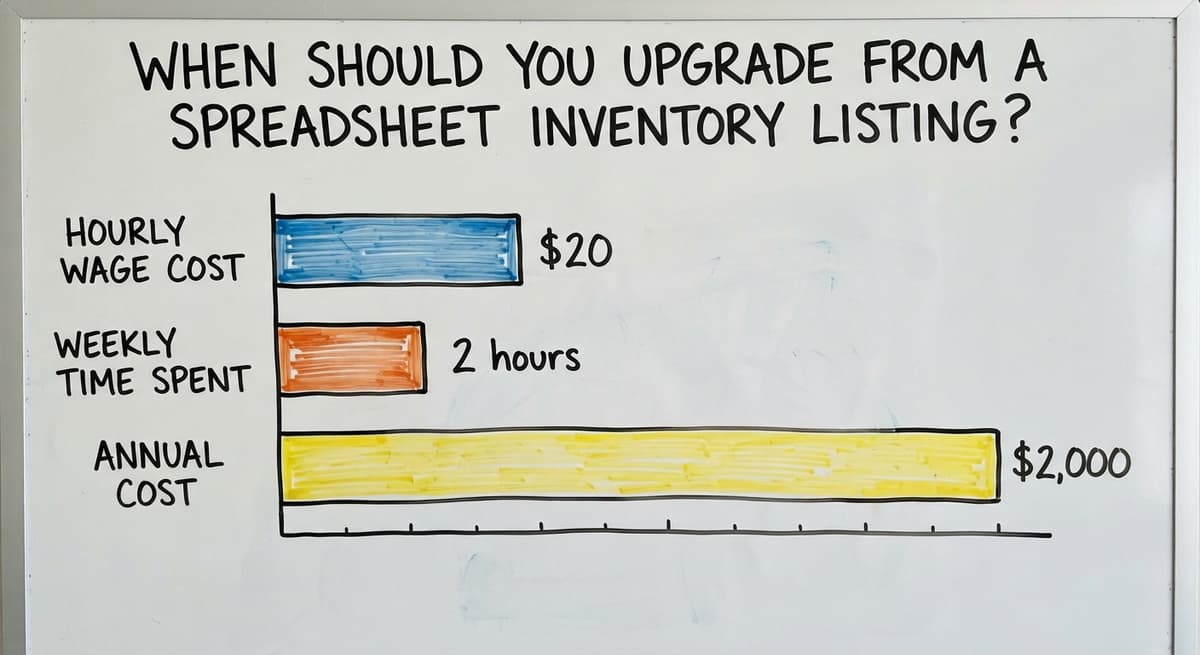
- Reconciling the listing takes more than an hour a week. That time compounds. At $20 an hour, 2 hours a week is over $2,000 a year for one person.
- Stockouts or overstock errors are costing real money, whether through lost sales, expedited shipping, or markdowns on excess stock.
- More than 2 or 3 people need to read or update the listing. A spreadsheet does not handle concurrent users well. Records get overwritten or locked.
- The listing and QuickBooks regularly disagree, and no one is confident which number is correct.
Any one of these signals is enough. All 4 together means the spreadsheet is no longer a tool. It is a liability.
How Can Custom Software Keep Your Inventory Listing Accurate?
Custom software keeps your inventory listing accurate by building the system around your existing workflow rather than asking your team to adapt to someone else's process. Replacing Excel with custom working software does not mean replacing QuickBooks. QuickBooks handles accounting. The custom layer tracks real-time inventory movement, flags reorder points, and keeps the stock list current without extra manual steps.
Small teams, including operations with 5 to 20 staff, can benefit from this approach without the cost or complexity of a full ERP system. QuickBooks integration for warehouse operations means the two systems share data cleanly. Accounting stays accurate. The inventory listing stays current. Neither team has to reconcile the gap between them.
Local, rollout-led support means the system gets built to match how your warehouse actually runs, not how a software vendor assumes it runs. When something changes, such as a new product line or a second location, the system changes with it. The result is an inventory listing that reflects what is on your shelves right now, not what was there when someone last updated the spreadsheet.
Conclusion: Your Inventory Listing Is the Foundation
Every decision your warehouse makes, from purchasing to picking to shipping, starts with what the inventory listing says. If that record is wrong, the downstream effects multiply fast. Stockouts, overstock, matching time, and reporting errors all trace back to a listing that no one fully trusts.
A spreadsheet is a fine starting point. Most small distributors begin there, and it works until it does not. The moment it stops working is usually gradual: a few extra hours a week, a few more errors per month, a growing gap between what QuickBooks says and what the shelf holds.
If your team is hitting those triggers, the next step is a system built around how you already work. Not a replacement for QuickBooks. Not a full ERP rollout. A focused inventory tracking layer that keeps the listing accurate without adding work to the people who run the floor.
Ready to see what that looks like for your operation? Reach out to The Software Society for a straightforward conversation about what a custom inventory solution would actually involve.
Frequently asked questions
How do I make my own inventory list?
Start with a spreadsheet and add one row per item you stock. Include at minimum: item name, SKU or part number, quantity on hand, unit of measure, and storage location. Add cost per unit and reorder point once the basics are working. The key is updating the list every time stock moves, not just during a monthly count. If manual updates get skipped, the list drifts out of sync quickly.
What is an inventory stock listing?
An inventory stock listing is a documented record of every item a business currently holds in storage. It shows what each item is, how many units are on hand, where they are stored, and often what they cost. It is the reference document your team uses to pick orders, plan buys, and report on the value of your stock.
What are the three types of inventory?
The three standard types are raw materials (inputs not yet used in production), work-in-progress (items partially through a production process), and finished goods (items ready to sell or ship). Most small wholesale distributors deal almost entirely with finished goods. Manufacturers track all three. The inventory listing for each type uses the same basic fields but serves different working purposes.
Can you give me an example of an inventory?
A plumbing supply distributor might hold 400 SKUs: copper fittings in several sizes, PVC pipe by the foot, valves, adhesives, and specialty tools. Their inventory listing would show each item with a part number, the quantity on hand in each warehouse zone, the unit of measure (each, box, or roll), and the reorder point that triggers a new buy order. That full list, kept current, is their inventory.
What is the difference between an inventory listing and an inventory count?
An inventory count is the physical act of checking what is on the shelf. An inventory listing is the written or digital record that captures those counts along with item details. A count feeds the listing. Without regular counts, the listing goes stale. Without a listing, counts have nowhere to land. Both are necessary for accurate warehouse inventory management.
When does a business outgrow a spreadsheet-based inventory listing?
Watch for these signs: reconciling the spreadsheet takes more than an hour a week, more than 2 or 3 people need to update it at the same time, stockouts or overstock errors are happening regularly, or the spreadsheet and QuickBooks consistently show different numbers. Any one of these signals means the manual approach is costing more than a better system would.
Does an inventory listing have to connect to QuickBooks?
It does not have to, but for most small distributors it should. QuickBooks handles accounting well. The problem is that QuickBooks item lists are not designed for real-time warehouse inventory tracking. A separate inventory system that syncs with QuickBooks gives you accurate stock counts on the warehouse side and accurate financials on the accounting side, without manual matching between the two.
How often should an inventory listing be updated?
Ideally, the listing updates in real time as stock moves. In practice, many small distributors update it daily or at the end of each shift. The minimum is before every buy order and before every financial reporting period. The IRS needs inventory to be valued at the start and end of each tax year, so at least two full matchings per year are a legal baseline, not just a best practice.
Start with a free first look
A 30 minute call, your operation mapped, and a clear picture of what we would build. No obligation and nothing to install.
Book a callRelated guides
The rest of this guide, for the parts of the job this page does not cover.
Guides
- Pick Lists
- On Page Seo Check List
- List of Warehouse Management Software
- Pick List
- Classification of Inventory
- Excess Inventory
- Closed for Inventory
- Multi Location Inventory Management Software
- Inventory Management for Multiple Locations
- Costing Inventory
- Is Inventory a Long-term Asset
- Inventory Management System for Manufacturing
- Inventory Fixed Assets
- Inventory Management Pics
- Excel Inventory Template
- Push and Pull Inventory
- Consumable Inventory
Common questions
- What is the Best Warehouse Inventory Management System?
- What is the Difference Between Warehousing and Inventory Management
- What is B Type of Inventory in Warehouse Management
- What is Warehousing and Inventory Management
- What is the Best Inventory Management Software for Small Business
- What is the Best Inventory Management System for Small Businesses?
- Mro Inventory Meaning