

What Is Warehousing And Inventory Management
Warehousing is the physical side: receiving goods, storing them, and shipping them out. Inventory management is the data side: knowing what you have, where it sits, and when you need more. Together, they form one operating system for your stock. When both sides work in sync, orders go out on time and your team is not chasing ghosts. When they do not, the chaos is daily.
Published 18 August 2026. Reviewed and updated 15 September 2026.
Book a callWhat Do Warehousing and Inventory Management Mean in Plain Terms?
Warehousing and inventory management are two halves of the same job. Warehousing covers everything your team does with their hands. Inventory management covers everything your system tracks on a screen. Neither one works well without the other.
The public record on this is worth reading directly: the US Federal Trade Commission covers the obligation to ship when you said you would, which is what an accurate count protects.
Reviewed August 2026. Each figure comes from the assumptions stated beside it, so you can substitute your own and the arithmetic still holds.
The holding cost is the part nobody prices. 500 units sitting for 90 days, at 3 dollars a unit a month, is 4,500 dollars of shelf time on stock that has not sold. Turning that stock 4 times a year instead of 2 halves it.
The obligation behind all of this is not optional. IRS Publication 538 states: “To figure taxable income, you must value your inventory at the beginning and end of each tax year.” A figure nobody trusts makes that number a guess.
Think of it this way. Your warehouse is the building, the shelves, the forklifts, and the people. Your inventory record is the running count of everything inside it, updated every time something moves.
Would you rather have it built around your operation?
The first look is free. If you would rather not compare products, describe how your operation already works and we build the system around it.
No build cost. You see it running on your own process first, and the monthly subscription starts only once it is live.
Book a callWhat Does Warehousing Actually Cover?
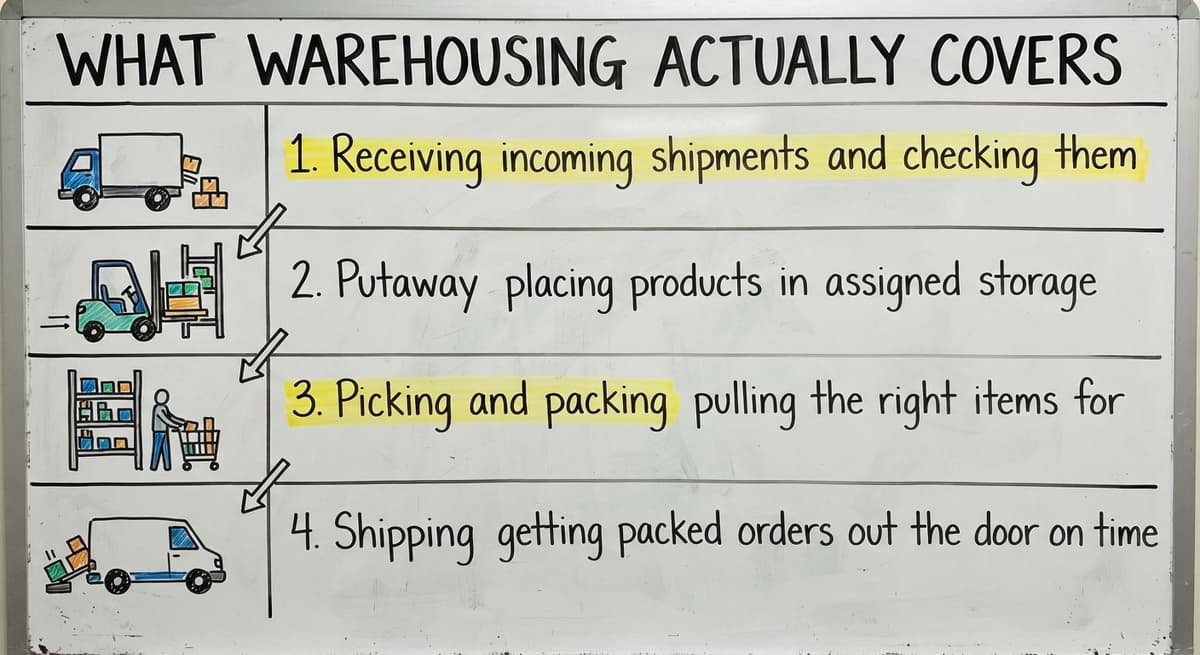
Warehousing is the hands-on, physical side of your operation. It includes four core activities:
- Receiving incoming shipments and checking them against purchase orders
- Putaway placing products in assigned storage locations
- Picking and packing pulling the right items for each outbound order
- Shipping getting packed orders out the door on time
Beyond those steps, warehousing also means managing the physical space, scheduling staff, and maintaining equipment. Every square foot and every labor hour has a cost.
Accurate scanning is what ties warehousing to your data. As the organization behind global barcode standards explains, barcodes are the global standard for identifying products and locations, and scanning them at each step is what keeps your physical movement and your records aligned.
What Is Inventory Management in Warehousing?
Inventory management is the practice of tracking what stock you have, where it is stored, and when to reorder it. In a warehouse context, that means your system reflects the physical reality of your shelves in real time.
Specifically, inventory management covers:
- Real-time stock levels by product and location
- Reorder points and low-stock alerts so you never run out unexpectedly
- Reconciliation between what your system says and what is actually on the shelf
- A clear record of every movement, from receiving to shipment
That is the record-keeping half. It does not move boxes. It tells you where the boxes are.

How Do the Two Work Together?
Every physical action in your warehouse is a data record waiting to be made. A shipment arrives, your team scans it in, and your stock counts update automatically. No manual entry. No clipboard math at the end of the day.
When the physical and data sides fall out of sync, orders get missed and stock gets lost. A product sits in the wrong bin. Your system shows 40 units available, but the shelf holds 12. A customer orders something you cannot actually ship.
Good inventory control makes warehouse work faster because your team knows exactly where to go. They are not searching. They are executing.
Is the comparison easier when one option is built for you?
Yes. Off-the-shelf means fitting your process to the software, and custom is the other way round. The first look costs nothing.
Book a callWhy Do Small Warehouses Struggle to Keep Inventory Accurate?
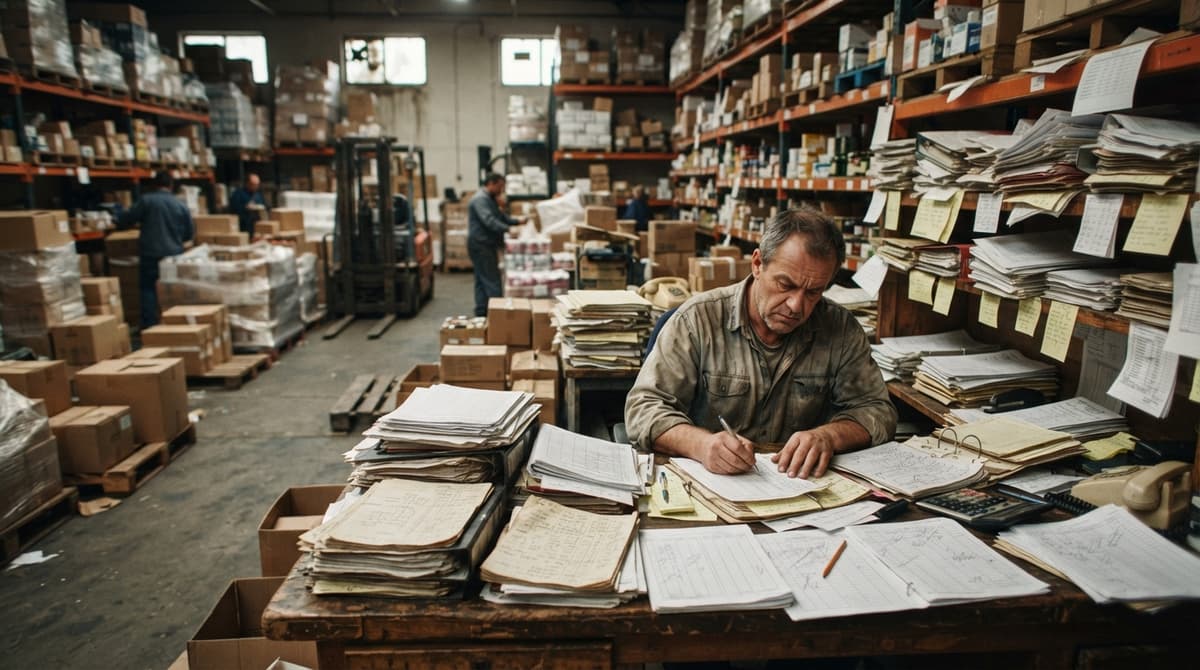
Most small warehouse operations track inventory in a bookkeeping app, a spreadsheet, or on paper pick sheets, and none of those tools were built for real-time warehouse movement. That kind of accounting software is built for bookkeeping, not for tracking a pallet from dock to shelf to outbound truck.
Here is what that looks like in practice:
- Stock data lives in three places and none of them agree
- Someone updates a spreadsheet at the end of the day, hours after the goods moved
- A staff member spends Friday afternoon reconciling counts instead of filling orders
- A customer calls about a late shipment and no one can find the product
This is not a people problem. It is a systems problem. The tools you are using were not designed for what you are asking them to do.
What Does Good Warehouse Inventory Management Look Like?
One place to see all stock levels and locations is the clearest sign that a system is working. Your team should not need to check three screens or call across the warehouse to confirm a count.
Beyond that single source of truth, a well-run system delivers:
- Automatic updates when goods move in or out, no manual entry required
- Clear alerts before a product hits zero, not after a customer already ordered it
- A simple interface your warehouse staff can use without training sessions
- Compatibility with the tools you already use, including your bookkeeping software
Notice that last point. Good warehouse inventory management does not require you to throw away everything and start over.
Do I Need to Replace Your Accounting Software to Manage Inventory Better?
No. The right warehouse management software sits alongside your accounting platform rather than replacing it. That platform handles your accounting. A purpose-built inventory layer handles your stock movements. The two talk to each other.
This is where warehouse inventory management software earns its value. It connects the physical and data sides of your operation without forcing a full migration.
Linking your financial software to your warehouse operations means your financial records stay accurate without requiring your warehouse staff to become accountants.
Avoid tools that require a six-month implementation or demand you abandon your current accounting setup. Right-size the solution to your actual operation, whether that is 5 people or 100.
Custom software built for wholesale distributors can be shaped around the workflow you already have, rather than forcing you to adapt to a generic enterprise platform designed for a company ten times your size.
What does it look like running on your own process?
The first thing you see is it running on your own process, at no build cost. The subscription starts once it is live and doing the job, not before.
Book a callSigns Your Current System Is Not Working
You already know something is wrong in the warehouse. Here is the checklist:
- You are regularly overselling or underselling because your counts are off
- Staff spend hours each week reconciling manual counts
- Orders get delayed because no one can locate a product quickly
- Your bookkeeping data and your physical shelf count never quite match
- Spreadsheets and printed pick lists are managing the overflow
Any one of these is a signal. All five together mean your current approach has a ceiling, and you are already hitting it.
What Should I Look for in Warehouse Inventory Management Software?
Fit is the first test, features the second. A system built around your workflow will outperform a feature-rich platform that requires you to change how your operation runs.
Useful criteria for a 10 to 80 person warehouse:
| Criteria | What to Look For |
|---|---|
| Integration | Works with your existing your accounting software setup |
| Ease of use | Staff can learn it in hours, not weeks |
| Real-time updates | Stock counts change when goods move, not at end of day |
| Alerts | Low-stock notifications before you run out |
| Implementation | A partner who builds to fit, not a vendor who sells and disappears |
Automating fulfillment center workflows is worth exploring once your core inventory tracking is stable. Automation compounds the value of accurate data. But accurate data comes first.

Where Do You Start?
Start by mapping where your data currently lives and where it breaks down. Walk the process from receiving dock to outbound shipment and mark every step where someone writes something down manually or copies data from one place to another. Those are your failure points.
From there:
- Identify the one or two manual steps causing the most errors or delays
- Look for a solution built around your workflow, not a generic platform
- Find a partner who understands small distribution operations and can build to fit
An overview of warehouse inventory management software can show you what a connected system looks like before you commit to anything.
The goal is not a perfect system on day one. The goal is a system that improves every week because your data is finally reliable.
If you are ready to stop managing your warehouse on spreadsheets and start working from a single source of truth, the conversation starts with your specific operation. Reach out and describe what is breaking. That is where the right solution begins.
Frequently asked questions
Frequently asked questions
What is inventory management in warehousing?
Inventory management in warehousing is the practice of tracking stock levels, product locations, and reorder needs in real time. It functions as the data layer, reflecting what is physically happening on your shelves.
When a shipment arrives or an order ships, inventory management records that movement so your counts stay accurate.
What are the 5 main activities in a warehouse?
The five main warehouse activities are receiving incoming goods, putaway into storage locations, picking items for outbound orders, packing those items securely, and shipping the finished order. Inventory tracking runs alongside all five, recording each movement so stock counts stay current.
What are the 7 types of warehouses?
The seven common warehouse types are private warehouses owned by a single company, public warehouses available for rent, bonded warehouses for goods held under customs control, distribution centers focused on rapid order fulfillment, cold storage facilities for temperature-sensitive goods, fulfillment centers that pick and ship individual consumer orders, and smart warehouses that use automation and real-time inventory systems. The right type depends on your product, volume, and distribution model.
Is a warehouse manager a stressful job?
The job can be. Warehouse managers are responsible for accuracy, speed, staffing, and safety at the same time.
The stress increases significantly when inventory data is unreliable, because every decision becomes a guessing game. Managers who have accurate real-time stock information and clear workflows report far fewer daily firefighting situations.
How are warehousing and inventory management different from each other?
Warehousing is the physical operation: moving, storing, and shipping goods. The inventory side is the data operation: recording stock, its location, and its quantity.
Warehousing happens with hands and equipment. Inventory management happens in software and records. Both are necessary, and they need to stay in sync.
What does good inventory control look like for a small distributor?
Good inventory control for a small distributor means one place to see all stock levels and locations, automatic updates when goods move, low-stock alerts before you run out, and a system your warehouse staff can use without extensive training. It does not require replacing your bookkeeping platform or buying an enterprise platform built for a company ten times your size.
Can warehouse inventory management software work with your accounting software?
Yes. The right warehouse inventory management software works alongside your accounting software, not replace it. That software handles your accounting and financials.
The inventory layer tracks real-time stock movements and locations. The two systems share data so your records stay consistent without requiring your warehouse team to work inside an accounting tool.
What signs tell me my current inventory system is not working?
The clearest signs are overselling or underselling products because your counts are wrong, staff spending hours on manual reconciliation each week, orders delayed because no one can locate a product, a mismatch between your bookkeeping records and your physical shelf count, and spreadsheets or paper pick sheets managing what your software cannot handle.
What is the difference between warehousing and inventory management?
Warehousing covers the physical side of the operation, covering receiving, storing, and shipping goods. Inventory management covers the data side, tracking what stock exists, where it sits, and when more is needed.
Warehousing involves hands-on work like putaway and picking. The inventory side keeps the running count and the records that mirror the shelves as they change.
Why is inventory management important?
Keeping stock records aligned with the shelf is what prevents missed orders and lost stock, and that is the whole point of the discipline.
Without accurate tracking, a system might show units available that are not really there, leading to overselling or shipping delays. Accurate inventory also supports required reporting, since inventory value must be calculated at the start and end of each tax year.
What are common inventory management techniques?
Common techniques include tracking real-time stock levels by product and location, setting reorder points with low-stock alerts so items never run out unexpectedly, and regularly reconciling system counts against actual shelf counts.
Keeping a clear record of every movement, from receiving through shipment, is also standard practice, along with scanning barcodes at each step to keep physical movement and data records aligned.
What software is used for warehousing and inventory management?
Warehousing and inventory management rely on a purpose-built inventory layer that works alongside general accounting software rather than replacing it. This kind of system updates counts on every scan, sends alerts before items run out, and gives everyone a single view of stock levels and locations, removing the need for manual spreadsheets, printed pick lists, or end of day reconciliation.
What is in a free first look?
A 30 minute call, your operation mapped, and a clear picture of what we would build. No obligation and nothing to install.
Book a callRelated guides
The rest of this guide, for the parts of the job this page does not cover.
Guides
- Warehouse Inventory Management Software
- Warehouse Inventory Management Systems
- Inventory and Warehouse Management Software
- Warehouse Inventory Management System
Common questions
- What is the Best Warehouse Inventory Management System?
- What is the Difference Between Warehousing and Inventory Management
- What is B Type of Inventory in Warehouse Management
- What Are the Benefits of Warehouse Management System
- What is the Point of Warehouse Management System
- What Are the Top 5 Warehouse Management Systems?
- What is Asn in Warehouse Management System
- What is a Warehouse Management System
- What is a Warehouse Management System Used For
- What is the Most Popular Warehouse Management System?
- What is the Purpose of a Warehouse Management System
- What is a Warehouse Management System Pdf
- What is a Simple Warehouse Management System?
- What is a Warehouse Management System Example
- What Warehouse Management System Does Amazon Use
- Why is Warehousing and Inventory Management Important
- How to Manage Inventory in a Warehouse
- What is the Most Important Part of Warehouse Organization
- What is Warehousing Operations
- What is Warehouse Operation