


Barcode For Id Card
A barcode for an ID card is a machine-readable pattern printed on a badge. It links a person to a record in your database. One scan replaces a manual sign-in, logs who did what, and can control access to a room or piece of equipment. This guide covers formats, printing, and how the whole thing fits a small warehouse or distribution operation. Reviewed and updated 15 September 2026.
Published 18 August 2026. Reviewed and updated 15 September 2026.
Book a callWhat Does a Barcode for an ID Card Do, and Why Does It Matter?
An ID card barcode stores a short code, an employee number. That code points to a full record in your software. The barcode itself is a key, not a filing cabinet. You see this every day on employee badges, visitor passes, and driver licenses.
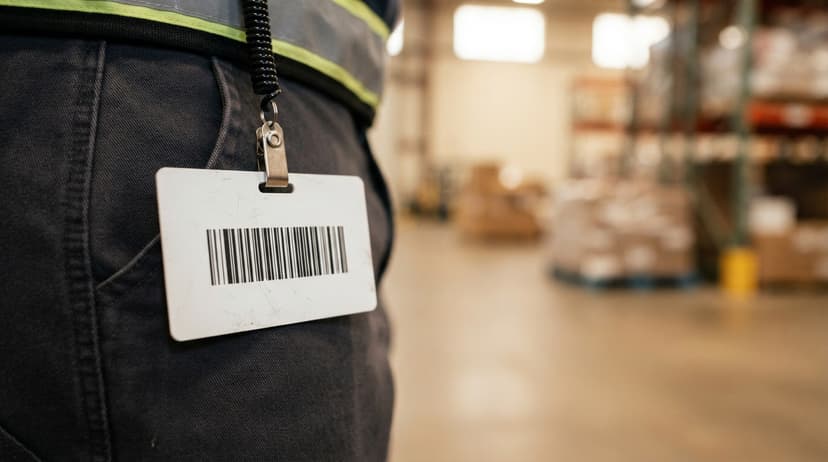
For a warehouse with 5 to 100 staff, the gains are immediate. Badge scans replace paper logs, timestamp every entry, and tie each worker to the actions they take in the system.
As GS1 notes, barcode standards exist so that "a barcode scanned anywhere in the world returns the same data" (gs1.org). That consistency is what makes a simple badge scan reliable enough to build a workflow around.
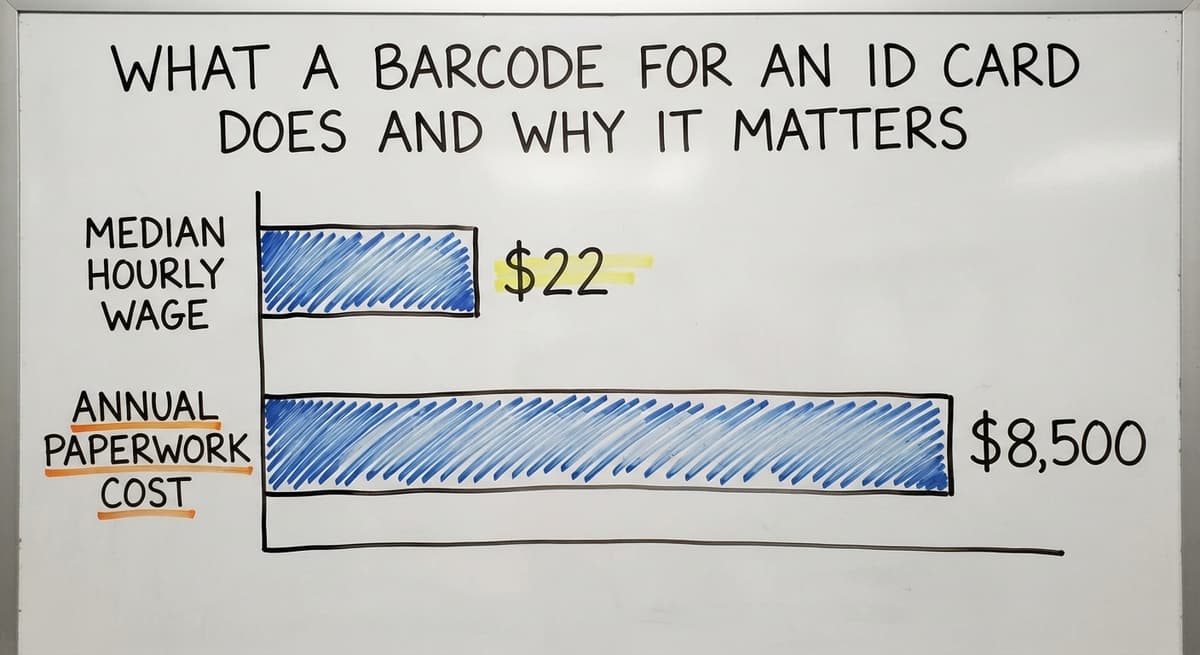
Consider 3 workers who each spend 15 minutes a day on manual sign-in sheets. At the median warehouse wage of around $22 an hour (BLS), that is roughly $8,500 a year spent on paperwork a badge scanner replaces in a single afternoon.
Would you rather have it built around your operation?
The first look is free. If you would rather not compare products, describe how your operation already works and we build the system around it.
No build cost. You see it running on your own process first, and the monthly subscription starts only once it is live.
Book a callWhich Barcode Format Should I Use on an Employee ID Card?
The right format depends on how much data the card needs to carry. Five formats cover nearly every use case in a small operation.
Code 39, Code 128, and 1D Barcodes
Code 39 is the older of the two linear formats. It reads letters and numbers and works with almost every scanner made in the last 30 years.
Code 128 is more compact. It stores more characters in the same physical space, which matters on a small badge.
Both are 1D barcodes: a row of vertical bars read left to right by a single scan line. For most employee badges, a 1D barcode holding a short ID number is all you need.
If your scanners already read product barcodes in Code 128, use the same format on the badge and one scanner handles both.
QR Codes and PDF417 for Higher Data Needs
A QR code is a 2D barcode, meaning it stores data in a grid rather than a line. It holds far more data than a 1D barcode and any smartphone camera can read it.
PDF417 is the format used on US state driver licenses. It can store a full name, address, and date of birth in a single scan.
For a warehouse badge, QR codes are easy to generate and print on standard badge stock. PDF417 makes sense when the card needs to carry full contact details or multi-level access permissions without a database lookup.
Choose 2D only if your scanners support 2D imaging; a standard laser scanner cannot read either format.
Is the comparison easier when one option is built for you?
Yes. Off-the-shelf means fitting your process to the software, and custom is the other way round. The first look costs nothing.
Book a call
What Data Does an ID Card Barcode Actually Store?
Most ID card barcodes store only a short identifier: an employee ID number, a badge number, or a department code. The full record, name, role, access level, sits in the database. The barcode just tells the system which record to pull.
This design keeps the barcode small and fast to scan. It also means that if an employee's details change, you update the database record, not the card. The barcode is the pointer; the database holds the truth.

How Does an ID Card Barcode Connect to Your Operation?
When a worker scans their badge, the system logs who performed an action and when.
In a pick, pack, and ship workflow, that creates a clear trail: who pulled the order, who packed it, who handed it to the carrier. Managers can pull reports by employee without chasing paper timesheets.
This connects directly to a barcode inventory management system already tracking products. The same scan event that records a product movement can also record which employee made it. No extra step, no separate log.
The accounting software handles the accounting side well but does not capture badge scan data.
A custom working layer can collect scan events and push summaries to the accounting software at the end of a shift or day. Small distributors can add barcode ID tracking without replacing the accounting software that already works.
Can the Same Scanner Read Product Barcodes and ID Card Barcodes?
Yes, as long as both use a compatible format. A scanner set to read Code 128 will read a Code 128 employee badge and a Code 128 product label in the same pass.
The software on the receiving end decides what to do with each scan based on the code structure. Match your badge format to your product format and you need only one scanner type on the floor.
What does it look like running on your own process?
The first thing you see is it running on your own process, at no build cost. The subscription starts once it is live and doing the job, not before.
Book a call
How Do You Print and Place a Barcode on an ID Card?
ID card printers from brands like a major scanner maker or Magicard print barcodes directly onto PVC card stock. The printer software generates the barcode image from the employee ID number.
Print resolution matters: 300 DPI is the minimum for a 1D barcode that scanners will read reliably. Below that, bars blur together and scans fail.
Placement affects both readability and card design. Put the barcode on the back of the card. The front stays clean for the photo, name, and logo.
Leave a blank margin, called a quiet zone, on each side of the barcode so the scanner can find where the bars start and stop. A 1D barcode on a standard ID card should be at least 0.5 inches tall.
Print a test batch of 3 to 5 cards and scan each one before printing the full run. A single bad setting wastes an entire batch of card stock.
Common Mistakes and How to Avoid Them
Setup errors are easy to make and easy to prevent. The most common ones follow a pattern: skipping a test, picking the wrong format, or cutting corners on print quality.
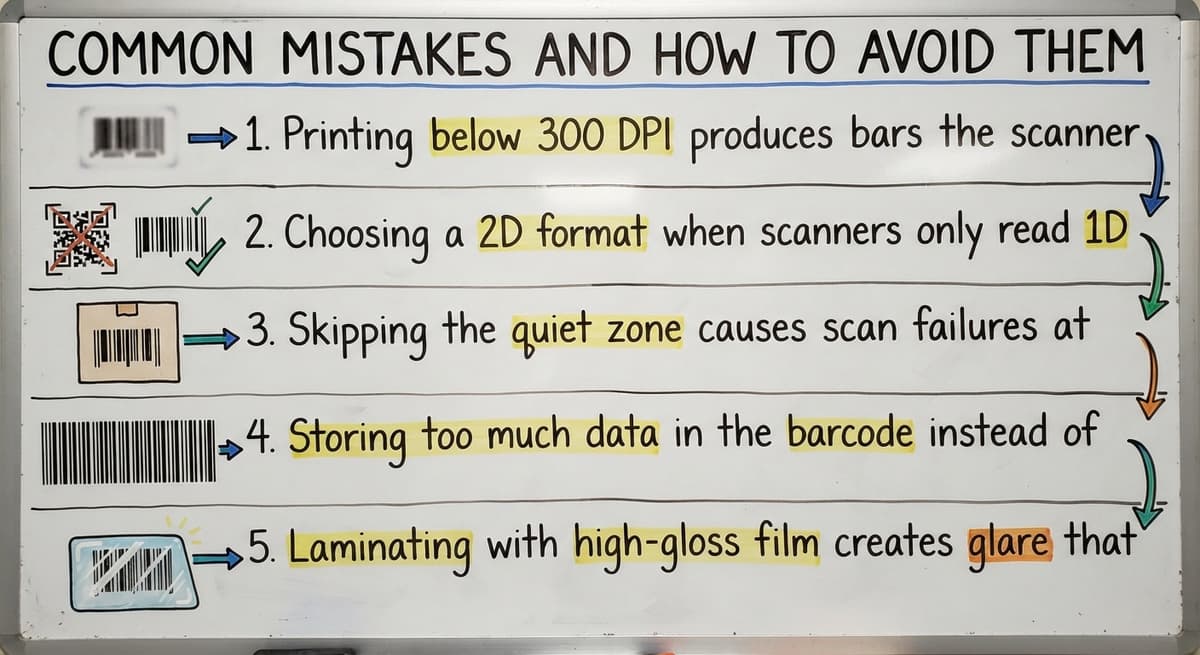
- Printing below 300 DPI produces bars the scanner cannot separate, and the card is useless from day one.
- Choosing a 2D format when scanners only read 1D means no scanner on the floor can read the badge.
- Skipping the quiet zone causes scan failures at the edges of the barcode where the reader looks for a start signal.
- Storing too much data in the barcode instead of using a database lookup makes the barcode large and fragile.
- Laminating with high-gloss film creates glare that deflects the scanner beam. Use matte laminate over any barcode area.
Test before you commit. One afternoon of testing saves a full reprint run.

How Do You Get Started with a Barcode for ID Card System?
Getting a working system in place is a short project, not a long one. Follow these steps in order.
- Decide what the barcode needs to do: time tracking, access control, inventory accountability, or all three.
- Pick a barcode format that matches the scanners already on the floor.
- Generate barcodes from your employee ID list using free online tools for a pilot or dedicated software for production.
- Print and test a small batch before rolling out to all staff.
- Connect scan data to the software that needs it, whether that is a time clock system, an access control panel, or a barcode inventory management system.
Off-the-shelf systems need changing how the operation already works. A custom build maps to the workflow you have and adds badge scanning where it helps most. For a 20-person warehouse, that is a small build, not an enterprise project.
A local builder can walk the floor, understand the real process, and write only what is needed. That is the difference between a system that fits and one that gets abandoned after a month.
The right starting point is a clear decision about what one scan should trigger. Everything else follows from that.
Frequently asked questions
What is the barcode on an ID card?
The barcode on an ID card is a machine-readable pattern that stores a short identifier, an employee or badge number.
When scanned, that number pulls up the person's full record in a connected database. The barcode itself does not store personal details; it points the system to where those details live.
Which barcode format should I use on an employee ID card?
Code 128 is the most practical choice for most warehouse employee badges. It stores enough data for an ID number, works with nearly every barcode scanner, and matches the format already used on many product labels.
Use QR or PDF417 only if the badge needs to carry more data than a short ID string.
Can I use the same scanner for product barcodes and ID card barcodes?
Yes. If both the product label and the employee badge use the same format, one scanner reads both. Code 128 is the common choice because it covers both uses.
The software decides what to do with each scan based on the code structure, so no extra hardware is needed.
What barcode format is used on a driver license?
US state driver licenses use PDF417, a 2D barcode format that stores name, address, date of birth, and license details in a single scan.
PDF417 holds far more data than a standard 1D barcode, which is why government IDs use it rather than Code 39 or Code 128.
How do I generate my own barcode?
Free online barcode generators let you type in an ID number and download a barcode image in seconds.
For a production system printing hundreds of badges, dedicated ID card software generates barcodes from a database and sends them directly to the card printer. Free tools work fine for a small pilot run.
How can I get a barcode for my product for free?
For internal use only, free online generators create a barcode image at no cost.
For a barcode that needs to scan at retail or in a trading partner's system, you need a GS1-registered number, which carries a fee. Employee ID card barcodes are internal identifiers and do not need GS1 registration.
How can I generate a barcode online?
Search for a free barcode generator, enter your ID number, choose a format such as Code 128, and download the image.
Most generators let you set the size and resolution before you download. For a badge, export at 300 DPI or higher so the bars print cleanly enough for a scanner to read.
What information is stored in a PDF417 barcode?
On a driver's licence, the same fields printed on the front: name, address, date of birth, licence number, issue and expiry dates, and physical description, in the AAMVA layout. On an employee card it holds whatever the issuer encoded, just the employee ID.
What barcode type is best for an employee ID card?
Code 128 for a plain employee number, since every scanner reads it and it fits across a card.
A QR code where phones will scan it or where the card carries more than an ID. Skip PDF417 unless a system you must match already uses it.
How do I print a barcode on a plastic ID card?
With a dye-sublimation card printer, $700 to $2,500, that prints the barcode with the photo and text in one pass.
For a handful of cards, print the barcode on a label and laminate it over a blank card; it scans the same and costs almost nothing.
Can a phone scan the barcode on a driver's licence?
Yes. A camera app that supports PDF417 reads it and shows the encoded fields. A scanning app used for access or age checks reads it the same way, which is why the encoded data should never hold more than the printed side.
What is in a free first look?
A 30 minute call, your operation mapped, and a clear picture of what we would build. No obligation and nothing to install.
Book a callRelated guides
More on the same work.
Guides
- System Id Barcode Solutions
- Barcode Abbreviation
- Barcode Scan Machine
- Tracking Number Barcode
- Barcode Reader Machine
- Barcode Scanner App Ios
- 2d Barcode Readers
- Barcode Producer
- Barcode Systems for Warehouse
- Barcode Reader Description
- Barcodes and Labels
- Alphanumeric Barcode
- Barcode Scanner Inventory System
- Lpn Barcodes
- Imager Barcode Scanner
- Barcode System for Inventory Free
- Inventory Management Software Barcode Scanner
- Make Barcode