


Tracking Number Barcode
A tracking number barcode is the fastest way to stop losing items between your receiving dock and your shipping door. If your team still uses printed sheets, spreadsheet, or email to manage where things are, this guide explains how barcode tracking works, what hardware you need, and how to add it without ripping out what already works.
Published 16 July 2026. Reviewed and updated 15 September 2026.
Book a callWhat Is a Tracking Number Barcode and How Does It Work?
A tracking number barcode is a machine-readable label that ties a number to a physical item or shipment. The barcode is the visual pattern of bars or squares. The tracking number is the data behind it.
Together they let a scanner read a label in under a second and tell your system exactly what just moved, where it came from, and where it needs to go.
Reviewed September 2026. Each figure comes from the assumptions stated beside it, so you can substitute your own and the arithmetic still holds.
The arithmetic is worth doing before the software conversation. 3 people spending 6 hours a week between them chasing the same questions, at 22 dollars an hour, is 936 hours a year of paid time spent confirming what a system would already know. Over 3 years that is 2,808 hours.
Think of it like a name tag that a computer can read. Every time that item is scanned, your system adds a new entry to its history. No typing, no guessing.
Would you rather have it built around your operation?
The first look is free. If you would rather not compare products, describe how your operation already works and we build the system around it.
No build cost. You see it running on your own process first, and the monthly subscription starts only once it is live.
Book a callHow Does a Tracking Number Barcode Differ from a Product Barcode?
Product barcodes such as UPCs or SKU codes identify what an item is. A tracking number barcode identifies where a specific shipment is in its journey. One product can appear in hundreds of different orders, each with its own tracking number.
As GS1 explains, barcodes are "the global language of business", but the standard you use depends on what question you are trying to answer: product identity or shipment location.
For warehouse and fulfillment operations, the distinction is practical. Scanning a UPC tells you what is on the shelf.
Scanning a tracking barcode tells you which order it belongs to, when it arrived, and whether it matches the buy order. Mixing up the two is the most common setup mistake in small operations.
What Are the Parts of a Tracking Number Barcode?
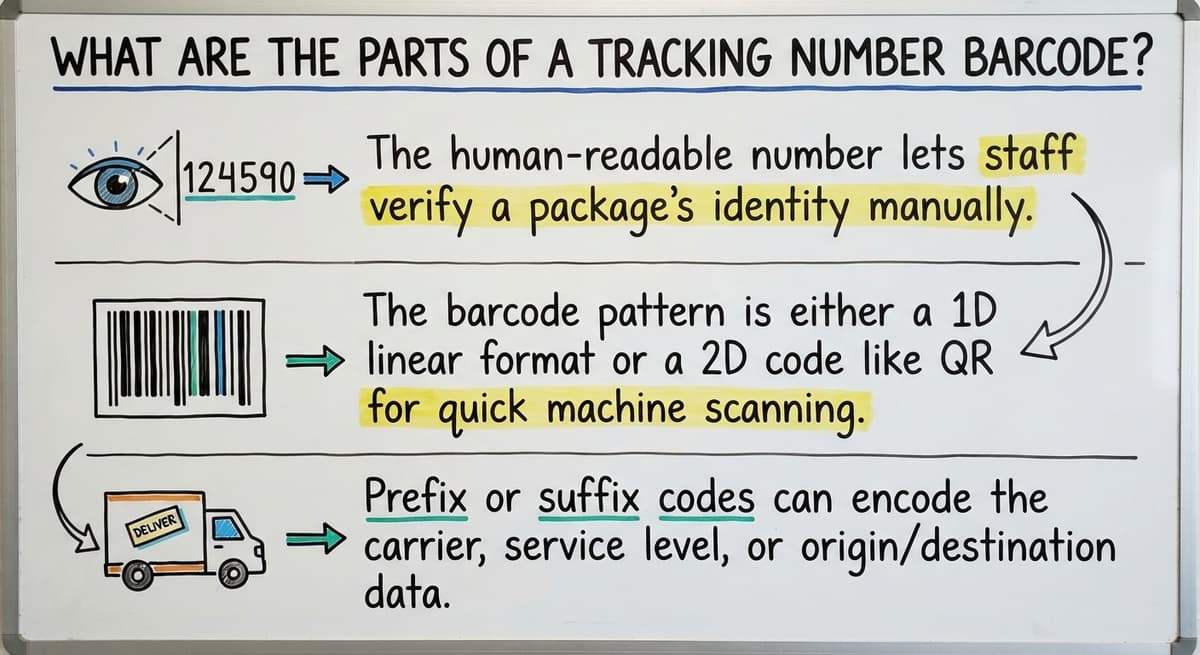
What does a tracking number barcode actually contain? The answer is three things working together: a human-readable number printed above or below the bars, the barcode pattern itself, and optional prefix codes that identify the carrier or internal system.
- The human-readable number lets staff verify a label visually when a scanner fails.
- The barcode pattern is either a 1D linear format like Code 128 or a 2D format like QR or Data Matrix.
- Prefix or suffix codes can encode the carrier, warehouse zone, or shipment date without making the number longer than it needs to be.
When a scanner reads the pattern, it converts the bars or squares into that number and passes it to your software. The software then pulls up the record tied to that number and updates it.
Common Barcode Formats Used for Tracking Numbers
Code 128 is the standard for shipping and warehouse tracking. It encodes letters and numbers in a compact strip and reads reliably with any handheld scanner. Most carrier labels use it.
GS1-128 is a structured version of Code 128 used when you need supply chain or retail compliance. It follows a defined data format that trading partners and retailers can parse automatically.
QR codes and Data Matrix codes store more data in a smaller space, which makes them useful when labels are small or when you need to encode a URL alongside the tracking number. They need a 2D-capable scanner.
| Format | Best For | Scanner Needed |
|---|---|---|
| Code 128 | Shipping, receiving, general warehouse | Any 1D laser scanner |
| GS1-128 | Retail and supply chain compliance | Any 1D laser scanner |
| QR / Data Matrix | Small labels, high data density | 2D imager |
For most small distributors, Code 128 covers every use case and keeps hardware costs low.
Where Are Tracking Number Barcodes Used in a Warehouse?
Every physical handoff in a warehouse is a point where items can get lost or miscounted. A scan event at each of those points replaces a manual note or a memory.
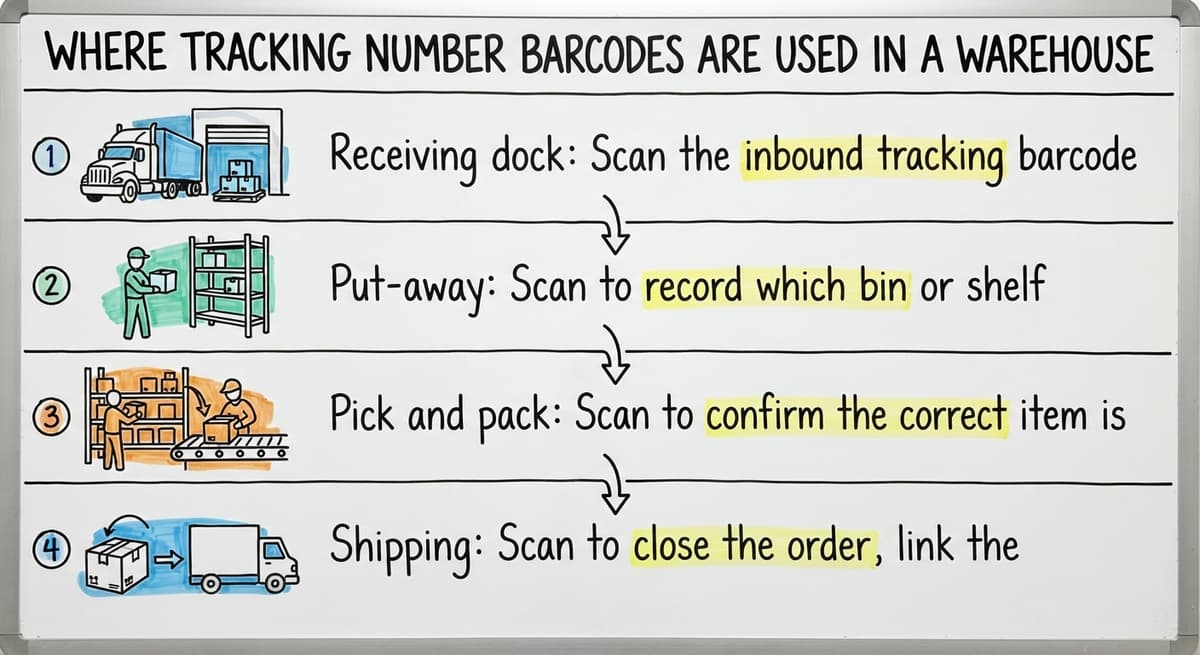
- Receiving dock: Scan the inbound tracking barcode to match the shipment against the buy order. Discrepancies surface before product enters inventory, which removes the need for manual check-in sheets.
- Put-away: Scan to record which bin or shelf received the item. Your system now knows the location without anyone writing it down.
- Pick and pack: Scan to confirm the correct item is pulled for the correct order. This is where most fulfillment errors are caught before they reach the customer.
- Shipping: Scan to close the order, link the carrier tracking number to the sales record, and trigger any outbound alerts.
Each scan is a timestamped record your team can audit later, which is something a printed pick list can never give you.
Is the comparison easier when one option is built for you?
Yes. Off-the-shelf means fitting your process to the software, and custom is the other way round. The first look costs nothing.
Book a callInternal Tracking Numbers versus Carrier Tracking Numbers: What Is the Difference?
The difference is where the number originates and how far it travels.
An internal tracking number is created by your own system to follow an item inside your four walls, from the receiving dock through storage and into the pick-and-pack area. A carrier tracking number takes over once the shipment leaves your building.
A well-built barcode inventory management system links both. You can trace a specific unit from the moment it arrived on your dock to the moment the customer signed for it, using one connected record.
Many small operations skip internal numbers entirely and only scan carrier labels. That works for outbound shipment tracking but leaves a blind spot for everything that happens before the label is printed.
If you cannot answer where an item is between receiving and shipping, internal tracking numbers are the missing piece.

How Does Scanning a Tracking Number Barcode Update Inventory Records?
Each scan creates or updates a record keyed to that tracking number. The number acts as the link between the physical object and its data in your inventory system.
Quantity on hand, bin location, and order status all change from scan events rather than from someone editing a spreadsheet.
This is the core mechanic of any barcode inventory management system. The scanner reads the label, the system finds the matching record, and the update happens in under a second.
No manual typing means the record reflects reality as it happens, not as someone remembered it an hour later.
Accuracy improves not because staff are more careful, but because the process removes the step where errors enter.
What Hardware Do I Need to Scan Tracking Number Barcodes?
You need three things: a scanner, a device to run your software, and a thermal label printer to produce labels worth scanning.
- Handheld barcode scanners from a major scanner maker or a major scanner maker are the warehouse standard. They are durable, fast, and connect over USB or Bluetooth.
- Mobile computers combine a scanner and a screen in one unit, which suits workflows where staff need to see information at the point of scan rather than walking back to a terminal.
- Smartphone cameras can read barcodes but are slower and less reliable under warehouse lighting. Reserve them for low-volume or occasional use.
- Thermal label printers produce labels that hold up to handling, moisture, and heat. Inkjet labels fade and fail; thermal labels do not.
The printer matters as much as the scanner. A label that cannot be read is the most common source of manual workarounds in a warehouse.
What Happens When a Tracking Number Barcode Cannot Be Scanned
A damaged or poorly printed label forces staff to type the number by hand, which reintroduces the errors that barcode scanning was meant to remove. One misread digit can attach a scan event to the wrong order.
The fix is upstream: reprint the label at receiving rather than work around a bad one.
Most scan failures trace back to printer calibration or label stock that does not match the printer's heat settings. A five-minute calibration check prevents the majority of failures before they happen.
Label quality is a maintenance task, not a one-time setup decision.
What does it look like running on your own process?
The first thing you see is it running on your own process, at no build cost. The subscription starts once it is live and doing the job, not before.
Book a call
Generating Your Own Tracking Number Barcodes
You do not have to depend on supplier labels for internal tracking. Your software can auto-generate a unique tracking number for every item, lot, or shipment the moment it enters your process.
Numbers can follow a format your team recognizes, such as a date prefix followed by a location code and a sequence number.
Labels print on demand from a thermal label printer connected to your system. When a shipment arrives without a usable label, your team prints one at once and scans it into the record. This gives you consistent, readable labels regardless of what the supplier sent.
Owning your numbering scheme means your data stays yours, independent of which carrier or supplier touched the item before it arrived.
Tracking Number Barcodes and the accounting software
The accounting software handles invoicing and accounting well. It was not built for scan-based warehouse tracking, and trying to force that workflow into it creates friction for your accounting team and gaps in your working data.
A barcode tracking layer can sit alongside the accounting software and push completed data back to it. When a shipment is received and matched to a buy order by scan, that receipt posts to the accounting software automatically.
When an outbound order is closed by scanning the carrier label, the invoice updates without anyone re-entering the information.
This approach suits small distributors who want accounting integration for warehouse operations without replacing a system their bookkeeper already knows.
Orders, receipts, and shipments stay in sync. The barcode system handles the physical side; the accounting software handles the financial side; and neither needs double entry.
Signs Your Operation Is Ready for Barcode Tracking
You do not need a certain volume or headcount to justify barcode tracking. You need a certain level of pain.
- Your team spends time searching for orders or reconciling inventory counts that do not match.
- Pick errors or wrong shipments generate regular complaints from customers.
- Inventory lives in a spreadsheet or on paper and the numbers are always slightly wrong.
- Staff cannot answer where a specific item is without physically walking the warehouse.
If two or more of those are true, the manual process is already costing more than a barcode system would. The question is not whether to add tracking, but where to start.

Custom Barcode Tracking Built Around Your Workflow
Off-the-shelf systems need you to adapt your process to fit their screens and their logic. A custom-built system maps to the steps your team already follows.
Tracking number barcodes can be generated, printed, and scanned in a way that matches your label sizes, your location naming scheme, and your accounting setup.
You choose which scan events matter and what data each one captures. Local teams in Columbus, Ohio can build and support this kind of system without a long enterprise rollout or a six-figure rollout fee.
Custom warehouse software for small distributors does not mean building from scratch every time. It means configuring a system around real operations rather than asking real operations to bend around software.
The goal is a system your team will actually use, because the best barcode setup is the one that fits the way your warehouse already moves.
Next Steps
A tracking number barcode is the link between a physical item and the data your operation depends on. Every scan is a timestamped record. Every record is a decision you can make with confidence rather than guesswork.
Start by identifying the one or two places in your process where losing track costs the most time. Receiving and shipping are the highest-use points. From there, the hardware and software choices follow naturally.
If you run a small warehouse or distribution operation and want to talk through what a barcode tracking setup would look like alongside your current the accounting software workflow, reach out for a straightforward conversation.
No pitch deck, no pressure, just a practical look at what would actually help.
Frequently asked questions
Can I track a package with the barcode?
Yes. Scan the barcode on the shipping label using a carrier's website or app, and it will return the current status of the package.
The barcode encodes the carrier tracking number, so scanning it is the same as typing the number into a tracking search. Every major carrier supports this.
Can I track with a barcode number?
Yes. The human-readable number printed on a tracking barcode label is the same number the carrier's tracking system uses.
You can type it directly into the carrier's tracking page without scanning anything. The barcode is just a faster way to enter that same number without risking a typo.
How to track order by barcode?
Scan the barcode on your shipping label with a barcode scanner or a carrier's mobile app, or type the number printed beneath the barcode into the carrier's tracking page.
Inside a warehouse, scanning the barcode updates the order record in your inventory system so your team can see the current status without contacting the carrier.
Is a barcode number a tracking number?
On a shipping label, yes. The barcode encodes the tracking number, and the same number is printed in human-readable form below the bars. They refer to the same record.
On a product label such as a UPC, the barcode number identifies the product type, not a specific shipment, so it is not a tracking number in the logistics sense.
What barcode format is used for warehouse tracking numbers?
Code 128 is the most common format for warehouse and shipping tracking. It reads with any standard 1D laser scanner and handles both letters and numbers.
GS1-128 is used when retail or supply chain compliance is required. QR and Data Matrix codes work for small labels or high-density data but need a 2D imager.
Do I need special software to generate tracking number barcodes?
You need software that can assign a unique number to each item or shipment and convert it into a printable barcode. Many warehouse management and inventory systems include this.
If you use a standard accounting package for accounting, a barcode tracking layer can sit alongside it and generate labels without requiring you to replace your existing setup.
What is the difference between an internal tracking number and a carrier tracking number?
An internal tracking number is created by your own system to follow an item inside your warehouse, from receiving through storage and into pick and pack.
The carrier assigns a tracking number when the shipment leaves your building. A good warehouse system links both so you can trace an item from arrival to delivery in one record.
Why is my tracking number not working?
The 3 usual reasons: the carrier has not scanned the package yet, so there is no record to show; a digit was mistyped, which a barcode scan avoids; or the number belongs to a different carrier's system.
Give a new shipment 12 to 24 hours before treating it as a problem.
Where is the tracking number on a shipping label?
It sits below the largest barcode on the label, printed as a string of 12 to 34 digits. The barcode above it encodes the same number, so scanning the barcode and reading the digits give the same result.
Can I track a package without a tracking number?
Sometimes. A carrier can look up a shipment by the reference number on the order, the sender's account, or the delivery address and date. It is slower and not always possible, which is why the warehouse should record the tracking number at dispatch.
How long does it take for tracking information to update?
The first scan appears within a few hours of pickup and each later scan within an hour of the event. Gaps of a day between scans are normal in transit; a gap of 3 days or more is worth a query.
What is in a free first look?
A 30 minute call, your operation mapped, and a clear picture of what we would build. No obligation and nothing to install.
Book a callRelated guides
More on the same work.
Guides
- Inventory Tracking Barcode
- Serial Numbering
- Serial Numbers on Products
- Manufacturing Serial Number
- Manufacturer's Serial Number
- Barcode Abbreviation
- Barcode Scan Machine
- Barcode Reader Machine
- Barcode Scanner App Ios
- 2d Barcode Readers
- Barcode Producer
- Barcode Systems for Warehouse
- Barcode Reader Description
- Barcodes and Labels
- Alphanumeric Barcode