


How To Read A Barcode Number
To read a barcode number, look at the digits printed below the bars and read them left to right. Each group of digits means something specific: who made the product, what the product is, and whether the scan was clean. You do not need a scanner to read the number. Your eyes work fine.
Reviewed September 2026. Each figure comes from the assumptions stated beside it, so you can substitute your own and the arithmetic still holds.
Published 15 August 2026. Reviewed and updated 15 September 2026.
Book a callWhat Is a Barcode Number, Actually?
A barcode number is a regular number encoded into a pattern of bars and spaces so a scanner can read it fast. The bars carry no extra information. They are just a delivery method for the digits printed beneath them.
Think of it like a printed price tag. The tag shows "$12.99" for people. The barcode shows the same price in a format a laser can read in under a second.
Strip away the bars and you still have the number. That number is what your inventory system actually uses.
Once you see it that way, reading a barcode number stops feeling technical.
Would you rather have it built around your operation?
The first look is free. If you would rather not compare products, describe how your operation already works and we build the system around it.
No build cost. You see it running on your own process first, and the monthly subscription starts only once it is live.
Book a callThe Two Parts of Every Barcode
Every barcode has 2 parts: the bars you see and the number printed below them. Scanners read the bars. People read the number. Both represent the same data.
This matters in a warehouse. Scanners break. Labels get wet. When a scanner fails, a worker can type the number below the bars directly into the system. The result is the same.
As GS1 explains in its barcode standards records, "barcodes are a way of encoding numbers and letters by using a combination of bars and spaces of varying widths." The number is the point. The bars just move it faster.
Keep a backup process ready. If your team knows to type the number when the scan fails, you avoid a stopped line.
What Barcode Formats Will You Encounter?
The format you see most often depends on your industry. Retail and wholesale operations see UPC-A and EAN-13 on almost every product. Warehouses and shipping operations deal with Code 128 daily. Here is a quick breakdown.
| Format | Digits | Where You See It |
|---|---|---|
| UPC-A | 12 | Retail, wholesale, consumer goods |
| EAN-13 | 13 | Imported goods, international trade |
| Code 128 | Variable | Shipping labels, bin tags, internal systems |
| QR Code | Variable | Digital content, URLs, mobile use |
If you receive consumer goods from domestic suppliers, UPC-A is your most common barcode format. If you import, expect EAN-13.
If you run a warehouse with internal bin labels or pick tickets, Code 128 is likely what your team scans all day. QR codes hold more data but are less common in traditional barcode inventory management systems.
How Do You Read a UPC Barcode Number?
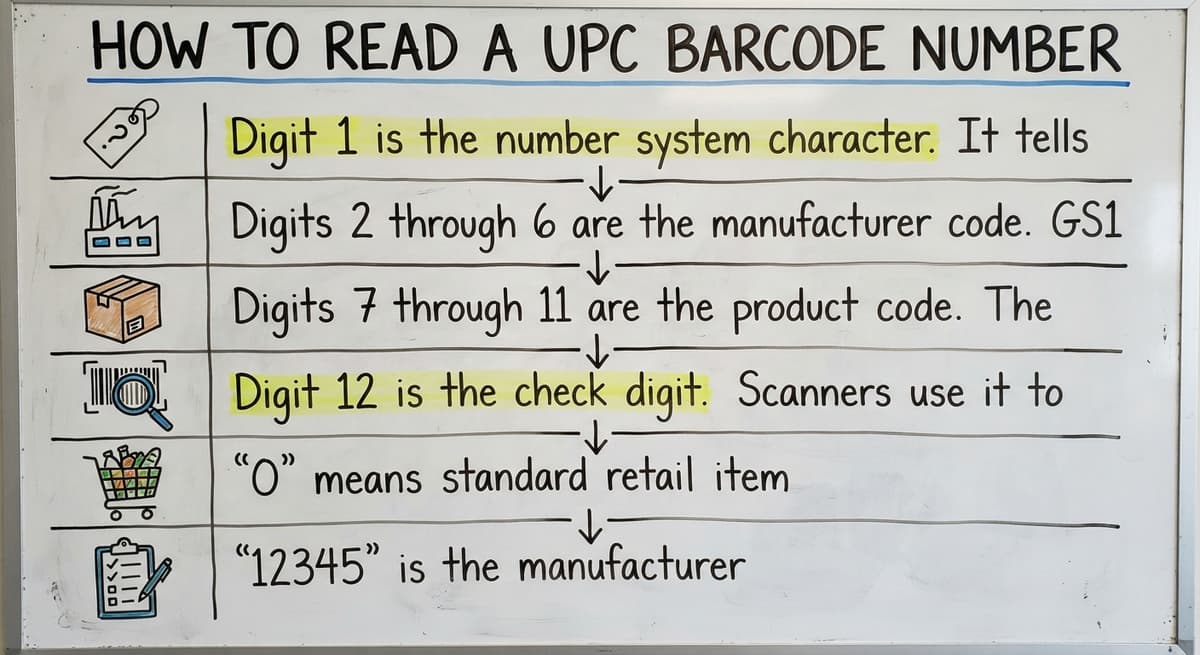
A UPC-A barcode has 12 digits, and each group does a different job. Reading left to right:
- Digit 1 is the number system character. It tells you the product type. A "0" is a standard grocery or retail item. A "3" is a drug or health product.
- Digits 2 through 6 are the manufacturer code. GS1 assigns this 5-digit number to the company that makes the product.
- Digits 7 through 11 are the product code. The manufacturer assigns these 5 digits to identify the specific item.
- Digit 12 is the check digit. Scanners use it to confirm the scan was clean.
Reading the Digits in Practice
Take a UPC barcode that reads: 0 12345 67890 5
- "0" means standard retail item
- "12345" is the manufacturer
- "67890" is the specific product
- "5" is the check digit
You do not need to memorize the manufacturer codes. Your inventory system holds that lookup. What matters is knowing the structure so you can spot a damaged or misprinted label before it causes a receiving error.
Is the comparison easier when one option is built for you?
Yes. Off-the-shelf means fitting your process to the software, and custom is the other way round. The first look costs nothing.
Book a call
What Does the Check Digit Do?
The check digit is the last number in any barcode, and it exists for one reason: to catch bad scans before they corrupt your data.
Scanners calculate a value from the other digits using a fixed math formula. If the result matches the check digit, the scan is accepted. If it does not match, the scanner rejects the scan and the worker tries again.
You never calculate this yourself. The scanner handles it in under a millisecond. What you do need to know is that a repeated scan failure on a specific label means the label is damaged or misprinted, not that the scanner is broken.
Try a different label from the same batch. If that one scans, the original label is the problem.
How Do You Read a Code 128 Barcode Number?
Code 128 is different from UPC-A in one key way: the length is variable. A Code 128 barcode can be short or long depending on what the business encoded into it.
Code 128 can hold letters, numbers, and special characters. That flexibility makes it the standard for shipping labels, warehouse bin tags, and internal inventory labels. A bin label might read "ZONE-A-BIN-042". A pick ticket might carry an order number like "ORD-2025-88341".
Unlike UPC-A, Code 128 numbers are not assigned by GS1. The business creates and manages them internally. Read the number below the bars left to right, just as you would any other code. Your warehouse barcode system defines what each part of the number means.

Can You Read a Barcode Number Without a Scanner?
Yes. Look at the number printed directly below the bars and read it left to right as a single string of digits or characters.
Most inventory systems let you type that number in manually if a scanner is unavailable. This keeps receiving and picking moving when hardware fails.
A few other options work when a label is partially damaged:
- Smartphone camera apps can decode most standard barcodes if the bars are still mostly intact
- Free barcode reader apps work on both iOS and Android for UPC-A, EAN-13, and Code 128
- Manual entry works when the number below the bars is still readable even if the bars are not
Training your team to use the printed number as a fallback takes about 5 minutes and prevents hours of receiving delays.
What the Numbers Tell You in an Inventory System
A barcode number on its own is just an identifier. It points to a record. The inventory system is what holds the actual data behind that number: product name, SKU, quantity on hand, storage location, unit cost, and supplier.
When a worker scans a barcode, the system looks up that number and pulls the full record in under a second.
Every scan updates the record in real time. That is how a warehouse keeps stock counts accurate across receiving, putaway, picking, and shipping without anyone writing anything down.
For wholesale operations, this matters at scale. The US Census Bureau's Monthly Wholesale Trade data tracks national inventory-to-sales ratios across wholesale firms. Tight ratios depend on accurate, real-time stock data. Barcode scanning is what makes that accuracy possible at volume.
The barcode number is the key. The system holds everything the key unlocks.
What does it look like running on your own process?
The first thing you see is it running on your own process, at no build cost. The subscription starts once it is live and doing the job, not before.
Book a call
Why Does a Barcode Sometimes Fail to Scan?
A barcode fails to scan because something breaks the link between the printed bars and the scanner's ability to read them. Most failures fall into 4 categories.
- Damaged or wrinkled labels distort the bars enough that the scanner cannot decode the pattern
- Low print contrast makes the bars blend into the background, especially on recycled or brown kraft labels
- Wrong barcode format means the scanner is set for UPC-A but the label is Code 128, or vice versa
- Number not in the system means the scan succeeds but the inventory system returns no match, which looks like a scan failure but is actually a data gap
Quick test: type the number below the bars directly into your system. If the record appears, the label is the problem. If nothing appears, the item was never set up in your system. These two problems have different fixes, and confusing them wastes time.
How Barcode Numbers Connect to Inventory Records
Each barcode number maps to exactly 1 SKU or item record in your system. When a scan happens, the system pulls that record and updates it: quantity received, quantity picked, location confirmed.
Duplicate barcode numbers break this entirely. If 2 different products share a number, every scan hits the wrong record half the time. Stock counts drift. Orders ship incorrectly. The problem is hard to trace because the scan itself succeeds.
Good barcode management starts before a product hits the floor. Assign numbers, link them to complete item records, and verify uniqueness before receiving begins.
The NIST Manufacturing Extension Partnership notes that supply chain accuracy depends on consistent, standardized data at the item level. Barcode number discipline is where that starts.
A clean number-to-record relationship is what makes a barcode inventory management system reliable.
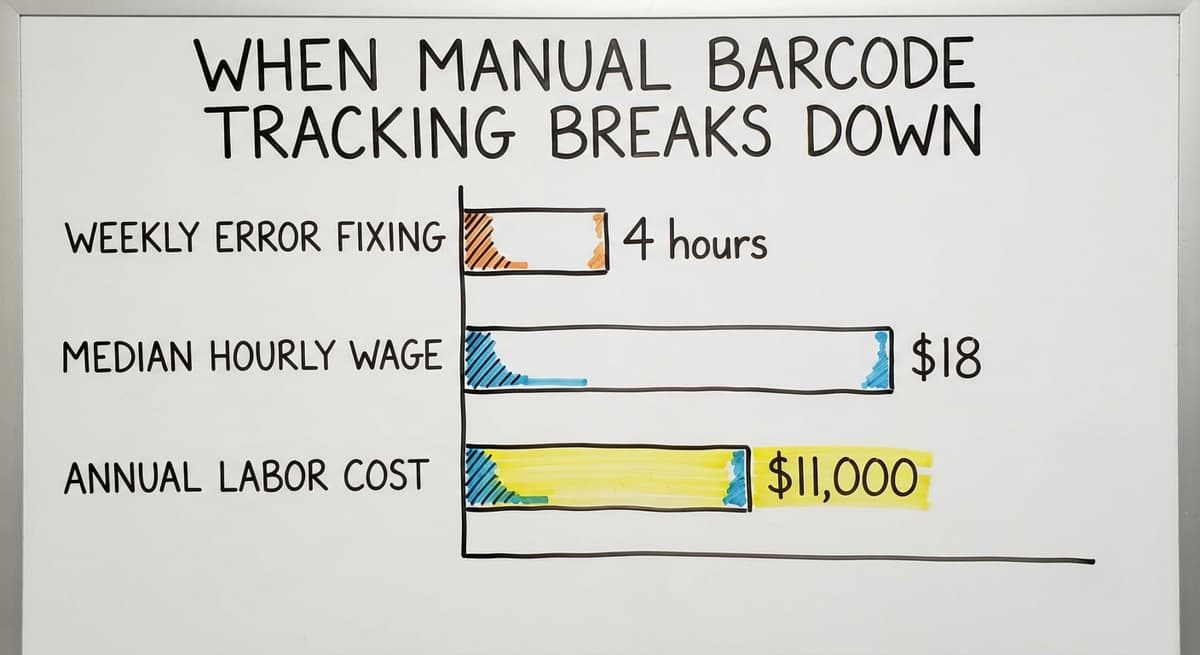
When Manual Barcode Tracking Breaks Down
Spreadsheets work for tracking barcodes when you have fewer than 50 SKUs and 1 person doing all the scanning. Past that point, the system starts failing in predictable ways.
Common problems include:
- Duplicate numbers created when 2 people add items without checking the existing list
- Missed scans that never get entered because there was no prompt or alert
- Unlinked records where a barcode exists on a label but was never added to the spreadsheet
These gaps compound. A missed scan at receiving means a phantom stockout at picking.
A duplicate number means a product that looks available is actually gone. 3 workers spending just 4 hours a week fixing these errors, at the BLS median wage for stock clerks of around $18 per hour, costs over $11,000 a year in labor alone, before counting the orders that ship wrong.
Replacing spreadsheet inventory tracking with a connected system removes the manual matching step entirely.
Making Barcode Numbers Work Harder in Your Operation
The mechanics of how to read a barcode number are simple. The harder part is building a process that makes every scan count.
Start with these steps:
- Standardize your barcode format across all products and locations. Mixing UPC-A and Code 128 without clear rules creates scanner setup problems.
- Link every barcode number to a complete item record before the product arrives on the floor. A label with no matching record is invisible to your system.
- Scan at every touchpoint: receiving, putaway, picking, and shipping. Each scan is a live update. Skipping one creates a gap that shows up later as a discrepancy.
- Train staff on the manual fallback: when a scan fails, read the number below the bars and type it in. Keep the line moving.
Operations that outgrow manual tracking benefit from a system built to match how they already work, one where barcode scanning is connected to live stock counts, not a separate step someone has to remember.
How barcode scanning works in a warehouse becomes straightforward once the system is built around the workflow rather than bolted onto it.
Barcode numbers are simple. A process that uses them well is what separates a warehouse that knows what it has from one that is always guessing.
Frequently asked questions
How do I decode a barcode number?
Look at the digits printed below the bars and read them left to right. For a UPC-A barcode, the first digit is the product type, the next 5 are the manufacturer code, the following 5 are the product code, and the last digit is the check digit.
For Code 128, the number is assigned internally by the business and can include letters and numbers. Your inventory system does the actual decoding when you scan or type the number in.
What do the numbers mean on a barcode?
Each group of digits in a barcode serves a specific purpose. In a UPC-A barcode, the digits identify the product type, the manufacturer, and the specific item. The last digit is a check digit that confirms the scan was accurate.
In Code 128 barcodes used in warehouses, the numbers are assigned by the business and can represent bin locations, order numbers, or internal SKUs. The barcode number itself is just an identifier. The inventory system holds the full product details behind it.
Is there a way to read a barcode?
Yes. You can read a barcode 3 ways. First, use a barcode scanner, which reads the bars in under a second. Second, use a smartphone camera app or a free barcode reader app, which works for most standard formats including UPC-A and Code 128.
Third, read the number printed below the bars with your eyes and type it manually into your system. The manual method works even when the bars are damaged, as long as the printed digits are still visible.
How to read a barcode by hand?
Find the number printed directly below the bars. Read it left to right as a single string. For a UPC-A barcode, you will see 12 digits. For EAN-13, you will see 13. For Code 128, the length varies.
Type that number into your inventory system the same way a scanner would. If the system returns a product record, the number is valid. If it returns nothing, the item may not be set up in your system yet.
What is the check digit on a barcode?
The check digit is the last number in a barcode. Scanners calculate a value from the other digits using a fixed formula and compare it to the check digit. If they match, the scan is accepted.
If they do not match, the scan is rejected. You never calculate this yourself. Repeated scan failures on a specific label mean the label is damaged or misprinted rather than the scanner being broken.
What is the difference between UPC, EAN, and Code 128 barcodes?
UPC-A has 12 digits and is standard for retail and wholesale products sold in North America. EAN-13 has 13 digits and is common on imported goods and products sold internationally.
Code 128 has a variable length and can hold letters, numbers, and special characters, making it the standard for shipping labels, warehouse bin tags, and internal inventory labels. The right format depends on your industry and whether your products are sold through retail channels or managed internally.
Why does a barcode number sometimes fail to scan?
The 4 most common causes are a damaged or wrinkled label, low print contrast between the bars and background, a mismatch between the barcode format and the scanner's settings, and a number that exists on the label but was never entered into the inventory system.
To find out which problem you have, type the number below the bars directly into your system. If the record appears, the label is the issue. If nothing appears, the item record is missing.
How does a barcode number connect to an inventory record?
Each barcode number maps to exactly one item record in your inventory system. When a worker scans a barcode, the system finds that record and updates it instantly, adjusting quantity, location, or status depending on the transaction.
If 2 different products share the same barcode number, every scan hits the wrong record half the time, which causes stock count errors that are difficult to trace. Clean, unique barcode number assignments are the foundation of accurate inventory data.
Can I look up a product using its barcode number?
Yes. A UPC or EAN typed into a barcode lookup site or a retailer's search returns the product and maker. An internal Code 128 number only means something inside the system that assigned it.
How do I tell whether a barcode is UPC or EAN?
Count the digits. A UPC-A has 12; an EAN-13 has 13. An EAN that starts with 0 is the same number as a UPC with the leading zero dropped, and scanners treat them as one.
What do the first digits of a barcode mean?
On a UPC or EAN the first digits are the GS1 company prefix that identifies the maker, not the country. The digits after it are the item number the maker assigned, and the last digit is the check digit.
How is the final check digit calculated?
Add the digits in odd positions and multiply by 3, add the digits in even positions, then take the total's distance to the next multiple of 10. That distance is the check digit; a scan that fails the sum is rejected as a misread.
What is in a free first look?
A 30 minute call, your operation mapped, and a clear picture of what we would build. No obligation and nothing to install.
Book a callRelated guides
More on the same work.
Guides
- Tracking Number Barcode
- Serial Numbering
- Serial Numbers on Products
- Manufacturing Serial Number
- Manufacturer's Serial Number
- Barcode Abbreviation
- Barcode Scan Machine
- Barcode Reader Machine
- Barcode Scanner App Ios
Common questions
- How Are Barcodes Read
- What Are the Numbers on a Barcode
- How to Create a Barcode System for Inventory
- How to Use a Barcode Scanner
- How to Barcode Scanners Work
- How Barcode Scanning Works
- How to Create a Barcode
- How Do I Create My Own Barcodes
- How to Make Your Own Barcode
- How Do Barcodes Work
- What Are Serial Numbers
- What is a Serial Number on a Product
- What Are Serial Numbers Used For
- Where Are Serial Numbers
- What Does a Barcode Look Like