

Inventory Management Software For Schools
Inventory management software for schools is a digital system that tracks every physical item your school owns, from Chromebooks to custodial supplies. It replaces spreadsheets and paper logs with a live record that any authorized staff member can check. Schools that use one spend less time counting, lose fewer items, and walk into audits ready. This guide was reviewed in July 2025.
Book a callWhat Is Inventory Management Software for Schools
School inventory management software is a tool that keeps a real-time record of what your school owns, where each item is, and who has it. Schools track physical items like supplies, equipment, textbooks, and tech devices. That is different from a retail store tracking products for sale or a warehouse tracking goods for shipping. Schools need to know who checked out a Chromebook, when it is due back, and whether the supply closet has enough paper. A dedicated system makes all of that visible without a manual count.
We build it for your operation, and the first look is free
If you would rather not compare products, describe how your operation already works and we build the system around it.
Reviewed September 2026. Figures are worked from the assumptions stated beside them, so you can substitute your own and the arithmetic still holds.
The obligation behind all of this is not optional. IRS Publication 538 states: “To figure taxable income, you must value your inventory at the beginning and end of each tax year.” A figure nobody trusts makes that number a guess.
No build cost. You see it running on your own process first, and the monthly subscription starts only once it is live.
Book a callWhy Schools Struggle with Inventory Without a System
Most schools start with a spreadsheet. Someone updates it when they remember to. Items go missing and no one notices for weeks. Staff spend hours each month reconciling paper logs against what is actually on the shelf.
As GS1, the global body that sets barcode standards, explains, consistent labeling is the foundation of any reliable count: visit GS1 barcode standards to see why a shared numbering system matters before you scan a single item.
Without a system, budget accountability suffers. Auditors ask for records that do not exist. Emergency supply orders eat into budgets that were already tight. The pain is real, and it compounds every semester.
What Types of Items Do Schools Need to Track?
Schools need to track far more item categories than most people expect, and each category plays by different rules. IT devices, textbooks, classroom supplies, furniture, sports equipment, and custodial supplies all live under one roof. Some items, like Chromebooks or calculators, are checked out to students and returned. Others, like printer paper or cleaning solution, are consumed and need reordering. Knowing which category an item falls into shapes how your system should handle it, which is why a one-size approach rarely works.
Core Features to Look for in School Inventory Software
Think of this section as a buyer checklist. Not every school needs every feature listed below. A small elementary school has different needs than a district with 12 buildings. The goal is to match features to the daily work your staff already does, not to buy the longest feature list you can find.
Asset Tracking and Unique Item IDs
Barcode scanning means printing a label with a unique code, sticking it on an item, and scanning it with a phone or reader to pull up that item's record instantly. QR codes work the same way and can be scanned with any smartphone camera. For larger schools with bigger budgets, RFID tags, which broadcast a signal a reader picks up without a direct scan, speed up bulk counts. Asset tracking for schools reduces loss and turns a full audit from a two-day project into an afternoon.
Check-Out and Check-In Tracking
Check-out tracking software logs who has each item and when it is due back. The system sends automated reminders by email or text so staff do not have to chase people down. This matters most for Chromebooks, calculators, library books, and sports gear, items that move constantly. A digital log replaces paper sign-out sheets and creates a record that is searchable in seconds. When a device goes missing, the log tells you exactly who had it last.
Low-Stock Alerts and Reorder Triggers
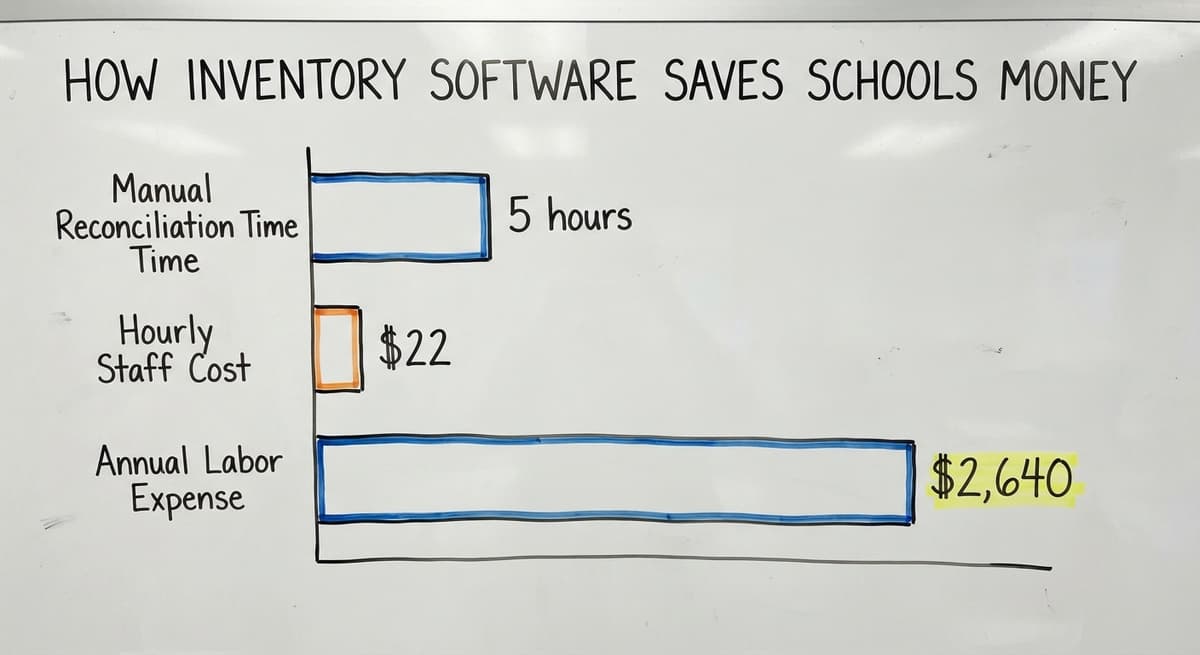
Low-stock alerts notify staff before supplies run out, not after. You set a minimum quantity for each item. When stock drops to that number, the system sends an alert by email or text. This connects directly to budget planning: buying supplies before you run out is almost always cheaper than an emergency order. Consider 3 staff members spending 2 hours each per month on manual counts at the BLS median wage for stock clerks of $22 per hour. That is $1,584 a year in labor alone, before counting the cost of items that run out unnoticed. Automated alerts pay for themselves quickly.
The comparison is easier when one option is built for you
Off-the-shelf means fitting your process to the software. We do it the other way round, and the first look costs nothing.
Book a callReporting, Audit Trails, and Multi-Location Support
School boards, grant administrators, and state auditors all ask for records. Good reporting covers usage history, current item location, depreciation, and missing items. A clear audit trail for school assets protects staff when a question comes up about a missing device or a supply budget that ran over.
For districts with multiple buildings, the system can separate inventory by building, department, or classroom. Transfers between locations are logged automatically. District-level admins see the full picture while building staff see only their own records. That separation keeps data clean and prevents one building's count from polluting another's.
Most solid platforms export reports to PDF or Excel so you can share them without extra steps.
User Roles and Permission Levels
Not every staff member should see every record. A custodian needs access to cleaning supply counts. A teacher needs to check out a projector. A department head may approve buys. Role-based access keeps the system clean and protects sensitive data. Common roles include admin, department head, teacher, and custodian. Good software makes adding or adjusting a role a two-minute task, not an IT ticket.

Cloud-Based vs. On-Premise School Inventory Software
Cloud-based school inventory software runs on remote servers. Staff access it from any device with a browser, updates happen automatically, and there is no server to keep on-site. On-premise software lives on your district's own servers. Data stays local, which suits districts with strict IT policies or limited internet reliability.
For most smaller schools, cloud-based wins on cost and convenience. There is no hardware to buy, no IT team needed to run updates, and staff can check inventory from a phone in the supply room. If your district has no strong reason to keep data on local servers, cloud-based is the practical starting point.
How School Inventory Software Integrates with Existing Systems
A new system has to work with what you already have. Common connections include accounting software, student information systems, and purchasing platforms. A good integration means the inventory system pulls from and pushes to those tools automatically, so staff do not re-enter the same data in 2 places.
The NIST Manufacturing Extension Partnership notes that supply chain efficiency depends on data moving cleanly between systems, not sitting in silos. The same logic applies to school operations. Integration cuts double data entry and removes the human error that comes with copying numbers from one screen to another.
Off-the-Shelf Software vs. Custom-Built Solutions
Off-the-shelf inventory software for school districts is a packaged product. It deploys fast, but your school may need to change how it works to fit the software's logic. Custom software is built around your existing workflow. It automates the slow, painful parts without forcing staff to relearn everything.
Custom does not always mean expensive or slow. When the builder is focused and local, a custom build can go live in weeks. The IRS needs that inventory be valued at the beginning and end of each tax year, which means your count method has to be defensible. A system built around how your school actually counts is easier to defend than one your staff works around.
The right question is not which product is most popular. It is which approach fits your process.
See it running on your own process first
No build cost. The subscription starts once it is live and doing the job, not before.
Book a callHow Is Custom Inventory Software Built Around Your Workflow?
Custom software starts with a map of what your staff already does, before a single line of code is written. A builder walks through each manual step: how items are received, labeled, stored, checked out, and counted. The goal is to automate what is slow and painful, not to replace everything at once. Staff adopt new tools faster when the system mirrors steps they already know. Building around your workflow means the software serves your operation, not the other way around, which is the core idea behind custom workflow rollout for growing organizations.

Implementation, Common Mistakes, and Questions to Ask
A typical rollout runs in 5 steps: discovery, build, test, train, and go live. A focused partner keeps this short. Be cautious of vendors who promise every feature but quote a 12-month timeline. Staff training is not an afterthought; it is the step that work out whether the system gets used.
Schools most often go wrong by buying more features than they will ever use, skipping a process review before the demo, choosing a vendor with no public-sector experience, or underestimating how much staff buy-in matters. A system no one uses solves nothing.
Before you sign anything, ask these questions:
- Can the system match our current process, or will we have to change how we work?
- What does rollout look like and how many weeks does it take?
- Who do we contact when something breaks?
- Is pricing per user, per location, or a flat rate?
- Can we see a demo using our actual item types?
The answers reveal whether a vendor is selling a product or solving your problem.
How Inventory Software Saves Schools Money
The savings show up in 4 places. Equipment that was never logged out stops disappearing quietly. Low-stock alerts trigger early enough to use normal purchasing channels instead of rush orders. Staff hours spent on manual counts drop sharply. Audit records becomes strong enough to protect grant funding when a reviewer asks for records.
Run the math for your school: if 2 staff members each spend 5 hours a month on manual matching at $22 an hour, that is $2,640 a year in labor before counting a single lost device. Most systems cost far less than that annually.

Real-World Example: Replacing Spreadsheets with a Tracked System
Consider a mid-size district with 4 schools and 600 Chromebooks. Before: devices were tracked in an Excel file updated by hand. Devices went missing between semesters. No one could say with certainty who had which device. Auditors flagged the gap.
After: every device received a barcode tag. Check-out tracking software logged each loan at the point of handoff. Automated reminders went out 3 days before return dates. End-of-year matching dropped from 3 days to half a day. The district recovered 14 devices in the first semester simply because staff could see who had them.
The change was not a technology overhaul. It was replacing one manual habit with a logged one.
How Do You Get Started with School Inventory Software?
Start before you look at any software. List every category of item your school currently tracks and write down how you track it today. That document becomes your requirements list. Involve the staff who will use the system daily; they know where the current process breaks. Once you have that picture, you can evaluate tools against your actual needs rather than a vendor's feature list. Reach out for a conversation before you commit to a buy, and you will save yourself from buying a system that fits someone else's school.
Frequently asked questions
What are the top 5 inventory management software?
There is no single answer that fits every school. The products most often evaluated for school use include Cheqroom, Snipe-IT, Asset Panda, UpKeep, and Sortly. Each fits different budgets and school sizes. The right choice depends on whether you need check-out tracking, multi-location support, or integration with your accounting system. Evaluate based on your workflow, not on rankings.
What software is commonly used in school management?
Schools commonly use student information systems like PowerSchool or Infinite Campus for enrollment and grades. For inventory and asset tracking, tools like Snipe-IT, Asset Panda, and Cheqroom appear frequently. Some districts use general platforms like Airtable or even Google Sheets before moving to a dedicated system. The best fit depends on what your school already uses and what it needs to track.
Which software is commonly used in inventory management?
Outside of schools, common inventory platforms include Fishbowl, inFlow, Cin7, and QuickBooks with inventory add-ons. These are built for retail or manufacturing and may not handle school-specific needs like student check-out tracking or grant audit trails. Schools often do better with tools designed for asset and equipment management rather than product sales.
What is the best software for inventory management?
Best depends entirely on your situation. A small school with 200 devices needs something different from a district with 10,000. Criteria that actually decide it: does the system handle both fixed assets and consumable supplies, can it support check-out and return tracking, does it integrate with your accounting platform, and will your staff actually use it. No single product wins on all criteria for every school.
Is inventory management software for schools only useful for large districts?
No. Small schools benefit just as much, sometimes more. A small team has less capacity for manual counting, so automating that work frees up real hours. Even a school with 100 devices and a single supply closet gains from having a live record instead of a spreadsheet that is always a week out of date.
Can inventory software track consumable supplies and fixed assets at the same time?
Yes. Most dedicated systems handle both. Fixed assets like laptops get unique IDs and check-out records. Consumables like paper or cleaning supplies get quantity tracking and low-stock alerts. The two types follow different rules inside the same platform, so you do not need separate tools.
How long does it take to implement school inventory software?
A focused build or setup can go live in 2 to 6 weeks for most schools. Complexity adds time: a single school with one item type is faster than a district with 8 buildings and 20 item categories. The step that most often causes delays is not the software itself but getting existing item data cleaned up and ready to import.
Does school inventory software need to connect to our existing accounting system?
It does not have to, but it usually saves time when it does. A connection means buy orders, asset values, and budget codes flow between systems automatically. Without it, staff re-enter data by hand, which introduces errors. Most modern platforms offer standard integrations with common accounting tools used in public education.
Start with a free first look
A 30 minute call, your operation mapped, and a clear picture of what we would build. No obligation and nothing to install.
Book a callRelated guides
More on the same work.
Guides
- Hvac Inventory Management Software
- Inventory Management Software Costs
- Multi Location Inventory Management Software
- Cloud Stock Management Software
- Best Inventory Software
- Inventory Management Software with Barcode
- Inventory Management Software Freeware
- Inventory Management Software Barcode Scanner
- Quickbooks Inventory Management Software
- Manufacturing Inventory Management Software
- Free Inventory Management Software for Small Business
- Free Inventory Management Software with Barcode Scanner
- Best Inventory Management Software for Small Businesses
- Inventory and Warehouse Management Software
- Cost of Inventory Management Software
- Custom Inventory Management Software
- Warehouse Inventory Management Software
Common questions
- What Software is Used for Inventory Management
- What is the Best Inventory Management Software for Small Business
- What is E Inventory Management
- What is Roq in Inventory Management
- What is Barcoding in Inventory Management
- What is Online Inventory Management System
- What is Effective Inventory Management
Added since this page was reviewed
The newer guides in this cluster are here.
- How to Manage Inventory in Rocket League Answered on its own page.
Added since this page was reviewed
The newer guides in this cluster are here.
- What is the Difference Between Aggregate and Item Inventory Management Answered on its own page.
- Inventory Management for Multiple Locations Answered on its own page.
- What is Jit Inventory Management Answered on its own page.
- What is Kanban System of Inventory Management Answered on its own page.
- What is the Definition of Inventory Management Answered on its own page.
Added since this page was reviewed
The newer guides in this cluster are here.
- Inventory Management System for Manufacturing Answered on its own page.
- Inventory Management Pics Answered on its own page.
- What is an Important Factor in Inventory Management Answered on its own page.
- B2B Inventory Management Answered on its own page.
- Jewelry Inventory Management Answered on its own page.
- Dental Inventory Management Answered on its own page.
- What is Abc Classification in Inventory Management Answered on its own page.
- What is Inventory Management in Working Capital Answered on its own page.
- The Objective of Inventory Management is To Answered on its own page.
- What is Poor Inventory Management Answered on its own page.
- What is Inventory Management and Its Types Answered on its own page.
- Qr Code for Inventory Management Answered on its own page.
- What is the Main Purpose of Inventory Management Answered on its own page.
Added since this page was reviewed
The newer guides in this cluster are here.
- Inventory Counting Software Answered on its own page.
Added since this page was reviewed
The newer guides in this cluster are here.
- Inventory Management Software List Answered on its own page.
Added since this page was reviewed
The newer guides in this cluster are here.
- Top 5 Inventory Management Software Answered on its own page.
Added since this page was reviewed
The newer guides in this cluster are here.
- Barcoding and Inventory Software Answered on its own page.
Added since this page was reviewed
The newer guides in this cluster are here.
- Material Inventory Software Answered on its own page.
Added since this page was reviewed
The newer guides in this cluster are here.
- Small Business Inventory Software Answered on its own page.
Added since this page was reviewed
The newer guides in this cluster are here.
- Inventory Management Software Retail Answered on its own page.
Added since this page was reviewed
The newer guides in this cluster are here.
- Retail Inventory Tracking Software Answered on its own page.
Added since this page was reviewed
The newer guides in this cluster are here.
- Inventory of Software Answered on its own page.
Added since this page was reviewed
The newer guides in this cluster are here.
- Inventory Software for Retail Shop Answered on its own page.
Added since this page was reviewed
The newer guides in this cluster are here.
- Simple Inventory Management Software Answered on its own page.
Added since this page was reviewed
The newer guides in this cluster are here.
- Retail Stock Management Software Answered on its own page.
Added since this page was reviewed
The newer guides in this cluster are here.
- Event Inventory Software Answered on its own page.