

Warehouse Management System Implementation
Warehouse management system implementation is the work of putting software in place that runs receiving, storage, picking, and shipping from one record. Done well it is 4 phases and 6 to 16 weeks for a warehouse of 5 to 100 people; done badly it is the story every operator has heard. This guide, reviewed in September 2026, sets out the phases, a realistic timeline, and the mistakes that stretch it, so the rollout stays inside the estimate and the team keeps shipping while it happens.
Published 7 August 2026. Reviewed and updated 15 September 2026.
Reviewed August 2026. Each figure comes from the assumptions stated beside it, so you can substitute your own and the arithmetic still holds.
Book a callWhat Does Warehouse Management System Implementation Actually Mean?
WMS implementation is not just buying software. It is the process of making that software fit the way your warehouse actually works.
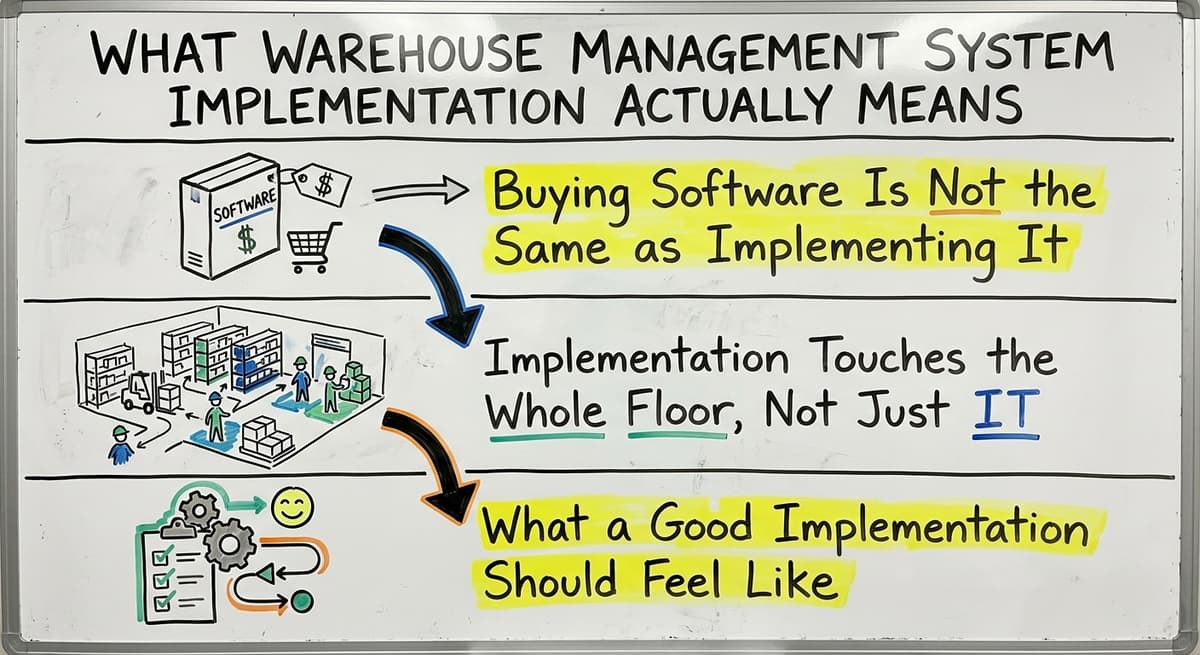
Buying Software Is Not the Same as Implementing It
Buying a WMS and truly implementing it are not the same thing. That happens more than you think. The system sits there. Staff work around it. Spreadsheets come back.
Real implementation means the software maps to your receiving dock, your pick paths, your packing rules, and your shipping steps. It fits your workflow. You do not bend your workflow to fit it.
Implementation Touches the Whole Floor, Not Just IT
A WMS implementation is not an IT project. It touches every part of your operation. Receiving staff scan goods in. Pickers follow system-guided routes.
Packers confirm orders before they ship. Managers see live stock levels without walking the floor. Every role changes a little. That is the point.
What a Good Implementation Should Feel Like
A good warehouse management system implementation removes steps. It does not add them. If your team is doing more clicks, more data entry, or more workarounds after go-live than before, something went wrong in the build.
The goal is fewer manual steps, faster training for new staff, and numbers that match what is actually on the shelf.
Would you rather have it built around your operation?
The first look is free. If you would rather not compare products, describe how your operation already works and we build the system around it.
No build cost. You see it running on your own process first, and the monthly subscription starts only once it is live.
Book a callWhy Do So Many Implementations Fail for Small Operations?
Most WMS products target warehouses with 500 or more staff and a full IT team. Small operations buy them anyway. That is where the trouble starts.
Enterprise Systems Are Built for Enterprise Problems
Big-warehouse software assumes you have a dedicated system admin, a project manager, and months to spare. It also assumes your process is already documented. Small operations rarely have any of that.
The system arrives with hundreds of settings no one understands. Staff spend weeks in training for features they will never use. The software feels foreign from day one.
Long Timelines and High Costs Leave No Room to Adjust
Enterprise WMS contracts run 12 to 24 months before go-live. Multi-year licensing locks you in before you know if the system fits. High upfront costs mean there is no budget left to fix problems after launch.
Small operations cannot absorb that kind of disruption. When the system does not fit, spreadsheets creep back in. The old process returns. The investment is wasted.
Safety and Staff Resistance Make It Worse
When software feels foreign to daily routines, staff push back. That is not laziness. It is a rational response to a tool that does not match the job.
OSHA notes that "the warehousing and storage industry includes establishments operating facilities for general merchandise, refrigerated goods, and other products", and the physical nature of that work means any system that slows people down creates real risk on the floor.
A system staff do not trust is a system they will not use.
Signs Your Operation Is Ready for Implementation
You do not need to be in crisis to benefit from a WMS. But certain signs tell you the time is right.
Your Tracking Is Split Across Too Many Places
When inventory data is split across email, printed sheets, the accounting system, and spreadsheets, errors are not a matter of if. They are a matter of when. Staff waste time cross-checking sources that rarely agree.
The IRS is clear on why this matters: "To figure taxable income, you must value your inventory at the beginning and end of each tax year," according to IRS Publication 538. Inaccurate counts are not just an operations problem. They are a compliance problem.
Stock Counts Are Wrong and Training Takes Too Long
If your physical count rarely matches what the accounting system shows, manual updates are the likely cause. One missed scan. One forgotten adjustment. One pick that never got logged. These errors compound.
New staff take weeks to get up to speed because the process lives in one person's head, not in a system. When that person is out, the whole operation slows down.
You Have Outgrown Your Current Setup
Picking errors increase as order volume grows. Shipping mistakes follow. You know you need something better, but a full ERP feels like too much. That gap, between outgrown spreadsheets and a full enterprise system, is exactly where a focused warehouse management system implementation fits.
You do not need to replace everything. You need to replace the parts that are breaking.
Is the comparison easier when one option is built for you?
Yes. Off-the-shelf means fitting your process to the software, and custom is the other way round. The first look costs nothing.
Book a callThe Core Phases of a Warehouse Management System Implementation
Breaking implementation into clear phases makes it manageable. It also keeps your team aligned on what comes next.
A typical WMS implementation for a small to mid-size operation moves through these phases:
- Discovery. Map your current process. Document how goods move from receiving to shipping. Identify the manual steps causing the most pain.
- System design. Build the workflow inside the software. Configure receiving rules, pick logic, packing steps, and shipping output to match your real operation.
- Integration. Connect the WMS to your accounting software and any other tools you use. Set up barcode scanning (the use of printed codes on products that scanners read to update stock automatically) if not already in place.
- Data migration. Move your current inventory data into the new system. Decide what historical data you actually need and leave the rest in the accounting system.
- Testing. Run the system with a small group before full rollout. Find the gaps before go-live, not after.
- Training. Train staff on the tasks relevant to their role. Keep it practical and short.
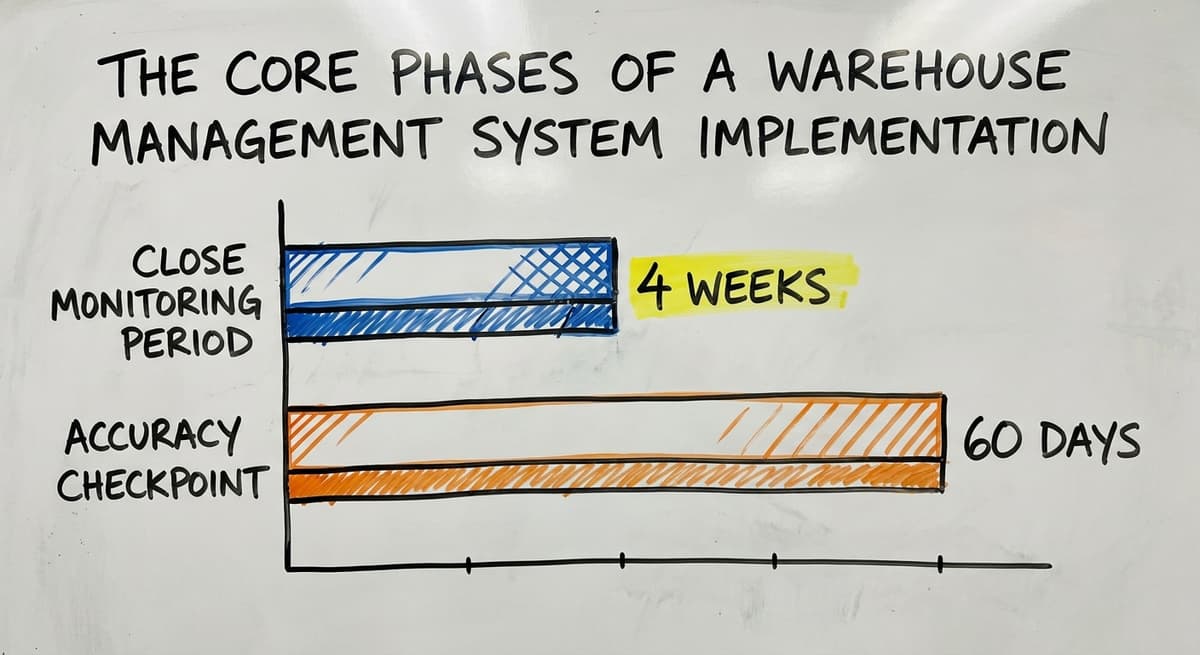
- Go-live. Launch with support on hand. Monitor closely for the first 2 to 4 weeks.
- Post-launch review. Check accuracy rates, pick times, and error counts at 30 and 60 days. Adjust where needed.
Adapt these phases to your pace. A 10-person operation moves faster than a 75-person one. The phases are the same. The timeline is not.

How to Keep Your Accounting Software in Place During Implementation
Your accounting software handles accounting well. There is no reason to replace it just to implement a WMS.
Accounting Data and Operational Data Are Different Things
An accounting package and a WMS handle different jobs. Both systems can run at the same time. The WMS handles warehouse operations. The accounting software handles the books. Each does what it does best.
The Integration Should Be Automatic, Not Manual
A well-built accounting integration for warehouses means warehouse staff update inventory and the books reflect it without anyone doing an export or import. No CSV files. No copy-paste. No reconciliation at the end of the week.
When a shipment goes out, the cost of goods updates. When stock arrives, the purchase order closes. It happens in the background. Avoid any setup that requires manual steps between the two systems. That defeats the purpose.
What a Good Integration Looks Like in Practice
A warehouse manager confirms a received shipment on a tablet. The WMS updates stock levels. The accounting system records the purchase against the open PO. The cost flows through automatically.
No double entry. No lag. No mismatch between what the shelf holds and what the books say. That is the outcome a proper warehouse inventory management integration delivers.

What Does a Realistic Implementation Timeline Look Like?
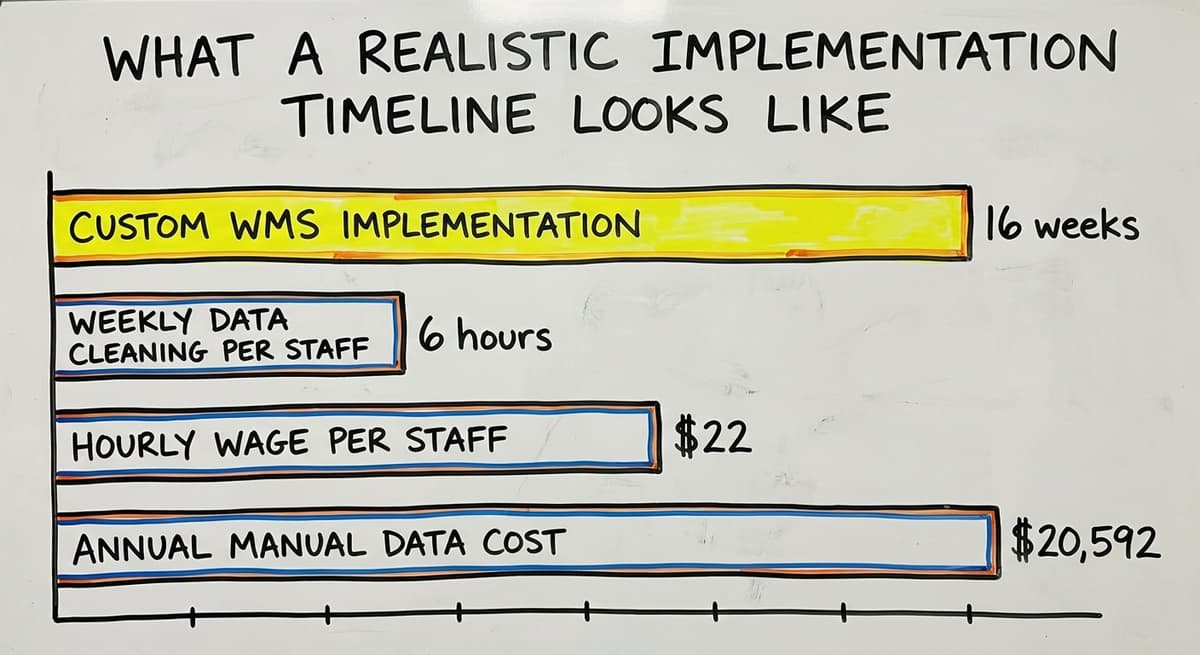
For a small to mid-size operation with 5 to 100 staff, a realistic custom WMS implementation runs 6 to 16 weeks.
What Extends the Timeline
Several factors push the WMS implementation timeline out:
- Messy or incomplete historical data that needs cleaning before migration
- A large number of product SKUs (unique product codes) with inconsistent naming
- Complex fulfillment rules, such as lot tracking, expiry dates, or multi-location picks
- Multiple warehouse locations that each need their own configuration
If 3 staff members spend 6 hours a week each cleaning data manually at $22 an hour, that is $20,592 a year in labor before a single order ships. Cleaning data before implementation saves that cost going forward.
What Shortens the Timeline
Several factors speed the WMS implementation timeline up:
- Clear process documentation before discovery starts
- Staff who are engaged and willing to test early
- Ownership that makes decisions quickly without long approval chains
- A single warehouse location with a straightforward pick-and-pack workflow
What does it look like running on your own process?
The first thing you see is it running on your own process, at no build cost. The subscription starts once it is live and doing the job, not before.
Book a callWhy a Phased Rollout Reduces Risk
Start with one workflow, such as receiving, before adding picking and shipping. A phased rollout means problems surface in one area, not across the whole operation at once. It also builds staff confidence.
When receiving works well, the team trusts the system before picking goes live. Avoid any vendor promising a full implementation in a few days. That means an out-of-the-box setup that will not fit your workflow.

Choosing the Right Implementation Partner
The implementation partner you choose matters as much as the software itself.
Ask About Your Process Before They Show You a Demo
A good implementation partner asks questions before showing features. What does your receiving process look like? Where do errors happen most? How do you handle returns?
If a vendor leads with a demo before understanding your operation, that is a warning sign. They are selling software. They are not solving your problem.
Look for Continuity After Go-Live
The team that builds the system should also support it after launch. Avoid partners who hand you off to a separate support team who had no part in the build.
When something breaks at 8am on a Monday, you want someone who knows your system, not someone reading a ticket for the first time.
The Warehousing Education and Research Council publishes standard benchmarks for distribution center performance that a good partner will reference when setting your targets.
Check References from Operations Like Yours
Ask for references from businesses of similar size and similar industry. Enterprise case studies do not tell you how a partner handles a 20-person wholesale distributor. Ask specifically:
- What was included after go-live?
- Were bug fixes covered or billed separately?
- Could you reach the team who built the system?
- Did the timeline hold?
Local partners who can visit your facility have a real advantage when your operation has physical complexity that is hard to explain on a call.

Common Mistakes to Avoid During Implementation
Most WMS implementation failures come down to a handful of avoidable mistakes.
Automating a Broken Process
Software does not fix a bad process. It makes a bad process faster and harder to change. Before you configure anything, map how work actually flows.
Fix the steps that do not make sense. Then build the system around the improved process. Skipping discovery and jumping to setup is the single most common cause of a failed WMS implementation.
Leaving Floor Staff Out Until Go-Live
Warehouse floor staff find problems that managers never see. They know which pick path is blocked on Tuesdays. They know which product gets mislabeled by the supplier. Involve them early.
Let them test the system before it goes live. Their input will catch real problems. Their buy-in will make the rollout smoother. The NIST Manufacturing Extension Partnership recommends involving frontline workers in process change as a core principle of supply chain improvement.
Other Mistakes That Derail Implementations
- Migrating all historical data when only recent data is actually needed
- Going live during peak season or a high-volume period
- Choosing a system based on price alone without checking fit for your workflow
- Assuming the software will run itself without a named owner on your team
Each of these is avoidable. Each one has ended an otherwise sound implementation.
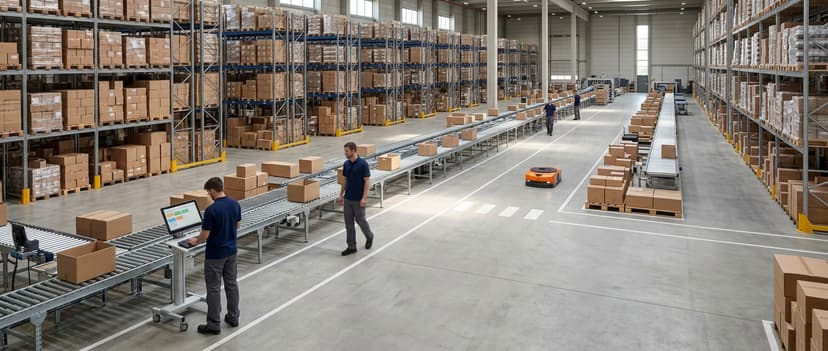
What Does Success Look Like After Implementation?
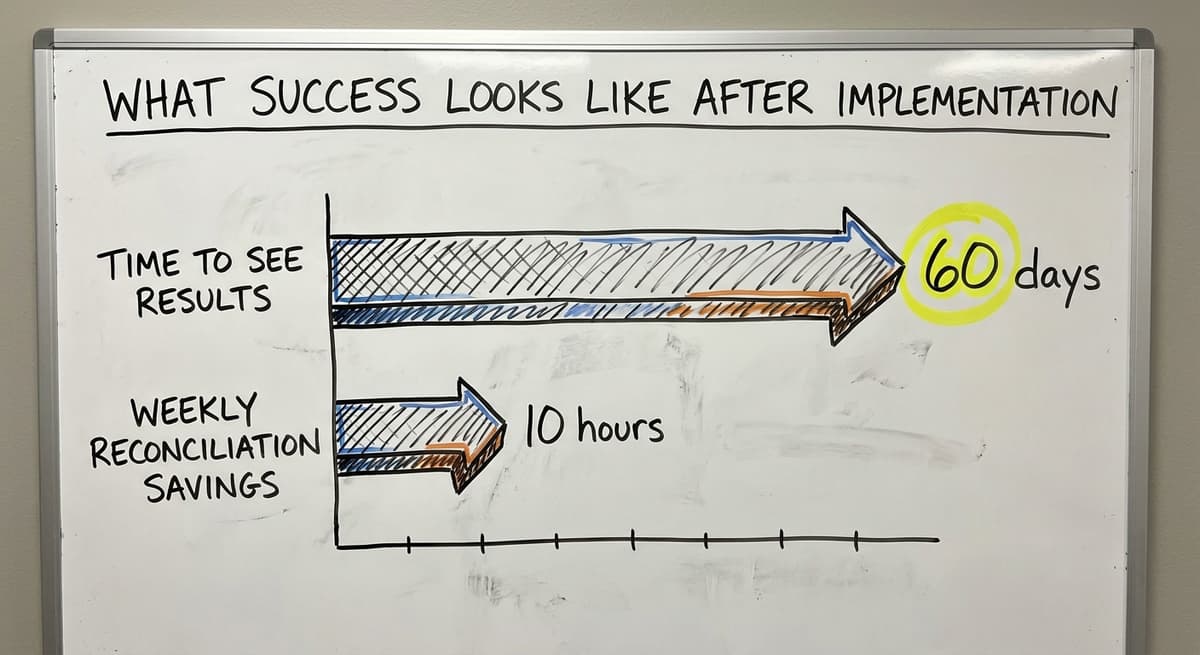
A successful warehouse management system implementation shows up in numbers within 60 days.
Accuracy and Efficiency Improve Fast
Inventory accuracy improves measurably once a WMS is in place. Stock discrepancy rates drop. Order errors fall because the system guides the pick and pack process step by step.
Staff spend less time on manual data entry. They spend more time on work that actually moves orders.
The US Bureau of Labor Statistics reports that warehouse workers earn a median wage that makes every hour of manual reconciliation a real cost. Cutting 10 hours of reconciliation per week per person adds up fast.
Management Gets Real Visibility
With a WMS in place, managers see live stock levels without walking the floor or waiting for a spreadsheet. The books stay current without extra effort.
The operation can grow order volume without adding staff at the same rate. New hires get up to speed faster because the process is in the system, not in someone's head.
Start with a free first look
Book a free 30 minute call, get your operation mapped, and leave with a clear picture of what we would build. No obligation and nothing to install.
Book a callThe Operation Scales Without Breaking
Custom warehouse software for small distributors built around your real workflow scales with you. Add a product line. Add a second location. Add a new fulfillment channel.
The system adjusts because it was built on your actual process, not a generic template. That is the difference between a system that fits and one that fights you.

Frequently Asked Questions About Warehouse Management System Implementation
How long does WMS implementation take for a small warehouse?
For a small to mid-size operation with 5 to 100 staff, a custom build runs 6 to 16 weeks.
Complexity, data quality, and how quickly your team makes decisions all affect the timeline. A phased rollout, starting with receiving before adding pick and pack, reduces risk and keeps the timeline tight.
Do we have to replace our accounting software to implement a WMS?
No. A good WMS integrates with your accounting software so both systems run at the same time. The accounting package handles accounting. The WMS handles warehouse operations. A proper integration means no manual exports or imports between the two.
What are the four types of WMS?
The 4 main types are: standalone WMS (software focused only on warehouse operations), ERP-integrated WMS (a WMS module built inside a larger enterprise ERP), cloud-based WMS (hosted software accessed via browser with no local install), and supply chain module WMS (part of a broader supply chain platform).
For small operations, a standalone or cloud-based WMS is the right fit. ERP-integrated systems carry costs and complexity that most small warehouses do not need.
Is an ERP the same as a WMS?
No. An ERP (Enterprise Resource Planning) system covers the whole business, and the large enterprise ERPs include a warehouse module as one part of it. Those platforms target large enterprises and are not a practical choice for small or mid-size operations.
The cost, the implementation timeline, and the ongoing admin overhead are all sized for companies with dedicated IT teams.
What are the five S's of warehouse management?
The 5S method comes from lean manufacturing. The 5 steps are: Sort (remove what is not needed), Set in order (organize what remains), Shine (clean the space), Standardize (document the process), and Sustain (keep it going).
A WMS supports 5S by making the standardize and sustain steps easier. When the process lives in the system, it does not drift.
Is WMS difficult to learn?
A well-built WMS should not be hard to learn. If it takes weeks to train a new staff member, the system is too complex for the job. A good WMS guides users through each task step by step.
Most floor staff can learn their core tasks in a day or two. Managers and admins take a little longer because they configure and report, but that is still measured in days, not weeks.
How much does warehouse management system implementation cost?
Cost varies widely. Enterprise ERP systems can run hundreds of thousands of dollars. A custom WMS built for a small operation costs far less. The honest answer is: get a scoped quote based on your specific workflow, not a price list.
Wholesale distribution software built for your size should fit your budget without a multi-year contract that locks you in before you know if it works.
What if our process is not well documented?
A good implementation partner will help you map your process during the discovery phase, even if it is not well documented. You do not need to arrive with a process manual.
You need to be willing to walk through how work actually happens, step by step. The partner documents it. That documentation becomes the foundation for the system build.
A warehouse management system implementation does not have to be a big, expensive, risky project.
For small and mid-size operations, it can be a focused build that slots into how you already work, keeps the accounting software in place, and removes the manual steps that are slowing you down.
If your inventory tracking is split across too many tools and your team is losing time to errors and reconciliation, the right next step is a conversation about your specific workflow, not a software demo.
The Software Society builds custom warehouse software for small distributors and wholesale operations. We start with your process. We build around it. We stay with you after go-live.
If you are ready to replace the patchwork, reach out and we will walk through what a fit-for-purpose implementation looks like for your operation.
Frequently asked questions
Frequently asked questions
What are the four types of WMS?
The 4 main types are: standalone WMS (focused only on warehouse operations), ERP-integrated WMS (a module inside a larger enterprise ERP), cloud-based WMS (hosted software accessed via browser), and supply chain module WMS (part of a broader supply chain platform).
For small operations, a standalone or cloud-based WMS is the right fit. ERP-integrated systems carry costs and complexity that most small warehouses do not need.
Is an ERP the same as a WMS?
No. An ERP (Enterprise Resource Planning) system covers the whole business, and the large enterprise ERPs include a warehouse module as one part of it. Those platforms target large enterprises with dedicated IT teams and are not a practical choice for small or mid-size operations due to cost, implementation timeline, and ongoing admin overhead.
What are the five S's of warehouse management?
The 5S method comes from lean manufacturing. The steps are: Sort (remove what is not needed), Set in order (organize what remains), Shine (clean the space), Standardize (document the process), and Sustain (keep it going).
A WMS supports 5S by making the standardize and sustain steps easier. When the process lives in the system, it does not drift back to old habits.
Is WMS difficult to learn?
A well-built WMS should not be hard to learn. If it takes weeks to train a new staff member, the system is too complex for the job. A good WMS guides users through each task step by step.
Most floor staff can learn their core tasks in a day or two. Managers and admins take a little longer, but that is still measured in days, not weeks.
How long does warehouse management system implementation take for a small warehouse?
For a small to mid-size operation with 5 to 100 staff, a custom build runs 6 to 16 weeks.
Complexity, data quality, and how quickly your team makes decisions all affect the timeline. A phased rollout, starting with receiving before adding pick and pack, reduces risk and keeps the timeline manageable.
Do we have to replace our accounting software to implement a warehouse management system?
No. A good WMS integrates with your accounting software so both systems run at the same time. The accounting package handles accounting.
The WMS handles warehouse operations. A proper integration means no manual exports or imports between the two. Warehouse staff update inventory and the books reflect it automatically.
How much does warehouse management system implementation cost?
Cost varies widely. Enterprise ERP systems can run hundreds of thousands of dollars. A custom WMS built for a small operation costs far less. The honest answer is: get a scoped quote based on your specific workflow.
Wholesale distribution software built for your size should fit your budget without a multi-year contract that locks you in before you know if it works.
Can we implement a WMS in phases rather than all at once?
Yes, and for most small operations it is the safer approach. Start with one workflow such as receiving, then add picking and shipping once the first phase is stable.
A phased rollout means problems surface in one area, not across the whole operation at once. It also builds staff confidence before the next phase goes live.
What data is needed for WMS implementation?
Four sets, and they have to be clean before go-live: a product list with consistent SKUs, units of measure and barcodes; a location map of every zone, aisle, shelf and bin; opening stock counts by location from a fresh physical count; and open purchase and sales orders so the system starts with the real backlog.
Historical transactions can stay in the accounting software. Bad data at go-live is the most common reason a warehouse management system implementation stalls.
What are the most important WMS implementation KPIs?
Track five from day one: inventory accuracy (system count against physical count), order accuracy (orders shipped complete and correct), receiving time from truck to shelf, picks per hour, and the number of manual corrections staff make each week.
The last one is the early warning: if corrections do not fall in the first month, the process and the system do not match yet.
How do you integrate a WMS with an ERP system?
Through the vendor's connector or an API, with a clear split of duties: the ERP or accounting package stays the financial and commercial record, the WMS becomes the physical record.
Orders and purchase orders flow into the WMS; receipts, picks, shipments and stock adjustments flow back with cost of goods.
Test the sync on real orders before go-live and confirm exactly which fields move, because a partial sync creates the double entry the project was meant to remove.
What are the best WMS implementation practices?
Map the current process before touching software. Clean the product and location data first. Roll out in phases, starting with receiving or one product line. Train a small group who then train the floor.
Keep the accounting software in place and connected rather than replacing it. Run the old and new process in parallel for one or two weeks, measure accuracy against a physical count, and only then switch fully.
Not sure this is the right shape for your operation?
The call is free. Describe how the work runs today. We map it on a call and show you what it would look like built around that, before you spend anything.
Book a callRelated guides
The rest of this guide, for the parts of the job this page does not cover.
Guides
- Warehouse Inventory Management Systems
- Warehouse Management System Top 10
- Software for Warehouse Management System
- Small Business Warehouse Management System
- Warehouse Management System Types
- Warehouse Inventory Management System
- Warehouse Management System Examples
- Cloud Warehouse Management System
- Warehouse Stock Management System
Common questions
- What Are the Benefits of Warehouse Management System
- What is the Point of Warehouse Management System
- How to Choose a Warehouse Management System
- What is Asn in Warehouse Management System
- How to Create a Warehouse Management System
- What is a Warehouse Management System
- Which Warehouse Management System Would a Jeweler Most Likely Use
- How to Build a Warehouse Management System
- What is a Warehouse Management System Used For
- Warehouse Management System vs Warehouse Control System
- Meaning of Warehouse Management System
- Definition of Warehouse Management System
- Warehouse Management System Comparison
- What is the Purpose of a Warehouse Management System
- What is a Warehouse Management System Pdf