


Inventory Management Software Costs
Inventory management software costs range from $0 to more than $100,000 in year one. Most small distributors and warehouses land between $3,000 and $30,000 when you add up the software, setup, and training. Where you fall depends on your team size, workflow complexity, and which pricing model you choose.
Reviewed September 2026. Figures are worked from the assumptions stated beside them, so you can substitute your own and the arithmetic still holds.
Reviewed and updated: June 2025
Book a callWhy Inventory Management Software Costs Vary So Much
The price gap between tools is enormous. A free tier in Zoho Inventory costs nothing. An enterprise contract with a platform like NetSuite can run six figures before rollout begins. Neither number tells you what you will actually pay.
Price depends on 4 main variables: the features you need, how many users need access, whether the software runs on your servers or in the cloud, and how much setup work the vendor does for you. Small distributors and warehouses have very different needs than large manufacturers, and the tools priced for manufacturers will charge you for features you will never open. Understanding these variables before you talk to a vendor helps you compare quotes on equal terms.
We build it for your operation, and the first look is free
If you would rather not compare products, describe how your operation already works and we build the system around it.
No build cost. You see it running on your own process first, and the monthly subscription starts only once it is live.
Book a callThe Main Pricing Models for Inventory Software
Knowing the model a vendor uses changes how you calculate your real annual cost.
- Monthly SaaS subscription is the most common model today. You pay every month and the vendor hosts the software.
- Per-user pricing charges a fee for each person who logs in. Flat-rate pricing charges one price regardless of team size.
- One-time license fees still exist in older or on-premise tools. You buy the software once, then pay for support each year.
- Custom-built software uses a project-based fee. You pay for the build, then a smaller ongoing retainer if you want changes.
GS1, the global standards body behind product barcodes, notes that "barcodes are the most widely used automatic spotting technology in the world", which means any pricing model you choose needs to support scan-based receiving if your warehouse uses labeled stock.
Why the Pricing Model Changes Your Year-One Math
The model matters because a $99/month plan with 15 users and a $5,000 rollout costs more in year one than a $299/month flat-rate plan with free onboarding.
How Much Does Inventory Management Software Cost Per Month?
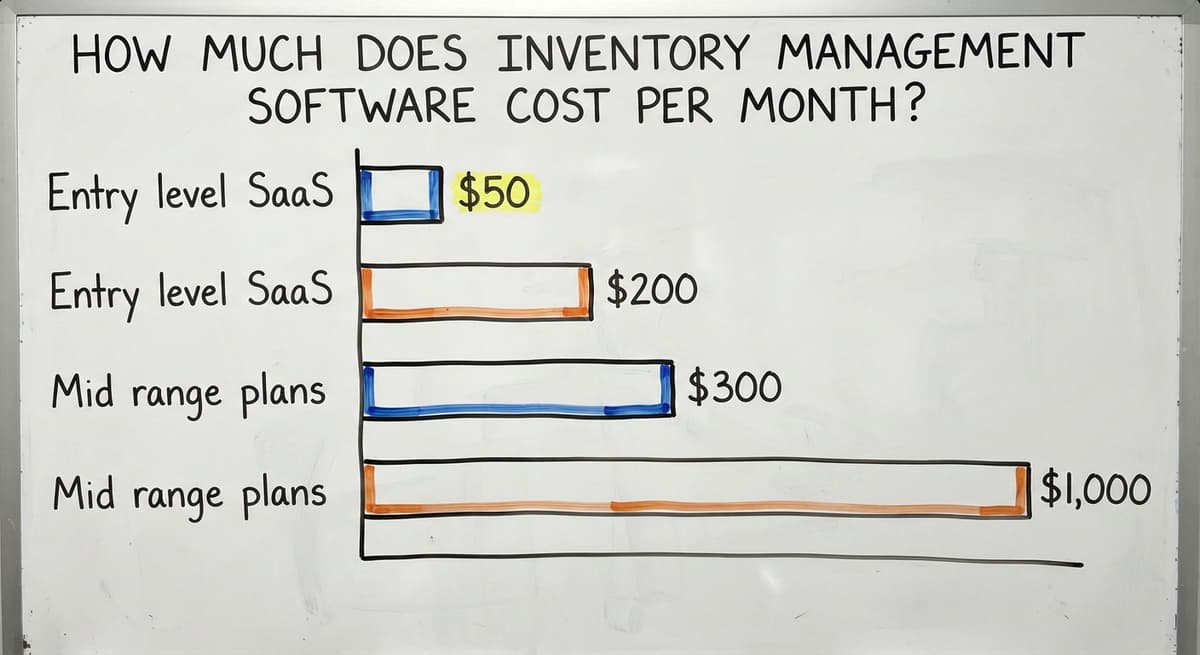
Subscription pricing runs across a wide range, and the advertised base price rarely tells the full story. Entry-level SaaS plans start around $50 to $200 per month and suit very small operations with fewer than 200 SKUs and 1 or 2 users. Mid-range plans for growing distributors usually run $300 to $1,000 per month. Higher-tier plans with multi-location tracking, lot tracking, and advanced reporting can reach $2,000 to $5,000 per month. Annual billing usually saves 10 to 20 percent over paying month to month, so ask for the annual rate before you compare.
Per-User Pricing: How It Adds Up
Per-user pricing sounds reasonable at $30 to $80 per user per month. Run the math on a real team and it changes fast. A 15-person warehouse at $50 per user is $750 per month, or $9,000 per year, before you pay for a single integration or add-on. Seasonal workers and part-time staff can trigger extra seat charges even if they only log in a few days a month. Flat-rate plans or custom software avoid this cost spiral entirely. Always calculate cost per active user rather than trusting the advertised per-seat rate.
What Features Drive the Price Up
Not every feature costs extra, but several commonly do. Barcode and mobile scanning support is often a premium add-on rather than a base feature. Multi-location or multi-warehouse tracking usually needs a higher tier. Lot tracking, serial number tracking, and expiration date management each add cost. Advanced reporting dashboards and automated reorder alerts are frequently locked to top-tier plans. Pay only for the features your operation actually uses, because every tier you climb to access one feature brings along a dozen you will ignore.
The comparison is easier when one option is built for you
Off-the-shelf means fitting your process to the software. We do it the other way round, and the first look costs nothing.
Book a callOne-Time License and Custom Software Costs
Not every business is best served by a monthly subscription. Two alternatives are worth understanding before you sign anything.
On-premise license software charges a one-time fee that can range from a few thousand dollars to tens of thousands. You host the software on your own servers and handle IT maintenance. Annual support contracts usually add 15 to 20 percent of the license fee each year. Upgrades are often sold separately, which raises the long-term cost in ways that are hard to predict at buy. This model is less common than it was but still appears in distribution-focused tools.
When Custom-Built Software Becomes the More Cost-Effective Path
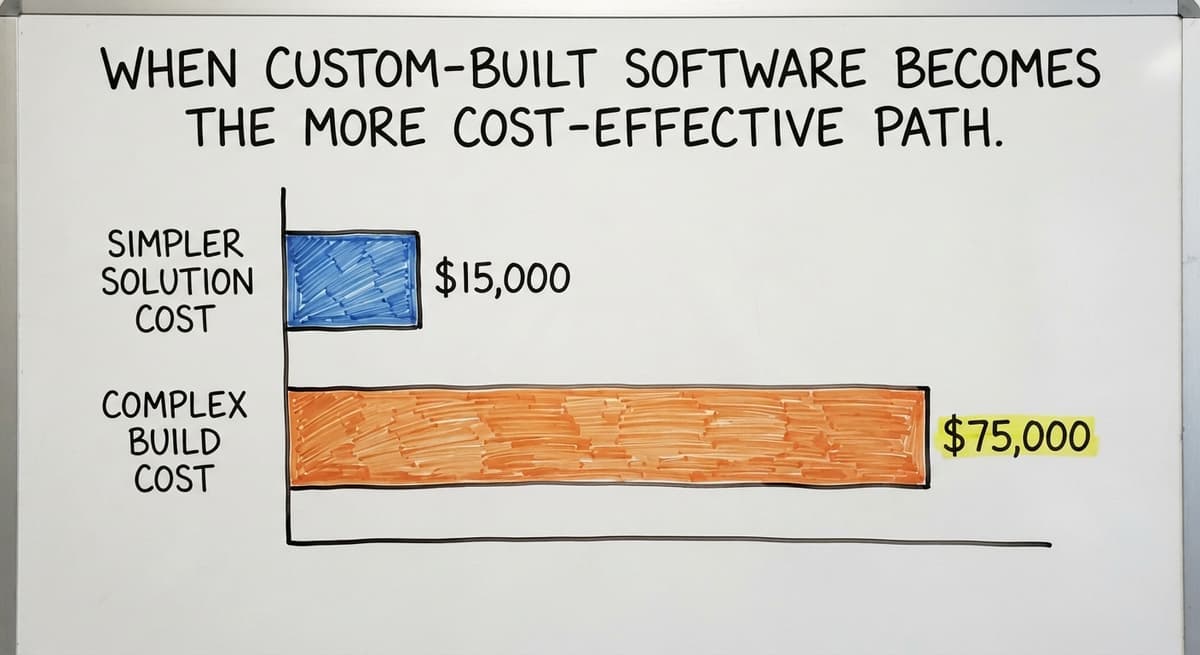
Custom-built software is priced by project scope, not by user seat. The initial build cost depends on how many workflows you are replacing and how complex the data connections are. Ongoing support retainers are common after launch. Total first-year cost often runs from $15,000 to $75,000 depending on complexity. There are no per-user fees and no forced upgrades that break existing workflows. For teams that have outgrown SaaS but not yet hit enterprise scale, custom software is frequently the more cost-effective path by year 3.

Hidden Costs That Catch Small Businesses Off Guard
The advertised price is rarely the price you pay. The IRS is direct on why inventory accuracy matters at all: "To figure taxable income, you must value your inventory at the beginning and end of each tax year," per IRS Publication 538. Getting that number wrong has real consequences, and getting the software set up wrong is how it happens.
Hidden costs to budget for include:
- Rollout fees of $2,000 to $20,000, often quoted separately or not quoted at all
- Data migration from Excel, Access, or a legacy system, which can add thousands depending on how messy the source data is
- Staff training, especially when the interface is unfamiliar or the vendor's video library is the only support offered
- Integration fees to connect with QuickBooks or shipping carriers, sometimes charged per connection per month
- Overage charges when your order volume or SKU count exceeds the plan limits
Why Poor Implementation Is the Top Reason Software Investments Fail
Poor rollout is the top reason software investments fail. A vendor who outsources setup to a third-party consultant adds another layer of cost and another point of accountability failure.
What Does QuickBooks Integration Cost in Inventory Software?
Most small distributors already rely on QuickBooks, so integration is not optional. Native QuickBooks integration is not always included in the base plan. Some vendors charge $50 to $150 per month extra for it. Others use third-party middleware like Zapier, which adds its own monthly fee and creates a fragile connection that breaks when either platform updates. A direct sync built for your specific QuickBooks setup avoids recurring middleware costs and removes the double-entry work that kills the efficiency gain you bought the software to get. Before you sign, ask whether QuickBooks integration is native, middleware-based, or a custom add-on, and get the cost in writing.
See it running on your own process first
No build cost. The subscription starts once it is live and doing the job, not before.
Book a call
Features Small Distributors Actually Need
Many small distributors pay for software built for manufacturers or large retailers. The core needs for a 5 to 100 person wholesale or distribution operation are straightforward: accurate stock counts, buy order management, sales order fulfillment, and a clean QuickBooks sync. Advanced demand forecasting, AI replenishment engines, and retail-facing features are rarely used at this scale and rarely worth the tier jump they need.
The Labor Cost That Makes the Right Software Pay for Itself
According to the US Bureau of Labor Statistics, stock clerks and order fillers earn a median wage around $17 to $19 per hour. Three people spending 8 hours a week on manual data entry costs roughly $21,000 to $24,000 per year in labor alone. Software that removes that entry pays for itself without a single advanced feature. A scoped tool, whether off-the-shelf or custom, that covers your actual workflow will always outperform a bloated platform your team never fully adopts.
Free Options: What You Get and What You Give Up
Free tiers exist in tools like Zoho Inventory and inFlow. They are real options for very small operations, but the limits are strict. Most cap SKUs at 50 to 1,000, limit monthly orders, and restrict users to 1 or 2. QuickBooks integration depth drops significantly at the free price point, and support is usually limited to help articles.
Free tools can serve as a short-term bridge while you evaluate paid options. They are rarely a long-term solution for a growing distributor. The cost of outgrowing a free tool mid-season, including the migration, the retraining, and the downtime, often exceeds what a paid plan would have cost from the start.

How to Compare Inventory Management Software Costs Fairly
How do you compare quotes from different vendors when every vendor structures pricing differently? Ask each vendor for an all-in price that covers setup, training, and integrations. A vendor who cannot give you that number is hiding something.
Use this checklist when evaluating quotes:
- Ask for a breakdown of what is included versus what costs extra.
- Get clarity on price increases at renewal. Many SaaS vendors raise rates 10 to 20 percent annually after year one.
- Ask for references from businesses of similar size and type.
- Confirm the support model. Ticket-only support is not the same as a real person you can call.
- Ask what happens to your data if you cancel.
Not sure this is the right shape for your operation
Describe how the work runs today. We map it on a call and show you what it would look like built around that, before you spend anything.
Book a callThe Question That Tells You Which Vendor to Trust
The NIST Manufacturing Extension Partnership recommends evaluating supply chain tools against your actual process before selecting a vendor, not after. The vendor who asks the most questions about your operation before quoting is usually the one worth trusting.
Total Cost of Ownership: Thinking Beyond the Monthly Bill
Total cost of ownership (TCO) covers software fees, rollout, training, and the staff time lost during the learning curve. A cheaper monthly plan with a long, painful setup can cost more in year one than a pricier plan with fast onboarding.
Here is a simple example using real numbers:
- SaaS plan at $600 per month = $7,200 per year, plus $5,000 rollout = $12,200 in year one
- Custom build at $30,000 with no per-user fees = $30,000 in year one, then $0 to $3,000 in year two
By year 3, the custom option often costs less in total, especially when the SaaS plan includes annual price increases and the team has grown past the base user count. Calculate TCO over 3 years to get a fair comparison between any two options.

The Switching Costs Vendors Never Mention
Also factor in the cost of switching if the software does not work out: migrating data, retraining staff, and lost productivity during the gap are real expenses that rarely appear in a vendor's pitch.
What Is the ROI of Inventory Management Software for a Small Warehouse?
Good inventory software returns value in 4 measurable ways: fewer labor hours on data entry and matching, fewer stockouts and overstock situations that tie up cash, faster order fulfillment with fewer shipping errors, and better visibility for purchasing decisions. The US Census Bureau's Monthly Wholesale Trade data tracks the inventories-to-sales ratio for wholesale firms, and a high ratio signals cash tied up in stock that a better system would prevent. The FTC's Mail and Internet Order Rule needs businesses to ship when promised, which is only possible when stock counts are accurate. Most small distributors see a positive ROI within 6 to 18 months of a well-implemented system. The businesses that do not get there usually had a poor rollout, not a bad product.

Next Steps: Getting an Honest Cost Estimate
Before you talk to any vendor, document your current workflow. List the specific problems you need solved: where orders get lost, where counts go wrong, what takes the most manual time. That list is more useful than a feature checklist.
Get at least 3 quotes and ask each vendor the same questions. A local software partner who visits your operation before quoting will give you a more accurate number than one who sends a pricing page. The Software Society offers a brief discovery call at no cost. You describe your workflow, and we give you a real number, not a range. If custom software is not the right fit, we will tell you that too.
Frequently asked questions
What is the price of inventory management software?
Inventory management software costs range from $0 for basic free tiers to more than $100,000 for enterprise contracts. Most small distributors and warehouses pay between $3,000 and $30,000 in year one when you include software fees, setup, and training. The exact price depends on team size, features needed, and whether you choose SaaS, a one-time license, or custom-built software.
Is there a free software for inventory management?
Yes. Zoho Inventory and inFlow both offer free tiers. The limits are strict: most cap SKUs at 50 to 1,000, restrict monthly orders, and limit users to 1 or 2. QuickBooks integration is usually shallow or absent at the free level. Free tiers work as a short-term starting point but most growing distributors outgrow them within a year.
What are the top 5 inventory management software?
There is no single best answer because the right tool depends on your operation size, workflow, and budget. Frequently used options for small distributors and warehouses include Fishbowl, inFlow, Cin7, Zoho Inventory, and QuickBooks Commerce. Each has different strengths, pricing models, and QuickBooks integration depth. Evaluate based on your specific SKU count, team size, and fulfillment process rather than rankings alone.
How much does management software cost?
For inventory and warehouse management, monthly SaaS plans run $50 to $5,000 per month depending on features and users. One-time license software costs $5,000 to $50,000 upfront plus 15 to 20 percent annually for support. Custom-built software usually runs $15,000 to $75,000 for the initial build with lower ongoing costs. Always add rollout, training, and integration fees to get the true first-year cost.
What hidden costs should I watch out for when buying inventory software?
The most common hidden costs are rollout fees ($2,000 to $20,000), data migration from spreadsheets or legacy systems, staff training beyond the vendor's video library, QuickBooks or carrier integration fees, and overage charges when your order volume or SKU count exceeds the plan limits. Ask every vendor for an all-in price before you sign.
Is custom inventory software cheaper than off-the-shelf in the long run?
Often yes, for teams larger than 10 to 15 people. A SaaS plan at $600 per month with per-user add-ons and annual price increases can cost $25,000 to $40,000 over 3 years. A custom build at $30,000 with minimal ongoing fees may cost less in total by year 3 and fits your workflow without forcing workarounds. The break-even point depends on team size, feature needs, and how well the software matches your process.
How do I calculate the total cost of ownership for inventory software?
Add up the annual software fee, the one-time rollout cost, training expenses, integration fees, and an estimate of staff time lost during the learning curve. Then multiply by 3 years and compare options on that number rather than the monthly rate alone. Include the cost of switching if the software does not work out, because data migration and retraining are real expenses.
What questions should I ask a vendor before signing a contract?
Ask: What happens to my data if I cancel? Is QuickBooks integration included or an add-on? How long does rollout take and who does it? What is the contract length and cancellation policy? Will the price change when I add more users or SKUs? Get answers in writing before you commit.
Start with a free first look
A 30 minute call, your operation mapped, and a clear picture of what we would build. No obligation and nothing to install.
Book a callRelated guides
More on the same work.
Guides
- Cost of Inventory Management Software
- Costing Inventory
- Inventory Management Software for Schools
- Hvac Inventory Management Software
- Multi Location Inventory Management Software
- Cloud Stock Management Software
- Best Inventory Software
- Warehouse Management Costs
- Inventory Management Software with Barcode
- Inventory Management Software Freeware
- Inventory Management Software Barcode Scanner
- Quickbooks Inventory Management Software
- Manufacturing Inventory Management Software
- Free Inventory Management Software for Small Business
- Free Inventory Management Software with Barcode Scanner
- Best Inventory Management Software for Small Businesses
- Inventory and Warehouse Management Software
- Custom Inventory Management Software
- Warehouse Inventory Management Software
Common questions
- What Software is Used for Inventory Management
- What is the Best Inventory Management Software for Small Business
- What is E Inventory Management
- What is Roq in Inventory Management
- What is Barcoding in Inventory Management
Added since this page was reviewed
The newer guides in this cluster are here.
- How to Manage Inventory in Rocket League Answered on its own page.
Added since this page was reviewed
The newer guides in this cluster are here.
- What is the Difference Between Aggregate and Item Inventory Management Answered on its own page.
- Inventory Management for Multiple Locations Answered on its own page.
- What is Jit Inventory Management Answered on its own page.
Added since this page was reviewed
The newer guides in this cluster are here.
- What is Kanban System of Inventory Management Answered on its own page.
- What is the Definition of Inventory Management Answered on its own page.
- Inventory Management System for Manufacturing Answered on its own page.
- Inventory Management Pics Answered on its own page.
- What is an Important Factor in Inventory Management Answered on its own page.
- B2B Inventory Management Answered on its own page.
- Jewelry Inventory Management Answered on its own page.
- Dental Inventory Management Answered on its own page.
- What is Abc Classification in Inventory Management Answered on its own page.
- What is Inventory Management in Working Capital Answered on its own page.
- The Objective of Inventory Management is To Answered on its own page.
- What is Poor Inventory Management Answered on its own page.
Added since this page was reviewed
The newer guides in this cluster are here.
- Inventory Counting Software Answered on its own page.
Added since this page was reviewed
The newer guides in this cluster are here.
- Inventory Management Software List Answered on its own page.
Added since this page was reviewed
The newer guides in this cluster are here.
- Top 5 Inventory Management Software Answered on its own page.
Added since this page was reviewed
The newer guides in this cluster are here.
- Barcoding and Inventory Software Answered on its own page.
Added since this page was reviewed
The newer guides in this cluster are here.
- Material Inventory Software Answered on its own page.
Added since this page was reviewed
The newer guides in this cluster are here.
- Small Business Inventory Software Answered on its own page.
Added since this page was reviewed
The newer guides in this cluster are here.
- Inventory Management Software Retail Answered on its own page.
Added since this page was reviewed
The newer guides in this cluster are here.
- Retail Inventory Tracking Software Answered on its own page.
Added since this page was reviewed
The newer guides in this cluster are here.
- Inventory of Software Answered on its own page.
Added since this page was reviewed
The newer guides in this cluster are here.
- Inventory Software for Retail Shop Answered on its own page.
Added since this page was reviewed
The newer guides in this cluster are here.
- Simple Inventory Management Software Answered on its own page.
Added since this page was reviewed
The newer guides in this cluster are here.
- Retail Stock Management Software Answered on its own page.
Added since this page was reviewed
The newer guides in this cluster are here.
- Event Inventory Software Answered on its own page.