

Is there a free barcode generator for Excel?
Yes, you can use add-ins and external tools to generate barcodes for free.

Learn how to create and manage barcodes in Excel with fonts, add-ins, and scanners. Tune inventory tracking well.
Published 31 July 2026. Reviewed and updated 15 September 2026.
Book a callAn Excel barcode is a way to integrate barcode scanning and generation into Excel spreadsheets. While Excel doesn't natively support barcodes, you can use fonts, add-ins, or scanners to work with barcodes. This means setting up barcodes in Excel involves installing special fonts or using external tools.
Before diving in, it's important to manage expectations: Excel can be a starting point for barcode tracking but has limitations as operations grow.
The first look is free. If you would rather not compare products, describe how your operation already works and we build the system around it.
Reviewed September 2026. Each figure comes from the assumptions stated beside it, so you can substitute your own and the arithmetic still holds.
The arithmetic is worth doing before the software conversation. 3 people spending 6 hours a week between them chasing the same questions, at 22 dollars an hour, is 936 hours a year of paid time spent confirming what a system would already know. Over 3 years that is 2,808 hours.
No build cost. You see it running on your own process first, and the monthly subscription starts only once it is live.
Book a callA barcode is essentially a visual representation of a number or code. A scanner reads this pattern and inputs the number into the active field. In Excel, the scanner acts like a keyboard, entering the code directly into a cell.
No special software is needed to scan barcodes into Excel. According to GS1, "Barcodes are a universal language that can be read by any scanner and processed by any system," you can learn more about barcode standards on GS1's official website.
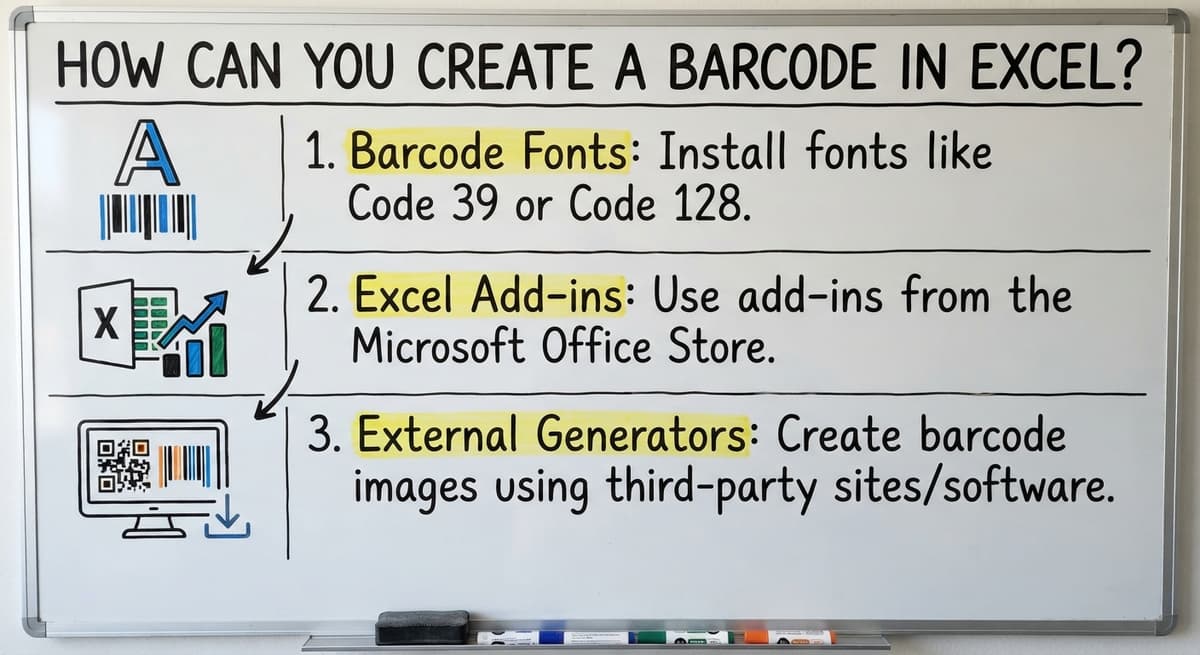
There are three main ways to create barcodes in Excel:
For label printing, fonts or add-ins work best, while external generators are ideal for lookup sheets.
To use a barcode font in Excel, first download and install a free font like Code 39 or Code 128. Type your desired value in one cell, then reference it in a second cell where the barcode font is applied.
Code 39 needs you to wrap your text in asterisks. For example, to encode "12345", you would type "12345". Print and test your setup with a scanner to ensure accuracy before full rollout.
Any USB or Bluetooth barcode scanner can be used with Excel, emulating keyboard input. Click on the target cell and scan the barcode; the value appears automatically.
Adjust scanner settings to add a tab or enter suffix, allowing it to move to the next row. Pairing this with a lookup formula can help retrieve item details from another sheet seamlessly.
Yes. Off-the-shelf means fitting your process to the software, and custom is the other way round. The first look costs nothing.
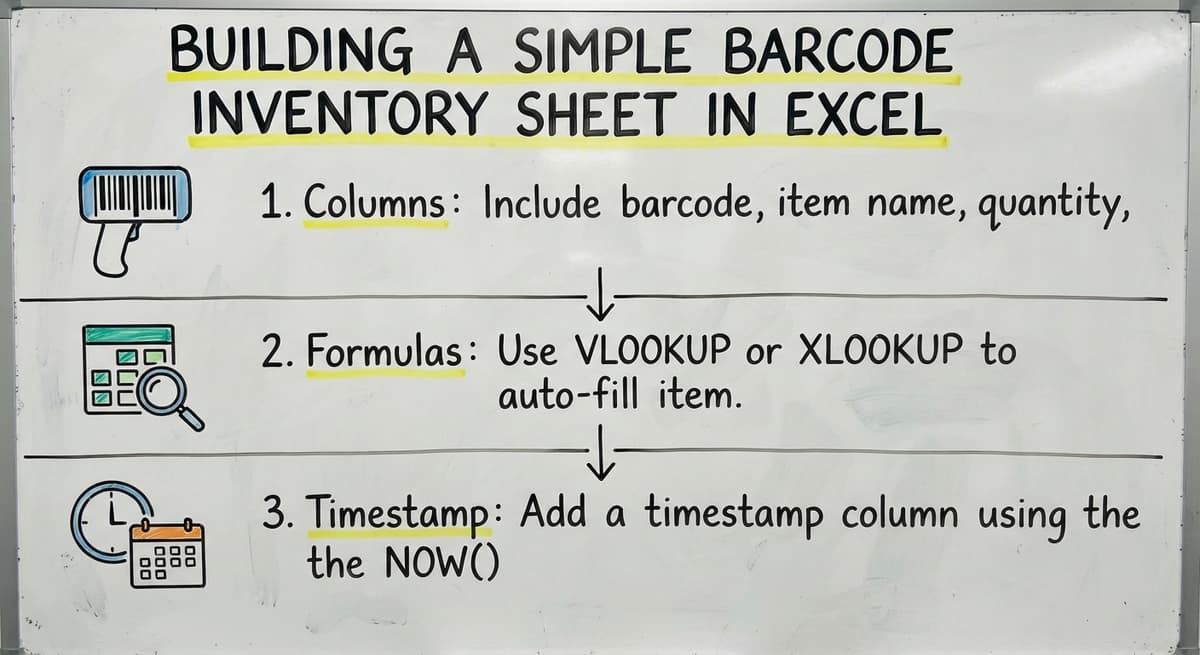
Book a callTo set up a basic inventory sheet:
Keep the sheet straightforward for ease of use by warehouse staff.

For label printing, use mail merge in Word linked to an Excel data source. Free Avery label templates align with standard label stock.
Apply the barcode font in the Word merge field. Always test print one sheet to ensure alignment and accuracy before proceeding with a full batch.
For most small operations, Code 128 is recommended as the default choice.
Excel barcode tracking is effective for small product catalogs and single-location warehouses. It suits businesses needing quick rollout without complex setups. It works well for spot counts and cycle counts feeding into QuickBooks manually, offering a practical solution for immediate needs.

Excel struggles when multiple users scan simultaneously, leading to data conflicts. It lacks real-time synchronization, leaving sheets slightly outdated. Formula errors occur if rows are deleted or columns are shifted, and there's no audit trail to track changes.
The first thing you see is it running on your own process, at no build cost. The subscription starts once it is live and doing the job, not before.
Book a callErrors like scanning into the wrong cell or overwriting the master file are common. Ensure the barcode font is installed on all devices accessing the file. Disable auto-correct to prevent unwanted text changes to scanned codes.
Accounting software does not directly read Excel files without third-party tools. Export Excel counts as CSV files and import them into the accounting package's inventory. Consistent manual steps are needed to keep accuracy, and import errors can cause hard-to-find mismatches.

If staff spend more time fixing the sheet than doing warehouse work, it may be time to upgrade. Excel struggles with inventory count discrepancies between it and the accounting software, and QuickBooks, new employee training challenges, and businesses expanding to multiple locations or shifts.
Custom systems allow multiple users to scan without overwriting each other. Each scan logs user, time, and location details. Systems push updates to the accounting software automatically and are tailored to the business's specific SKUs and workflows.
Many small distributors don't need a full ERP replacement. The accounting software handles accounting well and should remain. A custom barcode layer can sit between the warehouse floor and the accounting software, and QuickBooks, eliminating manual data entry while avoiding costly migrations.
The call is free. Describe how the work runs today. We map it on a call and show you what it would look like built around that, before you spend anything.
Book a call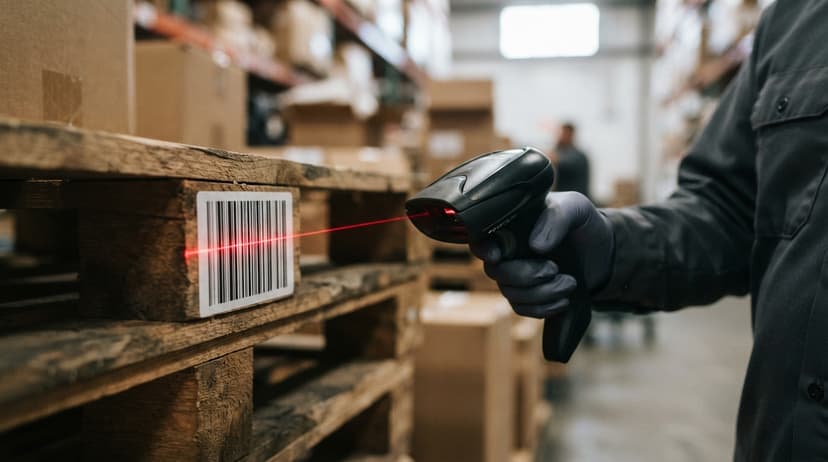
Rollout involves mapping current workflows, building tailored scanning screens, and training staff quickly due to familiar interfaces. Staggered go-live phases ensure minimal disruption to operations.
Download a simple template with barcode lookup and quantity columns. It includes an SKU column, VLOOKUP for item names, and a scan-in column. Install a barcode font for the label tab to render correctly. This template is a starting point, not a long-term solution.
Yes, you can use add-ins and external tools to generate barcodes for free.
Install a barcode font and type your code into a cell. The font will convert it to a barcode.
Yes, free fonts like Code 39 and Code 128 are available for download.
Yes, Excel works with any barcode scanner that acts like a keyboard input.

As businesses grow, Excel may not suffice. Transitioning to a custom system doesn't mean a big ERP project. Discuss your workflow with us for a no-pressure review. Our local team in Columbus, Ohio, serves operations nationally.
Yes, you can use add-ins and external tools to generate barcodes for free.
Install a barcode font and type your code into a cell. The font will convert it to a barcode.
Yes, free fonts like Code 39 and Code 128 are available for download.
Yes, Excel works with any barcode scanner that acts like a keyboard input.
Both Code 39 and Code 128 fonts work well with Excel and are commonly used.
Use mail merge in Word with Excel data and apply the barcode font in Word merge fields.
Consider upgrading when multiple users need real-time access or when errors become frequent.
Export Excel data as CSV and import it manually into the accounting software for accurate inventory tracking.
Format the column as Text before typing or pasting the codes, or prefix each entry with an apostrophe. A UPC that starts with 0 loses the zero in a Number cell and the barcode font then prints the wrong code.
Install a Code 128 font, put the item number in one cell, and use a formula or the font's encoder to add the start, check, and stop characters, then apply the font to the result. Test one printed label with a scanner before printing a sheet.
The 4 usual causes: the code was typed without the start and stop characters, the font size is too small for the scanner's resolution, the printer scaled the page, or the scanner has that symbology disabled. Print at 100 percent and test at the scanner's normal range.
A Code 128 font for internal labels, because it holds letters and numbers and every scanner reads it. Free Code 39 fonts are simpler to use, since they need no check digit, but they print wider for the same data.
A 30 minute call, your operation mapped, and a clear picture of what we would build. No obligation and nothing to install.
Book a callMore on the same work.