


Inventory Format In Excel
An inventory format in Excel should include columns for Item ID, product name, unit of measure, quantity on hand, reorder point, supplier name, lead time, and warehouse location. Add a Unit Cost column and a Total Value formula. Use conditional formatting to flag low stock. That covers the core of what a working inventory spreadsheet needs.
Reviewed and updated: October 2026
Book a callWhy Inventory Format in Excel Still Matters
Most small wholesale and distribution businesses start tracking inventory in Excel because it costs nothing and the team already knows how to use it. That is a sound reason, not a shortcut. A well-built inventory spreadsheet can carry a business through its early growth without any added software cost. The IRS is clear on the obligation: Publication 538 states, "To figure taxable income, you must value your inventory at the beginning and end of each tax year." Excel is a legitimate way to meet that requirement when the operation is small enough for one person to keep the file current.
We build it for your operation, and the first look is free
If you would rather not compare products, describe how your operation already works and we build the system around it.
No build cost. You see it running on your own process first, and the monthly subscription starts only once it is live.
Book a callThe Core Columns Every Inventory Sheet Needs
Every inventory format in Excel should start with the same foundation. These columns give the team enough detail to receive stock, pick orders, and make reorder decisions without hunting through emails or memory.
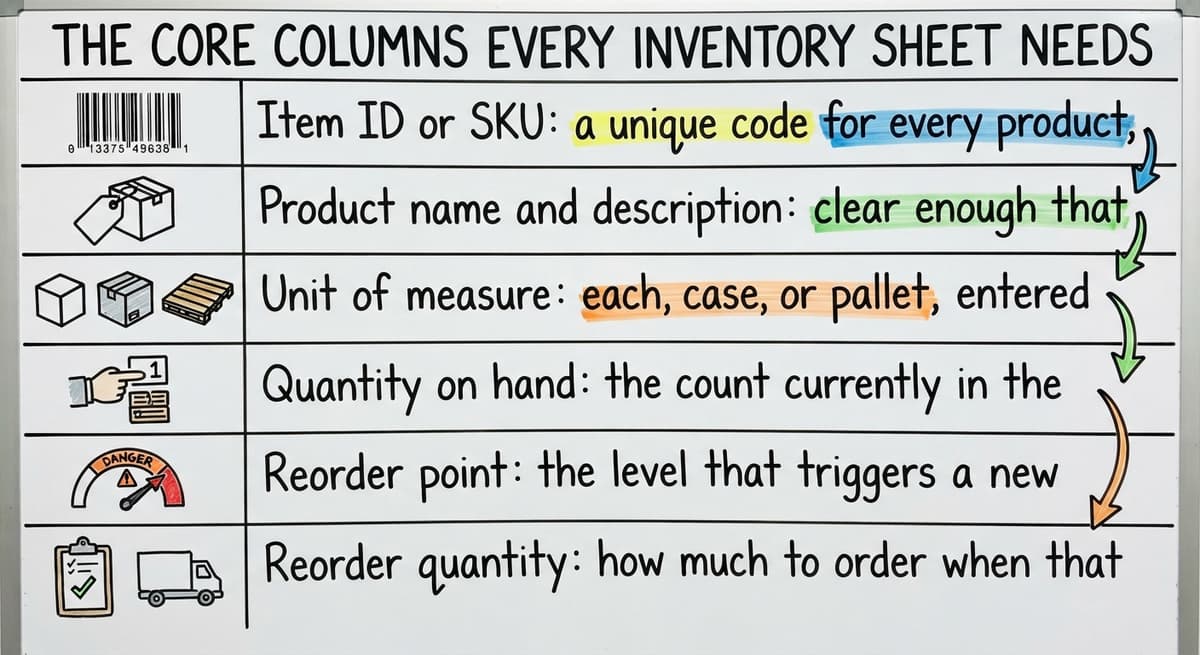
- Item ID or SKU: a unique code for every product, no duplicates allowed
- Product name and description: clear enough that any team member understands it without asking
- Unit of measure: each, case, or pallet, entered the same way every time
- Quantity on hand: the count currently in the building
- Reorder point: the level that triggers a new buy order
- Reorder quantity: how much to order when that point is reached
- Supplier name and lead time: who ships it and how many days it takes
- Location: aisle, bin, or shelf in a standard format
Keep column names short and free of spaces so filters and formulas work cleanly. For any scan-based count, GS1 notes that "barcodes are the most widely used automatic spotting technology in the world," which means your Item ID should match the barcode your supplier prints whenever possible.
Setting Up Your Item ID System
How do you set up an Item ID system in an Excel inventory sheet?
Start with a simple rule: category prefix plus a sequential number, such as ELEC-0042 for the 42nd electronics item. That format is fast to read and easy to sort. Avoid spaces and special characters because they break VLOOKUP and other lookup formulas. Match the Item ID to the code your accounting package or supplier already uses. Re-keying the same product under 2 different codes is one of the most common sources of duplicate records and count errors in a warehouse inventory sheet.
Why Consistency in Item IDs Pays Off
A consistent Item ID lets you pull data from any tab with a single formula. It also makes a future move to inventory management software for small distributors much smoother, because the codes carry over without a cleanup project. Set the format once, document it in a notes tab, and enforce it from day one.
Quantity Tracking: On Hand, On Order, and Available
Three quantity columns matter more than any others in an inventory spreadsheet.
| Column | What It Means |
|---|---|
| On Hand | Stock physically in the warehouse right now |
| On Order | Quantity in open buy orders not yet received |
| Available | On Hand minus quantities already committed to open sales orders |
Tracking all 3 prevents overselling and missed reorders. The formula for Available is simple: =On Hand - Committed. No macros needed. Available quantity is the number your sales team should quote, not On Hand, because On Hand does not account for orders already promised to other customers. Keeping these 3 columns separate is what turns a basic stock list into a working inventory tracking tool.
Adding a Reorder Point Column
How do I set up a reorder point in an Excel inventory sheet?
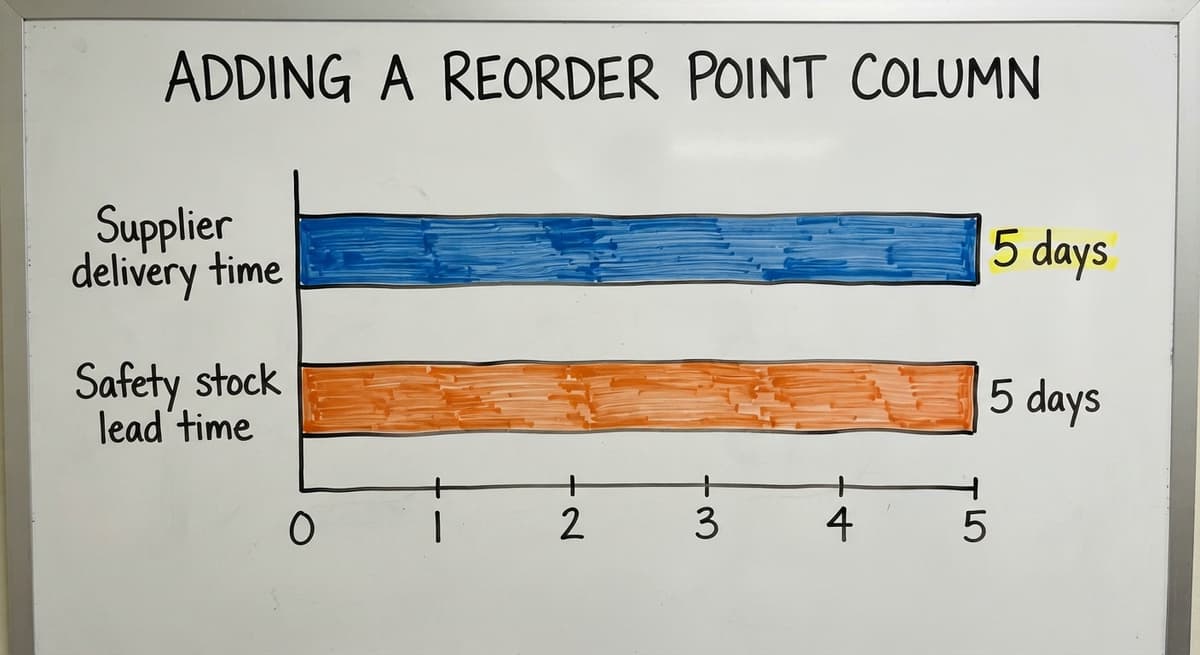
The reorder point is the on hand quantity at which you place a new buy order. The basic formula is: average daily usage multiplied by supplier lead time in days. For example, if you sell 10 units a day and your supplier takes 5 days to deliver, your reorder point is 50 units. Add a safety stock buffer for items that sell fast or come from slow suppliers. A buffer of 20 to 30 percent of that base number is a reasonable starting point. Place the formula in its own column so conditional formatting can compare it to On Hand automatically.
Calculating Safety Stock in Plain Math
Safety stock = (maximum daily usage minus average daily usage) multiplied by lead time. If your max daily usage is 15 and your average is 10, and lead time is 5 days, safety stock is 25 units. Add that to your base reorder point to get 75 units total. That number belongs in the Reorder Point column, not in a separate note, so every alert and formula reads from one place.
The comparison is easier when one option is built for you
Off-the-shelf means fitting your process to the software. We do it the other way round, and the first look costs nothing.
Book a callUsing Conditional Formatting as a Low-Stock Alert
Conditional formatting changes a cell's color based on its value. Set 1 rule: if On Hand is less than or equal to the Reorder Point, highlight the entire row in red. Staff see the alert the moment they open the file. No formula to remember, no separate report to run. A yellow highlight for stock within 20 percent of the reorder point gives an early warning before the item goes critical. This visual layer turns a static inventory sheet into a daily action list for whoever manages stock levels.

How Do I Track Inventory Receipts and Shipments in Excel?
A second tab handles movement. Log every receipt and every shipment there, with these columns: date, Item ID, transaction type, quantity, and a reference number such as a buy order or sales order number. A SUMIF formula on the main sheet then pulls the net quantity for each Item ID from that log.
The formula looks like this: =SUMIF(Log!B:B, A2, Log!D:D) where column B holds the Item ID and column D holds the quantity. This running log is your audit trail. When a supplier disputes a delivery or a customer claims a short shipment, the log gives you dates, quantities, and reference numbers in one place. A log with no gaps also makes the annual inventory count faster because you can cross-check it against the physical count.
Linking Your Inventory Sheet to Cost and Value
Add a Unit Cost column next to On Hand. Then add a Total Value column with the formula =Unit Cost × On Hand. Sum the Total Value column at the bottom to see current inventory asset value at a glance. The IRS needs you to value inventory consistently, so pick one cost method, either weighted average cost or most recent buy price, and use it for every item. Your accounting package should show a matching inventory asset figure. If the two numbers differ by more than a rounding amount, that gap points to a receiving or cost entry error worth finding before tax time.
Weighted Average Cost vs. Most Recent Price
Weighted average cost smooths out price swings. Most recent price is simpler to keep. For a small distributor with stable supplier pricing, most recent buy price is usually enough. Document the choice in the notes tab so anyone who opens the file later knows which method applies.

How Do I Keep My Spreadsheet Inventory Sheet in Sync with My Accounting Software?
Export the inventory report from your accounting package to CSV and paste it into a reference tab in the same Excel file. Then compare the On Hand quantities and unit costs line by line. Reconcile at least once a week. Manual updates in 2 systems drift apart fast, and a discrepancy that is small on Monday can become a large count error by Friday. Note which items disagree most often. Those items are where the process breaks down, whether from receiving errors, missing adjustments, or data entry mistakes. Fix the process for those items first before widening the matching effort.
See it running on your own process first
No build cost. The subscription starts once it is live and doing the job, not before.
Book a callOrganizing by Warehouse Location
A Location column with a standard format, such as A-03-2 for aisle A, bay 3, level 2, makes pick lists far more useful. Sort or filter by location to build a pick path that moves through the warehouse in order rather than jumping back and forth. If the operation uses more than 1 building, add a Warehouse column before the Location column. Consistent location codes cut pick time and reduce mis-picks, which are among the most common causes of customer complaints in small distribution operations.

Using Data Validation to Prevent Entry Errors
Data validation limits what a person can type into a cell. Two rules cover most of the common errors in a warehouse inventory sheet.
- Dropdown list for Unit of Measure: staff pick from a fixed list rather than typing, which stops "ea", "each", and "EA" from appearing as 3 separate values in the same column.
- Number validation on quantity columns: blocks text entries so a typo like "1O" instead of "10" gets rejected at the point of entry.
These guardrails take about 5 minutes to set up and save hours of cleanup each month. Bad data in an inventory spreadsheet compounds quickly because every formula that reads a corrupted cell returns a wrong answer.
Protecting the Format from Accidental Changes
Lock formula cells and header rows using Excel's sheet protection feature. Set a simple password and share it only with the file owner. Allow editing only in the columns that need daily input: quantity received, quantity shipped, and location. Locked formulas stay intact even when multiple people use the file on the same day. A single accidental deletion of a SUMIF formula can corrupt the On Hand count for every item in the sheet, and that kind of error is hard to spot until the physical count reveals it.

Naming and Saving Conventions for Shared Files
File names should carry the purpose and the date range: Inventory_Master_Q3.xlsx is clear; Book1.xlsx is not. Store the file in a shared drive folder with a single person named as the owner who controls version updates. Emailing the file back and forth creates version conflicts, and version conflicts are one of the most common causes of inventory errors in Excel-based operations. The owner publishes one current file; everyone else reads or edits that same file. A backup copy saved at the end of each week protects against corruption.
When One Tab Is Not Enough
A single-tab inventory sheet works well up to a few hundred SKUs. Past that point, the file becomes slow to scroll and hard to filter. The fix is to split by product category or warehouse zone, with each group on its own tab, and a summary tab that pulls totals from each with a simple SUM formula. Management gets a fast overview without opening every tab. If the team spends more time managing the spreadsheet than doing warehouse work, the spreadsheet has become the bottleneck. That is the signal to look at what comes next.
Not sure this is the right shape for your operation
Describe how the work runs today. We map it on a call and show you what it would look like built around that, before you spend anything.
Book a callWhat Are the Most Common Mistakes in Excel Inventory Formats?
Five mistakes appear in almost every Excel inventory sheet that has been in use for more than a few months. Each one is easy to avoid once you know to look for it.

- Merging cells breaks sorting and filtering, which makes the whole sheet harder to use as the SKU count grows.
- Using color as the only data point means that information cannot be filtered, summed, or exported to another system.
- Storing dates as text breaks date math and prevents correct sorting by receipt or shipment date.
- Leaving blank rows between records stops table functions and SUMIF formulas from reading the full data range.
- Keeping no backup copy means one corrupted file erases months of inventory count history with no recovery path.
Fix these before adding any new columns or formulas, because a clean structure scales and a broken one does not.
Signs Your Operation Has Outgrown Excel
Excel is a strong starting point, but certain patterns signal that the tool is no longer keeping up with the business.
- More than 1 person needs to edit the file at the same time, which causes version conflicts.
- Data moves daily between the spreadsheet, the accounting package, printed sheets, and email.
- Inventory counts are wrong by the time someone checks them, not because of physical errors but because the file was not updated in time.
- Reorder decisions come from memory rather than from the reorder point column.
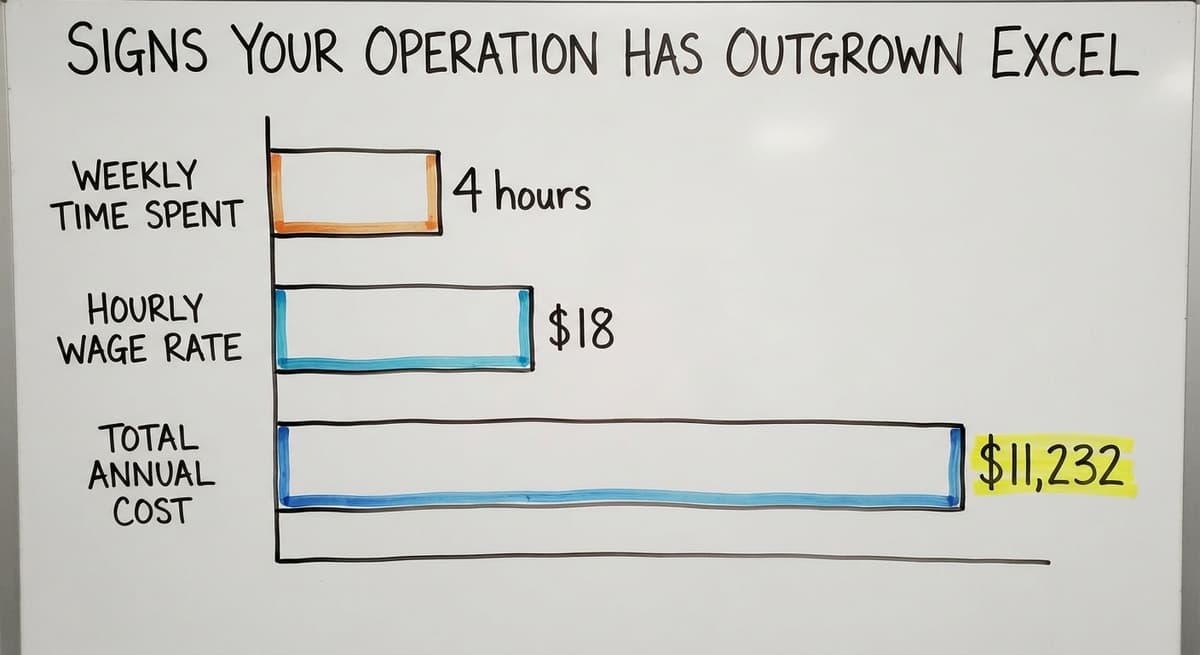
- Staff spend several hours each week maintaining the spreadsheet rather than doing warehouse work. At the Bureau of Labor Statistics median wage for stock clerks, 3 people spending 4 hours a week on spreadsheet maintenance at $18 an hour costs about $11,232 a year in labor alone, before counting the errors those hours produce.
When the spreadsheet creates more work than it saves, the math has shifted.
What Comes After the Spreadsheet
The next step for most small distributors is not a large system with a long rollout. It is a focused inventory tracking tool built around the workflows already in place. The goal is to keep the accounting package handling financials while replacing only the manual, error-prone parts of the warehouse process.

Custom warehouse software for wholesale businesses can mirror the logic already in your Excel sheet and add real-time updates, barcode scanning, and automatic reorder alerts. It connects directly to your accounting software so financial data stays accurate without double entry. Staff learn faster because the new system reflects the process they already know. The NIST Manufacturing Extension Partnership notes that aligning software to existing operations reduces adoption friction significantly, which matters when the team is small and cannot afford weeks of retraining. Rollout happens in stages so the warehouse keeps running throughout.
How Custom Inventory Software Fits Small Distributors
Custom-built software starts from the columns and workflows already in your Excel format. That means the Item IDs, location codes, reorder logic, and cost methods you have already defined carry over directly. Accounting software integration for warehouse operations removes the weekly spreadsheet export and manual matching step. The US Census Bureau's Monthly Wholesale Trade data shows that wholesale inventories-to-sales ratios shift through the year, which means a system that updates in real time gives a distributor a genuine edge over one working from a file that is hours or days behind.
Replacing manual processes in wholesale distribution does not need a full system migration. A phased approach lets the team move one workflow at a time, starting with the parts of the spreadsheet that cause the most errors. Local support means the people building the system understand the operation firsthand, which cuts the gap between what the software does and what the warehouse actually needs.
Next Steps for Your Inventory Operation
Start with the Excel format described here if you are not already using a structured sheet. Run it through a full inventory cycle and write down every point where the spreadsheet slows the team down or produces a wrong number. That list is more useful than any sales conversation because it names the specific problems a new system would need to solve.
Inventory tracking for fulfillment centers and small distributors works best when the tool fits the operation rather than the other way around. A short discovery call with a software team that builds around existing workflows can clarify whether a custom build makes sense for your size and budget. Bring the list of pain points from your Excel sheet to that call. The problems you can name are the ones a good partner can solve.
Frequently asked questions
What columns should every inventory format in Excel include?
Every inventory format in Excel needs at least these columns: Item ID or SKU, product name, unit of measure, quantity on hand, reorder point, reorder quantity, supplier name, lead time, warehouse location, unit cost, and total value. Those 11 columns cover receiving, picking, reordering, and basic cost tracking without any added software.
How do I set up a reorder point in an Excel inventory sheet?
Multiply your average daily usage by your supplier's lead time in days. That gives you the base reorder point. Add a safety stock buffer of 20 to 30 percent for fast-moving or slow-shipping items. Put the result in a dedicated Reorder Point column so conditional formatting can compare it to On Hand automatically.
How can I use conditional formatting to flag low stock in an inventory spreadsheet?
Select the On Hand column, open conditional formatting, and set a rule: if On Hand is less than or equal to the Reorder Point column, highlight the row in red. Add a yellow rule for stock within 20 percent of the reorder point as an early warning. Staff see the alert every time they open the file.
How do I protect my inventory spreadsheet from accidental changes?
Lock all formula cells and header rows using Excel's sheet protection feature. Set a simple password and share it only with the file owner. Allow editing only in the columns that need daily input: quantity received, quantity shipped, and location. This keeps formulas intact when multiple people use the file.
When has a business outgrown an Excel inventory format?
The clearest signs are: more than one person needs to edit the file at the same time, inventory counts are wrong before anyone checks them, reorder decisions come from memory rather than data, and staff spend several hours a week maintaining the spreadsheet rather than doing warehouse work. When those patterns appear together, the spreadsheet has become the bottleneck.
How do I organize inventory by warehouse location in Excel?
Add a Location column with a standard format such as A-03-2 for aisle A, bay 3, level 2. Sort or filter by that column to build a pick list that follows a logical path through the warehouse. If you have more than one building, add a Warehouse column before the Location column.
What are the most common mistakes in Excel inventory formats?
The five most common mistakes are: merging cells, which breaks sorting and filtering; using color as the only data point, which cannot be summed or exported; storing dates as text, which breaks date math; leaving blank rows between records, which breaks SUMIF formulas; and keeping no backup copy, which leaves the operation with no recovery path if the file is corrupted.
Start with a free first look
A 30 minute call, your operation mapped, and a clear picture of what we would build. No obligation and nothing to install.
Book a callRelated guides
The rest of this guide, for the parts of the job this page does not cover.
Guides
- Ms Excel Inventory Template
- Excel Inventory Template
- Inventory Control with Excel
- Sku Formats
- Excel Barcode
- Classification of Inventory
- Excess Inventory
- Closed for Inventory
- Multi Location Inventory Management Software
- Inventory Management for Multiple Locations
- Costing Inventory
- Is Inventory a Long-term Asset
- Inventory Management System for Manufacturing
- Inventory Fixed Assets
- Inventory Management Pics
- Inventory Monitoring
- Push and Pull Inventory
- Types of Inventory Control
- Consumable Inventory
- B2b Inventory Management
- Jewelry Inventory Management
- Dental Inventory Management