


Inventory Tracking Barcode
An inventory tracking barcode is a machine-readable label on a product or shelf. Scan it and your stock count updates in seconds. No manual entry. No lag. For small warehouses and distributors running on spreadsheets, that single change removes most of the errors that cause shipping mistakes and wasted hours.
Reviewed September 2026. Each figure comes from the assumptions stated beside it, so you can substitute your own and the arithmetic still holds.
Published 20 August 2026. Reviewed and updated 15 September 2026.
Book a callWhat Is an Inventory Tracking Barcode?
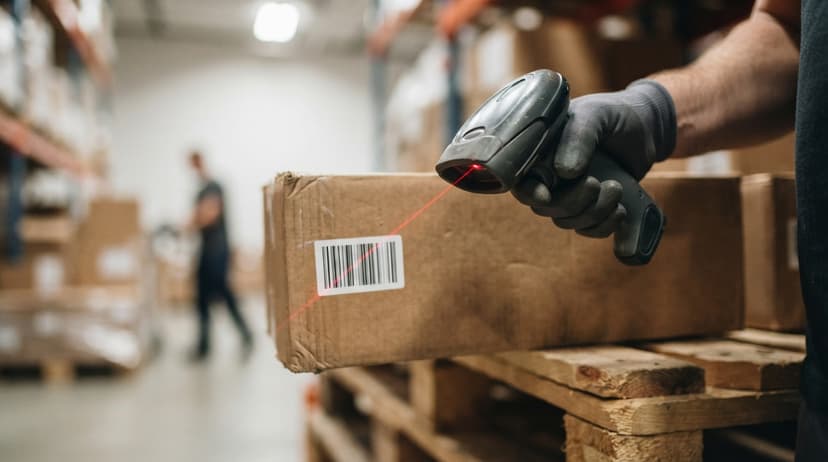
A barcode is a label a scanner can read in under a second. The scan sends item data straight into your inventory software. The count updates right then, not later that day when someone remembers to type it in.
For warehouses and distributors, that speed matters. Every minute between a physical event and a recorded event is a window for error. Barcode scanning closes that window.
The IRS makes the stakes plain: "To figure taxable income, you must value your inventory at the beginning and end of each tax year," as stated in IRS Publication 538. Accurate counts are not optional.
Would you rather have it built around your operation?
The first look is free. If you would rather not compare products, describe how your operation already works and we build the system around it.
No build cost. You see it running on your own process first, and the monthly subscription starts only once it is live.
Book a callHow Does a Barcode Carry Inventory Data?
The lines or squares on a barcode encode numbers and short text. A scanner reads those patterns and sends them to your software in a fraction of a second.
Common data stored in a barcode includes SKU, quantity, bin location, supplier, and lot number. The barcode does not do the thinking. It just passes the right identifier to the software, which then pulls up the full record.
GS1, the global body that sets barcode standards, describes their role as providing "a common language that allows trading partners to identify, capture and share information seamlessly." That shared language is why a scanner from one vendor can read a label printed by another.
The data a barcode carries is only as useful as the record it points to. Set up your item master first, then scan.
What Types of Barcodes Are Used in Warehouse Inventory Tracking?
Most warehouses do fine with 1D barcodes. The question is whether your label space and data volume push you toward something more.
1D barcodes, like UPC and Code 128, are the most common in wholesale and distribution. They store a product number or SKU. Scanners read them fast. Labels are cheap to print. Nearly every handheld scanner on the market handles them.
2D barcodes, like QR codes and Data Matrix, pack more data into a smaller space. A 2D code can hold a URL, a serial number, and a lot number all at once.
Useful when your label is tiny or when you need to encode several fields without a database lookup.
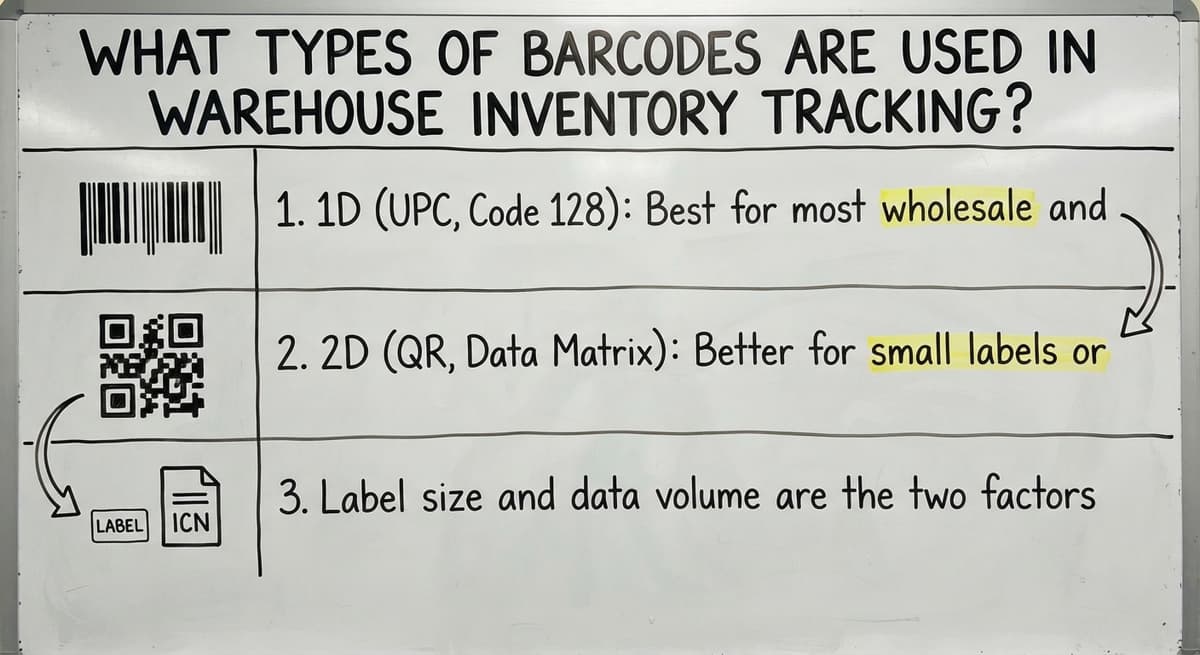
- 1D (UPC, Code 128): Best for most wholesale and distribution floors
- 2D (QR, Data Matrix): Better for small labels or high-data needs
- Label size and data volume are the two factors that decide which type fits
Start with 1D unless you have a specific reason not to. You can always add 2D labels for certain product lines later.
The Hardware You Need to Get Started
A basic barcode scanning setup has 3 components. None of them need a large capital budget for a small operation.
- Barcode scanner: Handheld units are the most flexible. Fixed-mount scanners work well at a receiving dock or shipping station. A smartphone camera with the right app can scan in a pinch, though it is slower.
- Label printer: A thermal label printer prints barcode stickers on demand. Labels are cheap to restock and the printers last for years.
- Mobile devices (optional): Tablets or rugged handhelds let pickers and receivers move through the warehouse while staying connected to the system.
Entry-level handheld scanners start under a few hundred dollars. A decent thermal label printer runs in a similar range. A small operation can be equipped for under $1,000 in hardware.
How Does the Software Side Work?
The scanner is just the input device. The software is where inventory tracking actually happens.
When a worker scans an item, the scanner sends a signal to your inventory software.
The software matches the barcode to a record, then updates the stock count, location, or order status. That update happens in real time. Every person on the team sees the same number.
The system becomes the single source of truth. No one has to call the warehouse to ask what is on hand. No one has to wait for a spreadsheet to be updated and emailed.
Most barcode inventory software can connect to the accounting software so your financials stay current without double entry. The warehouse side updates automatically, and the accounting software reflects the change. More on that below.
Good software also logs every scan with a timestamp and a user ID. That audit trail is useful when a discrepancy shows up and you need to trace it back.
Is the comparison easier when one option is built for you?
Yes. Off-the-shelf means fitting your process to the software, and custom is the other way round. The first look costs nothing.
Book a callWhy Do Spreadsheets and Printed Sheets Break Down?
A spreadsheet is always behind. Someone has to type in a receipt, a pick, or a return. That entry happens minutes or hours after the physical event.
One missed row or one typo sends the wrong number downstream. A fulfillment team working from a count entered yesterday may pick from stock that was already shipped that morning. The customer gets a backorder notice. The team spends an hour figuring out what happened.
There is also no audit trail. You cannot tell who changed a cell or when. When counts drift, you have no way to find the source.
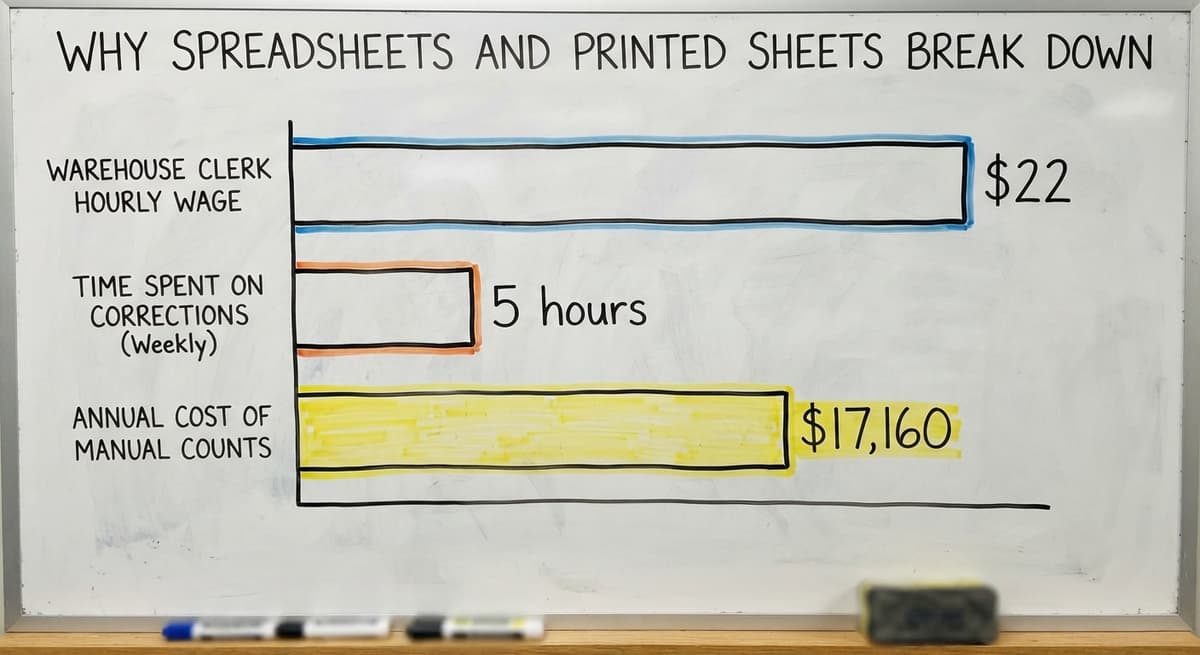
According to the US Bureau of Labor Statistics, warehouse and inventory clerks earn around $22 per hour. Three people spending just 5 hours a week on manual count corrections costs about $17,160 a year. That is before you count the orders that ship wrong.

What Do Inventory Tracking Barcodes Fix in a Warehouse?
Barcode tracking changes 4 core workflows. Each one removes a step where errors enter.
- Receiving: Scan items as they come off the truck. Quantities update before the boxes reach the shelf. No paper receiving log to enter later.
- Picking: The picker scans the item before pulling it. The system confirms it matches the order. A mismatch triggers an alert before the wrong product moves.
- Cycle counts: Scan shelf by shelf on a rolling schedule. No need to shut down operations for a full physical count.
- Shipping: Scan outbound items to close the order and reduce stock in one step. The record updates the moment the box leaves.
Each scan replaces a manual entry point, and each removed entry point is one fewer place for a number to go wrong.
Barcode Tracking for Receiving and Put-Away
Receiving is the first place inventory data enters your system. It is also where most errors start.
A simple barcode receiving workflow runs like this:
- Buy order arrives at the dock
- Worker scans each item as it comes off the truck
- System matches the scan to the open PO and confirms quantities
- Any discrepancy flags at once, before the product is put away
- Put-away scan records the bin or shelf where the item lands
From that point, the system knows where every unit lives. No paper log to search. No one has to ask.
Fewer receiving errors mean less time reconciling invoices against what actually arrived. The NIST Manufacturing Extension Partnership notes that accurate receiving data is foundational to reliable supply chain performance. Getting it right at the dock saves work at every stage that follows.

How Does Barcode Scanning Help with Picking and Packing?
Barcode scanning stops the wrong item from leaving the building. That is the core value of a scan-to-pick workflow.
The picker scans the item before pulling it from the shelf. If the barcode does not match the order line, the system flags it at once. The picker puts the item back and finds the right one. No supervisor needed. No guesswork.
A pack scan closes the pick and marks the order ready to ship. The system records which items went into which box.
- Fewer mis-picks reach the customer
- Returns drop because the right product ships the first time
- Throughput rises because pickers spend less time backtracking
Scan confirmation at the pick step is the single fastest way to cut shipping error rates in a small warehouse.
What does it look like running on your own process?
The first thing you see is it running on your own process, at no build cost. The subscription starts once it is live and doing the job, not before.
Book a callHow Does Barcode Inventory Tracking Work with the Accounting Software?
Many small distributors run a standard accounting package for accounting and invoicing. Replacing it is not the goal. A barcode inventory system can sync with the accounting software so both sides stay accurate.
Here is what that looks like in practice. A shipment goes out. The barcode system records the pick and closes the order. That transaction syncs to the accounting software. The invoice generates. Stock on hand updates. No one types the same number twice.
The accounting software stays in place. Only the manual inventory parts get replaced. The team keeps working in the tool they know. The warehouse side gains real-time accuracy.
This matters for small operations because a full ERP migration takes months and costs far more than most small distributors can justify. A the accounting software inventory integration for distributors is a smaller, faster change that solves the accuracy problem without disrupting the accounting workflow.

Setting Up Barcodes for Products You Already Carry
Most products from suppliers already carry a barcode. You do not need to create one. Scan the existing label and map it to your internal SKU in the software.
For items that arrive without barcodes, print your own labels. Use your SKU system. Keep it consistent. One barcode per item variant, one record in the software per barcode.
The one-time setup effort is mostly mapping. Pull your item list, assign barcodes, and load the records into the system. Once that work is done, every future scan is instant. The daily time savings start from the first day of scanning.
Clean your item master before you start. Duplicate records or missing fields will cause scan errors from day one, and fixing them after the fact takes longer than doing it right before launch.
Labeling Bin Locations and Shelf Slots
Bin location barcodes are as useful as product barcodes. Assign a barcode to every physical location in the warehouse: each shelf, each bin, each slot.
When a worker puts an item away, they scan the location barcode and then the product barcode. The system records the pairing. From that point, the software knows exactly where every unit lives.
Cycle count barcode work becomes faster too. Scan the location first, then scan everything in it. The system reconciles the expected contents against the actual scan in seconds.
New staff can find products without asking anyone. The system tells them the bin. That alone cuts the time it takes to onboard a new picker from days to hours.
Common Mistakes When Starting Barcode Inventory Tracking
Most setup problems are avoidable. They fall into 4 patterns.
- Skipping the item master cleanup: Scanning a barcode that points to a duplicate or incomplete record creates bad data instantly. Clean the list first.
- Buying consumer-grade scanners: A scanner that drops its wireless connection on the warehouse floor is worse than no scanner. Choose hardware rated for industrial environments.
- Skipping staff training before go-live: Workers who do not understand the scan workflow will find workarounds. Those workarounds reintroduce the manual entry problem you were trying to solve.
- Trying to track everything at once: Start with receiving. It is the simplest workflow and the fastest win. Add picking, packing, and shipping once the team is comfortable.
The operations that struggle are the ones that rush the setup. The ones that succeed pick one workflow and do it right before expanding.
How Long Does It Take to Set Up?
A small warehouse can be scanning in days, not months. Hardware ships fast. Software setup is mostly setup, not custom development.
The slower part is your item data. If your product list is clean and your locations are mapped, a basic system can go live in under a week. If the item master needs work, budget extra time for that cleanup before you scan anything.
This is not a year-long ERP project. It is a focused setup with a clear starting point: receiving. Get that workflow running, then build from there.
Not sure this is the right shape for your operation?
The call is free. Describe how the work runs today. We map it on a call and show you what it would look like built around that, before you spend anything.
Book a call
What Does Barcode Inventory Tracking Cost for a Small Operation?
Entry-level costs are lower than most small operators expect. A basic setup for a small warehouse inventory system breaks down like this.
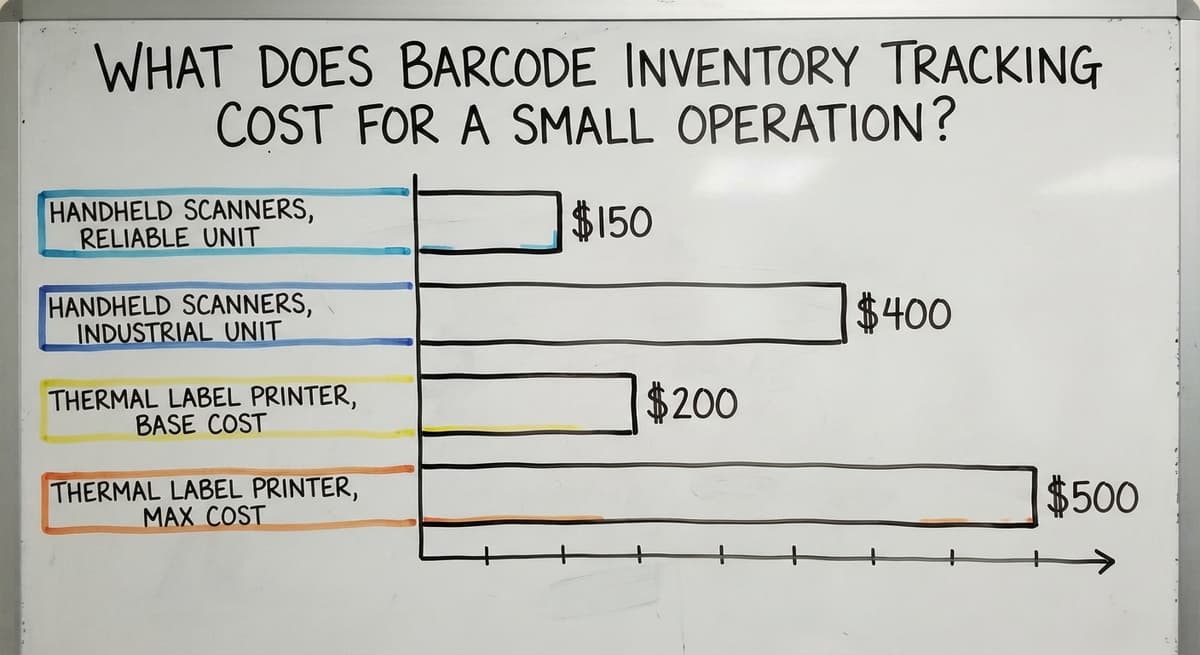
- Handheld scanners: $150 to $400 each for reliable industrial units
- Thermal label printer: $200 to $500, one-time buy
- Labels: A few dollars per roll, thousands of labels per roll
- Software: Varies by vendor. Some charge per user, some per location. Budget $50 to $200 per month for a small team
Compare that to the cost of manual processes. If 2 workers spend 8 hours a week on count corrections at $22 per hour, that is $18,304 a year in labor alone, before counting the cost of mis-ships and customer complaints.
The hardware pays for itself in the first month for most small operations. The ongoing software cost is a fraction of the labor it replaces.
Signs Your Operation Is Ready for Barcode Tracking
Some operations know they need a change. Others are not sure. These 4 signs are reliable indicators.
- You reconcile inventory counts more than once a week and still find gaps
- Mis-picks or shipping errors come up regularly in customer or team conversations
- Your team spends hours each month on physical counts that slow the operation down
- The accounting software shows one number and the shelf holds another, and no one can explain the difference
If 2 or more of these are true, a barcode tracking system will solve a real problem, not add a new one.

How Do Custom Barcode Systems Differ from Off-the-Shelf Software?
Off-the-shelf barcode inventory software is built for a generic warehouse. It covers the common cases well. It also comes with features you will never use and workflows that do not match how your floor actually runs.
A custom system follows your operation. Your SKU structure, your bin numbering, your receiving process. Workers learn a system that matches what they already do, not one that asks them to change their habits to fit the software.
Custom inventory software vs off-the-shelf solutions also differs in how they grow. An off-the-shelf tool adds features on its own roadmap. A custom system changes when you need it to, on your timeline.
The real cost of a poor-fit tool is not the subscription fee. It is the workarounds your team builds to get around the parts that do not fit, and those workarounds are just manual processes with extra steps.
What Should You Look for in a Barcode Inventory Tracking Partner?
Choosing a partner is as important as choosing software. Four questions filter the right ones from the wrong ones.
- Do they understand distribution and fulfillment, or do they sell software and hand off the rest?
- Will they connect to the accounting software, or will they push you toward replacing your accounting system?
- Can they work at your scale? A partner built for 1,000-person operations will over-engineer a 10-person warehouse.
- Do they build, support, and improve the system themselves, or do they hand it to a third party after launch?
A good partner sounds like a warehouse operations manager, not a software salesperson. They ask about your workflows before they recommend anything. The right partner makes your existing operation faster, not different.
Getting Started with Inventory Tracking Barcode Systems
The shortest path to a working system has 4 steps.
- Clean your item list before scanning anything
- Start with the receiving workflow, not the whole operation
- Choose hardware that fits your floor: rugged, reliable, and simple to use
- Talk to a team that has built this for operations your size before you commit to anything
A warehouse management software for small teams does not need to be complex. It needs to be accurate, fast, and matched to how your people actually work.
The first scan that updates a count automatically will make the case better than any sales conversation. Start small, prove it works, then expand.
If your the accounting software numbers and your shelf counts have been drifting apart, a barcode inventory system is the fix. The Software Society builds connected inventory and workflow systems for small distributors and fulfillment operations.
We start with your existing tools and build around them. Reach out to talk through what a setup for your operation would actually look like.
Frequently asked questions
How to keep track of inventory with barcodes?
Assign a barcode to every product and every shelf location. When items arrive, a worker scans them in. When items are picked or shipped, they are scanned out.
Each scan updates your inventory software in real time. The software becomes the live record of what you have and where it is. Start with receiving, get that workflow running cleanly, then add picking and shipping.
What is the best barcode scanner for inventory tracking?
There is no single best scanner for every operation. The right choice depends on your environment and budget. For a small warehouse floor, a rugged handheld scanner from a major scanner maker or a major scanner maker in the $200 to $400 range handles most needs reliably.
Avoid consumer-grade scanners: they drop wireless connections and wear out faster under daily warehouse use. If your team moves around a lot, look for a scanner with a long battery life and a comfortable grip.
How do I create a barcode for my inventory?
For products that already have a supplier barcode, use it as-is and map it to your SKU in your inventory software. For items without a barcode, generate one using your inventory software or a free barcode generator tool, then print it on a thermal label printer.
Use Code 128 for most warehouse labels. Keep one barcode per item variant and make sure every barcode points to a clean record in your system before you start scanning.
What is the best app for inventory barcodes?
The right app depends on what you already use. If you run mainstream accounting software, look for inventory apps that integrate with it directly. If you want a standalone system, the small-business inventory apps are the usual choice.
No single app is best for everyone. The deciding factors are the accounting software compatibility, how well the workflow matches your floor, and whether the vendor supports you after setup or hands you a manual.
How does barcode inventory tracking connect with the accounting software?
Most barcode inventory software connects to the accounting software through a direct integration or an API link. When a scan closes an order or records a receipt, the transaction syncs to the accounting software automatically.
Invoices generate, stock values update, and your books stay current without anyone typing the same number twice. The accounting software stays in place as your accounting tool. The barcode system handles the warehouse side and passes the data across.
How long does it take to set up a barcode inventory system for a small warehouse?
A small warehouse with clean item data can be scanning in 3 to 5 days. Hardware arrives quickly. Software setup is mostly setup. The part that takes longest is cleaning your item list and mapping your bin locations.
If your product records have gaps or duplicates, budget extra time for that before go-live. Starting with just the receiving workflow keeps the initial setup simple and gets you a working system fast.
What are the most common mistakes when starting barcode inventory tracking?
The four most common mistakes are: starting to scan before the item master is clean, buying consumer-grade scanners that fail on the warehouse floor, skipping staff training before go-live, and trying to roll out every workflow at once.
Each one is avoidable. Clean the data first, buy industrial hardware, train the team before day one, and start with receiving only. Expand to picking and shipping once the first workflow runs without issues.
How is a custom barcode system different from off-the-shelf software?
Off-the-shelf software is built for a generic warehouse. It may not match your SKU structure, your bin layout, or your receiving process. A custom system is built around how your operation already works. Workers do not have to change their habits to fit the software.
Custom systems also change when you need them to, rather than waiting for a vendor roadmap update. For small distributors with specific workflows, a custom build costs less in the long run than adapting a generic tool.
How much does a barcode inventory system cost?
Hardware for a 5-person floor runs $1,000 to $2,500: scanners, a thermal label printer, and labels. Software is $50 to $300 a month packaged, or $8,000 to $25,000 once for a build scoped to your process with a smaller monthly fee after.
Can I track inventory using my phone?
Yes. The camera reads 1D and 2D codes through the inventory app, which is enough for a stockroom or a cycle count. It is slower than a dedicated scanner and struggles with worn labels, so busy receiving and picking stations get a real scanner.
What barcode type should I use for inventory?
Code 128 for SKU and bin labels, because it holds letters and numbers and every scanner reads it. Keep the manufacturer's UPC where it exists and add your own label only where it is missing.
How do I create and print barcodes for products?
Assign each product a SKU, generate Code 128 labels from the inventory software, and print them on a thermal label printer. Test one label with a scanner before printing the roll.
What is in a free first look?
A 30 minute call, your operation mapped, and a clear picture of what we would build. No obligation and nothing to install.
Book a callRelated guides
More on the same work.
Guides
- Tracking Number Barcode
- Barcode Scanner Inventory System
- Barcode System for Inventory Free
- Inventory Management Software Barcode Scanner
- Inventory Management Software with Barcode
- Free Inventory Management Software with Barcode Scanner
- Inventory Software Barcode
- Barcode Abbreviation
- Barcode Scan Machine
- Barcode Reader Machine
- Barcode Scanner App Ios
- 2d Barcode Readers
- Barcode Producer
- Barcode Systems for Warehouse
- Barcode Reader Description
- Barcodes and Labels
- Alphanumeric Barcode
- Lpn Barcodes
- Imager Barcode Scanner
- Make Barcode