


B2b Inventory Management
B2B inventory management is the process of tracking stock that moves between businesses, not to end consumers. It covers buy orders, receiving, warehouse counts, pick-pack-ship, and reorder triggers. If your team runs this on Excel, printed sheets, or a patched-together mix of tools, this guide shows you what to fix first and how to connect it to the QuickBooks setup you already use.
Reviewed September 2026. Figures are worked from the assumptions stated beside them, so you can substitute your own and the arithmetic still holds.
Reviewed and updated: June 2025
Book a callWhat B2B Inventory Management Means for Distributors
B2B inventory management tracks stock as it flows from supplier to warehouse to business customer. The stakes are higher than in retail. A wrong count does not just mean a refund. It means a missed shipment, a broken contract, and a customer who calls your competitor next time.
Your customers order in bulk. They are fewer in number but far more demanding. They expect accurate lead times, backorder alerts, and order confirmations. They have long memories. One bad quarter can end a relationship that took years to build.
Retail inventory absorbs small errors. B2B inventory punishes them. That difference shapes every decision in this guide.
We build it for your operation, and the first look is free
If you would rather not compare products, describe how your operation already works and we build the system around it.
No build cost. You see it running on your own process first, and the monthly subscription starts only once it is live.
Book a callWhy B2B Inventory Is Harder Than It Looks
Multiple warehouses, bin locations, and product variants multiply complexity fast. A single SKU with 3 sizes across 2 warehouses is already 6 records to keep in sync. Add seasonal demand and you have a system that breaks the moment one person is out sick.
B2B customers do not guess. They expect a real answer when they ask about lead time. Manual processes that worked at 50 orders a week crack at 200.
Barcode scanning is one of the fastest ways to cut receiving errors. GS1, the global standards body, publishes the barcode specifications that make scan-based counts reliable: see GS1 barcode standards for the full technical reference. Without a standard, every scan is a guess.
The gap between what your customers expect and what a manual process can deliver is where errors live.
Does Excel Actually Cost You Money as an Inventory Tool?
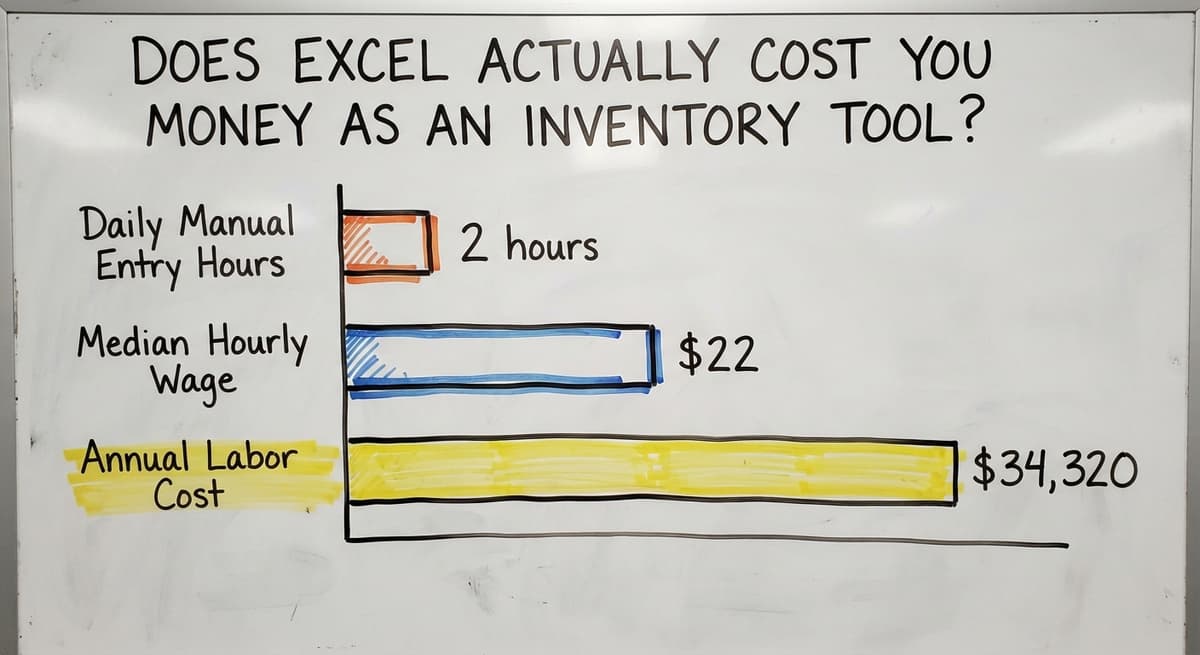
Yes, and the math is straightforward. A team of 3 people spending 2 hours each day on manual data entry, at the median wage for stock clerks of roughly $22 an hour per the US Bureau of Labor Statistics, runs about $34,320 a year in labor alone, before you count the errors.
A single copy-paste mistake in a spreadsheet can trigger an oversell on an item you do not have. That means a backorder call, a delayed shipment, and a customer who questions whether you can handle their volume.
Why Excel Breaks Down at Month-End
Month-end matching between Excel and QuickBooks can eat 2 full days of staff time. Version conflicts, where 2 people edit different copies of the same file, are nearly impossible to catch before the damage is done.
Spreadsheets are not inventory software. They are documents that look like inventory software until the operation grows.
Where QuickBooks Helps and Where It Stops
QuickBooks is excellent at what it was built for: invoices, vendor payments, payroll, and financial reporting. Your accounting team should keep using it. The goal here is not to replace it.
The problem is that QuickBooks was never designed to track bin locations, generate pick lists, or show real-time stock across multiple sites. Asking it to do those things is like using a hammer to cut wood. The tool is fine. The job is wrong.
The IRS needs that you "value your inventory at the beginning and end of each tax year" to figure taxable income. QuickBooks handles that valuation well. It does not handle the daily working tracking that keeps your counts accurate enough to value correctly.
Stop asking QuickBooks to do warehouse work. Let a dedicated inventory system handle the floor, and let QuickBooks handle the books.
Core Features Every B2B Inventory System Needs
A system built for wholesale distribution should cover these functions without requiring a consultant to configure each one.
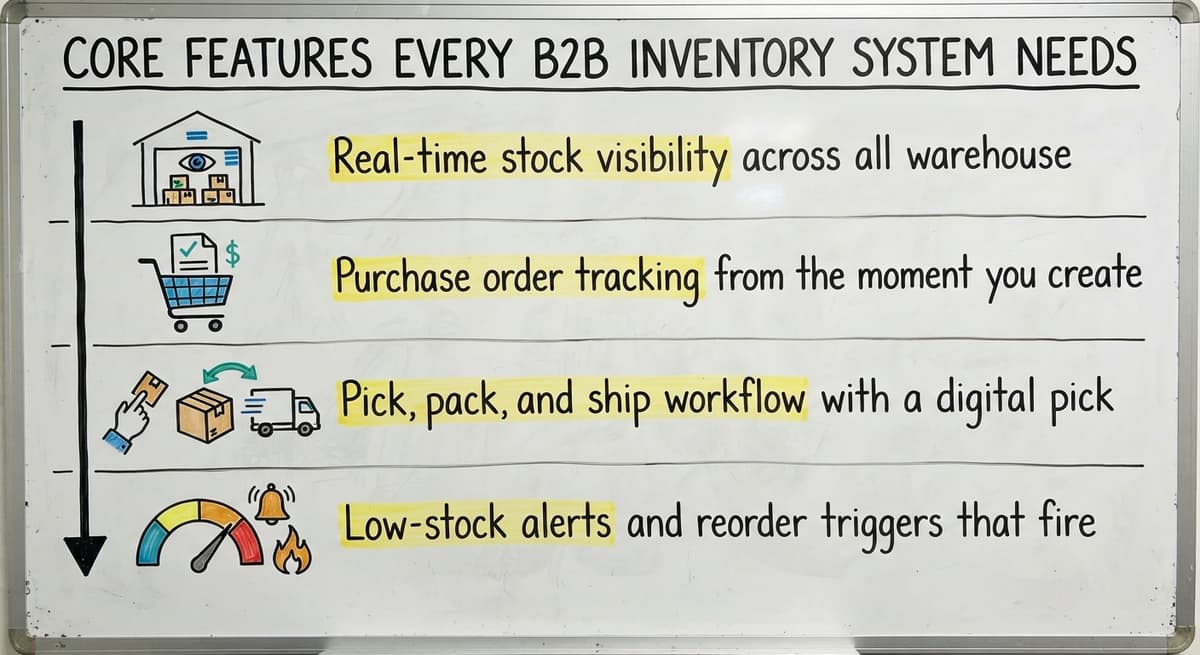
- Real-time stock visibility across all warehouse locations so your team never quotes a number that is already wrong
- Buy order tracking from the moment you create a PO through the moment goods hit the shelf, with 3-way matching that lines up the PO, the receiving record, and the vendor invoice automatically
- Pick, pack, and ship workflow with a digital pick list that routes staff through bin locations in the most efficient path, packing confirmation that updates stock and triggers the QuickBooks invoice, and shipping labels that flow back into the order record
- Low-stock alerts and reorder triggers that fire before you run out, not after a customer calls
These are not advanced features. They are the baseline for any operation handling more than 100 orders a week.
The comparison is easier when one option is built for you
Off-the-shelf means fitting your process to the software. We do it the other way round, and the first look costs nothing.
Book a callReceiving and Purchase Order Management
A proper receiving workflow updates stock counts the moment goods arrive, not at the end of the day when someone gets around to the data entry. That gap between physical receipt and system update is where phantom stock lives.
Three-way matching closes the loop: the buy order, the receiving record, and the vendor invoice all align automatically. If the vendor ships 90 units on a 100-unit PO, the system flags it. Your team does not discover the shortage 3 weeks later when a customer order comes up short.
This process also removes the paper receiving log. No more stack of printouts to key in after the dock closes. Stock is accurate in real time, and the accounting team sees the liability the moment it lands.

How Do I Manage Inventory Across Multiple Warehouse Locations?
A single view across all locations is the answer, and it has to update both records the moment a transfer happens. When your Columbus warehouse ships 50 units to your Cincinnati site, both counts change instantly. There is no lag, no phone call, and no spreadsheet to reconcile later.
That single view also prevents 2 common and expensive mistakes: overstocking one site while another runs dry, and placing a new buy order for stock that already exists somewhere in your network.
Why Real-Time Visibility Matters for Multi-Location Distributors
Excel breaks completely here. One file per location, never in sync, means someone is always working from a stale number. The US Census Bureau's Monthly Wholesale Trade data shows that wholesale inventories-to-sales ratios shift month to month, and a business that cannot see its own stock in real time cannot respond to those shifts.
Multi-location inventory management is not a premium feature. It is a basic requirement for any distributor running more than 1 site.
Reorder Points and Safety Stock: What They Are and Why They Matter
A reorder point is the stock level that triggers a new buy order. When units on hand drop to that number, the system fires an alert or creates the PO automatically. You set it once based on your average daily usage and your supplier's lead time.
Safety stock is the buffer you hold above that trigger. It covers supplier delays and demand spikes. If your supplier usually ships in 5 days but sometimes takes 9, safety stock covers the gap.
Setting these numbers in a system beats relying on someone's memory or a sticky note on a shelf. When that person leaves, the knowledge goes with them. When the system holds the number, the process survives turnover.
The NIST Manufacturing Extension Partnership offers vendor-neutral guidance on supply chain process design, including how to set these thresholds for small and mid-size distributors.

Lot Tracking, Serial Numbers, and When You Actually Need Them
Lot tracking assigns a batch number to a group of units that arrived together from the same supplier run. Serial number tracking assigns a unique ID to a single unit. Both exist for the same reason: when something goes wrong, you need to know exactly which items are affected.
Industries that need lot tracking include food and beverage, medical supplies, chemicals, and electronics. If a supplier issues a recall, lot tracking tells you which customers received the affected batch in minutes, not days.
Serial number tracking supports warranty management. When a customer calls about a defective unit, you can confirm the buy date, the warranty status, and the service history from one record.
Most small distributors skip this until a recall or audit forces the issue. Setting it up before that moment is far cheaper than the alternative.
See it running on your own process first
No build cost. The subscription starts once it is live and doing the job, not before.
Book a callHow B2B Inventory Software Connects to QuickBooks
A clean QuickBooks inventory integration works like this: the inventory system handles the warehouse events, and QuickBooks handles the financial records. The 2 systems talk to each other without anyone manually moving data between them.
When a sales order ships, the inventory system confirms the pick and pack, updates stock counts, and pushes the invoice data to QuickBooks. When a buy order is received, the system updates stock and sends the vendor bill to QuickBooks for payment. The accounting team sees accurate financials without touching the warehouse side.
What Stays in QuickBooks and What Moves to the Inventory System
What stays in QuickBooks: invoices, vendor bills, payments, payroll, and financial reports. What moves to the inventory system: stock counts, bin locations, pick lists, receiving records, and reorder triggers.
Your accounting team does not change how they work. The FTC's Mail and Internet Order Rule needs businesses to ship when they say they will. Accurate inventory counts, fed automatically to your order system, are what make that promise keepable.
The integration should be invisible to everyone except the person who set it up.

Signs Your Current System Is Costing You Money
Operations that have outgrown their tools run into the same problems every day, not just on bad days.
- Overselling items that are actually out of stock, because your system count and your real count do not match
- Staff spending more than an hour a day on inventory data entry that a system could handle in seconds
- Customers calling to ask where their order is because you have no real-time status to give them
- Month-end matching taking days instead of the minutes it should take when systems are connected
If 2 or more of these describe your operation, the manual overflow is already costing more than a fix would.
Do I Need a Full ERP, or Is There a Simpler Option?
For a 10-to-80 person distributor, a full ERP is almost always the wrong answer. ERP systems are built for companies with dedicated IT staff and six-figure rollout budgets. They carry modules for manufacturing, HR, global compliance, and dozens of other functions your operation will never touch.
Paying for features you will never use is not a growth investment. It is overhead with a long contract attached.
Why Off-the-Shelf Inventory Tools Fall Short Too
Off-the-shelf inventory tools are built for an average operation. If your workflow has anything specific to your product type, your customer base, or your warehouse layout, the generic tool will force you to adapt to it rather than the other way around.
Custom inventory software is built around your existing workflow. Rollout timelines for a focused custom build run weeks, not the 12-to-18 months a large ERP project usually demands. Replacing Excel and Access databases with custom software that fits your actual process is a narrower problem with a faster, cheaper solution.

What Does a Custom B2B Inventory System Actually Look Like?
Consider a wholesale distributor in Columbus running 150 orders a week. Before: email orders printed and handed to the warehouse, manual counts on a whiteboard, Excel for reorder tracking, and an Access database that only one person knew how to use. Month-end took 3 days to reconcile.
After a focused custom build: orders flow from the sales team into a digital pick list. Warehouse staff follow bin-location routing on a screen. Packing confirmation updates stock in real time and pushes the invoice to QuickBooks automatically. Reorder points fire buy orders before stock runs out. The Access database is gone. The whiteboard is gone. QuickBooks still does the books.
Not sure this is the right shape for your operation
Describe how the work runs today. We map it on a call and show you what it would look like built around that, before you spend anything.
Book a callWhat the Results of a Custom Build Actually Look Like
Order accuracy improved. Pick time dropped. The 3-day matching became a 2-hour review. The accounting team touched nothing new.
The goal was never a new system. The goal was to stop the manual overflow from eating the team's time and causing errors that cost accounts.
How to Evaluate B2B Inventory Management Software Without Getting Burned
Start with a process map of your current workflow before you talk to any vendor. Know where the errors happen, where the time goes, and what QuickBooks already handles. A vendor who does not ask about your process in the first conversation is selling a product, not solving a problem.
Five questions to ask every vendor:
- Does it connect to QuickBooks, and how long does that setup take?
- What does rollout look like, start to finish, in weeks?
- Who supports the system after go-live, and how do you reach them?
- Can we test it with our real data before we commit?
- What does it cost when we add a second warehouse or 10 more users?

Red Flags to Watch for During the Sales Process
Warn your team about demos that look polished but hide long setup times and required consultants. A great demo of a system that takes 9 months to implement is not a solution. It is a delay.
A healthy rollout runs: discovery, build, test with real data, train staff, go live. Avoid any vendor who proposes a big-bang cutover with no parallel run period. The people who use the system every day should be involved in designing it, or the system will not match the work.
Measuring Whether the New System Is Actually Working
Three numbers tell you most of what you need to know after go-live.
- Order accuracy rate: the share of orders shipped complete and correct on the first attempt
- Stock-out frequency: how often a customer order hits an item with zero available stock
- Hours spent on manual data entry: tracked weekly, this one usually drops fastest and is the easiest to see
Run a 90-day review to catch gaps before they become habits. A system that was configured for your workflow in month 1 may need a small adjustment by month 3 as the team finds edge cases. A good system gets better over time as your team identifies new steps to automate.
Measurement is not optional. If you do not track these numbers, you cannot tell whether the investment paid off.
Getting Started with B2B Inventory Management
Document your current process first. Write down every step from the moment a customer order arrives to the moment it ships. Mark the steps that cause errors. Mark the steps that eat the most time. That map is your brief for any solution you consider.
You do not need to fix everything at once. Fix the worst bottleneck first. For most small distributors, that is receiving accuracy or pick-list errors. Solve one problem completely before adding the next.
If your operation is outgrowing its current tools and you want a conversation about what a focused fix would look like for your specific workflow, reach out. No pressure to buy anything. Just a direct conversation about where your process breaks and what it would take to stop it.
Frequently asked questions
What are the four types of B2B?
The 4 common B2B models are: producers (companies that make goods and sell to other businesses), resellers (distributors and wholesalers that buy and resell without changing the product), governments (public agencies that buy from businesses at scale), and institutions (hospitals, universities, and nonprofits that buy in bulk). Most wholesale distributors fall into the reseller category, which is where B2B inventory management is most operationally demanding.
What is the 80/20 rule in inventory?
The 80/20 rule in inventory, also called the Pareto principle, holds that roughly 80% of your revenue comes from about 20% of your SKUs. In practice, this means a small number of products drive most of your sales volume. Knowing which items sit in that top 20% helps you set tighter reorder points, hold more safety stock on those lines, and spend less time managing slow-moving items that rarely affect your bottom line.
What are the four types of inventory management?
The 4 main inventory management methods are: just-in-time (ordering only what you need when you need it, which cuts holding costs but increases stockout risk), FIFO (first in, first out, which moves older stock first and is required in food and perishable distribution), LIFO (last in, first out, used for accounting purposes in some industries), and ABC analysis (ranking SKUs by value and managing each tier differently). Most B2B distributors use a combination, with FIFO as the default and ABC analysis to set reorder priorities.
Which CRM is best for inventory management?
No CRM is built for inventory management, and using one that way is the same mistake as using QuickBooks for warehouse tracking. A CRM manages customer relationships, contacts, and sales pipeline. Inventory management needs stock counts, bin locations, receiving workflows, and reorder triggers. The right setup connects a dedicated inventory system to your CRM and your accounting software, so each tool does what it was designed for. The best combination depends on your order volume, warehouse count, and whether you need lot tracking.
Why does Excel fail as an inventory management tool for growing distributors?
Excel fails because it has no live data. Two people editing different copies of the same file creates version conflicts that are nearly impossible to catch before an oversell or stockout happens. There is no receiving workflow, no pick list, and no automatic connection to QuickBooks. As order volume grows, the manual entry time grows with it, and the error rate grows faster. A team of 3 spending 2 hours a day on manual data entry at roughly $22 an hour is spending over $34,000 a year on a process a proper system handles automatically.
When does a small distributor need lot tracking or serial number tracking?
Lot tracking is required by regulation in food, medical supply, chemical, and electronics distribution. Serial number tracking is worth adding whenever you sell items under a manufacturer warranty or a service agreement. If you are not in a regulated industry and you sell commodity goods with no warranty component, you can skip both for now. Most small distributors add lot tracking after a supplier recall or a customer audit request makes the gap impossible to ignore. Setting it up before that moment costs far less than responding to one without it.
How does inventory software connect to QuickBooks without disrupting accounting?
A clean integration keeps the accounting team's workflow unchanged. The inventory system handles warehouse events: receiving, picking, packing, and shipping. When a shipment confirms, the system pushes invoice data to QuickBooks automatically. When a buy order is received, the vendor bill flows to QuickBooks for payment. The accounting team sees accurate financials without touching the warehouse side. Nothing in QuickBooks changes except that the numbers arriving there are more accurate and arrive faster.
What is the difference between a reorder point and safety stock?
A reorder point is the stock level that triggers a new buy order. You calculate it from your average daily usage and your supplier's lead time. Safety stock is the extra buffer you hold above that trigger to cover supplier delays and unexpected demand spikes. The reorder point tells you when to order. Safety stock tells you how much cushion to keep so you do not run out while you wait for the order to arrive. Both numbers belong in your inventory system, not in someone's head.
Start with a free first look
A 30 minute call, your operation mapped, and a clear picture of what we would build. No obligation and nothing to install.
Book a callRelated guides
The rest of this guide, for the parts of the job this page does not cover.
Guides
- Multi Location Inventory Management Software
- Inventory Management for Multiple Locations
- Inventory Management System for Manufacturing
- Inventory Management Pics
- Jewelry Inventory Management
- Dental Inventory Management
- The Objective of Inventory Management is To
- Qr Code for Inventory Management
- Hvac Inventory Management Software
- Inventory Management Software for Schools
- Nonprofit Inventory Management
- Manual Inventory Management
- Inventory Management Photos
- Inventory Management Software Costs
- Hvac Inventory Management
- Warehouse Inventory Management Software
- Warehouse Inventory Management Systems
- Quickbooks Inventory Management Software
- Inventory and Warehouse Management Software
- Custom Inventory Management Software
- Warehouse Inventory Management System
- Retail Inventory Management