


Qr Code For Inventory Management
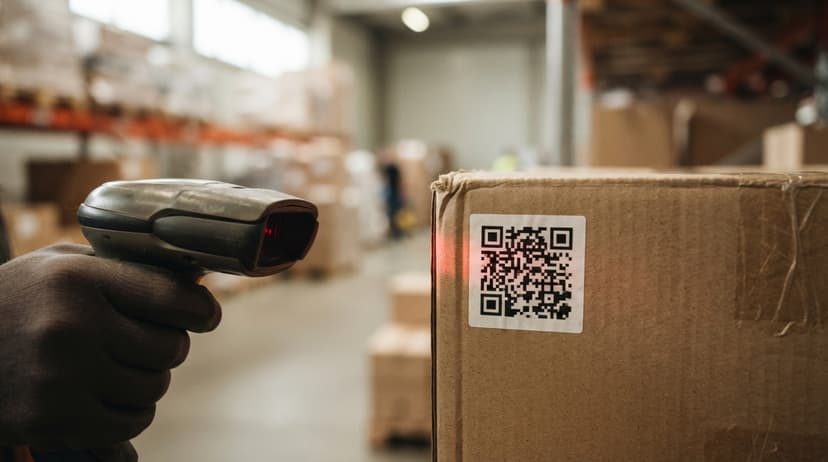
A QR code for inventory management is a scannable square label you print and stick on a product, bin, or shelf. When a staff member scans it with a phone or handheld scanner, your software logs the item, quantity, and location instantly. No paper. No re-entry. This guide covers everything a warehouse or distribution operation needs to get started, reviewed and updated July 2025.
Book a callWhat Is a QR Code for Inventory Management
A QR code is a small square pattern that holds data. Think of it as a smarter price tag. A phone camera or scanner reads the pattern in under a second and pulls up whatever information is stored inside. In a warehouse, that information is usually a SKU, a bin location, or a product record. Scanning replaces the step where a worker writes a number on paper and someone else types it in later. The record updates the moment the scan happens. No delay, no transcription error.
We build it for your operation, and the first look is free
If you would rather not compare products, describe how your operation already works and we build the system around it.
Reviewed September 2026. Figures are worked from the assumptions stated beside them, so you can substitute your own and the arithmetic still holds.
No build cost. You see it running on your own process first, and the monthly subscription starts only once it is live.
Book a callHow QR Codes Differ from Barcodes
A standard 1D barcode, the kind on a cereal box, holds one short string of numbers. A QR code holds far more: a URL, a lot number, a bin location, and a supplier reference can all live in a single code. Scanning angle matters too. Barcodes need to be lined up with the scanner beam. QR codes read from any angle. As GS1 notes in its barcode standards guide, "GS1 standards are the most widely used supply chain standards in the world," and those standards now fully cover QR codes alongside traditional barcodes (GS1). QR codes also cost nothing to generate and print in-house, which matters for a lean operation.
Why Are Small Warehouses Switching to QR Codes?
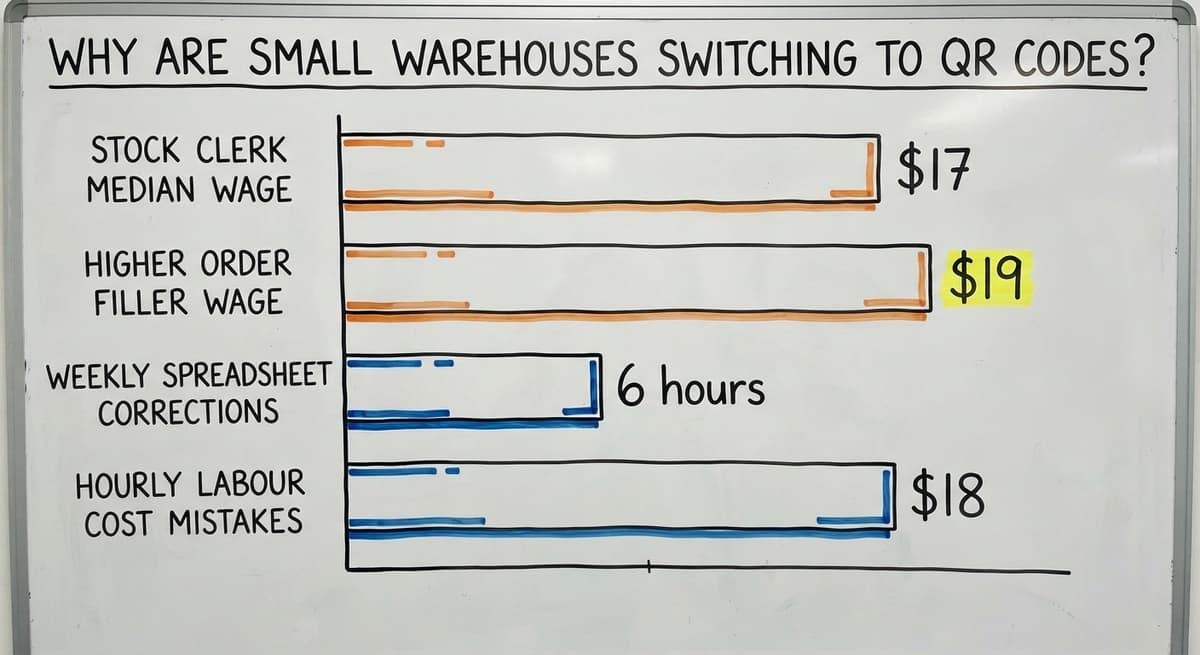
Small warehouses switch to QR codes because manual processes cost real money in errors and staff time. The US Bureau of Labor Statistics reports that stock clerks and order fillers earn a median wage around $17 to $19 an hour. Three people spending 6 hours a week correcting spreadsheet mistakes at $18 an hour adds up to roughly $16,848 a year in wasted labor. That figure does not count the cost of a mis-shipped order or a customer who does not come back.
QR codes speed up receiving, picking, and cycle counts. Staff scan with a smartphone, so there is no expensive hardware to buy on day one. The scan connects directly to inventory software, including QuickBooks, so managers stop reconciling what the system says versus what is actually on the shelf.
Core Use Cases in a Warehouse or Distribution Operation
QR codes fit into almost every step of a warehouse workflow. Here is where they make the biggest difference:
- Receiving: Scan inbound items to log quantities and bin locations the moment a shipment arrives, instead of writing counts on a paper receiving sheet.
- Picking and packing: Scan the item before it goes into a box to confirm the right SKU and quantity. Pick and pack software can flag a mismatch before the box is sealed.
- Cycle counts: Walk the floor with a phone and scan each location. The system records the count live, so there is no paper to transcribe later.
- Returns: Scan the returned item to identify it and route it to the correct bin automatically.
- Bin and shelf labeling: A QR code on a rack location tells staff exactly where stock lives, cutting the time spent searching for a slot.
Every one of these steps removes a point where data gets lost or mis-entered.
What Information Can a QR Code Store
A single QR code can carry more than most operations need. Common fields include:
- SKU or part number
- Product description
- Lot or batch number for traceability
- Expiration date
- Bin or warehouse location
- Supplier name or buy order reference
- A URL that opens the product record directly in your inventory software
One scan can surface all of this at once, which is something a 1D barcode cannot do. For serialized items, each unit gets its own unique code so you can track it individually from receipt to shipment.
The comparison is easier when one option is built for you
Off-the-shelf means fitting your process to the software. We do it the other way round, and the first look costs nothing.
Book a callHow to Generate QR Codes for Your Inventory
Free online generators work for simple, one-off needs. For a warehouse, you want codes tied to your actual SKU list, which means using your inventory software to generate them.
There are 2 types of QR codes worth knowing:
- Static codes hold fixed data. The SKU is baked in. If the SKU changes, you reprint the label.
- Dynamic codes hold a URL. The URL points to a record in your software. You can update the record without reprinting the label.
Custom inventory software can batch-generate codes for your entire product catalog and print label sheets on demand. That saves hours compared to generating codes one at a time from a free website tool.

Printing and Labeling Best Practices
The label is the weakest link in any QR code system. A damaged or unreadable label stops the workflow cold. Follow these rules to avoid that:
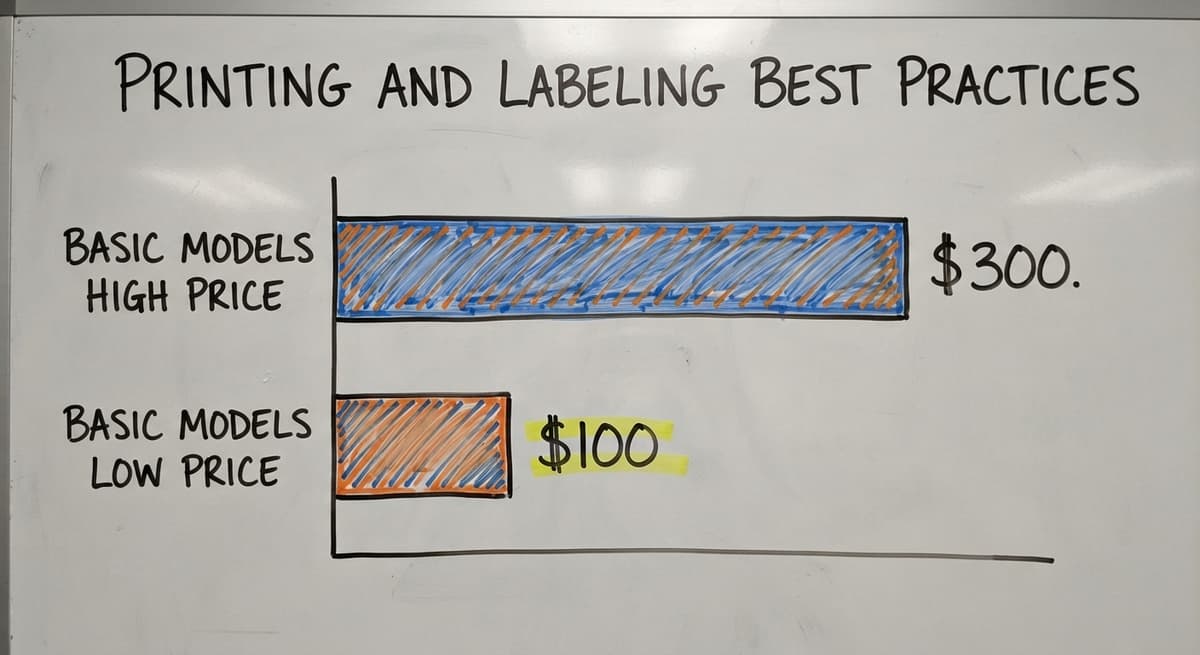
- Use a thermal label printer for crisp, smudge-proof output. Basic models run $100 to $300.
- Keep labels at least 1 inch square. Smaller codes are hard to scan reliably, especially in low light.
- Use laminated or weatherproof label stock in cold storage or outdoor dock areas. Paper labels peel and fade fast in those conditions.
- Place labels at a consistent height on every shelf so staff always know where to look.
- Print a human-readable SKU or product name below the QR code. If the code ever becomes unreadable, the worker can still look up the item manually.
Consistent label placement is a small detail that cuts scan time across hundreds of picks a day.
Scanning Hardware Options
Your volume and environment decide which hardware fits best. Here is a plain breakdown:
- Smartphones with a free scanning app are the lowest-cost starting point. Any modern phone works. This is the right choice for a small warehouse testing the process before committing to hardware.
- Dedicated handheld scanners are faster and built to survive drops and dust. They start around $200 and are worth it for operations scanning hundreds of items a shift.
- Fixed-mount scanners sit at a receiving dock or packing station and scan automatically as items pass by. Good for high-volume, repetitive tasks.
- Bluetooth scanners pair with a tablet or laptop and let workers move freely without carrying a full device.
A 10-person operation rarely needs enterprise-grade scanners. Match the hardware to the actual volume, not to what a vendor's demo looks like.

How Do QR Code Scans Connect to My Inventory Software?
A scan only helps your operation if it writes to a real inventory record. That is the point a lot of basic apps miss. The scan result must go directly into a database, not a spreadsheet that someone reviews later.
Custom warehouse software can tie each scan directly to QuickBooks items, buy orders, or sales orders. When a worker scans a receiving label, the system adds the quantity to the right item record and closes or updates the buy order. No one types anything. Avoid any setup that needs manual re-entry after scanning. That step defeats the whole purpose and reintroduces the errors you are trying to remove.
The IRS is also clear on why accurate counts matter beyond operations. IRS Publication 538 states: "To figure taxable income, you must value your inventory at the beginning and end of each tax year." A real-time record makes that obligation straightforward instead of a scramble at year end.
See it running on your own process first
No build cost. The subscription starts once it is live and doing the job, not before.
Book a callKeeping QuickBooks in the Loop
Many small distributors run their invoicing and purchasing inside QuickBooks and have no reason to leave it. QR-based inventory software does not replace QuickBooks. It sits alongside it and handles the warehouse layer: receiving, bin locations, cycle counts, and adjustments.
When a count changes on the warehouse side, the software syncs that adjustment back to QuickBooks automatically. No double entry. No gap between what the books show and what is actually on the shelf. This approach avoids the cost and disruption of a full ERP migration, which can run six figures and take a year or more to complete. QuickBooks inventory integration built into custom software gives you the accuracy without the upheaval.

Common Mistakes to Avoid When Setting Up QR Code Inventory
Most rollout problems are avoidable. These are the ones that come up most often:
- Printing labels before the SKU list is final. If product names or numbers change after printing, you reprint everything. Lock the list first.
- Using paper labels in wet or cold areas. They peel within days. Spend a little more on weatherproof stock.
- Skipping staff training. Scanning is simple, but the workflow around it must be agreed on before go-live. Who scans what, and when?
- Choosing software that does not connect to your accounting system. You end up with 2 sets of records that drift apart.
- Going too complex too fast. Start with receiving and one product category. Measure accuracy, then expand to the rest of the floor.
A phased start is not a slow start. It is the approach that actually sticks.
How Accurate Is QR Code Inventory Tracking
Accuracy depends on scanning discipline, not the QR code itself. When every receipt, pick, and adjustment is scanned, the record stays current. When staff skip scans or work around the system, the record drifts.
Manual counts are already out of date the moment someone writes them down. A scan-based system updates in real time, so the record reflects what is actually on the shelf right now. Operations that scan consistently report far fewer picking errors and less time spent on matching. The technology is reliable. The habit is what needs managing.
What Does It Cost to Implement QR Code Inventory Management
Cost depends on how far you want to go. Here is a realistic breakdown:
| Item | Low End | High End |
|---|---|---|
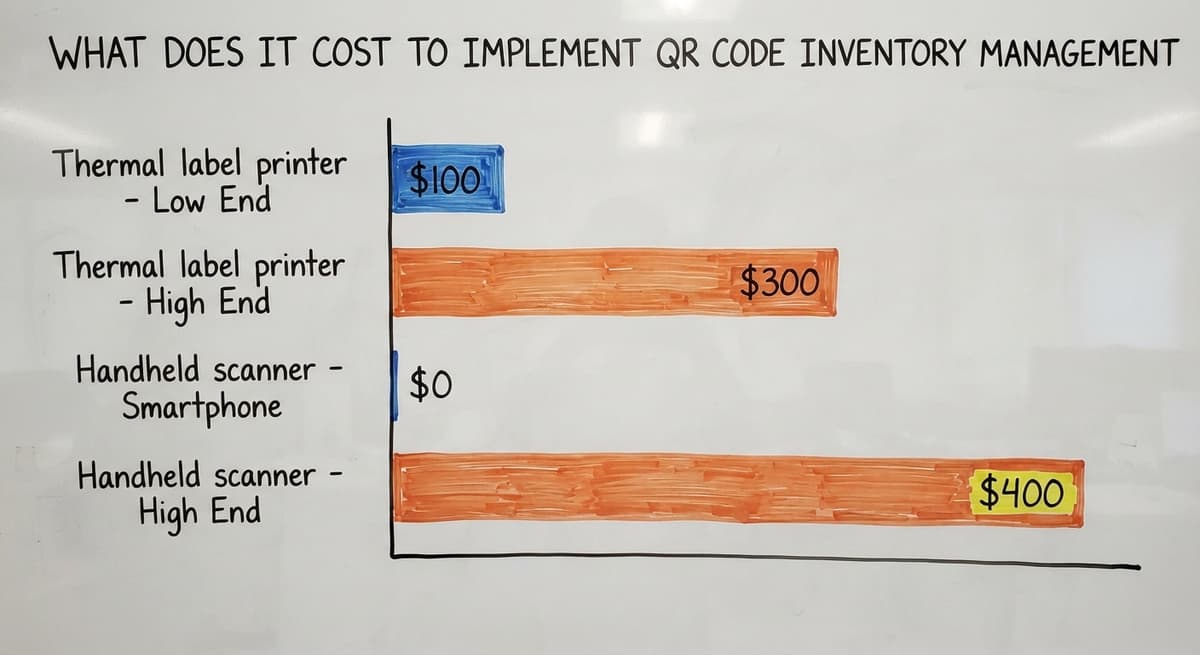
| Thermal label printer | $100 | $300 |
| Handheld scanner | $0 (smartphone) | $400 per unit |
| Software (SaaS app) | Free (limited) | $100 to $300/month |
| Custom software build | Varies by scope | One-time, no monthly fee |
A basic setup with a smartphone app and a $150 printer can be running for under $200. Custom software built around your specific workflows costs more upfront but removes monthly SaaS fees and the forced workflows that come with off-the-shelf tools. Compare either option to a full ERP rollout, which routinely runs $50,000 to $200,000 and takes 6 to 12 months. For a small warehouse or distributor, that scale is rarely justified.
How Long Does Implementation Take
A basic setup with a free app and printed labels can be running in a single day. A custom-built system tied to QuickBooks and your specific workflows usually takes a few weeks, not months. Phased rollouts cut disruption further. Start with one product line or one shift, confirm the process works, then expand. Any vendor quoting 6 to 12 months for a 20-person warehouse is selling you something you do not need. The right system fits your operation, not the other way around.
Not sure this is the right shape for your operation
Describe how the work runs today. We map it on a call and show you what it would look like built around that, before you spend anything.
Book a call
Is Your Operation Ready for QR Code Inventory Tracking?
Your operation is ready if you recognize any of these signs in your current process:
- Cycle counts happen on paper or in Excel, and the numbers are wrong by the time someone acts on them.
- Pickers pull the wrong item more than once a week.
- Receiving staff write quantities on a sheet and someone else types them in later.
- You cannot tell in real time how much of a SKU is on hand.
- Managers spend hours each week reconciling what QuickBooks shows versus what is actually on the shelf.
If 2 or more of those describe your operation, the cost of staying manual is already higher than the cost of switching. The US Census Bureau's Monthly Wholesale Trade data shows that wholesale inventories run in the trillions of dollars nationally. Even a small error rate across that volume represents serious money. At the individual warehouse level, the math is the same.
How Custom Software Makes QR Code Tracking Work for Your Operation
Off-the-shelf inventory apps assume a generic workflow. Your operation is not generic. A custom warehouse software build maps scan-to-receive, scan-to-pick, and cycle count screens to how your team already works, using your bin layout and your SKU structure.
QuickBooks inventory integration is built in from day one, not bolted on later. When your process changes, the software changes with it. That means a quick update from your development partner, not a workaround in Excel that three people keep and no one fully understands.
The NIST Manufacturing Extension Partnership recommends that small manufacturers and distributors align their systems to their actual supply chain processes rather than forcing operations to fit a software template. Custom software is how that recommendation becomes real for a 15- or 30-person warehouse.

Questions to Ask Before Choosing a QR Code Inventory System
Before you sign anything or start a trial, get clear answers to these:
- Does it connect to QuickBooks, or will your team re-enter data after every scan?
- Can you generate and print labels from inside the system, or do you need a separate tool?
- Does it support multiple bin locations and warehouse zones?
- What happens when a label is damaged or missing? Is there a recovery path?
- Is the vendor reachable by phone, or is support a ticket queue with a 48-hour response time?
- Can the system grow with your operation without a full rebuild?
A vendor who cannot answer these clearly is not the right partner for a lean operation that cannot afford downtime.
Getting Started with QR Code Inventory Management
A clean rollout follows a clear sequence. Here are the 6 steps that work:
- Audit your current process. Find where errors happen and where data gets re-entered. Those are the spots to fix first.
- Finalize your SKU list and bin locations before generating a single code. Changing these after printing means reprinting.
- Choose scanning hardware based on your daily scan volume and your environment. Start with smartphones if you are not sure.
- Select or build software that writes scan results directly to inventory records and connects to QuickBooks.
- Train staff on the workflow before go-live. The scan is easy. The agreement on who scans what, and when, is what matters.
- Start with one area, measure accuracy over 2 to 4 weeks, then roll out to the rest of the floor.
This sequence keeps disruption low and gives your team a chance to build the habit before it becomes the standard.
Frequently Asked Questions
Is there a free app to keep track of inventory? Yes. Apps like Sortly, inFlow (free tier), and Square for Retail offer basic inventory tracking at no cost. Free tiers limit the number of SKUs or users and rarely connect to QuickBooks without a paid upgrade. They are a reasonable starting point for a very small operation, but most growing warehouses outgrow them within a few months.
Which barcode scanner is best for inventory management? There is no single best answer. The right scanner depends on your volume and environment. Zebra and Honeywell make reliable handheld scanners for high-volume warehouse use, starting around $200 to $400. For light use, a smartphone with a free app works fine. Match the scanner to your daily scan count before spending on hardware.
Can ChatGPT generate QR codes? No. ChatGPT is a text and reasoning tool. It cannot produce image files or scannable QR codes. Use a dedicated QR code generator such as QR Code Generator, Canva, or the built-in tools inside your inventory software to create codes tied to real SKU data.
What is the best barcode app for inventory management? Again, no single app fits every operation. Sortly and inFlow are well-regarded for small warehouses. Fishbowl and Cin7 handle more complex needs. The deciding factor is whether the app connects to your accounting software. An app that does not sync with QuickBooks creates a second set of records your team has to manage manually.
Can I use QR codes without buying special scanners? Yes. Any modern smartphone running iOS or Android can scan a QR code using the built-in camera or a free app. Dedicated scanners are faster and more durable, but a phone is a perfectly valid starting point.
Do QR codes work in cold storage environments? Yes, with the right label material. Standard paper labels peel and fade in cold or wet conditions. Use polyester or polypropylene label stock rated for low-temperature use. The QR code itself is not affected by cold. The label holding it is.
Running a warehouse on printed sheets and spreadsheets is a choice that costs more every month it continues. A QR code for inventory management does not need a big ERP, a year-long project, or abandoning QuickBooks. The right system, built around how your team already works, can be live in weeks and paying for itself in accuracy and staff time within the first month. If your operation shows any of the signs listed above, the next step is a straightforward conversation about what a connected, scan-based system would look like for your specific floor.
Frequently asked questions
Is there a free app to keep track of inventory?
Yes. Apps like Sortly, inFlow (free tier), and Square for Retail offer basic inventory tracking at no cost. Free tiers limit the number of SKUs or users and rarely connect to QuickBooks without a paid upgrade. They work for very small operations but most growing warehouses outgrow them quickly.
Which barcode scanner is best for inventory management?
There is no single best answer. The right scanner depends on your volume and environment. Zebra and Honeywell make reliable handheld scanners for high-volume warehouse use, starting around $200 to $400. For light use, a smartphone with a free app works fine. Match the scanner to your daily scan count before spending on dedicated hardware.
Can ChatGPT generate QR codes?
No. ChatGPT is a text and reasoning tool and cannot produce image files or scannable QR codes. Use a dedicated QR code generator such as QR Code Generator, Canva, or the built-in tools inside your inventory software to create codes tied to real SKU data.
What is the best barcode app for inventory management?
No single app fits every operation. Sortly and inFlow are well-regarded for small warehouses. Fishbowl and Cin7 handle more complex needs. The deciding factor is whether the app connects to your accounting software. An app that does not sync with QuickBooks creates a second set of records your team has to manage manually.
Can I use QR codes without buying special scanners?
Yes. Any modern smartphone running iOS or Android can scan a QR code using the built-in camera or a free app. Dedicated scanners are faster and more durable for high-volume work, but a phone is a perfectly valid and zero-cost starting point for a small warehouse.
How do QR code scans connect to QuickBooks?
Custom inventory software writes each scan result directly to a QuickBooks item, buy order, or sales order. When a worker scans a receiving label, the system updates the quantity and closes the PO line automatically. No one types anything twice. Off-the-shelf apps sometimes offer a QuickBooks sync, but custom software builds the connection into every workflow from the start.
What happens if a QR code label is damaged or unreadable?
Print a human-readable SKU or product name below every QR code. If the code becomes unreadable, the worker reads the SKU, looks up the item in the system, and prints a replacement label on the spot. A good inventory system makes label reprinting a 30-second task, not a disruption.
Can QR codes track serialized items?
Yes. Each QR code can encode a unique serial number, so every individual unit gets its own label. The system tracks that unit from the moment it is received through picking, shipping, and any return. This is especially useful for electronics, medical devices, or any product subject to warranty or recall tracking.
Start with a free first look
A 30 minute call, your operation mapped, and a clear picture of what we would build. No obligation and nothing to install.
Book a callRelated guides
More on the same work.
Guides
Common questions
- What is E Inventory Management
- What is Roq in Inventory Management
- What is Barcoding in Inventory Management
- What is Online Inventory Management System
- What is Effective Inventory Management
- What is the Definition of Inventory Management
- What is Inventory Management Mary Kay
- What is Inventory Management Practices
- What is Fluctuation Stock in Inventory Management
- What is Abc Classification in Inventory Management
- What is the Purpose of Inventory in Operations Management
- How to Manage Food Inventory
- What is Sales and Inventory Management System
- What is the Importance of Quality Inventory Management
- What is Inventory Management System Project
- How to Manage Consignment Inventory
- What is Inventory Management Meaning in Hindi
- What is Fifo in Inventory Management
- What is Telecom Inventory Management
- How to Manage Fba Inventory
- What is Kanban System of Inventory Management
- How to Improve Inventory Management
- What is Management Inventory in Hrm
Added since this page was reviewed
The newer guides in this cluster are here.
- How to Manage Inventory in Rocket League Answered on its own page.
Added since this page was reviewed
The newer guides in this cluster are here.
- How to Manage Inventory in Stardew Valley Answered on its own page.
Added since this page was reviewed
The newer guides in this cluster are here.
- How to Manage Inventory Fallout 76 Answered on its own page.
Added since this page was reviewed
The newer guides in this cluster are here.
- Multi Location Inventory Management Software Answered on its own page.
- What is the Difference Between Aggregate and Item Inventory Management Answered on its own page.
- Inventory Management for Multiple Locations Answered on its own page.
- What is Jit Inventory Management Answered on its own page.
- Inventory Management System for Manufacturing Answered on its own page.
- Inventory Management Pics Answered on its own page.
- What is an Important Factor in Inventory Management Answered on its own page.
- B2b Inventory Management Answered on its own page.
- Jewelry Inventory Management Answered on its own page.
- Dental Inventory Management Answered on its own page.
- What is Inventory Management in Working Capital Answered on its own page.
- The Objective of Inventory Management is To Answered on its own page.
- What is Poor Inventory Management Answered on its own page.
- What is Inventory Management and Its Types Answered on its own page.
- Hvac Inventory Management Software Answered on its own page.
- Inventory Management Software for Schools Answered on its own page.
- What is the Main Purpose of Inventory Management Answered on its own page.
- Nonprofit Inventory Management Answered on its own page.
- Manual Inventory Management Answered on its own page.
- What is Inventory Management in Pharmacy Answered on its own page.
- Inventory Management Photos Answered on its own page.
Added since this page was reviewed
The newer guides in this cluster are here.
- How to Track Inventory with Qr Code Answered on its own page.