

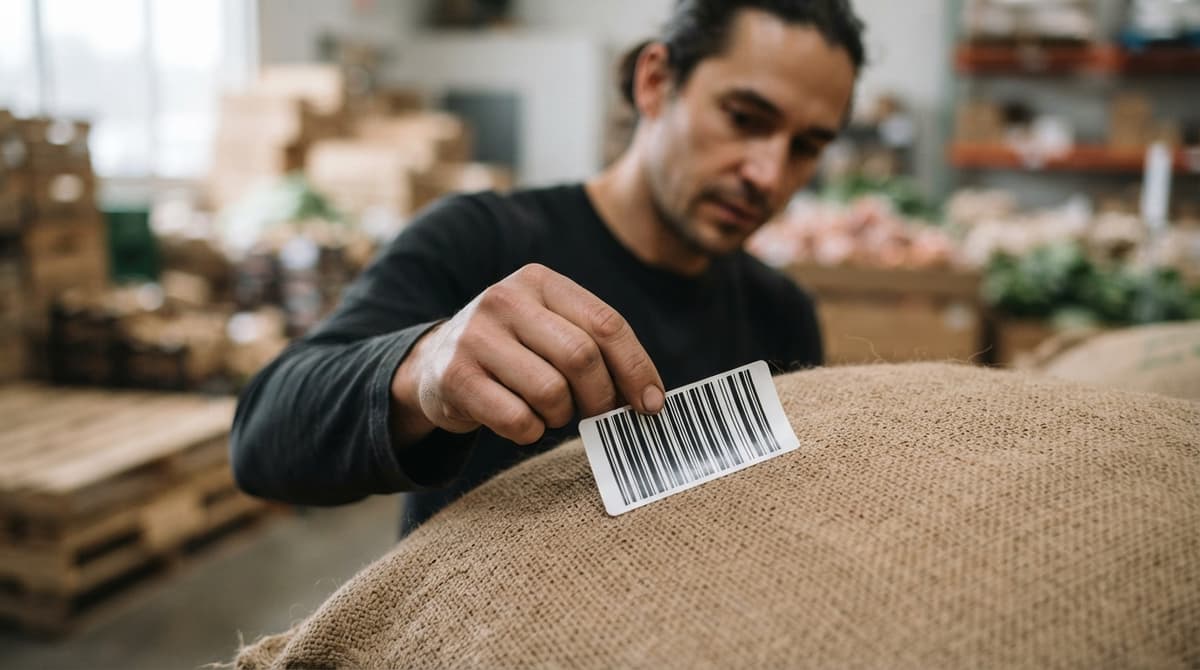
Real Food Barcodes
Real food barcodes are the machine-readable codes on food packaging that identify a product, its lot, its expiration date, and its weight in a single scan. They differ from standard retail barcodes because they carry safety-critical data your operation needs to receive stock, rotate inventory, and survive a recall audit. This guide covers every barcode type, workflow step, and system choice that matters for a small food distributor. Reviewed and updated June 2025.
Book a callWhat Are Real Food Barcodes and How Do They Differ from Standard Retail Barcodes?
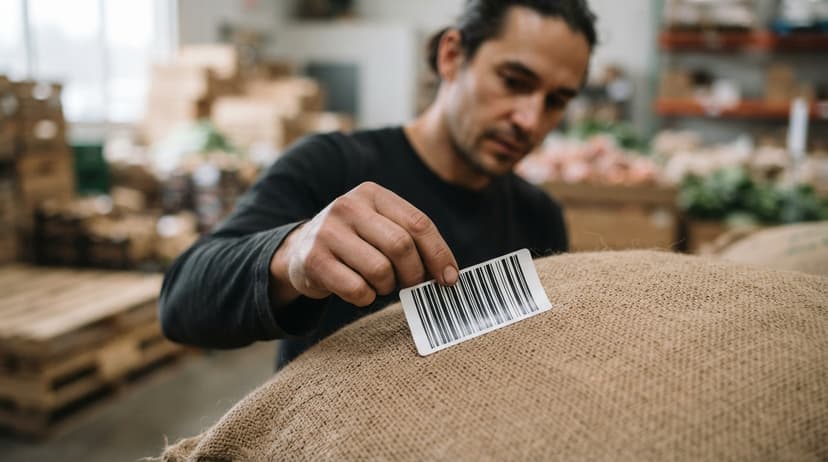
A standard retail barcode, the kind on a book or a phone case, does one job: it identifies the product so a register can pull the price. Real food barcodes do more. They carry lot numbers, expiration dates, and net weight alongside the product ID. That extra data is what lets your team trace a case back to its production run, enforce FIFO rotation, and respond to a recall without digging through paper logs.
Reviewed September 2026. Figures are worked from the assumptions stated beside them, so you can substitute your own and the arithmetic still holds.
Food barcodes appear on single consumer units, on shipping cases, and on full pallets. Each level carries different data. A consumer unit carries a GTIN (Global Trade Item Number), the core product identifier. A case or pallet usually carries a GS1-128 barcode that adds lot number, best-by date, and quantity in one scan. The same product moves through your dock in all 3 formats, and your system needs to read all of them.
We build it for your operation, and the first look is free
If you would rather not compare products, describe how your operation already works and we build the system around it.
No build cost. You see it running on your own process first, and the monthly subscription starts only once it is live.
Book a callWhy Food Products Need Their Own Barcode Standards
Food carries safety risk that a phone case does not. A lot number links every case you shipped to a single production run. An expiration date tells your team which pallet to pull first. Without both fields encoded in the barcode, your staff has to type that data by hand, and hand-typed data gets skipped when the dock is busy.
The FDA's Food Safety Modernization Act (FSMA) needs distributors to keep one-up, one-back records: who you got it from, and who you sent it to, tied to the specific lot. GS1, the global standards body, sets the barcode formats that make this possible. As GS1 states on its standards page, its barcode standards "enable the capture and sharing of information about products, locations, assets and more."
Food Barcode Standards Create Compliance Risk, Not Just Operational Risk
Skipping food-specific barcode standards does not just create working risk. It creates compliance risk with every retail buyer and food service customer you serve. Retail buyers increasingly need GS1-compliant labels as a condition of doing business. A single failed audit or rejected shipment costs more than the system that would have prevented it.
What Barcode Types Are Used on Food Products in Distribution?
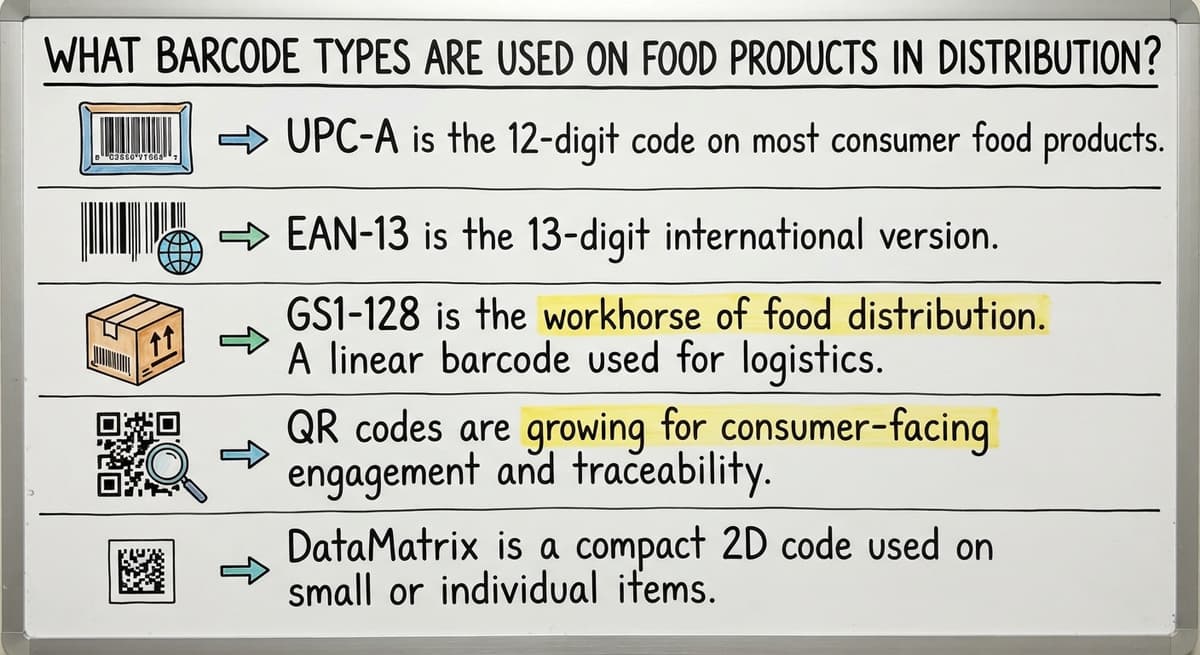
Several barcode formats appear in food distribution, and each fits a different job. The right answer depends on where in the supply chain the label lives.
- UPC-A is the 12-digit code on most consumer food packages. It identifies the product but carries no lot or date data.
- EAN-13 is the 13-digit international version common on imported items. It works the same way as UPC-A for product ID.
- GS1-128 is the workhorse of food distribution. A single GS1-128 barcode encodes product ID, lot number, best-by date, and quantity using Application Identifiers (AIs). AI 01 tags the GTIN; AI 17 tags the expiration date; AI 10 tags the lot number.
- QR codes are growing for consumer-facing traceability and recall notices, but most warehouse scanners do not rely on them for receiving.
- DataMatrix is a compact 2D code used on small or irregular packaging where a full GS1-128 label will not fit.
Why GS1-128 Is the Format Your Warehouse Must Read Without Fail
For warehouse barcode scanning at the case and pallet level, GS1-128 is the format your system must read without fail. UPC-A and EAN-13 identify what the product is. GS1-128 tells you which lot it came from, when it expires, and how many units are in the case. A system that cannot parse GS1-128 Application Identifiers forces your staff to key in the data that the barcode already contains.
The comparison is easier when one option is built for you
Off-the-shelf means fitting your process to the software. We do it the other way round, and the first look costs nothing.
Book a callWhat Data Lives Inside a Food Product Barcode?
A GS1-128 label on a food case can hold all of the following in one scan.
| Data Field | GS1 Application Identifier | Why It Matters |
|---|---|---|
| GTIN | AI 01 | Identifies the product across every system |
| Lot or batch number | AI 10 | Links the case to its production run |
| Expiration or best-by date | AI 17 | Drives FEFO rotation and recall response |
| Net weight | AI 310x | Required for variable-weight items |
| SSCC (pallet ID) | AI 00 | Tracks the full pallet as a shipping unit |
Lot number tracking and expiration date scanning are the two fields that separate a food barcode system from a generic inventory tool. If your software cannot capture both at receiving, every downstream process, from FEFO rotation to recall traceability, runs on incomplete data.

How Food Distributors Use Barcodes at Receiving, Putaway, and Picking
Barcode scanning earns its keep at 3 specific moments in your day: when the truck arrives, when product goes to the shelf, and when staff pulls an order. At receiving, scanning a GS1-128 label captures the lot number and expiration date in one motion, with no keyboard entry. At putaway, a scan ties that lot to a specific bin location so the system knows exactly where it landed. At picking, the system enforces first-expired, first-out (FEFO) rotation automatically, directing staff to the oldest lot before a newer one is touched. Two areas trip up food distributors more than any other at each of these steps: expiration date management and variable-weight items.
Expiration Date Management and Variable-Weight Barcode Challenges
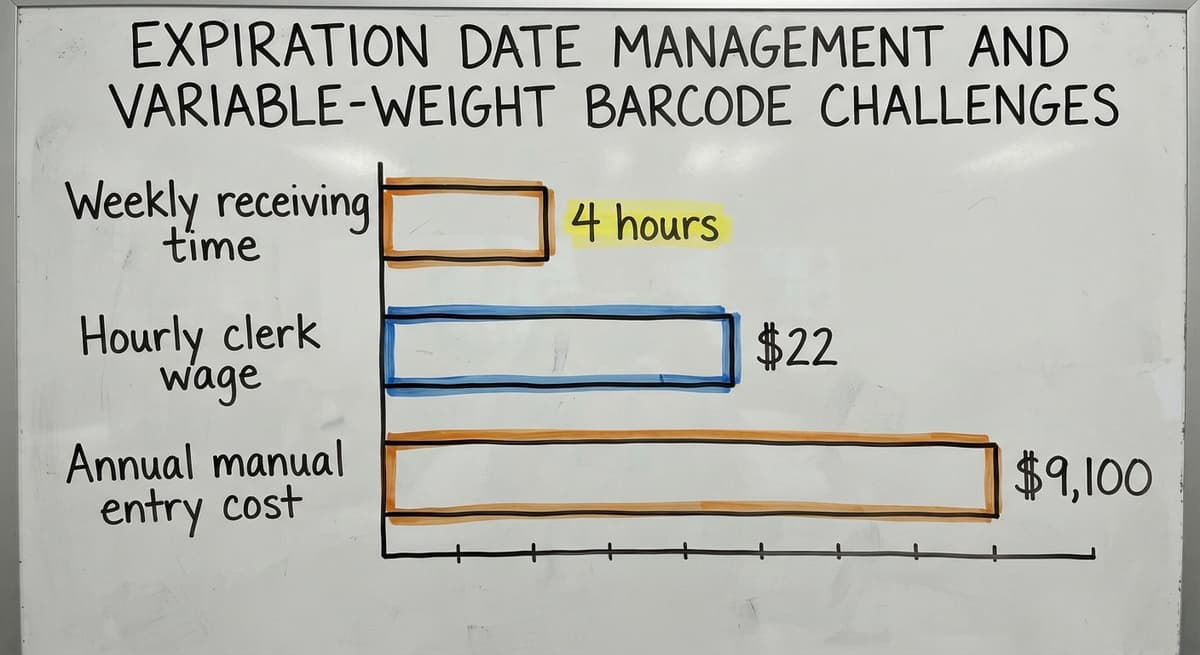
Expiration date management fails when the system stores a date but does not act on it. A system that tracks expiration dates should block picks from lots past their use-by date and alert a supervisor before a short-dated pallet ships. Variable-weight items add a second layer of complexity. A case of fresh chicken does not weigh the same as the next case. Price-embedded barcodes encode the actual weight in the barcode itself, and your scanning system must parse that field correctly or your inventory weights and costs will be wrong from the moment the case hits the dock.
Receiving
When a truck backs into your dock, a scanner reads each case against the open buy order. The system confirms quantity, product match, lot number, and expiration date in one pass. Discrepancies appear on screen before the driver leaves. This replaces the clipboard-and-spreadsheet process that most small distributors still run, where the same data gets written on paper and typed again later. 2 people spending 4 hours a week on manual receiving entry at $22 an hour (the median rate for stock clerks, per the US Bureau of Labor Statistics) costs your operation over $9,100 a year, before counting the errors.
Putaway
After receiving, staff scan a bin location barcode and the product barcode together. The system records exactly where each lot landed. FEFO rotation (first expired, first out) is enforced automatically because the system knows which lot expires soonest and directs staff to that bin first. Nobody has to remember where they put a pallet last Tuesday.
Does Scan-to-Pick Actually Prevent Mispicks?
Yes. Scan-to-pick guides staff to the right bin, then asks them to scan the product before it goes into the order. If they grab the wrong lot or an expired case, the scanner alerts them at once. This catches the error before it reaches your customer, not after. Mispicks that result in returns or complaints are expensive to fix and harder to explain. A scan-to-pick workflow removes the guesswork that causes most of them.

How Barcode Scanning Supports Food Safety and Lot Traceability
When a recall notice arrives, the first question is: which customers received that lot? A barcode-linked system answers that in minutes. A manual system, or a spreadsheet, may not answer it at all.
FSMA's one-up, one-back rule means you must show where each lot came from and where it went. That record has to survive an audit, which means it needs to be timestamped, tied to a user, and stored somewhere other than a shared Google Sheet.
See it running on your own process first
No build cost. The subscription starts once it is live and doing the job, not before.
Book a callWhy Manual Records Rarely Survive a Real Recall Investigation
Manual records rarely survive a real recall investigation intact. Handwriting gets misread, files get overwritten, and nobody can prove who entered what or when. A barcode inventory management system creates that audit trail automatically at the moment of each scan. Every receiving event, every putaway, every pick is logged with the lot number, the date, and the user. Food traceability is not a feature you add later. It is built into every scan from day one.
Expiration Date Management
When expiration dates are captured at receiving, the system can flag items approaching their sell-by window before anyone notices them on the shelf. Automated alerts let staff rotate stock and rank sales before product is wasted. Manual date-checking is inconsistent. Someone checks the front row and misses the case behind it. Shrink and spoilage eat into thin food distribution margins faster than almost any other loss.
Variable Weight Barcodes
Meat, deli, and produce items are sold by weight, not fixed unit count. A variable-weight barcode, sometimes called a price-embedded barcode, encodes the actual weight printed at the scale. The weight changes with every package, so the barcode changes too. Generic inventory software often cannot handle variable-weight SKUs alongside fixed-weight items in the same workflow. A system built for food distribution handles both natively, so your team does not need a workaround for every deli order.

Connecting Food Barcodes to QuickBooks Without Double Entry
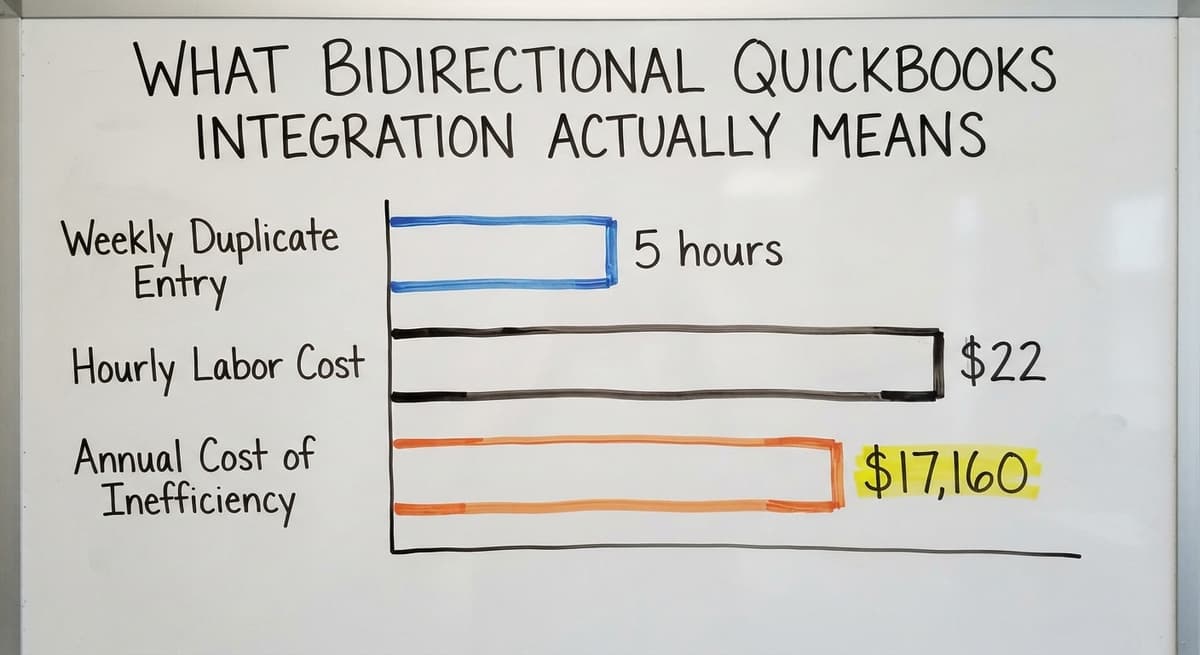
Most small food distributors already run their books in QuickBooks. The problem is that barcode data from the warehouse rarely gets into QuickBooks without someone typing it in a second time. Staff enter receiving data on a clipboard, type it into a spreadsheet, and then enter it again into QuickBooks. That is 3 touches for data that should move in 1.
What Bidirectional QuickBooks Integration Actually Means
A barcode inventory management system sits between your warehouse floor and QuickBooks. Scans at receiving push inventory adjustments automatically. Shipped orders update sales records without a manual export. QuickBooks integration for wholesale distributors works best when it is bidirectional: inventory changes flow in, and financial records update out, with no one typing the same number twice. If your current setup needs a manual export to sync the two systems, that gap is where errors live. A 3-person receiving team spending 5 hours a week on duplicate entry at $22 an hour spends $17,160 a year on work the software should do.
Why Spreadsheets Break Down for Food Barcode Tracking
Spreadsheets cannot capture a scan in real time. Someone still has to type the data after the truck leaves. Under pressure, lot numbers get transposed and expiration dates get skipped. Multiple staff editing the same file create version conflicts where the most recent save wins and earlier entries disappear.
The deeper problem is the audit trail. A spreadsheet has no audit trail. You cannot prove who entered a lot number, when they entered it, or whether it was corrected afterward. During a recall investigation, that absence of proof is the same as an absence of records. The IRS makes a related point about inventory records generally: IRS Publication 538 states, "To figure taxable income, you must value your inventory at the beginning and end of each tax year." A spreadsheet that gets overwritten cannot support that valuation either.
What Can a Barcode Inventory System Do That Excel Cannot?
A barcode inventory management system does several things a spreadsheet structurally cannot. Inventory counts update at the moment of each scan, not the next time someone opens a file. FEFO rotation is enforced by the system, not by whoever happens to be picking that day. Traceability reports pull in seconds rather than hours of searching through tabs.
Beyond the data, a purpose-built system connects label printers, scanners, and QuickBooks in one workflow. Label printing for food uses thermal printers that produce GS1-compliant labels pulled directly from the inventory record, so the data on the label matches the data in the system. Custom warehouse software for small operations scales with your volume without requiring an enterprise ERP or a 6-month rollout.
The real difference is not features. It is that the system enforces the right process every time, not just when staff remember to follow it.
Not sure this is the right shape for your operation
Describe how the work runs today. We map it on a call and show you what it would look like built around that, before you spend anything.
Book a call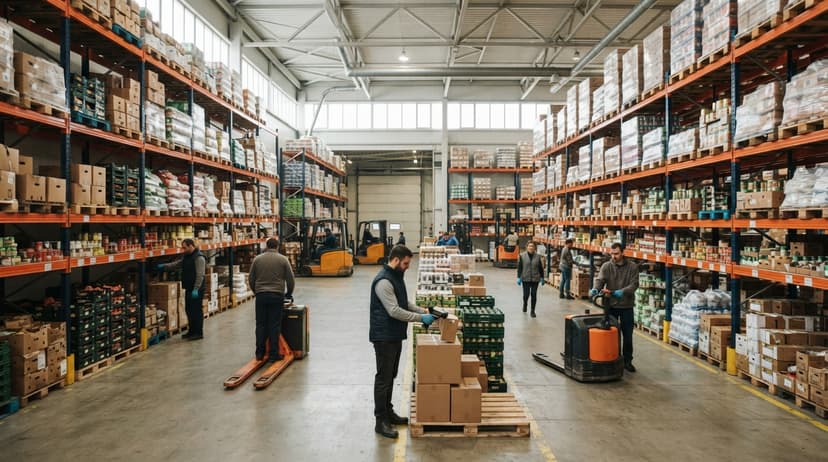
Printing Food Barcodes and Meeting Customer Compliance Requirements
Some distributors repack or relabel products and need to print compliant barcodes on-site. Thermal label printers are the standard for warehouse barcode labels. Labels must meet GS1 print quality standards to scan reliably at your customer's dock. A label that prints clearly in your warehouse but fails to scan at a grocery chain's receiving door creates a chargeback or a rejected shipment.
Large grocery chains and food service buyers increasingly need GS1-compliant barcodes on every case. Documenting your label printing and traceability ability is a selling point when you onboard new retail customers, not just a compliance checkbox. A barcode system with built-in label templates that pull data from the inventory record protects against chargebacks and positions your operation as a reliable supplier.
How to Choose a Barcode Inventory System Built for Food Operations
What should a food distributor look for when choosing a barcode inventory system? Start with the data fields the system handles natively. A system built for food distribution supports lot number tracking, expiration date scanning, and variable-weight barcodes without add-ons or workarounds. QuickBooks integration should be bidirectional and should not need a manual export step. The system should fit your existing workflow rather than forcing your team to learn a new process from scratch.

Questions to Ask Vendors Before You Buy
Ask vendors these specific questions before you buy:
- Does the system read GS1-128 and price-embedded variable-weight barcodes natively?
- How does QuickBooks integration work, and does it need manual exports?
- Can the system enforce FEFO rotation automatically at the pick step?
- What happens when a barcode will not scan? Does the workflow stop or continue?
- How long does rollout take, and who does the setup work?
- Is the system sized for an operation like yours, or will you pay for features you never use?
Scanner hardware matters too. Food environments are cold, wet, and hard on equipment. Look for IP-rated devices rated for cold storage and wet surfaces. Buy scanners after you confirm software compatibility, not before. The most common setup mistake is buying hardware first and discovering the software cannot read the barcode format you actually use.
Getting Started: 5 Steps to Real Food Barcode Scanning
Setting up a food barcode system does not have to be a long project. A focused rollout covers 5 steps.
- Audit your product catalog. Confirm every SKU has a valid barcode. Find the gaps before go-live, not after.
- Choose hardware for your environment. Cold storage and wet docks need IP-rated scanners. Match the device to the conditions.
- Map your workflows. Document receiving, putaway, picking, and shipping as they run today. The system should fit those steps, not replace them with new ones.
- Configure the software to match. Lot tracking and expiration date management should be set up before the first truck arrives, not as an afterthought.
- Train staff on the scan-first habit. The biggest rollout risk is staff reverting to paper when the scanner is slow. Train before go-live and reinforce the habit in the first 2 weeks.
Why Smaller Food Distributors Feel the Payoff Faster
Smaller operations feel errors more sharply than large ones. There is no buffer team to catch a mispick before it ships. A 10-person food distributor running a barcode inventory system has the same traceability ability as a large regional warehouse. The system pays for itself through reduced shrink, fewer mispicks, and faster receiving long before the first recall notice arrives.
Next Steps for Your Food Distribution Operation
Real food barcodes are the foundation of accurate inventory, safe traceability, and efficient fulfillment. Every workflow in your warehouse, from receiving a truck to answering a recall audit, depends on capturing the right data at the right moment. A barcode inventory management system built for food distribution makes that happen without adding staff or rebuilding your operation from scratch.
Before you choose software, map your current receiving and picking workflow on paper. Know where lot numbers are captured today, where they are not, and where data gets typed twice. That map tells you exactly what the system needs to solve.
If you want to walk through how a barcode system would fit your operation as it runs today, contact our team. We build around your workflow, connect to the QuickBooks setup you already use, and get your team scanning without a long rollout.
Frequently asked questions
What is a real food barcode and how is it different from a standard retail barcode?
A real food barcode carries safety-critical data beyond a product ID. It encodes lot numbers, expiration dates, and net weight using GS1 Application Identifiers. A standard retail barcode, like the one on a book, only identifies the product for pricing. Food barcodes support lot traceability, FEFO rotation, and recall response in ways a basic UPC cannot.
What barcode types are used on food products in distribution?
The most common are UPC-A for consumer units, EAN-13 for imported items, and GS1-128 for shipping cases and pallets. GS1-128 is the primary format for food distribution because it encodes product ID, lot number, expiration date, and quantity in one scan. DataMatrix and QR codes appear on small packaging and consumer-facing labels.
How does barcode scanning support food safety and lot traceability?
Every scan creates a timestamped record tied to a lot number and a user. When a recall hits, the system reports which customers received the affected lot in minutes. FSMA needs one-up, one-back traceability, meaning you must show where each lot came from and where it went. A barcode system builds that record automatically at receiving, putaway, and shipping.
How do variable-weight food items affect barcode scanning?
Variable-weight items like meat and produce use price-embedded barcodes that encode the actual weight at the time of packaging. The barcode changes with every package because the weight changes. Generic inventory software often cannot handle variable-weight SKUs alongside fixed-weight items. A system built for food distribution reads both formats natively without a manual workaround.
Can a food barcode system connect to QuickBooks without double entry?
Yes. A barcode inventory management system sits between your warehouse and QuickBooks. Scans at receiving push inventory adjustments automatically. Shipped orders update sales records without a manual export. Bidirectional QuickBooks integration means inventory changes flow in and financial records update out, eliminating the duplicate entry that causes most accounting errors in small food distribution operations.
How long does it take to implement a food barcode inventory system?
A focused rollout for a small food distributor usually runs 2 to 6 weeks. The timeline depends on how many SKUs need to be audited, how complex your workflows are, and how quickly staff adopt the scan-first habit. Systems built for small operations configure faster than enterprise ERP platforms. The biggest delay is usually the product catalog audit, not the software setup.
What mistakes should a small food distributor avoid when setting up a barcode system?
The most common mistakes are buying scanner hardware before confirming software compatibility, skipping label quality checks that cause scan failures at the customer's dock, failing to capture lot and expiration data at receiving, and choosing a retail-focused system that cannot handle food-specific data fields. Underestimating staff training time for the scan-first habit is also a frequent cause of slow rollouts.
What should a food distributor look for when choosing a barcode inventory system?
Look for native support for lot number tracking, expiration date scanning, and variable-weight barcodes. Confirm QuickBooks integration is bidirectional and needs no manual exports. Prefer a system sized for your operation rather than an enterprise platform with features you will never use. Ask whether the vendor has direct experience with food distribution, not just general warehousing.
Start with a free first look
A 30 minute call, your operation mapped, and a clear picture of what we would build. No obligation and nothing to install.
Book a callRelated guides
More on the same work.
Guides
- Barcode Abbreviation
- Barcode Scan Machine
- Tracking Number Barcode
- Barcode Reader Machine
- Barcode Scanner App Ios
- 2d Barcode Readers
- Barcode Producer
- Barcode Systems for Warehouse
- Barcode Reader Description
- Barcodes and Labels
- Alphanumeric Barcode
- Barcode Scanner Inventory System
- Lpn Barcodes
- Imager Barcode Scanner
- Barcode System for Inventory Free
- Inventory Management Software Barcode Scanner
- Make Barcode