

How to Track Inventory in Salesforce
You can track inventory in your CRM platform, but the platform has no built-in stock module. You build it with custom objects (tables you design yourself) or add an app. It also shows where the setup strains on a warehouse floor.
Book a callCan You Track Inventory in a CRM Platform?
Yes, but a CRM platform has no native inventory feature for stock counts. It is a customer system first. Inventory is an add-on you build with custom objects and fields, or buy as an app from a marketplace. The best fit is a team that already lives in its CRM platform for sales. Those users know the screens, and orders already sit there.
We build it for your operation, and the first look is free
If you would rather not compare products, describe how your operation already works and we build the system around it.
Reviewed October 2026.
No build cost. You see it running on your own process first, and the monthly subscription starts only once it is live.
Book a callWhat Do You Need Before You Start?
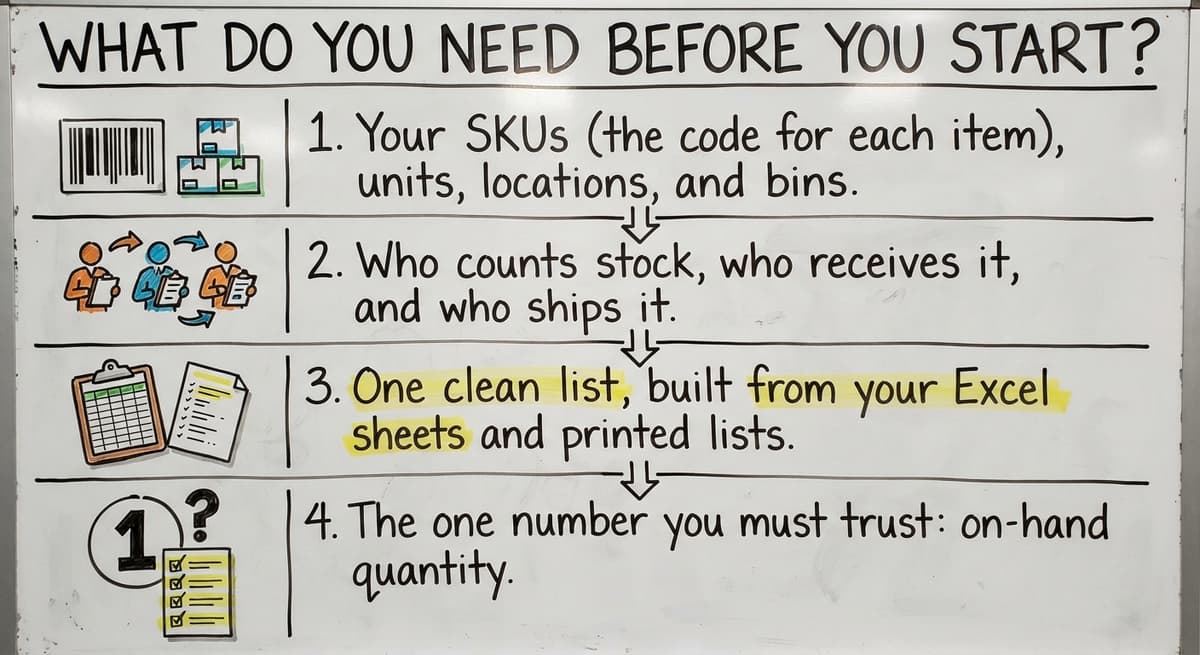
You need a clear list of what you stock and who touches it. Write down these items first:
- Your SKUs (the code for each item), units, locations, and bins.
- Who counts stock, who receives it, and who ships it.
- One clean list, built from your Excel sheets and printed lists.
- The one number you must trust: on-hand quantity.
GS1 says its barcode standards let items be "identified, captured and shared" across supply chains. Pick your SKU codes with that in mind. Clean data in means clean counts out.
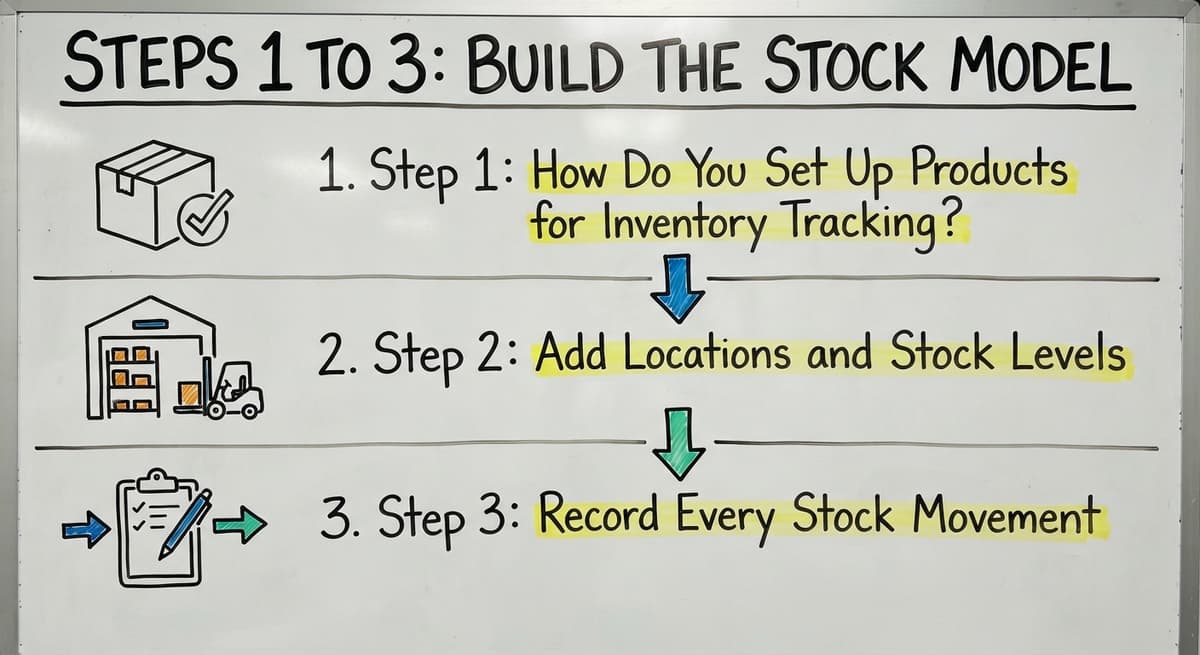
Steps 1 to 3: Build the Stock Model
Three custom setups hold your stock. Each one answers a different question: what is it, where is it, and what changed.
Step 1: How Do You Set Up Products for Inventory Tracking?
Use the standard Product object, then add fields. Product already holds item names and SKUs. Add custom fields for unit of measure, reorder point (the stock level that triggers a new order), and cost. Keep one record per item. Two records for one item split your counts, and no one can tell which is right.
Step 2: Add Locations and Stock Levels
Build two custom objects. A Location object lists warehouses, shelves, and bins. An Inventory Level object links one product to one location with a quantity. This beats one quantity field on the product. A single field cannot say where the 40 units sit. With levels per location, staff can track stock levels down to the bin.
Step 3: Record Every Stock Movement
Add a Stock Movement object. Each record is one of 4 types: received, picked, adjusted, or transferred. Each movement changes the on-hand number. Stock movements also leave a trail. When a count is off, you read the history and find the error. Keep the entry form short. Staff skip long forms.
Not sure this is the right shape for your operation
Describe how the work runs today. We map it on a call and show you what it would look like built around that, before you spend anything.
Book a callSteps 4 and 5: Connect Orders and Set Alerts
Once stock is modeled, orders and alerts make it work. Both use Flow, the built-in tool that runs steps for you when a record changes.
Step 4: How Can Orders Reduce Stock Automatically?
Link each order line to a product. Then build a Flow that subtracts the quantity when an order ships. Add a second Flow that flags orders when stock is too low. Keep allocated stock (promised to an order) apart from on-hand stock. Then a sale does not make you think shelves are empty while boxes still sit there. The FTC Mail, Internet, or Telephone Order Merchandise Rule expects you to ship when you said you would. A true count protects that promise.
Step 5: How Do You Get Low Stock Alerts?
Build a Flow that sends an alert when on-hand stock falls below the reorder point. Then add a few reports:
- Low stock, so buyers know what to order today.
- Slow movers, so cash does not sit on shelves.
- Stock by location, so pickers find items fast.
Put them on one dashboard for the owner or operations manager. Keep it to a few reports that people check daily.

Should You Use an App or Build Custom Objects?
Apps start faster, and custom objects fit your process better. An app follows its own structure, so you bend your work to it. Custom objects match your floor, but need careful design. Compare the two on cost, setup time, and fit with how staff really work.
| Factor | App | Custom objects |
|---|---|---|
| Setup time | Days to weeks | Weeks to months |
| Cost | Monthly fees | Build time |
| Fit to your floor | Partial | Close |
Pick the path that matches your workflow, not the one with the shortest demo.
What Are the Limits of Tracking Inventory in a CRM Platform?
A CRM platform strains under warehouse work. Four limits show up fast:
- Per-user licensing grows costly when dock staff need access.
- Barcode scanning, lot tracking, and bin workflows are not native. They need extra work.
- Screens are built for sales reps, not people on the dock.
- An admin must keep the setup.
For inventory tracking for warehouses, these limits matter most. Count them before you build.
The comparison is easier when one option is built for you
Off-the-shelf means fitting your process to the software. We do it the other way round, and the first look costs nothing.
Book a call
How Does CRM Inventory Work With Your Accounting Software?
Your CRM platform and accounting software can share inventory data, but you must pick an owner for each kind. QuickBooks often holds costs and accounting records. If both systems hold counts, they will show different numbers. Let one system own quantities and the other own money. Sync only what you need, such as item names and sold totals. IRS Publication 538 says, "To figure taxable income, you must value your inventory at the beginning and end of each tax year." Clean QuickBooks inventory records make that task easier.
When Does a Custom Tool Fit a Small Warehouse Better?
A custom tool fits better when your CRM platform is not your main system. Adding it only for stock is too much. A custom tool is built around how your operation already works. It keeps QuickBooks where it helps and replaces only the manual parts. It also works at small scale without a big ERP project (a large suite that runs a whole company).
The Software Society is a local team in Columbus, Ohio that builds this kind of software. If you want a plain look at your options, we can review your process with you. For a broader start, read how to keep track of inventory or how to keep track of inventory in warehouse.

Common Mistakes to Avoid
Four mistakes cause most drift in the numbers:
- Skipping cycle counts (small, regular counts of part of the stock) lets numbers drift.
- Letting staff edit quantities with no movement record hides errors.
- Building too much before testing with real orders wastes weeks.
- Running the old spreadsheet in parallel gives you two answers.
Test with 10 real orders, then grow. Want a second opinion on your setup? Contact The Software Society today.
Frequently asked questions
Can you track inventory in a CRM platform?
Yes. A CRM platform has no built-in stock module, so you build one with custom objects and fields or add an app.
Does a CRM platform have an inventory management feature?
No. It is a customer system first. Stock counts need custom objects, Flow, or a marketplace app.
Can a CRM platform and accounting software share inventory data?
Yes. Let one system own quantities and the other own money. Sync only the fields you need.
When is a custom tool a better choice?
A custom tool fits when your CRM platform is not your main system. It follows your own workflow and keeps your accounting software in place.
Start with a free first look
A 30 minute call, your operation mapped, and a clear picture of what we would build. No obligation and nothing to install.
Book a callRelated guides
More on the same work.
- How to Keep Track of Inventory
- How to Create an Inventory Tracking System?
- How to Keep Track of Inventory on Clover
- How to Keep Track of Computer Inventory
- How to Keep Track of Consignment Inventory
- How to Keep Track of Alcohol Inventory
- How to Keep Track of Product Inventory
- How to Keep Track of Ebay Inventory
- How to Keep Track of Poshmark Inventory
- How to Track Inventory for Home Staging
- How to Keep Track of Dental Inventory
- How to Keep Track of Boutique Inventory
- How to Keep Track of Vaccine Inventory
- How to Keep Track of Liquor Inventory
- How to Track Inventory Qbo
- How to Track Non Inventory Items
- How to Keep Track of Grocery Inventory
- How to Keep Track of Lularoe Inventory
- How to Keep Track of Freezer Inventory
- How to Track Ps5 Inventory
- How to Keep Track of Cigarette Inventory
- How to Keep Track of Inventory on Etsy
- How to Keep Track of Inventory Electronically
- How to Keep Track of Paparazzi Inventory