


How to Track Received Inventory
To track received inventory, match each delivery to a buy order, count what arrives, and record it the same day. Then shelve it and check the vendor bill against your record. Reviewed October 2026 for small wholesale and warehouse teams that run on paper, spreadsheets, and accounting software.
Book a callWhat Is the Simplest Way to Track Received Inventory?
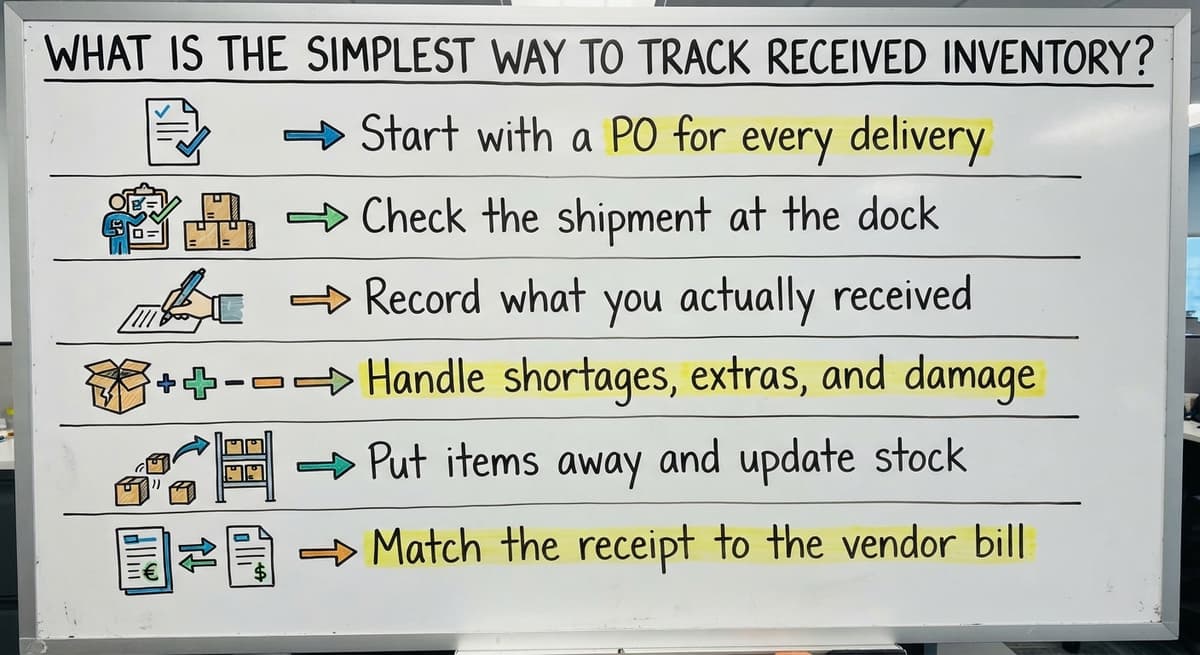
The receiving inventory process is a short loop. A buy order (PO) is the paper that lists what you bought. You check each truck against it. The habit matters more than the tool. A spreadsheet works. So does software.
The core steps are:
- Start with a PO for every delivery.
- Check the shipment at the dock.
- Record what you actually received.
- Handle shortages, extras, and damage.
- Put items away and update stock.
- Match the receipt to the vendor bill.
For scan-based counts, GS1 says its barcode standards give each product a "globally unique" identity, so one scan names the same item in every system. Pick one way and use it every time.
To track received inventory well, make the loop the same on every shift.
We build it for your operation, and the first look is free
If you would rather not compare products, describe how your operation already works and we build the system around it.
No build cost. You see it running on your own process first, and the monthly subscription starts only once it is live.
Book a callStep 1: Why Start Purchase Order Receiving With a PO?
Buy order receiving starts with a PO, because a PO tells the dock what should arrive. Each one needs a number, an item list, and quantities. Keep POs where receivers can see them, such as a shared folder or a printed stack at the dock. Do not leave them only in the buyer's inbox. An unplanned delivery gets a new PO or a hold tag before anyone puts it away.
No PO means no way to say what is wrong.
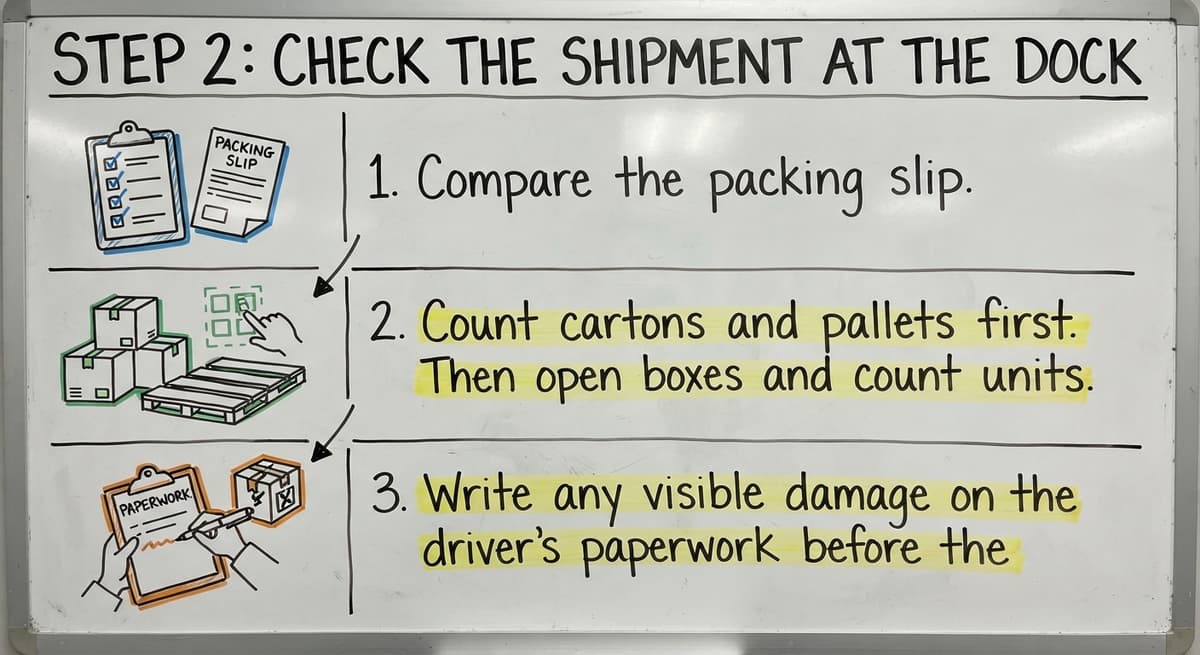
Step 2: Check the Shipment at the Dock
Warehouse receiving works best when you check before you sign. Dock checks take a few minutes and save days of fixing later.
- Compare the packing slip, the list of items inside the box, to the PO.
- Count cartons and pallets first. Then open boxes and count units.
- Write any visible damage on the driver's paperwork before the driver leaves.
Once the driver signs off and leaves, a claim for damage gets much harder to win.
Step 3: Record What You Actually Received
Your receiving log is the record of truth. Write down the real count, even when it differs from the packing slip. Use this inventory receiving checklist for each line:
- Item name or SKU
- Quantity received
- Date
- PO number
- Name of the person who received it
Add lot numbers or expiration dates when the product needs them. A food or chemical item does. Log it the same day, not from memory the next morning.
A log written at the dock is one you can trust.
Not sure this is the right shape for your operation
Describe how the work runs today. We map it on a call and show you what it would look like built around that, before you spend anything.
Book a call
Step 4: How Do You Handle a Partial Shipment or Damaged Goods?
A partial shipment is a delivery with fewer items than the PO lists. Mark it as a partial receipt so the PO stays open for the balance. Record damaged goods on their own line so they never enter sellable stock.
Then send the vendor a note the same day. Include photos, the PO number, and your counts. A short, dated note is hard to argue with.
For example, a PO lists 100 cases and 80 arrive, 4 of them crushed. Log 76 good, 4 damaged, and 20 still due.
Split the count into good, damaged, and missing, and every dispute gets simpler.
Step 5: Put Items Away and Update Stock
Stock on hand should rise only after the count is confirmed. Record the shelf or bin as part of receiving, not as a later chore. Label each item so the next person can find it without asking. If you also want a wider view, see how to keep track of inventory in warehouse settings.
Stock that has no location is stock you will count twice.

Step 6: Match Receipts to Vendor Bills
The IRS is clear on why counts matter: "To figure taxable income, you must value your inventory at the beginning and end of each tax year." A clean receiving record feeds that number.
Check the receipt record against the vendor bill before you pay. Pay for what arrived, not what was promised. Accounting software inventory tools can hold the bill and book the cost. The receiving record can live in the system your dock uses. When the two disagree, ask the vendor for a credit.
A bill you checked is money you kept.
The comparison is easier when one option is built for you
Off-the-shelf means fitting your process to the software. We do it the other way round, and the first look costs nothing.
Book a callWhat Information Should You Capture for Each Receipt?
Capture eight fields on every receipt: PO number, vendor, item, quantity ordered, quantity received, condition, date, and receiver. Add the shelf location too. Optional fields are lot, serial number, expiration date, carrier, and notes.
Keep the list short. Do the math: 5 people who each lose 2 minutes on a long form, 20 times a day, lose 200 minutes a day. People skip long forms.
Fewer fields get filled in, and filled-in fields get used.

Can Accounting Software and a Spreadsheet Track Received Inventory?
Yes, at small volume. Accounting software can record item receipts against buy orders. Excel can hold a receiving log with one row per line. Both work well when one person enters data once a day.
The cracks show in four places:
- Receipts get typed late.
- Partial deliveries leave POs half open.
- Several locations need one shared count.
- Sheets drift out of sync as copies spread.
These tools were built to keep books and lists. They were not built to run a dock. That limit is fine until volume grows.
The tool is not wrong. The volume has outgrown it.
Common Mistakes When You Track Received Inventory
Four mistakes cause most bad counts. Fix them before you buy anything.
- Receiving by memory or at the end of the day lets errors pile up.
- Trusting the packing slip without a count passes the vendor's mistakes to you.
- Letting one person keep the process in their head leaves a gap when they are out.
- Printed sheets that never get entered mean the shelf and the system disagree.
Write the steps down, and the process survives sick days.
When Should You Move Beyond Spreadsheets for Receiving?
Move when the same pain repeats. Watch for these signs: recount errors, vendor disputes, double entry, and long waits before stock shows as available.
You do not need a big ERP (a large all-in-one business system) rollout. A custom tool can follow your current dock routine and keep your accounting software for the books. Only the manual steps change. The Software Society, a Columbus, Ohio team, builds tools like this around how your team already works. If you also need how to keep track of inventory small business advice, start with the habits above.
Fix the habit first, then automate the part that still hurts. Talk to The Software Society about a receiving tool built around your dock.
Frequently asked questions
How do you track received inventory?
Match each delivery to a buy order, count it at the dock, and record it the same day. Then shelve it and check the vendor bill against your record.
What information should be recorded when inventory is received?
Record the PO number, vendor, item, quantity ordered and received, condition, date, receiver, and shelf location. Add lot or expiration dates when needed.
How do you handle partial or damaged shipments?
Mark a partial receipt so the PO stays open for the balance. Log damaged goods on a separate line. Send the vendor a same-day note with photos and counts.
Can accounting software and a spreadsheet track received inventory?
Yes, at small volume. Accounting software can record item receipts against buy orders, and a spreadsheet can hold a receiving log. Late entry, partial deliveries, and many locations strain both.
When is it time for custom software for receiving?
Move when recount errors, vendor disputes, double entry, or delays before stock shows as available keep happening. A custom tool can replace the manual steps and keep your accounting software.
Start with a free first look
A 30 minute call, your operation mapped, and a clear picture of what we would build. No obligation and nothing to install.
Book a callRelated guides
More on the same work.
- How to Keep Track of Inventory
- How to Create an Inventory Tracking System?
- How to Keep Track of Inventory on Clover
- How to Keep Track of Computer Inventory
- How to Keep Track of Consignment Inventory
- How to Keep Track of Alcohol Inventory
- How to Keep Track of Product Inventory
- How to Keep Track of Ebay Inventory
- How to Keep Track of Poshmark Inventory
- How to Track Inventory for Home Staging
- How to Keep Track of Dental Inventory
- How to Keep Track of Boutique Inventory
- How to Keep Track of Vaccine Inventory
- How to Keep Track of Liquor Inventory
- How to Track Inventory Qbo
- How to Track Non Inventory Items
- How to Keep Track of Grocery Inventory
- How to Track Inventory in Salesforce
- How to Keep Track of Lularoe Inventory
- How to Keep Track of Freezer Inventory
- How to Track Ps5 Inventory
- How to Keep Track of Cigarette Inventory
- How to Keep Track of Inventory on Etsy
- How to Keep Track of Inventory Electronically