


How to Track Walmart Inventory
To track Walmart inventory, count three places: your own building, items in transit, and items at Walmart. Keep one record for each. Match each against your Walmart buy orders. The steps differ a little if you are a direct supplier, a wholesaler to a reseller, or a marketplace seller.
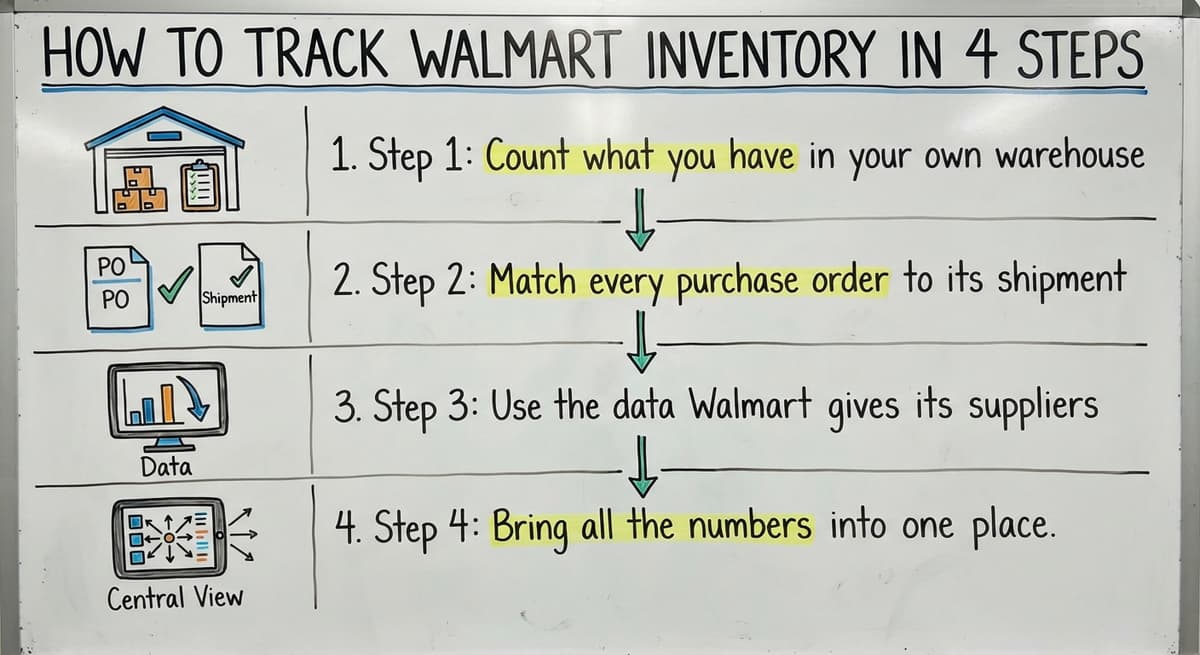
Book a callHow To Track Walmart Inventory in 4 Steps
Tracking Walmart inventory means watching stock you hold, stock on the road, and stock Walmart holds. Wholesalers, distributors, fulfillment centers, and warehouse managers all need it. Each must match shipments to Walmart buy orders. Barcodes help. GS1 sets the standard, and says its barcode standards give each product a unique, global identity. Shoppers checking store shelves are not the audience here.
Reviewed October 2026.
Step 1: Count what you have in your own warehouse
Start with an exact count by item and location. Use cycle counts, which means counting a few items each week instead of one huge yearly count. Pick fast sellers more often. Record every pick, receipt, and adjustment the same day. A count that is a week old is already wrong. Same-day entries keep warehouse inventory tracking honest.
The law also asks for counts. IRS Publication 538 says, "To figure taxable income, you must value your inventory at the beginning and end of each tax year."
Step 2: Match every purchase order to its shipment
Keep one record per Walmart buy order. List the items, quantity, ship date, and due date. Then compare three numbers: ordered, shipped, and received. A gap between them is a short ship. Flag it early. A late flag can turn into a fine or a lost sale.
Here is a simple example. You ship 480 units against an order of 500. Log the 20 missing units that day. Then you can ship them or warn the buyer before the due date.
Step 3: Use the data Walmart gives its suppliers
Suppliers and marketplace sellers can get sales and stock reports through Walmart's own supplier or seller portals. Check your own account to see which reports you can pull. Reports differ by account type.
Download them on a set schedule, such as every Monday. Save each file with the date in its name. Then you can compare week to week and spot a store or item that sells faster than you ship.
We build it for your operation, and the first look is free
If you would rather not compare products, describe how your operation already works and we build the system around it.
No build cost. You see it running on your own process first, and the monthly subscription starts only once it is live.
Book a callStep 4: Bring all the numbers into one place
Copying numbers by hand costs time and creates errors. Say 2 people spend 5 hours a week retyping counts at $20 an hour. That is $20,800 a year. A single typo can also hide a stockout until an order is late.
Most small firms have counts in an accounting package, a spreadsheet, printed pick sheets, and email. Pick one source of truth for stock levels. Every other file feeds it or reads from it.
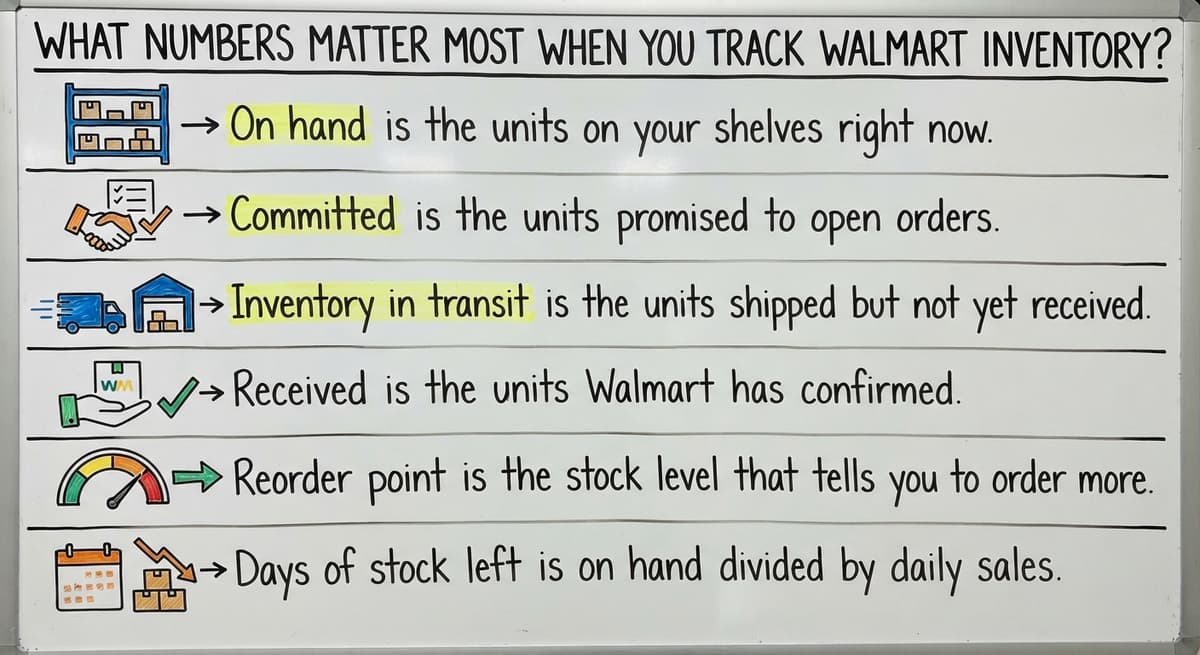
What Numbers Matter Most When You Track Walmart Inventory?
Seven numbers matter most, and each takes one line to explain.
- On hand is the units on your shelves right now.
- Committed is the units promised to open orders.
- Inventory in transit is the units shipped but not yet received.
- Received is the units Walmart has confirmed.
- Reorder point is the stock level that tells you to order more.
- Days of stock left is on hand divided by daily sales.
- Returns, damaged goods, and chargebacks are units and dollars you lose after the sale.
Watch these seven and you will see trouble before a buyer does.
Not sure this is the right shape for your operation
Describe how the work runs today. We map it on a call and show you what it would look like built around that, before you spend anything.
Book a call
Can You Track Big-Box Retailer Inventory in Accounting Software and a Spreadsheet?
The limits are plain. Updates are manual. Files get copied and versions clash. Neither tool warns you when stock runs low.
Yes, for small volumes. Accounting software inventory holds item counts and costs. Excel holds the Walmart report data. Together they cover a lean operation. If you want a wider plan, read our guide on how to keep track of inventory small business teams can run.
You have outgrown them when:
- Stock counts and shelf counts keep disagreeing.
- Updates land days late.
- One person is the only one who understands the spreadsheet.
Three of those signs mean it is time to fix the manual parts.

How Often Should You Update Walmart Inventory Counts?
Update daily for fast-moving items and weekly for slow ones. Also update after each receipt, shipment, or return. Name one person to own the routine. When two people share it, each assumes the other did it. One owner gives you one clear answer when someone asks what is in stock.
The comparison is easier when one option is built for you
Off-the-shelf means fitting your process to the software. We do it the other way round, and the first look costs nothing.
Book a call
Common Mistakes When You Track Walmart Inventory
Four mistakes cause most wrong counts.
- Staff count items in transit as on hand, so stock looks higher than it is.
- Teams ignore returns and damaged stock, so good units are overstated.
- Files use different item names or codes, so totals do not match.
- Owners wait for month-end to look, so small errors grow.
The FTC's merchandise rule expects you to ship when you said you would. A correct count is how you keep that promise. A weekly check catches all four mistakes early.
When Does Custom Inventory Software Make Sense?
Custom inventory software makes sense when manual steps eat hours each week and the same errors keep coming back. It can be built around how your team already works. Your accounting software can stay for accounting while we replace the hand-typed steps between your files.
This fits small teams. You skip a large ERP rollout, which is a big system that runs a whole company. The Software Society is a local team in Columbus, Ohio. We build custom inventory software that fits your real workflow. If you wonder how to create an inventory tracking system, start by listing the steps that hurt.
What Is the Simplest Way to Start Today?
Start by listing where your stock numbers live now. Write down every file, sheet, and inbox. Then pick the 3 numbers that matter most, such as on hand, in transit, and reorder point. Set a weekly time to compare them. Note where the manual work hurts most and fix that first. Want help? Talk to The Software Society about replacing only the manual parts.
Frequently asked questions
How do I track Walmart inventory as a supplier?
Track 3 places: your warehouse, items in transit, and items at Walmart. Keep one record per buy order and pull the reports your supplier portal offers on a set schedule.
Can I use a spreadsheet or accounting software to track big-box retailer inventory?
Yes, for small volumes. Accounting software holds item counts and costs. A spreadsheet holds the retailer's report data. Both need manual updates and give no low-stock alert.
How do I match Walmart buy orders to shipments?
Keep one record per order with items, quantity, ship date, and due date. Compare ordered, shipped, and received counts, and flag short ships early.
How often should I update inventory counts?
Daily for fast-moving items and weekly for slow ones. Also update after every receipt, shipment, or return.
When should a small warehouse move beyond spreadsheets?
Move when counts and shelves disagree, updates run late, or only one person understands the sheet. Replace the manual steps first.
Start with a free first look
A 30 minute call, your operation mapped, and a clear picture of what we would build. No obligation and nothing to install.
Book a callRelated guides
More on the same work.
- How to Keep Track of Inventory
- How to Create an Inventory Tracking System?
- How to Keep Track of Inventory on Clover
- How to Keep Track of Computer Inventory
- How to Keep Track of Consignment Inventory
- How to Keep Track of Alcohol Inventory
- How to Keep Track of Product Inventory
- How to Keep Track of Ebay Inventory
- How to Keep Track of Poshmark Inventory
- How to Track Inventory for Home Staging
- How to Keep Track of Dental Inventory
- How to Keep Track of Boutique Inventory
- How to Keep Track of Vaccine Inventory
- How to Keep Track of Liquor Inventory
- How to Track Inventory Qbo
- How to Track Non Inventory Items
- How to Keep Track of Grocery Inventory
- How to Track Inventory in Salesforce
- How to Keep Track of Lularoe Inventory
- How to Keep Track of Freezer Inventory
- How to Track Ps5 Inventory
- How to Keep Track of Cigarette Inventory
- How to Keep Track of Inventory on Etsy
- How to Keep Track of Inventory Electronically