


Nonprofit Inventory Management
Nonprofit inventory management is the process of tracking donated goods, program supplies, equipment, and consumables so your organization can serve people, report to funders, and pass audits. It differs from business inventory because accountability runs to donors and grant makers, not just to profit. This guide covers what good tracking looks like, where common systems break down, and how to move forward without a costly overhaul. Reviewed July 2025.
Book a callWhat Nonprofit Inventory Management Actually Covers
In a retail business, inventory is what you bought to sell. In a nonprofit, inventory is everything your organization receives, stores, and distributes to fulfill its mission. That includes in-kind donations such as food, clothing, and household goods. It includes program supplies like hygiene kits, educational materials, and medical items. It includes fixed assets like computers, furniture, and vehicles. It includes the paper and printer ink in your supply closet.
Each category may need different tracking rules. Fixed assets depreciate and appear on your balance sheet. Donated goods need fair-market valuation for IRS Form 990. Consumables just need a count. Understanding which type you are tracking is the first step to building a system that works.
We build it for your operation, and the first look is free
If you would rather not compare products, describe how your operation already works and we build the system around it.
No build cost. You see it running on your own process first, and the monthly subscription starts only once it is live.
Book a callWhy Nonprofits Struggle with Inventory More Than Businesses Do
For-profit companies have predictable buy orders and stable staff. Nonprofits deal with irregular donation inflows, high volunteer turnover, and reporting requirements that go far beyond a simple stock count.
Donations arrive in waves. A corporate drive drops 400 coats in one afternoon. Then nothing for 6 weeks. That unpredictability makes it hard to keep consistent records. When the person who built the spreadsheet leaves, the next volunteer starts a new tab and the data splits.
Grant reporting adds another layer. Funders want proof that the supplies they paid for reached the people they intended to help. As GS1, the global standards body behind product barcodes, notes on its barcode standards page, consistent item spotting is the foundation of any reliable supply chain. Without that foundation, linking a distributed item back to a specific grant becomes guesswork.
The result is that nonprofit supply tracking fails not because staff are careless, but because the tools were never built for this workload.
What Does Poor Inventory Tracking Actually Cost a Nonprofit?
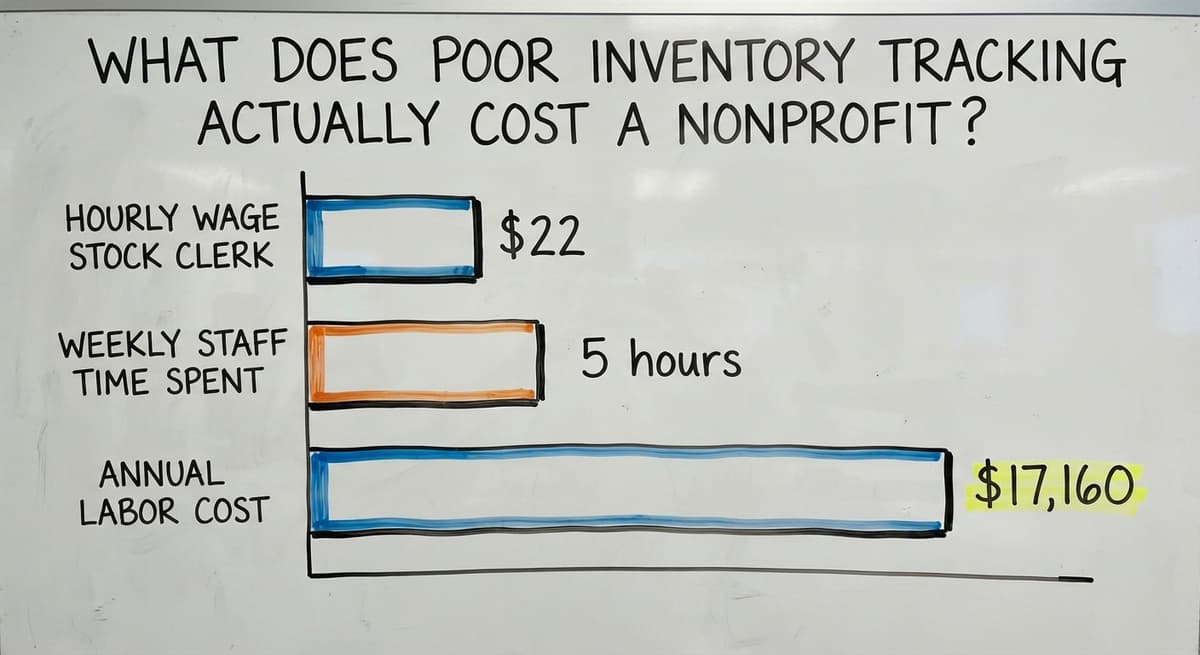
Poor inventory tracking costs real money, real time, and sometimes real grant dollars. Expired donated goods get thrown away because no one flagged the date. Staff place duplicate orders because they did not know stock existed in another room. Grant auditors find gaps in distribution records and request repayment.
The labor cost alone is large. The US Bureau of Labor Statistics reports a median hourly wage of around $22 for stock clerks and order fillers, per BLS occupational data. If 3 staff members each spend 5 hours a week on manual counts and data cleanup, that is $17,160 a year in labor before you count errors that need correction. That is money not spent on programs.
Sloppy records do not just slow you down. They put grant funding at risk.
How Donation Inventory Differs from Purchased Inventory
Purchased inventory arrives with a buy order, a price, and a vendor name. Donated inventory arrives with none of that. Your receiving workflow has to capture what a buy order would normally provide.
The IRS needs nonprofits to value in-kind donations for Form 990 reporting. IRS Publication 538 states: "To figure taxable income, you must value your inventory at the beginning and end of each tax year." While that language targets taxable entities, the same valuation discipline applies to nonprofits for donor acknowledgment letters and grant reporting.
Condition grading matters too. Not every donated item is usable. A system that records condition at intake prevents unusable goods from being counted as available stock. Lot tracking by donation date supports FIFO distribution, meaning the oldest items go out first, which reduces spoilage.
Donation receiving is its own workflow, and it needs to be treated as one.
The comparison is easier when one option is built for you
Off-the-shelf means fitting your process to the software. We do it the other way round, and the first look costs nothing.
Book a call
Grant Reporting and Inventory Accountability
Many grants need proof that funded supplies reached the people they were meant to serve. Your inventory records become audit evidence. If those records are incomplete, a funder can request repayment of the grant.
A proper nonprofit inventory system ties each item to a program or grant at the point of distribution. When an auditor asks how many hygiene kits were distributed under Grant X between January and June, the answer should take seconds, not days.
QuickBooks handles nonprofit finances well, but item-level distribution tracking is outside what it was built to do. QuickBooks integration for small operations works best when a purpose-built inventory layer sits alongside it and pushes financial summaries into QuickBooks, rather than replacing it. That approach avoids a costly full-system migration while closing the gap that grant auditors find.
What Good Nonprofit Inventory Management Looks Like
A well-run nonprofit inventory system has a few clear qualities. It is a single source of truth, meaning authorized staff and volunteers all see the same numbers at the same time.
The receiving workflow captures donor name, item description, quantity, and condition before anything goes on a shelf. The distribution workflow records who received what and when, linked to the program being served. Low-stock alerts fire before a program runs short, not after.
Reports line up with grant reporting periods so staff are not manually reconstructing data at deadline time.
NIST's Manufacturing Extension Partnership guidance on supply chain process emphasizes that a reliable system documents every hand-off in a supply chain. The same principle applies here: every item that moves should leave a record.
A system that captures receiving, storage, and distribution in one place turns inventory from a liability into evidence that your programs work.

What Features Should a Nonprofit Look for in Inventory Software?
The right inventory management software for a nonprofit handles the things a retail or warehouse tool was never designed for. Look for these features before committing to any platform.
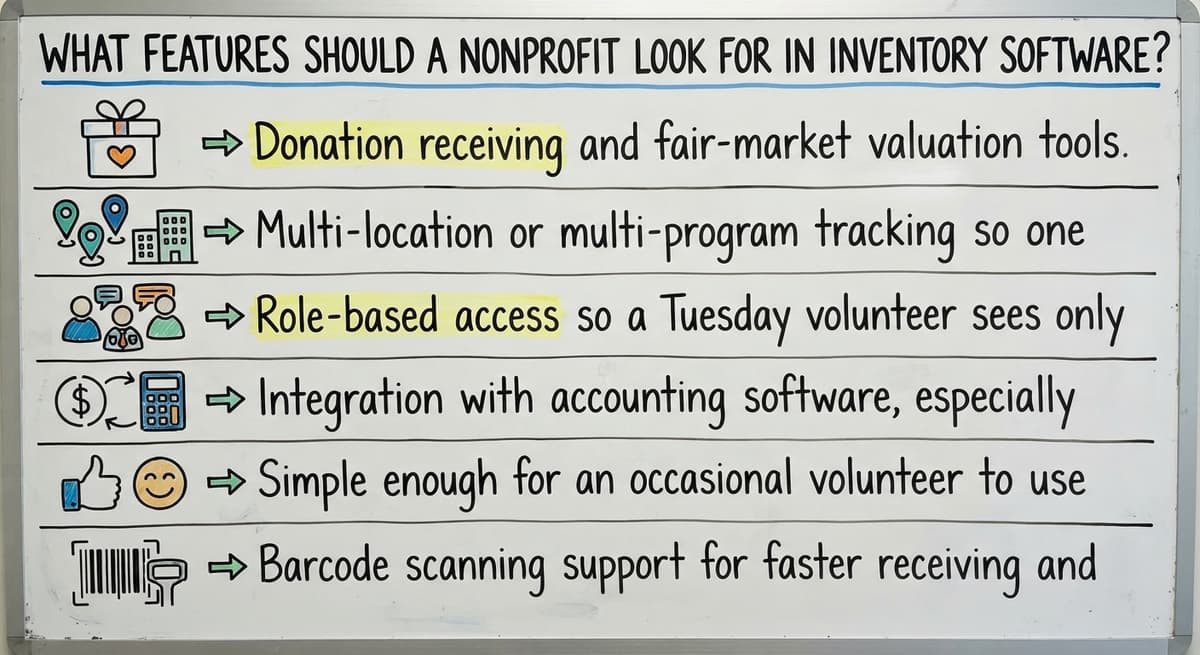
- Donation receiving and fair-market valuation tools so intake is documented from the first moment
- Multi-location or multi-program tracking so one site does not over-order while another runs short
- Role-based access so a Tuesday volunteer sees only the screens relevant to their task
- Integration with accounting software, especially QuickBooks, so financial records stay in sync
- Simple enough for an occasional volunteer to use correctly without a training session every time they show up
- Barcode scanning support for faster receiving and distribution when volume justifies it
The measure of good software is not its feature list. It is whether a volunteer who shows up twice a month can use it without calling anyone.
Barcode Scanning and Mobile Access
Barcode scanning speeds up receiving and distribution and cuts the data entry errors that come from handwritten logs. Mobile access lets a volunteer log items from a phone on the loading dock rather than walking to a desktop.
Not every nonprofit needs this from day one. If you receive fewer than 50 distinct items a week, a simple form works fine. Once volume grows or you add a second location, barcode scanning pays for itself quickly in time saved and errors avoided.
Should a Nonprofit Use Off-the-Shelf Software or a Custom System?
Off-the-shelf platforms start faster but are built for the average user, which often means retail or warehouse workflows. The key question is how much of your process you will have to change to fit the software.
Small nonprofits with unusual intake workflows, multiple programs, or specific grant reporting needs often get more from a lightweight custom workflow rollout built around how they already operate. A custom system built around your workflow does not need staff to learn a new way of thinking. It needs the software to learn yours.
If the software forces you to work around it, it is the wrong software.
Manual Tracking Methods and Where They Break Down
Spreadsheets are free, familiar, and fine at very small scale. Paper sign-out sheets cost nothing. Email chains for supply requests need no setup. There is no shame in starting there.
The limits appear fast when volume grows. Multiple users editing the same spreadsheet create version conflicts. A paper log page goes missing and a month of records disappears with it. An email request gets buried and no one fills the order.
These tools were not designed for multi-user, multi-location, audit-ready tracking. They break down not because staff use them badly, but because the tools were never meant to carry this load.
The goal is not to shame anyone for using a spreadsheet. It is to know when the spreadsheet has become the problem.
See it running on your own process first
No build cost. The subscription starts once it is live and doing the job, not before.
Book a call
Managing Inventory Across Multiple Locations or Programs
Food banks, shelters, and community organizations often serve more than 1 site. Without a shared system, each location manages its own count in isolation. One site over-orders while another runs out of the same item.
Transfers between locations need to be logged, not just assumed. A shared nonprofit inventory system shows what is on hand at each site in real time. Program-level reporting shows which initiative consumed which resources, which matters when 2 programs share the same supply but draw from separate grant budgets.
Multi-location inventory is not a feature upgrade. For organizations running more than 1 site, it is a basic requirement.
Training Volunteers and Avoiding Single Points of Failure
High volunteer turnover is one of the hardest parts of running a nonprofit. If your inventory process lives in one person's head, it leaves when they do.
The fix is a system intuitive enough that a new volunteer can follow it from step-by-step screens without a full training session. Role-based views show each person only what they need to do their job. Simple receiving and distribution workflows reduce dependence on tribal knowledge.
Good software reduces training time rather than increasing it. When the process is built into the tool, it does not rely on anyone remembering the right steps.
A system that any volunteer can use on their first day is more valuable than a powerful system that only 2 people understand.

What Are the Most Common Mistakes Nonprofits Make with Inventory?
Most inventory problems in nonprofits are not caused by bad intentions. They are caused by systems that were not built for the job. These are the patterns that show up most often.
- Waiting until a grant audit to reconcile records, which turns a 2-hour task into a 2-week crisis
- Tracking donations in one place and distributions in another with no link between them
- Letting one staff member own all inventory knowledge with no backup or records
- Choosing software built for retail or manufacturing and forcing nonprofit workflows into it
Each of these mistakes is fixable. The common thread is that the process was set up for convenience rather than accountability, and accountability is what funders need.
How to Get Started and Know When You Have Outgrown Your Current System
If your current process is a mess, do not try to fix everything at once. Start with a physical count and document what you actually have on hand. Identify the 2 or 3 biggest pain points, whether that is receiving, distribution records, or grant reporting gaps.
Pick 1 program or location to pilot a new approach before rolling it out broadly. Get buy-in from the staff who will use it daily, not just from leadership.
Signs you have outgrown your current system include spending more than a few hours a week on manual counts, having a grant reporting problem tied to missing records, or being unable to answer "how much do we have right now" without checking multiple places.
A good rollout starts with understanding how your nonprofit actually works today. It should not need a long, expensive project before anything is usable. The right partner builds around your workflow through a phased rollout: get the basics working first, then add features as the team grows comfortable.
If the system needs a consultant every time something changes, it is not the right system for a lean team.
Frequently asked questions
What is the 80/20 rule in inventory?
The 80/20 rule in inventory, also called ABC analysis, holds that roughly 80% of your impact comes from 20% of your items. For a nonprofit, that might mean 20% of your donated goods account for 80% of what you distribute. Focusing your tightest tracking on that high-impact 20% lets a small team manage a large catalog without tracking every item with equal effort.
Is there a version of QuickBooks for nonprofits?
QuickBooks offers a nonprofit edition through QuickBooks Premier and supports fund accounting features that general editions lack. It handles chart of accounts, donor tracking, and basic grant reporting. It does not handle item-level inventory distribution well, which is why many nonprofits add a separate inventory layer alongside QuickBooks rather than replacing it.
Is there a free inventory management system?
Free options exist, including spreadsheet templates, Google Sheets with shared access, and limited tiers of platforms like Sortly or inFlow. Free tools work at very small scale. As volume, locations, or grant reporting requirements grow, the time cost of working around a free tool's limits usually exceeds the cost of a purpose-built system.
What are the four types of inventory management?
The four common types are just-in-time (ordering only when needed), FIFO (first in, first out, meaning oldest stock distributes first), LIFO (last in, first out, less common for nonprofits), and ABC analysis (prioritizing tracking by item importance). For most nonprofits, FIFO matters most because it reduces spoilage of donated goods, and ABC analysis helps lean teams focus their effort.
Can we keep using QuickBooks while adding a nonprofit inventory system?
Yes. The right inventory system sits alongside QuickBooks and pushes financial summaries into it. You keep your existing accounting workflow and close the item-level tracking gap that QuickBooks was not built to fill. This avoids a full system migration and lets your finance team work in the tool they already know.
How do we track donated goods for IRS and audit purposes?
Record each donation at intake with the donor name, item description, quantity, condition, and estimated fair-market value. IRS Publication 538 needs that inventory be valued at the beginning and end of each tax year. Donor acknowledgment letters also need a description and value. A system that captures this at receiving means you are never reconstructing records at audit time.
When should a nonprofit move from spreadsheets to dedicated inventory software?
Move when any of these are true: staff spend more than a few hours a week on manual counts, you have had a grant reporting problem tied to missing records, you cannot answer how much stock you have right now without checking multiple places, or volunteers regularly make errors that need correction. At that point the spreadsheet costs more in staff time than software would.
What does a realistic rollout look like for a small nonprofit?
A realistic rollout starts with a physical count and a clear picture of your current workflow. A good partner does not need a long setup before anything is usable. Expect a phased rollout: receiving and intake first, then distribution tracking, then reporting. The whole process should fit your workflow rather than forcing your team to change how they work to match the software.
Start with a free first look
A 30 minute call, your operation mapped, and a clear picture of what we would build. No obligation and nothing to install.
Book a callRelated guides
More on the same work.
Guides
Common questions
- What is E Inventory Management
- What is Roq in Inventory Management
- What is Barcoding in Inventory Management
- What is Online Inventory Management System
- What is Effective Inventory Management
- What is the Definition of Inventory Management
- What is Inventory Management Mary Kay
- What is Inventory Management Practices
- What is Fluctuation Stock in Inventory Management
- What is Abc Classification in Inventory Management
- What is the Purpose of Inventory in Operations Management
- How to Manage Food Inventory
- What is Sales and Inventory Management System
- What is the Importance of Quality Inventory Management
- What is Inventory Management System Project
- How to Manage Consignment Inventory
- What is Inventory Management Meaning in Hindi
- What is Fifo in Inventory Management
- What is Telecom Inventory Management
- How to Manage Fba Inventory
- What is Kanban System of Inventory Management
- How to Improve Inventory Management
- What is Management Inventory in Hrm
Added since this page was reviewed
The newer guides in this cluster are here.
- How to Manage Inventory in Rocket League Answered on its own page.
Added since this page was reviewed
The newer guides in this cluster are here.
- How to Manage Inventory in Stardew Valley Answered on its own page.
Added since this page was reviewed
The newer guides in this cluster are here.
- How to Manage Inventory Fallout 76 Answered on its own page.
Added since this page was reviewed
The newer guides in this cluster are here.
- Multi Location Inventory Management Software Answered on its own page.
- What is the Difference Between Aggregate and Item Inventory Management Answered on its own page.
- Inventory Management for Multiple Locations Answered on its own page.
- What is Jit Inventory Management Answered on its own page.
- Inventory Management System for Manufacturing Answered on its own page.
- Inventory Management Pics Answered on its own page.
- What is an Important Factor in Inventory Management Answered on its own page.
- B2b Inventory Management Answered on its own page.
- Jewelry Inventory Management Answered on its own page.
- Dental Inventory Management Answered on its own page.
- What is Inventory Management in Working Capital Answered on its own page.
- The Objective of Inventory Management is To Answered on its own page.
- What is Poor Inventory Management Answered on its own page.
- What is Inventory Management and Its Types Answered on its own page.
- Qr Code for Inventory Management Answered on its own page.
- Hvac Inventory Management Software Answered on its own page.
- Inventory Management Software for Schools Answered on its own page.
- What is the Main Purpose of Inventory Management Answered on its own page.
- Manual Inventory Management Answered on its own page.
- What is Inventory Management in Pharmacy Answered on its own page.
- Inventory Management Photos Answered on its own page.