


Inventory Process Flow
Inventory process flow is the path stock takes from buy order to shipped order. Records track each move. A sound flow has 10 steps. Each step leaves one record. Small warehouses that map the flow count better and ship on time.
Reviewed November 2026.
It shows where paper, email and spreadsheets break the chain. It also shows how to tighten stock steps around your accounting package, with no big ERP.
Book a callWhat Is an Inventory Process Flow?
Inventory flow is the route stock takes through your building, from the order you place to the order you ship. Two flows run side by side.
- Physical flow: Boxes arrive on a pallet, move to a shelf, get picked and leave on a truck.
- Information flow: Every move needs a record, such as a receipt, a bin location or a shipping note.
When the two flows match, the count on screen equals the count on the shelf. A small warehouse or distributor lives on that match. You have few people and little slack, so one gap shows up fast. A clear inventory management process keeps both flows in step. Written inventory processes also make that match easy to check.
We build it for your operation, and the first look is free
If you would rather not compare products, describe how your operation already works and we build the system around it.
No build cost. You see it running on your own process first, and the monthly subscription starts only once it is live.
Book a callWhy Your Inventory Process Flow Matters
3 costs follow a wrong count: stockouts, overstock and late orders. A stockout loses a sale. Overstock ties up cash on a shelf. A late order costs trust, and the FTC's mail, internet or telephone order rule sets legal duties on shipping when you said you would.
A written flow also trains new staff in a day, not a month. Small teams feel errors sooner, so one lost pallet slip can stall a week of orders. Barcodes help here, and GS1 publishes the barcode standards behind most scan-based counts.
A clear flow is the cheapest way to protect every order you promise.
What Are the Steps in an Inventory Process Flow?
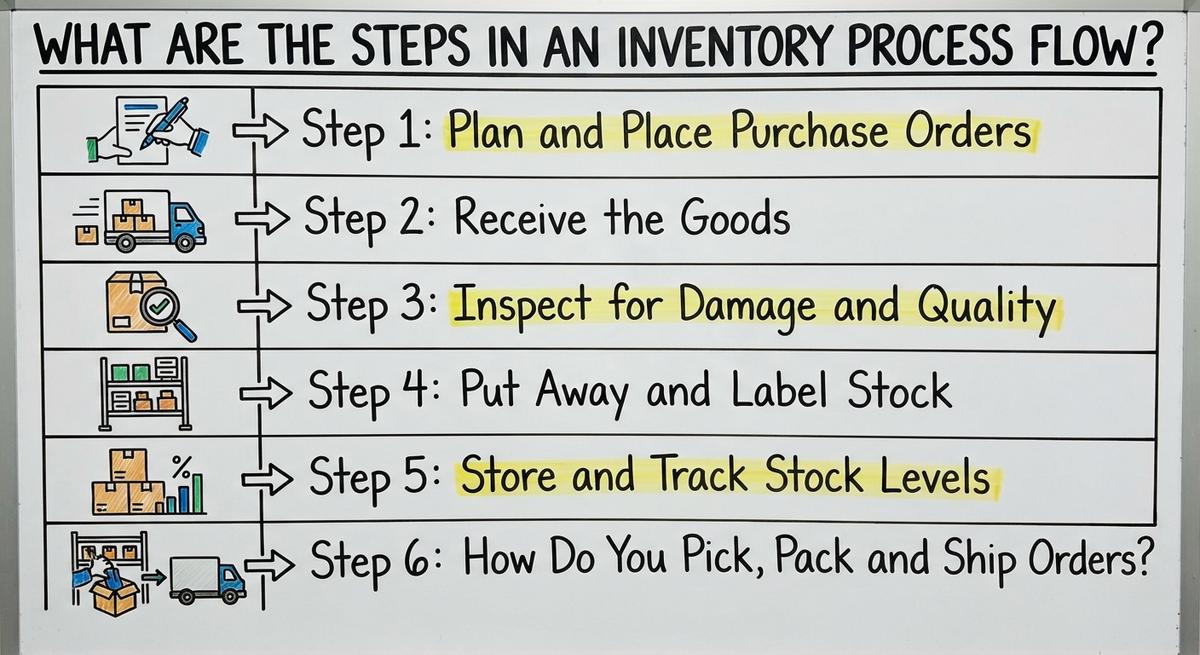
10 steps make up an inventory process flow, and each one should leave a record. Here is the full path:
- Buy: You order stock from a supplier.
- Receive: You check the delivery against the order.
- Inspect: You look for damage and wrong items.
- Put away: You place stock in a labeled location.
- Store: You track what sits on the shelf.
- Pick: You pull items for a customer order.
- Pack: You box and check the order.
- Ship: You send it out and log tracking.
- Count: You compare the shelf to the records.
- Reorder: You buy again before stock runs out.
No step is finished until its record exists.
Step 1: Plan and Place Purchase Orders
A PO is a written request to a supplier for set items at a set price. Three facts drive what you buy:
- Sales history: Past orders show how fast each item sells.
- Lead time: Lead time is the days between your order and the delivery.
- Current stock: Count what is on the shelf and what is already on order.
Check each PO line against your reorder point before you send it. Record every PO so inventory receiving has something to check against. The common gap is the order placed by phone or email and never logged. A dock worker then faces a pallet with no paper behind it.
A logged buy order is the yardstick for everything that arrives next.

Step 2: Receive the Goods
Receiving is the moment your inventory count changes, so it must be exact. The receiving and put away stage starts at the dock. Follow this order:
- Match the shipment to the PO and the packing slip.
- Count the items. Do not trust the slip alone.
- Note shortages and extras on the spot.
- Sign for the delivery with those notes written on it.
- Record the receipt the same day.
Say a driver drops 40 cartons and the slip says 44. A note on the signed slip gives you proof for a claim. A receipt entered a week late leaves stock on the shelf that the system cannot see.
A same-day receipt keeps the system and the dock in step.
Step 3: Inspect for Damage and Quality
Inspection is a quick check that goods are sound before they count as sellable inventory. Look for 4 things:
- Crushed or wet cartons.
- Wrong items or wrong sizes.
- Expiration dates, where goods expire.
- Lot numbers, where makers track batches.
Photograph damage before you move a carton. Move bad goods to a marked hold area at once. They must never reach the shelf as sellable stock. Then log the issue with the photo, the PO number and the count affected. That log is your proof for a vendor claim.
A hold area stops damaged stock from becoming a short order later.
Not sure this is the right shape for your operation
Describe how the work runs today. We map it on a call and show you what it would look like built around that, before you spend anything.
Book a callStep 4: Put Away and Label Stock
Put away is the move of received goods to a fixed home, plus a record of where that home is. Give every inventory item one bin or shelf location. A location like A-3-2 says aisle A, rack 3, shelf 2.
Place fast movers near the dock to shorten each pick walk. When stock moves, update the location record that day. Otherwise the picker walks to an empty shelf.
Labels and steady names cut picking mistakes:
- Use one name per item across all papers.
- Print labels with the item code and location.
- Keep similar items apart so pickers do not swap them.
A label on the shelf is a record the picker can read without asking anyone.
Step 5: Store and Track Stock Levels
Stock levels are the counts you keep for each item, and the whole business reads them. Keep one agreed inventory count of on-hand stock. Two sheets with two counts means neither one is right.
Split the count into three numbers:
- On-hand: Units physically on your shelves.
- Committed: Units promised to open orders.
- Available: On-hand minus committed.
If you hold 50 units and 18 sit on open orders, 32 are available to sell. Sell from the available number only.
Set a reorder point for fast movers. It is the stock level that triggers a new order. An item selling 12 a day with a 5-day lead time needs 60 units. Add 24 for safety and the reorder point is 84.
Available stock, not on-hand stock, is the number that protects you from overselling.
Step 6: How Do You Pick, Pack and Ship Orders?
Picking is the act of pulling items from shelves. Packing and shipping check them, box them and send them out with a record. Pick pack ship is the busiest part of warehouse inventory flow.
- Print pick lists in shelf order so the picker walks one loop.
- Check the picked items against the order before packing.
- Pack, weigh and label the box.
- Deduct stock when the order ships, not before.
- Record the carrier and tracking number.
Deduct at ship time and the available count stays honest. Early deducts hide stock that is still in the building. Late deducts let you sell goods that have left.
A shipped order with a tracking record closes the loop for the customer and the count.
Step 7: Handle Returns
A return is stock that comes back and must be judged before it counts again. Inspect each one and choose a path: restock, repair or discard. Each choice feeds back into your inventory process.
Add only sellable items back to available inventory. A box that is open and short a part is not sellable. Put it in the hold area until you decide.
Record the reason for each return. After 3 months, the reasons show patterns. If 9 of 30 returns say wrong size, the fault sits in a label or a listing, not in the carrier.
A return reason log points to the step that needs fixing.
Step 8: Count and Reconcile Inventory
Counting is how you prove the records match the shelf, and the law asks for it too. IRS Publication 538 says "you must value your inventory at the beginning and end of each tax year."
Two ways to count:
- Full count: You count every item at one time, often with the doors shut.
- Cycle counting: You count a few items each week, so the whole stock is covered over time.
Count high-value and fast-moving items more often. Slow, cheap items can wait.
When counts differ, find the cause. A fix that only changes the number hides the leak. Ask what step failed, and repair that step.
A gap with a known cause gets smaller. A gap with a patched number grows back.
The comparison is easier when one option is built for you
Off-the-shelf means fitting your process to the software. We do it the other way round, and the first look costs nothing.
Book a callHow to Map Your Own Inventory Process Flow
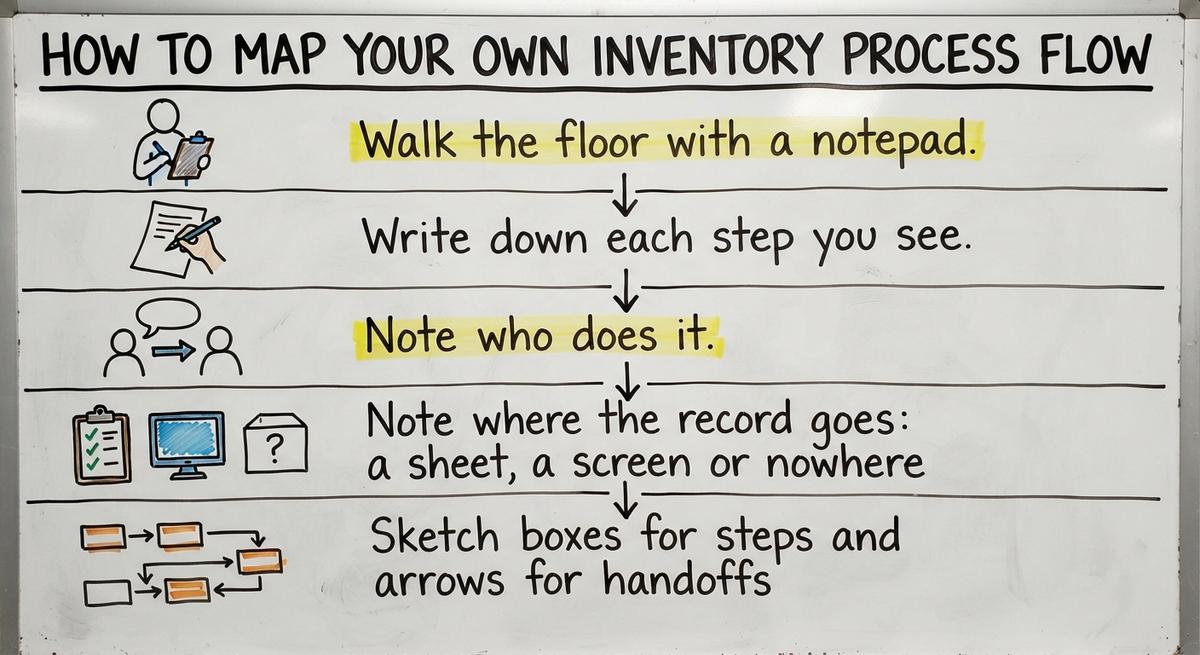
Mapping is drawing your real flow on paper, one step at a time, as it happens on your floor and not as you think it runs. Pick one order and follow it from PO to the truck.
- Walk the floor with a notepad.
- Write down each step you see.
- Note who does it.
- Note where the record goes: a sheet, a screen or nowhere.
- Sketch boxes for steps and arrows for handoffs.
No special tools are needed. A pencil and one sheet of paper do the job. Mark each arrow where a record is missing or retyped. Those marks are your to-do list.
A one-page sketch shows gaps that nobody sees from a desk.

Where Inventory Process Flows Usually Break Down
Inventory errors are handoff failures: places where one person passes work or data to the next. Three spots cause most of the damage:
- Handoffs: Paper sheets pass between desks and records go missing.
- Delayed or double entry: Someone types receipts at the end of the week, or types the same number twice.
- Unrecorded moves: A worker shifts a pallet and tells no one.
Manual steps then add typos. Retype one number in 3 places and you get 3 chances to be wrong. Printed sheets get lost. Email threads hide the latest version.
Take an accounting file that says 120 units while the shelf holds 104. Someone sold 16 and nobody posted the change. The accounting file stays fine as a ledger. The stock step around it is what failed.
Wherever a number is typed twice, expect it to differ.

Which Inventory Process Flow Metrics Should You Watch?
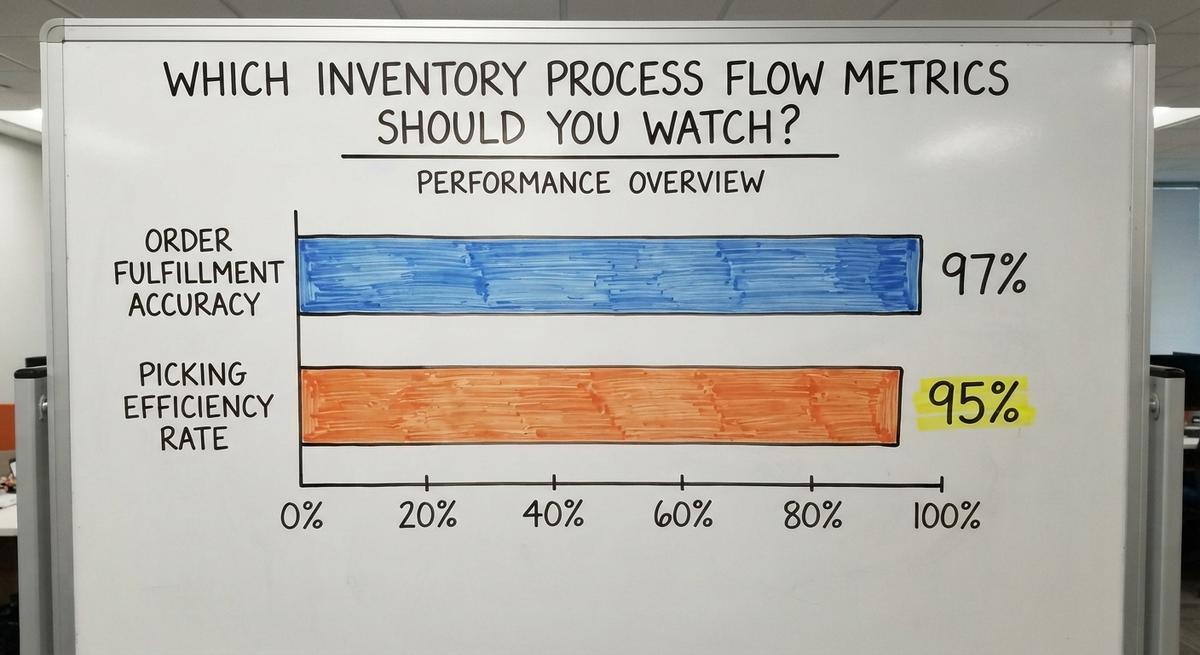
Four metrics tell you if your flow works: inventory accuracy, order fill rate, receiving time and stockouts. Add two more for cash: days of stock and turnover.
- Inventory accuracy: Items counted right divided by items counted. 970 right out of 1,000 is 97%.
- Order fill rate: Orders shipped complete divided by all orders. 190 of 200 is 95%.
- Receiving time: Hours from dock arrival to a posted receipt.
- Stockouts: Times an item hit zero while a customer wanted it.
- Turnover: Cost of goods sold divided by average stock. $600,000 over $100,000 is 6 turns.
- Days on hand: 365 divided by turnover. 365 over 6 is about 61 days.
Pick one or two to start, not ten. Accuracy and fill rate are the best pair.
The Census Bureau's wholesale data publishes inventories-to-sales ratios if you want an outside yardstick.

When Do Spreadsheets Stop Being Enough?
3 signs show your spreadsheet has hit its limit: errors cost more than the tool saves.
- Frequent oversells: You sell items that are not on the shelf.
- Long count days: Staff spend a full day on a count.
- Process in heads: One person knows the flow and no one else does.
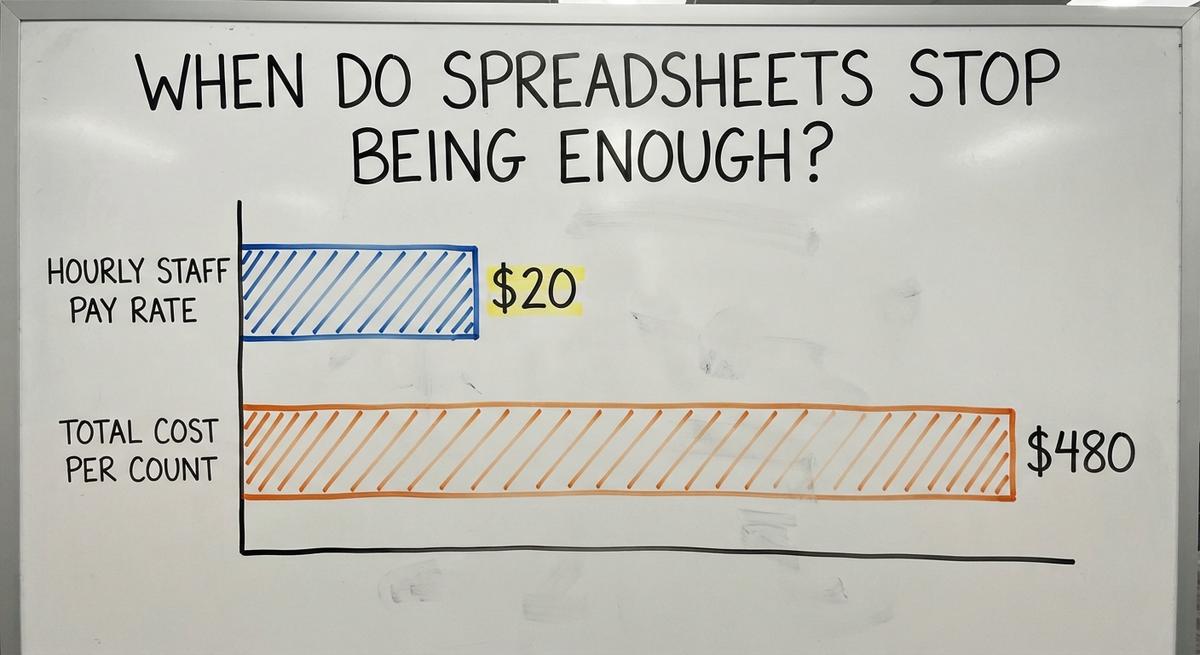
Put a price on it. A count that takes 3 staff 8 hours at $20 an hour costs $480 each time. The Bureau of Labor Statistics lists pay for stock clerks and order fillers if you want a local rate.
Your accounting software can stay as your accounting record. Tighten the stock steps around it. A full ERP, a large system that runs every part of the firm, is not the only next move.
Fix the manual steps first and the ledger stays as it is.
See it running on your own process first
No build cost. The subscription starts once it is live and doing the job, not before.
Book a call
How to Improve an Inventory Process Flow Step by Step
Improvement is a run of small moves in your inventory process flow, each checked before the next. NIST's supply chain guidance offers vendor-neutral help for small makers and distributors.
- Fix the biggest error source first. Use your map and count gaps to find it. For many teams it is late receiving.
- Write simple standard steps. One page per task, with 5 or fewer lines.
- Train everyone on them. Walk new staff through the page on the floor.
- Change one step at a time. Two changes at once hide which one worked.
- Check the results. Compare accuracy and fill rate a month later.
If receiving moves from weekly to same-day entry, accuracy should rise within a count cycle. If it does not, look for the next gap.
One fixed step, measured, beats five new ideas started together.
Questions to Ask Before Choosing Software for Your Flow
Good software is a tool that fits your flow and does not force you to rebuild it. Ask any provider these questions:

- Does it fit how your team works? Ask to see your own receiving and picking steps run on it.
- Can it work with your accounting tool? Ask how counts and sales post to the ledger, and who fixes a failed sync.
- Who keeps it? Learn who handles updates, bugs and new users.
- How are changes handled? Ask what it costs, and how long it takes, to add a step or a location.
- Can staff learn it fast? Ask for a trial with your 2 or 3 busiest workers.
The Sortly Help Center puts it this way: "Workflows are the tools in Sortly that take action on your inventory, not just track it." Ask whether a tool only logs stock or also acts on it.
A tool that matches your steps and leaves the ledger alone will cause the least pain.



Frequently asked questions
What is an inventory process?
An inventory process is the set of steps a business uses to buy, receive, store, pick, ship and count stock. Each step leaves a record, so the count on paper matches the shelf.
Where do inventory errors usually start?
Errors start at handoffs and data entry. A receipt typed late, a number retyped twice or a pallet moved with no note will each throw off the count.
How do I map my inventory process?
Follow one order from buy to shipment. Write each step, who does it and where the record goes. Sketch boxes and arrows, and mark every missing or retyped record.
How do spreadsheets and accounting software fit into the flow?
Both are record keepers. Accounting software suits the accounting ledger. A spreadsheet can hold stock counts for a small range. Errors rise when staff retype numbers between them.
How often should I count inventory?
Count high-value and fast-moving items every week or month. Count slow items each quarter. Run a full count once a year to match your tax figures.
What is the difference between on-hand and available stock?
On-hand is every unit on your shelves. Available is on-hand minus units promised to open orders. Sell only from available stock to avoid overselling.
Can I improve my inventory flow without a big ERP?
Yes. Map the flow, log every buy order, receive goods the same day and count in cycles. Add simple scanning later if errors remain.
Start with a free first look
A 30 minute call, your operation mapped, and a clear picture of what we would build. No obligation and nothing to install.
Book a callRelated guides
More on the same work.
Guides
- Work Flow Software
- Inventory Audit Checklist
- Inventory Management Best Practices
- Moving Average Method Inventory
- Inventory Shrinkage Accounting Entry
- Inventory Shrinkage is Recorded When
- Calculate Inventory Shrinkage
- Warehouse Inventory Management Software
- Warehouse Inventory Tracking Software
- Warehouse Inventory Management Systems
- Best Inventory Software
- Quickbooks Inventory Management Software
- Warehouse Inventory Systems
- Classification of Inventory
- Inventory and Warehouse Management Software
- Custom Inventory Management Software
- Excess Inventory
- Closed for Inventory
- Warehouse Inventory Management System
- Retail Inventory Management