

Work Flow Software
Work flow software moves a task from one person to the next automatically, so an order, a receipt, or an exception reaches the right desk without an email. For a warehouse or distributor of 5 to 80 people it costs $50 to $300 a month packaged or $10,000 to $30,000 once for a build around your own process, and the coordination time it removes is 4 to 8 hours per person per week. This guide, reviewed in September 2026, follows a work flow through a warehouse and a wholesale distributor, shows how exceptions are routed, and sets out what to ask before you commit.
Published 7 July 2026. Reviewed and updated 15 September 2026.
Book a callWhat Is Work Flow Software?
Work flow software is a digital system that moves work from one person or step to the next.
When step one is done, the software starts step two. No one has to remember to pass it along.
Reviewed August 2026. Each figure comes from the assumptions stated beside it, so you can substitute your own and the arithmetic still holds.
Without it, the same hand-off happens by email, a phone call, or a sticky note on a monitor. Someone forgets. The task sits. A customer waits.
The core job of work flow software is to replace manual coordination. It does not just store data. It moves data and triggers action based on what happens next. That is what makes it different from a spreadsheet or an inbox.
Operational workflow software is built for daily reality, not abstract tech diagrams. Think of it as a set of rules your business runs on, made visible and automatic.
Would you rather have it built around your operation?
The first look is free. If you would rather not compare products, describe how your operation already works and we build the system around it.
No build cost. You see it running on your own process first, and the monthly subscription starts only once it is live.
Book a callHow Does a Work Flow Actually Move Through Your Business?
A simple example with 4 steps makes this concrete. An order comes in. The system creates a pick task and assigns it to the right worker. The worker picks the items and marks the task done.
The system then creates a pack task. When packing is complete, a shipping label is generated and the customer gets an email. No manager printed a sheet. No one made a phone call.
Each hand-off is a step in the work flow. The software tracks and triggers every one of them.
Nothing falls through the cracks because the system knows where each task sits and who owns it.
Why Does Work Flow Software Keep Your Compliance Records Clean?
Work flow software is a compliance tool too. The IRS requires accurate records of your inventory and transactions.
As IRS Publication 538 states, "To figure taxable income, you must value your inventory at the beginning and end of each tax year." Work flow software keeps the data clean at every step, so the numbers your accountant needs are already there.
The Five Core Parts of Any Work Flow Software
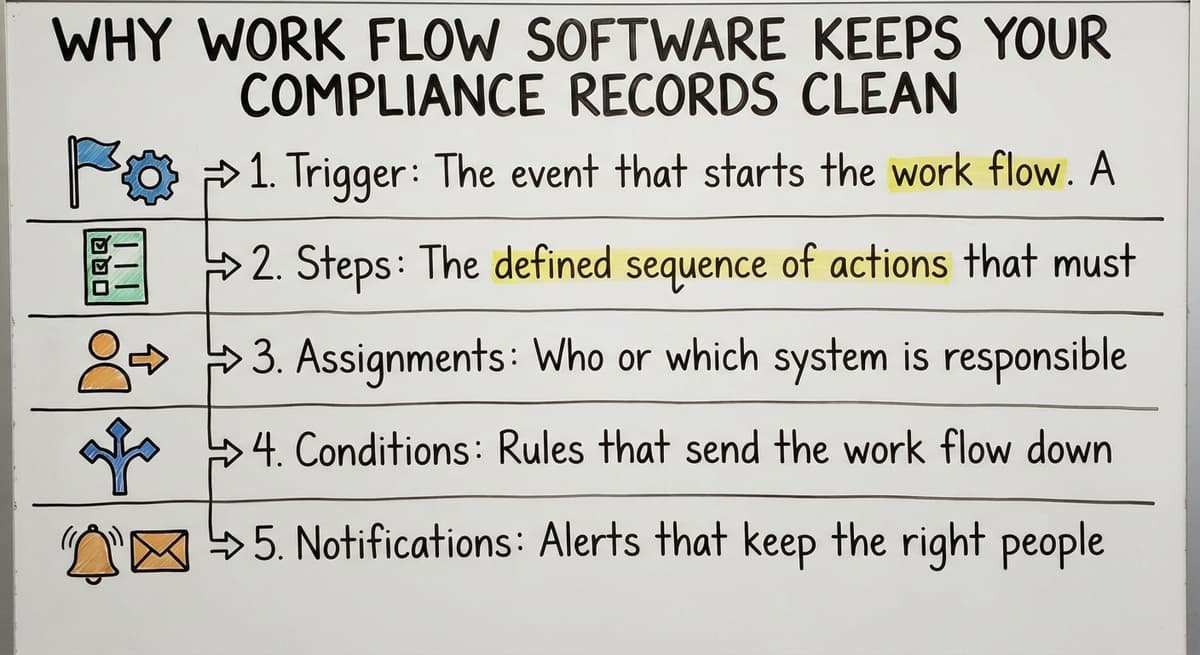
Every work flow, no matter how simple or complex, is built from the same 5 parts:
- Trigger: The event that starts the work flow. A new order, a received shipment, or a customer request.
- Steps: The defined sequence of actions that must happen in order.
- Assignments: Who or which system is responsible for each step.
- Conditions: Rules that send the work flow down different paths based on what happens.
- Notifications: Alerts that keep the right people informed without anyone having to ask.
Understanding these parts helps you map your own process before you buy or build anything.
What Is the Difference Between a Work Flow and a Task List?
A task list is static. A work flow is dynamic and responds to what happens next. That one sentence answers most of the confusion people have when they first look at work flow software.
A task list shows you what needs to be done. It does not know when step one is finished. It does not start step two on its own.
Someone has to check the list, notice the first item is done, and manually move to the next.
Why Does That Distinction Matter at Scale?
Work flow software knows when step one is done and automatically starts step two. This distinction matters most for operations teams managing dozens of moving parts at once.
When you have 3 shifts, 4 departments, and 200 open orders, a task list becomes a liability. A work flow becomes a system.
Process automation is not about replacing people. It is about removing the coordination work that pulls people away from the actual job.
Common Problems Work Flow Software Solves
Most small operations have a process problem, not a people problem. They have a process problem. The same errors happen at the same points, every week.
Here are the 4 most common ones:
- Steps get missed because no one knew it was their turn.
- Managers spend time chasing status updates instead of solving real problems.
- Errors happen when information is copied from one spreadsheet to another by hand.
- New staff take weeks to learn the process because it lives in someone's head, not in writing.
Work flow software fixes all 4 by making the process visible, automatic, and independent of any one person's memory.
What Does That Coordination Time Actually Cost?
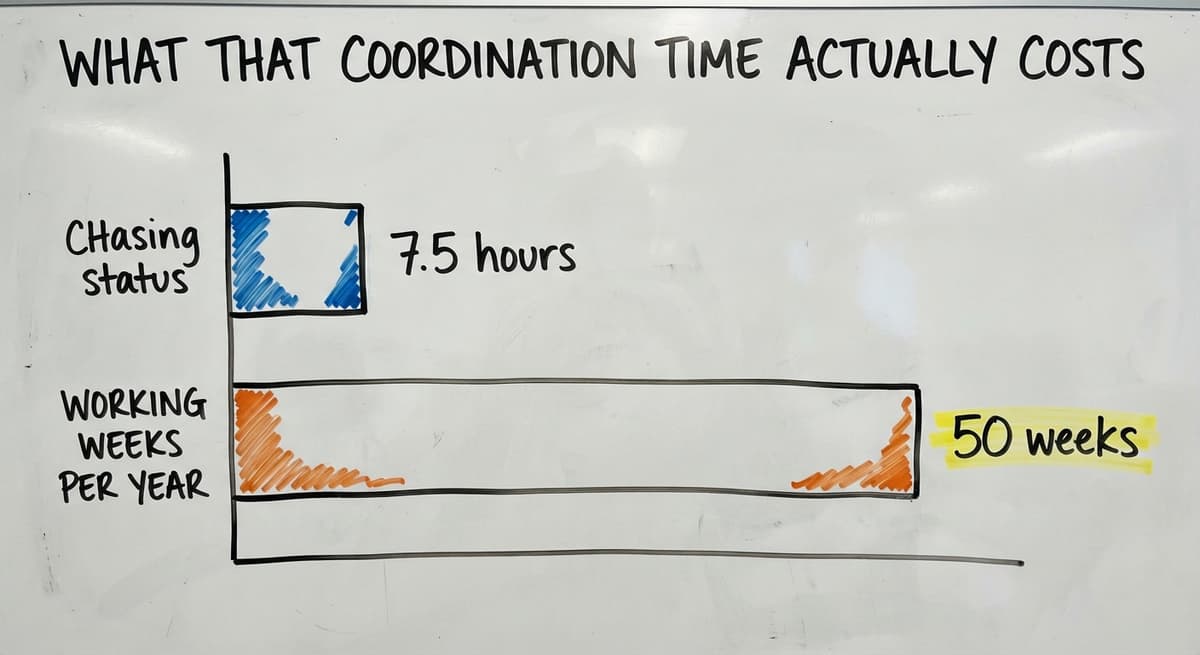
Consider the cost. If a manager spends 90 minutes a day chasing status on routine tasks, that is 7.5 hours a week.
At the median operations manager wage reported by the US Bureau of Labor Statistics, that time has a real dollar value your business is paying for coordination, not output. Multiply that by 50 weeks and the number is significant.
Is the comparison easier when one option is built for you?
Yes. Off-the-shelf means fitting your process to the software, and custom is the other way round. The first look costs nothing.
Book a callWhy Are Spreadsheets and Email Not Work Flow Software?
Spreadsheets store data. They do not move it. A spreadsheet cannot see that column B is filled in and automatically notify the next person in line.
Email communicates. It does not enforce sequence or track whether an action was completed. An email can be missed, deleted, or buried under 40 others.
Using both together creates version confusion and missed hand-offs. Someone updates their copy of the spreadsheet. Someone else is still working from last Tuesday's version. An order ships to the wrong address.
Work flow software replaces the coordination layer. It does not just store or send. It moves, tracks, and triggers. That is the gap that spreadsheets and email cannot fill, no matter how well you build them.
What Does Work Flow Software Look Like Inside a Warehouse?
Warehouse workflow has a rhythm. Receiving, putaway, picking, packing, shipping. Each step depends on the one before it.
When any step stalls, the whole rhythm breaks. Here is what business process software looks like in each phase.
Receiving
A shipment arrives. The system sees the purchase order is matched and assigns a putaway task to the right worker.
The worker scans the items, confirms the location, and marks the task done. The system updates inventory counts in real time.
Picking
An order triggers a pick list without a manager printing anything. The worker gets the task on a handheld device or screen.
When the pick is complete, the system moves the order to the pack stage automatically.
Shipping
Completing the pick automatically updates inventory and notifies the customer. A shipping label is generated. The carrier is booked. The customer gets a tracking number. No one typed the same address twice.
Warehouse management software built around this rhythm means the warehouse runs the same way every day, with every worker, on every shift.

What Does Work Flow Software Look Like Inside a Wholesale Distributor?
Order management workflow for a wholesale distributor covers more steps than a warehouse because more people touch each order. A sales order moves through credit check, inventory check, pick, and invoice.
Without work flow software, each hand-off is a phone call or an email. With it, each step triggers the next one automatically.
How Do Distributors Handle Exceptions Without Slowing Down?
Exceptions like backorders or pricing questions are flagged to the right person automatically. The sales rep does not have to call the warehouse. The warehouse does not have to call the owner. The system routes the exception and tracks it until it is resolved.
The owner can see where every order sits without asking anyone. The US Census Bureau's Monthly Wholesale Trade data shows that wholesale inventories and order volumes move in ways that demand reliable process controls. Distributors who rely on manual coordination are exposed every time volume spikes.
Can Work Flow Software Connect to the accounting software Without Replacing It?
Yes. Work flow software can sit alongside the accounting software and handle the operational steps while pushing finished data back to accounting. That is the most common setup for small and mid-size operations.
Many teams already use a standard accounting package for accounting and do not want to replace it. They should not have to.
accounting integration for operations means the work flow software handles picking, packing, and shipping, then writes the completed invoice back to the accounting software when the order closes.
This removes double entry. The warehouse team works in the operational system. The bookkeeper works in the accounting software. The data moves between them automatically.
This approach avoids a full ERP migration, which is a multi-year project most 20-person operations cannot survive. A focused accounting integration delivers most of the benefit at a fraction of the cost and time.

Is Built-In Work Flow Better Than Custom Work Flow Software?
Off-the-shelf tools are built with preset work flows. Those work flows may not match how your operation actually runs.
Custom work flow software follows your existing process so staff do not have to change how they work.
For small operations with specific processes, custom means faster adoption and fewer workarounds. When the software matches the process, training is short.
When staff have to adapt their work to fit the software, resistance is high and adoption is slow.
Comparing Off-the-Shelf and Custom Work Flow Software
The table below shows the 6 key differences:
| Factor | Off-the-Shelf | Custom |
|---|---|---|
| Fits your process | Rarely out of the box | Built to match it |
| Setup time | Fast to install, slow to adapt | Planned to your timeline |
| Workarounds needed | Many | Few or none |
| Staff adoption | Slower | Faster |
| Cost to change later | High | Lower with a good partner |
Custom software for wholesale distributors is not a luxury. For a 15-person operation with a specific receiving process, it is the faster and cheaper path.
How Does Work Flow Software Handle Exceptions?
Not every order follows the same path. A customer is over their credit limit. A product is out of stock.
A shipment arrives damaged. Good work flow software handles these without anyone having to invent a new process on the spot.
Conditional branches are the key. If the credit check passes, the order moves to picking.
If it fails, the order routes to the credit manager with a note. The credit manager resolves it. The order continues.
What does it look like running on your own process?
The first thing you see is it running on your own process, at no build cost. The subscription starts once it is live and doing the job, not before.
Book a call
Why Does Automated Exception Routing Reduce Errors?
Exceptions are routed to the right person automatically, which is the step that manual processes lose. They do not sit in a shared inbox waiting for someone to notice. The system tracks them the same way it tracks normal orders, so nothing gets lost in the exception pile.
Manual exception handling is where most errors and delays happen. Automating the routing does not remove human judgment. It makes sure the right human sees the right problem at the right time.
Reporting and Visibility Inside Work Flow Software
Managers can see every open task, who owns it, and how long it has been sitting. That visibility changes how a team is managed.
Bottlenecks become visible because the software shows where work piles up. If 40 orders are stuck at the pack stage every afternoon, the manager can see that pattern and fix it. Without the software, that pattern is invisible until a customer complains.
A live dashboard replaces the morning status meeting. Instead of asking each team lead what is open, the manager looks at one screen. That is 30 minutes back in the day, every day.
The NIST Manufacturing Extension Partnership notes that process visibility is one of the most consistent drivers of supply chain improvement for small and mid-size manufacturers and distributors. The principle applies directly to warehouse and wholesale operations.
How Do Small Teams Benefit From Work Flow Software?
Small teams cannot afford to have one person hold all the process knowledge. When that person is out sick or leaves, the operation slows down or stops.
Work flow software documents the process inside the system so any staff member can follow it.
The steps are built into the tool. A new hire follows the system on day one instead of shadowing someone for three weeks.
Onboarding becomes faster. Errors from misremembered steps drop. The business stops being fragile.
Task management built into a work flow also means staff know exactly what to do next without being told. That frees the manager to solve real problems instead of directing traffic.

Signs Your Operation Is Ready for Work Flow Software
Most operations wait too long. By the time they look for a solution, the pain is already costing real money.
Look for these 4 signs:
- You spend more than an hour a day chasing status on tasks that should be routine.
- Errors happen at hand-off points between departments or shifts.
- You have grown beyond what a shared spreadsheet can reliably manage.
- A new hire takes weeks to learn the process because it is not written down anywhere.
Any one of these is a signal. All 4 together mean the cost of waiting is higher than the cost of fixing it.
What Should I Look for When Choosing Work Flow Software?
The right work flow software fits your process. You should not have to rewrite how your operation works to use it. That is the first and most important question to answer before you buy.
Here are the questions that matter:
- Does the tool fit your actual process, or do you have to change your process to fit it?
- Can it connect to the accounting software and the other tools you already use?
- How long does setup take and who does the work?
- Is it built for your scale, or designed for large enterprise customers?
- What happens when your process changes next year?
Operational management software built for a 500-person company will not serve a 20-person distributor well. The features will be wrong.
The price will be wrong. The support model will be wrong. Look for a partner who works at your scale and knows your industry.
Questions to Ask Before Buying Work Flow Software
Before you sign anything, there are 6 questions that need clear answers:
- Can we map our current process into the tool without rewriting how we operate?
- Who configures the work flows and how long does that take?
- What happens when our process changes?
- Is there a local team we can call when something breaks?
A vendor who cannot answer these clearly is not the right partner.
The answer to "what happens when our process changes" is the most revealing one. A good system gets extended. A rigid one gets replaced.

How Does Implementation Work for Work Flow Software?
Good implementation is 4 to 8 weeks, and it starts by mapping the current process before writing a single line of code.
The team doing the build needs to understand how work actually moves through your operation today, not how it looks on an org chart.
Staff should be involved early. The people doing the daily work know where the real problems are.
If the software reflects their actual steps, they will use it. If it reflects someone else's idea of their steps, they will work around it.
A phased rollout lets the team adapt without shutting down operations. Start with one process. Get it running. Then add the next one. This approach keeps the scope manageable and delivers visible wins early.
The goal is a running system, not a finished project handed off and forgotten.
What is in a free first look?
A 30 minute call, your operation mapped, and a clear picture of what we would build. No obligation and nothing to install.
Book a callWhy Do Long Implementations Fail Small Operations?
A 12-month ERP rollout is not realistic for a team of 20 people. The business has to keep running. Staff cannot spend months in training. Budget runs out before go-live.
Long projects lose staff buy-in and often get abandoned before they go live. The team that was excited at the start is exhausted and skeptical by month eight.
The software goes live into a culture that has already moved on.
Work flow software built in focused phases keeps the scope tight. A first phase that takes 6 to 10 weeks delivers something real. Staff see it working. Confidence builds. The second phase is easier.
This is why the implementation model matters as much as the software itself.
How Does Work Flow Software Help the Operations Manager and the Business Owner?
The operations manager and the business owner each get something different from work flow software, and both are significant. The operations manager stops spending the day chasing status updates and starts spending it solving real problems.
Exceptions surface automatically instead of arriving as surprises. The business owner gains visibility into every open order and process step without having to ask anyone, which changes how the business feels to run and what decisions become possible.
For the Operations Manager
The software handles routine hand-offs. The manager handles exceptions. That shift in daily work is the difference between a reactive job and a proactive one.
Visibility into bottlenecks lets the manager fix process problems before they become customer problems. Instead of finding out an order is late when the customer calls, the manager sees it stalling at the pack stage at 2pm and fixes it.
For the Business Owner
Owners get a live view of operations without having to ask staff for updates. The dashboard shows what is open, what is late, and where the problems are.
Work flow software makes the business less dependent on any one person's knowledge. That makes it easier to scale. It also makes it easier to hand off when the time comes, because the process is in the system, not in someone's head.

How Can Work Flow Software Grow as My Business Grows?
Work flow software grows with your business when it is built on a flexible foundation. Start with the one process that causes the most pain. Build that first.
Get it running well. When the business adds a product line, a new location, or a third shift, new work flows can be added without rebuilding the whole system.
Building on What Already Works
A well-built system does not need to be replaced when the business grows. It gets extended. The NIST MEP supply chain guidance consistently points to scalable process design as a foundation for sustainable growth in small and mid-size operations.
If you start with order management workflow and it works, adding a returns process or a receiving workflow is a natural next step. The team already knows how to use the system. The new work flow follows the same logic.
Real Results Work Flow Software Delivers
Here is what changes when work flow software is running well:
- Fewer errors at hand-off points between teams because the system controls the sequence.
- Faster order cycle times because steps no longer wait for someone to notice they are next.
- Less manager time on status updates and more time on problems that need human judgment.
- Staff who know exactly what to do next without being told, because the system tells them.
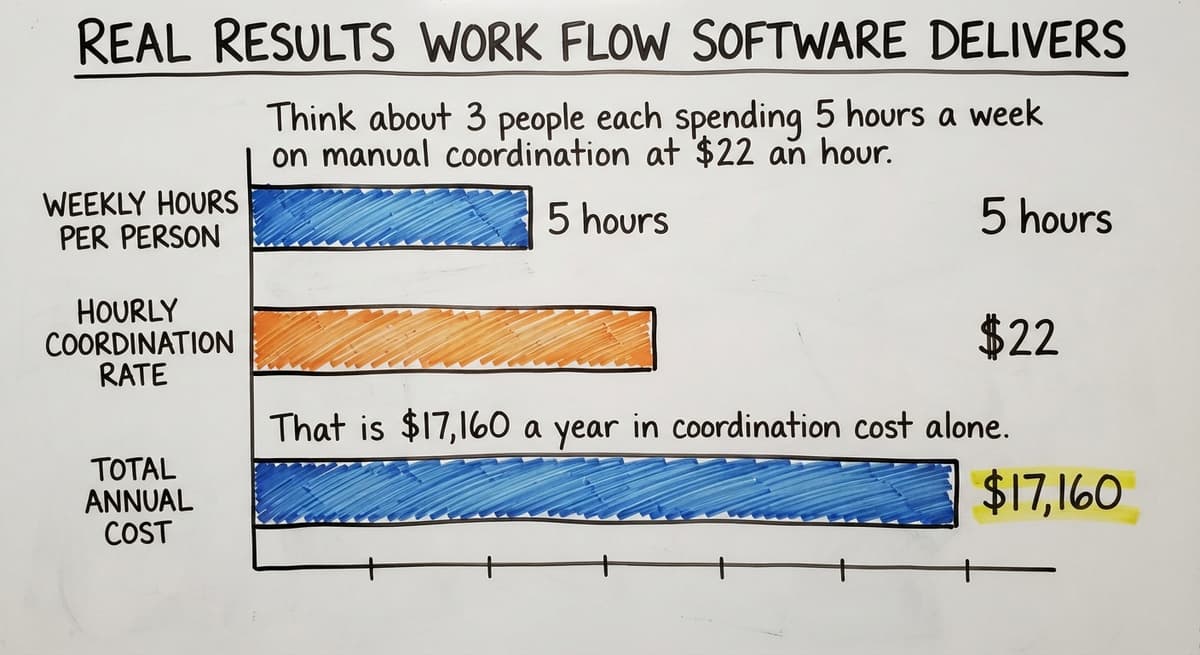
Think about 3 people each spending 5 hours a week on manual coordination at $22 an hour. That is $17,160 a year in coordination cost alone.
Work flow software does not eliminate people. It redirects their time to work that actually moves the business forward.
Next Steps If You Are Considering Work Flow Software
The first step is writing down the one process that breaks most often and costs the most time. Be specific. Name the step where things go wrong and the people involved.
Then talk to a team that will map your process before proposing a solution. If the first conversation is about features and pricing rather than how your operation works, that is the wrong partner.
What Should You Ask Before You Commit?
The first ask is a clear timeline and a defined first phase. Not a multi-year roadmap. Not a discovery process that takes six months before anything gets built. The Operational Management Software overview page on this site shows how a connected system handles the full range of operational needs for growing businesses.
If your operation runs on the accounting software and you want to add workflow automation without replacing your accounting system, that is exactly the kind of work we do. A local partner who knows your industry can move faster and stay accountable. The right first step is a conversation about your process, not a software demo.
Frequently asked questions
Frequently asked questions
What is work flow software and how does it work?
Work flow software is a system that moves tasks, approvals, and information from one step to the next automatically.
When one step is completed, the software triggers the next one without anyone having to send an email or make a phone call. It replaces the manual coordination that slows down daily operations.
How is work flow software different from a spreadsheet or email?
Spreadsheets store data but do not move it. Email communicates but does not enforce sequence or track whether a task was completed.
Work flow software does both. It knows when a step is done and automatically starts the next one, which spreadsheets and email cannot do.
Can work flow software connect to the accounting software without replacing it?
Yes. Work flow software can sit alongside the accounting software and handle the operational steps like picking, packing, and shipping, then push the completed data back to the accounting software automatically. This removes double entry and keeps your accounting clean without a full ERP migration.
How long does implementation take for a small team?
A focused first phase for a small operation takes 6 to 10 weeks when the process is mapped clearly before any build begins.
Long multi-month projects tend to lose staff buy-in before they go live. A phased approach delivers something working early and builds from there.
What are the five core parts of any work flow software?
Every work flow is built from a trigger that starts the process, steps that define the sequence, assignments that say who is responsible, conditions that route the work flow based on what happens, and notifications that keep the right people informed automatically.
How does work flow software handle exceptions like backorders or credit holds?
Good work flow software uses conditional branches. If a credit check fails, the order routes to the credit manager automatically with a note.
If a product is out of stock, the system flags it to the right person. Exceptions are tracked the same way normal orders are, so nothing gets lost.
What signs tell me my operation is ready for work flow software?
The clearest signs are spending more than an hour a day chasing status on routine tasks, errors happening at hand-off points between departments, growing beyond what a shared spreadsheet can manage, and new staff taking weeks to learn the process because it is not written down anywhere.
Is custom work flow software better than off-the-shelf tools for a small distributor?
For small operations with specific processes, custom work flow software means faster adoption and fewer workarounds because the software matches how the team already works.
Off-the-shelf tools can require the operation to change its process to fit the software, which slows adoption and creates resistance.
What is the best workflow software for small businesses?
The one that follows the process the team already runs, connects to the accounting package in use, and goes live in weeks.
For office tasks a general workflow tool at $10 to $30 a user a month is enough; for a warehouse or distributor, the work flow lives inside the order and inventory system, packaged or built.
What is the difference between workflow software and project management software?
Project management tracks work that happens once: a launch, a build, a move, with dates and owners.
Workflow software runs work that repeats: every order, every receipt, every return, the same steps in the same sequence, hundreds of times a week. An operation needs the second; it may want the first.
What are the best free workflow automation tools?
The free tiers of the general automation tools handle a few hundred tasks a month between office apps, and the open-source workflow engines are free to self-host. Both stop at the warehouse door: routing a pick or an exception needs the work flow inside the operational system.
How do I create a workflow for my business?
Write down one process that breaks most often as a numbered list of steps, name who does each step and what they need to see, and mark where it stalls. That list is the specification; the software's job is to move each step to its owner and show the owner what to do.
Not sure this is the right shape for your operation?
The call is free. Describe how the work runs today. We map it on a call and show you what it would look like built around that, before you spend anything.
Book a callRelated guides
The rest of this guide, for the parts of the job this page does not cover.
Guides
- Order Management Software
- Warehouse Inventory Management Software
- Warehouse Inventory Tracking Software
- Best Inventory Software
- Warehouse Receiving Software
- Quickbooks Inventory Management Software
- Warehouse Stock Management Software
- Software for Warehouse Management System
- Inventory and Warehouse Management Software
- Custom Inventory Management Software
- List of Warehouse Management Software
- Online Warehouse Management Software
- Warehouse Stock Software
- Multi Location Inventory Management Software
- Warehouse Inventory Software Programs
- 3pl Software
- Cloud Stock Management Software
- Manufacturing Inventory Management Software
- Best 3pl Wms Software
- Cost of Inventory Management Software