


Mrp Barcode
An MRP barcode is a barcode that feeds real stock data directly into a material requirements planning system. Scan a barcode, the stock count updates, and the planning engine uses that count to decide what to order and when. That is the whole system. You do not need a large ERP to make it work.
Reviewed September 2026. Each figure comes from the assumptions stated beside it, so you can substitute your own and the arithmetic still holds.
Published 23 August 2026. Reviewed and updated 15 September 2026.
Book a callWhat Is an MRP Barcode and How Does It Work?
MRP stands for material requirements planning. It is a planning method that answers one question: given what you have in stock right now, what do you need to order, and how much?
The barcode is the data entry point. Every time a worker scans a label, the system records a movement. MRP reads those movements and keeps its calculations current.
Without a barcode, someone has to type the count in by hand. That step is where errors start. The barcode removes it.
Think of the barcode as the input and MRP as the engine. The engine is only as good as what you feed it.
Would you rather have it built around your operation?
The first look is free. If you would rather not compare products, describe how your operation already works and we build the system around it.
No build cost. You see it running on your own process first, and the monthly subscription starts only once it is live.
Book a callHow Does Barcode Scanning Feed Material Requirements Planning?
Here is a simple receiving example. A shipment arrives. A worker scans each item at the dock. The system adds those units to the stock count. MRP reads the updated count and recalculates whether a reorder is needed.
No one types a number. No one updates a spreadsheet. The count is current within seconds of the scan.
As GS1, the global body that sets barcode standards, explains: "Barcodes are the most widely used automatic spotting technology in the world," and their standards page at gs1.org/standards/barcodes shows exactly how each symbology encodes the data that systems like MRP depend on.
Accurate scan data is what separates a planning system that works from one that guesses.
What Types of Barcodes Are Used in MRP Systems?
Several barcode formats appear in warehouse and distribution settings. Each fits a different context.
- UPC encodes a product identifier in 12 digits. Common on retail goods and finished products.
- Code 128 handles longer strings and alphanumeric data. Widely used on cartons and internal labels.
- GS1-128 adds structured data fields like lot number, expiry date, and quantity on top of Code 128. This is the standard for most wholesale and distribution labeling.
- QR codes can store more data and are readable by a phone camera. Useful for low-volume operations where a dedicated scanner is not yet justified.
The format matters less than consistency. A warehouse that uses 3 different label formats across its SKU range will create gaps in the data MRP reads. Pick one format per label type and apply it everywhere.
Where Are Barcodes Scanned in an MRP Workflow?
Every scan point in a warehouse is a data update. MRP reads those updates to keep its stock picture current. The key scan points are:
- Receiving dock: adds units to stock when a delivery arrives
- Put-away: records the bin location for each item
- Pick: removes units from stock when an order is fulfilled
- Pack and ship: confirms units have left the building
- Cycle count: corrects the running count against a physical check
Missing a single scan point creates a gap. If a worker skips the pick scan, MRP still thinks those units are in stock. It will not trigger a reorder when it should. Every skipped scan is a planning error waiting to happen.
What Happens When Barcode Data Is Missing or Wrong?
When scan data is missing, MRP calculates from a wrong starting point. The results are orders you did not need, or stockouts you did not see coming.
A simple example: a receiving scan is missed. MRP thinks 80 units are on hand when 200 arrived. It flags a reorder. The warehouse now buys stock it already has.
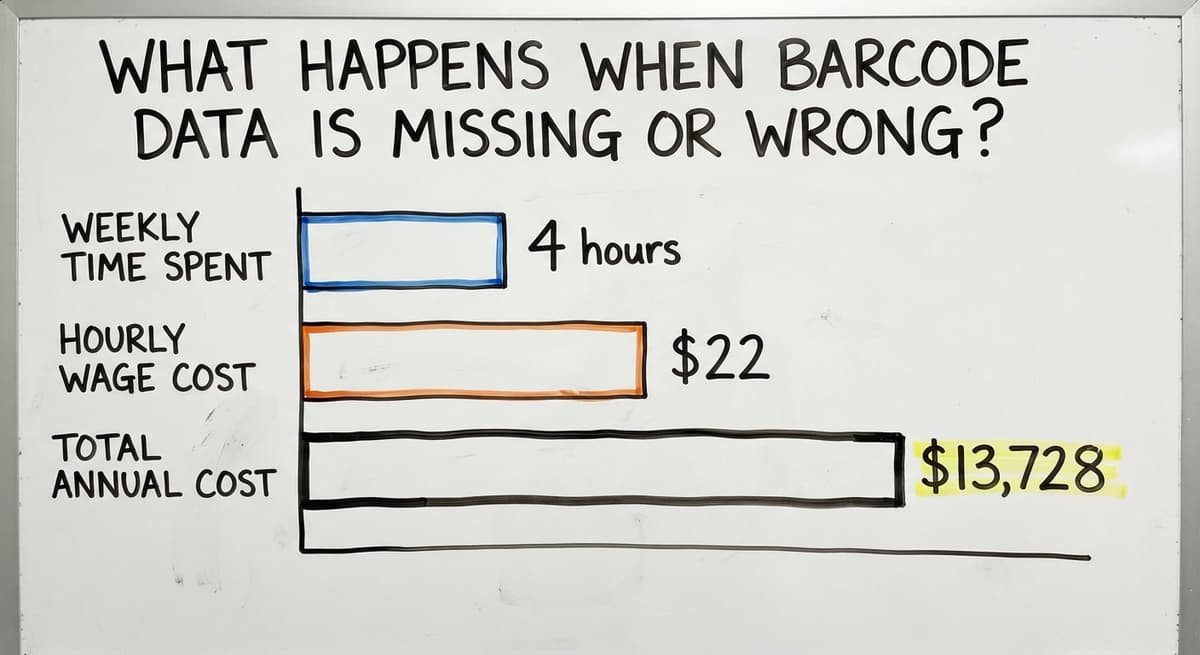
Run that error across 20 SKUs and the cost adds up fast. 3 staff spending 4 hours a week correcting buy orders at $22 an hour, which is close to the median wage for stock clerks according to the US Bureau of Labor Statistics, comes to roughly $13,728 a year in rework time alone.
Many small distributors already recognize this problem. They see it in the spreadsheet that is always one version behind, or in the printed pick sheet that does not match what is actually on the shelf.
The IRS makes the stakes clear: IRS Publication 538 states, "To figure taxable income, you must value your inventory at the beginning and end of each tax year." A wrong stock count is not just a planning problem. It is a compliance problem.
The fix is accurate scan data at every point, not a better spreadsheet formula.
Is the comparison easier when one option is built for you?
Yes. Off-the-shelf means fitting your process to the software, and custom is the other way round. The first look costs nothing.
Book a callIs Running MRP in a Spreadsheet Good Enough?
No. A spreadsheet can hold a reorder formula, but it cannot stay current on its own.
The common pattern looks like this: a barcode scanner outputs a CSV file, someone pastes it into spreadsheet, and a formula calculates the reorder point. By the time the paste happens, the data is already old.
Manual steps introduce lag. Lag means decisions based on yesterday's counts. One skipped paste, one wrong cell reference, and the whole calculation drifts.
A proper MRP barcode system closes this gap by connecting the scan directly to the planning calculation. No paste step. No version lag. The reorder signal fires when the count actually hits the threshold, not when someone remembers to update the sheet.
The spreadsheet is not a system. It is a workaround that grows more fragile as the SKU count grows.
Setting Up MRP Reorder Rules Using Barcode Counts
A reorder point is the stock level that triggers a new order. A reorder quantity is how much to buy when that trigger fires.
In a barcode-driven MRP system, the scan count feeds the reorder point check automatically. When the system sees that Item A has dropped below 50 units, it creates a suggested buy order for 200 more. No one has to notice. No one has to remember.
Setting this up needs 3 inputs per SKU: the reorder point, the reorder quantity, and the lead time from the supplier. Once those are set, the system runs the check every time a scan updates the count.
Buy order automating only works when the scan count is trustworthy, which is why every earlier section in this article matters.
Cycle Counts and MRP Accuracy
A cycle count is a regular scan of a portion of inventory, rather than a full physical count once a year. The goal is to catch and correct drift before it compounds.
With barcode scanning, a cycle count on a fast-moving item takes minutes. A worker scans the bin, the system compares the scan count to the recorded count, and any gap is flagged at once.
Done weekly on high-velocity SKUs, cycle counts keep MRP data accurate between full counts.
The NIST Manufacturing Extension Partnership recommends regular inventory check as a core supply chain discipline, not a one-time project. Cycle counting best practices treat accuracy as an ongoing process, not an annual event.
Regular cycle counts are what keep a barcode-driven MRP system honest over time.

MRP Barcode Systems for Small Warehouses
The common assumption is that MRP barcode systems target large operations with hundreds of staff and dedicated IT teams. That assumption is wrong.
Small warehouses with 5 to 50 workers benefit most from accurate scan data because manual errors hit harder at smaller scale.
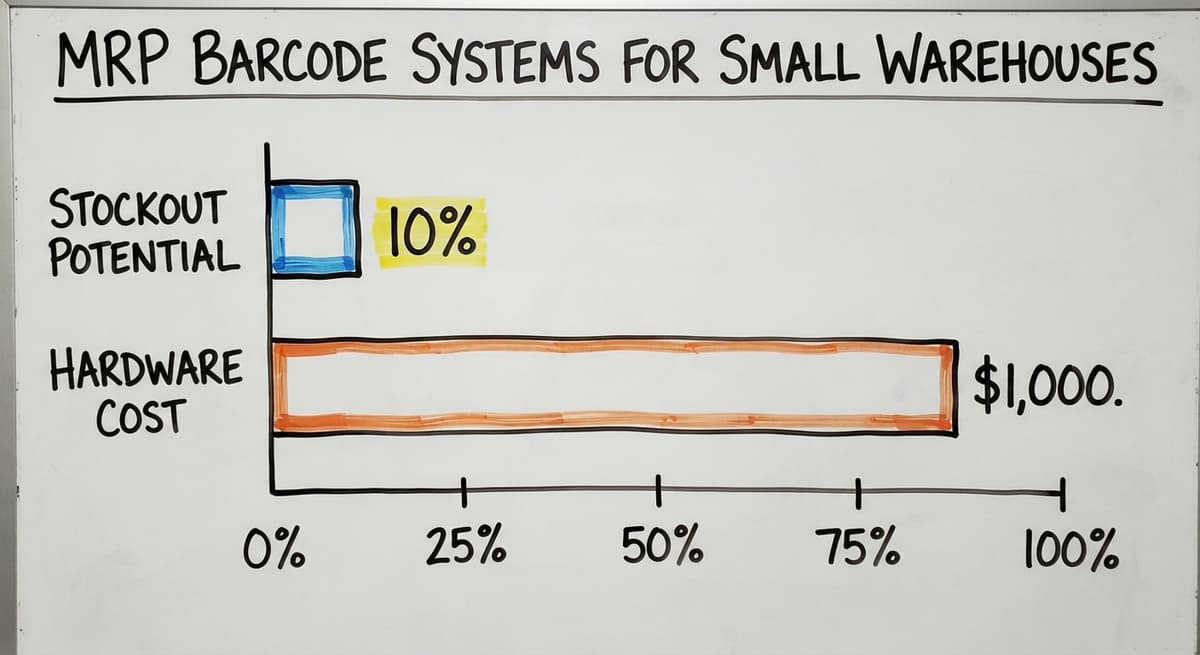
One wrong receiving count in a 10-SKU operation can cause a stockout on 10% of the product range. The same error in a 1,000-SKU warehouse is noise.
The system should fit the operation. A small distributor does not need a 200-screen ERP. It needs accurate scan counts feeding a reorder calculation. That is achievable with basic hardware and a system sized for the team.
What does it look like running on your own process?
The first thing you see is it running on your own process, at no build cost. The subscription starts once it is live and doing the job, not before.
Book a callHardware You Need to Get Started
The hardware list for a small operation is short.
- A handheld barcode scanner handles most scan points. Wired or wireless both work; wireless gives more flexibility on a receiving dock.
- A label printer prints barcode labels for items that arrive without them.
- Labels that match the printer type and survive the storage environment.
For very low-volume operations, a mobile phone with a camera scanning app can substitute for a dedicated scanner while volume is small. The total hardware cost for a small setup can run well under $1,000. This does not need a capital budget approval.
What Goes on a Barcode Label?
The label content drives what MRP can read and plan from. At minimum, encode the SKU so the system knows which item was scanned. Beyond that, the most useful fields are:
- Lot number, for traceability and expiry tracking
- Bin location, so put-away and pick scans update the right slot
- Supplier code, for reorder routing
- Quantity per pack, if the item ships in cases
Consistency across all products matters more than label complexity. A label with 5 fields applied to every SKU beats a sophisticated label applied to half of them.
How Do MRP Barcode Systems Work Alongside the Accounting Software?
Many small distributors already use a standard accounting package for purchasing and financials. The question is not whether to replace it. The question is how to connect scan data to it.
A barcode-driven inventory planning layer can sit alongside the accounting software rather than under it. Scan data updates stock counts in the planning system.
When MRP triggers a reorder, the suggested buy order can flow into the accounting software for approval and payment. The financial record stays in the accounting software. The planning logic lives in the layer that reads the scans.
accounting integration for warehouse operations works best when the two systems have a clear division: the accounting software handles money, the inventory layer handles movement.
Trying to run MRP inside the accounting software alone is like running a warehouse from an accounting ledger. It can be done, but it was not built for it.
The goal is not to replace what works. It is to connect the scan data to the decision.
MRP Barcodes Without a Full ERP
A common concern is that MRP needs a large enterprise system. It does not. The planning calculation itself is simple arithmetic: current stock, minus demand, plus supply on order, compared to the reorder point. Any system that holds those 4 numbers can run MRP.
Custom warehouse management software for small distributors can deliver full MRP barcode features at a fraction of the cost and complexity of an enterprise ERP.
The US Census Bureau's Monthly Wholesale Trade data shows that small wholesale firms carry large inventory relative to their sales volume, which means the planning problem is real even at small scale. The software solution does not need to be large to match it.
The goal is accurate scan data feeding a planning calculation. That is the outcome. The software brand is secondary.

Common Mistakes When Implementing an MRP Barcode System
Most MRP barcode rollouts that fail do not fail because of the technology. They fail because of process gaps.
- Inconsistent labeling means some items scan and some do not, leaving holes in the data MRP reads.
- Skipping scan points creates phantom stock. Items that were picked but not scanned still appear as available.
- Undertrained staff scan the wrong barcode or skip steps under time pressure, especially on a busy receiving dock.
- Starting with too many SKUs at once makes it hard to spot errors before they spread across the whole catalog.
A phased rollout on a pilot group of 20 to 30 SKUs lets the team build the habit before the stakes are high.
Once the process is clean on the pilot group, expanding is straightforward. The discipline of scanning every item at every step is the system. The hardware just records it.
Not sure this is the right shape for your operation?
The call is free. Describe how the work runs today. We map it on a call and show you what it would look like built around that, before you spend anything.
Book a callHow Long Does It Take to Set Up an MRP Barcode System?
For a small distributor, a realistic phased rollout runs 4 to 8 weeks from labeling the first pilot SKUs to running live reorder suggestions from scan data. That timeline assumes a team of 5 to 15 people, an existing accounting setup, and a clear pilot SKU group.
Week 1 to 2 covers labeling the pilot group and configuring scan points. Week 3 to 4 is live scanning with staff trained on each step.
Week 5 to 6 compares MRP output to manual counts to verify accuracy. Expansion to the full SKU range follows once the pilot is clean.
A big-bang go-live, where every SKU and every scan point goes live on the same day, is the fastest way to create chaos in a small team. Phased rollout is slower on paper and faster in practice.
Setup does not need months of consulting. It needs a clear process and a team that scans every item, every time.
Signs Your Operation Is Ready for an MRP Barcode System
Readiness is not about technology. It is about pain. Check whether any of these are true for your operation right now.
- Stockouts happen more than once a month and the cause is always a surprise
- Reorder decisions rely on a gut check or a count someone did last week
- Receiving errors cause problems downstream, in picking, packing, or invoicing
- Staff manually type scan data into a spreadsheet before anyone can see the count
- Buy orders are sometimes duplicated because two people saw the same low-stock alert
If 2 or more of those are true, the operation is already ready. The barrier is not ability. It is the first step of auditing the current scan points and choosing a pilot group.
If your team is already scanning barcodes and then typing the data somewhere else, you have the hardware. You just need the connection.

What Should You Look for in an MRP Barcode Solution?
Skip the feature list. Ask outcome questions instead.
- Does it reduce stockouts by keeping scan counts current between orders?
- Does it cut the manual data entry step that currently sits between the scanner and the planning decision?
- Does it connect to the accounting software without a custom development project?
- Can staff learn the scan workflow in a day, not a week?
- Is there a local or dedicated support contact, not just a help ticket queue?
Rollout timeline matters as much as features for a small team. A system that takes 6 months to configure is not the right fit for a distributor that needs a result in 6 weeks.
Short timelines and a clear division of who does what during setup are signals that the vendor has done this before.
The right solution fits the workflow you already have and improves it. It does not ask you to rebuild the operation to fit the software.
Getting Started with an MRP Barcode System
The first step is an audit, not a buy. Walk the warehouse and list every point where an item moves. Note which of those points currently has a scan and which relies on a manual entry or no record at all.
Then choose a pilot SKU group. Pick 20 to 30 items that move regularly and are easy to label. Set reorder points and quantities for each one.
Label them, scan them at every movement point for 2 weeks, and compare the MRP output to a manual count.
If the counts match, the system is working. Expand from there.
Every operation is different. The scan points that matter in a 3-dock facility are not the same as those in a single-room warehouse.
If you want to talk through what the right setup looks like for your specific operation, that conversation is more useful than any generic product demo.
Frequently asked questions
How to make a mrp barcode?
To make an MRP barcode, decide what data to encode (at minimum, the SKU), choose a barcode format (GS1-128 is standard for warehouse use), print the label on a thermal label printer, and apply it to the item or bin. The barcode itself is just a printed label.
The MRP part comes from connecting your scanner to a system that reads the scan and updates the stock count automatically. If you are starting from scratch, begin with Code 128 or GS1-128, use a basic thermal printer, and make sure every label uses the same format across your SKU range.
What is an MRP label?
An MRP label is a barcode label applied to a product, bin, or carton so that scanning it updates the stock record that a material requirements planning system reads. It encodes the SKU, and may also include lot number, bin location, supplier code, and quantity.
The label itself is standard barcode printing. What makes it an MRP label is that the scan data flows into a planning system rather than stopping at a basic inventory log.
How do I print MRP labels?
Print MRP labels using a thermal label printer connected to your inventory or warehouse system. The system generates the barcode from the SKU and any other fields you have configured, and sends it to the printer. A major scanner maker and Brother both make reliable thermal printers suited to warehouse use at entry-level price points.
For the barcode format, GS1-128 is the most widely supported in distribution settings. Make sure the label size fits your product and that the adhesive suits the storage temperature, since labels that fall off in cold storage defeat the purpose.
What is an MRP tag?
An MRP tag is the physical label or ticket attached to an item that carries the barcode or identifier a material requirements planning system reads. The term is used interchangeably with MRP label in most warehouse settings.
In older operations, MRP tags were paper tickets filled in by hand. In a modern barcode-driven system, the tag is a printed barcode label that a scanner reads at each movement point, removing the handwriting step entirely.
Can a small distributor use an MRP barcode system without a full ERP?
Yes. MRP is a planning calculation, not a software brand. A small distributor needs accurate scan counts, a reorder point per SKU, and a system that compares the two and suggests a buy order. That can be done with a mid-market or custom warehouse system that costs far less than an enterprise suite.
Many small distributors run this alongside the accounting software rather than replacing it.
How do cycle counts keep MRP data accurate?
Cycle counting means scanning a portion of inventory on a regular schedule, rather than counting everything once a year. Each cycle count scan compares the physical count to the system record and corrects any gap.
Done weekly on fast-moving items, cycle counts prevent small errors from compounding into large planning mistakes. Barcode scanning makes each count fast enough to do without disrupting daily operations.
What are the most common mistakes when implementing an MRP barcode system?
The most common mistakes are inconsistent labeling across SKUs, skipping scan points under time pressure, and trying to go live on the full SKU range at once.
Staff training is the most overlooked step: if workers do not scan every item at every movement point, the data MRP reads will be wrong regardless of the software. Start with a pilot group of 20 to 30 SKUs, prove the process, then expand.
How does an MRP barcode system work alongside the accounting software?
A barcode-driven inventory planning layer sits alongside the accounting software rather than replacing it. Scan data updates stock counts in the planning system. When MRP triggers a reorder, the suggested buy order flows into the accounting software for approval and payment.
The accounting software handles the financial record. The inventory layer handles stock movement and planning. The two systems divide the work rather than overlap it.
What information must be printed on an MRP label?
In the retail sense used in India, an MRP label carries the maximum retail price inclusive of taxes, the net quantity, the month and year of packing, and the packer's name and address. That is a pricing label; the MRP in this guide is material requirements planning, and the two share only the letters.
How do I create an MRP barcode sticker?
Generate a Code 128 label with the SKU as the value, add the human-readable number beneath, and print on thermal stock.
If the label must also carry a lot or a date for planning, use a GS1-128 or a QR code so the scan captures all three at once.
What is the difference between an MRP barcode and a QR code?
The barcode is the label; MRP is what the scan feeds. A 1D barcode carries the item number alone, a QR code can carry item, lot, and quantity, and either one drives the planning calculation once the scan lands in the system.
Which barcode type is best for products in India?
EAN-13 from GS1 India for anything sold through retail, since that is what the register expects. For internal planning labels the country does not matter: Code 128 or a QR code, printed from the inventory system.
What is in a free first look?
A 30 minute call, your operation mapped, and a clear picture of what we would build. No obligation and nothing to install.
Book a callRelated guides
More on the same work.
Guides
- Barcode Abbreviation
- Barcode Scan Machine
- Tracking Number Barcode
- Barcode Reader Machine
- Barcode Scanner App Ios
- 2d Barcode Readers
- Barcode Producer
- Barcode Systems for Warehouse
- Barcode Reader Description
- Barcodes and Labels
- Alphanumeric Barcode
- Barcode Scanner Inventory System
- Lpn Barcodes
- Imager Barcode Scanner
- Barcode System for Inventory Free
- Inventory Management Software Barcode Scanner
- Make Barcode
- 2d Wireless Barcode Scanner