

What Are The Numbers On A Barcode
You scan hundreds of barcodes a day. But do you know what those numbers actually mean? This guide breaks down every digit in plain language, connects each one to a real warehouse task, and explains what barcodes cannot do on their own.
Published 22 July 2026. Reviewed and updated 15 September 2026.
Book a callThe Short Answer
The numbers on a barcode are a structured product identifier. Each digit group plays a specific role: identifying the country, the manufacturer, the product, and verifying the scan was accurate.
The black bars and white spaces are simply a visual way to encode those numbers so a scanner can read them quickly. If you want the full breakdown of what each digit means and why it matters in a warehouse, keep reading.
Would you rather have it built around your operation?
The first look is free. If you would rather not compare products, describe how your operation already works and we build the system around it.
Reviewed September 2026. Each figure comes from the assumptions stated beside it, so you can substitute your own and the arithmetic still holds.
The arithmetic is worth doing before the software conversation. 3 people spending 6 hours a week between them chasing the same questions, at 22 dollars an hour, is 936 hours a year of paid time spent confirming what a system would already know. Over 3 years that is 2,808 hours.
No build cost. You see it running on your own process first, and the monthly subscription starts only once it is live.
Book a callWhat Is a Barcode, Actually?
A barcode is a printed pattern that a scanner reads as a string of numbers. The black bars represent binary data that decodes into digits. The number printed below the bars is the human-readable version of that same data.
One thing worth knowing: barcodes do not store price, description, or stock level. All of that lives in a database connected to the barcode number.
As GS1, the global standards body that manages barcode numbering, puts it: "A barcode is simply a carrier of information," and the meaning of that information depends entirely on the system reading it. You can read more about how that works at gs1.org/standards/barcodes.
The barcode is the key. The database is the lock.
What Do the Numbers on a UPC Barcode Actually Mean?
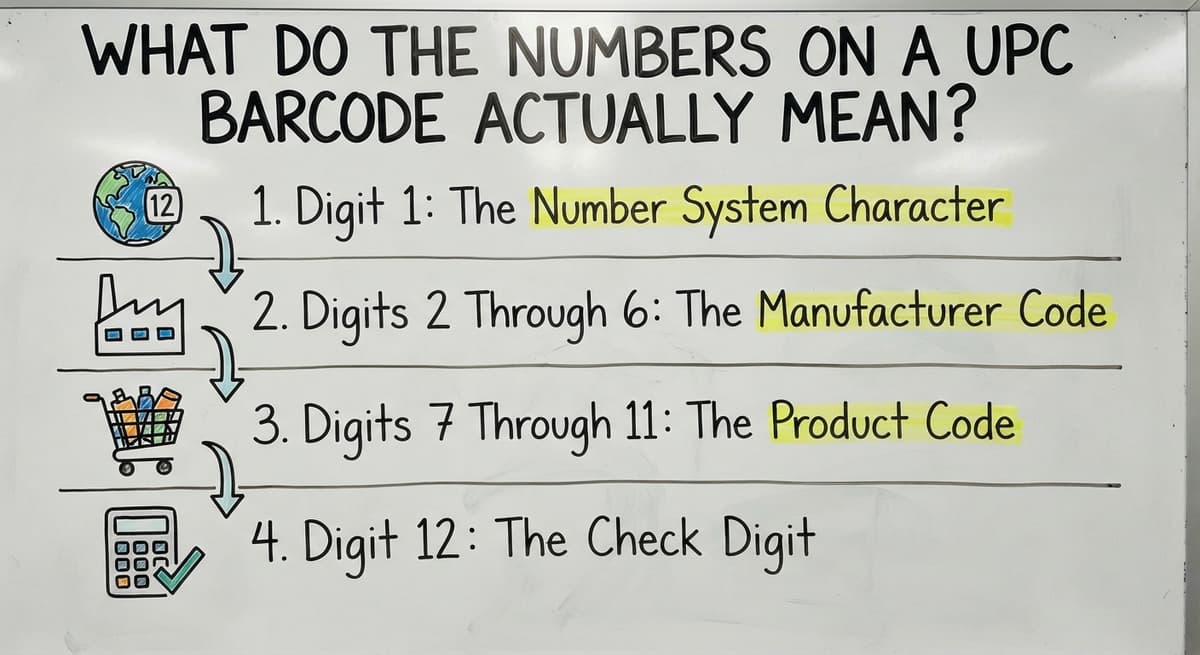
UPC-A is the standard 12-digit barcode found on most retail and wholesale products in North America. Each digit position has a defined purpose, and understanding that structure helps you catch errors, trace products, and manage receiving more correctly.
EAN-13, the international version, uses 13 digits and adds a country prefix at the front. Both formats follow the same logic, just at different lengths.
Digit 1: The Number System Character
The first digit tells a barcode scanner what category of product or organization issued the code. It is not a country code. It is a classification flag.
Common values include:
- 0 and 1: Standard grocery and retail products
- 2: Variable-weight items such as deli meats or produce priced by the pound
- 3: Pharmaceuticals and health products
- 4: Store loyalty or in-store use only
- 5: Coupons
For most warehouse receiving work, you will see 0 or 1 on almost every carton. A 2 or 5 showing up on an inbound shipment is worth a second look.
Digits 2 Through 6: The Manufacturer Code
The manufacturer code, digits two through six, identifies the company that made or registered the product. GS1 assigns every manufacturer a unique prefix, so no two companies share the same code.
This is the digit range that lets you trace a product back to its source. If a shipment arrives with damaged goods and you need to contact the supplier, the manufacturer code is the fastest path to that information.
Wholesale distributors use this prefix daily, without realizing it, every time they sort inbound freight by vendor.
Manufacturer codes are purchased through GS1. Smaller companies sometimes license a prefix from a third party, which is why some codes point to a licensing agency rather than the brand name on the box.
Digits 7 Through 11: The Product Code
The product code, digits seven through eleven, is assigned by the manufacturer to identify a specific item. Different sizes, colors, and setups of the same product each get a unique product code.
A single unit and a case of 12 of the same item will carry different barcodes.
So will a 16-ounce and a 32-ounce version of the same product. This is the digit range most relevant to warehouse receiving and SKU management, because it is what separates one line item from another in your system.
When a pick-and-pack error sends the wrong size to a customer, the product code is where the mismatch originated.
Is the comparison easier when one option is built for you?
Yes. Off-the-shelf means fitting your process to the software, and custom is the other way round. The first look costs nothing.
Book a callDigit 12: The Check Digit
The last digit is a calculated value used to confirm the scan was accurate. A scanner runs a specific math formula against the first 11 digits and compares the result to digit 12.
If the numbers do not match, the scanner rejects the scan as an error rather than logging a wrong product. This single digit prevents misreads from silently corrupting your inventory counts. A barcode that is slightly smudged or printed at a low angle might produce a plausible-looking number.
The check digit is what catches it before that bad read becomes a phantom unit in your system.
The formula is a weighted sum called the Luhn-adjacent GS1 algorithm, but you never need to run it manually. The scanner handles it in milliseconds.
Other Barcode Formats You Might See
UPC-A and EAN-13 are the most common formats in retail, but distribution and warehouse environments use several others. Here is a quick reference:
| Format | Structure | Where You See It |
|---|---|---|
| EAN-13 | 13 digits | Imported goods, international retail |
| Code 128 | Alphanumeric, variable length | Shipping labels, carton tracking |
| Code 39 | Alphanumeric, older standard | Industrial, government, some automotive |
| QR Code | 2D matrix | URLs, serial numbers, returns portals |
Code 128 is the format you will encounter most often on inbound freight labels and outbound shipment records. It can encode letters and numbers, which makes it useful for order numbers and lot codes that do not fit the numeric-only UPC structure.

Does a Barcode Number Tell You the Price or Stock Level?
No. The barcode number itself contains no price, no stock level, no product description, and no location data. All of that information lives in a database that is linked to the barcode number.
When a scanner reads a barcode, it sends the number to the connected system, which looks up everything else. This is why the same product can ring up at different prices at different retailers. Each store maps that barcode number to its own pricing record. The barcode is identical. The database behind it is not.
This also explains why a good barcode inventory system matters as much as the barcode itself. A scanner with no system behind it is just a number reader.
What does it look like running on your own process?
The first thing you see is it running on your own process, at no build cost. The subscription starts once it is live and doing the job, not before.
Book a callHow Do Warehouses and Distributors Use Barcode Numbers?
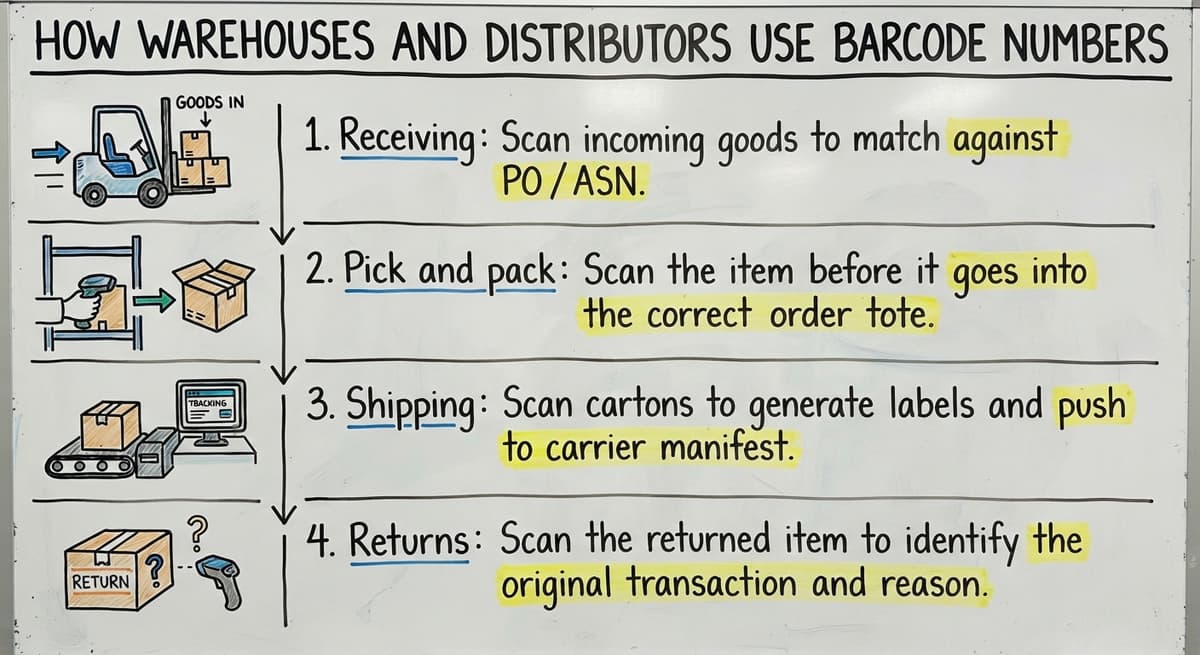
Barcode numbers are most valuable when they trigger an action in a connected system. Here is how that plays out across a typical warehouse day:
- Receiving: Scan incoming goods to match against open buy orders and update stock counts without manual entry. Warehouse receiving process automating built around barcode scanning removes the step where miskeys create ghost inventory.
- Pick and pack: Scan the item before it goes into the box to confirm the right product code was pulled, not just the right product name.
- Shipping: Scan cartons to generate labels and push shipment records to the carrier and the customer automatically.
- Returns: Scan the returned item to identify the exact SKU, condition, and original order before routing it to the correct bin.

What Decides What a Scan Does?
Each scan is a data point, and each data point is only useful if the system receiving it is set up to act on it. How barcode scanning works in a warehouse depends almost entirely on what the scanner is connected to, not the scanner itself.
When Barcode Numbers Cause Problems in Manual Systems
Manually typing barcode numbers into a spreadsheet is where most warehouse errors begin. A 12-digit number entered by hand has many opportunities to go wrong, and two products with similar codes are easy to transpose under time pressure.
Spreadsheets and paper logs cannot validate a check digit in real time. A scanner rejects a bad read instantly. A spreadsheet accepts whatever you type.
Misread or mistyped barcode numbers lead to phantom inventory, missed shipments, and customer complaints that are hard to trace back to their source. By the time you discover that 40 units are showing as in stock but physically absent, the original entry error is buried under weeks of transactions. This is the working pain that makes the jump from manual logs to a barcode inventory system worth the effort.

Connecting Barcode Numbers to Your Inventory System
A barcode is only as useful as the system it talks to. A proper barcode inventory management system overview starts with mapping each barcode number to a SKU, a bin location, and a quantity. That mapping is what turns a scan into a record.
When that system connects to accounting software, a scan during receiving can update financials without a second round of data entry.
The accounting software inventory integration for distributors works this way: the barcode triggers the stock update, and the stock update flows into the books automatically.
Building Barcode Workflows Around How Your Team Already Moves
Custom inventory software for small distributors takes shape around the barcode workflows already in place, rather than forcing your team to change how they move through the warehouse.
The goal is a system where the barcode number does the administrative work so your team can focus on moving product correctly and on time.
If your current setup needs someone to manually type what a scanner could send in a fraction of a second, that gap is worth closing.
Frequently asked questions
What does 3 of 9 barcode mean?
Code 39, sometimes called 3 of 9, is a barcode format where each character is represented by 9 elements (5 bars and 4 spaces), and exactly 3 of those 9 elements are wide. It is an older alphanumeric format that can encode letters, numbers, and a few special characters. It is still used in some industrial, government, and automotive settings, though Code 128 has largely replaced it in modern distribution because Code 128 is more compact and supports a wider character set.
How do I decode a barcode?
The easiest way is to use a barcode scanner app on a smartphone, such as any free barcode reader app. Point the camera at the barcode and the app returns the number.
For UPC-A barcodes, you can then look up the number in a product database like the GS1 registry or Open Food Facts to see what company and product it belongs to. Decoding the bars manually is possible but impractical: each digit is encoded as a pattern of four alternating bars and spaces with specific widths.
How to read a barcode by hand?
For most practical purposes, you read the human-readable number printed below the bars and look up that number in your inventory system or a product database. The bars themselves encode that same number in binary patterns, and reading them without a scanner needs knowing the specific encoding table for the barcode format.
For UPC-A, each digit maps to a 7-bit pattern of bars and spaces. It is a useful exercise to understand once, but not something you would do in daily warehouse operations.
What does a barcode number tell you?
A UPC barcode number tells you the product category (digit 1), the manufacturer (digits 2 through 6), the specific product (digits 7 through 11), and includes a check digit to verify the scan was accurate (digit 12). It does not tell you the price, stock level, or product description. Those details live in a database that is linked to the barcode number, which is why the same barcode can show different prices at different retailers.
What is the last digit on a barcode for?
The last digit is called the check digit. A scanner calculates a value from the first 11 digits using a specific formula and compares the result to the check digit. If they match, the scan is accepted.
If they do not match, the scanner flags an error rather than logging a potentially wrong product. This prevents smudged or partially damaged barcodes from silently recording the wrong item in your inventory system.
What is the difference between UPC and EAN barcodes?
UPC-A uses 12 digits and is the standard format for retail products in North America. EAN-13 uses 13 digits and is the international standard.
The extra digit in EAN-13 is a country prefix added to the front of the number. Both formats follow the same structure for manufacturer code, product code, and check digit. Most modern barcode scanners read both formats without any setup change.
Who assigns barcode numbers to products?
GS1, a global non-profit standards organization, assigns manufacturer prefixes to companies. A business applies to GS1 for a unique prefix, and then assigns individual product codes within that prefix to each of its items.
Smaller companies sometimes license a prefix through a third-party reseller rather than purchasing directly from GS1, which is why some barcodes trace back to a licensing agency rather than the brand on the label.
How many digits does a barcode have?
The answer depends on the format. UPC-A barcodes have 12 digits and are the most common format in North American retail. EAN-13 barcodes have 13 digits and are used internationally.
Code 128 and Code 39 are variable-length formats that can hold more or fewer characters depending on what information needs to be encoded. QR codes are two-dimensional and can store hundreds of characters, including URLs and serial numbers.
Can I tell a product's country of origin from its barcode?
No. The first digits identify the GS1 member organisation that issued the prefix, which is where the company registered, not where the product was made. A code starting with 0 or 1 was registered through GS1 US and could be made anywhere.
What does the last digit of a barcode mean?
It is the check digit, calculated from the other digits. The scanner recomputes it on every read and rejects the scan if it does not match, which is how a misread is caught before it reaches your records.
How does a barcode scanner read the lines?
It measures the widths of the dark bars and light spaces as reflected light, and each group of widths maps to one digit. The decoder assembles the digits and checks the last one before sending the number to software.
How is a barcode check digit calculated?
Add the digits in odd positions and multiply by 3, add the digits in even positions, and total them. The check digit is the number that brings that total up to the next multiple of 10.
What is in a free first look?
A 30 minute call, your operation mapped, and a clear picture of what we would build. No obligation and nothing to install.
Book a callRelated guides
More on the same work.
Guides
- Tracking Number Barcode
- Serial Numbering
- Serial Numbers on Products
- Manufacturing Serial Number
- Manufacturer's Serial Number
- Barcode Abbreviation
- Barcode Scan Machine
- Barcode Reader Machine
- Barcode Scanner App Ios
- 2d Barcode Readers
- Barcode Producer
- Barcode Systems for Warehouse
- Barcode Reader Description
- Barcodes and Labels
- Alphanumeric Barcode