

Package Scanning
Package scanning is how a warehouse turns a physical box into a digital record. A scanner reads the barcode on the label. The software logs what moved, where it went, and when. That is the whole idea.
Reviewed September 2026. Each figure comes from the assumptions stated beside it, so you can substitute your own and the arithmetic still holds.
Published 15 August 2026. Reviewed and updated 15 September 2026.
Book a callWhat Is Package Scanning, and How Does It Work?
Package scanning is the act of reading a barcode or label on a box to record its movement through your operation.
A scanner captures the pattern of lines or dots on the label and converts it into a code. That code goes to whatever software is listening, which then matches it to an item record and updates a quantity or location.
Scanning happens at 4 key points: receiving, put-away, pick and pack, and outbound shipping. At each point, the scan creates a timestamped record. Nothing gets logged from memory. Nothing gets missed because someone forgot to write it down.
Would you rather have it built around your operation?
The first look is free. If you would rather not compare products, describe how your operation already works and we build the system around it.
No build cost. You see it running on your own process first, and the monthly subscription starts only once it is live.
Book a callWhy Does Scanning Matter for Tax-Year Inventory Valuation?
The IRS makes the stakes clear. IRS Publication 538 states: "To figure taxable income, you must value your inventory at the beginning and end of each tax year." Scanning gives you the data to do that correctly, without a manual count scramble at year-end.
Scanning is the input method. The software is the system. Both have to be in place for it to work.
What Types of Barcodes Are Used on Warehouse Packages?
The 4 formats you will see most often in a distribution or fulfillment setting are Code 128, UPC, QR code, and GS1-128. Each one shows up in a different context.
- Code 128 encodes text and numbers in a compact strip. It is common on internal labels you print yourself, such as bin locations or work orders.
- UPC is the retail barcode on consumer goods. If you receive product from a manufacturer, it likely has a UPC already.
- QR code holds more data and can be read by a phone camera. Some operations use them for lot tracking or links to spec sheets.
- GS1-128 is the standard for shipping labels between trading partners. It can carry item number, quantity, lot number, and expiry date in one scan.
For most small operations, Code 128 for internal labels and GS1-128 for inbound and outbound shipments will cover everything you need.
Scanner Hardware and Where Scanning Fits in the Workflow
Which scanner does a small warehouse actually need?
Four types of scanners are common in warehouse settings. The right one depends on how your team moves and what they need to do while scanning.
| Scanner type | Best use | Trade-off |
|---|---|---|
| Handheld scanner | General receiving and shipping | Ties up one hand |
| Ring scanner | Pick and pack lines | Higher cost per unit |
| Fixed-mount scanner | Conveyor or dock door | Only works at one spot |
| Mobile computer | Full warehouse mobility | Heavier, more to manage |
Most modern scanners connect over Wi-Fi or Bluetooth. For a team of 5 to 15 people, 2 to 4 handheld scanners connected to a central software system is a practical starting point.
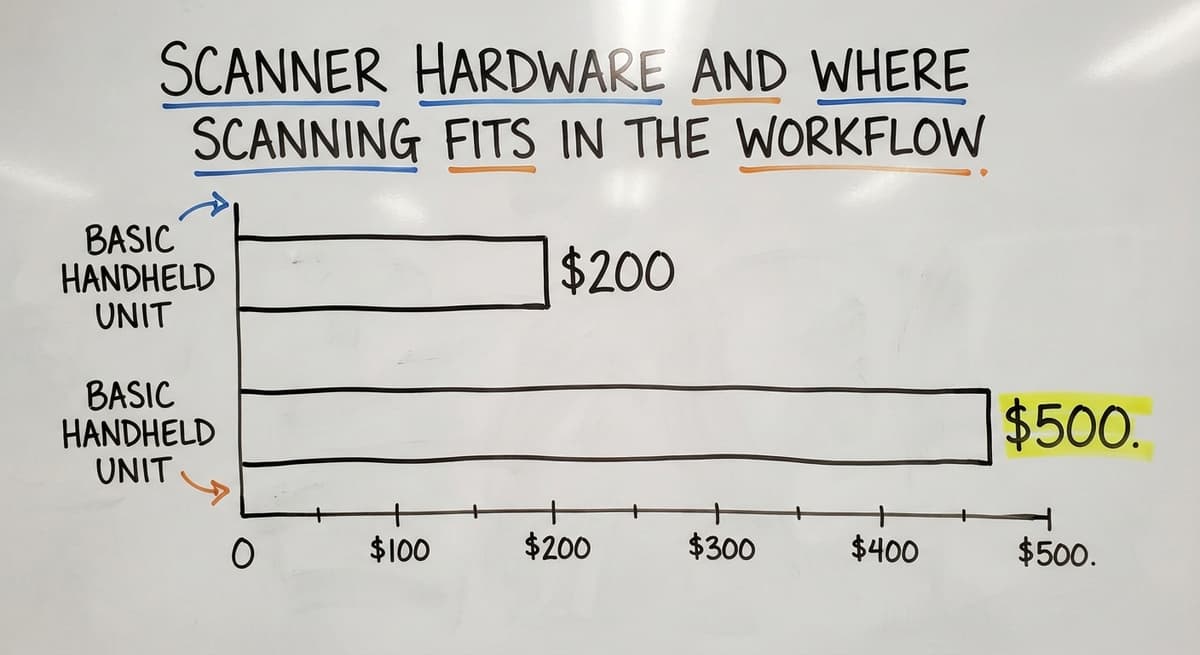
A basic handheld unit runs $200 to $500. That is a fraction of what a single mis-ship or receiving error costs over a year.
Is the comparison easier when one option is built for you?
Yes. Off-the-shelf means fitting your process to the software, and custom is the other way round. The first look costs nothing.
Book a callWhere scanning fits in the workflow
Each scan point captures different data and solves a different problem.
- Receiving dock: Scan confirms what actually arrived against the buy order. Discrepancies surface at once, not at month-end.
- Put-away: Scan records which bin the item went into. Your team can find it later without a search.
- Pick and pack: Scan-to-pick guides the picker to the right item and confirms the right quantity before the box is sealed.
- Outbound shipping: Final scan ties the shipment to the order and closes the record.
Skipping any of these points leaves a gap. If you only scan at shipping, you still have no idea what is in your bins.

How Scanning Connects to Inventory Management and the accounting software
Every scan is a real-time inventory event. The scan sends a code to the software. The software matches it to an item record and updates stock levels, location, or order status. No clipboard. No manual entry at the end of a shift.
A Barcode Inventory Management System overview shows how this loop closes: scan in, record updates, counts stay current. That is the core of inventory accuracy.
How Scanning Works Alongside the accounting software Without Replacing It
The concern most owners raise is whether adding scanning means replacing the accounting software. It does not. Scanning software can sit on top of the accounting software and push updates to it.
Your books stay in the accounting software. Your warehouse data lives in the scanning system. The 2 talk to each other through a accounting integration for warehouses. The accounting software handles financials. The scanning system handles stock.
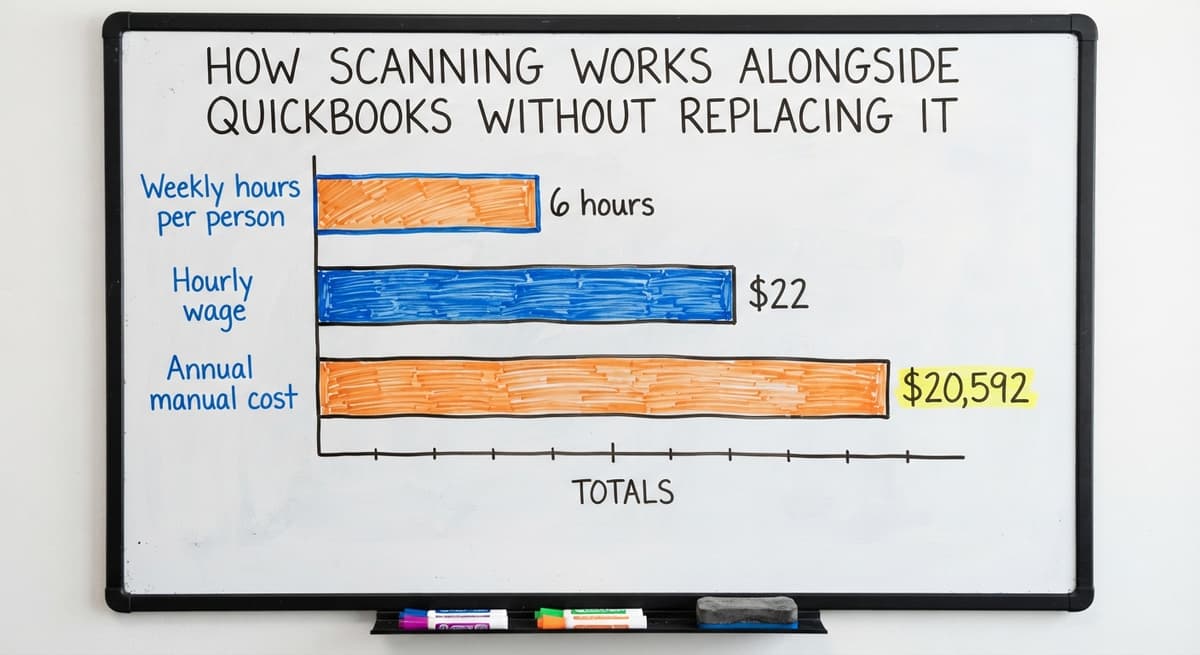
Consider the cost of not doing this. If 3 people each spend 6 hours a week on manual inventory entry at $22 an hour (near the median for stock clerks, per the US Bureau of Labor Statistics), that is $20,592 a year in labor doing work a scanner handles in seconds.

Is Your Spreadsheet Causing More Problems Than It Solves?
Spreadsheet tracking breaks in predictable ways. Items arrive at the dock but no one logs them until later. Shipments go out without a record. Counts are always a day behind. When someone does enter data, they type a quantity wrong or pick the wrong row.
Manual errors compound. A wrong count at receiving leads to a wrong pick weeks later. A mis-ship leads to a return, a credit, and a frustrated customer.
The Warehouse receiving process is where most of these errors start, and it is the first place scanning pays off.
Scanning is not a luxury for large operations. It is the fix for the specific pain that spreadsheets create: a record that is always behind the physical reality of your warehouse.
Label Printing and Setting Up Scanning for a Small Operation
Thermal label printers are the standard in warehouse settings. They print at the resolution a scanner needs to read reliably. Inkjet labels smear. Laser labels peel. Thermal labels hold up on a shelf or a box in a cold dock.
A label can carry any field your operation needs: item number, lot, location, expiry date, or a customer-specific code.
The label format has to match what your scanner expects. Mismatched formats are one of the most common reasons a new scanning setup fails in the first week.
What does it look like running on your own process?
The first thing you see is it running on your own process, at no build cost. The subscription starts once it is live and doing the job, not before.
Book a call
How to Roll Out Scanning in Four Steps
Setting up scanning for a small team follows 4 steps:
- Pick a scanner that fits how your team moves.
- Design labels that carry the fields your workflow needs.
- Connect the scanner to software that logs each scan.
- Start at 1 scan point, prove it works, then add the next.
A Custom warehouse software for small operations built around your existing process is faster to adopt than off-the-shelf software that forces a new workflow. Your team learns it in their language, not the vendor's.
Common Mistakes and How to Know If You Are Ready
Is your operation ready for package scanning?
Readiness is about pain level, not team size. If any of these sound familiar, you are ready:
- Inventory counts are wrong by the time you check them
- Receiving takes too long because no one is sure what came in
- Mis-ships show up as a regular complaint from customers
- Month-end matching feels like archaeology
Start with 1 scan point. Receiving is the right choice because it is where errors enter the system. Fix that first, then extend to Pick and pack workflow software once the receiving data is clean.
Mistakes to Avoid and What Wholesale Operations Need
The mistakes that slow teams down most are buying scanners before the software is ready, using label formats the scanner cannot read reliably, and scanning at only 1 point while leaving the rest of the workflow manual.
None of these are hard to avoid if you plan the full loop before you buy anything.
Wholesale and distribution operations handle high volumes of similar-looking items. A scan takes 2 seconds. A mix-up between 2 nearly identical SKUs can cost hours to untangle and hundreds of dollars in returns.
Lot tracking and serial number tracking, both supported by GS1-128 labels, are standard needs in this segment. Scanning supports both inbound and outbound accuracy without adding headcount.
Getting Started With Package Scanning
The path is short. Find the biggest pain point in your current workflow. Pick the scan point that addresses it. Connect it to your inventory system. Check that your labels print at the right resolution and your scanner can read them every time.
Your team does not need an ERP project or a 6-month rollout. A focused setup built around how you already move product can be running in days.
If you want a system built to your workflow rather than a generic one you have to adapt to, The Software Society builds custom warehouse scanning systems for small and mid-size operations.
Reach out and describe where your biggest inventory problem lives. That is where we start.
What the manual process costs, in numbers
Most articles on this topic address enterprise warehouses with full IT teams. This one is for the owner or operations manager of a 10-to-50-person wholesale or distribution business still running on the accounting software and clipboards.
The message is simple: scanning does not need a big overhaul. You can start at 1 point in your existing workflow and build from there.
Frequently asked questions
How do you scan a package?
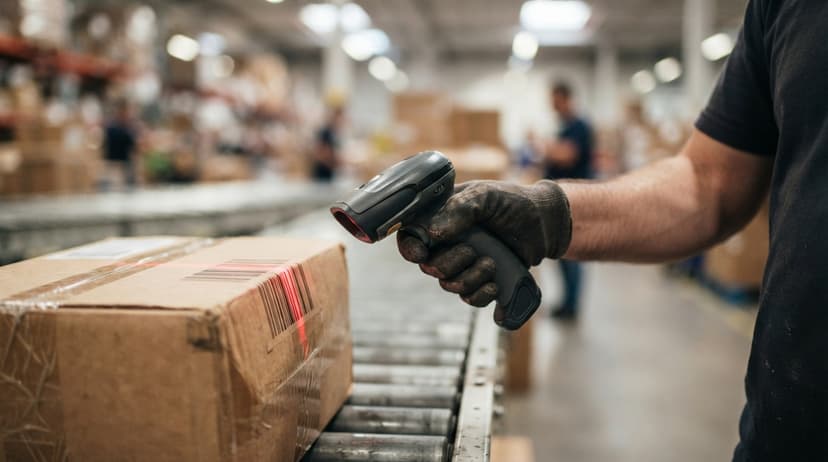
Point a barcode scanner at the label on the package and press the trigger. The scanner reads the barcode pattern and sends the code to your software, which logs the item, quantity, and timestamp.
The whole action takes about 2 seconds. If the label is damaged or the scanner cannot read it, most systems let you type the code manually as a fallback.
Is it normal for a carrier to not scan packages?
Carriers scan most packages at multiple points, but gaps do happen. A package may go unscanned if it bypasses a sorting facility, moves through a manual handling stage, or if the label is damaged.
Tracking updates can lag by 24 hours or more during peak periods. If a package shows no movement for several days, contact the carrier directly with the tracking number.
What does it mean if my package is getting scanned?
Each scan is a checkpoint. It means the carrier's system has recorded that your package passed through a specific location at a specific time. Multiple scans show the package moving through the network toward its destination.
A scan at a distribution center means it is in transit. A scan at a local facility means delivery is within 1 to 2 days.
Are all packages scanned by the carrier?
Carriers scan the majority of packages, but not every single one gets scanned at every point. Tracked services include regular scans; economy services record only pickup and delivery.
Some lower-tier mail classes receive fewer scan events. Packages handled manually or processed during high-volume periods may have fewer tracking updates than expected.
What types of barcodes are used on warehouse packages?
The 4 most common formats are Code 128, UPC, QR code, and GS1-128. Code 128 is used on internal labels. UPC appears on consumer goods from manufacturers.
QR codes work well for lot tracking. GS1-128 is the standard for shipping labels between trading partners and can carry item number, quantity, lot, and expiry date in a single scan.
Can package scanning work alongside the accounting software without replacing it?
Yes. Scanning software sits on top of the accounting software and pushes updates to it. The accounting software continues to handle your financials.
The scanning system manages warehouse data: stock levels, locations, and order status. The two connect through an integration layer, so you do not lose your existing accounting setup.
What scanner hardware does a small warehouse need to get started?
For most small operations, 2 to 4 handheld barcode scanners connected over Wi-Fi to a central software system is enough to start. A basic handheld unit costs $200 to $500.
Ring scanners are useful on pick lines but cost more. Fixed-mount scanners work at a single point like a dock door. Start with handhelds and add other types as the workflow grows.
What mistakes should you avoid when starting with barcode scanning?
Three mistakes come up most often. First, buying scanners before the software is set up, which leaves the hardware sitting unused. Second, printing labels in a format the scanner cannot read reliably, which causes constant failures at the scan point.
Third, scanning at only one point in the workflow and leaving the rest manual, which means errors still enter the system between scan points.
What is in a free first look?
A 30 minute call, your operation mapped, and a clear picture of what we would build. No obligation and nothing to install.
Book a callRelated guides
The rest of this guide, for the parts of the job this page does not cover.
Guides
- Barcode Scan Machine
- Scanning Manual
- Warehouse Scanning System
- Barcode Words
- 2d Image Barcode Scanner
- Upc Scanner Gun
- Barcode Reader Description
- Alphanumeric Barcode
- Inventory Management Software with Barcode
- Mrp Barcode
- Online Barcode
- Sku Formats
- Scanner Inventory Software
- Barcode Systems for Warehouse
- Make Barcode
- Inventory Tracking Barcode