


How To Create A Barcode
To create a barcode, assign a unique code to each item, generate the barcode image with a free tool, print the label, and link the code to a record in your inventory system. The whole process takes under an hour for a small batch. This guide covers every step, updated for the current setup tools available as of June 2025.
Published 20 August 2026. Reviewed and updated 15 September 2026.
Book a callWhat Is a Barcode, Actually?
A barcode is a machine-readable pattern that stores a short string of data, a number. The scanner reads that pattern and sends the number to a database. The database returns the matching record. The barcode itself holds almost nothing. It is a label that points to information stored elsewhere.
Think of it like a library call number: the number on the spine does not contain the book, it just tells the system where to look. That distinction matters when you set up your system, because a barcode with no matching record is worthless.
Would you rather have it built around your operation?
The first look is free. If you would rather not compare products, describe how your operation already works and we build the system around it.
Reviewed September 2026. Each figure comes from the assumptions stated beside it, so you can substitute your own and the arithmetic still holds.
No build cost. You see it running on your own process first, and the monthly subscription starts only once it is live.
Book a callCommon Barcode Formats and When to Use Each
Picking the right barcode format saves time later. The format needs to match your scanner and software.
- UPC-A: 12-digit format used for retail products sold in stores. Needs a licensed number prefix from GS1.
- Code 128: Flexible length, alphanumeric, and the standard for warehouse and shipping use. Works with nearly every modern scanner.
- Code 39: Older format, widely supported, good for internal systems that were built before Code 128 became common.
- QR Code: A 2D format that holds more data and is readable by phones without a dedicated scanner.
As GS1 explains on its barcode standards page, "barcodes are the global language of business, enabling the spotting of products, locations, assets and more." For most wholesale and warehouse work, Code 128 is the practical default because it handles alphanumeric codes of any length and is supported by every major inventory system.
What Do You Need Before You Start?
Before you generate a single barcode image, you need 4 things in place. Skipping this step is the most common reason a barcode project stalls.
- A list of every item, location, or asset you plan to label
- A numbering or naming scheme tied to your records
- A barcode generator tool, many of which are free online
- A label printer or a standard printer loaded with label stock
You also need a clear answer to where the barcode data will live. A spreadsheet works for small counts. A the accounting software item list handles basic product records.
A purpose-built barcode inventory system is the right choice once volume or team size grows. Decide this before you print anything.
Step 1: Choose Your Barcode Format
Match the barcode format to the scanner and software you already own. If your team uses dedicated USB or Bluetooth barcode scanners, Code 128 works with nearly every device on the market.
If staff will scan with phones, a QR code removes the need for a separate scanner entirely.
Avoid UPC-A unless you are selling retail. UPC needs a licensed prefix purchased through GS1, which adds cost and a registration step that internal operations do not need.
For a barcode inventory system inside a warehouse or distribution operation, Code 128 is the right starting point in almost every case.
Is the comparison easier when one option is built for you?
Yes. Off-the-shelf means fitting your process to the software, and custom is the other way round. The first look costs nothing.
Book a call
Step 2: Assign a Unique Code to Each Item
Each barcode must map to exactly 1 record. Two items sharing a code creates inventory chaos that is hard to untangle later.
If you already have SKUs or part numbers, use them. They are already unique and already tied to your records. If you are starting from scratch, a simple numeric sequence works fine. Start at 1001 and go up.
Write the scheme down and apply it consistently, because consistency matters more than a clever format. Avoid spaces and special characters in the code string. They cause read errors on some scanners and create import problems in spreadsheets and inventory software.
Step 3: Generate the Barcode Image
Free tools make this step fast. Enter your code string, pick your format, and download the image.
Good options for single barcodes include:
- Barcode Generator (free, browser-based)
- Cognex (free barcode tools in their online suite)
- Zint (open-source, runs locally)
For batch creation, LibreOffice Calc with a barcode font handles many items at once without paid software. Dedicated label design tools like Bartender or NiceLabel merge a CSV list with a label template and generate one image per row automatically.
Export as PNG or SVG for the cleanest print output. Avoid JPG, which compresses the image and can blur the bars. Always scan the image on screen before printing in bulk. One test scan catches format mismatches before they become a stack of wasted labels.
Step 4: Print and Apply the Barcode Label
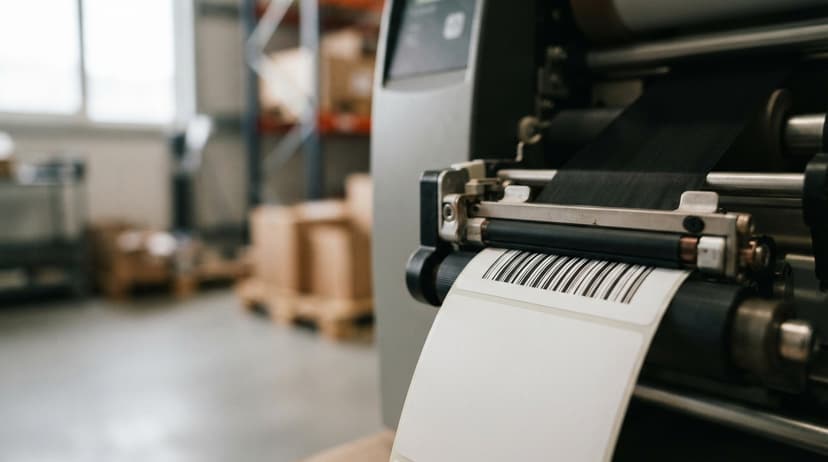
Print quality work out whether your labels scan reliably in the field. A thermal label printer, such as a major scanner maker, Dymo, or Brother model, produces the sharpest result and does not smear when the label gets wet or handled.
A standard laser printer on label stock works for low-volume or office use.
Size matters. A barcode label should be at least 1 inch wide for reliable scanning at normal distances. Smaller labels are scannable in theory but fail more often in practice, especially in low light or with worn scanners.
Where you apply the label is as important as how you print it. Apply to a flat, clean surface. Avoid curves, seams, and reflective packaging.
A label on the curved shoulder of a bottle or across a cardboard seam will scan poorly or not at all. Test every label with the actual scanner before the item enters your workflow.
Step 5: Connect the Barcode to Your Records
A printed label is not a working barcode until it has a matching record in your system. This step is where most small operations run into trouble.
Open your inventory system, the accounting software item list, or spreadsheet. Enter the code exactly as it appears in the barcode. One wrong character breaks the lookup. Scan the label and confirm the right record appears on screen before you put the item into circulation.
Do this for every item, not just a sample. The cost of a bad record showing up during a pick or a receiving check is higher than the time it takes to verify each one.
What does it look like running on your own process?
The first thing you see is it running on your own process, at no build cost. The subscription starts once it is live and doing the job, not before.
Book a callHow Do You Create Barcodes in Bulk for Many Items?
Bulk barcode creation is straightforward once your item list is clean. Export your item list to a CSV file with at least 2 columns: the code and the label text.
Open that file in label design software such as Bartender, ZebraDesigner, or NiceLabel. Map each column to a field in your label template. The software generates 1 label per row and prints the full run in sequence.
Review a sample sheet of 5 to 10 labels before printing the full batch. Check that the code, the label text, and the barcode image all match.
Bulk setup is worth the time if you have more than 50 items, because manual entry at that scale introduces errors that compound across every transaction.

Common Mistakes to Avoid
Most barcode problems trace back to setup errors, not equipment failures. Watch for these:
- Duplicate codes give 2 items the same barcode, and every scan after that returns the wrong record or an error.
- Orphaned labels exist as physical barcodes but have no matching record in the system, so scanning returns nothing.
- Poor label placement puts barcodes on curved or reflective surfaces where scanners cannot get a clean read.
- Low-resolution printing blurs the bars enough to make the code unscannable, especially on a standard inkjet.
- No intake process for new items means the system falls behind every time stock arrives without labels.
Building a simple checklist for receiving new items stops the last problem before it starts.
When Does a Barcode System Outgrow a Spreadsheet?
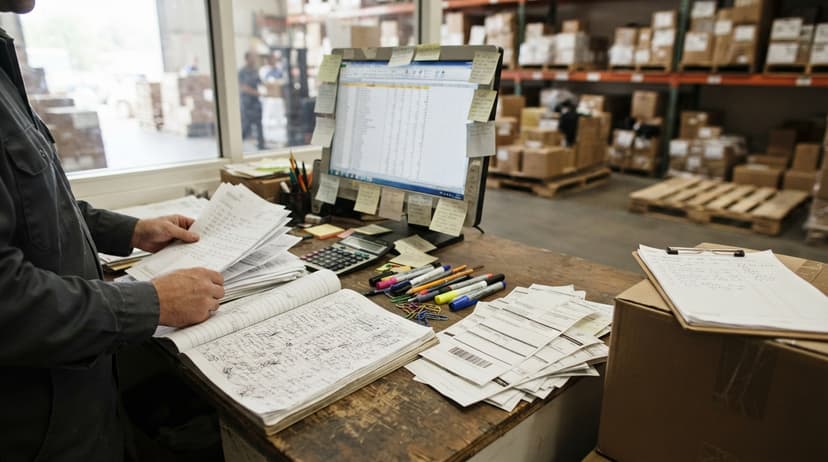
Barcodes alone do not manage inventory. The system behind them does. A spreadsheet works when 1 person updates it at a time. Add a second person scanning and updating simultaneously, and the file produces conflicting versions within days.
The accounting software handles basic item records and works for simple setups. It is not built for real-time scan-based receiving or pick confirmation.
The IRS is direct about why accurate inventory records matter: IRS Publication 538 states, "To figure taxable income, you must value your inventory at the beginning and end of each tax year." A system that drifts out of sync with physical stock creates a tax problem, not just an operations problem.
When scan data needs to drive fulfillment, receiving, or reorder decisions in real time, a purpose-built inventory layer becomes necessary.
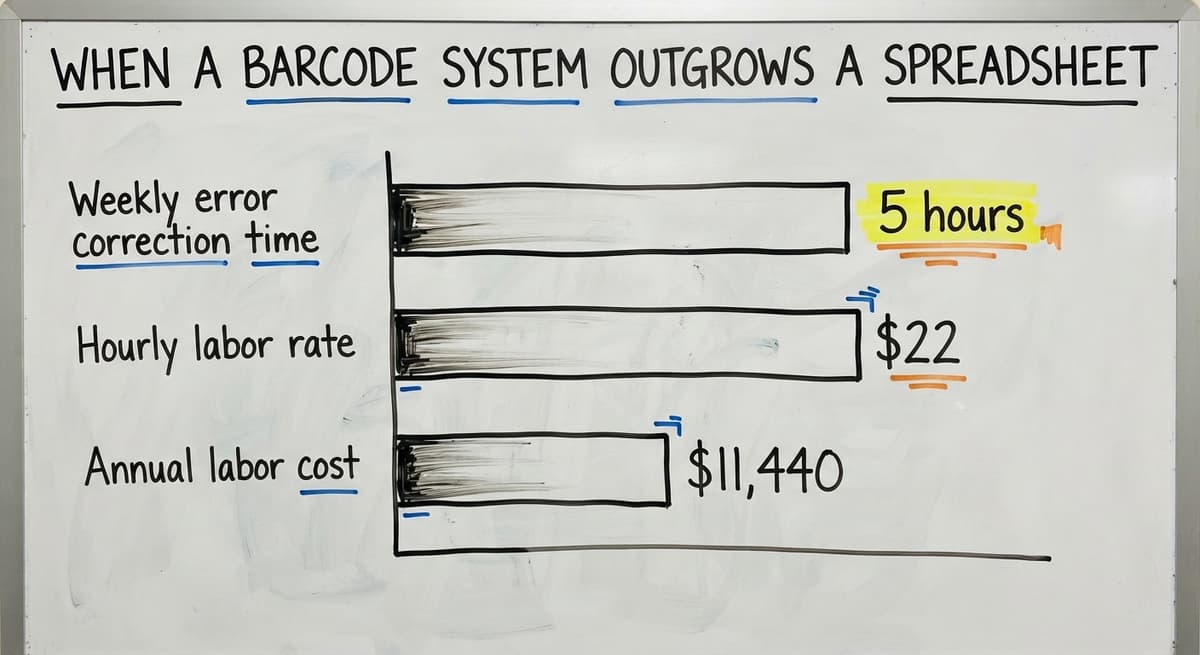
Consider the labor cost: 2 people spending 5 hours a week correcting inventory errors at $22 an hour, a figure consistent with BLS wage data for stock and order clerks, adds up to $11,440 a year in rework alone. That is the point where wholesale and distribution operations look for a barcode inventory management system that connects scanning, records, and reporting in one place.
If you are evaluating that next step, the guide on how to set up a warehouse inventory system covers what that transition looks like in practice.
Frequently Asked Questions
Can I create a barcode for free? Yes. Many free online generators create barcode images for internal use at no cost.
Free tools are fine for Code 128, Code 39, and QR codes. You only need to pay when you need a GS1-licensed UPC prefix for retail products.
Do I need to register a barcode? Only for retail UPC codes sold in stores. Internal barcodes for warehouse, asset, or inventory use need no registration. You assign the numbers yourself.
What barcode scanner do I need? Any USB or Bluetooth barcode scanner that supports your chosen format works. Most modern scanners read Code 128 and QR codes out of the box. Check the scanner spec sheet for the formats it supports before buying.
Can I create barcodes on my phone? Yes. Several free apps generate and display barcodes on a phone screen. For QR codes specifically, your phone camera can both create and read them. For printing, you still need a connected printer.
How do I get a barcode for my product? For internal use, generate one yourself with a free tool and assign any code you choose.
For retail products sold in stores, buy a GS1 Company Prefix through GS1 US, which gives you a licensed block of UPC numbers.
Is there a free app to generate barcodes? Yes. Apps like Barcode Generator and Zint are free. Browser-based tools from Cognex also work without installation. For bulk label printing, LibreOffice with a barcode font is free and handles large item lists.
How much does it cost to create a barcode? For internal barcodes, the cost is well zero. Free generators handle image creation.
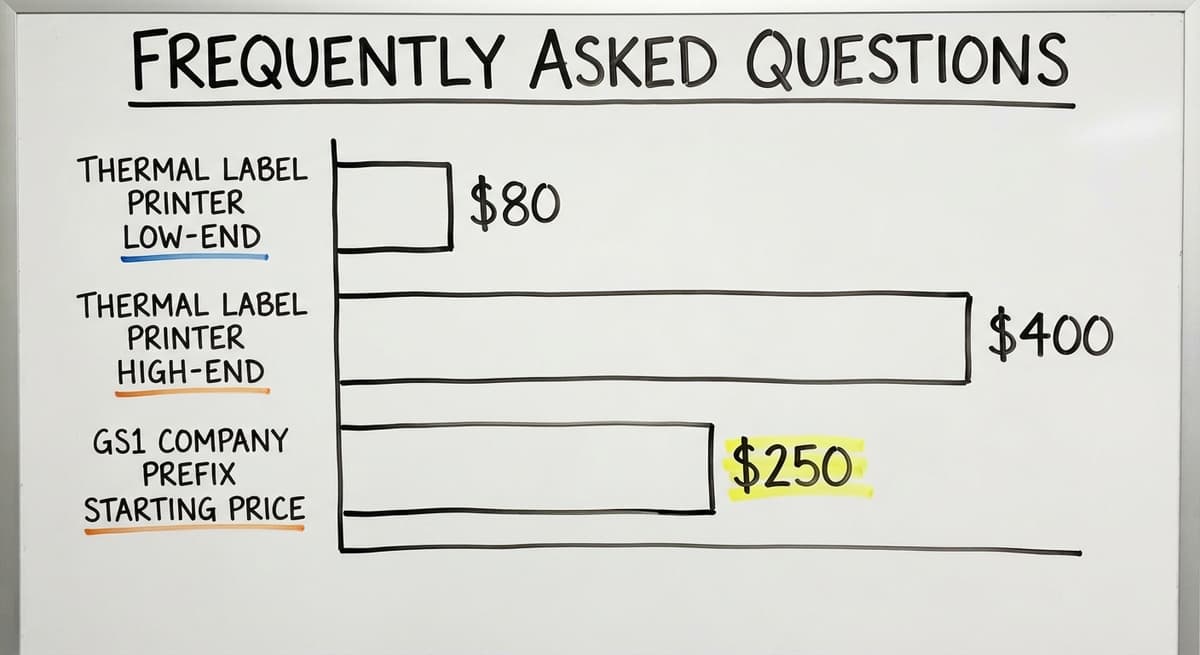
A thermal label printer runs $80 to $400 depending on the model, and label stock costs a few cents per label. A GS1 Company Prefix for retail UPC codes starts at around $250 per year for a small prefix block.
Does the accounting software support barcode scanning? the accounting software has limited barcode support for item lookup. The accounting software does not natively scan barcodes.
For operations that need scan-based receiving or picking, a separate inventory layer that integrates with the accounting software is the practical path. The page on the accounting software inventory limitations for distributors covers what that gap looks like in detail.
Frequently asked questions
Can I create barcodes on my phone?
Yes. Several free apps generate and display barcodes on a phone screen. For QR codes, your phone camera can both create and read them without extra hardware. For printing labels, you still need a connected printer, either wireless or via a computer.
How do I get a barcode for my product?
For internal use, generate one yourself with a free tool and assign any code you choose. For retail products sold in stores, buy a GS1 Company Prefix through GS1 US, which gives you a licensed block of UPC numbers recognized by retailers and point-of-sale systems.
Is there a free app to generate barcodes?
Yes. Browser-based tools from Cognex and sites like Barcode Generator work without installation. Zint is a free open-source option that runs locally. For bulk label creation, LibreOffice Calc with a barcode font handles large item lists at no cost.
How much does it cost to create a barcode?
For internal barcodes, the cost is well zero. Free generators handle image creation, and label stock costs a few cents per label.
A thermal label printer runs $80 to $400 depending on the model. A GS1 Company Prefix for retail UPC codes starts at around $250 per year for a small prefix block.
Can I create a barcode for free?
Yes. Many free online generators create Code 128, Code 39, and QR code images for internal use at no cost. You only need to pay when you need a GS1-licensed UPC prefix for retail products sold in stores.
Do I need to register a barcode?
Only for retail UPC codes sold in stores. Internal barcodes for warehouse, asset, or inventory use need no registration. You assign the numbers yourself and there is no governing body that tracks internal codes.
What barcode scanner do I need?
Any USB or Bluetooth barcode scanner that supports your chosen format works. Most modern scanners read Code 128 and QR codes out of the box. Check the scanner spec sheet for supported formats before buying, especially if you are using an older Code 39 system.
Does the accounting software support barcode scanning?
The accounting software has limited barcode support for item lookup. The accounting software does not natively scan barcodes.
Operations that need scan-based receiving or pick confirmation add a separate inventory layer that integrates with the accounting software rather than relying on the accounting software alone.
What barcode type should I use for my product?
UPC or EAN if it sells through retail, with the number issued by GS1. Code 128 for anything internal, since it holds letters and numbers and every scanner reads it.
A QR code only where a phone camera is the scanner or the label must carry more than an ID.
What is the difference between a barcode and a QR code?
A barcode holds a short number in one row of bars and points to a record.
A QR code holds up to 4,296 characters in a grid and can carry the record itself. Both read with a 2D imager; only the barcode reads with an older laser scanner.
How do I print barcode labels?
From a thermal label printer, $150 to $500, on direct thermal stock for labels that live under a year and thermal transfer for longer.
Print from the inventory system so the label and the record are created together, and test one label with a scanner before printing a roll.
How can I make a barcode from a SKU?
Use the SKU as the value in a Code 128 generator or in the label print of your inventory system.
Keep the SKU under 20 characters, avoid letters that look like digits, and print the SKU in text under the bars so a person can read it when the scanner cannot.
What is in a free first look?
A 30 minute call, your operation mapped, and a clear picture of what we would build. No obligation and nothing to install.
Book a callRelated guides
More on the same work.
Guides
- Create a Barcode
- Barcode Abbreviation
- Barcode Scan Machine
- Tracking Number Barcode
- Barcode Reader Machine
- Barcode Scanner App Ios
- 2d Barcode Readers
- Barcode Producer
- Barcode Systems for Warehouse
- Barcode Reader Description
- Barcodes and Labels
- Alphanumeric Barcode
- Barcode Scanner Inventory System
Common questions
- How to Create a Barcode System for Inventory
- How Do I Create My Own Barcodes
- How to Use a Barcode Scanner
- How to Read a Barcode Number
- How to Barcode Scanners Work
- How Barcode Scanning Works
- How Are Barcodes Read
- How to Make Your Own Barcode
- How Do Barcodes Work
- What Does a Barcode Look Like
- When Was Barcode Scanner Invented