

Scanning Manual
Learn exactly what to include in a scanning manual for a small warehouse. Covers receiving, picking, shipping, error handling, and the accounting software sync in plain language.
Published 22 July 2026. Reviewed and updated 15 September 2026.
Book a callWhat Is a Scanning Manual, and Why Does Your Warehouse Need One?
Reviewed and updated 15 September 2026.
The arithmetic is worth doing before the software conversation. 3 people spending 6 hours a week between them chasing the same questions, at 22 dollars an hour, is 936 hours a year of paid time spent confirming what a system would already know. Over 3 years that is 2,808 hours.
A scanning manual is a written guide that tells staff exactly how to use barcode scanners: what to scan, when to scan it, and what the software does with that data. It is not a general inventory policy. It is a step-by-step operations document that a new hire can follow on day one without asking anyone for help.
Without written scanning steps, each person builds their own habit. One worker scans receiving first, another confirms the buy order first. Small differences stack up into count errors that are hard to trace. A manual creates consistency even when staff turns over.
Accuracy also has a legal dimension. The IRS is direct about this: "To figure taxable income, you must value your inventory at the beginning and end of each tax year," as stated in IRS Publication 538.
A scanning manual is one of the practical tools that makes an accurate year-end count possible.
Small distributors running an accounting package plus spreadsheets feel this pressure most. One wrong scan can break the count for an entire product line. A manual keeps the process tight enough that errors stay rare and easy to fix.
Would you rather have it built around your operation?
The first look is free. If you would rather not compare products, describe how your operation already works and we build the system around it.
No build cost. You see it running on your own process first, and the monthly subscription starts only once it is live.
Book a callHow Does Barcode Scanning Work in a Small Warehouse?
A scanner reads the barcode and sends a number to the software, which matches that number to a product record and updates the quantity or location. That is the whole loop. Nothing more happens unless the software is set up to respond to that number.
The scanner itself is just a reader. The work happens in the inventory software. A handheld scanner connects to the software over Wi-Fi and sends each scan in real time.
A wearable scanner does the same thing but leaves both hands free for picking. A fixed-mount scanner sits at a conveyor point and reads items as they pass.
For most small warehouses, a wireless handheld scanner is the right starting point. It is low cost, easy to replace, and compatible with most inventory software.
The scanner type matters when you write the manual because the steps change depending on how the device connects and what screen the staff member sees after each scan.
Every product needs a unique barcode before scanning can be consistent. Options include using the supplier's existing barcode, printing your own labels, or a mix of both.
Shelf and bin location barcodes make the manual simpler because staff scan the location first, then the item, which confirms both the product and where it came from.

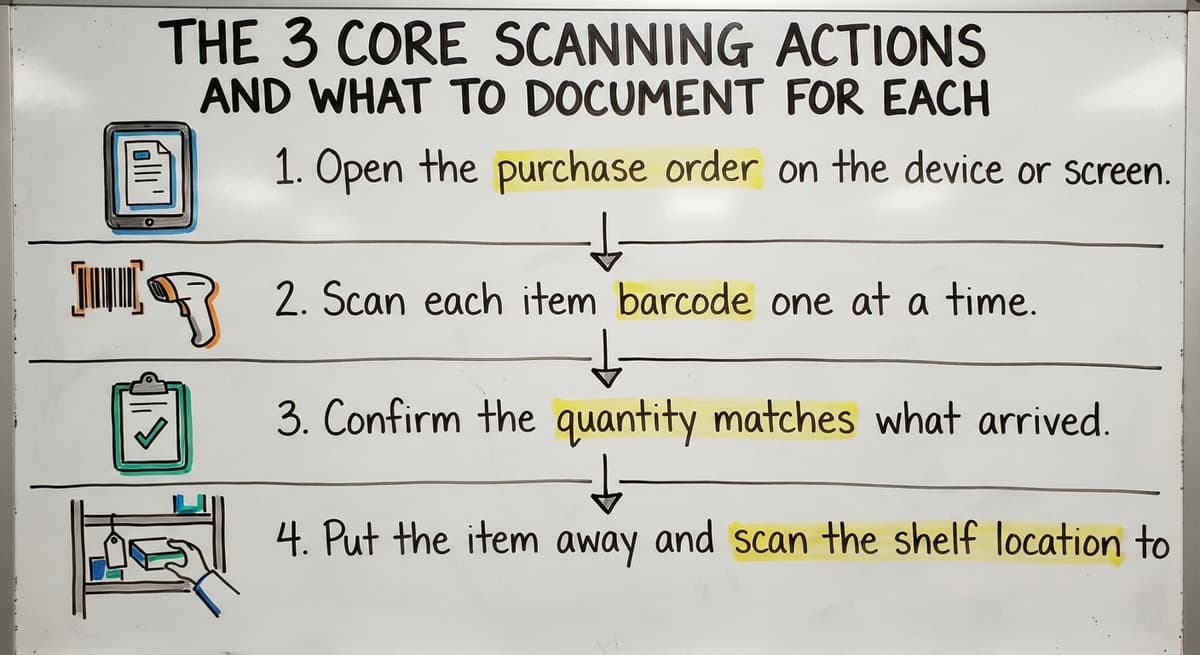
The 3 Core Scanning Actions and What to Document for Each
A scanning manual should be built around 3 core actions: receiving, picking, and shipping. Each needs its own section with step-by-step instructions, not a combined overview.
Scan to Receive
The warehouse receiving process starts before the scanner comes out. Staff should open the buy order in the software first, then scan each item as it comes off the delivery. The steps look like this:
- Open the buy order on the device or screen.
- Scan each item barcode one at a time.
- Confirm the quantity matches what arrived.
- Put the item away and scan the shelf location to record placement.
The manual must also cover what to do when a barcode does not scan. Print a label on the spot, or hold the item aside and flag it before closing the receipt.
Never skip an item and assume the count is right. Document who prints replacement barcode labels and where the label printer is.
Pick and Ship
Pick and pack operations follow a different rhythm. Staff pull a pick list from the system, scan the shelf location to confirm they are in the right spot, then scan the item before pulling it.
If the quantity on the shelf does not match the order, the manual should tell them how to flag a short pick without stopping the rest of the order.
The shipping scan is the final check. Before the box closes, a staff member scans each item inside to confirm it matches the order.
The software then marks the order as shipped and adjusts inventory. That scan event should also connect to the customer record or invoice in the accounting software so the books reflect the outbound movement.
Is the comparison easier when one option is built for you?
Yes. Off-the-shelf means fitting your process to the software, and custom is the other way round. The first look costs nothing.
Book a call
Handling Scanning Errors and Keeping the accounting software in Sync
Scanning errors fall into 3 common types: an unreadable barcode, the wrong item scanned, or a duplicate scan. The manual should give a clear decision path for each one rather than leaving staff to guess.
- An unreadable barcode means the label is damaged. Print a new label, confirm the product by hand, then scan the new label before recording the transaction.
- A wrong item scanned means the previous scan must be voided before continuing. Name who has authority to void a scan entry so staff do not wait for a manager when the fix is simple.
- A duplicate scan means the same item was scanned twice. The software may catch this automatically. If it does not, the manual should say how to check and correct the count.
Many small distributors use a standard accounting package for invoicing and purchasing but not for live stock counts. A barcode inventory system can push updates to the accounting software automatically after each scan event, or batch the updates on a schedule.
The manual should state clearly when and how the accounting software gets updated. Staff who understand the full loop make fewer workaround decisions that break the sync.
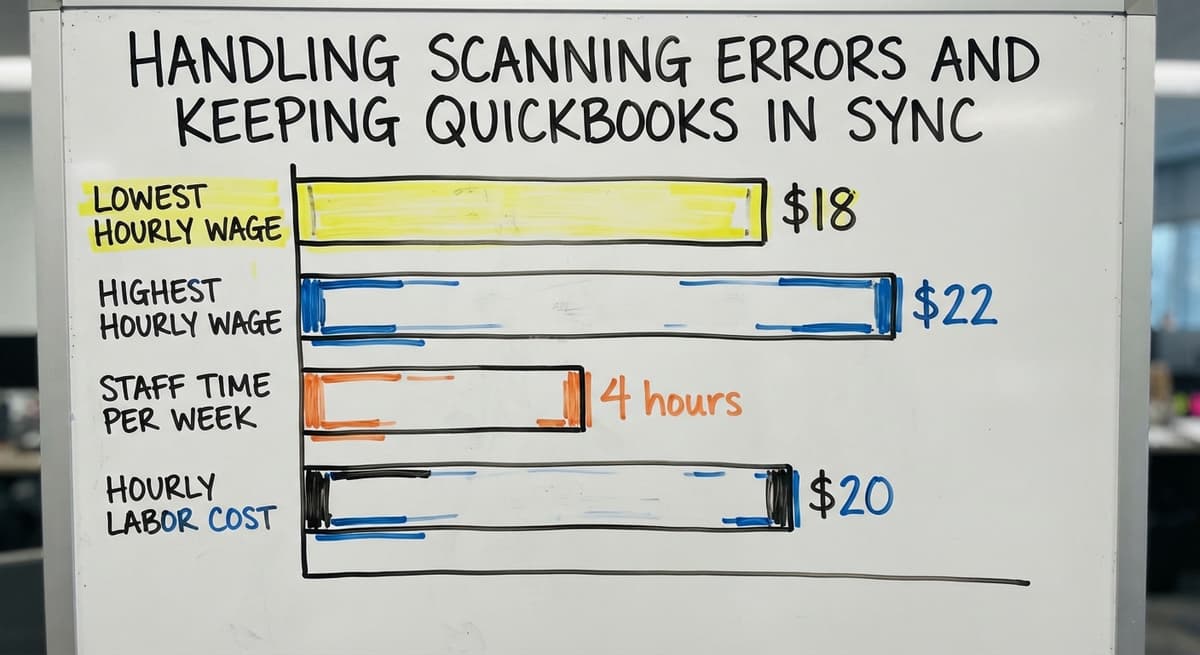
According to the US Bureau of Labor Statistics, warehouse order fillers earn around $18 to $22 an hour.
Three staff members spending 4 hours a week on manual count corrections at $20 an hour adds up to $12,480 a year in labor that a clean scanning process removes.

What Are the Most Common Mistakes in a Scanning Manual?
The most common mistake is writing steps that assume the reader already knows the software. Name every screen. Include a screenshot or a diagram of what the staff member should see before they scan anything.
The second mistake is skipping error handling because it feels like an edge case. Errors are not edge cases in a working warehouse. They happen daily.
A manual without an error section forces staff to improvise, and improvised fixes create the count drift the manual was supposed to prevent.
The third mistake is never updating the document. Assign 1 person as the manual owner. Version-date every copy so staff know which one is current.
Update the manual when the software changes, when a new scanner is added, or when the same error keeps repeating and reveals a gap in the steps.

A Simple Template Structure for Your Scanning Manual
A working scanning manual does not need to be long. Five sections cover everything a small warehouse needs:
- Purpose and scope: what the manual covers and who it applies to.
- Equipment list: scanner model, label printer location, and how each device connects to the software.
- Step-by-step procedures: one sub-section each for receiving, picking, and shipping.
- Error handling: a decision path for each of the 3 common error types.
- Who to contact: names and roles for software questions, label printing, and scan overrides.
Post a laminated one-page summary at each scanning station. Walk new staff through the full manual with a live scanner on their first day. Review the manual whenever a new product type or shelf location is added.

When Is the Manual Not Enough, and the Software Needs to Change?
A scanning manual cannot fix a software problem. If staff have built workarounds into their daily routine, if errors repeat despite clear steps, or if stock counts drift week over week, the issue is the system, not the records.
Off-the-shelf inventory software needs extra steps that the manual must document around. A custom barcode inventory system built to match the actual operation removes most of those extra steps.
The manual gets shorter and clearer because the software already handles the situations that used to need a workaround.
The NIST Manufacturing Extension Partnership notes that aligning process design to actual operations is a core principle of supply chain improvement. A scanning manual is a strong first step. A system built around how the operation actually runs is the complete answer.
Start by mapping the 3 core scanning actions before writing anything. Get input from the staff who use the scanners every day. Then ask honestly whether the current software supports the process or works against it.
If it works against it, reach out to discuss a scanning setup built around your existing operation rather than one you have to write around.
Frequently asked questions
What is the easiest way to scan a document?
In a warehouse context, the easiest way is to use a wireless handheld scanner connected to your inventory software over Wi-Fi. Point the scanner at the barcode, pull the trigger, and the software records the scan automatically.
No typing required. For paper documents, a flatbed or sheet-fed scanner connected to a computer works the same way: place the page, press scan, and the image saves to a folder you choose.
How do I scan a document and put it on my computer?
Connect the scanner to your computer with a USB cable or over Wi-Fi. Open the scanning software that came with the device, or use the built-in scan tool in Windows or macOS.
Place the document face-down on the glass or face-up in the feeder. Click Scan. The file saves as a PDF or image to the folder you select. Name the file before you close the software so it is easy to find later.
How do I scan and upload a document?
Scan the document first and save it to your computer as described above. Then open the platform where you want to upload it, such as email, a cloud drive, or a web form.
Click the upload or attach button, find the saved file, and select it. Most platforms accept PDF or JPEG files. If the file is too large, reduce the scan resolution in the scanner settings before scanning again.
How do you use a scanner step by step?
- Power on the scanner and confirm it is connected to the software or computer. 2. Open the correct screen in the software before scanning anything. 3. Point the scanner at the barcode and press the trigger or button. 4. Confirm the software shows the correct product or record. 5. Repeat for each item. 6. Save or confirm the transaction when all items are scanned. The scanning manual for your operation should document exactly which screen to open at step 2, because that changes by scanner action.
What should a scanning manual include for a small warehouse?
A scanning manual should cover 5 areas: the purpose and scope of the document, an equipment list with scanner and printer details, step-by-step procedures for receiving, picking, and shipping, a clear error-handling section with a decision path for each common error type, and a contact list for software questions and scan overrides. Include screenshots of the actual screens staff will see.
How do you handle scanning errors in a warehouse?
Match the fix to the error type. An unreadable barcode means printing a new label before scanning. A wrong item scanned means voiding the previous scan before continuing.
A duplicate scan means checking whether the software caught it automatically and correcting the count if it did not. The manual should name who has authority to void or correct a scan so staff do not wait for approval when the fix is straightforward.
How do you connect barcode scanning data to the accounting software?
A barcode inventory system can push scan data to the accounting software automatically after each transaction or on a scheduled batch. The manual should state which method your setup uses and when the update happens.
Staff who know the timing make fewer decisions that break the sync between live inventory counts and the accounting software invoicing records.
How often should a scanning manual be updated?
Update the manual when the software changes, when a new scanner model is added, or when the same error keeps repeating and reveals a gap in the steps.
Assign one person as the manual owner and version-date every copy. A manual with no date on it is treated as outdated by the staff who use it daily.
What should a warehouse scanning manual cover?
The 3 core actions (receive, move, count), the screen each one uses, what to do when a scan fails, and who to call when the software needs a change.
One page per action, with a photo of the screen, is enough for a new hire's first shift.
How often should the scanning manual be updated?
Every time a screen or a step changes, and reviewed once a quarter against what staff actually do. A manual that describes last year's process trains people into the workarounds you are trying to remove.
What is in a free first look?
A 30 minute call, your operation mapped, and a clear picture of what we would build. No obligation and nothing to install.
Book a callRelated guides
The rest of this guide, for the parts of the job this page does not cover.
Guides
- Scanner Manuals
- Package Scanning
- Barcode Scan Machine
- Warehouse Scanning System
- Manual Inventory System
- Manual Inventory Management
- Barcode Words
- 2d Image Barcode Scanner
- Upc Scanner Gun
- Barcode Reader Description
- Alphanumeric Barcode
- Inventory Management Software with Barcode
- Mrp Barcode
- Online Barcode
- Sku Formats
- Scanner Inventory Software
- Barcode Systems for Warehouse
- Make Barcode