


How Barcode Scanning Works
A barcode scanner shines light on a printed label. Dark bars absorb the light. White spaces reflect it back. A sensor reads that pattern and converts it to a number. That number goes to your inventory software, which looks up the matching product record and updates it. The whole process takes less than a second.
Published 20 August 2026. Reviewed and updated 15 September 2026.
Reviewed September 2026. Each figure comes from the assumptions stated beside it, so you can substitute your own and the arithmetic still holds.
Book a callHow Does Barcode Scanning Work, End to End?
Understanding how barcode scanning works means following the data from the moment light hits the label to the moment a record changes in your system. Most guides stop at the hardware. This one follows every step.
The scanner is just the input device. It reads a pattern and sends a number.
Your inventory software does everything that matters after that: matching the number to a product, updating a quantity, logging a location, or triggering a transaction. Get the software setup wrong and the scanner sends accurate numbers into a broken system.
Would you rather have it built around your operation?
The first look is free. If you would rather not compare products, describe how your operation already works and we build the system around it.
No build cost. You see it running on your own process first, and the monthly subscription starts only once it is live.
Book a callWhat Is a Barcode, Actually?
A barcode is a number printed in a way a machine can read fast. The bars or dots represent digits using a fixed encoding rule. The number itself carries no meaning until software looks it up in a database.
Common formats differ by use. A UPC (Universal Product Code) is the 12-digit code on retail goods. Code 128 is a flexible format used in warehouses and shipping. A QR code is a 2D grid that can hold a URL or longer string of data.
As GS1, the global standards body that manages barcode identifiers, states: "Barcodes are the most widely used method of automatic spotting and data capture" (GS1). The number encoded in the barcode is the key that unlocks the product record in your database.
How Does a Barcode Scanner Read a Barcode?
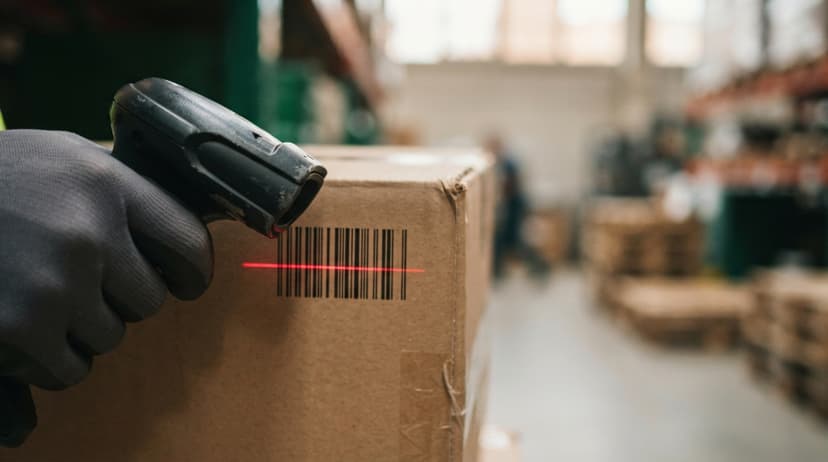
A barcode scanner reads a barcode by shining a laser or LED light across the label and measuring what bounces back. Dark bars absorb the light. White spaces reflect it. A sensor records that pattern as a series of on and off signals.
An internal decoder then converts those signals into digits. The decoder knows the encoding rules for the barcode format, so it can translate the pattern reliably. The result is a string of numbers, sent to the connected software in under a second.
Camera-based barcode readers work the same way but use image processing instead of a laser beam. The math is different. The output is identical.
Wired Scanners vs Wireless Scanners
The right scanner type depends on whether your workers stay in one place or move through the facility.
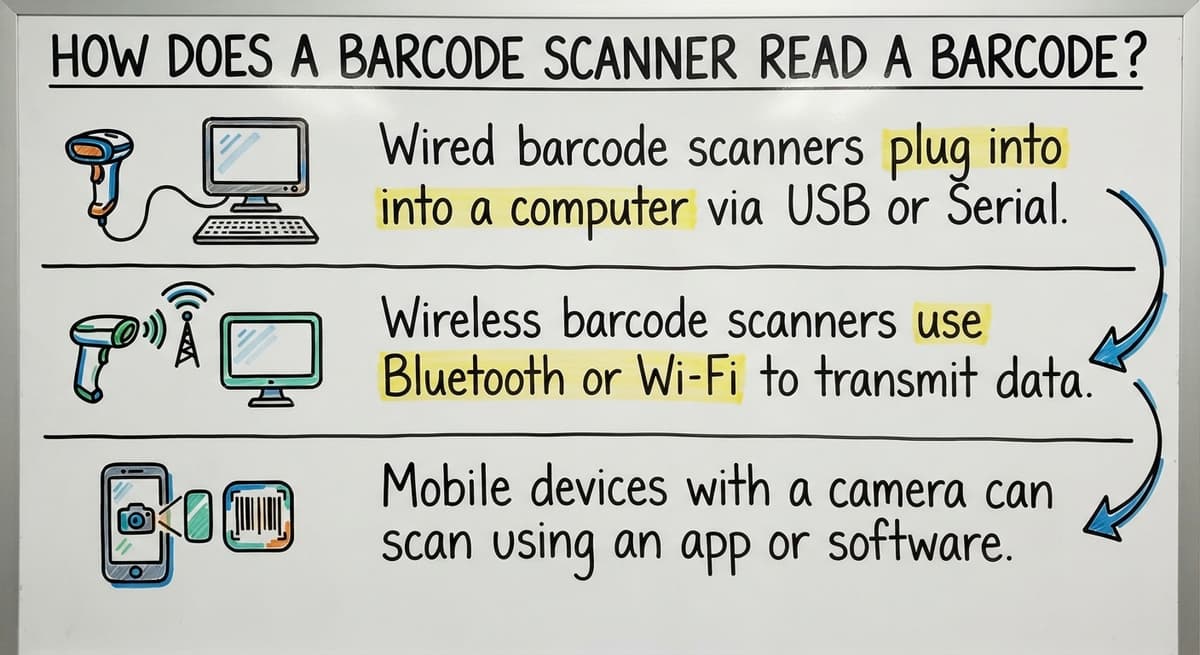
- Wired barcode scanners plug into a computer via USB. They are simple, reliable, and need no battery. A good fit for a fixed receiving desk or checkout point.
- Wireless barcode scanners use Bluetooth or Wi-Fi. Workers can walk the warehouse floor without being tethered to a workstation. Battery life and range matter here.
- Mobile devices with a camera can scan using an app. This works for low-volume operations or teams that already carry phones or tablets.
For a warehouse where workers move between receiving, putaway, and picking, a wireless barcode scanner is almost always the right call.
Is the comparison easier when one option is built for you?
Yes. Off-the-shelf means fitting your process to the software, and custom is the other way round. The first look costs nothing.
Book a callWhat Happens After the Scan?
The decoded number leaves the scanner as a keystroke stream or an API call, depending on how your system is set up.
Your inventory software receives it and searches its database for a matching SKU (stock-keeping unit, the unique code that identifies each product in your system).
When it finds a match, the software acts on it. It might add 1 to an on-hand quantity, record a bin location, mark an order line as picked, or flag a discrepancy. The scan is the input. The software action is the value.
If the database has a missing SKU or a wrong unit of measure, the scan will either fail or post to the wrong record. A scanner cannot fix a bad database. This is why setup matters as much as the hardware itself.

Where Does Barcode Scanning Fit in a Warehouse?
A barcode inventory system touches every stage of product movement. Each scan creates a timestamped record that replaces a manual entry.
- Receiving: Scan items as they arrive and confirm they match the buy order line by line. Discrepancies surface at once rather than days later.
- Putaway: Scan the product and the bin label to record exactly where stock goes. Workers do not rely on memory or paper.
- Picking (scan to pick): Scan to confirm the right item is pulled for each order. A wrong scan triggers an alert before the wrong product reaches the customer.
- Shipping: Scan each item in the outbound shipment to verify the order is complete before the box closes.
For more on structuring this process, see the warehouse receiving process best practices guide.
Every one of those scans builds a log that auditors, managers, and software can query. That log is what makes the system useful beyond simple quantity tracking.
How Scanning Connects to Inventory Counts
Every scan either adds or removes quantity from the on-hand count in your system. This keeps your inventory current without anyone opening a spreadsheet.
Cycle counts, where workers count a portion of inventory on a rolling basis rather than shutting down for a full count, become faster.
Workers scan items rather than writing numbers on a clipboard. The system compares the scanned count to the expected count and flags gaps.
Discrepancies appear the same day rather than surfacing at month-end when the cause is hard to trace.
The IRS is direct on why this matters: "To figure taxable income, you must value your inventory at the beginning and end of each tax year" (IRS Publication 538). Accurate real-time counts make that obligation easier to meet.
For a practical starting point, the guide on how to set up inventory tracking for a small warehouse covers the setup steps in order.

Why Accuracy Depends on the Software, Not Just the Scanner
A barcode reader sends a number. That is all it does. Whether that number produces a useful result depends entirely on what the software does with it.
If your product database has duplicate SKUs, wrong units, or items that were never entered, scans will mismatch or post to the wrong record. Workers will start overriding the system, which defeats the purpose.
Off-the-shelf inventory systems sometimes fail in practice because the default setup does not match how the business actually receives and ships.
A system built around retail receiving will not map cleanly onto a wholesale distributor that buys in cases and sells in eaches. The scanner is a solved problem. The database is where the work is.
Custom inventory software for wholesale distributors addresses this by building the workflow around how the operation actually runs, rather than asking the operation to fit a generic template.
What does it look like running on your own process?
The first thing you see is it running on your own process, at no build cost. The subscription starts once it is live and doing the job, not before.
Book a callIs Barcode Scanning Better Than Manual Data Entry?
Yes, and the gap is large. Manual entry is slow, error-prone, and creates a lag between the physical action and the system record. Scanning is fast, consistent, and posts the record at once.
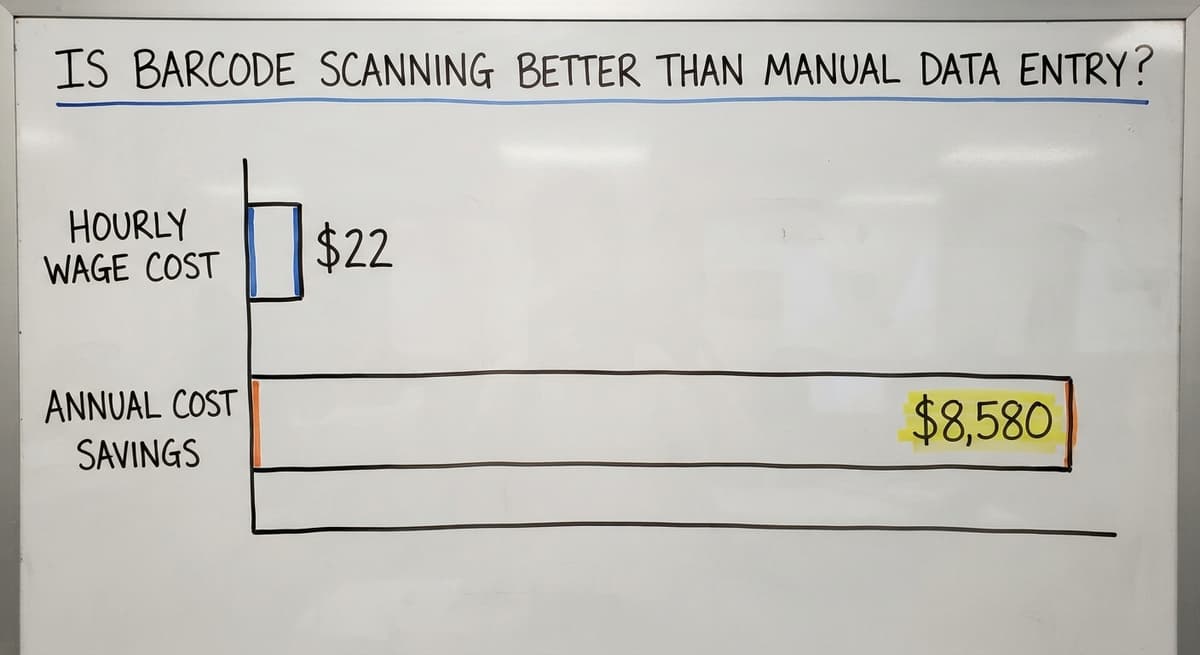
A useful way to see the cost: if 2 warehouse workers each spend 45 minutes a day on manual entry tasks that scanning would remove, and each earns $22 an hour (close to the current median for stock clerks per the US Bureau of Labor Statistics), that is about $8,580 a year in labor doing work a scanner handles in seconds. The hardware pays for itself quickly.
For wholesale and distribution, fewer entry errors mean fewer mispicks, fewer returns, and fewer customer complaints. The business case is not about the scanner. It is about what stops going wrong.

What You Need to Get Started
Getting a barcode inventory system running does not need a large project. Four things cover it.
- Barcodes on every product. Manufacturer barcodes work if they are already on the item. For products without them, print and apply labels.
- At least one scanner. A handheld wired unit is fine for a fixed station. A wireless barcode scanner suits a team that moves around.
- Inventory software that accepts scan input. The software must be able to receive the number the scanner sends and match it to a product record.
- A clean product database to start from. Accurate SKUs and opening quantities matter more than anything else. A scanner pointed at a bad database produces bad records faster.
Small operations start with one scanner at the receiving dock and expand from there. The barcode inventory management system overview covers what to look for when choosing software.
How Scanning Works with the accounting software
The accounting software has basic inventory tracking but no native scanning workflow. There is no built-in way for a worker on the floor to scan an item and have the accounting software update in real time.
The practical fix is a connected inventory layer that sits between the scanner and the accounting software. The inventory system handles the scan, applies the logic (receive, pick, adjust), and then syncs the result to the accounting software as a transaction or quantity update.
This keeps the accounting software as the financial record without requiring workers to type anything into the accounting software on the floor. The finance team sees accurate numbers. The warehouse team works with a system built for scanning.
For more on this gap and how to close it, see the guide on the accounting software inventory limitations and how to work around them. The scanner is not the missing piece. The inventory layer between the floor and the books is.
Common Questions About Barcode Scanning
How does a barcode scanner work step by step? Light hits the label. Dark bars absorb it, white spaces reflect it. A sensor reads the pattern.
A decoder converts it to digits. The digits go to the software. The software matches them to a product record and updates it. Six steps, under a second.
What are common problems with barcode scanners? A dirty or torn label will not scan cleanly. A scanner set to read one barcode format will not read another.
Poor lighting affects camera-based readers. And a scan that reads fine but posts wrong is almost always a database problem, not a hardware one.
When you scan a barcode, where does it go? The scanner sends the decoded number to whatever software it is connected to, either as a string of keystrokes or through an API.
The software looks up the number, finds the matching product record, and takes the action it is configured to take: update a quantity, log a location, mark a line complete.
Can you explain how a barcode scanner works? A barcode scanner is a light reader. It shines light on a label, measures what reflects back, and uses those reflections to reconstruct the number encoded in the bars or dots. The number goes to software. The software does the rest.
Do I need internet for a scanner to work? It depends on the system. Some inventory software needs a live connection to look up records. Others let workers scan offline and sync when they reconnect. If your warehouse has dead zones, offline ability matters.
Can I use my phone as a barcode scanner? Yes. Most modern smartphones can scan barcodes using a camera-based app. For occasional use or low volume, this works well. For high-volume warehouse scanning, a dedicated barcode reader is faster and more durable.
What if a barcode does not scan? Check the label first. Dirt, creases, or fading will break the read. If the label looks clean, check whether the scanner supports the barcode format on the label. A 1D laser scanner will not read a QR code.
How long does setup take? The hardware is ready in minutes. Software setup depends on how complete your product database is.
If SKUs and quantities are accurate, onboarding can move fast. If the database needs cleaning first, that work takes longer than the software setup itself.
What the manual process costs, in numbers
The arithmetic is worth doing before the software conversation. 3 people spending 6 hours a week between them chasing the same questions, at 22 dollars an hour, is 936 hours a year of paid time spent confirming what a system would already know. Over 3 years that is 2,808 hours.
Frequently asked questions
How does a barcode scanner work step by step?
Light hits the label. Dark bars absorb it, white spaces reflect it. A sensor reads the pattern. A decoder converts it to digits. The digits go to the software. The software matches them to a product record and updates it. Six steps, under a second.
What are common problems with barcode scanners?
A dirty or torn label will not scan cleanly. A scanner set to read one barcode format will not read another. Poor lighting affects camera-based readers. And a scan that reads fine but posts wrong is almost always a database problem, not a hardware one.
When you scan a barcode, where does it go?
The scanner sends the decoded number to whatever software it is connected to, either as a string of keystrokes or through an API.
The software looks up the number, finds the matching product record, and takes the action it is configured to take: update a quantity, log a location, or mark a line complete.
Can you explain how a barcode scanner works?
A barcode scanner is a light reader. It shines light on a label, measures what reflects back, and uses those reflections to reconstruct the number encoded in the bars or dots. The number goes to software. The software does the rest.
Do I need internet for a scanner to work?
The answer depends on the system. Some inventory software needs a live connection to look up records. Others let workers scan offline and sync when they reconnect. If your warehouse has dead zones, offline ability matters.
Can I use my phone as a barcode scanner?
Yes. Most modern smartphones can scan barcodes using a camera-based app. For occasional use or low volume, this works well. For high-volume warehouse scanning, a dedicated barcode reader is faster and more durable.
What if a barcode does not scan?
Check the label first. Dirt, creases, or fading will break the read. If the label looks clean, check whether the scanner supports the barcode format on the label. A 1D laser scanner will not read a QR code.
How long does barcode scanning setup take?
The hardware is ready in minutes. Software setup depends on how complete your product database is. If SKUs and quantities are accurate, onboarding can move fast. If the database needs cleaning first, that work takes longer than the software setup itself.
Why do some barcodes fail to scan?
Damaged or low-contrast print, glare from glossy labels or screens, a code held outside the scanner's range, or a scanner with that symbology disabled. A reprint and the right setting fix most failures.
How do QR codes store information?
In a grid of dark and light squares read in both directions, with error-correction blocks that let a code read even with a third of it damaged. A QR code holds up to 4,296 characters against about 20 for a UPC.
How much information can a barcode hold?
A 1D code holds a short number, 12 to 20 characters, that points to a database record. A 2D code holds the record itself: thousands of characters, enough for a lot, an expiry date, and a URL.
What information is stored in a UPC barcode?
Twelve digits: a company prefix issued by GS1, an item number the maker assigned, and a check digit. Nothing else. The price, description, and stock level come from the system that looks the number up.
What is in a free first look?
A 30 minute call, your operation mapped, and a clear picture of what we would build. No obligation and nothing to install.
Book a callRelated guides
More on the same work.
Guides
- Barcode Scan Machine
- Warehouse Scanning System
- Package Scanning
- Scanning Manual
- Barcode Abbreviation
- Tracking Number Barcode
- Barcode Reader Machine
- Barcode Scanner App Ios
- 2d Barcode Readers
- Barcode Producer
- Barcode Systems for Warehouse
- Barcode Reader Description
- Barcodes and Labels
Common questions
- How to Barcode Scanners Work
- How Do Barcodes Work
- What Do Barcode Scanners Scan
- How to Create a Barcode System for Inventory
- How to Use a Barcode Scanner
- How to Read a Barcode Number
- How Are Barcodes Read
- How to Create a Barcode
- How Do I Create My Own Barcodes
- How to Make Your Own Barcode
- What Does a Barcode Look Like