


Sku Formats
A SKU format is the pattern you follow when you build the short codes that identify every product in your warehouse. Get it right and your team picks faster, counts cleaner, and makes fewer errors. Get it wrong and you end up with duplicate entries, phantom stock, and a spreadsheet nobody trusts.
Reviewed September 2026. Each figure comes from the assumptions stated beside it, so you can substitute your own and the arithmetic still holds.
Published 23 August 2026. Reviewed and updated 15 September 2026.
Book a callWhat Is a SKU Format and Why Does It Matter?
A SKU, or Stock Keeping Unit, is a short code your business creates to identify a product.
A SKU format is the structure behind that code: the order of segments, the separators, the abbreviations. Think of it as the grammar rule your warehouse uses so every code follows the same pattern.
SKUs are internal. You create them, you control them. They are not barcodes, and they are not UPCs. A barcode is just a visual way to print any code, including your SKU.
A UPC is a universal code assigned by a standards body for retail sales. Your SKU lives inside your own systems.
Would you rather have it built around your operation?
The first look is free. If you would rather not compare products, describe how your operation already works and we build the system around it.
No build cost. You see it running on your own process first, and the monthly subscription starts only once it is live.
Book a callWhy Is a Consistent SKU Format a Legal and Operational Requirement?
A consistent SKU format is the difference between a warehouse that runs and one that guesses. Staff who can read a code at a glance make fewer pick errors. A format that scales from 50 products to 500 saves you a painful rebuild later.
The IRS makes the stakes clear: as stated in IRS Publication 538, "To figure taxable income, you must value your inventory at the beginning and end of each tax year." Inventory you cannot count correctly is inventory you cannot value, and that is a legal problem, not just an working one.
The Basic Parts of a SKU
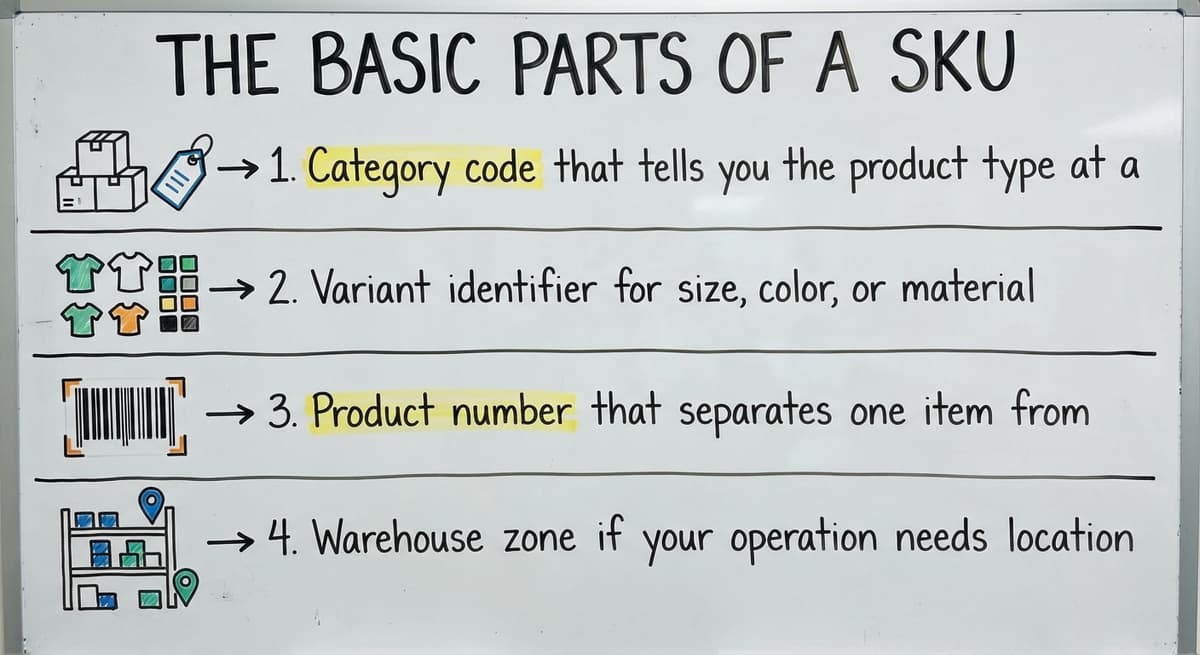
What does a well-built SKU actually contain? Most SKUs are made of 2 to 4 segments, joined by dashes or run together without a separator. Each segment carries one piece of meaning.
Common segments include:
- Category code that tells you the product type at a glance (SHIRT, GLOVE, CABLE)
- Variant identifier for size, color, or material (BLU, LG, BLK)
- Product number that separates one item from another within the same category
- Warehouse zone if your operation needs location encoded in the code itself
A simple example: SHIRT-BLU-LG tells a picker the product is a shirt, the color is blue, and the size is large. A more detailed version, SH-BLU-LG-A1, adds a bin location.
Not every SKU needs all 4 segments. Match the complexity of your format to the actual size of your operation. A 60-product catalog does not need the same structure as a 600-product one.
How Many Segments Does a SKU Actually Need?
The right number of segments is the fewest that let your team work without looking anything up. Three patterns cover most warehouse operations. A flat two-segment code such as CATEGORY-NUMBER suits a small catalog with no variants. A three-segment code such as CATEGORY-VARIANT-NUMBER covers most mid-size operations.
A four-segment code that adds a location or supplier prefix suits fulfillment centers managing multiple clients or bin locations. Each pattern suits a different kind of catalog and team, and moving to a more complex pattern is easier when the simpler one was documented from the start.
Is the comparison easier when one option is built for you?
Yes. Off-the-shelf means fitting your process to the software, and custom is the other way round. The first look costs nothing.
Book a callCommon SKU Format Structures
Three patterns cover most warehouse operations. Each suits a different kind of catalog and team.
Alphanumeric SKU Format
An alphanumeric SKU mixes letters and numbers to encode meaning directly into the code. Letters carry category or attribute information; numbers identify the specific item or size. This is the most common format in wholesale and distribution because staff can decode it at a glance.
Example: GLOVE-MED-BLK tells you at once that the item is a medium black glove. No lookup table needed.
This format works well from 20 SKUs to several hundred. It stays readable as the catalog grows, and it survives the transition from spreadsheet to inventory software without needing a rebuild.
The main risk is abbreviation drift: if one person writes BLK and another writes BK, the format breaks. Fix that with a shared abbreviation list before you start.
Hierarchical SKU Format
A hierarchical SKU builds from broad to specific: department, then product type, then variant. Each segment narrows the description.
Example: ELC-CABLE-USB-6FT places the item in electronics, identifies it as a cable, specifies USB, and notes the length. This format makes filtering and reporting straightforward in spreadsheets and inventory software because products group naturally when sorted alphabetically.
Hierarchical formats suit businesses with large catalogs and many product categories. The trade-off is length: a 4-segment code can push past 12 characters, which increases the chance of entry errors. Keep each segment short and the total code under 16 characters.
Sequential SKU Format
Sequential codes are assigned in order: 0001, 0002, 0003. They are the fastest format to set up and the easiest to generate automatically.
The problem is that the code carries no product information at all. A picker holding a box labeled 0047 has no idea what is inside without looking it up.
Sequential formats work when a separate product database holds all the details and staff never need to read a code cold. For most warehouse operations, that is a dependency you do not want.
Which Characters Should I Use or Avoid in a SKU?
Use uppercase letters and numbers. They scan cleanly, display consistently across systems, and cause no formatting surprises in CSV exports.
Dashes are the safest separator. Avoid spaces, slashes, and special characters. Specific pairs to ban from any SKU format:
- The letter O next to the number 0: they look identical on a printed label
- The letter I next to the number 1: same problem, same result
- Commas and ampersands: they break CSV exports and database queries in QuickBooks and Excel
- Spaces: they cause mismatch errors when codes move between systems
Stick to uppercase letters, digits, and dashes, and your SKUs will move cleanly through every system they touch.

How Long Should a SKU Be, and How Do Variants Fit In?
The industry standard is 8 to 12 characters. That is long enough to carry meaning and short enough to scan and type without errors.
Avoid codes longer than 16 characters: every extra character is another chance for a typo. Avoid codes shorter than 4: you will run out of unique combinations faster than you expect.
A practical test: have a picker read the code aloud. If they stumble, the code is too long or too complex for daily use.
What does it look like running on your own process?
The first thing you see is it running on your own process, at no build cost. The subscription starts once it is live and doing the job, not before.
Book a callHow Do You Build Variants into a SKU Format?
Variants like size, color, and material belong as a consistent suffix or segment. Use standardized abbreviations across the whole catalog:
- Colors: BLK, WHT, RED, BLU, GRN
- Sizes: XS, SM, MD, LG, XL
- Materials: COT for cotton, NYL for nylon, STL for steel
Building variants in consistently means JACKET-RED-SM, JACKET-RED-MD, and JACKET-RED-LG sort together in any system. Build a master abbreviation list, share it with everyone who creates SKUs, and treat it as a living document.
Variants that follow a shared pattern keep your catalog sortable and your pick sheets readable as the product line grows.
SKU Format vs Barcode vs UPC
SKU, UPC, and barcode are 3 distinct terms that describe different things, and mixing them up causes real problems.
| Term | Who creates it | What it does |
|---|---|---|
| SKU | Your business | Internal product identifier you control |
| UPC | GS1 standards body | Universal code required for retail sales |
| Barcode | Your printer | Visual representation of any code, including your SKU |
You can print barcodes of your own SKUs for internal warehouse scanning without a UPC. Any SKU format can be encoded into a barcode as long as the format is consistent. Code 128 and Code 39 are the most common barcode types for warehouse SKUs.
A barcode scanner reads the SKU and passes it to your inventory system. Clean SKU formats reduce scan errors and speed up both receiving and shipping. A barcode inventory management system overview covers how this connects to your broader workflow.
You only need a UPC when you sell through a retailer or marketplace that needs one. For internal operations, your SKU is the code that matters.

How Do SKU Formats Work with QuickBooks Inventory?
QuickBooks uses the SKU field as plain text. Any format works technically. The problem is not QuickBooks rejecting your codes: it is QuickBooks sorting and filtering by SKU text, which means your format work out how useful your reports are.
Things that break QuickBooks inventory imports and exports:
- Special characters like
&,/, and#in SKU codes - Mixed case codes where
shirt-blu-lgandSHIRT-BLU-LGare treated as different products - SKUs that exist in Excel but were entered differently in QuickBooks
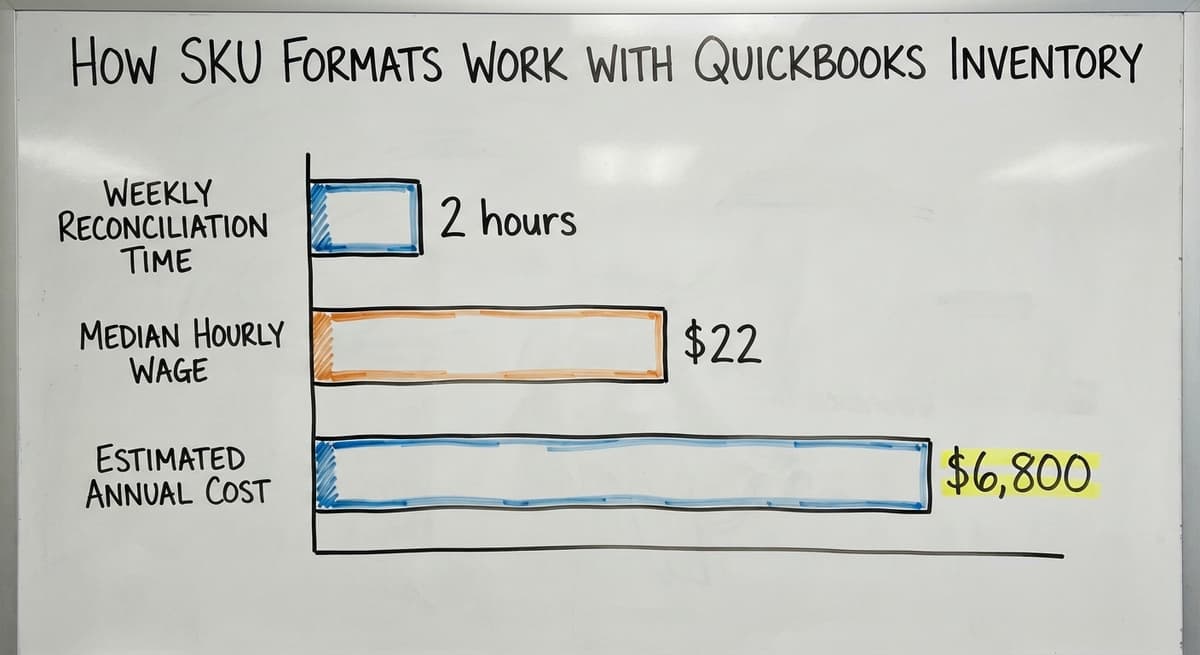
If you manage inventory across QuickBooks and a spreadsheet, the SKU must match exactly in both places. One extra character or one case difference creates a duplicate entry. 3 people spending 2 hours a week reconciling mismatched SKUs at a median wage of around $22 an hour (based on BLS occupational data for stock clerks and order fillers) adds up to more than $6,800 a year in avoidable labor.
QuickBooks inventory integration works best when the SKU format is locked down before data entry begins, not after.
A format your QuickBooks reports can sort is a format your business can act on.
How Do I Build a SKU Format from Scratch?
Building a SKU format from scratch is a 4-step process, and the order matters.
- List the attributes your pickers and buyers use most. Category, size, color, and supplier are the most common. Only include an attribute if your team needs it to do their job without a lookup.
- Assign short abbreviations to each attribute value. Keep every abbreviation to 2 to 4 characters. Write them all in one document before you build a single code.
- Decide on segment order and separator. Put the broadest attribute first. Use a dash as the separator. A format like
CATEGORY-PRODUCT-VARIANTcovers most operations. - Test the format on 20 real products before rolling it out. Pick products from different categories, including your most complex variants. If the format breaks or produces a code longer than 14 characters, fix it before it scales.
The NIST Manufacturing Extension Partnership notes that supply chain consistency depends on shared standards across every point in the process. A SKU format is your internal standard. Document it in writing and store it where every team member can find it.
A format tested on real products before launch will outlast one designed in theory.
Not sure this is the right shape for your operation?
The call is free. Describe how the work runs today. We map it on a call and show you what it would look like built around that, before you spend anything.
Book a callStandardizing SKUs Across an Existing Catalog and Avoiding Common Mistakes
If your current SKUs are inconsistent, the fix is a migration, not a quick edit. Changing a SKU mid-stream without a plan breaks pick sheets, barcode labels, and any open orders tied to the old code.
The process:
- Export your full product list to a spreadsheet
- Flag every inconsistency: mixed cases, missing segments, and duplicate codes
- Build a crosswalk table that maps every old SKU to its new one
- Update QuickBooks, barcode labels, and pick sheets at the same time
Doing step 4 in stages is where most teams go wrong. A label printed with the old SKU on the same day QuickBooks shows the new one causes a mismatch that is hard to trace.

The Mistakes That Damage a SKU Catalog Over Time
The mistakes that cause the most damage over time:
- Reusing a discontinued SKU for a new product: old buy history attaches to the wrong item
- Letting multiple staff create codes with no shared rules: you end up with 3 formats running in parallel
- Building a format too complex for new employees to follow: complexity that only the person who designed it understands is a liability
- Failing to plan for new categories: a format with no room to grow forces a rebuild at the worst possible time
The US Census Bureau's Monthly Wholesale Trade data shows that wholesale inventories regularly represent months of sales value. A catalog that cannot be counted cleanly puts a large asset at risk.
The goal of standardization is a catalog where any team member can create a new SKU correctly without asking anyone.
How Can I Keep My SKU Format Consistent Over Time?
Consistency is more valuable than perfection. A simple format that every team member follows beats a sophisticated one that only the warehouse manager understands.
3 practices that keep formats stable:
- Assign one SKU owner. One person creates all new codes. Everyone else requests them. This single rule prevents most format drift.
- Write the format rules on one page and store it where new hires find it on day one. Include the abbreviation list, the segment order, and examples of correct and incorrect codes.
- Review the format once a year or whenever you add a major new product category. A review is not a rebuild: it is a check that the rules still fit the catalog.
Signs your format has outgrown itself: staff are creating their own variations, duplicate SKUs are appearing, and lookup errors are frequent.
When those signs appear, plan a migration before you add the next product line or switch software. Barcode scanning for warehouses becomes far more reliable when the underlying SKU format is locked and documented.
The format that lasts is the one written down, owned by one person, and reviewed before it breaks.
SKU Format Examples by Industry and How Custom Software Helps
Different operations need different structures. These examples show what works at the floor level:
- Wholesale apparel:
SHIRT-WHT-LGputs category, color, and size in plain view for any picker - Hardware distribution:
STN-4482-EAencodes vendor, part number, and unit of measure - Fulfillment center with multiple clients:
ACME-BOX-SMkeeps client and product separated so reports filter cleanly - Food and beverage:
BEV-WATER-12PKcaptures category, product, and pack size for receiving and invoicing
Custom inventory software can enforce these rules automatically. It rejects a code that does not match the pattern before it enters the system. It auto-generates the next SKU in a sequence so staff never guess.
When that system connects to QuickBooks, the same SKU flows through purchasing, receiving, and invoicing without re-entry. That is the difference between software built around your format and a generic tool you have to bend into shape. Pick and pack operations run faster when the system enforces the format rather than relying on individual memory.
The right software does not replace your format: it makes sure everyone follows it.
Frequently asked questions
What is the format of a SKU?
A SKU format is the pattern used to build product codes. Most formats use 2 to 4 segments separated by dashes, where each segment carries one piece of meaning such as category, color, or size.
A common example is SHIRT-BLU-LG. The format is internal to your business: you decide the structure, the abbreviations, and the segment order.
What is the best format for SKUs?
There is no single best format. The right choice depends on your catalog size and how your team works. Alphanumeric formats like GLOVE-MED-BLK work well for most wholesale and distribution operations because staff can read them without a lookup.
Hierarchical formats suit large catalogs with many categories. Sequential formats are fastest to set up but carry no product information. The best format is the one your whole team follows consistently.
What are the different types of SKUs?
The 3 main SKU format types are alphanumeric, hierarchical, and sequential. Alphanumeric codes mix letters and numbers to encode meaning directly, such as WH-042-RED. Hierarchical codes build from broad to specific, such as ELC-CABLE-USB-6FT.
Sequential codes are assigned in order, such as 0001, 0002, 0003, with no embedded product information. Most warehouses use alphanumeric or hierarchical formats because they are readable without a database lookup.
What is an SKU example?
A clear SKU example for a medium black glove would be GLOVE-MED-BLK. Each segment carries one attribute: product type, size, and color. For a six-foot USB cable in an electronics department, a hierarchical example would be ELC-CABLE-USB-6FT.
For a small box in a fulfillment center handling the ACME client, the format might be ACME-BOX-SM. The structure stays the same across every product; only the values change.
How many characters should a SKU be?
The standard range is 8 to 12 characters. Codes shorter than 4 characters run out of unique combinations quickly. Codes longer than 16 characters increase scan and entry errors.
A useful test: ask a picker to read the code aloud. If they stumble, the code is too long for daily use.
Can two products share the same SKU?
No. Every SKU must be unique. Sharing a code between 2 products causes inventory counts to merge, makes pick errors unavoidable, and produces inaccurate financial reports. Never reuse a discontinued product's SKU for a new item: old buy history will attach to the wrong product.
Do SKUs need to match between my website and my warehouse?
Yes. A mismatch between the SKU on your website and the one in your warehouse system causes fulfillment errors.
When an order comes in with one code and your pick sheet shows another, someone has to manually match them. That step adds time and introduces mistakes. Keep the SKU identical across every system that touches the product.
What is the difference between an SKU and a UPC?
A UPC is the 12-digit retail number issued by GS1 and shared by every seller of that product.
An SKU is your own code for the item as you stock it, so 2 sellers give the same product different SKUs and one product can carry the same UPC across all of them.
How should I create SKUs for product variants?
Put the variant in its own segment at the end: a base code for the product, then size, then colour, each fixed width. TS-BLU-M and TS-BLU-L sort together, report together, and read at a glance on a pick list.
Should SKUs include supplier or manufacturer codes?
No. A supplier changes, a manufacturer part number changes, and a SKU built on either has to change with it. Keep the supplier's code in a field on the item record and link the two there.
What is in a free first look?
A 30 minute call, your operation mapped, and a clear picture of what we would build. No obligation and nothing to install.
Book a callRelated guides
More on the same work.
Guides
- Inventory Format in Excel
- Barcode Abbreviation
- Barcode Scan Machine
- Tracking Number Barcode
- Serial Numbering
- Barcode Reader Machine
- Barcode Scanner App Ios
- 2d Barcode Readers
- Barcode Producer
- Serial Numbers on Products
- Barcode Systems for Warehouse
- Barcode Reader Description
- Barcodes and Labels
- Warehouse Scanning System
- Alphanumeric Barcode
- Barcode Scanner Inventory System
- Lpn Barcodes
- Imager Barcode Scanner