


Online Barcode
An online barcode is a barcode tied to a live database record. Scan it and the system returns current stock levels, location, or order status in real time. That is the core difference from a printed label, which carries only fixed text. This guide covers formats, hardware, common mistakes, and how to know when your operation is ready. Reviewed and updated 15 September 2026.
Published 23 August 2026. Reviewed and updated 15 September 2026.
Book a callWhat Is an Online Barcode and How Is It Different from a Printed Label?
A printed label carries a fixed string of characters. It tells you what the item is, but nothing more. An online barcode links to a live record that can be updated every time someone scans it, receives stock against it, or ships an order.
Reviewed September 2026. Each figure comes from the assumptions stated beside it, so you can substitute your own and the arithmetic still holds.
Think of a printed label as a name tag. An online barcode is closer to a staff ID that unlocks a door and logs the time. The data behind it changes; the barcode itself stays the same.
Would you rather have it built around your operation?
The first look is free. If you would rather not compare products, describe how your operation already works and we build the system around it.
No build cost. You see it running on your own process first, and the monthly subscription starts only once it is live.
Book a callWhy Does the Live Link Matter for Stock Accuracy?
As GS1, the global body that sets barcode standards, explains, barcodes are designed to carry "unique spotting keys" that point back to a data source rather than storing all the information themselves.
You can read the full standard at gs1.org/standards/barcodes. For a warehouse that ships dozens of orders a day, that live link is what makes the difference between knowing your stock level now and finding out it was wrong three days ago.
What Barcode Formats Are Most Useful in a Small Warehouse or Distribution Centre?
The right format depends on where and how the barcode will be scanned. The 4 formats you will encounter most often are listed below, along with the job each one does best.
- UPC (Universal Product Code) works on retail-ready consumer goods and is the format most suppliers already use on their cases.
- Code 128 encodes both letters and numbers in a compact strip. It is the standard choice for carton labels, pallet tags, and shelf locations because most scanners read it without any setup.
- QR code holds more data in a smaller space and can be scanned by a smartphone camera, which makes it useful for asset tags or internal location signs.
- Data Matrix is the smallest of the group and suits tiny components or medical devices where label space is tight.
Which Formats Cover Most Small Fulfilment Centres Day to Day?
For most small fulfilment centres, Code 128 on cartons and UPC on individual units covers the majority of daily scanning. QR codes add value where staff are already using phones rather than dedicated scanners.
How Does an Online Barcode Connect to Inventory Data?
The flow has 3 steps. A worker scans a barcode label. The scanner sends the code over Wi-Fi or a wired network to a database. The database finds the matching record and either returns information to the screen or updates a quantity.
That database can sit in the cloud or on a local server. Cloud hosting means any device on the network can reach the same data. A local server keeps data on site, which some operations prefer for speed or security.
Connecting a Barcode System to the accounting software Without Replacing It
The accounting software inventory can serve as that database when the barcode system is built to read from and write back to it.
The barcode layer handles the warehouse floor. The accounting software keeps doing the accounting it already does. No replacement is needed, only a connection.
The IRS makes the stakes clear: "To figure taxable income, you must value your inventory at the beginning and end of each tax year," as stated in IRS Publication 538.
A live barcode system makes that count faster and more accurate than a clipboard ever will.
Is the comparison easier when one option is built for you?
Yes. Off-the-shelf means fitting your process to the software, and custom is the other way round. The first look costs nothing.
Book a callWhy Do Small Warehouses Still Run on Spreadsheets?
Many small distributors and fulfilment centres track stock in a spreadsheet, printed pick sheets, or email threads. That is not a failure.
At low order volumes, those tools work. A team of 3 people shipping 20 orders a day can keep up with a shared spreadsheet.
The problem appears when volume grows. At 100 orders a day, the spreadsheet becomes a source of conflict rather than truth. Two people edit it at once. A row gets overwritten. A pick sheet is printed before the last order is entered.
The Hidden Labour Cost of Spreadsheet-Based Inventory
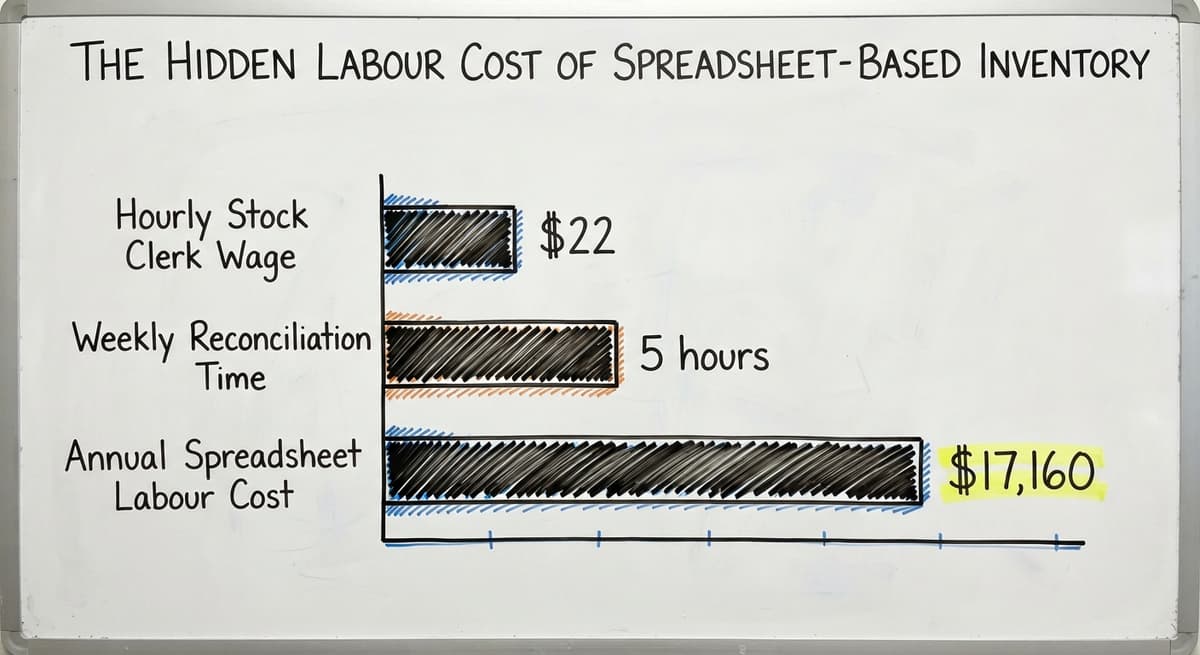
Consider the labour cost alone. According to the US Bureau of Labor Statistics, stock clerks and order fillers earn around $22 an hour. 3 people spending 5 hours a week reconciling spreadsheets costs about $17,160 a year. That number does not include the cost of the mis-ships those errors cause.
Most operations that reach this point are not choosing between a barcode system and a spreadsheet. They are choosing between paying for a system or paying for the chaos.

Where Do Online Barcodes Fit into a Barcode Inventory Management System?
A barcode inventory management system has 3 core parts: the barcode label, the scanner or mobile device, and the connected database. All 3 must work together. A label without a scanner is just a sticker. A scanner without a database returns nothing useful.
The online barcode is the input device for the whole system. Every scan is a data event. Receiving a pallet, picking an item, confirming a shipment: each one writes a record. Over time, those records build a picture of how stock moves through the building.
Inventory accuracy is the output. The NIST Manufacturing Extension Partnership notes that accurate, real-time supply chain data reduces waste and speeds fulfilment across operations of every size.
For a small warehouse, the practical result is fewer phone calls to customers about missing items and fewer emergency orders to cover a count that was wrong.
Receiving and Picking: Where Barcode Scanning Pays Off First
Receiving Stock with an Online Barcode
A truck arrives. A worker scans each item as it comes off the dock. The system matches the scan against the buy order and updates the quantity on hand.
The whole session takes minutes rather than the hour it takes to count by hand and enter the numbers later.
Errors caught at receiving are cheap to fix. The item is still in the building. Errors that slip through receiving become mis-ships, which cost the price of the replacement item, the return shipping, and the customer relationship.
A barcode scan at the dock is the earliest and least expensive place to catch a problem.
For distributors tracking the inventories-to-sales ratio that the US Census Bureau Monthly Wholesale Trade reports each month, accurate receiving data is the foundation of any useful ratio. A number built on bad counts is not a number worth watching.
Picking and Packing Orders Using Barcodes
A picker carries a handheld barcode scanner through the warehouse. The system shows the item and quantity needed.
The picker scans the item before placing it in the box. If the scan does not match the order, the device flags it before the box is sealed.
This step is where pick and pack accuracy is won or lost. Mis-ships are among the most costly errors in fulfilment because the customer sees them directly.
The fix is not to hire more careful people. The fix is to give the team a system that catches the mistake before it leaves the building.
Mobile barcode scanning on a tablet or smartphone can handle this job in a lower-volume setting. A purpose-built rugged scanner is the better choice in a high-volume or outdoor environment where a phone screen would be hard to read.
How Does Scanning a Barcode at the Shipping Dock Close an Order?
Scanning a barcode at the shipping dock closes the order in the system and triggers any downstream steps, including invoicing in the accounting software, without any manual data entry. That scan is a timestamped record that shows exactly when the shipment left and who confirmed it.
This removes a common bottleneck at the end of the fulfilment process. In many small operations, the shipping desk is where orders go to wait.
Someone has to manually mark the order complete, then tell the accounts team, who then raises an invoice. Each handoff is a place where time is lost and mistakes are made. A single scan replaces all of that.
What does it look like running on your own process?
The first thing you see is it running on your own process, at no build cost. The subscription starts once it is live and doing the job, not before.
Book a callOnline Barcode Generation and Mobile Scanning
Generating Custom Barcode Labels
Most barcode inventory systems let users generate barcodes on demand for new SKUs, shelf locations, or assets. A web-based barcode generator can print labels directly from a browser without special software installed on each machine.
Custom labels can carry the company name, SKU, description, and barcode in one print run. That consistency matters. When every label looks the same and carries the same fields, staff know where to look and scanners read faster.
A mix of label formats across product lines or locations is one of the most common causes of scan failures.
Mobile Devices and Browser-Based Barcode Scanning
Modern smartphones and tablets can scan barcodes through a browser or a lightweight app. For a small operation, this lowers the hardware cost compared to buying a fleet of dedicated scanners.
The trade-off is real, though. A phone screen in a cold store or a bright loading dock is harder to read than a rugged handheld device built for that environment.
Start with phones if budget is tight. Plan to move to purpose-built hardware as volume grows.

Can an Online Barcode System Work Alongside the accounting software Without Replacing It?
Yes, and that is the right way to build it. The accounting software is the accounting backbone for many small distributors.
A well-built barcode system reads from the accounting software and writes back to it. The accounting software keeps doing the accounting. The barcode layer handles the warehouse floor.
The goal is not to replace a tool that already works. It is to stop the manual re-entry that happens between the warehouse and the accounts desk.
Every time a receiving count is typed into the accounting software by hand, there is a chance of error. A barcode system that writes directly to the accounting software inventory record removes that step entirely.
For a business already using accounting integration for warehouse operations, the barcode system becomes an extension of the existing setup rather than a parallel system to keep.
Signs Your Operation Is Ready, and What to Look for in a System
Signs Your Operation Is Ready
The following signals are normal growth pains, not failures. If 2 or more apply, a barcode system will likely pay for itself within the first year.
- Stock counts are frequently wrong and no one can explain why.
- Mis-ships are increasing and the fixes are eating staff time.
- Receiving sessions take more than an hour for a standard delivery.
- Staff spend several hours a week reconciling spreadsheets against physical counts.
- A new hire takes weeks to learn where things are because nothing is labelled consistently.
Off-the-Shelf Software vs a Custom-Built System
Off-the-shelf barcode software is faster to start. It comes with standard workflows already built. The risk is that those workflows were designed for a generic warehouse, not yours. Staff end up changing how they work to match the software rather than the other way around.
When Does a Custom Build Make More Sense Than Off-the-Shelf?
Custom warehouse software for small distributors is built around the workflows already in place. Staff do not relearn their jobs. The system learns the job instead.
Custom does not have to mean expensive or slow when the scope is focused: replace only the manual steps that cause the most pain, leave everything else alone, and expand later.
The right choice depends on how different your operation is from a standard pick-and-ship model. If your workflow is close to standard, off-the-shelf is a reasonable starting point.
If you have unusual product types, multi-step receiving, or tight the accounting software dependencies, a custom build will save more time in the long run.

What Does a Custom Online Barcode Implementation Actually Look Like?
A focused custom build follows a clear path, and the operation keeps running throughout. There is no big-bang cutover where everything stops while a new system goes in.
- Discovery: Map the current receiving, picking, and shipping steps. Find the 2 or 3 manual steps that cause the most errors or take the most time.
- Design: Choose barcode formats, label layouts, and scan points. Define what the system writes to the database at each step.
- Build: Connect the scanner workflow to the database and, where needed, to the accounting software.
- Test with staff: Run the new process alongside the old one for a short period. Catch edge cases before they become live problems.
- Go live: Cut over one process at a time, starting with receiving.
Not sure this is the right shape for your operation?
The call is free. Describe how the work runs today. We map it on a call and show you what it would look like built around that, before you spend anything.
Book a callWhy Is Scope the Most Important Variable in a Custom Build?
A focused build for a small warehouse can be completed in weeks, not months. The scope is the control.
A system that tries to automate everything at once takes longer and fails more often than one that starts with the highest-pain process and builds from there.
Hardware, Common Mistakes, and How to Measure Success
Hardware Needed to Get Started
The basics are straightforward. Most small warehouses already own some of this.
- A barcode scanner or a mobile device with a camera that can read standard formats
- A label printer capable of producing durable labels (thermal printers are the standard choice because they do not use ink)
- A Wi-Fi or wired network that reaches the areas where scanning happens
The network is the part most often overlooked. Dead spots in the warehouse mean failed scans, and failed scans mean manual workarounds that defeat the purpose of the system.
Common Mistakes When Setting Up Barcode Inventory Tracking
The 4 mistakes below appear in almost every troubled rollout.
- Skipping a physical count before go-live locks existing errors into the new system. The count takes time, but it is the only way to start with a clean baseline.
- Using inconsistent label formats across locations or product lines causes scan failures and confuses staff. Pick one format and apply it everywhere before the system goes live.
- Not training staff on scan failures means a damaged label or a dead battery becomes a workaround rather than a reported problem. Staff need a clear process for what to do when a scan does not work.
- Trying to automate everything at once stretches the build, increases the chance of errors, and makes it harder to find what went wrong. Start with receiving.
How Do You Measure Whether the System Is Working?
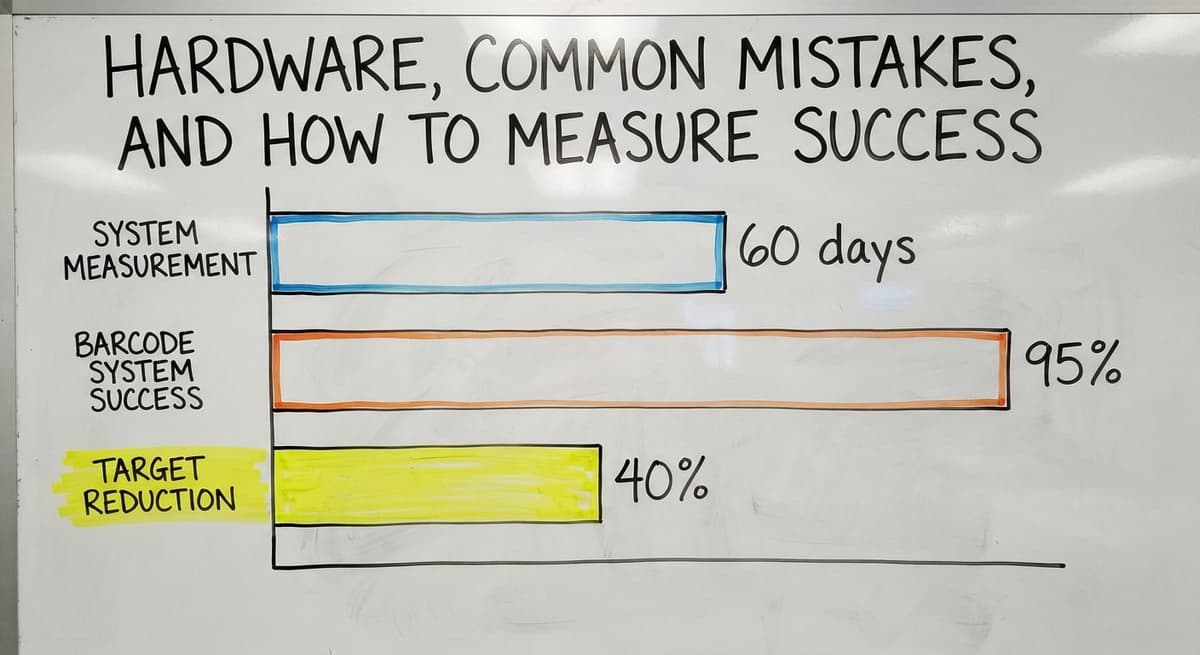
Three numbers are enough to track real improvement. Measure them before the system goes live and again 60 days after.
- Inventory accuracy percentage: Count a sample of 50 SKUs and compare the physical count to the system count. A well-run barcode system should push this above 95%.
- Time to complete a receiving session: Clock a standard delivery from truck arrival to stock posted in the system. The target is a reduction of at least 40%.
- Mis-ships per week: Count orders that left the building with the wrong item or wrong quantity. This number should fall quickly once pick scanning is in place.
These are the numbers that show whether the investment paid off, not in abstract terms but in minutes saved and errors avoided. Track them on a simple spreadsheet and review them monthly.
Next Steps for Adding an Online Barcode System to Your Warehouse
Start on paper. Map your current receiving, picking, and shipping steps as they actually happen today, not as they are supposed to happen. Note where counts are entered by hand, where paper changes hands, and where errors tend to surface.
That map is the starting point for any useful conversation with a software partner. It shows what needs to change and, just as importantly, what is already working and should be left alone.
Choosing the Right Partner Before Buying Any Hardware
Talk to a partner who understands small distribution operations before buying any hardware or software. The wrong scanner for your environment, or a label printer that does not match your label size, creates problems before the system is even live.
If you run a small warehouse and want a plain conversation about whether an online barcode system makes sense for your specific workflow, reach out.
No pressure, no pitch deck: just a practical look at where you are and what a focused build would actually involve.
Frequently asked questions
Can I make a barcode online?
Yes. Many web-based barcode generators let you create a barcode in a browser without installing any software. You enter the data you want to encode, choose a format such as Code 128 or QR, and download or print the result.
Free tools handle basic label needs. If you need barcodes that connect to a live inventory database and write back to a system like the accounting software, you need a generator that is part of a broader barcode inventory management system rather than a standalone tool.
Can I get a barcode for free?
You can generate a barcode image for free using any number of online tools. What you cannot get for free is a globally unique product identifier registered with GS1, which is required if your products will be sold through a retailer or listed on a marketplace that checks for registered codes.
For internal warehouse use, such as shelf locations or internal SKUs, a free generator is perfectly adequate. For retail-ready products, budget for a GS1 membership, which assigns a company prefix that makes your barcodes unique worldwide.
How can I scan a barcode online?
A smartphone or tablet camera can scan most common barcode formats through a browser-based scanner or a lightweight app. Point the camera at the barcode, and the app reads the encoded data and returns it to the screen or sends it to a connected system.
For occasional use, a free browser tool is enough. For warehouse work where speed and accuracy matter, a purpose-built barcode scanner or a mobile device running a dedicated app will be faster and more reliable than a phone camera in poor lighting or at awkward angles.
What is the best free barcode app?
There is no single best answer because the right app depends on what you need it to do. For simple scanning and lookup, apps like Scanbot or the native camera on most smartphones handle everyday barcodes without any setup.
For warehouse use where scans need to update an inventory record, a standalone scanning app is not enough on its own: it needs to connect to a database. Evaluate any app against 3 criteria: which barcode formats it reads, whether it can send scan data to your existing system, and how it performs in the lighting conditions of your actual workspace.
How does an online barcode connect to live inventory data?
A worker scans a barcode label. The scanner sends the encoded data over a network to a database. The database finds the matching record and either displays current information or updates a quantity.
The database can sit in the cloud or on a local server. When the system is built to connect to the accounting software, each scan can update the accounting software inventory record directly, removing the need for manual re-entry.
What hardware does a small warehouse need to start with barcode scanning?
The basics are a barcode scanner or a mobile device with a camera, a thermal label printer, and a Wi-Fi or wired network that reaches every area where scanning happens.
Most small warehouses already own at least one of these. The network is the most commonly overlooked item: dead spots cause scan failures, and scan failures lead to manual workarounds that undermine the whole system.
How long does it take to implement a basic online barcode system for a small operation?
A focused build for a small warehouse can be completed in weeks rather than months when the scope is limited to replacing the highest-pain manual steps.
The key is starting with one process, receiving, rather than trying to automate everything at once. The operation keeps running throughout the build. There is no point where everything stops while a new system goes in.
What mistakes should be avoided when setting up barcode inventory tracking?
The 4 most common mistakes are: skipping a physical count before go-live, which locks existing errors into the new system; using inconsistent label formats across locations or product lines; not training staff on what to do when a scan fails; and trying to automate every process at once instead of starting with the step that causes the most pain.
Each of these is avoidable with a little planning before the system goes live.
Which barcode format should I use?
Code 128 for internal SKU and bin labels, because it holds letters and numbers and every scanner reads it. UPC or EAN only for products sold through retail, where the number comes from GS1. A QR code where a phone camera is the scanner.
How do I create a barcode online for free?
Type the SKU into a free generator, pick Code 128, and download the image. That is fine for a test label. For a whole catalogue, generate the labels from the inventory system so the code and the record are created together and never drift.
Can I make a barcode from a URL?
Yes, as a QR code. A 1D barcode cannot hold a URL of any length. Keep the URL short, and point it at a page you control so the label still works when the destination changes.
Can I generate multiple barcodes at once?
Yes. Most generators accept a pasted list and return one image per line, and label software prints a sheet from a CSV. An inventory system does the same from its own item list, which is the version that stays in sync.
What is in a free first look?
A 30 minute call, your operation mapped, and a clear picture of what we would build. No obligation and nothing to install.
Book a callRelated guides
More on the same work.
Guides
- Barcode Abbreviation
- Barcode Scan Machine
- Tracking Number Barcode
- Barcode Reader Machine
- Barcode Scanner App Ios
- 2d Barcode Readers
- Barcode Producer
- Barcode Systems for Warehouse
- Barcode Reader Description
- Barcodes and Labels
- Alphanumeric Barcode
- Barcode Scanner Inventory System
- Lpn Barcodes
- Imager Barcode Scanner
- Barcode System for Inventory Free
- Inventory Management Software Barcode Scanner
- Make Barcode
- 2d Wireless Barcode Scanner