


What Is Picking And Packing In A Warehouse?
Picking and packing in a warehouse is the physical process that turns a customer order into a shipped package. Picking means pulling the right items from storage. Packing means placing those items into a box, sealing it, and labeling it for shipment. Together, they are the bridge between a customer clicking "buy" and a box arriving at their door.
Published 14 August 2026. Reviewed and updated 15 September 2026.
Reviewed August 2026. Each figure comes from the assumptions stated beside it, so you can substitute your own and the arithmetic still holds.
This article addresses small and mid-size wholesale distributors and fulfillment centers. If your team is running on basic accounting software and printed sheets, you will find something useful here.
Book a callWhat Is Picking and Packing in a Warehouse?
Picking is the first half, and it starts when a picker receives a pick list. That list shows item locations, SKUs, and quantities.
The picker walks or drives to the correct bin, shelf, or zone and pulls each item. Every mistake at this step means the wrong product goes into a box.
Packing starts where picking ends. The packer checks the pulled items against the order, selects the right box size, adds protective materials, prints the shipping label, seals the box, and moves it to the outbound dock.
The difference between the two is simple: picking is about finding the right product, and packing is about getting it out the door correctly.
Would you rather have it built around your operation?
The first look is free. If you would rather not compare products, describe how your operation already works and we build the system around it.
No build cost. You see it running on your own process first, and the monthly subscription starts only once it is live.
Book a callThree Picking Methods Common in Warehouse Operations
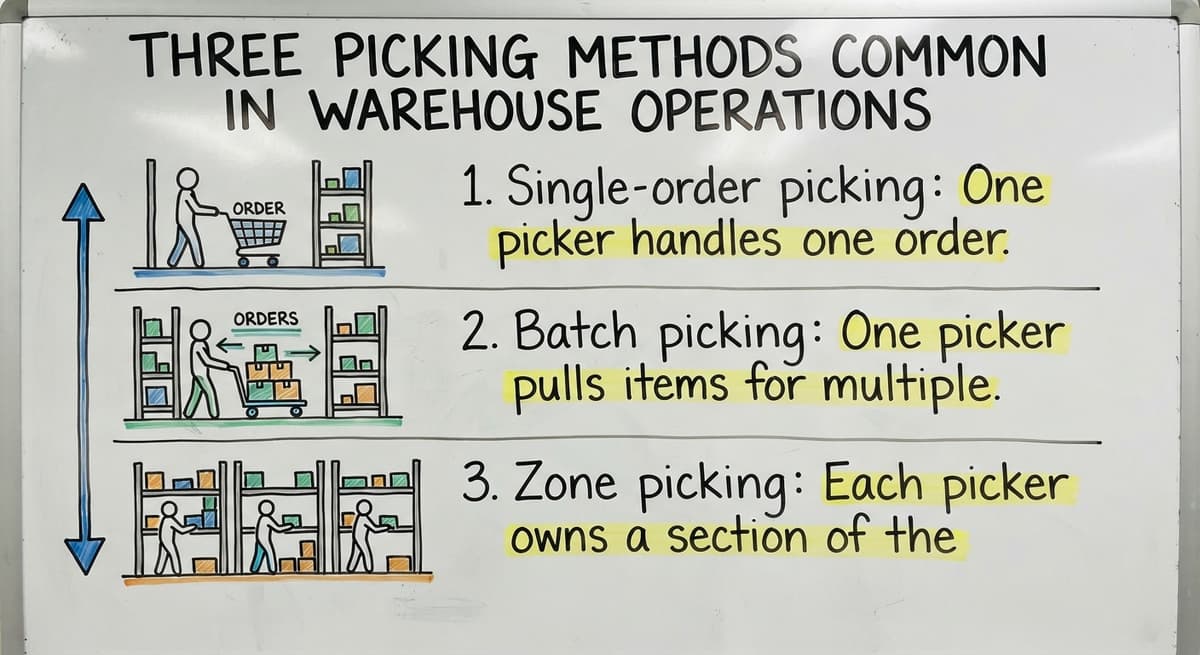
Three picking methods are common in warehouse operations:
- Single-order picking: One picker handles one order start to finish. Simple and accurate, but slower in high-volume environments.
- Batch picking: One picker pulls items for multiple orders in a single trip. Faster, but requires careful sorting afterward.
- Zone picking: Each picker owns a section of the warehouse. Orders are assembled as they move through zones. Works well for large facilities.
OSHA notes that warehousing operations involve "physical hazards such as forklifts, conveyor belts, and manual material handling" that require specific safety controls. You can read their full warehousing guidance at https://www.osha.gov/warehousing.
What Happens During the Packing Step?
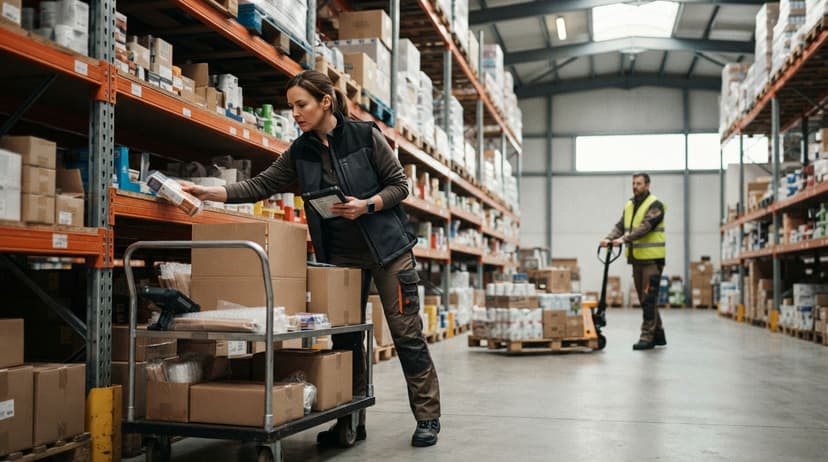
The packing step is where errors either get caught or get shipped. A packer who verifies picked items against the order before closing the box is running a quality check that costs almost nothing and saves real money.
A standard packing sequence looks like this:
- Packer receives the picked items and the order.
- Each item is confirmed against the pick list.
- The right box size is chosen to reduce damage and dimensional weight charges.
- Protective materials go in around the product.
- The shipping label is printed and applied.
- The box is sealed and moved to carrier staging.
A verification check at this stage catches picking errors before they leave the building. Once a box is on a truck, the cost of fixing a wrong item multiplies fast: return shipping, re-pick, re-pack, re-ship, and a customer who now has a reason to buy elsewhere.
Why Does Getting This Right Matter for Distributors?
Order accuracy is not just a warehouse metric. For wholesale distributors and fulfillment centers, it is a competitive differentiator. Buyers who receive wrong or incomplete orders do not always call to complain. They quietly move their next order to a competitor.
Slow packing creates a different problem. Missed carrier cutoffs mean orders that should ship today sit until tomorrow. That delay compounds across dozens of orders and shows up as late deliveries on customer accounts.
The cost of a single wrong pick includes:
- Return shipping in both directions
- Labor to re-pick and re-pack the correct order
- Expedited shipping if the customer needs it fast
- The relationship cost, which is harder to measure but very real
Getting picking and packing right is not about perfection. It is about building a process that catches mistakes before they become customer problems.
Common Problems in Pick and Pack Operations
Most picking and packing errors come from the same short list of process gaps. If any of these sound familiar, you are not alone.
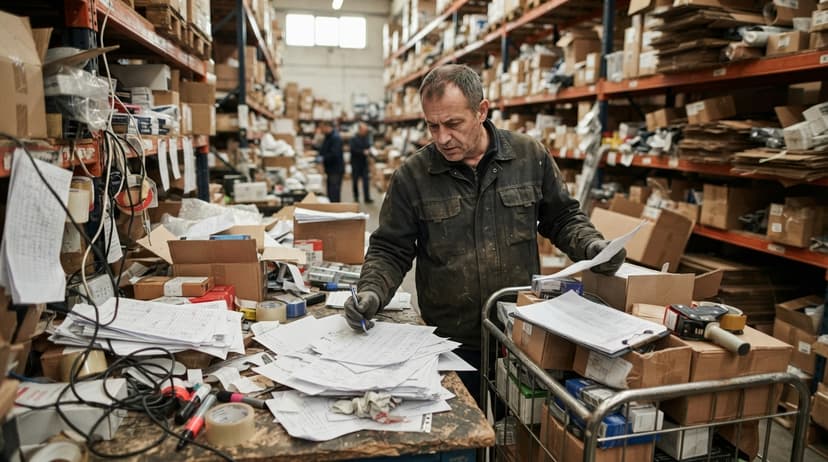
- Printed pick lists that go out of sync with live inventory because a sale came in after the sheet was printed
- Staff pulling from the wrong bin because bin locations are not clearly labeled or tracked in a system
- No verification step, so items go straight into a box without anyone confirming they match the order
- Order changes communicated by email or text, with no way to update a pick list already in someone's hands
- Relying on spreadsheet software to track warehouse inventory, which means the file is always slightly behind reality
These are not signs of a poorly run operation. They are signs of a team that has outgrown the tools it started with.
Is the comparison easier when one option is built for you?
Yes. Off-the-shelf means fitting your process to the software, and custom is the other way round. The first look costs nothing.
Book a callHow Does Warehouse Software Support Pick and Pack?
Warehouse inventory management software overview starts with one core function: generating pick lists from live inventory data. No paper lag. No version mismatch between what the system shows and what is actually on the shelf.
Here is what that looks like in practice:
- Pick lists are generated automatically when an order is confirmed
- Bin locations, item codes, and quantities reflect current stock, not yesterday's count
- Barcode scanning or on-screen confirmation adds a verification step without slowing the team down
- Errors are caught before packing, not after delivery
- Inventory counts update automatically when a pick is confirmed
Why Does a Targeted Fix Beat a Full ERP for Small Warehouses?
A targeted inventory tool replaces the printed sheet and spreadsheet workflow without requiring a full ERP implementation. For teams tracking inventory in a small warehouse, this kind of targeted fix solves the specific problem without introducing a system that is bigger than the operation needs.
For a deeper look at how to track inventory in a small warehouse, that topic covers the underlying inventory side of this process in more detail.
Do I Have to Replace Your Accounting Software to Get Pick and Pack Software?
No. A well-built warehouse system sits alongside your bookkeeping software and handles the warehouse side without touching your accounting workflow.
Accounting software integration for warehouse operations works by keeping orders and invoices in that same accounting system while moving picking, packing, and inventory tracking into a dedicated warehouse layer.
Your accounting team keeps working exactly as they do now. Your warehouse team gets tools built for warehouse work.
This matters because most small and mid-size distributors are not looking for a full ERP. They are looking for something that fills the gap between their bookkeeping software and the physical work happening on the floor.
| What Stays in your accounting software | What Moves to Warehouse Software |
|---|---|
| Invoices and payments | Pick list generation |
| Customer records | Bin location tracking |
| Purchase orders | Barcode scanning and confirmation |
| Financial reporting | Real-time inventory counts |
The goal is a system that fills a specific gap, not one that replaces everything you already have working.
What does it look like running on your own process?
The first thing you see is it running on your own process, at no build cost. The subscription starts once it is live and doing the job, not before.
Book a callWhat Does a Pick and Pack Workflow Look Like With the Right System?
Here is a realistic picture of a single order moving through a warehouse running on purpose-built software.
- An order comes in. The system automatically creates an itemized picking list, with bin locations, item numbers, and quantities pulled from live inventory.
- The picker sees the list on a screen or a printed sheet that reflects current stock. No guessing, no outdated locations.
- At each bin, the picker scans the item or confirms on screen. A mismatch triggers a flag before anything goes into a tote.
- The packer receives the tote, checks the items against what was ordered, chooses an appropriately sized box, and prints the label from the same system.
- The box is sealed and moved to the dock. Inventory updates automatically. No manual entry after the fact.

How Does Custom Warehouse Software Adapt to Your Operation?
For teams building custom warehouse software for distributors, this kind of workflow can be shaped around the specific products, bin layouts, and carrier requirements already in use. The system adapts to the operation, not the other way around.
What Should Your Team Do Next?
Picking and packing is the physical core of order fulfillment. Getting it right means customers receive what they ordered, on time, without your team spending hours fixing errors after the fact.
Software does not have to be complex or expensive to solve real problems here.
The right system generates accurate pick lists, tracks bin locations, adds a verification step, and keeps inventory current without requiring a complete ERP rollout or replacing the accounting setup you already depend on.
How Do You Start the Conversation About Your Pick and Pack Process?
If your team is still working from printed sheets or spreadsheets, a short conversation about your current process is a good place to start. No commitment, no pitch.
Just a clear look at where the gaps are and whether a targeted fix makes sense for your operation.
Reach out and walk us through how your pick and pack process works today. We will tell you honestly whether software would help and what that might look like for a team your size.
Frequently asked questions
What the manual process costs, in numbers
Put numbers on the errors and it gets clearer. 200 orders a day at a 2 percent mispick rate is 4 wrong shipments a day and roughly 1,000 orders a year going out wrong.
Cutting that to 0.5 percent leaves 250 orders a year, which is 750 fewer apologies.
Frequently asked questions
What does a picker and packer do in a warehouse?
A picker retrieves the required products from their storage locations based on a picking sheet that shows bin locations, SKUs, and quantities.
A packer receives those items, checks them against the original order, places them in a properly sized box with protective materials, prints the shipping label, and sends the package to the outbound dock. In smaller warehouses, one person does both jobs.
What does "packing and picking" mean?
Packing and picking refers to the two-step process of fulfilling a customer order in a warehouse. Picking is the act of locating and pulling the correct items from storage.
Packing is the act of placing those items into a shipping container, sealing it, and labeling it for delivery. The two steps together move an order from the shelf to the carrier.
Is picker packer a hard job?
Picking and packing is physically demanding. Pickers and packers spend most of their shift on their feet, walking or lifting repeatedly. Accuracy is also required, so the job demands both physical stamina and attention to detail.
In warehouses without a confirmation check or clear bin labeling, the mental load of avoiding errors adds to the difficulty.
What is warehouse picking and packing?
Warehouse picking and packing is the fulfillment process that starts when an order is placed and ends when a sealed, labeled package leaves the building.
Picking involves locating and pulling items from storage. Packing involves confirming those items, boxing them, and preparing them for shipment. Together they determine whether a customer receives the right product on time.
Why do pick and pack errors happen?
Most picking and packing errors come from a short list of process gaps: pick lists that are out of sync with live inventory, bin locations that are not clearly labeled or tracked, no verification step before a box is sealed, and order changes communicated outside the system. These are not signs of careless staff. They are signs of a process that has outgrown manual tools.
How does warehouse software improve picking and packing accuracy?
Warehouse software generates pick lists from live inventory, so the locations and quantities a picker sees are always current. Barcode scanning or on-screen confirmation adds a check at the pick step.
A second confirmation at packing catches anything that slipped through. Inventory counts update automatically, removing the manual entry step that introduces errors in spreadsheet-based workflows.
Do I have to replace your accounting software to get pick and pack software?
No. A well-built warehouse system works alongside your accounting software. Orders and invoices stay in that program. Picking, packing, bin location tracking, and inventory counts move into the warehouse layer.
Your accounting workflow does not change. The warehouse team gets tools built for warehouse work without anyone touching the financial setup.
How can a small warehouse team improve order accuracy without a big ERP?
Start with two things in the picking and packing flow: digital pick lists tied to live inventory and a confirmation check before boxes are sealed. Both are available in warehouse software built for smaller distribution and fulfillment operations.
You do not need a complete ERP system to get these. A targeted system that handles pick list generation, bin location tracking, and barcode scanning solves the accuracy problem without the cost or complexity of an enterprise platform.
What are the different types of warehouse picking?
Warehouses commonly use three picking methods. Single-order picking has one picker complete an entire order from start to finish, which is simple and accurate but slower for high volume.
Batch picking has one picker pull items for several orders in one trip, which speeds things up but requires careful sorting afterward. Zone picking assigns each picker a section of the warehouse, with orders assembled as they move through zones, working well in larger facilities.
What equipment is used for picking and packing?
Picking and packing relies on tools that support accuracy and speed rather than any single piece of equipment. Pickers use pick lists or handheld scanners to locate items by bin, shelf, or zone.
Packing stations use boxes in various sizes, protective packing materials, label printers, and sealing tools. Barcode scanning or on-screen confirmation is added to verify items before they are packed and shipped.
What is the difference between pick and pack and order fulfillment?
Picking and packing is one part of the broader order fulfillment process. Picking means pulling the correct products off the shelf, and packing means boxing, sealing, and labeling them for shipment.
Order fulfillment covers the entire journey of a customer order, including receiving it, picking and packing it, and getting it onto a carrier for delivery. In short, picking and packing is a physical step inside the larger fulfillment process.
What are common picking and packing mistakes?
Common picking and packing mistakes stem from a short list of process gaps. Printed pick lists can fall out of sync with live inventory after a sale comes in. Staff may pull from the wrong bin when locations are not clearly labeled or tracked.
Skipping a verification step lets wrong items reach the box unnoticed. Order changes sent by email or text may never reach a pick list already in hand, and spreadsheet tracking lags behind actual stock.
Start with a free first look
A 30 minute call, your operation mapped, and a clear picture of what we would build. No obligation and nothing to install.
Book a callRelated guides
The rest of this guide, for the parts of the job this page does not cover.
Guides
Common questions
- What Are the 7s Rules in a Warehouse?
- What Does Receiving Mean in a Warehouse?
- What Are the 5 Main Activities in a Warehouse?
- What is the Most Important Part of Warehouse Organization
- What Are the Benefits of Warehouse Management System
- What is the Point of Warehouse Management System
- What Are the Top 5 Warehouse Management Systems?
- What is Asn in Warehouse Management System
- What is a Warehouse Management System
- What is the Best Warehouse Inventory Management System?
- What is a Warehouse Management System Used For
- What is the Difference Between Warehousing and Inventory Management
- What is the Most Popular Warehouse Management System?
- What Are the 7 Types of Warehouses?
- What is Warehousing Operations
- What is the Purpose of a Warehouse Management System
- What is a Warehouse Management System Pdf
- What is Warehouse Operation
- What is B Type of Inventory in Warehouse Management
- What Does Lpn Stand for in Warehousing