

Warehousing Pick And Pack
Warehousing pick and pack means selecting items from storage and packing them into outbound shipments. A picker pulls the right items from the right bins; a packer boxes, seals, and labels them. This guide, reviewed in September 2026, covers the 4 picking methods, where the process goes wrong in a small warehouse, and the software that fixes it.
Published 7 August 2026. Reviewed and updated 15 September 2026.
Reviewed August 2026. Each figure comes from the assumptions stated beside it, so you can substitute your own and the arithmetic still holds.
Reviewed and updated 15 September 2026.
Book a callWhat Does Warehousing Pick and Pack Actually Mean?
Pick and pack is the heart of order fulfillment. Every order that leaves your warehouse goes through it. Understanding the two steps clearly helps you see where things go wrong.
Picking: Finding and Pulling the Right Items
Picking means going into the warehouse and pulling items off shelves. A picker gets an order, walks to the right bin, grabs the right item, and brings it to the pack station. Simple in theory.
In practice, similar SKUs, poor bin labels, and long walks across a crowded floor make it easy to grab the wrong thing. Picking is a physical job. The faster you do it, the more chances there are for mistakes.
Packing: Boxing, Labeling, and Shipping
Packing is the second half of pick and pack, and it starts when the picked items arrive at the pack station.
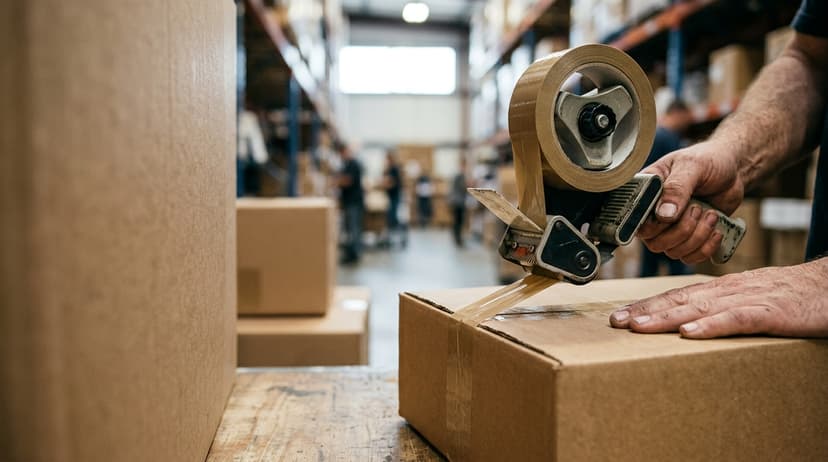
The packer checks the items, chooses the right box size, adds any packing material, prints a packing slip, seals the box, and applies a shipping label.
Each step is a chance to catch an error before the box leaves the building. Most small warehouses do not have a formal check at this stage. That is where costly mistakes slip through.
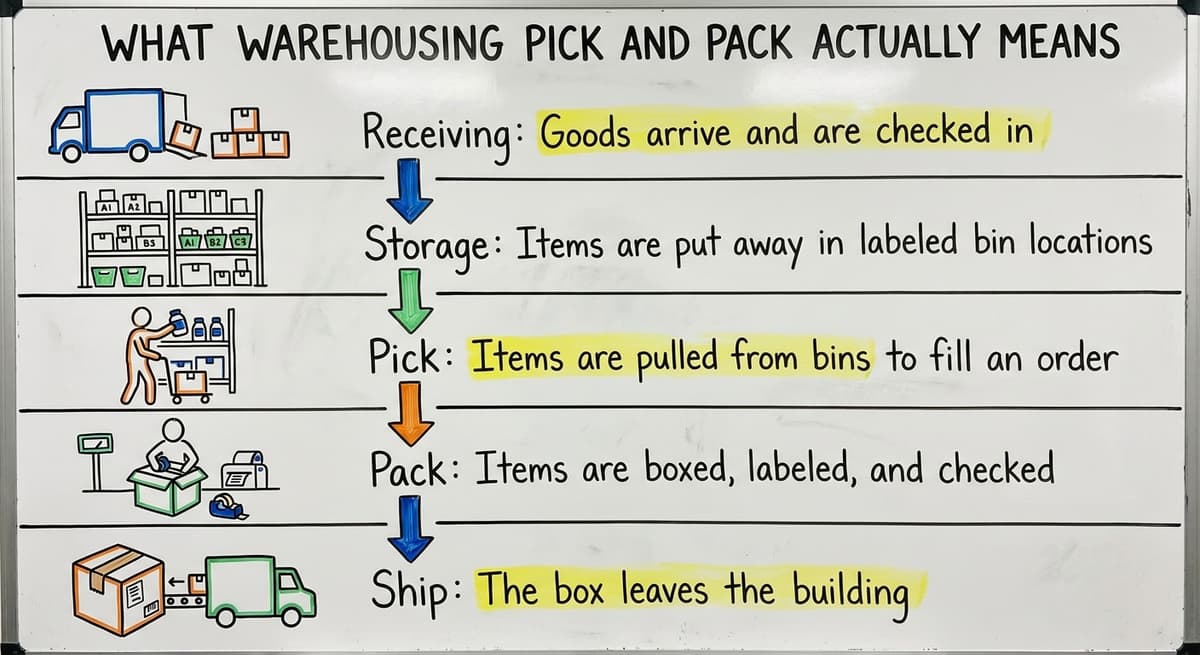
Here is how pick and pack fits into the full warehouse workflow:
- Receiving: Goods arrive and are checked in
- Storage: Items are put away in labeled bin locations
- Pick: Items are pulled from bins to fill an order
- Pack: Items are boxed, labeled, and checked
- Ship: The box leaves the building
A small wholesale distributor shipping 50 orders a day touches every one of these steps for every order. Pick and pack is where the most time is spent and where the most errors happen.
Would you rather have it built around your operation?
The first look is free. If you would rather not compare products, describe how your operation already works and we build the system around it.
No build cost. You see it running on your own process first, and the monthly subscription starts only once it is live.
Book a callThe Most Common Pick and Pack Methods
Warehouses do not all pick orders the same way. The right method depends on your order volume, your team size, and your floor layout. Here are the 4 main methods, and which ones suit small-to-mid operations best.
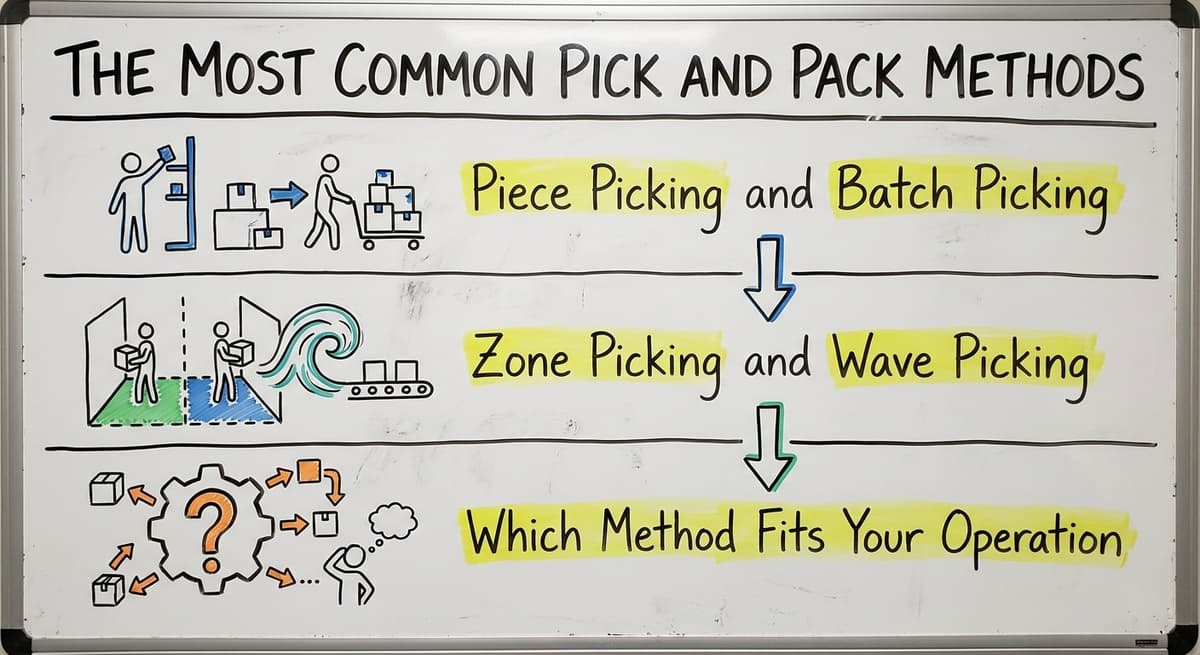
Piece Picking and Batch Picking
Piece picking, also called discrete picking, means one picker handles one order from start to finish. They pull every item on the order, then bring it all to the pack station. This is the most common method in small warehouses. It is easy to manage and easy to train.
The downside is travel time. A picker might walk the same aisle 10 times a day for 10 different orders.
Batch picking solves that. One picker pulls items for several orders at the same time. They walk the aisle once and collect items for 5 or 6 orders in a single pass. This cuts travel time sharply.
For a team of 5 to 20 people, batch picking is the fastest win available. No new software required to start. Just reorganize how you release orders.
Zone Picking and Wave Picking
Zone picking is the method that divides the warehouse into sections. Each picker owns one zone.
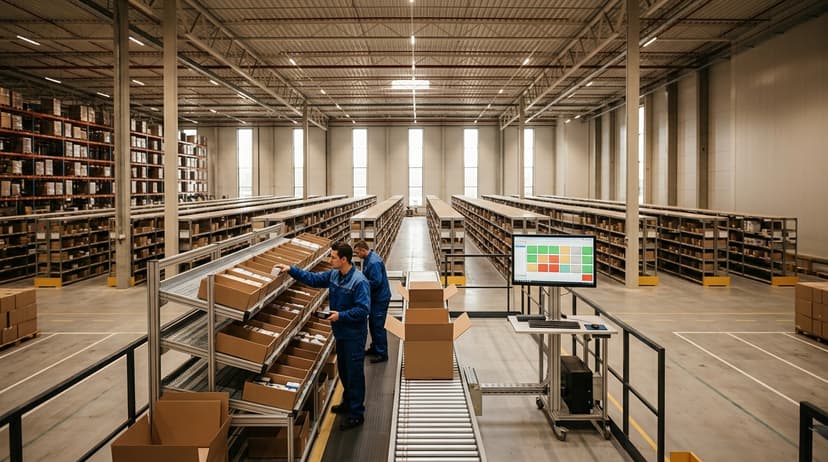
When an order needs items from multiple zones, each picker pulls their part and the items are consolidated before packing. This works well for warehouses with 20 or more pickers and a large floor. It reduces congestion and keeps each picker moving fast in a small area.
Wave picking releases orders in scheduled batches, called waves, rather than one at a time. It combines zone and batch logic.
A warehouse manager might release a wave of 40 orders at 9am, another at noon, and a third at 3pm. This smooths out the workflow and helps with staffing.
Wave picking is standard in large operations but can also help mid-size warehouses that ship in defined windows.
Which Method Fits Your Operation?
Most small distributors default to piece picking because it is simple. That is fine to start. But if your team has more than 3 or 4 pickers and your order volume is growing, batch picking is worth trying this week. No software upgrade required.
For context on why inventory tracking matters at every stage, the IRS is direct on the obligation: "To figure taxable income, you must value your inventory at the beginning and end of each tax year," according to IRS Publication 538.
Every pick is an inventory event. If it is not recorded, your counts drift and your tax figures drift with them.
Here is a quick comparison of the 4 methods:
| Method | Best For | Team Size | Complexity |
|---|---|---|---|
| Piece picking | Simple, low-volume ops | 1 to 10 pickers | Low |
| Batch picking | Growing ops, same SKU mix | 3 to 20 pickers | Low to medium |
| Zone picking | Large floor, high volume | 20+ pickers | Medium |
| Wave picking | Scheduled ship windows | 15+ pickers | Medium to high |
Why Does Pick and Pack Go Wrong in Small Warehouses?
Pick and pack errors are not a sign of a bad team. They are a sign that the process has grown past the tools holding it together. Here is where things break.
Wrong Items and Inefficient Routes
Wrong picks happen when SKUs look alike, bin labels are hard to read, or a picker relies on memory.
A warehouse with 500 SKUs and hand-written bin labels is set up for errors. It is not the picker's fault. The system is not giving them enough help.
Inefficient routes are the other silent cost. A picker with no path logic walks wherever feels right. They might cross the same aisle 4 times in one trip.
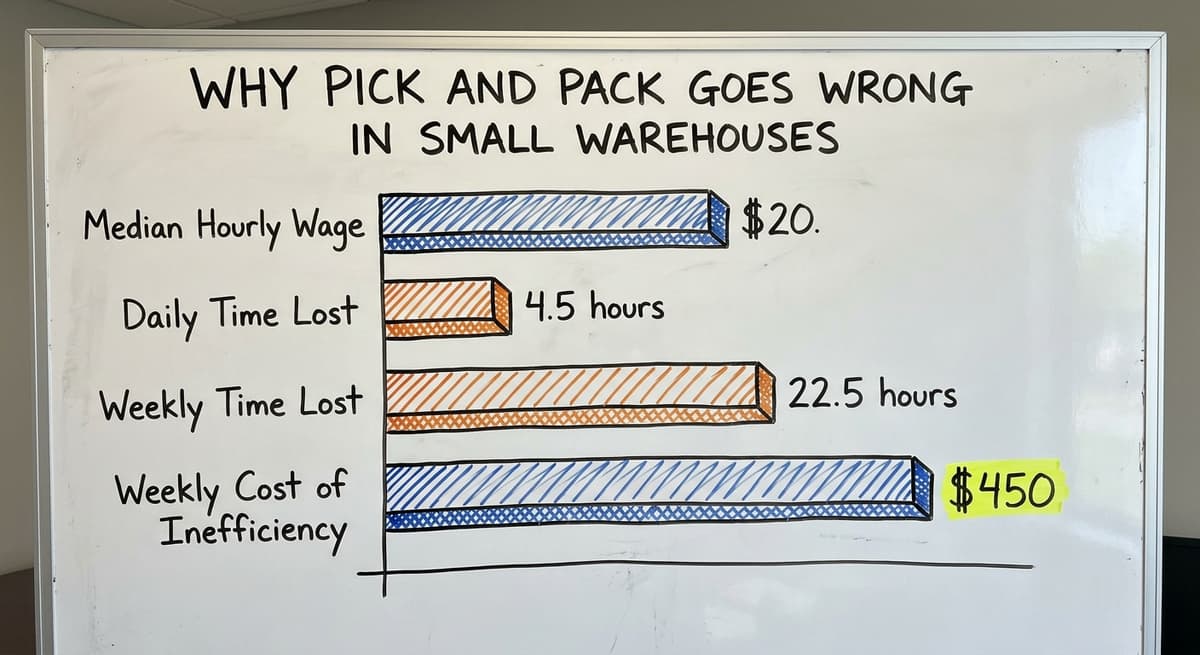
According to the US Bureau of Labor Statistics, warehouse order fillers earn a median hourly wage around $20.
If 3 pickers each waste 90 minutes a day on inefficient routes, that is 4.5 hours of paid time lost every day.
Over a 5-day week, that is 22.5 hours. At $20 an hour, that is $450 a week, or roughly $23,400 a year, going to unnecessary walking.
Is the comparison easier when one option is built for you?
Yes. Off-the-shelf means fitting your process to the software, and custom is the other way round. The first look costs nothing.
Book a callPack Errors and the Order Handoff Problem
Pack errors include wrong box sizes, missing items, and wrong quantities. These happen because the packer is working from the same paper sheet the picker used.
If the picker made an error, the packer has no way to catch it without a second check.
The order handoff is where many small warehouses quietly lose control. An order comes into your accounting software. Someone prints it or emails it to the floor.
The picker works from that sheet. Nothing connects back to the system until someone re-keys the data later. That gap is where errors live.
Integrating your bookkeeping software into the warehouse closes this gap for distributors. The order flows from the system directly to the picker's device. No printing, no re-keying, no handoff delay.
Inventory Drift and the One-Person Problem
Inventory counts drift when items are pulled but not recorded in real time. The system says you have 40 units. The shelf has 27. You do not find out until a customer orders something you cannot ship.
The one-person problem is just as serious. Many small warehouses have one experienced person who knows where everything is. They know the shortcuts, the quirky bin locations, the SKUs that get mixed up.
If they leave, that knowledge walks out with them. That is not a staffing problem. It is a documentation problem. Good management software keeps that knowledge in the system instead of one person's head.
How Does Pick and Pack Connect to Inventory Accuracy?
Every pick is an inventory event. If it is not recorded the moment it happens, your count is already wrong.
The Compounding Effect of One Missed Scan
A single missed scan seems small. But it starts a chain. The count is off by 1. The reorder point triggers late. You run short.
A customer order cannot be filled. You expedite a shipment at higher cost. Or you overstock because the system thought you had less than you did.
This is not a rare edge case. It is what happens in warehouses running on paper pick sheets every day. The US Census Bureau's Monthly Wholesale Trade data tracks inventory-to-sales ratios across wholesale firms.
When those ratios drift, it is because physical counts and system counts have separated. The paper-based pick process is one of the main reasons they separate.
Paper Sheets Create a Dangerous Lag
A paper pick sheet is a record of what was supposed to be pulled. It does not record what was actually pulled, when, or by whom.
The system does not know what left the shelf until someone updates it later, at the end of the day or the end of the week.
In that window, you might sell stock you no longer have. You might reorder stock you already pulled. That lag costs real money.
Inventory tracking and cycle counting can help correct the drift. But cycle counting is a symptom fix. It finds errors after they happen. The root fix is recording every pick in real time, at the moment the item leaves the bin.
Wrong Warehouse Data Means Wrong Data in Your Accounting Software
If your warehouse inventory is wrong, your accounting numbers are wrong. Cost of goods, gross margin, and inventory asset values all depend on accurate physical counts. A warehouse that loses track of picks does not just create fulfillment problems. It creates accounting problems.
The two systems have to stay in sync. That only happens when picks are recorded in real time and passed back to the financial system automatically.
What does it look like running on your own process?
The first thing you see is it running on your own process, at no build cost. The subscription starts once the software is live and doing the job, not before.
Book a call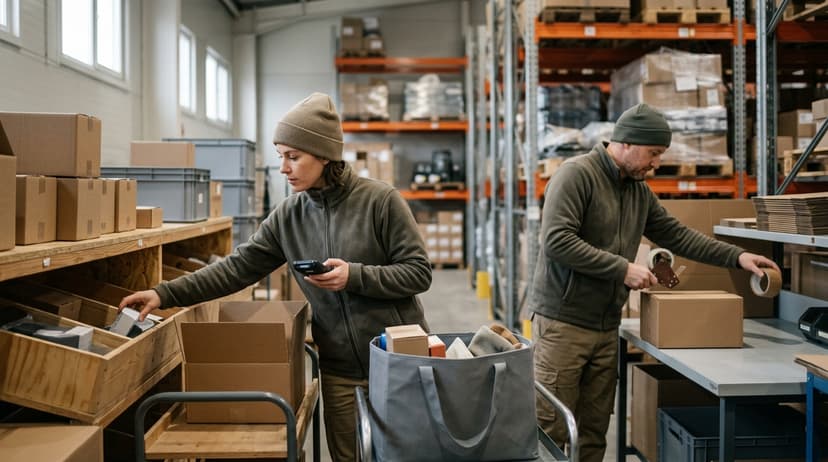
What Does Good Pick and Pack Software Do?
Good pick and pack software does one thing well: it removes the manual steps where errors happen. Here is what that looks like in practice.
Automated Pick Lists and Barcode Scanning
The software is what generates a warehouse pick list automatically from an incoming order. No one types it. No one prints it out or carries it over to the pack floor. The picker gets it on a handheld device or mobile phone.
The list is already sorted by bin location to minimize walking distance. The picker scans each item as they pull it.
Barcode scanning in the warehouse confirms the right item is in hand before it goes in the tote. If the scan does not match, the device flags it immediately.
This one change, scanning at the point of pick, removes a major source of pick errors. The picker does not have to read a label and decide if it matches. The scanner decides.
Real-Time Inventory Updates and Packing Prompts
The moment an item is scanned and pulled, the inventory count updates. Not at end of day. Not when someone remembers to enter it. Right then. That means your system always reflects what is actually on the shelf.
At the pack station, the software prompts the right box size, generates a packing slip, and triggers a shipping label. The packer does not have to make those decisions from memory.
The system flags any discrepancy before the box is sealed. A wrong quantity or a missing item gets caught before the customer calls about it.
Accountability and Connection to Your Accounting Software
Good warehouse management software tracks who picked what and when. This is not about watching people. It is about having a record when something goes wrong. You can see exactly where an error happened and fix the process, not just the mistake.
The software keeps your accounting platform as the financial record. It does not replace that platform. It handles the physical workflow on the floor and passes clean data back to the accounting system.
Custom warehouse software for small and mid-size operations is built exactly this way: the warehouse layer sits on top of what you already have.

Signs Your Pick and Pack Process Needs a Software Upgrade
Most warehouse teams know something is off before they can name it. Here are the signs that the pick and pack process has outgrown the tools.
Day-to-Day Warning Signs
- There are 5 warning signs, and the first is re-keying order data from your invoicing software into a spreadsheet or printed sheet for the floor
- Pick errors happen more than once a week
- You cannot say, right now, exactly how many units of a specific SKU are on the shelf
- Your fastest picker is fast because they have memorized the warehouse, and you worry what happens if they leave
- Returns and re-ships are eating into margin
- You have tried to fix this with better spreadsheets and it keeps breaking
None of these are signs of a bad team. They are signs of a process that has grown past its tools.
A 10-person warehouse processing 80 orders daily on printed pick sheets is not failing. It is just running software built for a 3-person warehouse handling 20 orders a day.
The Growth Trap
Order volume grows. You add a person to keep up. Volume grows again. You add another person. At some point, adding headcount stops working. The floor gets crowded. Errors go up, not down. The answer is not more people. It is a process that scales.
An overview of warehouse inventory management software is a good starting point for understanding what tools are available. The goal is not to replace your team. It is to give them a system that makes the right action the easy action.

Why Do Small Warehouses Not Need a Big ERP to Fix Pick and Pack?
Enterprise warehouse management systems target operations running hundreds of staff across multiple sites. They are not built for a 20-person distributor shipping 100 orders daily.
The ERP Problem
Enterprise ERP implementations can take 6 to 18 months and cost six figures before you go live. The NIST Manufacturing Extension Partnership offers vendor-neutral guidance on supply chain process improvement, and the consistent message is that the right tool matches the actual operation.
A system built for a 500-person logistics company does not match a 20-person distributor. It forces the operation to change to fit the software, rather than the other way around.
Failed ERP implementations are real and well-documented. They can disrupt operations for months. Staff get confused. Orders get missed. The cure becomes worse than the problem.
What is in a free first look?
A 30 minute call, your operation mapped, and a clear picture of what we would build. No obligation and nothing to install.
Book a callThe Right-Sized Alternative
Software built around how your warehouse already works is the alternative to an enterprise ERP. Your bin layout stays the same.
Your zones stay the same. Your ledger software stays in place. The custom layer handles the floor: pick lists, scanning, packing prompts, and real-time inventory updates.
Order management for wholesale distributors works best when the software fits the operation, not the other way around. A system that goes live in weeks rather than months means your team is using it before they forget why they wanted it.
Local Support Makes a Real Difference
Local implementation support means someone who can walk your floor before writing a line of code. They see where your bins are. They understand your pick path. They know which SKUs cause confusion. A remote help desk ticket cannot do that.
For warehouses in and around Columbus, Ohio, a local team that understands the specific operation is not a luxury. It is how you avoid the gap between what the software does and what your warehouse actually needs.
What Should You Look for When Evaluating Pick and Pack Solutions?
Evaluating pick and pack solutions and bringing that decision to ownership requires a clear checklist. Here is what to ask before you commit.
Fit and Flexibility
- Does it connect to your existing order source, your accounting software or your order management system, without a full data migration?
- Can it be set up to match your current bin and zone layout rather than forcing a reorganization?
- Does it support barcode scanning on affordable hardware, including mobile devices and handheld scanners?
- Can it grow with you, adding users, locations, or features, without a full replacement?
Implementation and Support
- The first question is time: how long does implementation actually take, weeks or months?
- Who supports it when something breaks: a help desk ticket or a person who knows your setup?
- Is the vendor willing to show you a working version before you commit?
These questions help you cut through the sales pitch. A vendor who cannot answer them clearly is telling you something.
Frequently Asked Questions About Warehousing Pick and Pack

The Bottom Line on Warehousing Pick and Pack
Your pick and pack problems are not a people problem. They are a tools problem. The good news is the fix does not have to be a massive, expensive ERP project.
Start by looking honestly at where errors happen. Is it at the point of pick, because there is no scan to confirm the item?
Is it at the handoff, because orders are printed and walked to the floor? Is it in the inventory count, because picks are not recorded until end of day? Each of those is a solvable problem.
Custom warehouse software built around how you already work, connected to your accounting platform, and supported by people who can walk your floor, is a real option for a 10-to-50-person operation. It doesn't require a year of implementation or a six-figure budget.
If your team is ready to move past printed pick sheets and manual re-keying, the next step is a conversation about what your specific operation needs. Not a demo of a system built for someone else's warehouse. A look at yours.
Frequently asked questions
Frequently asked questions
What is pick and pack in a warehouse?
Pick and pack is the process of selecting items from storage to fill a customer order, then packing those items into a box for shipment. Picking means pulling the right items from the right bins.
Packing means boxing them, adding a packing slip, and applying a shipping label. It is a step inside the broader fulfillment process, not a synonym for fulfillment itself.
Is picker packer a hard job?
It is physically demanding. Pickers walk long distances, lift boxes, and work at a steady pace for hours. The job is not technically complex, but it requires attention to detail.
Grabbing the wrong item or the wrong quantity causes problems downstream. Good software and clear bin labels make the job easier and reduce errors without adding mental load.
What qualifications do I need for picker packer?
Most picker packer roles require no formal qualifications. Employers look for reliability, basic reading and counting skills, and the ability to work on your feet.
Some roles require a forklift licence or the ability to lift a set weight. Barcode scanning systems have made the job easier to learn quickly, since the device guides the picker rather than relying on memory.
Is picker packer a warehouse job?
Yes. Picker packer is a warehouse role. It sits inside the order fulfillment workflow, between storage and shipping.
In small warehouses, one person might pick and pack the same order. In larger operations, picking and packing are separate roles handled by different staff at different stations.
What is the difference between pick and pack and fulfillment?
Fulfillment covers the full process of receiving an order and getting it to the customer. Pick and pack is one step inside that process.
Fulfillment also includes receiving inventory, storing it, managing returns, and handling customer service. Pick and pack is the physical act of pulling items and boxing them.
Can pick and pack software work with your accounting software?
Yes. The right solution connects to your bookkeeping software rather than replacing it. That software handles the accounting. The warehouse software handles the physical workflow: pick lists, scanning, packing, and shipping.
Orders flow from your accounting platform to the floor automatically. Inventory updates flow back. No re-keying, no lag, no separate data entry.
How long does it take to implement pick and pack software?
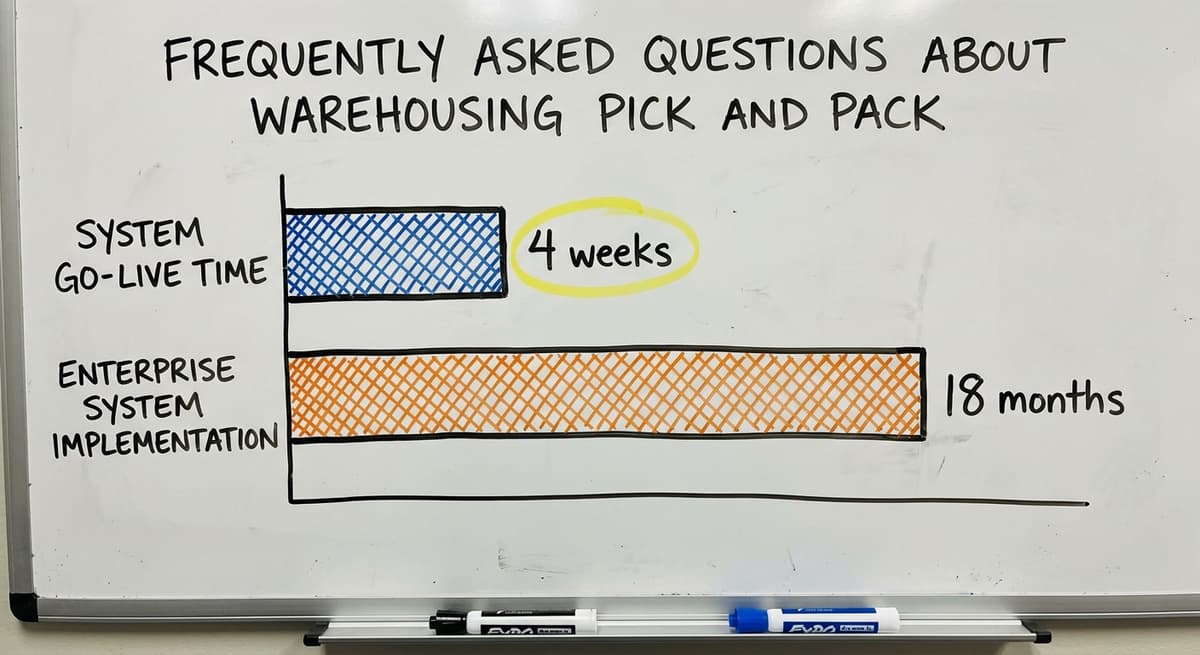
Custom solutions built for small operations can go live in weeks. Enterprise systems take 6 to 18 months.
The difference is how much the software has to be configured to fit your operation versus how much your operation has to change to fit the software. A solution built around your existing layout and bookkeeping setup takes far less time to deploy.
How much does pick and pack software cost for a small warehouse?
Costs vary widely. Enterprise systems can run tens of thousands of dollars a year in licensing alone, before implementation. Custom solutions built for small operations are far more affordable.
The right question is not the sticker price but the total cost including setup, training, and ongoing support. A system that goes live in 4 weeks and costs a fraction of an ERP may deliver more value faster.
What is the difference between picking, packing, and shipping?
Picking is pulling the correct items from their storage bins to fill an order. Packing happens once those items reach the pack station, where they are checked, boxed with the right materials, labeled, and prepared for dispatch.
Shipping is the final step, when the sealed box actually leaves the building. Together these three steps make up order fulfillment, each a distinct stage in moving an order from storage to the customer.
What are the best warehouse picking methods?
The best method depends on team size and order volume. Piece picking, where one person handles an entire order start to finish, suits small teams with low volume.
Batch picking, pulling items for several orders in one pass, works well for growing teams and cuts travel time. Zone picking suits large floors with many pickers, while wave picking fits operations that ship in scheduled windows and combines batch and zone logic.
How do you calculate pick-and-pack costs?
Pick and pack costs are calculated by multiplying the time each picker or packer spends per order by their hourly wage, then multiplying that by the number of orders processed in a given period.
Adding in time lost to inefficient travel routes or manual handoffs between picking and packing gives a fuller picture. Since the math scales with your own numbers, you can substitute your team size, wage rate, and order volume to find your true cost.
How can warehouse pick-and-pack accuracy be improved?
Accuracy improves when clear, legible bin labels and digital order instructions replace handwritten sheets, so pickers and packers work from the same accurate source without re-keying data.
Adding a check at the pack station catches errors before shipping, and recording each pick the moment it happens keeps inventory counts correct.
Reducing reliance on one experienced worker's memory by documenting bin locations and shortcuts also prevents mistakes when that knowledge would otherwise be lost.
Not sure this is the right shape for your operation?
The call is free. Describe how the work runs today. We map it on a call and show you what it would look like built around that, before you spend anything.
Book a callRelated guides
The rest of this guide, for the parts of the job this page does not cover.
Guides
- Pick and Pack in Warehouse
- Pick List
- Pick Lists
- Warehouse Inventory Management Software
- Warehouse Inventory Tracking Software
- Warehouse Inventory Management Systems
- Warehouse Receiving Software
- Warehouse Inventory Systems
- Warehouse Stock Management Software
- Warehouse Management System Top 10
- Software for Warehouse Management System
- Warehouse Shipment
- Warehouse Tracking System
- Warehousing Operations
- Inventory and Warehouse Management Software
- Small Business Warehouse Management System
- Cloud Based Warehouse Management
- Warehouse Management System Types
- Warehouse Inventory Management System
- List of Warehouse Management Software