

Manual Inventory Management
Manual inventory management means tracking stock by hand: spreadsheets, printed count sheets, notebooks, or email threads. It is common across warehouses, distributors, and fulfillment centers of every size. This article, reviewed July 2025, explains when it works, what it costs when it does not, and how to move forward without blowing up a process that mostly runs fine.
Book a callWhat Is Manual Inventory Management
Manual inventory management is the practice of recording and updating stock levels without automated software doing the work for you. A staff member counts items, writes the number down, and enters it into a spreadsheet or notebook. Another person checks that record before quoting a customer. A third person updates it after a shipment goes out.
Reviewed September 2026. Figures are worked from the assumptions stated beside them, so you can substitute your own and the arithmetic still holds.
This is not a sign that a business is behind. Most small warehouses and wholesale distributors start here, and many stay here for years. The IRS needs it in some form regardless: IRS Publication 538 states plainly, "To figure taxable income, you must value your inventory at the beginning and end of each tax year." Manual or not, every business counts.
The real question is not whether to track inventory. It is whether tracking it by hand still fits the pace of your operation.
We build it for your operation, and the first look is free
If you would rather not compare products, describe how your operation already works and we build the system around it.
No build cost. You see it running on your own process first, and the monthly subscription starts only once it is live.
Book a callCommon Tools Used in Manual Inventory Tracking
Most small operations use a mix of tools at once, not one clean system. The most common ones are:
- Excel spreadsheets for running stock counts and buy orders
- Printed count sheets for physical inventory counts on the floor
- QuickBooks inventory module for basic item tracking tied to accounting
- Email chains to confirm what was received or shipped
- Whiteboards for quick daily updates the whole team can see
- Access databases in older operations that built something custom years ago
QuickBooks handles the basics well, but teams often layer Excel or paper on top of it because the built-in inventory tools do not match the pace or detail of the floor. Barcodes help when teams get there. As GS1 explains, barcode standards exist specifically to make item spotting consistent across supply chains, which is why scan-based counts are faster and more accurate than keyed entries.
The mix of tools is not the problem. The problem is that each tool holds a piece of the picture, and no single record is ever fully current.
How Does a Manual Inventory Process Actually Work Day to Day?
A typical manual process runs on people remembering to update the record at each step. Here is what that looks like in a small warehouse with 10 to 30 staff.
- A shipment arrives. A receiving clerk counts the boxes and writes the quantities on a printed sheet.
- Later, someone keys those numbers into the master spreadsheet, or into QuickBooks, or both.
- A sales rep checks the spreadsheet before quoting a customer.
- The order ships. Someone updates the spreadsheet to subtract the units.
- At the end of the week or month, the team does a physical inventory count to see whether the spreadsheet matches what is on the shelf.
Every one of those steps depends on a person doing the update, doing it correctly, and doing it before the next person needs the number. When any step slips, the record drifts from reality. The physical count at the end is how the team finds out how far it drifted.
Where Manual Inventory Management Works Fine
Spreadsheet inventory is genuinely good enough in certain situations. If your operation has fewer than 200 SKUs, ships fewer than 20 orders a day, and has 1 or 2 people who own the records, the overhead of software may not be worth it yet.
A single-location retailer, a small wholesale distributor with a tight product line, or a fulfillment center handling one brand's goods can often run cleanly on Excel and QuickBooks for years. The process is visible, cheap to run, and easy to explain to new staff.
The ceiling is real, but it is not the same for every business. Some operations never hit it. Others hit it fast as order volume climbs or staff count grows.
The comparison is easier when one option is built for you
Off-the-shelf means fitting your process to the software. We do it the other way round, and the first look costs nothing.
Book a call
The Hidden Costs of Manual Inventory Management
Manual tracking has costs that do not appear on any invoice. They show up in payroll hours, lost sales, and the time your team spends fixing mistakes instead of filling orders. The next 3 sections break those costs into specific categories so you can see which ones apply to your operation.
Time Spent on Data Entry and Reconciliation
Inventory matching, meaning the work of checking whether the spreadsheet matches the physical count, grows with order volume. It does not scale flat.
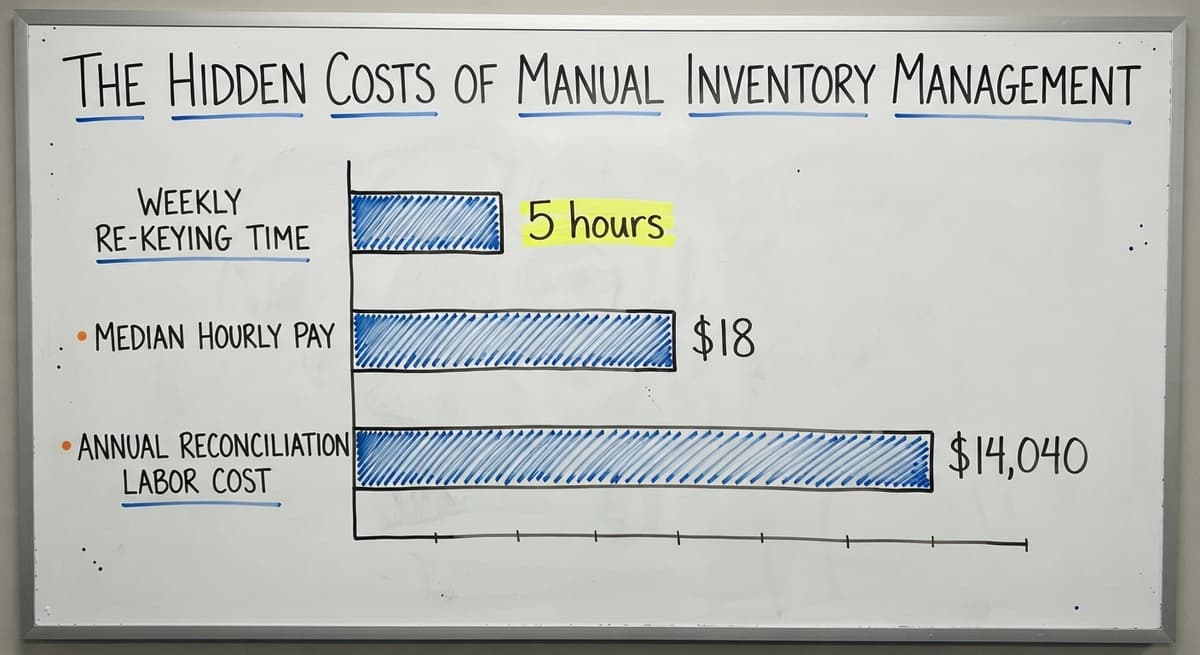
Consider a concrete example: 3 staff members each spend 5 hours a week re-keying buy orders, cross-checking spreadsheet tabs, and correcting count errors. The Bureau of Labor Statistics puts median pay for stock clerks and order fillers near $18 an hour. At that rate, those 3 people cost the business roughly $14,040 a year in matching labor alone, before you count errors that need a second correction.
That number grows as the business grows. More orders mean more entries. More entries mean more chances for the record to drift.
Inventory Errors and Their Downstream Effects
The most common manual errors are wrong counts, duplicate entries, and teams working from different versions of the same spreadsheet. Each one is small on its own. Together they cause real damage.
When a count is wrong, a sales rep may quote stock that is not there. That leads to overselling. Overselling leads to short shipments. Short shipments lead to customer complaints, and sometimes to a legal obligation. The FTC's Mail, Internet, or Telephone Order Merchandise Rule needs businesses to ship within the time they promise or notify the customer. An inaccurate inventory count is often what breaks that promise.
Errors compound when more than one person updates the same file. A warehouse with 5 people touching the spreadsheet has 5 chances per transaction to introduce a version conflict.
Slow Decisions from Outdated Stock Data
A manual system shows yesterday's data, or this morning's, depending on when someone last updated the file. That gap matters more than it looks.
A sales rep quotes availability at 2 p.m. based on a spreadsheet last updated at 8 a.m. Six orders came in between those times. The stock the rep quoted is already gone. The customer places the order expecting delivery. The warehouse discovers the shortfall at pick time.
Missed reorder windows follow the same pattern. When the number in the spreadsheet lags behind the shelf, the signal to reorder arrives late. Stockouts that could have been caught a week earlier become urgent problems.
What Happens When the Person Who Owns the Spreadsheet Leaves?
Staff dependency is one of the most overlooked risks in a manual inventory system. When one person built the spreadsheet, knows the formulas, and handles the weekly matching, that person is a single point of failure. The risk is not about that person's character or reliability. It is a structural problem.
When that person calls in sick on a high-volume day, the count does not get updated. When they quit, the institutional knowledge about which tab overrides which, and why column G is blank for certain SKUs, leaves with them. A new hire starts from scratch or, worse, starts from wrong assumptions.
A system that only one person understands is not a system. It is a dependency. Fixing this does not need replacing the person. It needs replacing the fragile structure they are holding together.
See it running on your own process first
No build cost. The subscription starts once it is live and doing the job, not before.
Book a callSigns Your Manual Inventory System Is Holding You Back
Some warning signs are obvious. Others creep up slowly. Here are the ones worth watching:
- Your team adds new spreadsheet tabs or printed sheets every time order volume increases, rather than the system absorbing the growth.
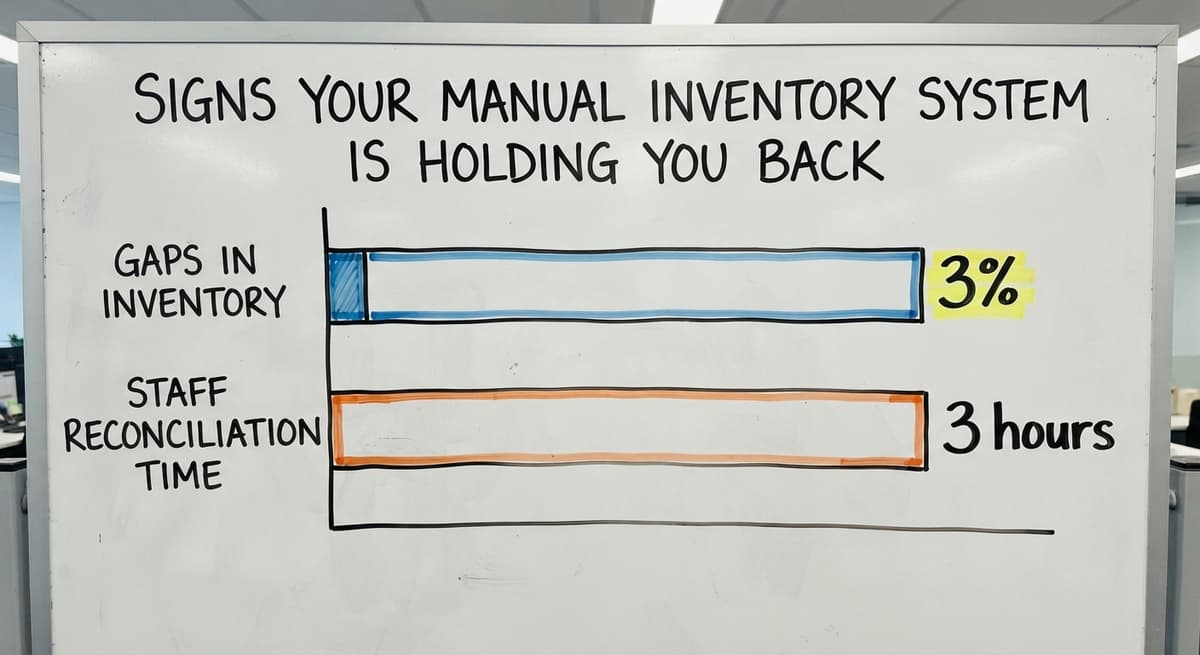
- Physical inventory counts regularly show gaps of more than 2 to 3% between the record and the shelf.
- Staff spend more than 3 hours a week on matching that does not add new information, only corrects old errors.
- Customer complaints about wrong or late shipments have become a recurring pattern rather than an occasional exception.
- A sales rep cannot get a reliable stock number without calling the warehouse directly.
- Reorder decisions happen reactively, after a stockout, rather than based on a reorder alert.
If 3 or more of these are true right now, the manual system is costing more than it is saving.

Manual Inventory Management vs. Inventory Software
The core difference is when the data updates. A manual system updates when a person remembers to update it. Inventory management software updates when the transaction happens.
| Factor | Manual System | Inventory Software |
|---|---|---|
| Data timing | Hours or days behind | Real-time or near real-time |
| Source of truth | Scattered files and tabs | Single shared record |
| Reorder alerts | Manual check required | Triggered automatically |
| Error rate | Grows with volume | Stays flat as volume grows |
| Setup cost | Near zero | Varies by scope |
Software is not a magic fix. There is a transition involved, and a bad rollout can disrupt a process that was running well enough. The comparison above is honest: software wins on accuracy and speed, but it costs something to get there. The question is whether what you spend is less than what the manual errors are already costing you.
Why Small Operations Stay Manual Longer Than They Should
The reasons are real, and they deserve a straight answer rather than a dismissal.
Fear of a large ERP project is the most common one. A full enterprise system can take 12 to 18 months to implement and cost six figures before the first order ships through it. For a 20-person distributor, that is not a reasonable trade.
Past bad experiences matter too. Many owners have watched a software rollout fail, seen staff reject a new system, or paid for a platform that never matched how the warehouse actually worked.
The good news is that a full ERP is not the only alternative to a clipboard. There is a middle path: targeted software that fixes the specific parts of the manual process causing pain, without touching the parts that work.

Do I Have to Replace QuickBooks to Get Better Inventory Control?
No. Businesses running on QuickBooks do not have to abandon it to get real-time inventory visibility. QuickBooks handles accounting well. The gap is usually on the warehouse floor, not in the books.
Custom inventory software can sit alongside QuickBooks and sync with it. A practical example: a buy order is created in the inventory system when stock drops below a set threshold. That order flows into QuickBooks automatically when it is approved. No one re-keys it. The accounting record stays accurate without a second data entry step.
This is what QuickBooks integration for warehouse operations looks like when it is built around the existing workflow. The goal is to remove the manual steps that cause errors, not to replace a tool that is already doing its job.
Not sure this is the right shape for your operation
Describe how the work runs today. We map it on a call and show you what it would look like built around that, before you spend anything.
Book a callWhat a Better System Looks Like Without a Full ERP
Inventory management software for small distributors does not have to be a rip-and-replace project. The right build replaces only the manual parts that are breaking down.
For most small warehouses, that means three things:
- Real-time stock visibility so any staff member can see the current count without calling someone or opening a shared drive.
- Automated reorder alerts that flag when a SKU drops below its threshold, so the reorder decision happens before the stockout.
- Accurate picking lists generated from confirmed orders, not from a spreadsheet someone updated this morning.
Custom warehouse management software built this way slots into the existing workflow. The team learns one new step, not a whole new system. QuickBooks stays where it is useful. The spreadsheet that was doing 4 jobs gets replaced by a tool that does those 4 jobs reliably.
The NIST Manufacturing Extension Partnership recommends mapping current processes before changing them, specifically to avoid replacing something that works with something that does not fit. That is the right starting point for any inventory project.

How to Move Away From Manual Inventory Without Disrupting Operations
Start with the single most painful step, not the whole process. For most operations, that is receiving: the moment when a shipment arrives and someone has to count it, write it down, and key it in. Automating that one step removes the most common source of entry errors and frees up the most staff time.
A phased approach works well here:
- Automate receiving first. Scan or confirm items as they arrive and let the system update the count.
- Move to picking next. Generate accurate pick lists from confirmed orders rather than from a shared spreadsheet.
- Add reorder alerts last. Once the counts are reliable, the system can tell you when to buy before you run out.
Replacing Excel with custom working software does not have to mean a long rollout. A good partner maps the current process before writing a line of code. The goal is to understand what the spreadsheet is actually doing before deciding what replaces it. A system built around your workflow takes weeks to adopt, not months.
Frequently Asked Questions About Manual Inventory Management
How to manage inventory manually? Use a spreadsheet or printed count sheet to record every item, its location, and its current quantity. Update the record every time stock moves: when a shipment arrives, when an order ships, and after each physical count. Assign one person to own the master record and set a regular schedule for reconciling it against the physical shelf count. Keep the format simple enough that any staff member can read and update it without training.
What is the 80/20 rule in inventory? The 80/20 rule, also called the Pareto principle, holds that roughly 80% of your revenue comes from 20% of your SKUs. In practice, this means your top 20% of products deserve tighter tracking and more frequent counts than the rest. For a manual system, it is a useful way to decide where to focus attention when you cannot track everything with equal care.
What are the four types of inventory management? The four common types are periodic review, where counts happen on a fixed schedule; perpetual tracking, where every transaction updates the record in real time; just-in-time, where stock arrives only as needed to reduce holding costs; and ABC analysis, which groups items by value and tracks high-value items more closely. Most small operations use a mix of periodic review and informal ABC logic without naming them.
What are the 5 stages of the inventory management process? The five stages are: receiving stock and confirming quantities; storing items in assigned locations; picking items to fill orders; shipping orders and updating records; and counting physical stock to verify the records are accurate. Manual systems handle all five stages, but each one depends on a person completing the step correctly and on time.
What is the biggest risk of staying manual too long? Errors and staff dependency grow with the business. A process that one person can manage at 15 orders a day becomes unmanageable at 80 orders a day using the same tools. The risk is not a single failure. It is a slow drift where the records get less reliable as volume grows, and no one notices until a customer complains or a count is badly wrong.
Is a full ERP the only alternative to manual tracking? No. Wholesale distributor software solutions and custom builds can target only the parts of the manual process that are failing. A business that runs QuickBooks and Excel today can replace the Excel-based inventory tracking with a purpose-built system while keeping QuickBooks exactly where it is. The US Census Bureau's wholesale trade data shows how much inventory wholesale firms carry relative to sales, which is precisely why right-sized tools matter more than large platforms for most distributors.

Next Steps for Warehouse and Distribution Teams Ready to Move Forward
Manual inventory management has a ceiling. Most growing operations hit it sooner than they expect, and the signs are usually visible before the real damage starts.
The fix does not have to be a large project. The Software Society builds systems around the workflow your team already uses. QuickBooks stays in place. The parts causing pain get replaced. The parts running fine stay exactly where they are.
If you are not sure whether your current process has room to grow or is already at its limit, start with a conversation. Describe what your team does today, where the friction is, and what a better outcome would look like. There is no commitment involved, and no pressure to move fast. Reach out to start that conversation.
Frequently asked questions
How to manage inventory manually?
Use a spreadsheet or printed count sheet to record every item, its location, and its current quantity. Update the record every time stock moves: when a shipment arrives, when an order ships, and after each physical count. Assign one person to own the master record and set a regular schedule for reconciling it against the physical shelf count. Keep the format simple enough that any staff member can read and update it without training.
What is the 80/20 rule in inventory?
The 80/20 rule holds that roughly 80% of your revenue comes from 20% of your SKUs. In practice, your top 20% of products deserve tighter tracking and more frequent counts than the rest. For a manual system, it is a useful way to decide where to focus attention when you cannot track everything with equal care.
What are the four types of inventory management?
The four common types are periodic review, where counts happen on a fixed schedule; perpetual tracking, where every transaction updates the record in real time; just-in-time, where stock arrives only as needed to reduce holding costs; and ABC analysis, which groups items by value and tracks high-value items more closely. Most small operations use a mix of periodic review and informal ABC logic without naming them.
What are the 5 stages of the inventory management process?
The five stages are: receiving stock and confirming quantities; storing items in assigned locations; picking items to fill orders; shipping orders and updating records; and counting physical stock to verify the records are accurate. Manual systems handle all five stages, but each one depends on a person completing the step correctly and on time.
What is the biggest risk of staying with manual inventory management too long?
Errors and staff dependency grow with the business. A process one person can manage at 15 orders a day becomes unmanageable at 80 orders a day using the same tools. The risk is not a single failure. It is a slow drift where records get less reliable as volume grows, and no one notices until a customer complains or a count is badly wrong.
Do I have to replace QuickBooks to get better inventory control?
No. QuickBooks handles accounting well. The gap is usually on the warehouse floor. Custom inventory software can sit alongside QuickBooks and sync with it automatically, so buy orders flow from the inventory system into QuickBooks without anyone re-keying them. The accounting record stays accurate, and the warehouse gets real-time stock visibility without a platform swap.
Is a full ERP the only alternative to manual inventory tracking?
No. Targeted inventory software can replace only the manual steps that are causing problems, while leaving QuickBooks and existing workflows in place. A custom build focused on receiving, picking, and reorder alerts is far faster to implement than a full ERP and costs a fraction of the price. For most small warehouses and distributors, that middle path is the right one.
How long does it take to implement inventory software?
It depends on scope. A full ERP can take 12 to 18 months. A targeted custom build that replaces specific manual steps usually takes weeks, not months, especially when the rollout partner maps the current process first. The more clearly the business can describe what is broken and what needs to stay the same, the faster a fit-for-purpose system can be built and adopted.
Start with a free first look
A 30 minute call, your operation mapped, and a clear picture of what we would build. No obligation and nothing to install.
Book a callRelated guides
More on the same work.
Guides
Common questions
- What is E Inventory Management
- What is Roq in Inventory Management
- What is Barcoding in Inventory Management
- What is Online Inventory Management System
- What is Effective Inventory Management
- What is the Definition of Inventory Management
- What is Inventory Management Mary Kay
- What is Inventory Management Practices
- What is Fluctuation Stock in Inventory Management
- What is Abc Classification in Inventory Management
- What is the Purpose of Inventory in Operations Management
- How to Manage Food Inventory
- What is Sales and Inventory Management System
- What is the Importance of Quality Inventory Management
- What is Inventory Management System Project
- How to Manage Consignment Inventory
- What is Inventory Management Meaning in Hindi
- What is Fifo in Inventory Management
- What is Telecom Inventory Management
- How to Manage Fba Inventory
- What is Kanban System of Inventory Management
- How to Improve Inventory Management
Added since this page was reviewed
The newer guides in this cluster are here.
- How to Manage Inventory in Rocket League Answered on its own page.
Added since this page was reviewed
The newer guides in this cluster are here.
- How to Manage Inventory in Stardew Valley Answered on its own page.
Added since this page was reviewed
The newer guides in this cluster are here.
- How to Manage Inventory Fallout 76 Answered on its own page.
Added since this page was reviewed
The newer guides in this cluster are here.
- Multi Location Inventory Management Software Answered on its own page.
- What is the Difference Between Aggregate and Item Inventory Management Answered on its own page.
- Inventory Management for Multiple Locations Answered on its own page.
- What is Jit Inventory Management Answered on its own page.
- Inventory Management System for Manufacturing Answered on its own page.
- Inventory Management Pics Answered on its own page.
- What is an Important Factor in Inventory Management Answered on its own page.
- B2b Inventory Management Answered on its own page.
- Jewelry Inventory Management Answered on its own page.
- Dental Inventory Management Answered on its own page.
- What is Inventory Management in Working Capital Answered on its own page.
- The Objective of Inventory Management is To Answered on its own page.
- What is Poor Inventory Management Answered on its own page.
- What is Inventory Management and Its Types Answered on its own page.
- Qr Code for Inventory Management Answered on its own page.
- Hvac Inventory Management Software Answered on its own page.
- Inventory Management Software for Schools Answered on its own page.
- What is the Main Purpose of Inventory Management Answered on its own page.
- Nonprofit Inventory Management Answered on its own page.
- What is Inventory Management in Pharmacy Answered on its own page.