


Manual Inventory System
A manual inventory system is any process where a person records stock data by hand rather than software capturing it automatically. That includes paper logs, Excel spreadsheets, printed count sheets, and email updates. Manual systems are a legitimate starting point for small operations. They also break down in predictable ways as volume grows.
Reviewed September 2026. Figures are worked from the assumptions stated beside them, so you can substitute your own and the arithmetic still holds.
Reviewed and updated: June 2025
Book a callWhat Is a Manual Inventory System and Who Uses One
A manual inventory system relies on people to record stock levels. The tools vary: notebooks, Excel files, printed pick sheets, whiteboards, and sometimes Access databases. What they share is that a person writes something down or types a number rather than a scanner or software doing it automatically.
Small to mid-size wholesale distributors use these systems most often. So do fulfillment centers and warehouses with 5 to 100 staff. Many operations use QuickBooks for billing but track stock separately in a spreadsheet. Owners and operations managers who built their own workarounds over time are the most common users. These are not people who missed a memo about software. They built something that worked at the scale they were at.
A manual system is a real solution, not a placeholder. It just has a ceiling.
We build it for your operation, and the first look is free
If you would rather not compare products, describe how your operation already works and we build the system around it.
No build cost. You see it running on your own process first, and the monthly subscription starts only once it is live.
Book a callHow a Manual Inventory System Works
The basic cycle has 5 steps: receive goods, record quantities, pick orders, update counts, and reconcile. Each step depends on a person writing something down or entering a number.
A shipment arrives. Someone counts the boxes and logs the quantities on a receiving sheet. That sheet goes to the office, where someone enters the numbers into a spreadsheet. When an order ships, a picker pulls from the shelf and marks off a printed pick sheet. The spreadsheet gets updated later, sometimes hours after the fact.
What a Manual System Leaves Out
QuickBooks handles the invoice side for many distributors. It records the sale and the payment. It does not track what is left on the shelf in real time.
GS1, the global standards body behind barcode systems, notes that "barcodes are the most widely used automatic spotting technology in the world" at gs1.org/standards/barcodes. A manual system skips that layer entirely. Every count depends on a person being accurate, present, and on time.
What Tools Does a Manual Inventory System Use?
Most small distributors use a combination of tools rather than one single system. The most common ones are:
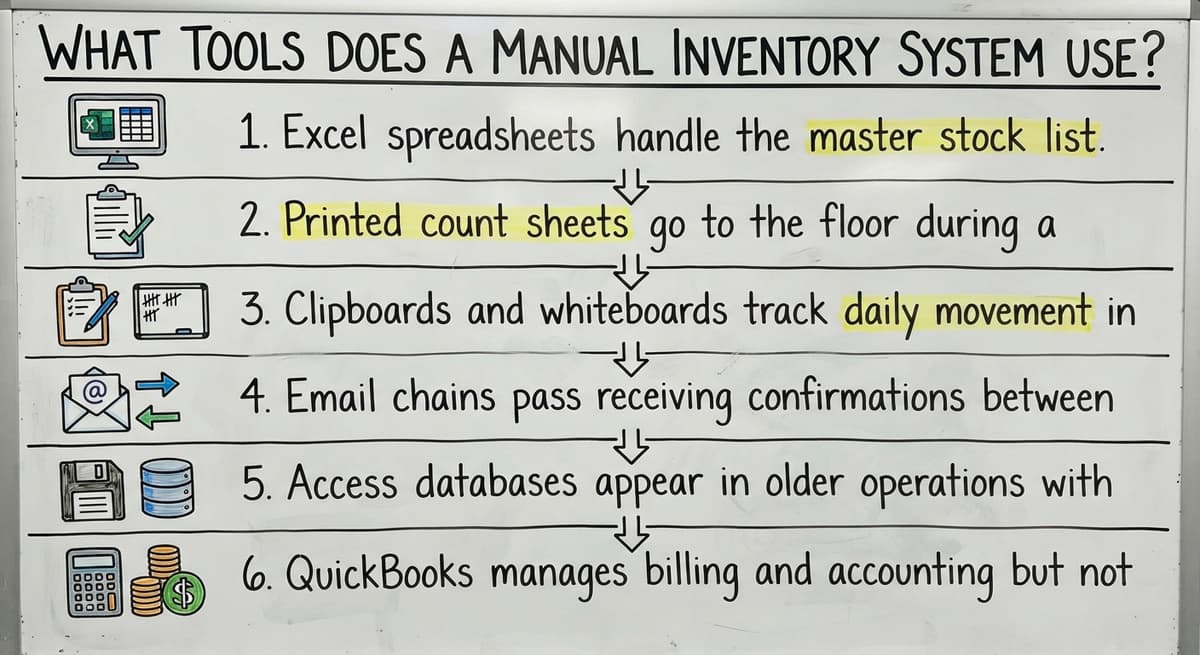
- Excel spreadsheets handle the master stock list and running counts
- Printed count sheets go to the floor during a physical inventory count
- Clipboards and whiteboards track daily movement in fast-moving areas
- Email chains pass receiving confirmations between staff
- Access databases appear in older operations with more structured data needs
- QuickBooks manages billing and accounting but not live warehouse inventory
These tools solve real problems at small scale. A whiteboard in a cold storage room costs nothing and takes 10 seconds to update. An Excel file built over 3 years carries institutional knowledge that no off-the-shelf product replicates on day one. The honest answer is that these tools work until the volume or the team grows past what they can handle.

Advantages and Real Costs of a Manual Inventory System
Why Manual Systems Still Make Sense at Small Scale
A manual inventory system has genuine advantages. No software license is required. Staff can learn the process in an afternoon. There is no vendor to depend on and no rollout to manage. If the process needs to change, one person edits a spreadsheet rather than filing a support ticket.
For a single-location operation with a low SKU count and predictable volume, the math often favors staying manual. An early-stage business still figuring out its product mix does not need a warehouse management system. The IRS does need that inventory be counted and valued: Publication 538 states, "To figure taxable income, you must value your inventory at the beginning and end of each tax year" at irs.gov/publications/p538. A spreadsheet satisfies that requirement.
The system earns its keep when the cost of changing it is higher than the cost of running it.
The comparison is easier when one option is built for you
Off-the-shelf means fitting your process to the software. We do it the other way round, and the first look costs nothing.
Book a callWhere Manual Tracking Gets Expensive
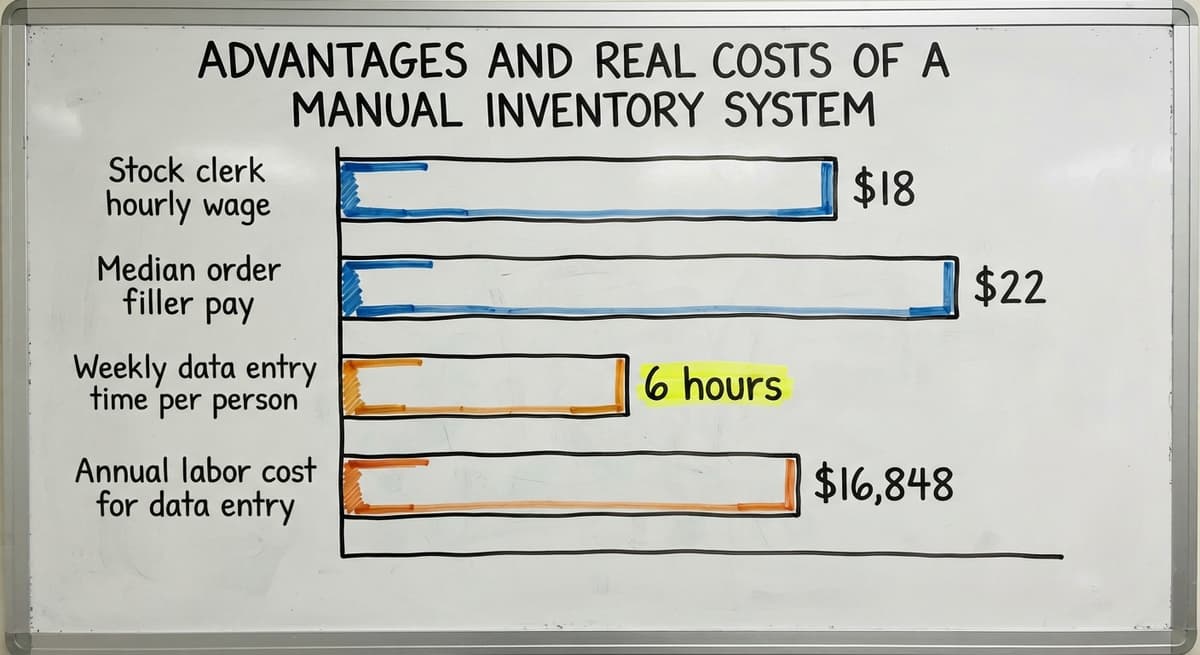
Staff time is the largest hidden cost. According to the US Bureau of Labor Statistics, stock clerks and order fillers earn a median wage around $18 to $22 an hour. Three people each spending 6 hours a week on manual data entry and matching costs between $16,848 and $20,592 a year in labor alone, before errors.
How Errors Compound the Cost
Errors compound that cost. A wrong count leads to an oversell. An oversell leads to a short shipment. A short shipment leads to a customer complaint and a recount. The US Federal Trade Commission's Mail and Internet Order Rule needs sellers to ship when promised or notify the customer. A stale count makes that promise hard to keep.
Month-end matching adds more. When the spreadsheet and the physical shelf do not match, someone has to find the gap. That search takes hours, sometimes days. The cost is not abstract: it shows up in payroll, chargebacks, and lost accounts.
Manual Inventory Count Methods
Three methods cover most of what small distributors actually do.
- Full physical count stops all activity and counts everything at once. Most operations do this monthly or quarterly. It is accurate but disruptive.
- Cycle counting rotates through sections of inventory on a schedule so the full count is never done all at once. A section of the warehouse gets counted each week. Cycle counting reduces the shutdown burden and catches errors earlier.
- Spot count is triggered by a discrepancy or a high-value item check. It is fast and targeted but reactive by nature.
Cycle counting is the method the NIST Manufacturing Extension Partnership points to as a best practice for ongoing inventory accuracy in small and mid-size operations. It keeps counts current without halting the floor.
The right method depends on how many SKUs you carry and how much disruption you can absorb.

Where Manual Inventory Systems Break Down
Volume is the first trigger. Counts fall behind when orders come in faster than the team can update the spreadsheet. The data goes stale. Picks happen against numbers that are hours or days old.
Multiple users create the second problem. Two people editing the same Excel file in different windows produces conflicting versions. One overwrites the other. No one knows which number is right.
Staff turnover is the third. A key employee leaves and the system they built in their head leaves with them. No one else knows which column to trust or why a formula was set up that way.
The fourth is the one that costs money: a customer order ships wrong because the count was stale. That is the moment most owners start looking for a better path.
These are not edge cases. They are the predictable ceiling of any manual process.
Is a Manual Inventory System the Same as Spreadsheet Tracking?
Spreadsheet tracking is one type of manual inventory system, not a separate category. A spreadsheet is a tool. A manual system is the full process around it.
Some operations use paper on the floor and a spreadsheet in the office. Others run entirely on printed sheets. A few use a structured paper-based system with no spreadsheet at all. All of them are manual inventory systems because a person records every data point.
The distinction matters when you are deciding what to fix. If the problem is the spreadsheet itself, a better-structured file might solve it. If the problem is the process around the spreadsheet, a new file will not help.
Knowing which type you are running tells you where to start.
See it running on your own process first
No build cost. The subscription starts once it is live and doing the job, not before.
Book a call
How QuickBooks Fits Into a Manual Inventory System
Does QuickBooks work as an inventory system? QuickBooks handles invoicing and accounting well. It is not built for real-time warehouse tracking.
Most distributors use QuickBooks for billing and a separate spreadsheet for stock. That split works until the 2 systems drift apart. An invoice goes out in QuickBooks. The spreadsheet does not get updated until the next morning. By then, someone else may have sold the same item.
A custom system built around QuickBooks can close that gap. It handles the warehouse floor, receiving, and order fulfillment, then syncs transactions to QuickBooks automatically. Staff keeps using QuickBooks for what it does well. The manual re-entry step disappears.
The goal is not to replace QuickBooks. It is to stop managing 2 systems that do not talk to each other.
Manual Inventory System vs. Inventory Management Software
Software captures data at the point of action rather than after the fact. A barcode scan at receiving updates the count at once. A pick confirmation in the system reduces the on-hand quantity in real time. No one types a number into a spreadsheet later.
The practical difference is visibility. With a manual system, the answer to "how much stock do I have right now" needs a trip to the floor. With software, the answer is on a screen.
Software also reduces month-end matching. When every transaction is logged automatically, the gap between the system and the shelf is smaller and easier to find.

Choosing the Right Software Fit
Not every software option needs a full ERP. Custom inventory software built for small operations can match an existing workflow without forcing a process change. Off-the-shelf tools are built for a general use case and may need you to adapt your process to fit theirs. The right fit depends on how unique your workflow is and how much change your team can absorb at once.
The question is not whether software is better in theory. It is whether the cost of your current system now exceeds the cost of changing it.
Signs Your Manual System Is Holding You Back and How to Improve It
Recognizing the Tipping Point
Several signals indicate that a manual inventory system is no longer keeping up:
- Reconciling counts takes more than a few hours each week
- At least 1 large shipping error occurred in the past quarter
- Staff avoid updating the spreadsheet because it is confusing or slow
- You cannot answer "how much stock do I have right now" without walking the floor
- Order volume is growing faster than the team can track
- Month-end close takes days instead of hours
Growing past a manual system is not a failure. It is a natural milestone. The US Census Bureau's Monthly Wholesale Trade data shows that wholesale inventories-to-sales ratios shift as volume scales. Operations that grow without updating their tracking process carry more risk with every order.
Practical Fixes Before You Replace Anything
If a full system change is not the right move yet, these steps reduce errors without new software:
- Standardize count sheets and enforce a single version of the spreadsheet so no one works from an old copy
- Assign 1 person as the owner of each data entry step so accountability is clear
- Set a regular matching schedule rather than waiting for a discrepancy to force one
- Use conditional formatting in Excel to flag items below their reorder point automatically
A cleaner process on the same tools buys time and makes any future transition easier.
Not sure this is the right shape for your operation
Describe how the work runs today. We map it on a call and show you what it would look like built around that, before you spend anything.
Book a call
What Does Transitioning Away From a Manual Inventory System Look Like?
A good transition does not need a big disruption. Start by mapping the current process before building anything new. Write down each step, who does it, and how long it takes. That map reveals where the real cost sits.
Next, identify the 2 or 3 pain points causing the most delay or error. Build or implement a fix for those first rather than trying to replace everything at once.
Train the team on the new process before going live. A system that staff understand and trust gets used. One that feels imposed gets worked around.
When evaluating options, look for a solution that fits how the operation already runs, integrates with QuickBooks so accounting stays intact, and comes from a partner who understands small and mid-size distribution rather than enterprise sales cycles.
The best transition is the one the team actually follows on day two.
Frequently Asked Questions About Manual Inventory Systems
What are the four main types of inventory systems? The 4 most common types are periodic manual systems (counted on a schedule), perpetual systems (updated with every transaction), barcode-based systems (scanned at each movement), and RFID systems (tracked automatically by radio signal). Most small distributors start with a periodic manual system and move toward perpetual tracking as volume grows.
How do I track inventory manually? Start with a master product list that includes SKU, description, unit of measure, and reorder point. Create a receiving log and a picking log. Count on a regular schedule, daily or weekly for fast-moving items. Record every receipt and every shipment. Reconcile the log against the physical shelf at least monthly.
How to do manual inventory? Choose a count method: full physical count, cycle count by section, or spot count for high-value items. Print or prepare count sheets before you start. Count the physical shelf, not what the system says. Record what you find. Compare to the last recorded quantity and investigate any gap before moving on.
Frequently Asked Questions: Software, Compliance, and Accuracy
What are the top 3 inventory management systems? There is no single right answer because the best fit depends on operation size, workflow, and budget. QuickBooks Commerce, Fishbowl, and inFlow are frequently cited for small to mid-size businesses. Custom-built systems are worth considering when a standard product needs too much process change to fit an existing operation.
Is a manual inventory system legal and compliant? Yes, for most small businesses. The IRS needs that inventory be valued at the start and end of each tax year, and a well-kept manual system satisfies that. There is no federal requirement to use software for inventory tracking.
How accurate is a manual inventory system? Only as accurate as the last count. Every hour between a physical count and a transaction is a window for error. Accuracy degrades faster at higher volume, with more staff, or when the process is not consistently followed.
Next Steps for Operations Ready to Move Forward
Manual inventory systems work until the cost of staying with them outweighs the cost of changing. That calculation is different for every operation.
If you are not sure where you stand, start by documenting your current process. Write down each step, who owns it, and how long it takes. That exercise alone often reveals where the time and errors are going.
If the numbers point toward a change, the right move is a partner who builds around your existing operation rather than selling a template. QuickBooks integration for distributors, custom warehouse software for small operations, and wholesale distribution software built to your workflow are all options worth exploring before committing to a large ERP.
Contact us to walk through your current setup. We will look at what you are running now and show you what a practical, low-disruption upgrade could look like for your operation.
Frequently asked questions
What are the four main types of inventory systems?
The 4 most common types are periodic manual systems (counted on a schedule), perpetual systems (updated with every transaction), barcode-based systems (scanned at each movement), and RFID systems (tracked automatically by radio signal). Most small distributors start with a periodic manual system and move toward perpetual tracking as volume grows.
How do I track inventory manually?
Start with a master product list that includes SKU, description, unit of measure, and reorder point. Create a receiving log and a picking log. Count on a regular schedule, daily or weekly for fast-moving items. Record every receipt and every shipment. Reconcile the log against the physical shelf at least monthly.
How to do manual inventory?
Choose a count method: full physical count, cycle count by section, or spot count for high-value items. Print or prepare count sheets before you start. Count the physical shelf, not what the system says. Record what you find. Compare to the last recorded quantity and investigate any gap before moving on.
What are the top 3 inventory management systems?
There is no single right answer because the best fit depends on operation size, workflow, and budget. QuickBooks Commerce, Fishbowl, and inFlow are frequently cited for small to mid-size businesses. Custom-built systems are worth considering when a standard product needs too much process change to fit an existing operation.
Is a manual inventory system legal and compliant for a small business?
Yes, for most small businesses. The IRS needs that inventory be valued at the start and end of each tax year, and a well-kept manual system satisfies that requirement. There is no federal mandate to use software for inventory tracking.
How accurate is a manual inventory system?
Only as accurate as the last count. Every hour between a physical count and a transaction is a window for error. Accuracy degrades faster at higher volume, with more staff, or when the process is not consistently followed by everyone on the team.
Can I use Excel as my inventory system?
Yes, and many small distributors do. Excel works well at low volume with a small team. It breaks down when multiple people edit the same file, when version conflicts appear, or when the count cycle cannot keep up with order volume. At that point, a more structured system reduces errors.
Start with a free first look
A 30 minute call, your operation mapped, and a clear picture of what we would build. No obligation and nothing to install.
Book a callRelated guides
More on the same work.
Guides
- Manual Inventory Management
- Inventory Management System for Manufacturing
- Inventory Bin System
- Automated Inventory Management System
- Web Based Inventory Management System
- Best Inventory Management System
- Cloud Based Inventory Management Systems
- Perpetual Inventory System
- Periodic Inventory Systems
- Scanner Manuals
- Scanning Manual
- Hospital Stock Management System
- Top 10 WMS Systems
- Types of Stock Control Systems
- Perpetual Stock System
- Medical Stock Management System
- Best Inventory Software
- Classification of Inventory