


Serial Numbering
Serial numbering means giving every single item its own unique ID. One unit, one number, no sharing. If you run a warehouse and want to know exactly where any item is at any moment, serial numbering is the method that makes that possible. This article covers what it is, how it differs from lot tracking, when it is worth the effort, and how to start small.
Reviewed September 2026. Each figure comes from the assumptions stated beside it, so you can substitute your own and the arithmetic still holds.
Published 9 July 2026. Reviewed and updated 15 September 2026.
Book a callWhat Does Serial Numbering Mean in a Warehouse?
Serial numbering assigns a unique item identifier to each individual unit, not just to a product type or a batch. Think of it as a name tag. Every item that comes through your door gets its own tag. No two tags are the same.
This is different from lot or batch tracking, where a group of items made or received together shares one number. Lot tracking tells you which batch an item came from.
Serial number tracking tells you where that specific unit is right now, who handled it, and what happened to it along the way.
For a small or mid-size distributor, that distinction changes how you handle returns, recalls, and warranty claims.
Would you rather have it built around your operation?
The first look is free. If you would rather not compare products, describe how your operation already works and we build the system around it.
No build cost. You see it running on your own process first, and the monthly subscription starts only once it is live.
Book a callSerial Numbers vs Lot Numbers: What Is the Difference
A lot number covers a group. A serial number covers one item only.
Here is a plain example. You receive 50 power tools in a shipment. That shipment gets one lot number. Each of the 50 tools gets its own serial number.
The lot number tells you they all arrived on the same truck. The serial number tells you which specific tool ended up in which customer's hands.
Lot tracking makes sense for bulk goods where individual units are interchangeable: fasteners, chemicals, food ingredients. Serial number tracking makes sense when the item has a warranty, a high value, or a regulatory requirement attached to it.
Serial Numbers and the Legal Obligation to Know What You Hold
The IRS draws a line here too. As IRS Publication 538 states, "To figure taxable income, you must value your inventory at the beginning and end of each tax year." Knowing exactly which units you hold, and which have left the building, is not optional. It is a legal obligation. Serial numbers make that count precise.
Why Does Serial Numbering Matter for Inventory Control?
Why does serial numbering improve inventory control? Because it closes every gap where a unit can disappear without a record.
With serialized inventory, you can locate any single unit at any point in the supply chain. That visibility reduces shrinkage. When every item is accounted for individually, it is much harder for one to walk out the door unnoticed.
Returns, warranty claims, and recalls all become faster. Instead of searching through paper logs or spreadsheets, you pull up one record and see the full history of that item.
For a distributor moving high-value goods, the labor saved on a single recall event can cover the cost of implementing serial number tracking many times over.
The NIST Manufacturing Extension Partnership notes that supply chain traceability is a core factor in reducing risk for small and mid-size manufacturers and distributors.
How Do Barcodes and Serial Numbers Work Together in an Inventory System?
The serial number is the data. The barcode is how your team reads it without typing anything.
A barcode printed on a label encodes the serial number. When a worker scans it, the system pulls up that item's full record instantly. No manual entry, no transcription errors.
1D barcodes (the standard striped kind) store a short string of characters, enough for most serial number formats. QR codes store more data and can encode the serial number plus supporting fields like manufacture date or product category in one scan.
For most warehouse operations, a 1D barcode is enough. QR codes add value when you need to pass data to a customer or a partner who does not have access to your system.
A Barcode Inventory Management System overview will show you how these two pieces connect inside a live warehouse workflow.
Is the comparison easier when one option is built for you?
Yes. Off-the-shelf means fitting your process to the software, and custom is the other way round. The first look costs nothing.
Book a callWhat a Serial Number Can Carry, and How to Build a Good Format
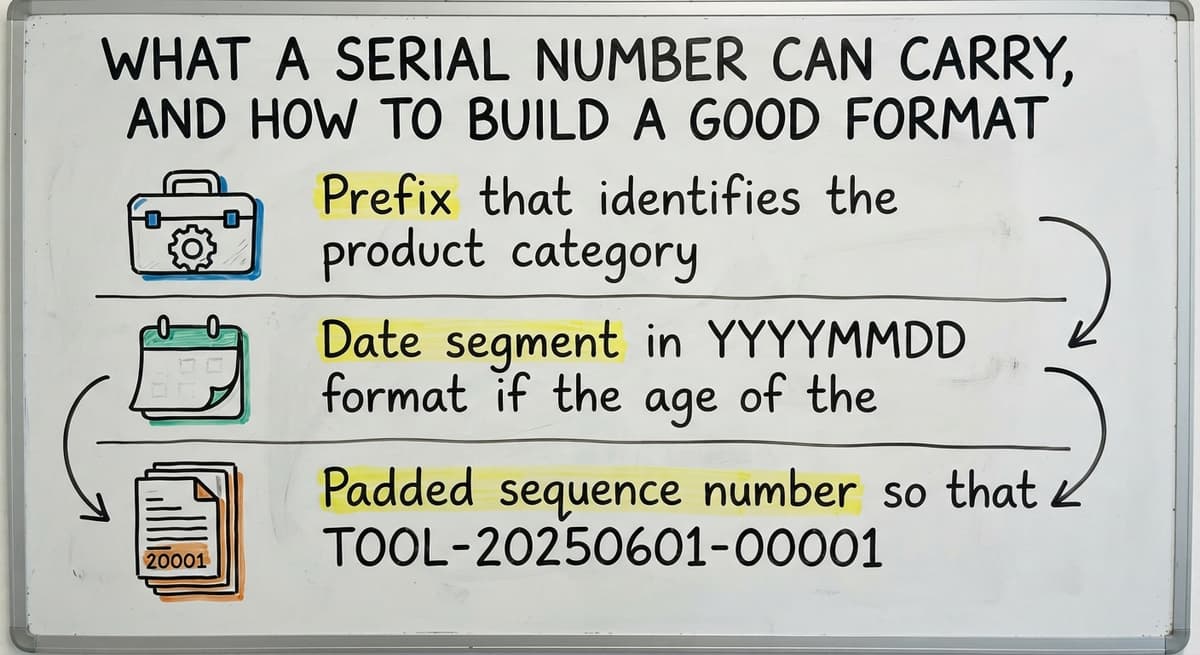
Serial numbers can embed the product type, manufacture date, location, and a sequence. A structured format makes sorting and searching faster. Even a plain sequential number works if the system stores the context behind it.
Here is a format that works well for most distributors:
- Prefix that identifies the product category (example: TOOL for power tools)
- Date segment in YYYYMMDD format if the age of the item matters for warranty or recall
- Padded sequence number so that TOOL-20250601-00001 sorts correctly next to TOOL-20250601-00099
Avoid special characters. Hyphens are fine. Slashes, ampersands, and spaces cause scanners to misread or skip the number entirely. Keep the total length under 20 characters where possible. Long numbers slow down manual check and increase the chance of a scan error.
The goal is a format your receiving team can read at a glance and your system can sort without custom logic.
Assigning Serial Numbers at Receiving, and Tracking Items Through the Warehouse
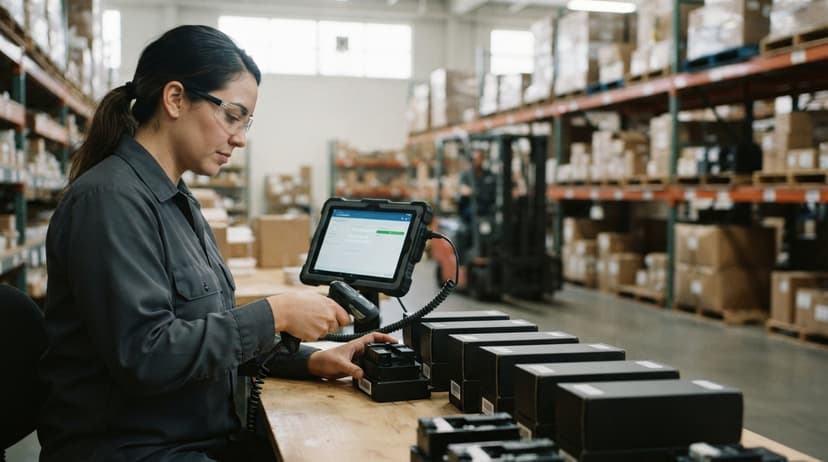
The best time to assign a serial number is the moment an item enters the warehouse. Assign it at the receiving dock, tie it to the buy order, and print the label before the item moves anywhere.
Items serialized at receiving are tracked from day one. That closes the gap where most shrinkage hides: the period between arrival and the first system entry.
From that point, every scan at a new location updates the item's position. Pick events, pack events, and ship events all attach to the same serial number record. At any moment you can answer: where is this item right now?
Receiving and put-away workflows built around barcode scanning make this process fast enough that it does not slow the dock down. A worker scans the item, the label prints, and the item moves. The whole step takes seconds.
What Happens at the Point of Sale or Shipment?
Scanning the serial number at ship confirms the right item left the building, and that scan creates the chain of custody record you will need later.
The sale record links to the serial number. If a customer calls about a warranty or return, you open that record and see exactly what shipped, when it shipped, and who signed for it. No digging through paper. No guessing.
This is also where fraud prevention kicks in. A returned item that does not match a serial number you actually shipped cannot be restocked as new. The system flags it before it gets back on the shelf.
For any business selling items with warranties, this data is the difference between a 2-minute resolution and a 20-minute investigation.
Handling Returns and Warranty or Recall Management With Serial Numbers
Scan a returned item and its full history appears: who bought it, when it shipped, what condition it was in at the time of sale. That record confirms the item is genuinely one you sold, which prevents a common fraud where customers return a different unit than the one they purchased.
Restocking a serialized item is clean. The system knows what came back, so it updates the location and status automatically.

How Serial Numbers Make Recall Management Faster and Cheaper
If a manufacturer issues a recall, you pull every affected serial number and see exactly where each unit went. You know which customers to call. You know which items are still in the warehouse. You know which ones are already in the field.
Without serial numbers, a recall means contacting every customer who bought that product type in a given window and hoping they respond.
With serial numbers, you contact only the people who have the specific affected units. That is faster, cheaper, and far less damaging to customer trust.
What does it look like running on your own process?
The first thing you see is it running on your own process, at no build cost. The subscription starts once it is live and doing the job, not before.
Book a callWhen Serial Numbering Makes Sense, and When It Is Overkill
Serial number tracking earns its keep on items where the cost of losing track of one unit is high. That includes:
- Electronics, tools, and equipment with manufacturer warranties
- Medical devices or safety equipment with regulatory traceability requirements
- Any product where a single defective unit creates liability if it cannot be located
- High-value goods where shrinkage of even one unit is a meaningful loss
When Lot Tracking Is Enough
Not every product needs serial tracking. Pens, packaging tape, and other low-cost consumables rarely justify per-unit tracking. If the cost of labeling and scanning each unit exceeds the risk of losing it, skip it.
Use lot tracking instead for bulk goods that move together. A Lot tracking vs serial tracking comparison can help you decide where the line sits for your specific product mix.
A practical rule: if the item has a serial number printed on it by the manufacturer, track it. If it does not, ask whether you would ever need to find that specific unit again. If the answer is no, lot tracking is enough.

Does the accounting software Support Serial Number Tracking Well Enough?
The accounting software has serial number fields, but it does not have a real scan-and-track workflow. You can record a serial number against a sale, but you cannot scan items through receiving, picking, and shipping in real time inside the accounting software alone.
For a small operation doing low volume, the accounting software may be enough to get started. For any warehouse doing meaningful daily throughput, the gaps show up quickly.
Manual entry of serial numbers is slow and error-prone. A worker entering 30 serial numbers by hand at the end of a shift will make mistakes.
Pairing the accounting software With a Dedicated Barcode System
A dedicated barcode inventory management system handles the warehouse movements: scanning at receiving, tracking through pick and pack, confirming at ship.
The accounting software handles the financials. The two can coexist through a accounting integration for inventory that passes the data between systems without double entry.
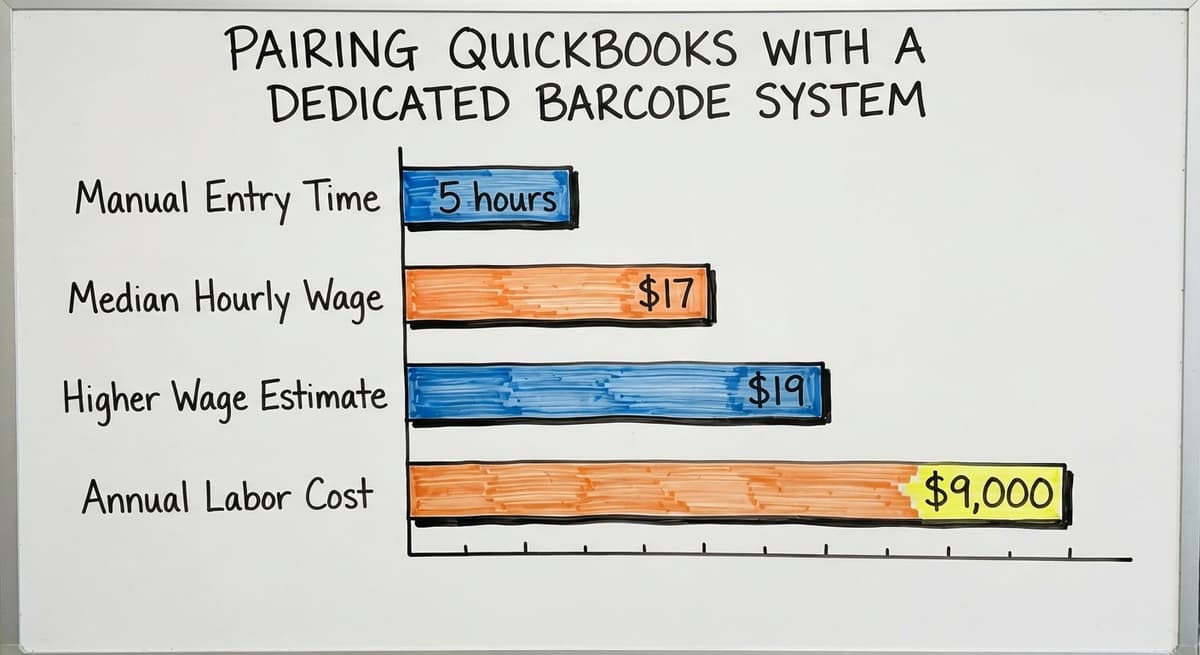
Consider the labor cost. According to the US Bureau of Labor Statistics, stock clerks and order fillers earn a median wage around $17 to $19 per hour.
If 2 workers spend 5 hours a week on manual serial number entry and error correction, that is roughly $9,000 to $10,000 a year in labor doing a job a scanner handles in seconds.
What Are the Most Common Serial Numbering Mistakes?
The most common serial numbering mistake is assigning numbers too late, which leaves a gap in the item's history that can never be filled.
Other mistakes that cost time and money:
- Duplicate serial numbers slip through when the format is managed in a spreadsheet. Use a system that rejects duplicates automatically before the label prints.
- Formats that include special characters cause scanners to misread or truncate the number. Test every format with your actual scanner hardware before rolling it out.
- Numbers that are too long slow down manual check and increase transcription errors when a scanner is not available.
Not sure this is the right shape for your operation?
The call is free. Describe how the work runs today. We map it on a call and show you what it would look like built around that, before you spend anything.
Book a call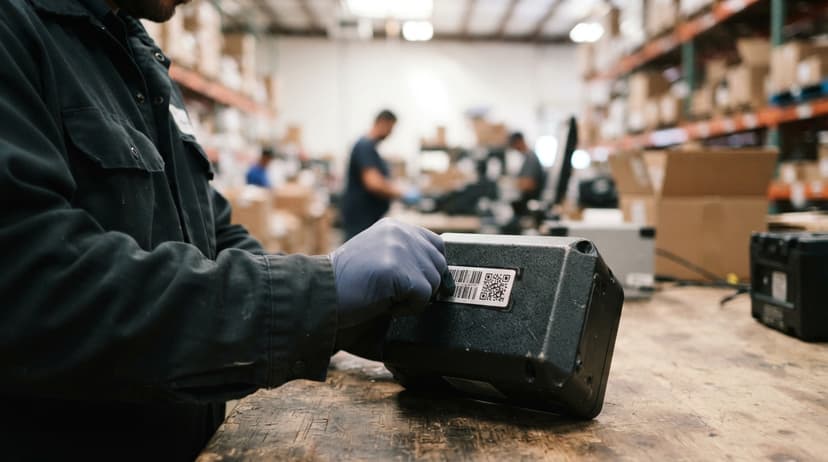
Why Skipping Staff Training Is the Most Expensive Serial Numbering Mistake
A serial number system only works if every scan happens, every time. One worker who skips the scan at receiving creates a gap that looks like shrinkage even when nothing was lost.
Start with a written procedure. Post it at the receiving dock. Review it during the first 2 weeks of rollout.
How Software Automates Serial Number Assignment and Reporting
Modern inventory software auto-generates the next serial number in sequence. When an item arrives at the receiving dock, the system creates the number, sends it to the label printer, and records the assignment against the buy order. No one types anything.
The system enforces uniqueness. Any attempt to reuse a number is flagged before the label prints.
How Automated Serial Tracking Turns Reporting Into a Tool
Pull a report showing every item by serial number, location, and current status. Cycle counting best practices built around serial numbers let you verify items by scan rather than manual count, which cuts the time a cycle count takes by a large margin.
Audit trails satisfy insurance requirements, compliance checks, and customer inquiries without anyone digging through filing cabinets.
Label printing triggered automatically at receiving is the single step that makes the rest of the system reliable. If the label prints at the dock, the item is in the system from the start.
Getting Started With Serial Numbering in a Small Warehouse
Start with one product line, not your entire catalog. Pick your highest-value items, the ones where losing track of a single unit would actually hurt.
Choose a simple format and commit to it. A prefix, a date, and a padded sequence number is enough. Do not redesign it after rollout.
Train the receiving team first. The serial number is born at the dock. If receiving gets it right, every downstream step is easier. Once the process feels natural there, add more product categories one at a time.
Choosing a System That Fits a Small Warehouse Without an Enterprise Budget
A system built around your workflow can enforce your specific serial number format, connect to your existing accounting setup without replacing it, and be implemented by people who also train your staff.
No enterprise price tag is required for a 10-to-80-person distributor. The goal is a process your team actually follows, not the most sophisticated system on the market.
If you are ready to replace fragmented manual tracking with a system that fits how your warehouse actually works, that is exactly the kind of custom workflow rollout that takes shape around your operation without a long enterprise project.
Frequently asked questions
How do I read a serial number?
Most serial numbers are printed on a label or engraved on the item itself. In a warehouse system, you read it by scanning the barcode on the label with a handheld scanner. The scanner sends the number to your inventory software, which pulls up that item's record.
If there is no barcode, you type the number directly into the system. Structured serial numbers encode information in segments: a product prefix, a date, and a sequence. Reading those segments left to right tells you the product type, when it was made or received, and its position in the production or receiving run.
What is a 10 digit serial number?
A 10 digit serial number is simply a serial number that uses exactly 10 characters, all digits. Many manufacturers use a fixed length to make sorting and searching consistent.
In a warehouse context, 10 digits gives you room for a date segment (8 digits for YYYYMMDD) plus a 2-digit sequence, or a shorter date plus a longer sequence. The length itself is not large. What matters is that the format is consistent, the system enforces uniqueness, and your scanner hardware can read it without errors.
How are serial numbers formatted?
Serial number formats vary by industry and manufacturer, but most follow a similar pattern: a prefix that identifies the product or category, a middle segment that encodes a date or location, and a padded sequence number at the end.
For example, TOOL-20250601-00047 tells you it is a tool, received on June 1, 2025, and was the 47th unit processed. Avoid spaces, slashes, and special characters. Hyphens are safe. Keep the total length under 20 characters where possible. The format you choose matters less than picking one and sticking to it consistently across your entire operation.
How can I look up a serial number?
In an inventory system, you look up a serial number by scanning the item's barcode or typing the number into a search field. The system returns the full record: where the item came from, every location it moved through, and where it went.
If the item was sold, the record shows the sale date and customer. Manufacturers provide a lookup tool on their website where you can enter the serial number to check warranty status or verify authenticity. For items you track in your own warehouse system, the lookup lives inside your inventory software.
When should a warehouse use serial numbers instead of lot numbers?
Use serial numbers when individual units have warranties, high value, or regulatory traceability requirements. Use lot numbers when items are interchangeable and move together in bulk.
A simple test: would you ever need to find that specific unit again after it leaves your warehouse? If yes, serialize it. If no, lot tracking is enough.
What happens during a product recall if items are serialized?
With serial numbers in place, a recall is a report rather than a search. You pull every serial number in the affected range and see exactly which customers received those units and which units are still in stock.
You contact only the people who have the specific affected items. Without serial numbers, you contact everyone who bought that product type in a given period, which is slower, more expensive, and more damaging to customer relationships.
How do you start a serial numbering program in a small warehouse without disrupting operations?
Start with one high-value product line only. Pick a simple format, print labels at the receiving dock, and train the receiving team first. Do not try to serialize your entire catalog at once.
Once the receiving team runs the process without thinking about it, add the next product category. The disruption is lowest when the rollout is narrow and the training is hands-on at the dock rather than in a meeting room.
Does the accounting software handle serial number tracking for a warehouse?
The accounting software has serial number fields that let you record a number against a sale or buy. It does not have a scan-and-track workflow for receiving, picking, and shipping. For low-volume operations, that may be enough.
For any warehouse doing meaningful daily throughput, a dedicated barcode inventory system handles the warehouse movements while the accounting software handles the financials. The two work together through an integration that passes data between them without double entry.
What is the difference between a serial number and a SKU?
A SKU identifies a product type; every unit of that product shares it. A serial number identifies one unit. A shelf of 40 identical scanners has 1 SKU and 40 serial numbers.
Should serial numbers be sequential or random?
Sequential for internal tracking: they are easy to read, sort, and spot gaps in. Random or check-digit serials make sense only where customers could guess valid numbers, such as licence keys. Either way, never reuse one.
How do I create an automatic serial numbering system?
Let the inventory software assign the next number at receiving or at production, from a counter it owns. A prefix for the product family, a 6-digit sequence, and a check digit is enough; the system prints the label and stores the record in one step.
How can I prevent duplicate serial numbers?
Make the serial a unique field in the database so a duplicate cannot save, generate numbers from one counter rather than several people typing, and scan at receiving so a supplier's duplicate is caught at the dock.
What is in a free first look?
A 30 minute call, your operation mapped, and a clear picture of what we would build. No obligation and nothing to install.
Book a callRelated guides
The rest of this guide, for the parts of the job this page does not cover.
Guides
- Manufacturer's Serial Number
- Manufacturing Serial Number
- Serial Numbers on Products
- Tracking Number Barcode
- Barcode Words
- 2d Image Barcode Scanner
- Upc Scanner Gun
- Barcode Reader Description
- Alphanumeric Barcode
- Inventory Management Software with Barcode
- Mrp Barcode
- Online Barcode
- Sku Formats
- Scanner Inventory Software
Common questions
- What is a Serial Number on a Product
- What Are Serial Numbers Used For
- Where Are Serial Numbers
- What Are Serial Numbers
- How to Read a Barcode Number
- What Are the Numbers on a Barcode
- What is Bin Number in Inventory Management
- What Does a Barcode Look Like
- How Do I Create My Own Barcodes
- When Was Barcode Scanner Invented